Real-Time Operating Systems
− What does real time mean?
− What is an OS?
− Why would I need an OS?
− Why would I need a real time OS?
− How do we use an OS on embedded
systems?
By Mohit Kumar

A human operator must regulate the temperature of a systemA human operator must regulate the temperature of a system
with a +/- 5 degrees Fwith a +/- 5 degrees F

The temperature adjusts the current intensity to
regulate the temperature.

The oven has a huge inertia: its temperature varies by
at most 2 degrees per hour

The union imposes 2 coffee breaks a day

The coffee break was negotiated to last one hour!
Consider the following case:

Consider a system that can achieve 10 Mflops

We want to use this machine for 24-hour weather
prediction.

The atmosphere is respectively divided in longitude
and latitude in areas of 200 miles X 200 miles.
Measures are made at different altitudes

It takes 100 billion floating operations to solve the
Navier-Stockes equations.
− A piece of software
− It provides tools to manage (for embedded systems)

Processes, (or tasks)

Memory space
− It is a program (software) that acts as an intermediary
between a user of a computer and the computer
hardware.
− Make the use of a computer CONVENIENT and
EFFICIENT.
What is an OS?
What Is an Operating System?
For an Embedded System
− Provides software tools for a convenient and prioritized control
of tasks.
− Provides tools for task (process) synchronization.
− Provides a simple memory management system
Convenient and Efficient?
(General Purpose)
− Convenient :

Simplicity of use

Messy or complicated details are
hidden

User is unaware that he is using an
OS
− Efficient

Resources are optimally used
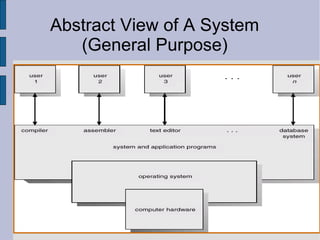
Abstract View of A System
(General Purpose)
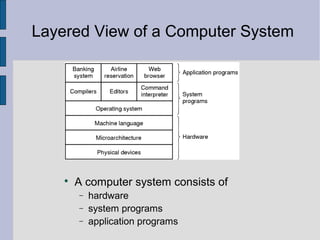
Layered View of a Computer System

A computer system consists of
− hardware
− system programs
− application programs
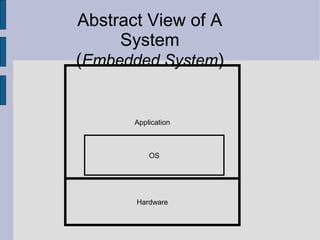
Abstract View of A
System
(Embedded System)
Hardware
Application
OS
Operating System Definitions
(General Purpose)
− Resource allocator – manages and allocates resources
− Control program – controls the execution of user programs
and operations of I/O devices
− Kernel – the one program running at all times (all else being
application programs)
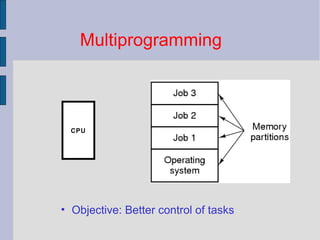
Multiprogramming
• Objective: Better control of tasks
CPU
Dual-Mode Operation
− Sharing system resources requires operating system to
ensure that an incorrect program or poorly behaving
human cannot cause other programs to execute
incorrectly
− OS must provide hardware support to differentiate
between at least two modes of operations
1. User mode – execution done on behalf of a user
2. Monitor mode (also kernel mode or system mode) –
execution done on behalf of operating system
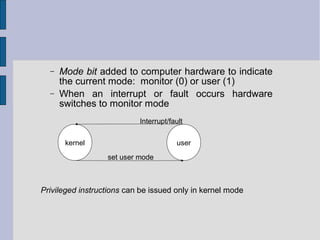
− Mode bit added to computer hardware to indicate
the current mode: monitor (0) or user (1)
− When an interrupt or fault occurs hardware
switches to monitor mode
kernel user
set user mode
Privileged instructions can be issued only in kernel mode
Interrupt/fault
Process/Task Concept
− An operating system executes a variety of programs:

Batch system – jobs

Time-shared systems – user programs or tasks
− Similar terms job, process, task (ES) almost interchangeably
− Process – a program in execution; process execution must
progress in sequential fashion
− A process includes:

program counter

stack

data section
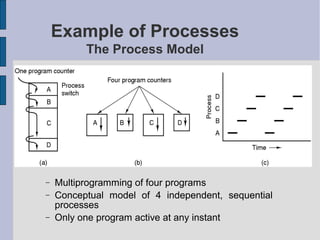
Example of Processes
The Process Model
− Multiprogramming of four programs
− Conceptual model of 4 independent, sequential
processes
− Only one program active at any instant
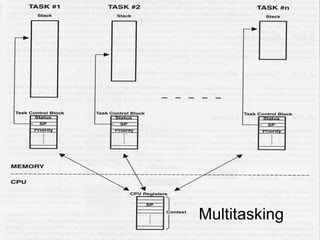
Multitasking
Key Difference on
Embedded Systems
Key Difference on
Embedded Systems

General Purpose OS: processes may be initiated by:
− Different users
− Different application

Embedded system: tasks are part of a unique
application
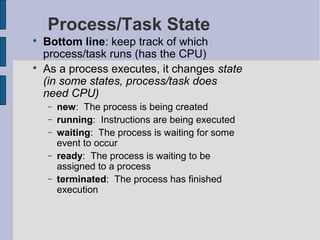
Process/Task State

Bottom line: keep track of which
process/task runs (has the CPU)

As a process executes, it changes state
(in some states, process/task does
need CPU)
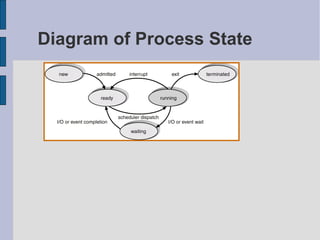
− new: The process is being created
− running: Instructions are being executed
− waiting: The process is waiting for some
event to occur
− ready: The process is waiting to be
assigned to a process
− terminated: The process has finished
execution
Diagram of Process State
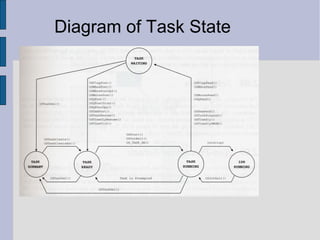
Diagram of Task State
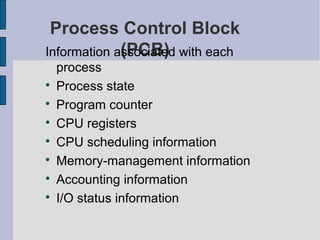
Process Control Block
(PCB)Information associated with each
process

Process state

Program counter

CPU registers

CPU scheduling information

Memory-management information

Accounting information

I/O status information
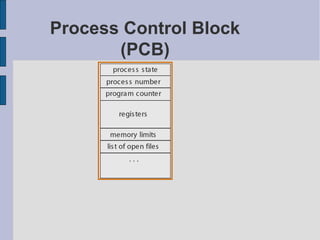
Process Control Block
(PCB)
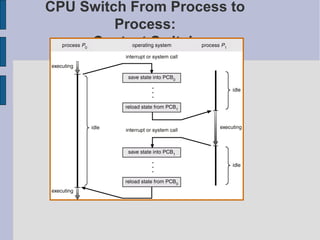
CPU Switch From Process to
Process:
Context Switch
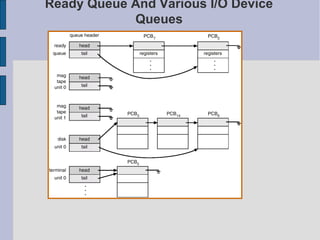
Ready Queue And Various I/O Device
Queues
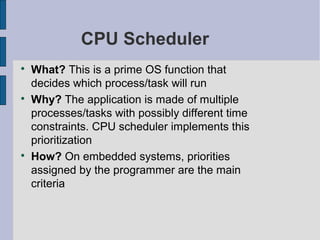
CPU Scheduler

What? This is a prime OS function that
decides which process/task will run

Why? The application is made of multiple
processes/tasks with possibly different time
constraints. CPU scheduler implements this
prioritization

How? On embedded systems, priorities
assigned by the programmer are the main
criteria
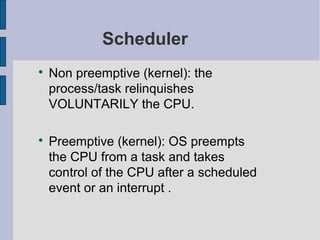
Scheduler

Non preemptive (kernel): the
process/task relinquishes
VOLUNTARILY the CPU.

Preemptive (kernel): OS preempts
the CPU from a task and takes
control of the CPU after a scheduled
event or an interrupt .
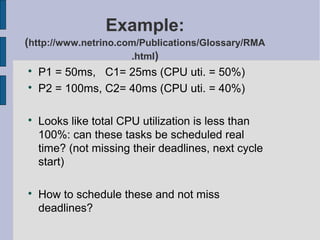
Example:
(http://www.netrino.com/Publications/Glossary/RMA
.html)

P1 = 50ms, C1= 25ms (CPU uti. = 50%)

P2 = 100ms, C2= 40ms (CPU uti. = 40%)

Looks like total CPU utilization is less than
100%: can these tasks be scheduled real
time? (not missing their deadlines, next cycle
start)

How to schedule these and not miss
deadlines?
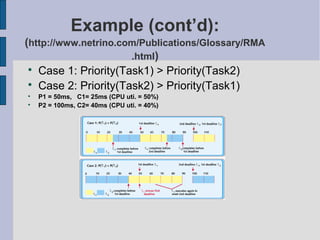
Example (cont’d):
(http://www.netrino.com/Publications/Glossary/RMA
.html)

Case 1: Priority(Task1) > Priority(Task2)

Case 2: Priority(Task2) > Priority(Task1)

P1 = 50ms, C1= 25ms (CPU uti. = 50%)

P2 = 100ms, C2= 40ms (CPU uti. = 40%)
Question:

If I assign priorities such that most
frequent tasks get highest priorities,
does my scheduling GUARANTEE
meeting the deadlines?
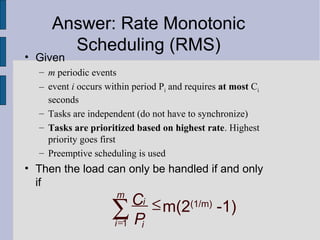
• Given
– m periodic events
– event i occurs within period Pi and requires at most Ci
seconds
– Tasks are independent (do not have to synchronize)
– Tasks are prioritized based on highest rate. Highest
priority goes first
– Preemptive scheduling is used
• Then the load can only be handled if and only
if
1
m(2(1/m)
-1)
m
i
i i
C
P=
≤∑
Answer: Rate Monotonic
Scheduling (RMS)
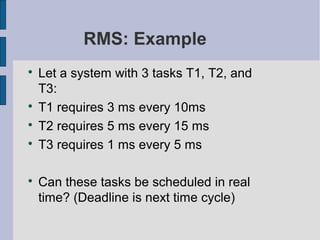
RMS: Example

Let a system with 3 tasks T1, T2, and
T3:

T1 requires 3 ms every 10ms

T2 requires 5 ms every 15 ms

T3 requires 1 ms every 5 ms

Can these tasks be scheduled in real
time? (Deadline is next time cycle)
If a Task Can Be
Interrupted..

We get problems:
− Shared data problem
− Non reentrant functions
Reentrant Function

A function F is reentrant if it can be
invoked by multiple processes/tasks
that can execute F CORRECTLY and
concurrently.

In other words, F is correctly used by
multiple processes/tasks at the same
time.
Reentrant Function (2)

In general, if a function modifies only local
variables (usually stored on stack), it is
reentrant.

Example: non reentrant function
int temp; /* global variable */
void swap(int *x, int *y){
temp = *x;
*x = *y;
*y = temp;
}
Dealing With Non Reentrant
F.

Modify functions to make them
reentrant

If not possible, treat them as critical
regions (sections) and enforce mutual
exclusion
Enforcing Mutual Exclusion

Disable/Enable interrupts:
− OS_ENTER_CRITICAL()
− OS_EXIT_CRITICAL()

Using Test-and-Set function

Disable/Enable scheduling:
− OSSchedLock()
− OSSchedUnlock()

Using semaphores
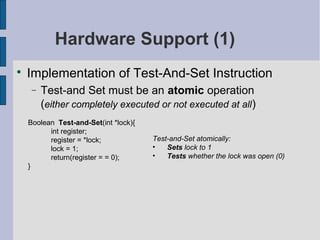
Hardware Support (1)

Implementation of Test-And-Set Instruction
− Test-and Set must be an atomic operation
(either completely executed or not executed at all)
Boolean Test-and-Set(int *lock){
int register;
register = *lock;
lock = 1;
return(register = = 0);
}
Test-and-Set atomically:
• Sets lock to 1
• Tests whether the lock was open (0)
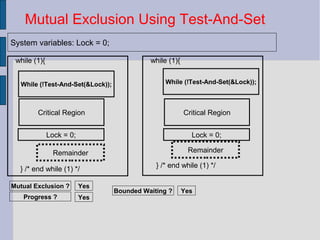
while (1){
} /* end while (1) */
While (!Test-And-Set(&Lock));
Lock = 0;
Critical Region
Remainder
Mutual Exclusion Using Test-And-Set
System variables: Lock = 0;
Mutual Exclusion ? Yes
Progress ? Yes
while (1){
} /* end while (1) */
Remainder
Lock = 0;
Critical Region
While (!Test-And-Set(&Lock));
Bounded Waiting ? Yes
Semaphore (Cont’d)

Down function: (Wait)
if (S <= 0)
sleep();
S = S – 1;

Up function: (Signal)
S = S + 1;
wake up some process
Mutexes are binary semaphores
while (1){
} /* end while (1) */
OSSemPend(SharedDataSem,0,&err);
OSSemPost(SharedDataSem);
Critical Region
Remainder
Mutual Exclusion Using Semaphores µC
System variables: Lock = 0;
Mutual Exclusion ? Yes
Progress ? Yes
while (1){
} /* end while (1) */
Remainder
Critical Region
Bounded Waiting ? Yes
OSSemPend(SharedDataSem,0,&err);
OSSemPost(SharedDataSem);
Semaphores for Scheduling

Consider a task that waits for some event that can
be generated by another task or some interrupt.
− Solution 1: use a flag variable
− Solution 2: use a semaphore
Process/Task
Communication

Necessary and useful for multi-tasking systems
and/or in a distributed system

Design and implementation issues :
− How to establish links among processes ?
− Link’s connectivity : how processes are linked ?
How many of them should be linked
− Link’s capability: how many messages can be
passed ?
Link’s Connectivity

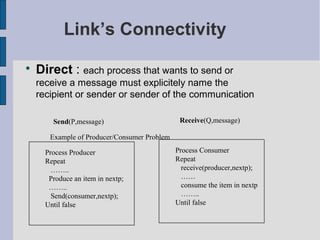
Direct : each process that wants to send or
receive a message must explicitely name the
recipient or sender or sender of the communication
Send(P,message) Receive(Q,message)
Example of Producer/Consumer Problem
Process Producer
Repeat
……..
Produce an item in nextp;
……..
Send(consumer,nextp);
Until false
Process Consumer
Repeat
receive(producer,nextp);
……
consume the item in nextp
……..
Until false
Link’s Connectivity

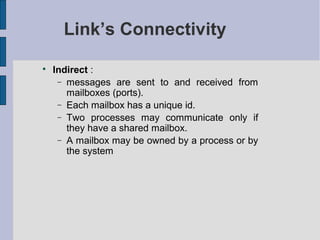
Indirect :
− messages are sent to and received from
mailboxes (ports).
− Each mailbox has a unique id.
− Two processes may communicate only if
they have a shared mailbox.
− A mailbox may be owned by a process or by
the system
Link’s capability

Zero capability

Bounded capability

Unbounded capability
Semantics of send

Normal situation
− The sending process continues (its execution)

Asynchronous communication
− The sending process suspends until an
acknowledgement comes back :

Remote procedure call

Synchronous communication
Semantics of send

Abnormal situations
− What happens if a link (say, a mailbox) is full
when the process want to send a message

Delay the process until mailbox has room

The sending process continues as if the
message has been sent (the current
message is lost)

The sending process continues while the
current message replaces one of the old
messages in the mailbox

The sending process terminates (run-time
error!)
Semantics of send

Abnormal situations (2)
− What happens if the receiver/mailbox does not
exist when a process sends a message to it ?

The sending process continues as the message
has been sent. The current message is lost

The sending process terminates (run-time
error!)
− What happens if a message is lost by the system?
Semantics of receive

Abnormal situations
− What happens if a link (say, a mailbox) is empty
when a process wants to receive a message from it
?

The receiving process is delayed until the
mailbox has some message

The receiving process receives a nil message

The receiving process receives a copy of an old
message which was in the mailbox

The receiving process terminates (run-time
error!)
Semantics of receive

Abnormal situations (2)
− What happens if the sender/mailbox does not exist
when a process wants to receive a message from
it ?

The receiving process receives a nil message

The receiving process terminates (run-time
error!)
Thank You!!

rtos by mohit

  • 1.
    Real-Time Operating Systems −What does real time mean? − What is an OS? − Why would I need an OS? − Why would I need a real time OS? − How do we use an OS on embedded systems? By Mohit Kumar
  • 2.
     A human operatormust regulate the temperature of a systemA human operator must regulate the temperature of a system with a +/- 5 degrees Fwith a +/- 5 degrees F  The temperature adjusts the current intensity to regulate the temperature.  The oven has a huge inertia: its temperature varies by at most 2 degrees per hour  The union imposes 2 coffee breaks a day  The coffee break was negotiated to last one hour! Consider the following case:
  • 3.
     Consider a systemthat can achieve 10 Mflops  We want to use this machine for 24-hour weather prediction.  The atmosphere is respectively divided in longitude and latitude in areas of 200 miles X 200 miles. Measures are made at different altitudes  It takes 100 billion floating operations to solve the Navier-Stockes equations.
  • 4.
    − A pieceof software − It provides tools to manage (for embedded systems)  Processes, (or tasks)  Memory space − It is a program (software) that acts as an intermediary between a user of a computer and the computer hardware. − Make the use of a computer CONVENIENT and EFFICIENT. What is an OS?
  • 5.
    What Is anOperating System? For an Embedded System − Provides software tools for a convenient and prioritized control of tasks. − Provides tools for task (process) synchronization. − Provides a simple memory management system
  • 6.
    Convenient and Efficient? (GeneralPurpose) − Convenient :  Simplicity of use  Messy or complicated details are hidden  User is unaware that he is using an OS − Efficient  Resources are optimally used
  • 7.
    Abstract View ofA System (General Purpose)
  • 8.
    Layered View ofa Computer System  A computer system consists of − hardware − system programs − application programs
  • 9.
    Abstract View ofA System (Embedded System) Hardware Application OS
  • 10.
    Operating System Definitions (GeneralPurpose) − Resource allocator – manages and allocates resources − Control program – controls the execution of user programs and operations of I/O devices − Kernel – the one program running at all times (all else being application programs)
  • 11.
  • 12.
    Dual-Mode Operation − Sharingsystem resources requires operating system to ensure that an incorrect program or poorly behaving human cannot cause other programs to execute incorrectly − OS must provide hardware support to differentiate between at least two modes of operations 1. User mode – execution done on behalf of a user 2. Monitor mode (also kernel mode or system mode) – execution done on behalf of operating system
  • 13.
    − Mode bitadded to computer hardware to indicate the current mode: monitor (0) or user (1) − When an interrupt or fault occurs hardware switches to monitor mode kernel user set user mode Privileged instructions can be issued only in kernel mode Interrupt/fault
  • 14.
    Process/Task Concept − Anoperating system executes a variety of programs:  Batch system – jobs  Time-shared systems – user programs or tasks − Similar terms job, process, task (ES) almost interchangeably − Process – a program in execution; process execution must progress in sequential fashion − A process includes:  program counter  stack  data section
  • 15.
    Example of Processes TheProcess Model − Multiprogramming of four programs − Conceptual model of 4 independent, sequential processes − Only one program active at any instant
  • 16.
  • 17.
    Key Difference on EmbeddedSystems Key Difference on Embedded Systems  General Purpose OS: processes may be initiated by: − Different users − Different application  Embedded system: tasks are part of a unique application
  • 18.
    Process/Task State  Bottom line:keep track of which process/task runs (has the CPU)  As a process executes, it changes state (in some states, process/task does need CPU) − new: The process is being created − running: Instructions are being executed − waiting: The process is waiting for some event to occur − ready: The process is waiting to be assigned to a process − terminated: The process has finished execution
  • 19.
  • 20.
  • 21.
    Process Control Block (PCB)Informationassociated with each process  Process state  Program counter  CPU registers  CPU scheduling information  Memory-management information  Accounting information  I/O status information
  • 22.
  • 23.
    CPU Switch FromProcess to Process: Context Switch
  • 24.
    Ready Queue AndVarious I/O Device Queues
  • 25.
    CPU Scheduler  What? Thisis a prime OS function that decides which process/task will run  Why? The application is made of multiple processes/tasks with possibly different time constraints. CPU scheduler implements this prioritization  How? On embedded systems, priorities assigned by the programmer are the main criteria
  • 26.
    Scheduler  Non preemptive (kernel):the process/task relinquishes VOLUNTARILY the CPU.  Preemptive (kernel): OS preempts the CPU from a task and takes control of the CPU after a scheduled event or an interrupt .
  • 27.
    Example: (http://www.netrino.com/Publications/Glossary/RMA .html)  P1 = 50ms,C1= 25ms (CPU uti. = 50%)  P2 = 100ms, C2= 40ms (CPU uti. = 40%)  Looks like total CPU utilization is less than 100%: can these tasks be scheduled real time? (not missing their deadlines, next cycle start)  How to schedule these and not miss deadlines?
  • 28.
    Example (cont’d): (http://www.netrino.com/Publications/Glossary/RMA .html)  Case 1:Priority(Task1) > Priority(Task2)  Case 2: Priority(Task2) > Priority(Task1)  P1 = 50ms, C1= 25ms (CPU uti. = 50%)  P2 = 100ms, C2= 40ms (CPU uti. = 40%)
  • 29.
    Question:  If I assignpriorities such that most frequent tasks get highest priorities, does my scheduling GUARANTEE meeting the deadlines?
  • 30.
    • Given – mperiodic events – event i occurs within period Pi and requires at most Ci seconds – Tasks are independent (do not have to synchronize) – Tasks are prioritized based on highest rate. Highest priority goes first – Preemptive scheduling is used • Then the load can only be handled if and only if 1 m(2(1/m) -1) m i i i C P= ≤∑ Answer: Rate Monotonic Scheduling (RMS)
  • 31.
    RMS: Example  Let asystem with 3 tasks T1, T2, and T3:  T1 requires 3 ms every 10ms  T2 requires 5 ms every 15 ms  T3 requires 1 ms every 5 ms  Can these tasks be scheduled in real time? (Deadline is next time cycle)
  • 32.
    If a TaskCan Be Interrupted..  We get problems: − Shared data problem − Non reentrant functions
  • 33.
    Reentrant Function  A functionF is reentrant if it can be invoked by multiple processes/tasks that can execute F CORRECTLY and concurrently.  In other words, F is correctly used by multiple processes/tasks at the same time.
  • 34.
    Reentrant Function (2)  Ingeneral, if a function modifies only local variables (usually stored on stack), it is reentrant.  Example: non reentrant function int temp; /* global variable */ void swap(int *x, int *y){ temp = *x; *x = *y; *y = temp; }
  • 35.
    Dealing With NonReentrant F.  Modify functions to make them reentrant  If not possible, treat them as critical regions (sections) and enforce mutual exclusion
  • 36.
    Enforcing Mutual Exclusion  Disable/Enableinterrupts: − OS_ENTER_CRITICAL() − OS_EXIT_CRITICAL()  Using Test-and-Set function  Disable/Enable scheduling: − OSSchedLock() − OSSchedUnlock()  Using semaphores
  • 37.
    Hardware Support (1)  Implementationof Test-And-Set Instruction − Test-and Set must be an atomic operation (either completely executed or not executed at all) Boolean Test-and-Set(int *lock){ int register; register = *lock; lock = 1; return(register = = 0); } Test-and-Set atomically: • Sets lock to 1 • Tests whether the lock was open (0)
  • 38.
    while (1){ } /*end while (1) */ While (!Test-And-Set(&Lock)); Lock = 0; Critical Region Remainder Mutual Exclusion Using Test-And-Set System variables: Lock = 0; Mutual Exclusion ? Yes Progress ? Yes while (1){ } /* end while (1) */ Remainder Lock = 0; Critical Region While (!Test-And-Set(&Lock)); Bounded Waiting ? Yes
  • 39.
    Semaphore (Cont’d)  Down function:(Wait) if (S <= 0) sleep(); S = S – 1;  Up function: (Signal) S = S + 1; wake up some process Mutexes are binary semaphores
  • 40.
    while (1){ } /*end while (1) */ OSSemPend(SharedDataSem,0,&err); OSSemPost(SharedDataSem); Critical Region Remainder Mutual Exclusion Using Semaphores µC System variables: Lock = 0; Mutual Exclusion ? Yes Progress ? Yes while (1){ } /* end while (1) */ Remainder Critical Region Bounded Waiting ? Yes OSSemPend(SharedDataSem,0,&err); OSSemPost(SharedDataSem);
  • 41.
    Semaphores for Scheduling  Considera task that waits for some event that can be generated by another task or some interrupt. − Solution 1: use a flag variable − Solution 2: use a semaphore
  • 42.
    Process/Task Communication  Necessary and usefulfor multi-tasking systems and/or in a distributed system  Design and implementation issues : − How to establish links among processes ? − Link’s connectivity : how processes are linked ? How many of them should be linked − Link’s capability: how many messages can be passed ?
  • 43.
    Link’s Connectivity  Direct :each process that wants to send or receive a message must explicitely name the recipient or sender or sender of the communication Send(P,message) Receive(Q,message) Example of Producer/Consumer Problem Process Producer Repeat …….. Produce an item in nextp; …….. Send(consumer,nextp); Until false Process Consumer Repeat receive(producer,nextp); …… consume the item in nextp …….. Until false
  • 44.
    Link’s Connectivity  Indirect : −messages are sent to and received from mailboxes (ports). − Each mailbox has a unique id. − Two processes may communicate only if they have a shared mailbox. − A mailbox may be owned by a process or by the system
  • 45.
    Link’s capability  Zero capability  Boundedcapability  Unbounded capability
  • 46.
    Semantics of send  Normalsituation − The sending process continues (its execution)  Asynchronous communication − The sending process suspends until an acknowledgement comes back :  Remote procedure call  Synchronous communication
  • 47.
    Semantics of send  Abnormalsituations − What happens if a link (say, a mailbox) is full when the process want to send a message  Delay the process until mailbox has room  The sending process continues as if the message has been sent (the current message is lost)  The sending process continues while the current message replaces one of the old messages in the mailbox  The sending process terminates (run-time error!)
  • 48.
    Semantics of send  Abnormalsituations (2) − What happens if the receiver/mailbox does not exist when a process sends a message to it ?  The sending process continues as the message has been sent. The current message is lost  The sending process terminates (run-time error!) − What happens if a message is lost by the system?
  • 49.
    Semantics of receive  Abnormalsituations − What happens if a link (say, a mailbox) is empty when a process wants to receive a message from it ?  The receiving process is delayed until the mailbox has some message  The receiving process receives a nil message  The receiving process receives a copy of an old message which was in the mailbox  The receiving process terminates (run-time error!)
  • 50.
    Semantics of receive  Abnormalsituations (2) − What happens if the sender/mailbox does not exist when a process wants to receive a message from it ?  The receiving process receives a nil message  The receiving process terminates (run-time error!)
  • 51.