React Native
Unleash the power of
react in your device
AMSTERDAM 11-12 MAY 2016
This work is licensed under a Creative Commons Attribution 4.0
International License
HELLO!I am Eduard Tomàs 
You can find me at @eiximenis
I work @ PlainConcepts
http://www.plainconcepts.com
What is React
Native?
And what makes it different?
That have native UI
React Native is a
library to build
mobile apps
Using JavaScript and
the same workflow and
tools that we use to
build web applications
What makes React Native fresh and powerful is…
But these are’nt
the most
important things…
React Native
brings the “React
way” to mobile
development
“Thinking in
React”
Only components
Single source of truth
One direction data flow

Reusable Stateless

Components
Avoiding state in your
components not only make
them reusable… also can
save your life!
State should be stored in a
single point.
Components should have only
“read acces” to this state
Components should expose
an API to change its behavior
React Native
architecture
Not a “write
once” solution
At least not yet!
JavaScript code can be
shared with iOS and Android
applications
UI code (React components)
is not totally reusable.
Most components are shared
between platforms but some
does’nt
This is improving
UI is fully native
Virtual DOM generated by
components is translated to
real native UI
components.
A react native button is
really a UIButton or a
android.widget.Button
And about
JavaScript…
JavaScript is bundled in the
application package
JavaScript is executed
using JavaScript Core (part
of WebKit project)
JavaScript runs in an
Asynchronous way…
… with native methods
calls batched…
… exchanging serializable
messages (not sharing
mutable data)
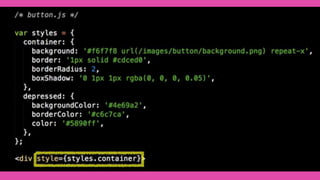
What about
styling?
React Native contains a custom implementation of
CSS
Based on JavaScript objects (no CSS files exist)
What about
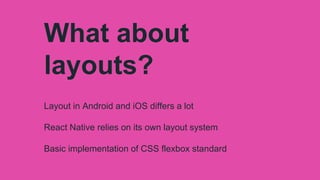
layouts?
Layout in Android and iOS differs a lot
React Native relies on its own layout system
Basic implementation of CSS flexbox standard
“Functional” UI
f is a pure function A pure function is a
function with no
side effects
𝑈𝐼 = 𝑓 𝑑𝑎𝑡𝑎
𝑈𝐼 = 𝑓 𝑐𝑜𝑢𝑛𝑡
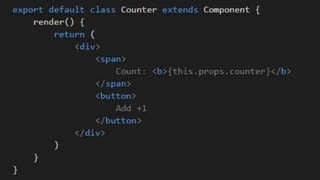
𝑈𝐼 = 𝑓 𝑐𝑜𝑢𝑛𝑡 =
𝑑𝑖𝑣(
𝑠𝑝𝑎𝑛 ′𝐶𝑜𝑢𝑛𝑡′
+ 𝑐𝑜𝑢𝑛𝑡
𝑏𝑢𝑡𝑡𝑜𝑛 ′𝐴𝑑𝑑 + 1′
)
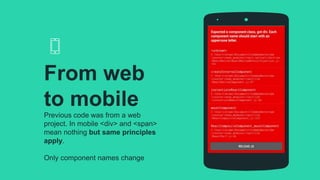
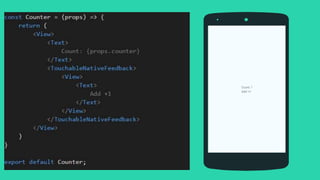
Previous code was from a web
project. In mobile <div> and <span>
mean nothing but same principles
apply.
Only component names change
From web
to mobile
Updating the
state
State should be on a single
place, usually in the “top
most” component
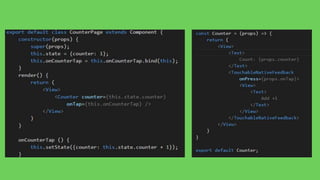
CounterPage
TopMost component
holding state
Receives events from
Counter component and
updates its own state
Counter
Stateless component
Have “read only” view of
data in their props
Communicates via events
One direction data flow
WANT BIG IMPACT?
USE BIG
IMAGE.
Time to code…
The “mobile
workflow”
Code something
Compile
Deploy on emulator
Do some changes
Compile again
Deploy again
And again, and again…
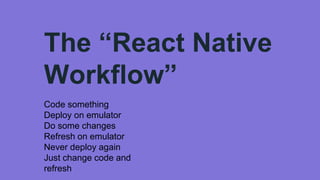
The “React Native
Workflow”
Code something
Deploy on emulator
Do some changes
Refresh on emulator
Never deploy again
Just change code and
refresh
The debugging
experience
Debugging code is
performed through Chrome
As any web application
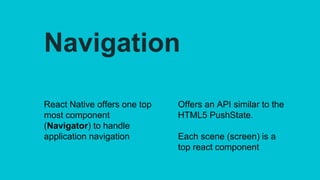
Navigation
React Native offers one top
most component
(Navigator) to handle
application navigation
Offers an API similar to the
HTML5 PushState.
Each scene (screen) is a
top react component
WANT BIG IMPACT?
USE BIG
IMAGE.
Show me in action!
React Native APIs
React Native come with a
lot of APIs to do basic stuff
Most of these APIs exists
for both Android and iOS
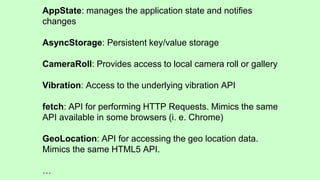
AppState: manages the application state and notifies
changes
AsyncStorage: Persistent key/value storage
CameraRoll: Provides access to local camera roll or gallery
Vibration: Access to the underlying vibration API
fetch: API for performing HTTP Requests. Mimics the same
API available in some browsers (i. e. Chrome)
GeoLocation: API for accessing the geo location data.
Mimics the same HTML5 API.
…
Q: Can I interoperate
with native code?
Yes, you can create a
native module using ObjC
(for iOS) or Java (for
Android)
A native module is a class
For iOS must to conform the
RCTBridgeModule protocol
For Anrdoid must extend
ReactContextBaseJavaModule
class
Q: Can I use native
UI controls?
Yes, you can expose native
UI controls to JavaScript
You can bridge native
properties to/from
JavaScript code
Can dispatch events from the UI
control to JavaScript code
Any questions?
You can find me at @eiximenis or contact me using
etomas@plainconcepts.com
Thanks!
Info@plainconcepts.com
Avinguda Josep Tarradellas, 10, 6º 1ª
08029 Barcelona, España
+34 93 3607 114
Barcelona

React native - Unleash the power of your device

  • 1.
    React Native Unleash thepower of react in your device AMSTERDAM 11-12 MAY 2016 This work is licensed under a Creative Commons Attribution 4.0 International License
  • 2.
    HELLO!I am EduardTomàs  You can find me at @eiximenis I work @ PlainConcepts http://www.plainconcepts.com
  • 3.
    What is React Native? Andwhat makes it different?
  • 4.
    That have nativeUI React Native is a library to build mobile apps Using JavaScript and the same workflow and tools that we use to build web applications
  • 5.
    What makes ReactNative fresh and powerful is… But these are’nt the most important things…
  • 6.
    React Native brings the“React way” to mobile development
  • 7.
  • 8.
    Only components Single sourceof truth One direction data flow
  • 9.
    Reusable Stateless Components Avoiding statein your components not only make them reusable… also can save your life! State should be stored in a single point. Components should have only “read acces” to this state Components should expose an API to change its behavior
  • 10.
  • 11.
    Not a “write once”solution At least not yet! JavaScript code can be shared with iOS and Android applications UI code (React components) is not totally reusable. Most components are shared between platforms but some does’nt This is improving
  • 12.
    UI is fullynative Virtual DOM generated by components is translated to real native UI components. A react native button is really a UIButton or a android.widget.Button
  • 13.
    And about JavaScript… JavaScript isbundled in the application package JavaScript is executed using JavaScript Core (part of WebKit project) JavaScript runs in an Asynchronous way… … with native methods calls batched… … exchanging serializable messages (not sharing mutable data)
  • 14.
    What about styling? React Nativecontains a custom implementation of CSS Based on JavaScript objects (no CSS files exist)
  • 16.
    What about layouts? Layout inAndroid and iOS differs a lot React Native relies on its own layout system Basic implementation of CSS flexbox standard
  • 17.
  • 18.
    f is apure function A pure function is a function with no side effects 𝑈𝐼 = 𝑓 𝑑𝑎𝑡𝑎
  • 20.
    𝑈𝐼 = 𝑓𝑐𝑜𝑢𝑛𝑡
  • 21.
    𝑈𝐼 = 𝑓𝑐𝑜𝑢𝑛𝑡 = 𝑑𝑖𝑣( 𝑠𝑝𝑎𝑛 ′𝐶𝑜𝑢𝑛𝑡′ + 𝑐𝑜𝑢𝑛𝑡 𝑏𝑢𝑡𝑡𝑜𝑛 ′𝐴𝑑𝑑 + 1′ )
  • 24.
    Previous code wasfrom a web project. In mobile <div> and <span> mean nothing but same principles apply. Only component names change From web to mobile
  • 26.
    Updating the state State shouldbe on a single place, usually in the “top most” component
  • 28.
    CounterPage TopMost component holding state Receivesevents from Counter component and updates its own state Counter Stateless component Have “read only” view of data in their props Communicates via events One direction data flow
  • 29.
    WANT BIG IMPACT? USEBIG IMAGE. Time to code…
  • 30.
    The “mobile workflow” Code something Compile Deployon emulator Do some changes Compile again Deploy again And again, and again…
  • 31.
    The “React Native Workflow” Codesomething Deploy on emulator Do some changes Refresh on emulator Never deploy again Just change code and refresh
  • 32.
    The debugging experience Debugging codeis performed through Chrome As any web application
  • 33.
    Navigation React Native offersone top most component (Navigator) to handle application navigation Offers an API similar to the HTML5 PushState. Each scene (screen) is a top react component
  • 34.
    WANT BIG IMPACT? USEBIG IMAGE. Show me in action!
  • 35.
    React Native APIs ReactNative come with a lot of APIs to do basic stuff Most of these APIs exists for both Android and iOS
  • 36.
    AppState: manages theapplication state and notifies changes AsyncStorage: Persistent key/value storage CameraRoll: Provides access to local camera roll or gallery Vibration: Access to the underlying vibration API fetch: API for performing HTTP Requests. Mimics the same API available in some browsers (i. e. Chrome) GeoLocation: API for accessing the geo location data. Mimics the same HTML5 API. …
  • 37.
    Q: Can Iinteroperate with native code? Yes, you can create a native module using ObjC (for iOS) or Java (for Android) A native module is a class For iOS must to conform the RCTBridgeModule protocol For Anrdoid must extend ReactContextBaseJavaModule class
  • 38.
    Q: Can Iuse native UI controls? Yes, you can expose native UI controls to JavaScript You can bridge native properties to/from JavaScript code Can dispatch events from the UI control to JavaScript code
  • 39.
    Any questions? You canfind me at @eiximenis or contact me using etomas@plainconcepts.com
  • 40.
  • 41.
    Info@plainconcepts.com Avinguda Josep Tarradellas,10, 6º 1ª 08029 Barcelona, España +34 93 3607 114 Barcelona