CREATED BY:-
HARSHIL AMIN(150800116001)
ASHISH BARWALIYA(150800116003)
GUIDED BY:-
PROF.
VADODARA INSTITUE OF
ENGINEERING
ALA:-
COMPUTER GRAPHICS
Objective
2
* Video Display Device
* CRT
* Types of Display System
* Color Generation Technique
4
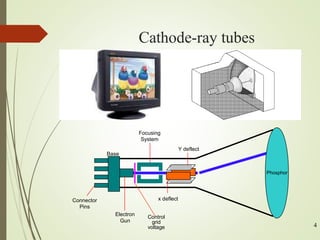
Cathode-ray tubes
(CRT)
Base
Connector
Pins
Y deflect
x deflect
Phosphor
Electron
Gun
Focusing
System
Control
grid
voltage
Steps
1. The electron gun emits a beam of electrons
(cathode rays).
2. The electron beam passes through focusing and
deflection systems that direct it towards
specified positions on the phosphor-coated
screen.
3. When the beam hits the screen, the phosphor
emits a small spot of light at each position
contacted by the electron beam.
Because the light emitted by the phosphor fades very
quickly some method is needed for maintaining the
screen picture.
Basic operations of a CRT
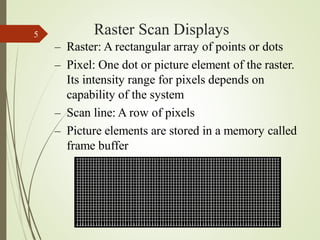
Raster Scan Displays
5
– Raster: A rectangular array of points or dots
– Pixel: One dot or picture element of the raster.
Its intensity range for pixels depends on
capability of the system
– Scan line: A row of pixels
– Picture elements are stored in a memory called
frame buffer
19
Raster Scan Displays
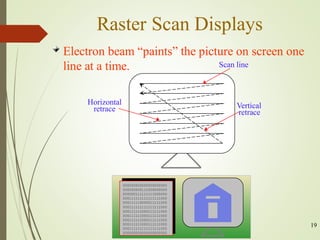
Electron beam “paints” the picture on screen one
line at a time.
Vertical
retrace
Horizontal
retrace
Scan line
000000000000000000000
000000000111000000000
000000111111111000000
000111111111111111000
000111110000011111000
000111111111111111000
000111111000111111000
000111111000111111000
000111111000111111000
000111111000111111000
000111111111111111000
000000000000000000000
Raster Scan Displays
7
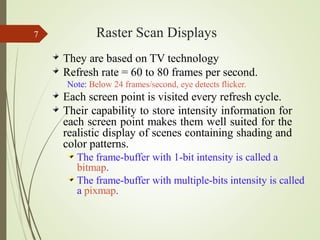
They are based on TV technology
Refresh rate = 60 to 80 frames per second.
Note: Below 24 frames/second, eye detects flicker.
Each screen point is visited every refresh cycle.
Their capability to store intensity information for
each screen point makes them well suited for the
realistic display of scenes containing shading and
color patterns.
The frame-buffer with 1-bit intensity is called a
bitmap.
The frame-buffer with multiple-bits intensity is called
a pixmap.
Random-Scan (Vector) displays
8
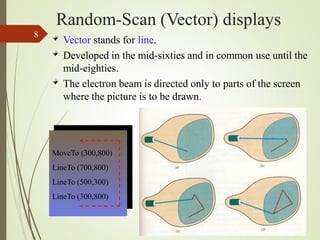
Vector stands for line.
Developed in the mid-sixties and in common use until the
mid-eighties.
The electron beam is directed only to parts of the screen
where the picture is to be drawn.
MoveTo (300,800)
LineTo (700,800)
LineTo (500,300)
LineTo (300,800)
Random Scan Displays
9
Picture is stored as a set of point- and line-drawing
commands with (x,y) or (x,y,z) endpoint coordinates, as
well as character-plotting commands.
Refresh rate depends on the number of lines to be
displayed. To avoid flicker it must be at least 30 times per
second (30 Hz).
They are designed to draw all the component lines of a
picture 30 to 60 times per second – more than 60 could
burn the phosphor.
High quality vector systems are capable of handling
approximately 100,000 lines at this refresh rate.
They are designed for line drawing applications and cannot
display realistic shaded images.
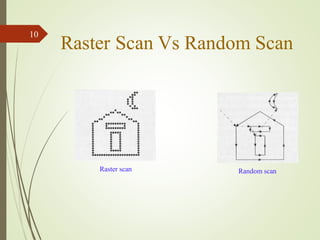
Raster Scan Vs Random Scan
Random scan
Raster scan
10
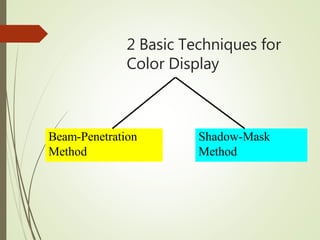
2 Basic Techniques for
Color Display
Beam-Penetration
Method
Shadow-Mask
Method
Beam-Penetration Method
Used with random scan monitors
The screen has two layers of phosphor: usually red and green
The displayed color depends on how far the electron beam penetrates
through the two layers.
A beam of slow electrons excites only the outer of the red layer, a beam
of fast electrons penetrates through the red layer and excites the inner
green layer, and at intermediate beam speeds, combinations of the two
colors are emitted to show other colors (yellow & orange).
25
2
Shadow-Mask Method
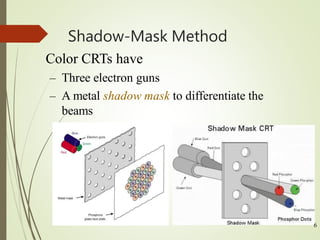
Color CRTs have
– Three electron guns
– A metal shadow mask to differentiate the
beams
6
The Shadow mask in the previous image is known as the delta-delta
shadow-mask.
The 3 electron beams are deflected and focused as a group onto the
shadow mask, which contains a series of holes aligned with the
phosphor-dot patterns.
The 3 beams pass through a hole in the shadow mask and activate a dot
triangle, which appears as a small color spot on the screen.
Computer Graphics

Computer Graphics

  • 1.
    CREATED BY:- HARSHIL AMIN(150800116001) ASHISHBARWALIYA(150800116003) GUIDED BY:- PROF. VADODARA INSTITUE OF ENGINEERING ALA:- COMPUTER GRAPHICS
  • 2.
    Objective 2 * Video DisplayDevice * CRT * Types of Display System * Color Generation Technique
  • 3.
    4 Cathode-ray tubes (CRT) Base Connector Pins Y deflect xdeflect Phosphor Electron Gun Focusing System Control grid voltage
  • 4.
    Steps 1. The electrongun emits a beam of electrons (cathode rays). 2. The electron beam passes through focusing and deflection systems that direct it towards specified positions on the phosphor-coated screen. 3. When the beam hits the screen, the phosphor emits a small spot of light at each position contacted by the electron beam. Because the light emitted by the phosphor fades very quickly some method is needed for maintaining the screen picture. Basic operations of a CRT
  • 5.
    Raster Scan Displays 5 –Raster: A rectangular array of points or dots – Pixel: One dot or picture element of the raster. Its intensity range for pixels depends on capability of the system – Scan line: A row of pixels – Picture elements are stored in a memory called frame buffer
  • 6.
    19 Raster Scan Displays Electronbeam “paints” the picture on screen one line at a time. Vertical retrace Horizontal retrace Scan line 000000000000000000000 000000000111000000000 000000111111111000000 000111111111111111000 000111110000011111000 000111111111111111000 000111111000111111000 000111111000111111000 000111111000111111000 000111111000111111000 000111111111111111000 000000000000000000000
  • 7.
    Raster Scan Displays 7 Theyare based on TV technology Refresh rate = 60 to 80 frames per second. Note: Below 24 frames/second, eye detects flicker. Each screen point is visited every refresh cycle. Their capability to store intensity information for each screen point makes them well suited for the realistic display of scenes containing shading and color patterns. The frame-buffer with 1-bit intensity is called a bitmap. The frame-buffer with multiple-bits intensity is called a pixmap.
  • 8.
    Random-Scan (Vector) displays 8 Vectorstands for line. Developed in the mid-sixties and in common use until the mid-eighties. The electron beam is directed only to parts of the screen where the picture is to be drawn. MoveTo (300,800) LineTo (700,800) LineTo (500,300) LineTo (300,800)
  • 9.
    Random Scan Displays 9 Pictureis stored as a set of point- and line-drawing commands with (x,y) or (x,y,z) endpoint coordinates, as well as character-plotting commands. Refresh rate depends on the number of lines to be displayed. To avoid flicker it must be at least 30 times per second (30 Hz). They are designed to draw all the component lines of a picture 30 to 60 times per second – more than 60 could burn the phosphor. High quality vector systems are capable of handling approximately 100,000 lines at this refresh rate. They are designed for line drawing applications and cannot display realistic shaded images.
  • 10.
    Raster Scan VsRandom Scan Random scan Raster scan 10
  • 11.
    2 Basic Techniquesfor Color Display Beam-Penetration Method Shadow-Mask Method
  • 12.
    Beam-Penetration Method Used withrandom scan monitors The screen has two layers of phosphor: usually red and green The displayed color depends on how far the electron beam penetrates through the two layers. A beam of slow electrons excites only the outer of the red layer, a beam of fast electrons penetrates through the red layer and excites the inner green layer, and at intermediate beam speeds, combinations of the two colors are emitted to show other colors (yellow & orange). 25
  • 13.
    2 Shadow-Mask Method Color CRTshave – Three electron guns – A metal shadow mask to differentiate the beams 6
  • 14.
    The Shadow maskin the previous image is known as the delta-delta shadow-mask. The 3 electron beams are deflected and focused as a group onto the shadow mask, which contains a series of holes aligned with the phosphor-dot patterns. The 3 beams pass through a hole in the shadow mask and activate a dot triangle, which appears as a small color spot on the screen.