RRPP
Rapid Ring Protection Protocol
Mr TOP Sovandy
NOC Engineer
EZECOM
Agenda
u  Overview of RRPP
u  Comparing of RRPP with other Ethernet ring technologies
u  RRPP Features
u  Brief RRPP Topologies Sample
u  Configuration sample of Single RRPP Ring
u  Configuration Sample of Single RRPP Ring Multiple
instances
I. Overview of RRPP
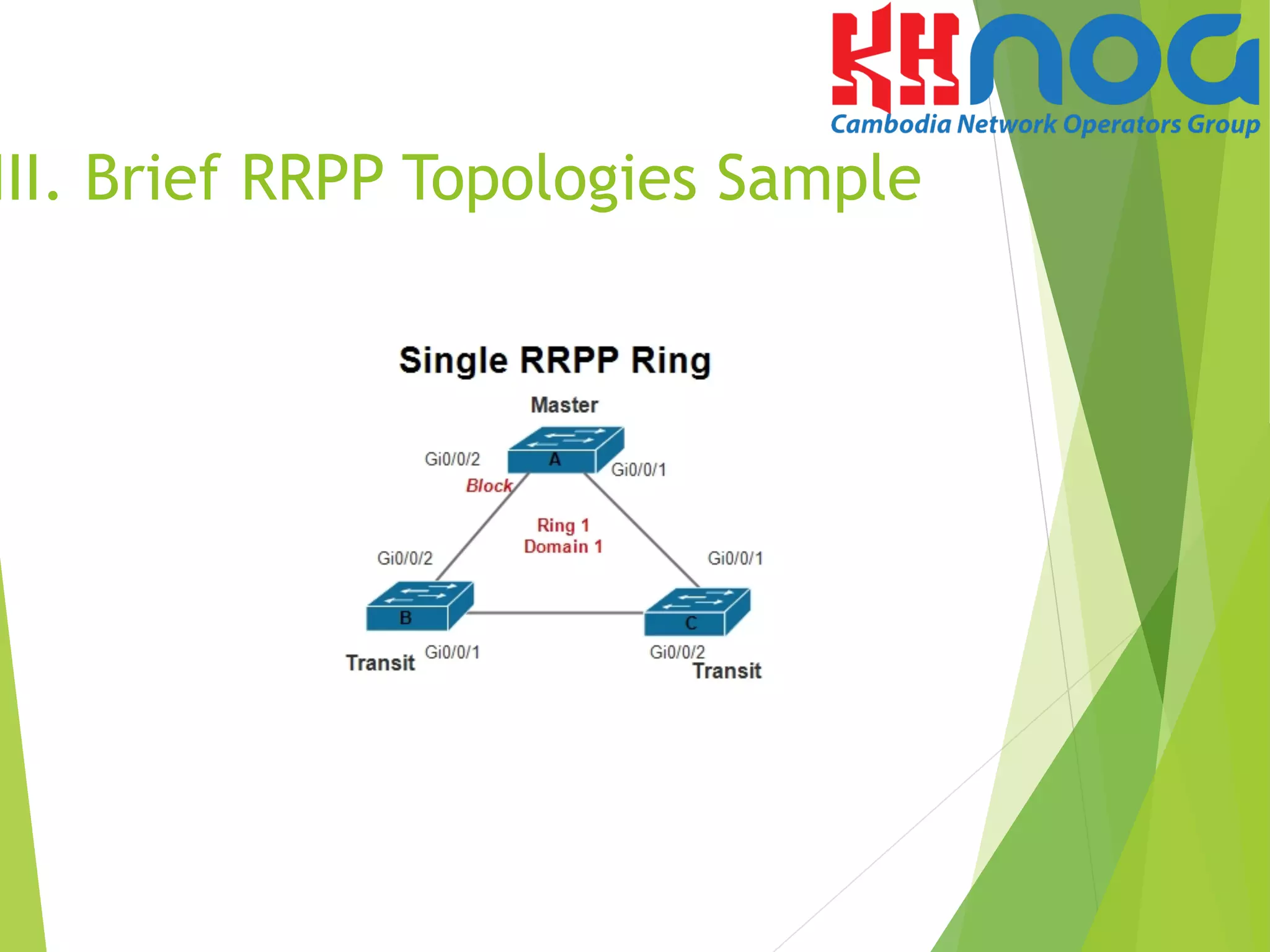
u  RRPP is Huawei proprietary link layer protocol used for
applying to Ethernet rings. RRPP can prevent broadcast
storms caused by data loops on a complete Ethernet
ring. When a link on the Ethernet ring fails, nodes on the
ring can restores communication immediately through
the backup link with fast convergence time.
u  There are some kinds of RRPP Rings topologies
u  Single RRPP Ring
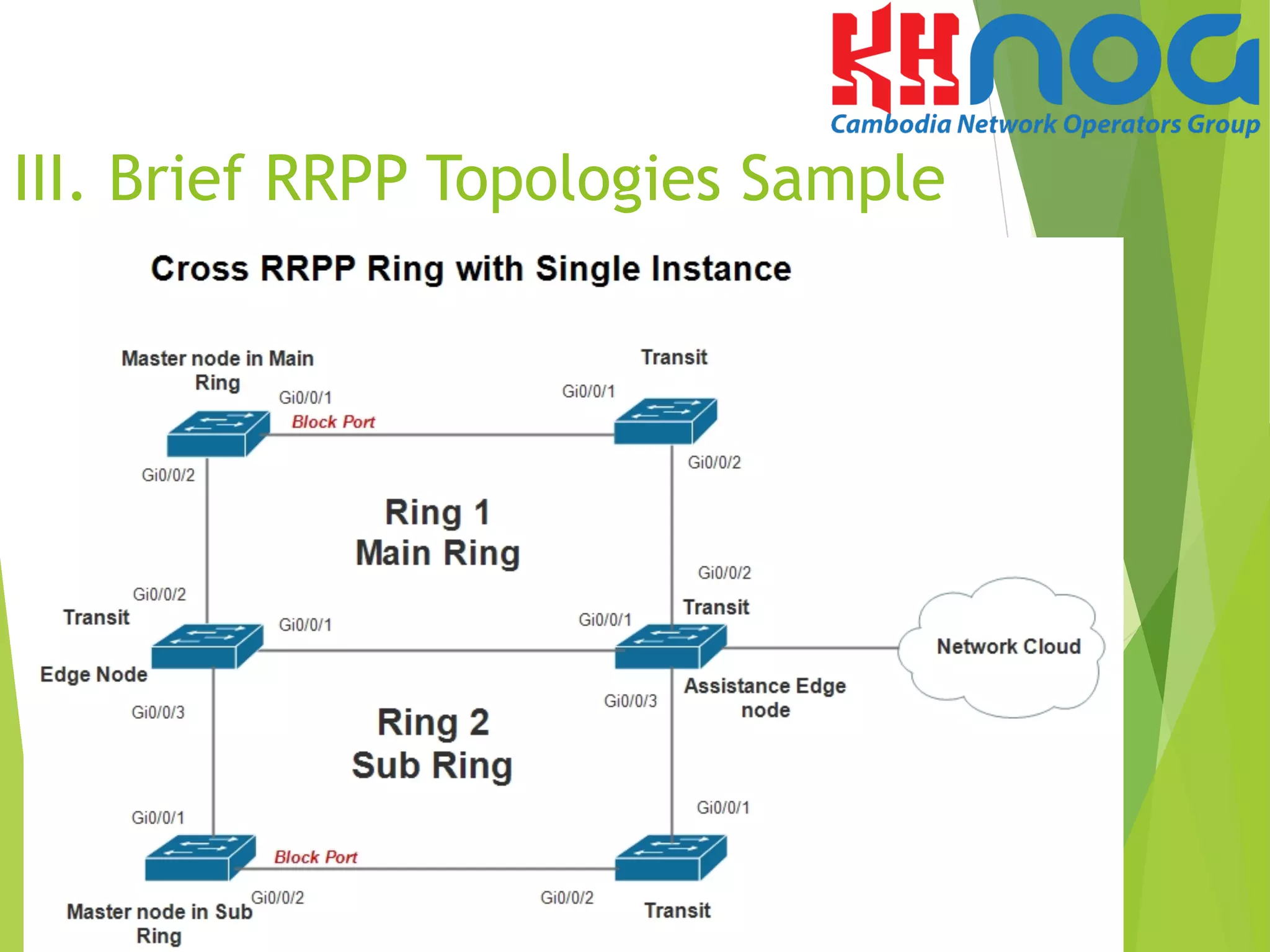
u  Cross RRPP Ring
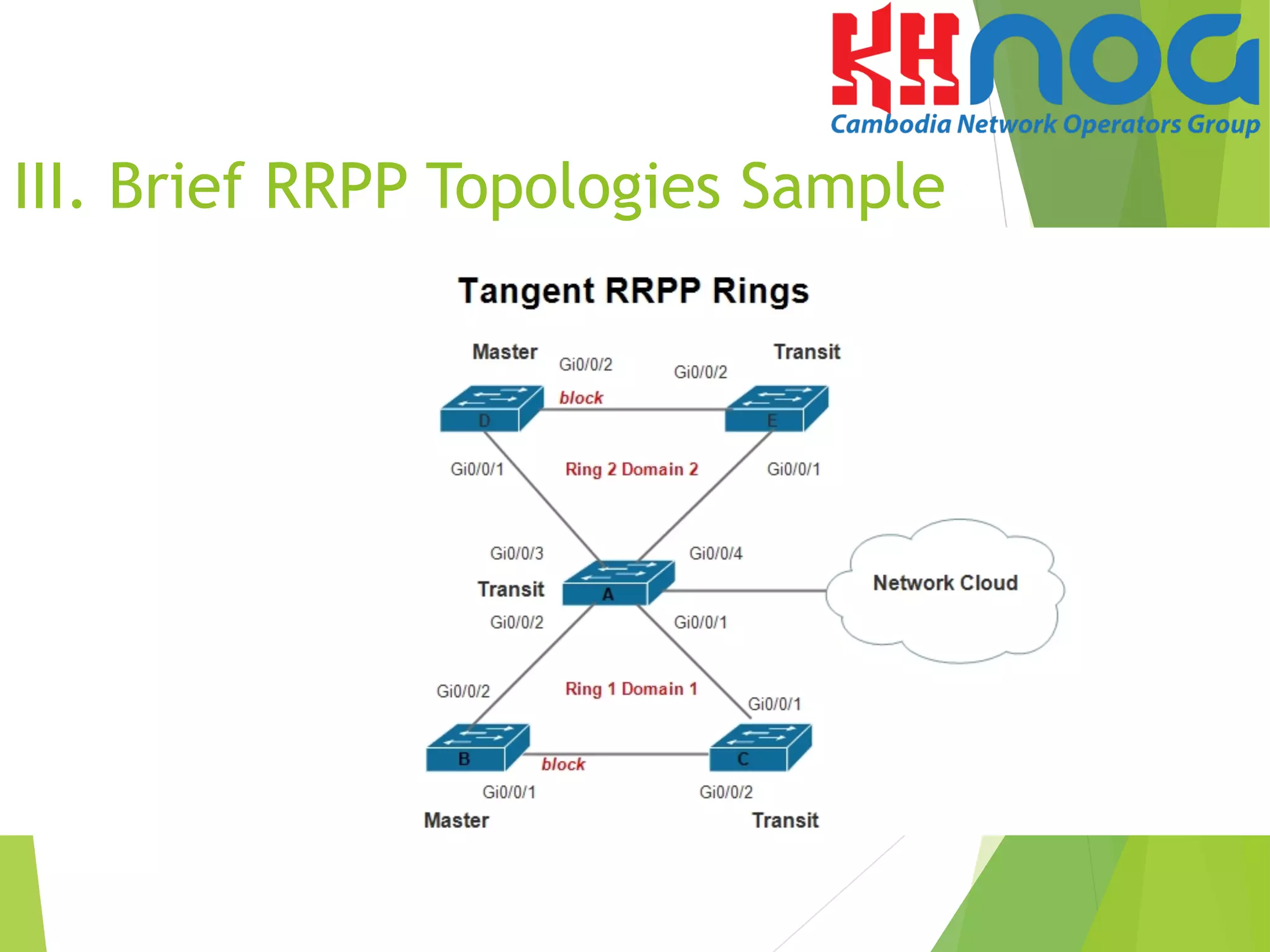
u  Tangent RRPP Ring
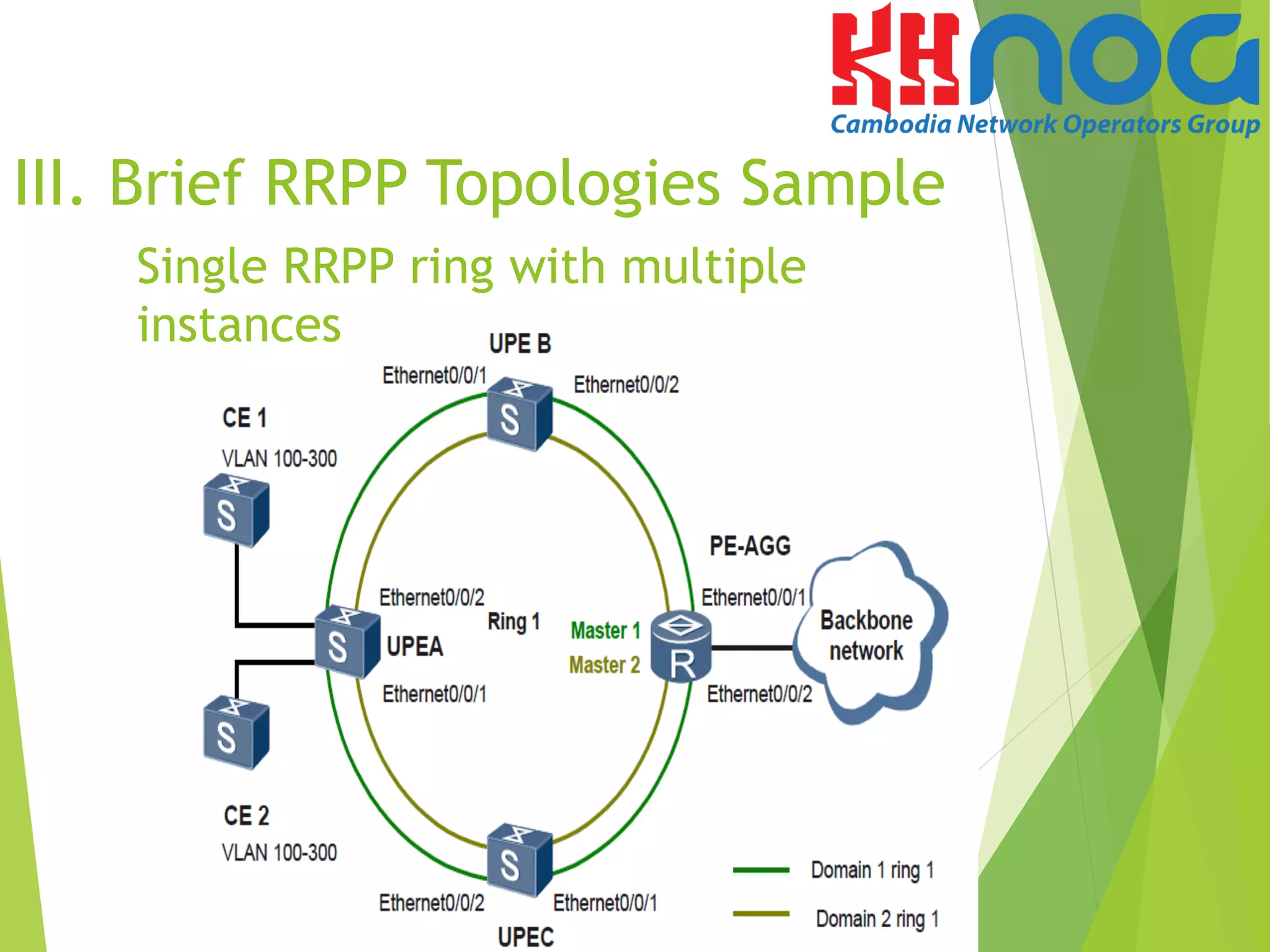
u  Single RRPP Ring with Multiple instances
u  Tangent RRPP Ring with Multiple instance
u  Cross RRPP Ring with Multiple instance
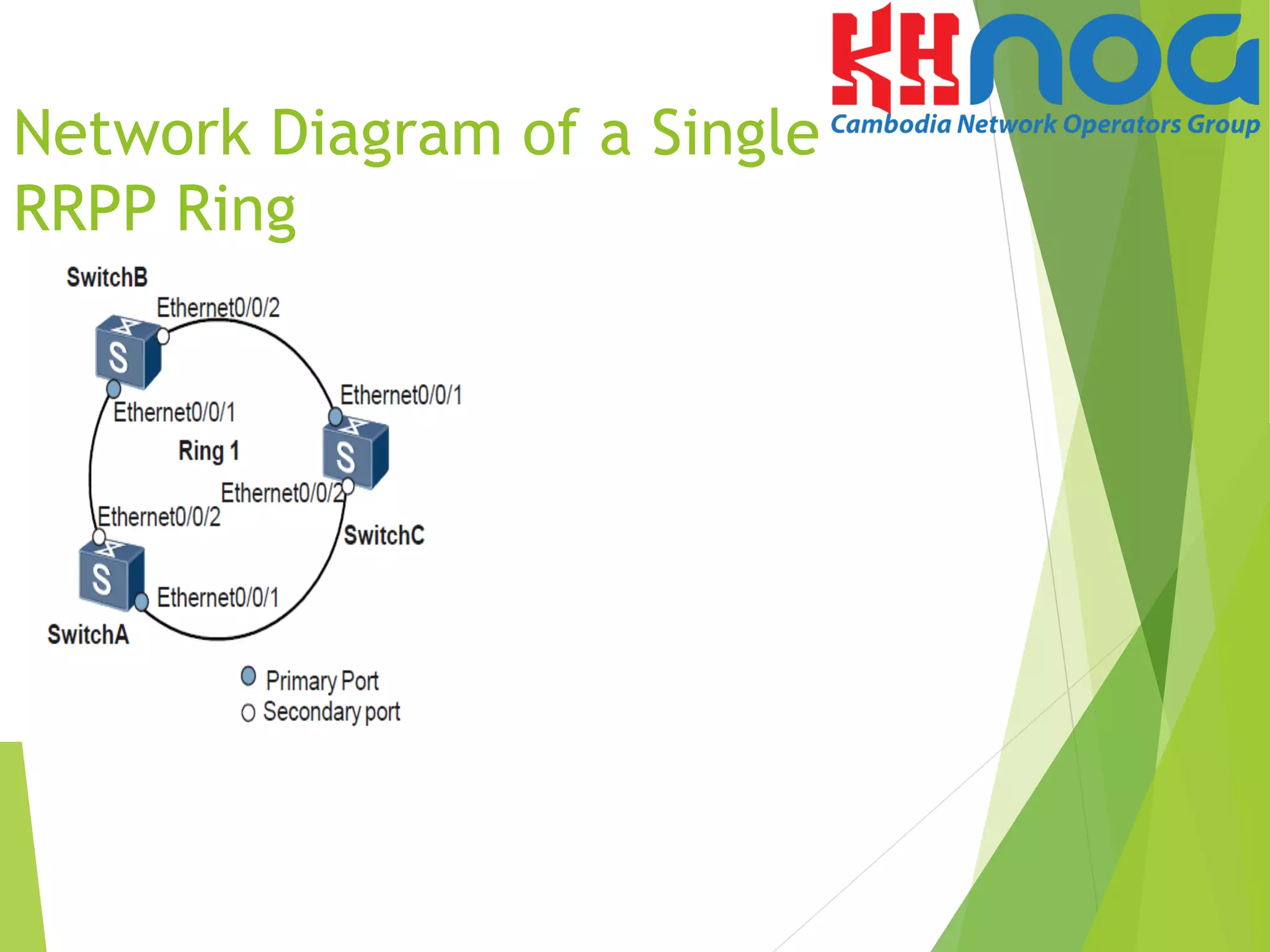
Network Diagram of a Single
RRPP Ring
II. Comparing with other Ethernet
ring technologies, RRPP has the
following features:
u  Convergence time is not related to the number of nodes
on the ring network. Thus, RRPP can be applied to a
large-scale network.
u  The topology convergence time is less than 50 ms. The
service interruption time on the RRPP ring is less than
200 ms
u  RRPP can prevent the data loop from causing broadcast
storm when the Ethernet ring network is complete.
u  RRPP, RSTP and MSTP are generally adopted to address
the layer 2 network loop. But RSTP/MSTP is highly
adaptable and the convergence time is measure in
seconds.
III. RRPP Features
u  RRPP Functions and Elements
- RRPP Domain
An RRPP domain consists of a group of interconnected switches
with the same domain ID and control VLAN ID. An RRPP domain consists
of the elements such as RRPP major ring and sub ring, control VLAN,
master node, transit node, primary port and secondary port. An RRPP
domain is identified by its ID, which is an integer.
- RRPP Ring
Physically, an RRPP ring corresponds to an Ethernet ring. An
RRPP ring is a path of its RRPP domain. An RRPP domain consist of one
RRPP ring or multiple crossed RRPP rings.
- RRPP major ring and sub ring
If an RRPP domain consists of multiple crossed RRPP rings, we
can configure one ring as the major ring and other rings as subrings by
setting their levels. An RRPP domain has only one major ring. Protocol
packets of sub rings are transmitted in the major ring as data packets,
and protocol packets of the major ring are transmitted only in the major
ring.
II. RRPP Features
u  RRPP Functions and Elements
- Control VLAN
A VLAN that transmits RRPP protocol packets in an RRPP domain is
called a control VLAN. A control VLAN can contain only RRPP ports. An RRPP
domain is configured with two control VLANs. The primary control VLAN and
the sub control VLAN. We need to specify only the primary control VLAN. The
VLAN whose ID is one more than the ID of the primary control VLAN becomes
the sub control VLAN. Different from a control VLAN, a data VLAN is used to
transmit data packets. The data VLAN can contain both the RRPP ports and
non-RRPP ports.
- Master node
On an RRPP ring, each switch is called a nodes. Each RRPP ring must
have only one master node.
- Transit node
On an RRPP ring, all nodes except the master node are transit
nodes. A transit node monitors the status of its directly connected RRPP
links. When the link status changes, the transit node informs the master
nodes. The master nodes then determines the policy for reacting to the
change of the link status.
II. RRPP Features
u  RRPP Functions and Elements
- Edge node and Assistant edge node
An edge node or assistant edge node is configured on a sub
ring in the RRPP cross Ring. It functions as a transit node on the major
ring. On a sub ring, either of the two nodes that are on the crossed
points of the major ring and sub ring can be configured as the edge
node or one is edge node and other one is assistant edge node.
- Primary Interface and secondary interface
On the master node and transit nodes, we can configure one
of the two interface connected to the Ethernet ring as the primary
interface and the other as the secondary interface.
- Common interface and edge interface
On an edge node or an assistant edge node, the interface
share by the sub ring and the major ring is called the common
interface. An interface located only on a sub ring is called a edge
interface.
u  RRPP Functions and elements
- RRPP Multi-Instance
In the RRPP networking, one RRPP ring contains only one
master node. When the master node is in complete state, the blocked
secondary interface rejects all the data packets. In the manner, all the
data packets are transmitted through the same path on the RRPP ring.
The link of the secondary interface on the master node is idle, which
wastes bandwidth. The RRPP multi-instance feature is implemented
base domains. In the RRPP multi-instance networking, multiple domains
can be configured on an RRPP ring.
Each domain contains one or more instance, and each instance
represents a VLAN range. The VLANs in a domain are protected VLANs in
the RRPP domain. A protected VLAN can be a data VLAN. The control
VLAN on the major ring, or the control VLAN on a subring in the RRPP
domain.
In the RRPP multi-instance networking, a ring can contain
multiple master nodes, Load balancing and link backup can be
implemented based on the blocking state of the secondary interface on
the master node.
II. RRPP Features
III. Brief RRPP Topologies Sample
Single RRPP ring with multiple
instances
III. Brief RRPP Topologies Sample
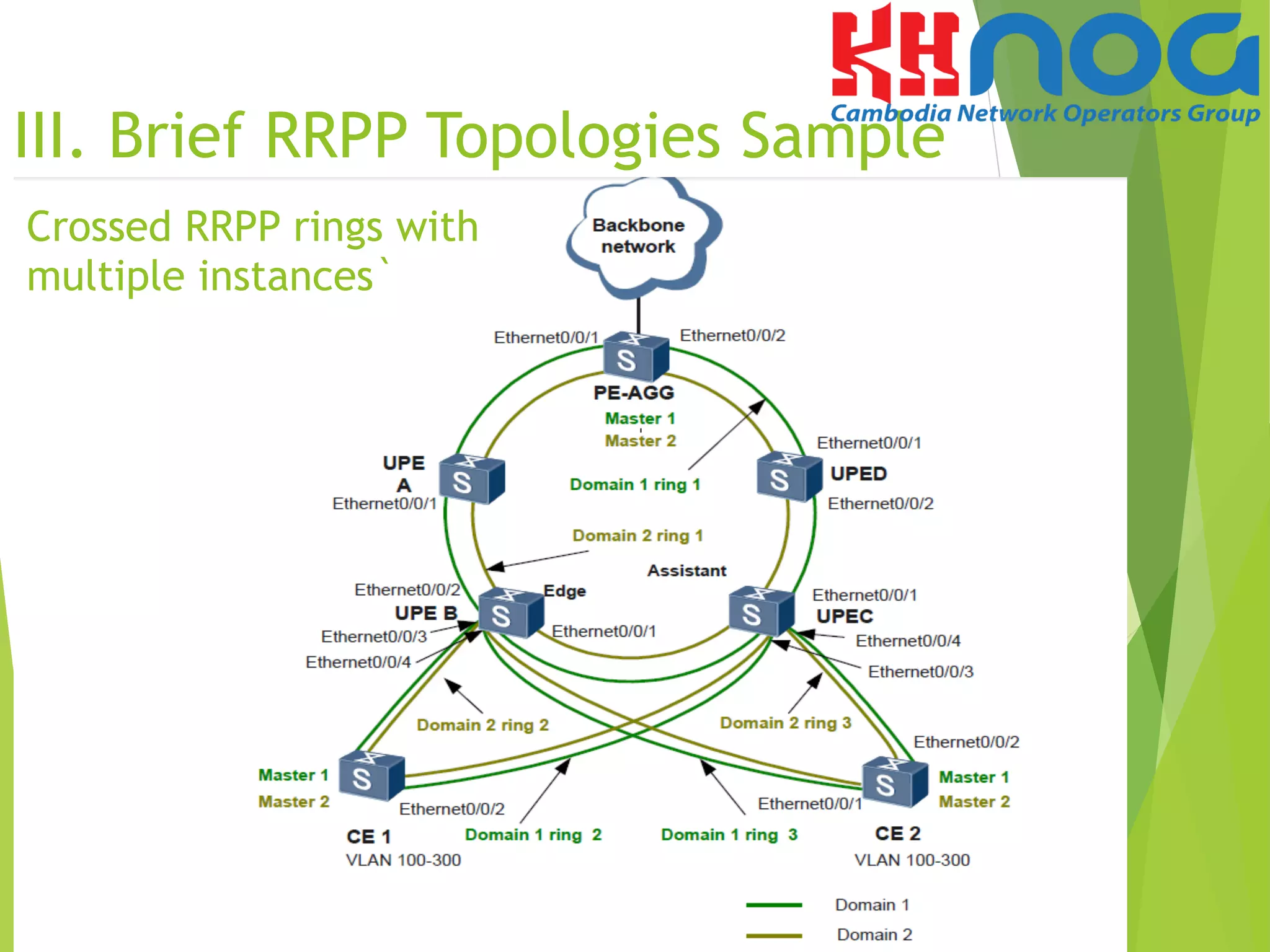
Crossed RRPP rings with
multiple instances`
III. Brief RRPP Topologies Sample
CE1, UPE B, and UPE C form two subrings: ring 2 in domain 1 and ring 2 in domain 2. CE1 is
connected to the major rings through Eth 0/0/3 of UPE B and Eth 0/0/3 of UPE C. UPE B is an
edge node, and UPE is an assistant edge node.
CE2, UPE B, and UPE C form two subrings: ring 3 in domain 1 and ring 3 in domain 2. CE2 is
connected to the major rings through Eth 0/0/4 of UPE B and Eth 0/0/4 of UPE C. UPE B is an
edge node, and UPE is an assistant edge node.
VLANs 100 to 300 are configured on CE. Domain 1 and domain 2 share the traffic of packets
from VLANs 100 to 300. Packets from VLANs 100 to 200 are transmitted through domain 1,
and packets from VLANs 201 to 300 are transmitted through domain 2.
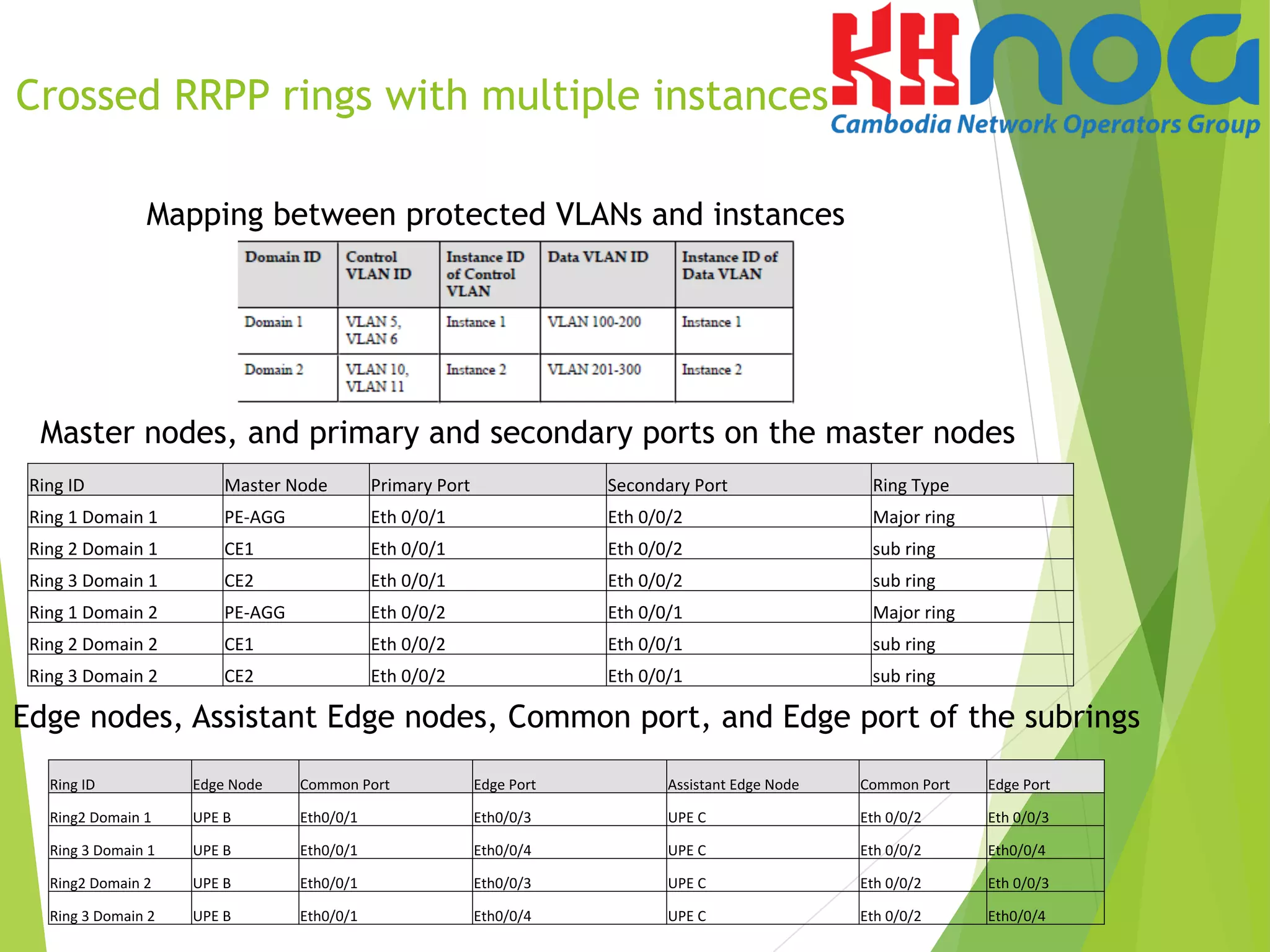
Crossed RRPP rings with multiple instances
III. Brief RRPP Topologies Sample
Ring	
  ID	
   Master	
  Node	
   Primary	
  Port	
   Secondary	
  Port	
   Ring	
  Type	
  
Ring	
  1	
  Domain	
  1	
   PE-­‐AGG	
   Eth	
  0/0/1	
   Eth	
  0/0/2	
   Major	
  ring	
  
Ring	
  2	
  Domain	
  1	
   CE1	
   Eth	
  0/0/1	
   Eth	
  0/0/2	
   sub	
  ring	
  
Ring	
  3	
  Domain	
  1	
   CE2	
   Eth	
  0/0/1	
   Eth	
  0/0/2	
   sub	
  ring	
  
Ring	
  1	
  Domain	
  2	
   PE-­‐AGG	
   Eth	
  0/0/2	
   Eth	
  0/0/1	
   Major	
  ring	
  
Ring	
  2	
  Domain	
  2	
   CE1	
   Eth	
  0/0/2	
   Eth	
  0/0/1	
   sub	
  ring	
  
Ring	
  3	
  Domain	
  2	
   CE2	
   Eth	
  0/0/2	
   Eth	
  0/0/1	
   sub	
  ring	
  
Ring	
  ID	
   Edge	
  Node	
   Common	
  Port	
   Edge	
  Port	
   Assistant	
  Edge	
  Node	
   Common	
  Port	
   Edge	
  Port	
  
Ring2	
  Domain	
  1	
   UPE	
  B	
   Eth0/0/1	
   Eth0/0/3	
   UPE	
  C	
   Eth	
  0/0/2	
   Eth	
  0/0/3	
  
Ring	
  3	
  Domain	
  1	
   UPE	
  B	
   Eth0/0/1	
   Eth0/0/4	
   UPE	
  C	
   Eth	
  0/0/2	
   Eth0/0/4	
  
Ring2	
  Domain	
  2	
   UPE	
  B	
   Eth0/0/1	
   Eth0/0/3	
   UPE	
  C	
   Eth	
  0/0/2	
   Eth	
  0/0/3	
  
Ring	
  3	
  Domain	
  2	
   UPE	
  B	
   Eth0/0/1	
   Eth0/0/4	
   UPE	
  C	
   Eth	
  0/0/2	
   Eth0/0/4	
  
Edge nodes, Assistant Edge nodes, Common port, and Edge port of the subrings
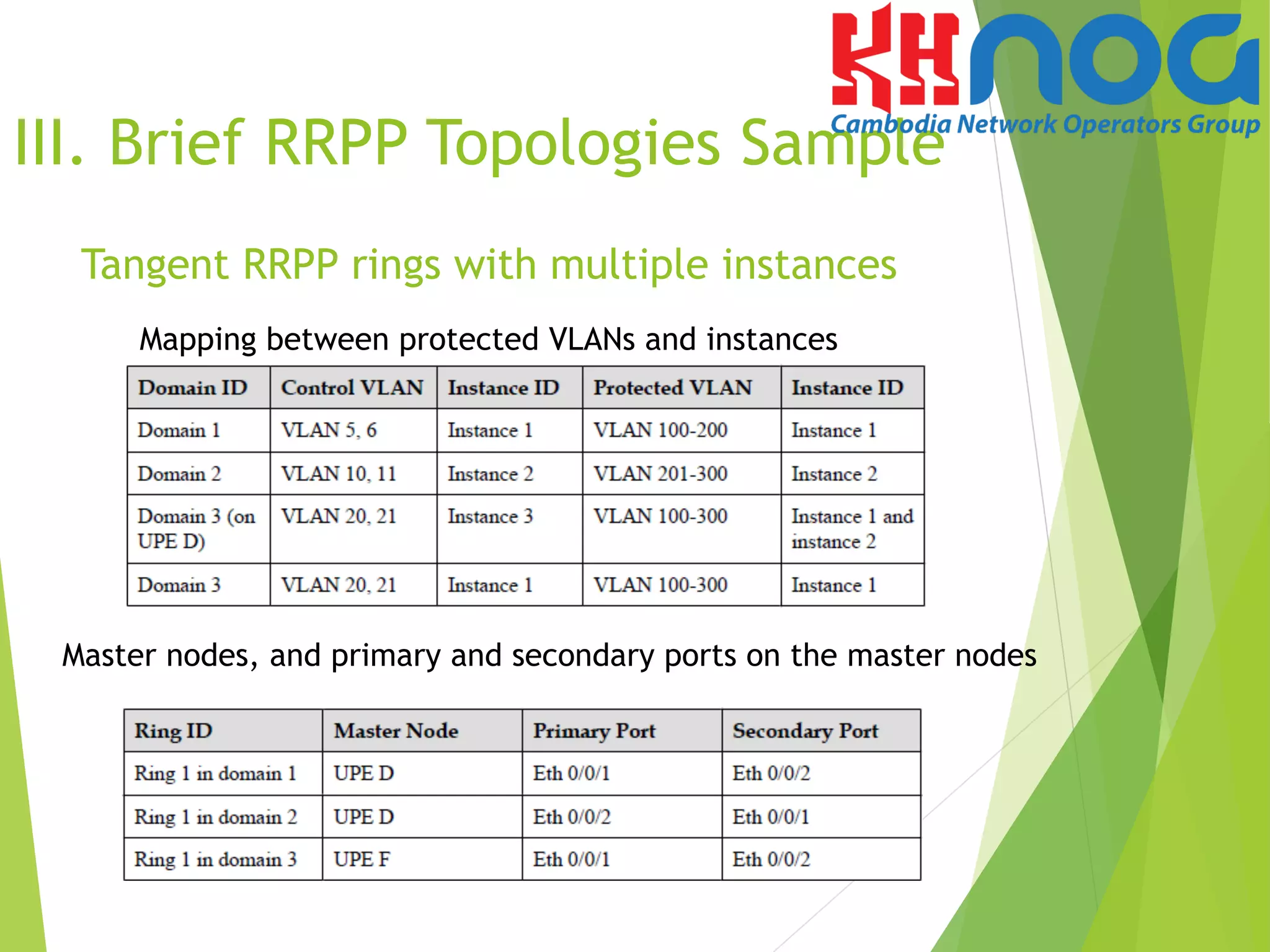
Mapping between protected VLANs and instances
Master nodes, and primary and secondary ports on the master nodes
Crossed RRPP rings with multiple instances
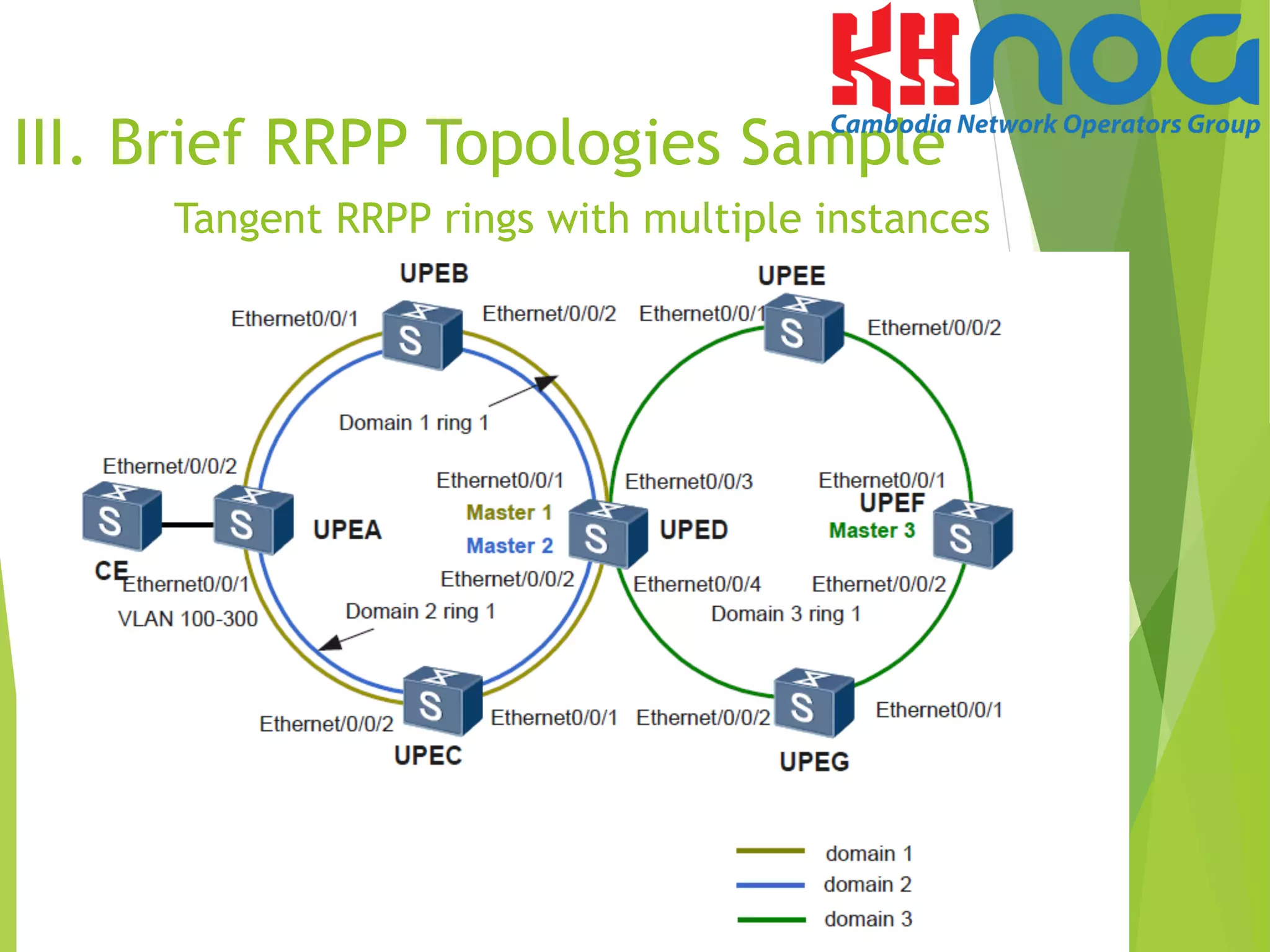
Tangent RRPP rings with multiple instances
III. Brief RRPP Topologies Sample
UPE A, UPE B, UPE C, and UPE D form two multi-instance rings:
ring 1 in domain 1 and ring 1 in domain 2. UPE D, UPE E, UPE F, and UPE G form ring 1 in
domain 3. Packets of the data VLANs connected to CE are forwarded to the backbone network
through the two tangent rings. The tangent point of the two rings is UPE D.
VLANs 100 to 300 are configured on CE. Domain 1 and domain 2 share the traffic of packets
from VLANs 100 to 300. Packets from VLANs 100 to 200 are transmitted through domain 1,
and packets from VLANs 201 to 300 are transmitted through domain 2.
III. Brief RRPP Topologies Sample
Tangent RRPP rings with multiple instances
Mapping between protected VLANs and instances
Master nodes, and primary and secondary ports on the master nodes
Tangent RRPP rings with multiple instances
III. Brief RRPP Topologies Sample
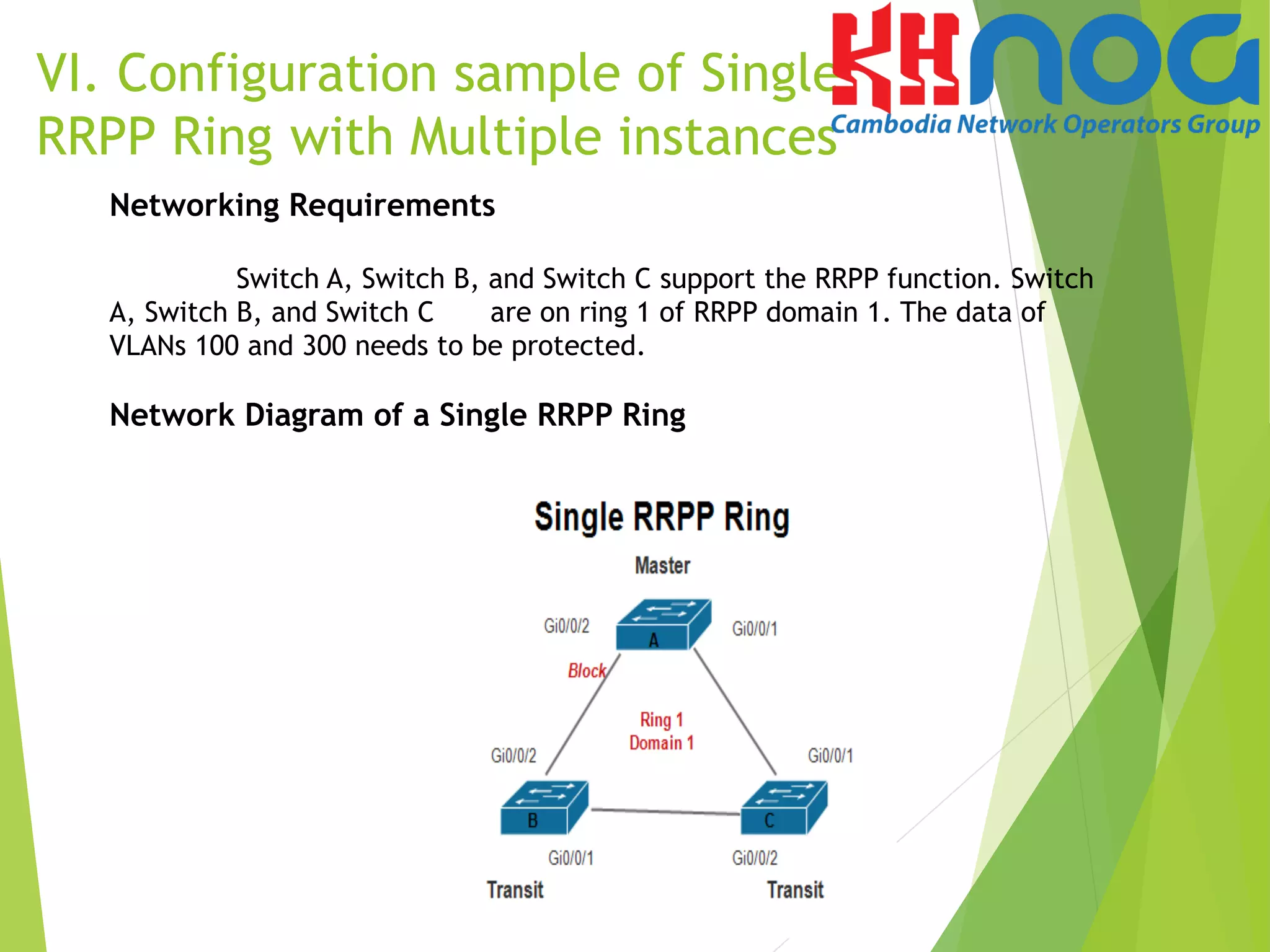
Networking Requirements
Switch A, Switch B, and Switch C support the RRPP function. Switch
A, Switch B, and Switch C are on ring 1 of RRPP domain 1. The data of
VLANs 100 and 300 needs to be protected.
Network Diagram of a Single RRPP Ring
VI. Configuration sample of Single
RRPP Ring with Multiple instances
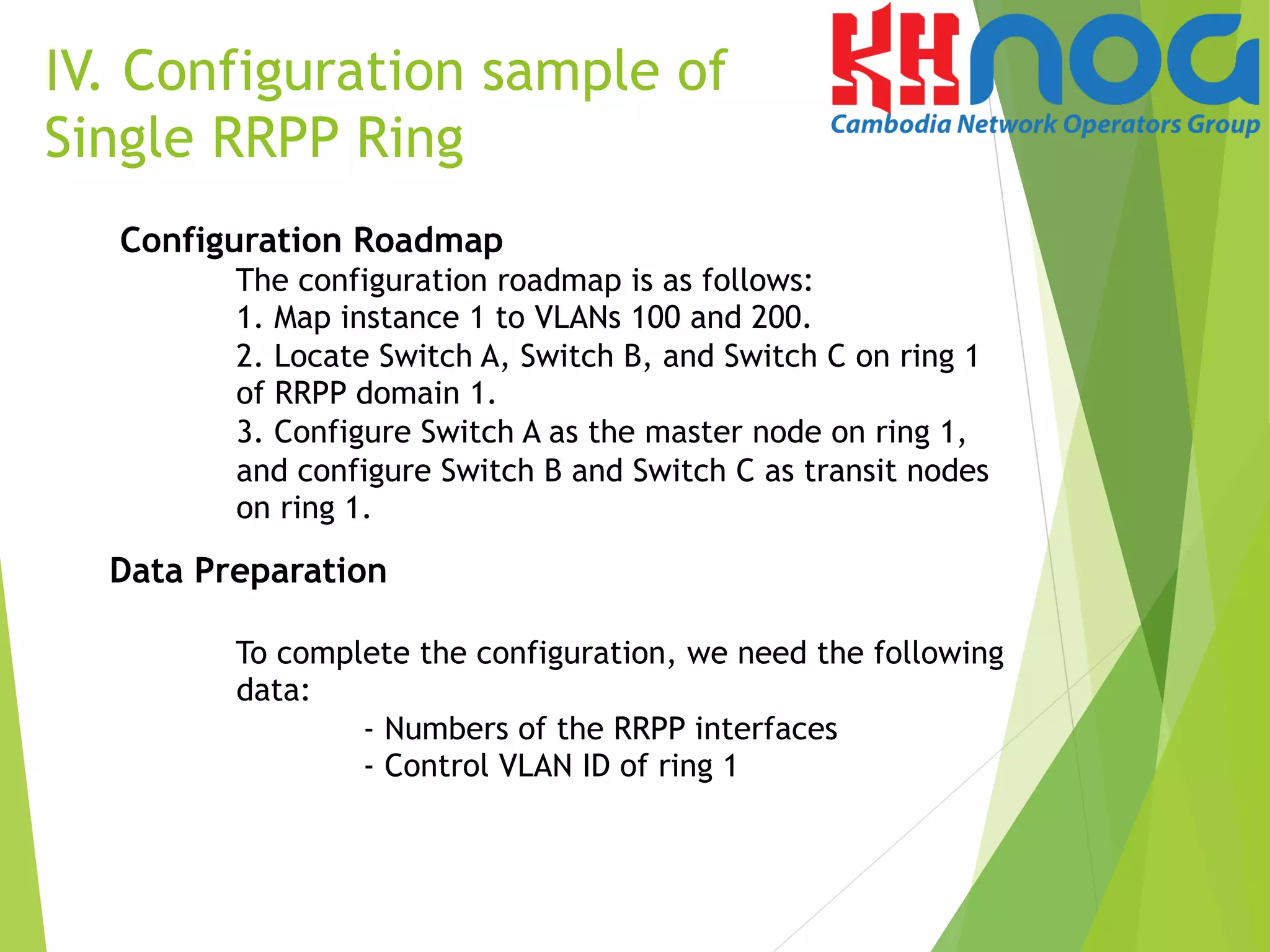
Configuration Roadmap
The configuration roadmap is as follows:
1. Map instance 1 to VLANs 100 and 200.
2. Locate Switch A, Switch B, and Switch C on ring 1
of RRPP domain 1.
3. Configure Switch A as the master node on ring 1,
and configure Switch B and Switch C as transit nodes
on ring 1.
Data Preparation
To complete the configuration, we need the following
data:
- Numbers of the RRPP interfaces
- Control VLAN ID of ring 1
IV. Configuration sample of
Single RRPP Ring
Procedure
Step 1 Map instance 1 to VLANs 100 and 200.
[Switch-A]stp region-configuration
[Switch-A-mst-region]instance 1 vlan 10 11 100 200
[Switch-A-mst-region]active region-configuration
The configurations of Switch B and Switch C are similar to the
configuration of Switch A. The detailed configurations are omitted here.
V. Configuration sample of
Single RRPP Ring
Step 2 Create an RRPP domain and the control VLAN.
# On the master node of ring 1, namely Switch -A, create RRPP domain 1 and c
configure VLAN 10 as the main control VLAN.
[Switch-A]rrpp domain 1
[Switch-A-rrpp-domain-region1]control-vlan 10
# On the transit node of ring 1, namely Switch B, create RRPP domain 1 and configure
VLAN 10 as the main control VLAN.
[Switch-B] rrpp domain 1
[Switch-B-rrpp-domain-region1] control-vlan 10
# On the master node of ring 1, namely SwitchC, create RRPP domain 1 and configure
VLAN 10 as the main control VLAN.
[Switch-C] rrpp domain 1
[Switch-C-rrpp-domain-region1] control-vlan 10
Procedure
Step 3 Configure the interfaces to be added to the RRPP ring as trunk
interfaces, allow VLANs 100 and 200 on the interfaces, and disable STP
on the interfaces.
# Configure Switch A. 
[Switch-A]interface gi0/0/1
[Switch-A-GigabitEthernet0/0/1]port link-type trunk
[Switch-A-GigabitEthernet0/0/1]port tru all vla 100 200
[Switch-A-GigabitEthernet0/0/1]stp disable
 
[Switch-A]interface gi0/0/2
[Switch-A-GigabitEthernet0/0/2]port link-type trunk
[Switch-A-GigabitEthernet0/0/2]port trunk allow-pass
vlan 100 200
[Switch-A-GigabitEthernet0/0/2]stp disable
V. Configuration sample of
Single RRPP Ring
Note: The configurations on interfaces of Switch B and switch C are the same to
the configuration of Switch A. The detailed configurations are omitted.
Procedure
Step 4 Configure a protection VLAN and create the RRPP
ring and enable RRPP.
# Configure the protection VLAN on Switch A and configure Switch A as the
master node of RRPP ring 1 and specify the primary interface and secondary
interface.
[Switch-A]rrpp domain 1
[Switch-A-rrpp-domain-region1]protected-vlan reference-instance 1
[Switch-A-rrpp-domain-region1]ring 1 node-mode master primary-port gi0/0/1
secondary-port gi0/0/2 level 0
[Switch-A]rrpp enable
V. Configuration sample of
Single RRPP Ring
Procedure
Step 4 Configure a protection VLAN and create the RRPP
ring and enable RRPP.
# Configure the protection VLAN on Switch B and configure Switch B as the
transit node of RRPP ring 1 and specify the primary interface and secondary
interface.
[Switch-B]rrpp domain 1
[Switch-B-rrpp-domain-region1]protected-vlan reference-instance 1
[Switch-B-rrpp-domain-region1]ring 1 node-mode transit primary-port gi0/0/1
secondary-port gi0/0/2 level 0
[Switch-B-rrpp-domain-region1]ring 1 enable
[Switch-B]rrpp enable
# Configure the protection VLAN on Switch C and configure Switch C as the
transit node of RRPP ring 1 and specify the primary interface and secondary
interface.
[Switch-C]rrpp domain 1
[Switch-C-rrpp-domain-region1]protected-vlan reference-instance 1
[Switch-C-rrpp-domain-region1]ring 1 node-mode transit primary-port
gi0/0/1
secondary-port gi0/0/2 level 0
[Switch-C-rrpp-domain-region1]ring 1 enable
[Switch-C]rrpp enable
V. Configuration sample of
Single RRPP Ring
Step 6 Verify the configuration.
After the configurations are completed and network become stable, run the
following commands
to verify the configuration. Run the display rrpp brief command on Switch-A.
The following information is displayed:
[Switch-A]dis rrpp brief
Abbreviations for Switch Node Mode :
M - Master , T - Transit , E - Edge , A - Assistant-Edge
 
RRPP Protocol Status: Enable
RRPP Working Mode: HW
RRPP Linkup Delay Timer: 0 sec (0 sec default)
Number of RRPP Domains: 1
 
Domain Index : 1
Control VLAN : major 10 sub 11
Protected VLAN : Reference Instance 1
Hello Timer : 1 sec(default is 1 sec) Fail Timer : 6 sec(default is 6 sec)
 
Ring Ring Node Primary/Common Secondary/Edge Is
ID Level Mode Port Port Enabled
----------------------------------------------------------------------------
1 0 M GigabitEthernet0/0/1 GigabitEthernet0/0/2 Yes
 
V. Configuration sample of
Single RRPP Ring
Step 6 Verify the configuration.
After the configurations are completed and network become stable, run the
following commands
to verify the configuration. Run the display rrpp verbose domain 1 command on
Switch-A.
The detail information about RRPP domain 1 is displayed as followed:
[Switch-A]dis rrpp verbose domain 1
Domain Index : 1
Control VLAN : major 10 sub 11
Protected VLAN : Reference Instance 1
Hello Timer : 1 sec(default is 1 sec) Fail Timer : 6 sec(default is 6 sec)
 
RRPP Ring : 1
Ring Level : 0
Node Mode : Master
Ring State : Complete
Is Enabled : Enable Is Active: Yes
Primary port : GigabitEthernet0/0/1 Port status: UP
Secondary port : GigabitEthernet0/0/2 Port status: BLOCKED
V. Configuration sample of
Single RRPP Ring
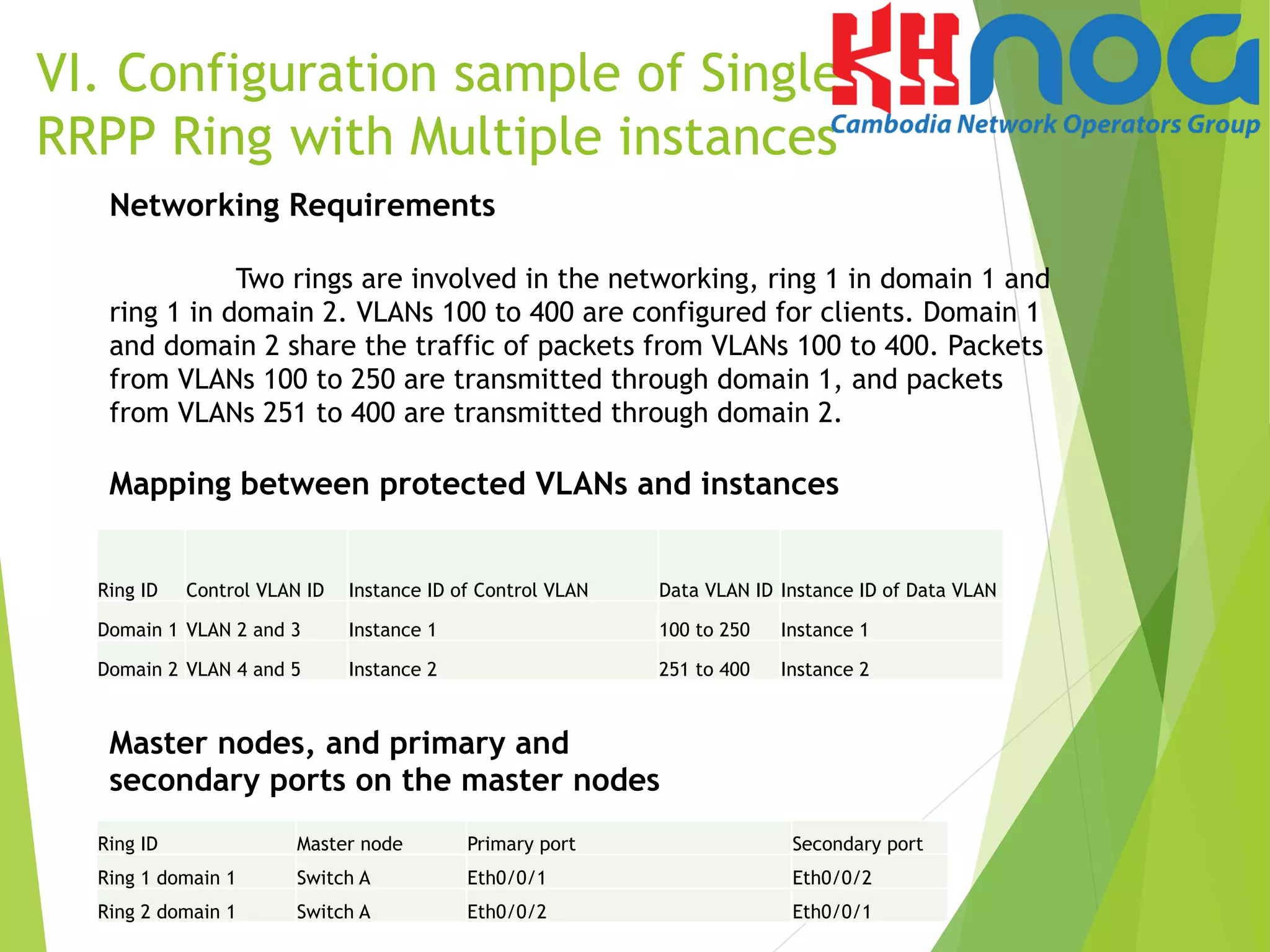
Networking Requirements
Two rings are involved in the networking, ring 1 in domain 1 and
ring 1 in domain 2. VLANs 100 to 400 are configured for clients. Domain 1
and domain 2 share the traffic of packets from VLANs 100 to 400. Packets
from VLANs 100 to 250 are transmitted through domain 1, and packets
from VLANs 251 to 400 are transmitted through domain 2.
Mapping between protected VLANs and instances
VI. Configuration sample of Single
RRPP Ring with Multiple instances
Ring ID	
   Control VLAN ID	
   Instance ID of Control VLAN	
   Data VLAN ID	
   Instance ID of Data VLAN	
  
Domain 1	
   VLAN 2 and 3	
   Instance 1	
   100 to 250	
   Instance 1	
  
Domain 2	
   VLAN 4 and 5	
   Instance 2	
   251 to 400	
   Instance 2	
  
Master nodes, and primary and
secondary ports on the master nodes
Ring ID	
   Master node	
   Primary port	
   Secondary port	
  
Ring 1 domain 1	
   Switch A	
   Eth0/0/1	
   Eth0/0/2	
  
Ring 2 domain 1	
   Switch A	
   Eth0/0/2	
   Eth0/0/1	
  
VI. Configuration sample of Single
RRPP Ring with Multiple instances
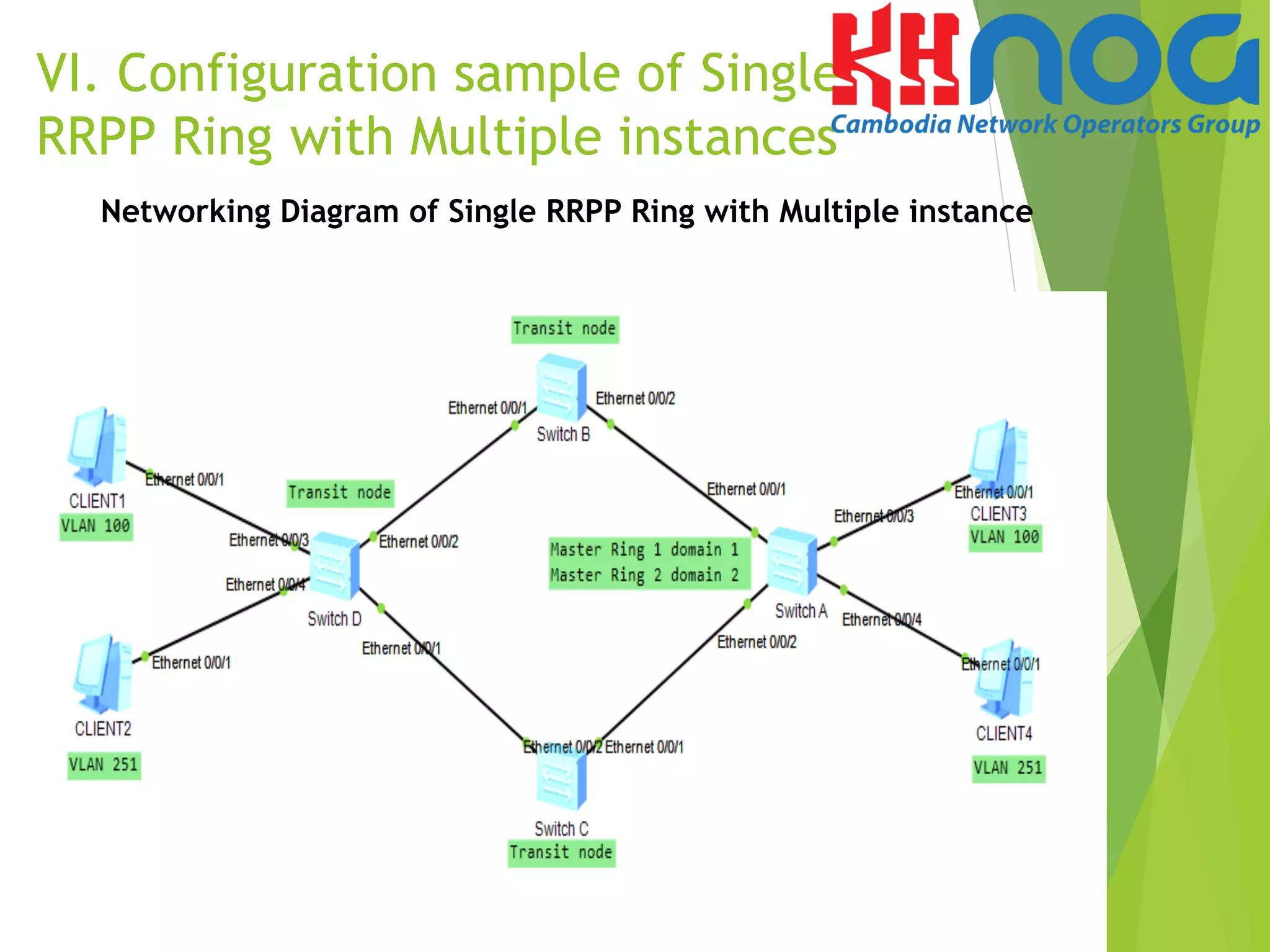
Networking Diagram of Single RRPP Ring with Multiple instance
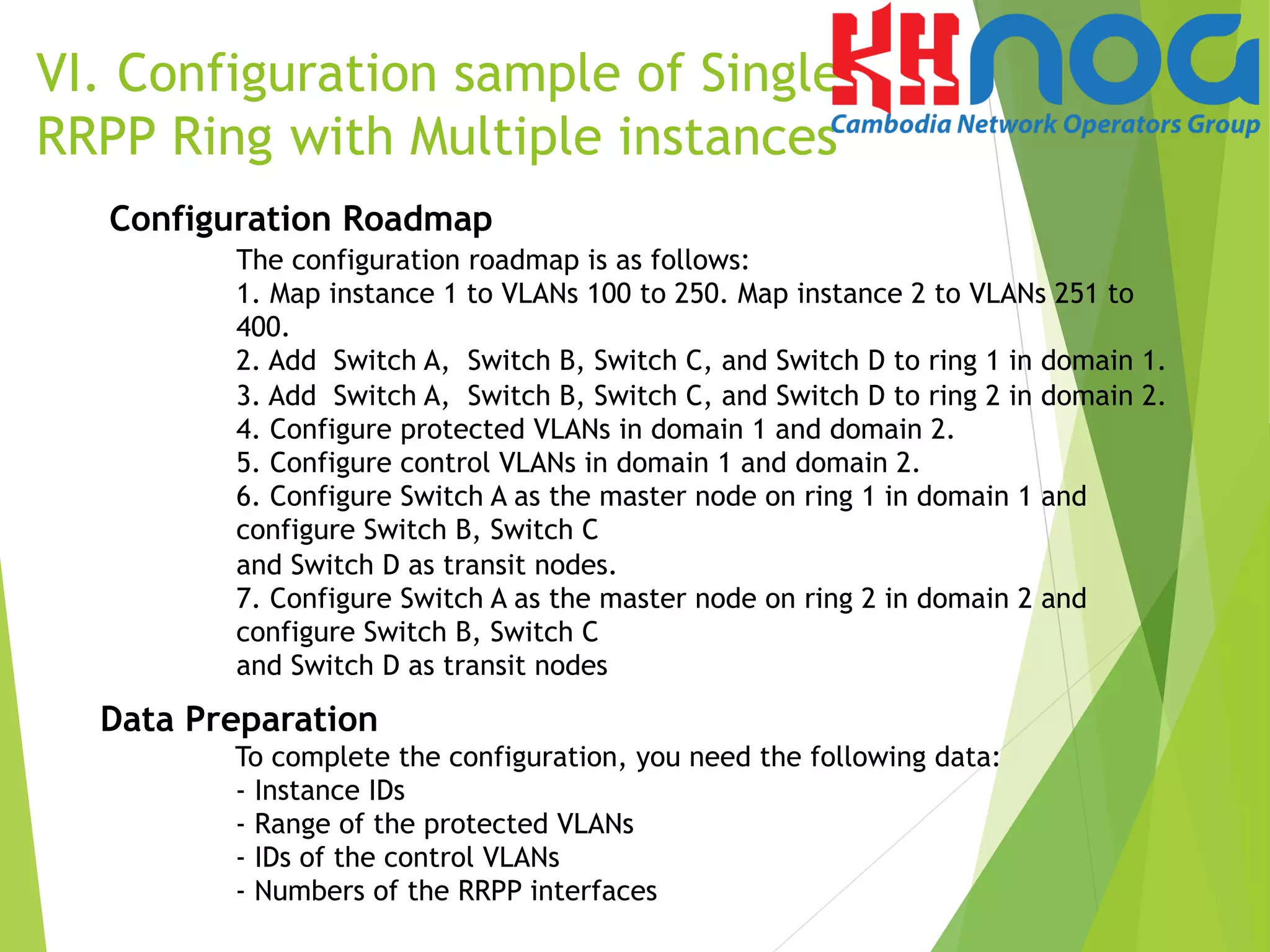
Configuration Roadmap
The configuration roadmap is as follows:
1. Map instance 1 to VLANs 100 to 250. Map instance 2 to VLANs 251 to
400.
2. Add Switch A, Switch B, Switch C, and Switch D to ring 1 in domain 1.
3. Add Switch A, Switch B, Switch C, and Switch D to ring 2 in domain 2.
4. Configure protected VLANs in domain 1 and domain 2.
5. Configure control VLANs in domain 1 and domain 2.
6. Configure Switch A as the master node on ring 1 in domain 1 and
configure Switch B, Switch C
and Switch D as transit nodes.
7. Configure Switch A as the master node on ring 2 in domain 2 and
configure Switch B, Switch C
and Switch D as transit nodes
Data Preparation
To complete the configuration, you need the following data:
- Instance IDs
- Range of the protected VLANs
- IDs of the control VLANs
- Numbers of the RRPP interfaces
VI. Configuration sample of Single
RRPP Ring with Multiple instances
Procedure
Step 1 Create VLAN and instances.
#Create VLAN on Switch A, B, C and D
<SwitchA>system-view
[SwitchA]vlan batch 100 to 400
# Create instance 1 and map it to control VLANs VLAN 2 VLAN 3
and data VLANs 100 to 250 in domain 1.
[SwitchA]stp region-configuration
[SwitchA-mst-region]instance 1 vlan 2 3 100 to 250
[SwitchA-mst-region]active region-configuration
# Create instance 2 and map it to control VLANs VLAN 4 VLAN 5
and data VLANs 251 to 400 in domain 2.
[SwitchA]stp region-configuration
[SwitchA-mst-region]instance 2 vlan 4 5 251 to 400
[SwitchA-mst-region]active region-configuration.
Note: The configurations of Switch B, Switch C and switch D are the same to the
configuration of Switch A. The detailed configurations are omitted.
VI. Configuration sample of Single
RRPP Ring with Multiple instances
# Verify the configuration
Run the display stp region-configuration command on the devices to view the
mapping between instance and VLANs. The displayed information on Switch A is
as follows:
[SwitchA]dis stp region-configuration
Oper configuration
Format selector :0
Region name :4c1fccd111de
Revision level :0
Instance VLANs Mapped
0 1, 6 to 99, 401 to 4094
1 2 to 3, 100 to 250
2 4 to 5, 251 to 400
 
VI. Configuration sample of Single
RRPP Ring with Multiple instances
VI. Configuration sample of Single
RRPP Ring with Multiple instances
Step 2 Create an RRPP domain and configure the protected
VLAN the control VLAN.
# Configure the VLANs mapping instance 1 as the protected VLANs in domain 1.
Configure VLAN 2 as the control VLAN.
[SwitchA]rrpp domain 1
[SwitchA-rrpp-domain-region1]protected-vlan reference-instance 1
[SwitchA-rrpp-domain-region1]control-vlan 2
# Configure the VLANs mapping instance 2 as the protected VLANs in domain 2.
Configure VLAN 4 as the control VLAN.
[SwitchA]rrpp domain 2
[SwitchA-rrpp-domain-region2]protected-vlan reference-instance 2
[SwitchA-rrpp-domain-region2]control-vlan 4
Note: The configurations of Switch B, Switch C and switch D are the same to the
configuration of Switch A. The detailed configurations are omitted.
Step 3 Create RRPP Rings.
- Configure Switch A
# Configure Switch A as the master node of ring 1 in domain 1.
Configure Eth 0/0/1 as the primary port and Eth 0/0/2 as the
secondary port.
 
[SwitchA]rrpp domain 1
[SwitchA-rrpp-domain-region1]ring 1 node-mode master
primary-port Ethernet 0/0/1 secondary-port Ethernet 0/0/2
level 0
[SwitchA-rrpp-domain-region1]ring 1 enable
# Configure Switch A as the master node of ring 2 in domain 2.
Configure Eth 0/0/1 as the primary port and Eth 0/0/2 as the
secondary port.
[SwitchA]rrpp domain 2
[SwitchA-rrpp-domain-region2]ring 2 node-mode master
primary-port Ethernet 0/0/2
secondary-port Ethernet 0/0/1 level 0
[SwitchA-rrpp-domain-region2]ring 2 enable
# Enable RRPP protocol
After configuring an RRPP ring, you need to enable RRPP on each
node on the ring to activate the RRPP ring.
[SwitchA]rrpp enable
VI. Configuration sample of Single
RRPP Ring with Multiple instances
Step 3 Create RRPP Rings.
- Configure on Switch B, Switch C and Switch D
# Configure Switch B, Switch C and Switch D as the transit node of
ring 1 in domain 1 and specify the primary and secondary port.
[SwitchB]rrpp domain 1
[SwitchB-rrpp-domain-region1]ring 1 node-mode transit primary-
port Ethernet 0/0/1 secondary-port Ethernet 0/0/2 level 0
[SwitchB-rrpp-domain-region1]ring 1 enable
# Configure Switch B, Switch C and Switch D as the transit node of
ring 2 in domain 2 and specify the primary and secondary port.
[SwitchB]rrpp domain 2
[SwitchB-rrpp-domain-region2]ring 2 node-mode transit primary-
port Ethernet 0/0/1 secondary-port Ethernet 0/0/2 level 0
[SwitchB-rrpp-domain-region1]ring 2 enable
# Enable RRPP protocol
After configuring an RRPP ring, you need to enable RRPP on each node on
the ring to activate the RRPP ring.
[SwitchB]rrpp enable
Note: The configurations of Switch C and switch D are the same to the configuration of Switch B.
The detailed configurations are omitted.
VI. Configuration sample of Single
RRPP Ring with Multiple instances
Step 6 Verify the configuration.
After the configurations are completed and network become stable, run the
following commands to verify the configuration. Run the display rrpp brief command
on Switch-A. The following information is displayed:
SwitchA]dis rrpp brief
Abbreviations for Switch Node Mode :
M - Master , T - Transit , E - Edge , A - Assistant-Edge
RRPP Protocol Status: Enable
RRPP Working Mode: HW
RRPP Linkup Delay Timer: 0 sec (0 sec default)
Number of RRPP Domains: 2
Domain Index : 1
Control VLAN : major 2 sub 3
Protected VLAN : Reference Instance 1
Hello Timer : 1 sec(default is 1 sec) Fail Timer : 6 sec(default is 6 sec)
Ring Ring Node Primary/Common Secondary/Edge Is
ID Level Mode Port Port Enabled
----------------------------------------------------------------------------
1 0 M Ethernet0/0/1 Ethernet0/0/2 Yes
Domain Index : 2
Control VLAN : major 4 sub 5
Protected VLAN : Reference Instance 2
Hello Timer : 1 sec(default is 1 sec) Fail Timer : 6 sec(default is 6 sec)
Ring Ring Node Primary/Common Secondary/Edge Is
ID Level Mode Port Port Enabled
----------------------------------------------------------------------------
2 0 M Ethernet0/0/2 Ethernet0/0/1 Yes
Step 6 Verify the configuration.
After the configurations are completed and network become stable, run the following
commands to verify the configuration. Run the display rrpp verbose domain 1 command on
Switch-A. The detail information about RRPP domain 1 is displayed as followed:
[SwitchA]dis rrpp verbose
Domain Index : 1
Control VLAN : major 2 sub 3
Protected VLAN : Reference Instance 1
Hello Timer : 1 sec(default is 1 sec) Fail Timer : 6 sec(default is 6 sec)
RRPP Ring : 1
Ring Level : 0
Node Mode : Master
Ring State : Complete
Is Enabled : Enable Is Active: Yes
Primary port : Ethernet0/0/1 Port status: UP
Secondary port : Ethernet0/0/2 Port status: BLOCKED
Domain Index : 2
Control VLAN : major 4 sub 5
Protected VLAN : Reference Instance 2
Hello Timer : 1 sec(default is 1 sec) Fail Timer : 6 sec(default is 6 sec)
RRPP Ring : 2
Ring Level : 0
Node Mode : Master
Ring State : Complete
Is Enabled : Enable Is Active: Yes
Primary port : Ethernet0/0/2 Port status: UP
Secondary port : Ethernet0/0/1 Port status: BLOCKED
Rapid Ring Protection Protocol (RRPP)

Rapid Ring Protection Protocol (RRPP)

  • 1.
    RRPP Rapid Ring ProtectionProtocol Mr TOP Sovandy NOC Engineer EZECOM
  • 2.
    Agenda u  Overview ofRRPP u  Comparing of RRPP with other Ethernet ring technologies u  RRPP Features u  Brief RRPP Topologies Sample u  Configuration sample of Single RRPP Ring u  Configuration Sample of Single RRPP Ring Multiple instances
  • 3.
    I. Overview ofRRPP u  RRPP is Huawei proprietary link layer protocol used for applying to Ethernet rings. RRPP can prevent broadcast storms caused by data loops on a complete Ethernet ring. When a link on the Ethernet ring fails, nodes on the ring can restores communication immediately through the backup link with fast convergence time. u  There are some kinds of RRPP Rings topologies u  Single RRPP Ring u  Cross RRPP Ring u  Tangent RRPP Ring u  Single RRPP Ring with Multiple instances u  Tangent RRPP Ring with Multiple instance u  Cross RRPP Ring with Multiple instance
  • 4.
    Network Diagram ofa Single RRPP Ring
  • 5.
    II. Comparing withother Ethernet ring technologies, RRPP has the following features: u  Convergence time is not related to the number of nodes on the ring network. Thus, RRPP can be applied to a large-scale network. u  The topology convergence time is less than 50 ms. The service interruption time on the RRPP ring is less than 200 ms u  RRPP can prevent the data loop from causing broadcast storm when the Ethernet ring network is complete. u  RRPP, RSTP and MSTP are generally adopted to address the layer 2 network loop. But RSTP/MSTP is highly adaptable and the convergence time is measure in seconds.
  • 6.
    III. RRPP Features u RRPP Functions and Elements - RRPP Domain An RRPP domain consists of a group of interconnected switches with the same domain ID and control VLAN ID. An RRPP domain consists of the elements such as RRPP major ring and sub ring, control VLAN, master node, transit node, primary port and secondary port. An RRPP domain is identified by its ID, which is an integer. - RRPP Ring Physically, an RRPP ring corresponds to an Ethernet ring. An RRPP ring is a path of its RRPP domain. An RRPP domain consist of one RRPP ring or multiple crossed RRPP rings. - RRPP major ring and sub ring If an RRPP domain consists of multiple crossed RRPP rings, we can configure one ring as the major ring and other rings as subrings by setting their levels. An RRPP domain has only one major ring. Protocol packets of sub rings are transmitted in the major ring as data packets, and protocol packets of the major ring are transmitted only in the major ring.
  • 7.
    II. RRPP Features u RRPP Functions and Elements - Control VLAN A VLAN that transmits RRPP protocol packets in an RRPP domain is called a control VLAN. A control VLAN can contain only RRPP ports. An RRPP domain is configured with two control VLANs. The primary control VLAN and the sub control VLAN. We need to specify only the primary control VLAN. The VLAN whose ID is one more than the ID of the primary control VLAN becomes the sub control VLAN. Different from a control VLAN, a data VLAN is used to transmit data packets. The data VLAN can contain both the RRPP ports and non-RRPP ports. - Master node On an RRPP ring, each switch is called a nodes. Each RRPP ring must have only one master node. - Transit node On an RRPP ring, all nodes except the master node are transit nodes. A transit node monitors the status of its directly connected RRPP links. When the link status changes, the transit node informs the master nodes. The master nodes then determines the policy for reacting to the change of the link status.
  • 8.
    II. RRPP Features u RRPP Functions and Elements - Edge node and Assistant edge node An edge node or assistant edge node is configured on a sub ring in the RRPP cross Ring. It functions as a transit node on the major ring. On a sub ring, either of the two nodes that are on the crossed points of the major ring and sub ring can be configured as the edge node or one is edge node and other one is assistant edge node. - Primary Interface and secondary interface On the master node and transit nodes, we can configure one of the two interface connected to the Ethernet ring as the primary interface and the other as the secondary interface. - Common interface and edge interface On an edge node or an assistant edge node, the interface share by the sub ring and the major ring is called the common interface. An interface located only on a sub ring is called a edge interface.
  • 9.
    u  RRPP Functionsand elements - RRPP Multi-Instance In the RRPP networking, one RRPP ring contains only one master node. When the master node is in complete state, the blocked secondary interface rejects all the data packets. In the manner, all the data packets are transmitted through the same path on the RRPP ring. The link of the secondary interface on the master node is idle, which wastes bandwidth. The RRPP multi-instance feature is implemented base domains. In the RRPP multi-instance networking, multiple domains can be configured on an RRPP ring. Each domain contains one or more instance, and each instance represents a VLAN range. The VLANs in a domain are protected VLANs in the RRPP domain. A protected VLAN can be a data VLAN. The control VLAN on the major ring, or the control VLAN on a subring in the RRPP domain. In the RRPP multi-instance networking, a ring can contain multiple master nodes, Load balancing and link backup can be implemented based on the blocking state of the secondary interface on the master node. II. RRPP Features
  • 10.
    III. Brief RRPPTopologies Sample
  • 11.
    III. Brief RRPPTopologies Sample
  • 12.
    III. Brief RRPPTopologies Sample
  • 13.
    Single RRPP ringwith multiple instances III. Brief RRPP Topologies Sample
  • 14.
    Crossed RRPP ringswith multiple instances` III. Brief RRPP Topologies Sample
  • 15.
    CE1, UPE B,and UPE C form two subrings: ring 2 in domain 1 and ring 2 in domain 2. CE1 is connected to the major rings through Eth 0/0/3 of UPE B and Eth 0/0/3 of UPE C. UPE B is an edge node, and UPE is an assistant edge node. CE2, UPE B, and UPE C form two subrings: ring 3 in domain 1 and ring 3 in domain 2. CE2 is connected to the major rings through Eth 0/0/4 of UPE B and Eth 0/0/4 of UPE C. UPE B is an edge node, and UPE is an assistant edge node. VLANs 100 to 300 are configured on CE. Domain 1 and domain 2 share the traffic of packets from VLANs 100 to 300. Packets from VLANs 100 to 200 are transmitted through domain 1, and packets from VLANs 201 to 300 are transmitted through domain 2. Crossed RRPP rings with multiple instances III. Brief RRPP Topologies Sample
  • 16.
    Ring  ID  Master  Node   Primary  Port   Secondary  Port   Ring  Type   Ring  1  Domain  1   PE-­‐AGG   Eth  0/0/1   Eth  0/0/2   Major  ring   Ring  2  Domain  1   CE1   Eth  0/0/1   Eth  0/0/2   sub  ring   Ring  3  Domain  1   CE2   Eth  0/0/1   Eth  0/0/2   sub  ring   Ring  1  Domain  2   PE-­‐AGG   Eth  0/0/2   Eth  0/0/1   Major  ring   Ring  2  Domain  2   CE1   Eth  0/0/2   Eth  0/0/1   sub  ring   Ring  3  Domain  2   CE2   Eth  0/0/2   Eth  0/0/1   sub  ring   Ring  ID   Edge  Node   Common  Port   Edge  Port   Assistant  Edge  Node   Common  Port   Edge  Port   Ring2  Domain  1   UPE  B   Eth0/0/1   Eth0/0/3   UPE  C   Eth  0/0/2   Eth  0/0/3   Ring  3  Domain  1   UPE  B   Eth0/0/1   Eth0/0/4   UPE  C   Eth  0/0/2   Eth0/0/4   Ring2  Domain  2   UPE  B   Eth0/0/1   Eth0/0/3   UPE  C   Eth  0/0/2   Eth  0/0/3   Ring  3  Domain  2   UPE  B   Eth0/0/1   Eth0/0/4   UPE  C   Eth  0/0/2   Eth0/0/4   Edge nodes, Assistant Edge nodes, Common port, and Edge port of the subrings Mapping between protected VLANs and instances Master nodes, and primary and secondary ports on the master nodes Crossed RRPP rings with multiple instances
  • 17.
    Tangent RRPP ringswith multiple instances III. Brief RRPP Topologies Sample
  • 18.
    UPE A, UPEB, UPE C, and UPE D form two multi-instance rings: ring 1 in domain 1 and ring 1 in domain 2. UPE D, UPE E, UPE F, and UPE G form ring 1 in domain 3. Packets of the data VLANs connected to CE are forwarded to the backbone network through the two tangent rings. The tangent point of the two rings is UPE D. VLANs 100 to 300 are configured on CE. Domain 1 and domain 2 share the traffic of packets from VLANs 100 to 300. Packets from VLANs 100 to 200 are transmitted through domain 1, and packets from VLANs 201 to 300 are transmitted through domain 2. III. Brief RRPP Topologies Sample Tangent RRPP rings with multiple instances
  • 19.
    Mapping between protectedVLANs and instances Master nodes, and primary and secondary ports on the master nodes Tangent RRPP rings with multiple instances III. Brief RRPP Topologies Sample
  • 20.
    Networking Requirements Switch A,Switch B, and Switch C support the RRPP function. Switch A, Switch B, and Switch C are on ring 1 of RRPP domain 1. The data of VLANs 100 and 300 needs to be protected. Network Diagram of a Single RRPP Ring VI. Configuration sample of Single RRPP Ring with Multiple instances
  • 21.
    Configuration Roadmap The configurationroadmap is as follows: 1. Map instance 1 to VLANs 100 and 200. 2. Locate Switch A, Switch B, and Switch C on ring 1 of RRPP domain 1. 3. Configure Switch A as the master node on ring 1, and configure Switch B and Switch C as transit nodes on ring 1. Data Preparation To complete the configuration, we need the following data: - Numbers of the RRPP interfaces - Control VLAN ID of ring 1 IV. Configuration sample of Single RRPP Ring
  • 22.
    Procedure Step 1 Mapinstance 1 to VLANs 100 and 200. [Switch-A]stp region-configuration [Switch-A-mst-region]instance 1 vlan 10 11 100 200 [Switch-A-mst-region]active region-configuration The configurations of Switch B and Switch C are similar to the configuration of Switch A. The detailed configurations are omitted here. V. Configuration sample of Single RRPP Ring Step 2 Create an RRPP domain and the control VLAN. # On the master node of ring 1, namely Switch -A, create RRPP domain 1 and c configure VLAN 10 as the main control VLAN. [Switch-A]rrpp domain 1 [Switch-A-rrpp-domain-region1]control-vlan 10 # On the transit node of ring 1, namely Switch B, create RRPP domain 1 and configure VLAN 10 as the main control VLAN. [Switch-B] rrpp domain 1 [Switch-B-rrpp-domain-region1] control-vlan 10 # On the master node of ring 1, namely SwitchC, create RRPP domain 1 and configure VLAN 10 as the main control VLAN. [Switch-C] rrpp domain 1 [Switch-C-rrpp-domain-region1] control-vlan 10
  • 23.
    Procedure Step 3 Configurethe interfaces to be added to the RRPP ring as trunk interfaces, allow VLANs 100 and 200 on the interfaces, and disable STP on the interfaces. # Configure Switch A.  [Switch-A]interface gi0/0/1 [Switch-A-GigabitEthernet0/0/1]port link-type trunk [Switch-A-GigabitEthernet0/0/1]port tru all vla 100 200 [Switch-A-GigabitEthernet0/0/1]stp disable   [Switch-A]interface gi0/0/2 [Switch-A-GigabitEthernet0/0/2]port link-type trunk [Switch-A-GigabitEthernet0/0/2]port trunk allow-pass vlan 100 200 [Switch-A-GigabitEthernet0/0/2]stp disable V. Configuration sample of Single RRPP Ring Note: The configurations on interfaces of Switch B and switch C are the same to the configuration of Switch A. The detailed configurations are omitted.
  • 24.
    Procedure Step 4 Configurea protection VLAN and create the RRPP ring and enable RRPP. # Configure the protection VLAN on Switch A and configure Switch A as the master node of RRPP ring 1 and specify the primary interface and secondary interface. [Switch-A]rrpp domain 1 [Switch-A-rrpp-domain-region1]protected-vlan reference-instance 1 [Switch-A-rrpp-domain-region1]ring 1 node-mode master primary-port gi0/0/1 secondary-port gi0/0/2 level 0 [Switch-A]rrpp enable V. Configuration sample of Single RRPP Ring
  • 25.
    Procedure Step 4 Configurea protection VLAN and create the RRPP ring and enable RRPP. # Configure the protection VLAN on Switch B and configure Switch B as the transit node of RRPP ring 1 and specify the primary interface and secondary interface. [Switch-B]rrpp domain 1 [Switch-B-rrpp-domain-region1]protected-vlan reference-instance 1 [Switch-B-rrpp-domain-region1]ring 1 node-mode transit primary-port gi0/0/1 secondary-port gi0/0/2 level 0 [Switch-B-rrpp-domain-region1]ring 1 enable [Switch-B]rrpp enable # Configure the protection VLAN on Switch C and configure Switch C as the transit node of RRPP ring 1 and specify the primary interface and secondary interface. [Switch-C]rrpp domain 1 [Switch-C-rrpp-domain-region1]protected-vlan reference-instance 1 [Switch-C-rrpp-domain-region1]ring 1 node-mode transit primary-port gi0/0/1 secondary-port gi0/0/2 level 0 [Switch-C-rrpp-domain-region1]ring 1 enable [Switch-C]rrpp enable V. Configuration sample of Single RRPP Ring
  • 26.
    Step 6 Verifythe configuration. After the configurations are completed and network become stable, run the following commands to verify the configuration. Run the display rrpp brief command on Switch-A. The following information is displayed: [Switch-A]dis rrpp brief Abbreviations for Switch Node Mode : M - Master , T - Transit , E - Edge , A - Assistant-Edge   RRPP Protocol Status: Enable RRPP Working Mode: HW RRPP Linkup Delay Timer: 0 sec (0 sec default) Number of RRPP Domains: 1   Domain Index : 1 Control VLAN : major 10 sub 11 Protected VLAN : Reference Instance 1 Hello Timer : 1 sec(default is 1 sec) Fail Timer : 6 sec(default is 6 sec)   Ring Ring Node Primary/Common Secondary/Edge Is ID Level Mode Port Port Enabled ---------------------------------------------------------------------------- 1 0 M GigabitEthernet0/0/1 GigabitEthernet0/0/2 Yes   V. Configuration sample of Single RRPP Ring
  • 27.
    Step 6 Verifythe configuration. After the configurations are completed and network become stable, run the following commands to verify the configuration. Run the display rrpp verbose domain 1 command on Switch-A. The detail information about RRPP domain 1 is displayed as followed: [Switch-A]dis rrpp verbose domain 1 Domain Index : 1 Control VLAN : major 10 sub 11 Protected VLAN : Reference Instance 1 Hello Timer : 1 sec(default is 1 sec) Fail Timer : 6 sec(default is 6 sec)   RRPP Ring : 1 Ring Level : 0 Node Mode : Master Ring State : Complete Is Enabled : Enable Is Active: Yes Primary port : GigabitEthernet0/0/1 Port status: UP Secondary port : GigabitEthernet0/0/2 Port status: BLOCKED V. Configuration sample of Single RRPP Ring
  • 28.
    Networking Requirements Two ringsare involved in the networking, ring 1 in domain 1 and ring 1 in domain 2. VLANs 100 to 400 are configured for clients. Domain 1 and domain 2 share the traffic of packets from VLANs 100 to 400. Packets from VLANs 100 to 250 are transmitted through domain 1, and packets from VLANs 251 to 400 are transmitted through domain 2. Mapping between protected VLANs and instances VI. Configuration sample of Single RRPP Ring with Multiple instances Ring ID   Control VLAN ID   Instance ID of Control VLAN   Data VLAN ID   Instance ID of Data VLAN   Domain 1   VLAN 2 and 3   Instance 1   100 to 250   Instance 1   Domain 2   VLAN 4 and 5   Instance 2   251 to 400   Instance 2   Master nodes, and primary and secondary ports on the master nodes Ring ID   Master node   Primary port   Secondary port   Ring 1 domain 1   Switch A   Eth0/0/1   Eth0/0/2   Ring 2 domain 1   Switch A   Eth0/0/2   Eth0/0/1  
  • 29.
    VI. Configuration sampleof Single RRPP Ring with Multiple instances Networking Diagram of Single RRPP Ring with Multiple instance
  • 30.
    Configuration Roadmap The configurationroadmap is as follows: 1. Map instance 1 to VLANs 100 to 250. Map instance 2 to VLANs 251 to 400. 2. Add Switch A, Switch B, Switch C, and Switch D to ring 1 in domain 1. 3. Add Switch A, Switch B, Switch C, and Switch D to ring 2 in domain 2. 4. Configure protected VLANs in domain 1 and domain 2. 5. Configure control VLANs in domain 1 and domain 2. 6. Configure Switch A as the master node on ring 1 in domain 1 and configure Switch B, Switch C and Switch D as transit nodes. 7. Configure Switch A as the master node on ring 2 in domain 2 and configure Switch B, Switch C and Switch D as transit nodes Data Preparation To complete the configuration, you need the following data: - Instance IDs - Range of the protected VLANs - IDs of the control VLANs - Numbers of the RRPP interfaces VI. Configuration sample of Single RRPP Ring with Multiple instances
  • 31.
    Procedure Step 1 CreateVLAN and instances. #Create VLAN on Switch A, B, C and D <SwitchA>system-view [SwitchA]vlan batch 100 to 400 # Create instance 1 and map it to control VLANs VLAN 2 VLAN 3 and data VLANs 100 to 250 in domain 1. [SwitchA]stp region-configuration [SwitchA-mst-region]instance 1 vlan 2 3 100 to 250 [SwitchA-mst-region]active region-configuration # Create instance 2 and map it to control VLANs VLAN 4 VLAN 5 and data VLANs 251 to 400 in domain 2. [SwitchA]stp region-configuration [SwitchA-mst-region]instance 2 vlan 4 5 251 to 400 [SwitchA-mst-region]active region-configuration. Note: The configurations of Switch B, Switch C and switch D are the same to the configuration of Switch A. The detailed configurations are omitted. VI. Configuration sample of Single RRPP Ring with Multiple instances
  • 32.
    # Verify theconfiguration Run the display stp region-configuration command on the devices to view the mapping between instance and VLANs. The displayed information on Switch A is as follows: [SwitchA]dis stp region-configuration Oper configuration Format selector :0 Region name :4c1fccd111de Revision level :0 Instance VLANs Mapped 0 1, 6 to 99, 401 to 4094 1 2 to 3, 100 to 250 2 4 to 5, 251 to 400   VI. Configuration sample of Single RRPP Ring with Multiple instances
  • 33.
    VI. Configuration sampleof Single RRPP Ring with Multiple instances Step 2 Create an RRPP domain and configure the protected VLAN the control VLAN. # Configure the VLANs mapping instance 1 as the protected VLANs in domain 1. Configure VLAN 2 as the control VLAN. [SwitchA]rrpp domain 1 [SwitchA-rrpp-domain-region1]protected-vlan reference-instance 1 [SwitchA-rrpp-domain-region1]control-vlan 2 # Configure the VLANs mapping instance 2 as the protected VLANs in domain 2. Configure VLAN 4 as the control VLAN. [SwitchA]rrpp domain 2 [SwitchA-rrpp-domain-region2]protected-vlan reference-instance 2 [SwitchA-rrpp-domain-region2]control-vlan 4 Note: The configurations of Switch B, Switch C and switch D are the same to the configuration of Switch A. The detailed configurations are omitted.
  • 34.
    Step 3 CreateRRPP Rings. - Configure Switch A # Configure Switch A as the master node of ring 1 in domain 1. Configure Eth 0/0/1 as the primary port and Eth 0/0/2 as the secondary port.   [SwitchA]rrpp domain 1 [SwitchA-rrpp-domain-region1]ring 1 node-mode master primary-port Ethernet 0/0/1 secondary-port Ethernet 0/0/2 level 0 [SwitchA-rrpp-domain-region1]ring 1 enable # Configure Switch A as the master node of ring 2 in domain 2. Configure Eth 0/0/1 as the primary port and Eth 0/0/2 as the secondary port. [SwitchA]rrpp domain 2 [SwitchA-rrpp-domain-region2]ring 2 node-mode master primary-port Ethernet 0/0/2 secondary-port Ethernet 0/0/1 level 0 [SwitchA-rrpp-domain-region2]ring 2 enable # Enable RRPP protocol After configuring an RRPP ring, you need to enable RRPP on each node on the ring to activate the RRPP ring. [SwitchA]rrpp enable VI. Configuration sample of Single RRPP Ring with Multiple instances
  • 35.
    Step 3 CreateRRPP Rings. - Configure on Switch B, Switch C and Switch D # Configure Switch B, Switch C and Switch D as the transit node of ring 1 in domain 1 and specify the primary and secondary port. [SwitchB]rrpp domain 1 [SwitchB-rrpp-domain-region1]ring 1 node-mode transit primary- port Ethernet 0/0/1 secondary-port Ethernet 0/0/2 level 0 [SwitchB-rrpp-domain-region1]ring 1 enable # Configure Switch B, Switch C and Switch D as the transit node of ring 2 in domain 2 and specify the primary and secondary port. [SwitchB]rrpp domain 2 [SwitchB-rrpp-domain-region2]ring 2 node-mode transit primary- port Ethernet 0/0/1 secondary-port Ethernet 0/0/2 level 0 [SwitchB-rrpp-domain-region1]ring 2 enable # Enable RRPP protocol After configuring an RRPP ring, you need to enable RRPP on each node on the ring to activate the RRPP ring. [SwitchB]rrpp enable Note: The configurations of Switch C and switch D are the same to the configuration of Switch B. The detailed configurations are omitted. VI. Configuration sample of Single RRPP Ring with Multiple instances
  • 36.
    Step 6 Verifythe configuration. After the configurations are completed and network become stable, run the following commands to verify the configuration. Run the display rrpp brief command on Switch-A. The following information is displayed: SwitchA]dis rrpp brief Abbreviations for Switch Node Mode : M - Master , T - Transit , E - Edge , A - Assistant-Edge RRPP Protocol Status: Enable RRPP Working Mode: HW RRPP Linkup Delay Timer: 0 sec (0 sec default) Number of RRPP Domains: 2 Domain Index : 1 Control VLAN : major 2 sub 3 Protected VLAN : Reference Instance 1 Hello Timer : 1 sec(default is 1 sec) Fail Timer : 6 sec(default is 6 sec) Ring Ring Node Primary/Common Secondary/Edge Is ID Level Mode Port Port Enabled ---------------------------------------------------------------------------- 1 0 M Ethernet0/0/1 Ethernet0/0/2 Yes Domain Index : 2 Control VLAN : major 4 sub 5 Protected VLAN : Reference Instance 2 Hello Timer : 1 sec(default is 1 sec) Fail Timer : 6 sec(default is 6 sec) Ring Ring Node Primary/Common Secondary/Edge Is ID Level Mode Port Port Enabled ---------------------------------------------------------------------------- 2 0 M Ethernet0/0/2 Ethernet0/0/1 Yes
  • 37.
    Step 6 Verifythe configuration. After the configurations are completed and network become stable, run the following commands to verify the configuration. Run the display rrpp verbose domain 1 command on Switch-A. The detail information about RRPP domain 1 is displayed as followed: [SwitchA]dis rrpp verbose Domain Index : 1 Control VLAN : major 2 sub 3 Protected VLAN : Reference Instance 1 Hello Timer : 1 sec(default is 1 sec) Fail Timer : 6 sec(default is 6 sec) RRPP Ring : 1 Ring Level : 0 Node Mode : Master Ring State : Complete Is Enabled : Enable Is Active: Yes Primary port : Ethernet0/0/1 Port status: UP Secondary port : Ethernet0/0/2 Port status: BLOCKED Domain Index : 2 Control VLAN : major 4 sub 5 Protected VLAN : Reference Instance 2 Hello Timer : 1 sec(default is 1 sec) Fail Timer : 6 sec(default is 6 sec) RRPP Ring : 2 Ring Level : 0 Node Mode : Master Ring State : Complete Is Enabled : Enable Is Active: Yes Primary port : Ethernet0/0/2 Port status: UP Secondary port : Ethernet0/0/1 Port status: BLOCKED