Bonding Interface In Mikrotik
1
Presented by : EAN SARATH
Job Position : Network Engineer at MaxBIT
Certified : MTCNA, CCNA
Present Date : 25-01-2016
Agenda
´ Bonding Interface Overview
´ Link Monitoring
´ Bonding Mode
´ Configuration Demo
´ Reference
2
Bonding Interface Mikrotik
3
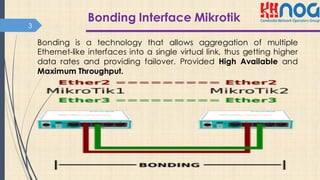
Bonding is a technology that allows aggregation of multiple
Ethernet-like interfaces into a single virtual link, thus getting higher
data rates and providing failover. Provided High Available and
Maximum Throughput.
Link Monitoring4
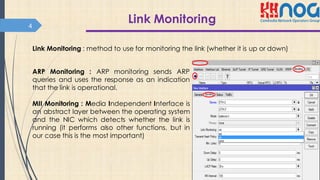
Link Monitoring : method to use for monitoring the link (whether it is up or down)
ARP Monitoring : ARP monitoring sends ARP
queries and uses the response as an indication
that the link is operational.
MII Monitoring : Media Independent Interface is
an abstract layer between the operating system
and the NIC which detects whether the link is
running (it performs also other functions, but in
our case this is the most important)
Bonding Mode
5
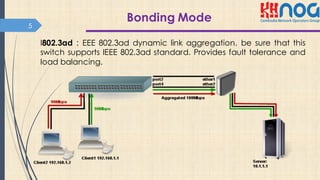
I802.3ad : EEE 802.3ad dynamic link aggregation. be sure that this
switch supports IEEE 802.3ad standard. Provides fault tolerance and
load balancing.
Active-Backup
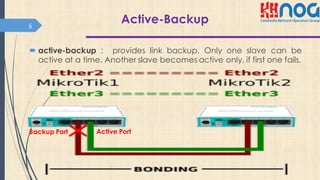
´ active-backup : provides link backup. Only one slave can be
active at a time. Another slave becomes active only, if first one fails.
6
Backup Port Active Port
Balance -rr and Balance-xor
´ balance-rr : round-robin load balancing. Slaves in bonding
interface will transmit and receive data in sequential order. Provides
load balancing and fault tolerance.
´ balance-xor: This mode balances outgoing traffic across the active
ports based on the hashed protocol header information and
accepts incoming traffic from any active port.
7
Balance tlb
´ The outgoing traffic is distributed according to the current load.
´ Incoming traffic is not balanced
´ this mod is address-pair load balancing
8
Balance alb
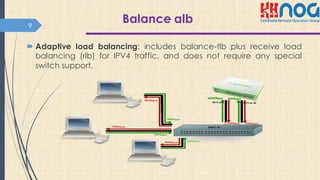
´ Adaptive load balancing: includes balance-tlb plus receive load
balancing (rlb) for IPV4 traffic, and does not require any special
switch support.
9
Broadcast
´ Broadcast: transmits everything on all slave interfaces. This mode
provides fault tolerance.
10
Configuration Demo11
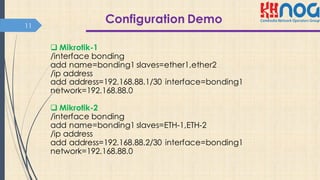
q Mikrotik-1
/interface bonding
add name=bonding1 slaves=ether1,ether2
/ip address
add address=192.168.88.1/30 interface=bonding1
network=192.168.88.0
q Mikrotik-2
/interface bonding
add name=bonding1 slaves=ETH-1,ETH-2
/ip address
add address=192.168.88.2/30 interface=bonding1
network=192.168.88.0
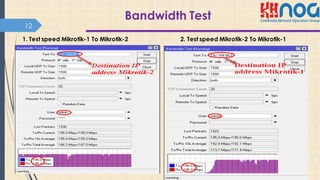
Bandwidth Test
Open source Linux
12
1. Test speed Mikrotik-1 To Mikrotik-2 2. Test speed Mikrotik-2 To Mikrotik-1
Reference
´ http://wiki.mikrotik.com/wiki/Manual:Interface/Bonding
´ https://www.mikrotik.com/testdocs/ros/2.9/interface/bondin
g.php
´ http://wiki.mikrotik.com/wiki/Manual:Bonding_Examples
´ http://www.linuxhorizon.ro/bonding.html
13
Thank you !
14

Bonding Interface in MikroTik

  • 1.
    Bonding Interface InMikrotik 1 Presented by : EAN SARATH Job Position : Network Engineer at MaxBIT Certified : MTCNA, CCNA Present Date : 25-01-2016
  • 2.
    Agenda ´ Bonding InterfaceOverview ´ Link Monitoring ´ Bonding Mode ´ Configuration Demo ´ Reference 2
  • 3.
    Bonding Interface Mikrotik 3 Bondingis a technology that allows aggregation of multiple Ethernet-like interfaces into a single virtual link, thus getting higher data rates and providing failover. Provided High Available and Maximum Throughput.
  • 4.
    Link Monitoring4 Link Monitoring: method to use for monitoring the link (whether it is up or down) ARP Monitoring : ARP monitoring sends ARP queries and uses the response as an indication that the link is operational. MII Monitoring : Media Independent Interface is an abstract layer between the operating system and the NIC which detects whether the link is running (it performs also other functions, but in our case this is the most important)
  • 5.
    Bonding Mode 5 I802.3ad :EEE 802.3ad dynamic link aggregation. be sure that this switch supports IEEE 802.3ad standard. Provides fault tolerance and load balancing.
  • 6.
    Active-Backup ´ active-backup :provides link backup. Only one slave can be active at a time. Another slave becomes active only, if first one fails. 6 Backup Port Active Port
  • 7.
    Balance -rr andBalance-xor ´ balance-rr : round-robin load balancing. Slaves in bonding interface will transmit and receive data in sequential order. Provides load balancing and fault tolerance. ´ balance-xor: This mode balances outgoing traffic across the active ports based on the hashed protocol header information and accepts incoming traffic from any active port. 7
  • 8.
    Balance tlb ´ Theoutgoing traffic is distributed according to the current load. ´ Incoming traffic is not balanced ´ this mod is address-pair load balancing 8
  • 9.
    Balance alb ´ Adaptiveload balancing: includes balance-tlb plus receive load balancing (rlb) for IPV4 traffic, and does not require any special switch support. 9
  • 10.
    Broadcast ´ Broadcast: transmitseverything on all slave interfaces. This mode provides fault tolerance. 10
  • 11.
    Configuration Demo11 q Mikrotik-1 /interfacebonding add name=bonding1 slaves=ether1,ether2 /ip address add address=192.168.88.1/30 interface=bonding1 network=192.168.88.0 q Mikrotik-2 /interface bonding add name=bonding1 slaves=ETH-1,ETH-2 /ip address add address=192.168.88.2/30 interface=bonding1 network=192.168.88.0
  • 12.
    Bandwidth Test Open sourceLinux 12 1. Test speed Mikrotik-1 To Mikrotik-2 2. Test speed Mikrotik-2 To Mikrotik-1
  • 13.
    Reference ´ http://wiki.mikrotik.com/wiki/Manual:Interface/Bonding ´ https://www.mikrotik.com/testdocs/ros/2.9/interface/bondin g.php ´http://wiki.mikrotik.com/wiki/Manual:Bonding_Examples ´ http://www.linuxhorizon.ro/bonding.html 13
  • 14.