Secure Work Space Apps
Deep Dive for iOS and Android
Ranbijay Kumar
May 16th, 2013
Agenda
Ÿ  Secure Work Space – What Is It?
Ÿ  BlackBerry Balance Comparison
Ÿ  Secure Work Space – Developer Insights
Ÿ  What Is Required?
Ÿ  Container Demo
Ÿ  Resources
Ÿ  Q&A
Secure Work Space – What Is It?
Screen shots are conceptual renderings only.
Secure Work Space
Overview
Ÿ  A device work space where applications are secured
„  Integrated Email, Calendar, Contacts, Notes* and Tasks*
„  Secure Browser
„  Secure attachment viewing and editing
„  Ability to secure enterprise applications
Ÿ  A separation of work and personal data that is secured
and controlled
„  Authentication is required
„  Data is saved to the secure file system as work data
„  Work data cannot be shared outside the secure work space
Ÿ  Cut / copy / paste is only allowed within the secured work space
„  Personal applications cannot access work data
*iOS only
Secure Work Space
Secure Connectivity
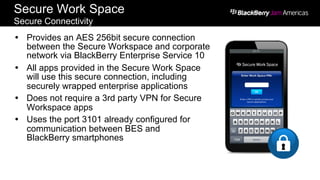
Ÿ  Provides an AES 256bit secure connection
between the Secure Workspace and corporate
network via BlackBerry Enterprise Service 10
Ÿ  All apps provided in the Secure Work Space
will use this secure connection, including
securely wrapped enterprise applications
Ÿ  Does not require a 3rd party VPN for Secure
Workspace apps
Ÿ  Uses the port 3101 already configured for
communication between BES and
BlackBerry smartphones
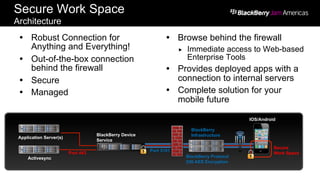
Ÿ  Robust Connection for
Anything and Everything!
Ÿ  Out-of-the-box connection
behind the firewall
Ÿ  Secure
Ÿ  Managed
Ÿ  Browse behind the firewall
„  Immediate access to Web-based
Enterprise Tools
Ÿ  Provides deployed apps with a
connection to internal servers
Ÿ  Complete solution for your
mobile future
Secure Work Space
Architecture
Screen shots are conceptual renderings only.
BlackBerry Device
Service
BlackBerry Protocol
256 AES Encryption
IOS/Android
Secure
Work Space
Application Server(s)
Activesync
Port 443
Port 3101
BlackBerry
Infrastructure
Secure Work Space
Secure Browser
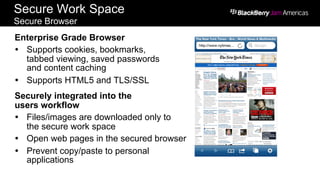
Enterprise Grade Browser
Ÿ  Supports cookies, bookmarks,
tabbed viewing, saved passwords
and content caching
Ÿ  Supports HTML5 and TLS/SSL
Securely integrated into the
users workflow
Ÿ  Files/images are downloaded only to
the secure work space
Ÿ  Open web pages in the secured browser
Ÿ  Prevent copy/paste to personal
applications
Secure Work Space
Document Editing and Viewing
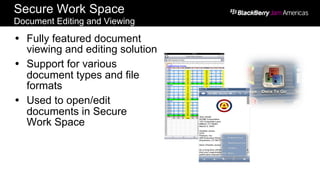
Ÿ  Fully featured document
viewing and editing solution
Ÿ  Support for various
document types and file
formats
Ÿ  Used to open/edit
documents in Secure
Work Space
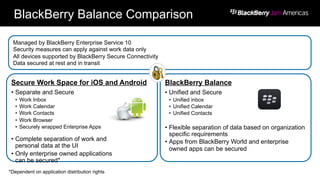
BlackBerry Balance Comparison
Secure Work Space for iOS and Android
•  Separate and Secure
•  Work Inbox
•  Work Calendar
•  Work Contacts
•  Work Browser
•  Securely wrapped Enterprise Apps
•  Complete separation of work and
personal data at the UI
•  Only enterprise owned applications
can be secured*
BlackBerry Balance
•  Unified and Secure
•  Unified inbox
•  Unified Calendar
•  Unified Contacts
•  Flexible separation of data based on organization
specific requirements
•  Apps from BlackBerry World and enterprise
owned apps can be secured
Managed by BlackBerry Enterprise Service 10
Security measures can apply against work data only
All devices supported by BlackBerry Secure Connectivity
Data secured at rest and in transit
*Dependent on application distribution rights
BlackBerry Balance Comparison
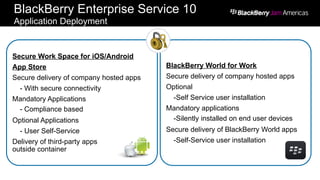
BlackBerry Enterprise Service 10
Application Deployment
Secure Work Space for iOS/Android
App Store
Secure delivery of company hosted apps
- With secure connectivity
Mandatory Applications
- Compliance based
Optional Applications
- User Self-Service
Delivery of third-party apps
outside container
BlackBerry World for Work
Secure delivery of company hosted apps
Optional
-Self Service user installation
Mandatory applications
-Silently installed on end user devices
Secure delivery of BlackBerry World apps
-Self-Service user installation
Secure Work Space
Developer Insights
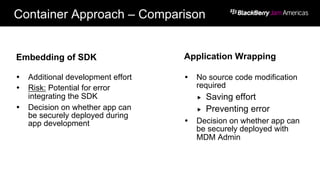
Container Approach – Comparison
Embedding of SDK Application Wrapping
Ÿ  No source code modification
required
„  Saving effort
„  Preventing error
Ÿ  Decision on whether app can
be securely deployed with
MDM Admin
Ÿ  Additional development effort
Ÿ  Risk: Potential for error
integrating the SDK
Ÿ  Decision on whether app can
be securely deployed during
app development
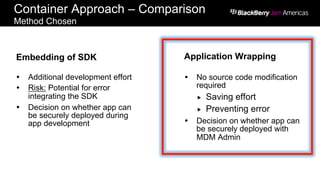
Container Approach – Comparison
Method Chosen
Embedding of SDK Application Wrapping
Ÿ  No source code modification
required
„  Saving effort
„  Preventing error
Ÿ  Decision on whether app can
be securely deployed with
MDM Admin
Ÿ  Additional development effort
Ÿ  Risk: Potential for error
integrating the SDK
Ÿ  Decision on whether app can
be securely deployed during
app development
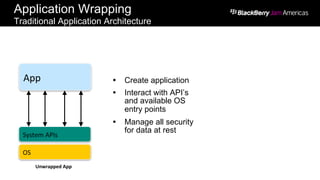
System	
  APIs
OS
App
Unwrapped	
  App
Ÿ  Create application
Ÿ  Interact with API’s
and available OS
entry points
Ÿ  Manage all security
for data at rest
Application Wrapping
Traditional Application Architecture
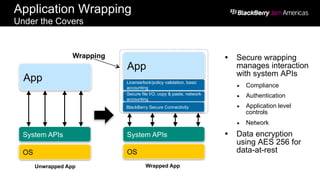
Wrapped App
Wrapping
System APIs
OS
App
System APIs
OS
License/lock/policy validation, basic
accounting
Secure file I/O, copy & paste, network
accounting
App
Unwrapped App
Ÿ  Secure wrapping
manages interaction
with system APIs
„  Compliance
„  Authentication
„  Application level
controls
„  Network
Ÿ  Data encryption
using AES 256 for
data-at-rest
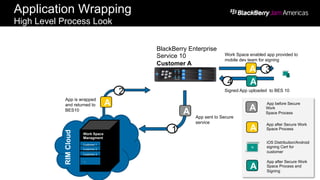
Application Wrapping
Under the Covers
BlackBerry Secure Connectivity
A
App is wrapped
and returned to
BES10
2
Work Space
Managment
Customer 1
Customer 2
Customer 3
,,,
RIMCloud
BlackBerry Enterprise
Service 10
Customer A
A
Work Space enabled app provided to
mobile dev team for signing
3
A
Signed App uploaded to BES 10
4
A App sent to Secure
service
1 A
App after Secure Work
Space Process
N
iOS Distribution/Android
signing Cert for
customer
A
App after Secure Work
Space Process and
Signing
A
App before Secure
Work
Space Process
Application Wrapping
High Level Process Look
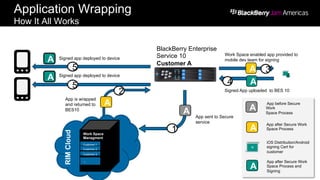
A App sent to Secure
service
1
A
2
A Signed app deployed to device
5
Work Space
Managment
Customer 1
Customer 2
Customer 3
,,,
RIMCloud
A Signed app deployed to device
5
BlackBerry Enterprise
Service 10
Customer A
A
Work Space enabled app provided to
mobile dev team for signing
3
A
Signed App uploaded to BES 10
4
A
App after Secure Work
Space Process
N
iOS Distribution/Android
signing Cert for
customer
A
App after Secure Work
Space Process and
Signing
A
App before Secure
Work
Space Process
App is wrapped
and returned to
BES10
Application Wrapping
How It All Works
What Is Required?
BES 10
BlackBerry Data Center
3101
APNs
443
Enterprise
Application Servers
443
2195
VPN
Customer NetworkInternet
AES 256
Encrypted
Tunnel
BlackBerry Enterprise Service 10 (10.0)
iOS and Android Management
BlackBerry Enterprise Service 10
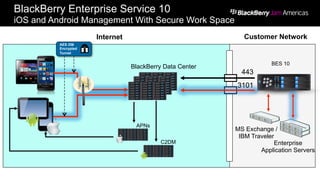
iOS and Android Management With Secure Work Space
BES 10
BlackBerry Data Center
3101
APNs
C2DM
443
MS Exchange /
IBM Traveler
Enterprise
Application Servers
AES 256
Encrypted
Tunnel
Customer NetworkInternet
Developer Input
Application – Obviously
Application that is working and packaged
(.ipa or .apk)
Administrative Cooperation
Wrapping the Application
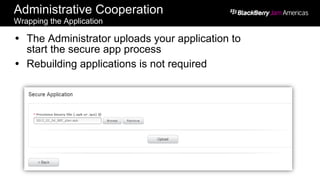
Ÿ  The Administrator uploads your application to
start the secure app process
Ÿ  Rebuilding applications is not required
Administrative Cooperation
Wrapping the Application (cont.)
24
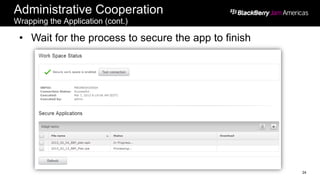
•  Wait for the process to secure the app to finish
A
2
Work Space
Managment
Customer 1
Customer 2
Customer 3
,,,
RIMCloud
BlackBerry Enterprise
Service 10
Customer A
A
Work Space enabled app provided to
mobile dev team for signing
3
A
Signed App uploaded to BES 10
4
A App sent to
Secure service
1 A
App after Secure Work
Space Process
N
iOS Distribution/Android
signing Cert for
customer
A
App after Secure Work
Space Process and
Signing
A
App before Secure Work
Space Process
App is wrapped
and returned to
BES10
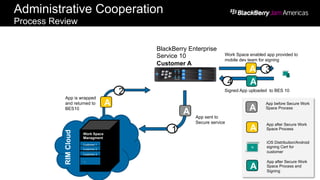
Administrative Cooperation
Process Review
Administrative Cooperation
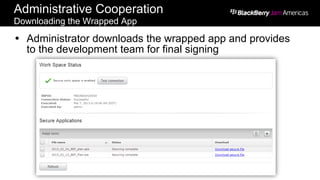
Downloading the Wrapped App
Ÿ  Administrator downloads the wrapped app and provides
to the development team for final signing
Developer Input – Again
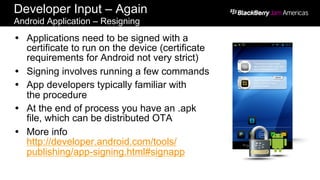
Android Application – Resigning
Ÿ  Applications need to be signed with a
certificate to run on the device (certificate
requirements for Android not very strict)
Ÿ  Signing involves running a few commands
Ÿ  App developers typically familiar with
the procedure
Ÿ  At the end of process you have an .apk
file, which can be distributed OTA
Ÿ  More info
http://developer.android.com/tools/
publishing/app-signing.html#signapp
Developer Input – Again
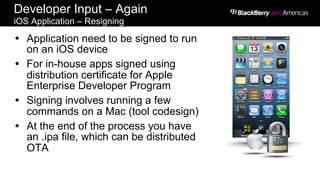
iOS Application – Resigning
Ÿ  Application need to be signed to run
on an iOS device
Ÿ  For in-house apps signed using
distribution certificate for Apple
Enterprise Developer Program
Ÿ  Signing involves running a few
commands on a Mac (tool codesign)
Ÿ  At the end of the process you have
an .ipa file, which can be distributed
OTA
Administrative Cooperation – Last One
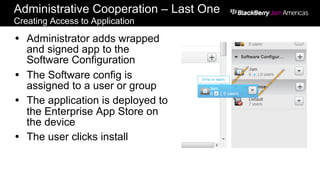
Creating Access to Application
Ÿ  Administrator adds wrapped
and signed app to the
Software Configuration
Ÿ  The Software config is
assigned to a user or group
Ÿ  The application is deployed to
the Enterprise App Store on
the device
Ÿ  The user clicks install
Container Demo
Resources
Resources
BlackBerry Live Sessions:
Ÿ  BPD06 – Understanding Secure Work Space for iOS and
Android Devices
Ÿ  BPD04 – Understanding Multi-platform Management
Ÿ  BPD11 – Q&A Panel: Managing iOS and Android Devices
Ÿ  JAM13 – BlackBerry Enterprise Service 10 Connection
Service versus VPN ... Fight!
Websites:
Ÿ  www.bes10.com
Resources
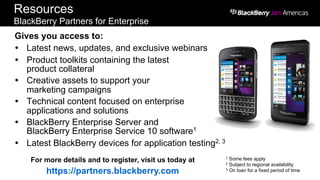
BlackBerry Partners for Enterprise
Gives you access to:
Ÿ  Latest news, updates, and exclusive webinars
Ÿ  Product toolkits containing the latest
product collateral
Ÿ  Creative assets to support your
marketing campaigns
Ÿ  Technical content focused on enterprise
applications and solutions
Ÿ  BlackBerry Enterprise Server and
BlackBerry Enterprise Service 10 software1
Ÿ  Latest BlackBerry devices for application testing2, 3
For more details and to register, visit us today at
https://partners.blackberry.com
1 Some fees apply
2 Subject to regional availability
3 On loan for a fixed period of time
Q&A
THANK YOU
Ranbijay Kumar
May 16th, 2013

Ranbijay Kumar - BlackBerry Jam Americas 2013

  • 1.
    Secure Work SpaceApps Deep Dive for iOS and Android Ranbijay Kumar May 16th, 2013
  • 2.
    Agenda Ÿ  Secure WorkSpace – What Is It? Ÿ  BlackBerry Balance Comparison Ÿ  Secure Work Space – Developer Insights Ÿ  What Is Required? Ÿ  Container Demo Ÿ  Resources Ÿ  Q&A
  • 3.
    Secure Work Space– What Is It?
  • 4.
    Screen shots areconceptual renderings only. Secure Work Space Overview Ÿ  A device work space where applications are secured „  Integrated Email, Calendar, Contacts, Notes* and Tasks* „  Secure Browser „  Secure attachment viewing and editing „  Ability to secure enterprise applications Ÿ  A separation of work and personal data that is secured and controlled „  Authentication is required „  Data is saved to the secure file system as work data „  Work data cannot be shared outside the secure work space Ÿ  Cut / copy / paste is only allowed within the secured work space „  Personal applications cannot access work data *iOS only
  • 5.
    Secure Work Space SecureConnectivity Ÿ  Provides an AES 256bit secure connection between the Secure Workspace and corporate network via BlackBerry Enterprise Service 10 Ÿ  All apps provided in the Secure Work Space will use this secure connection, including securely wrapped enterprise applications Ÿ  Does not require a 3rd party VPN for Secure Workspace apps Ÿ  Uses the port 3101 already configured for communication between BES and BlackBerry smartphones
  • 6.
    Ÿ  Robust Connectionfor Anything and Everything! Ÿ  Out-of-the-box connection behind the firewall Ÿ  Secure Ÿ  Managed Ÿ  Browse behind the firewall „  Immediate access to Web-based Enterprise Tools Ÿ  Provides deployed apps with a connection to internal servers Ÿ  Complete solution for your mobile future Secure Work Space Architecture Screen shots are conceptual renderings only. BlackBerry Device Service BlackBerry Protocol 256 AES Encryption IOS/Android Secure Work Space Application Server(s) Activesync Port 443 Port 3101 BlackBerry Infrastructure
  • 7.
    Secure Work Space SecureBrowser Enterprise Grade Browser Ÿ  Supports cookies, bookmarks, tabbed viewing, saved passwords and content caching Ÿ  Supports HTML5 and TLS/SSL Securely integrated into the users workflow Ÿ  Files/images are downloaded only to the secure work space Ÿ  Open web pages in the secured browser Ÿ  Prevent copy/paste to personal applications
  • 8.
    Secure Work Space DocumentEditing and Viewing Ÿ  Fully featured document viewing and editing solution Ÿ  Support for various document types and file formats Ÿ  Used to open/edit documents in Secure Work Space
  • 9.
  • 10.
    Secure Work Spacefor iOS and Android •  Separate and Secure •  Work Inbox •  Work Calendar •  Work Contacts •  Work Browser •  Securely wrapped Enterprise Apps •  Complete separation of work and personal data at the UI •  Only enterprise owned applications can be secured* BlackBerry Balance •  Unified and Secure •  Unified inbox •  Unified Calendar •  Unified Contacts •  Flexible separation of data based on organization specific requirements •  Apps from BlackBerry World and enterprise owned apps can be secured Managed by BlackBerry Enterprise Service 10 Security measures can apply against work data only All devices supported by BlackBerry Secure Connectivity Data secured at rest and in transit *Dependent on application distribution rights BlackBerry Balance Comparison
  • 11.
    BlackBerry Enterprise Service10 Application Deployment Secure Work Space for iOS/Android App Store Secure delivery of company hosted apps - With secure connectivity Mandatory Applications - Compliance based Optional Applications - User Self-Service Delivery of third-party apps outside container BlackBerry World for Work Secure delivery of company hosted apps Optional -Self Service user installation Mandatory applications -Silently installed on end user devices Secure delivery of BlackBerry World apps -Self-Service user installation
  • 12.
  • 13.
    Container Approach –Comparison Embedding of SDK Application Wrapping Ÿ  No source code modification required „  Saving effort „  Preventing error Ÿ  Decision on whether app can be securely deployed with MDM Admin Ÿ  Additional development effort Ÿ  Risk: Potential for error integrating the SDK Ÿ  Decision on whether app can be securely deployed during app development
  • 14.
    Container Approach –Comparison Method Chosen Embedding of SDK Application Wrapping Ÿ  No source code modification required „  Saving effort „  Preventing error Ÿ  Decision on whether app can be securely deployed with MDM Admin Ÿ  Additional development effort Ÿ  Risk: Potential for error integrating the SDK Ÿ  Decision on whether app can be securely deployed during app development
  • 15.
    System  APIs OS App Unwrapped  App Ÿ Create application Ÿ  Interact with API’s and available OS entry points Ÿ  Manage all security for data at rest Application Wrapping Traditional Application Architecture
  • 16.
    Wrapped App Wrapping System APIs OS App SystemAPIs OS License/lock/policy validation, basic accounting Secure file I/O, copy & paste, network accounting App Unwrapped App Ÿ  Secure wrapping manages interaction with system APIs „  Compliance „  Authentication „  Application level controls „  Network Ÿ  Data encryption using AES 256 for data-at-rest Application Wrapping Under the Covers BlackBerry Secure Connectivity
  • 17.
    A App is wrapped andreturned to BES10 2 Work Space Managment Customer 1 Customer 2 Customer 3 ,,, RIMCloud BlackBerry Enterprise Service 10 Customer A A Work Space enabled app provided to mobile dev team for signing 3 A Signed App uploaded to BES 10 4 A App sent to Secure service 1 A App after Secure Work Space Process N iOS Distribution/Android signing Cert for customer A App after Secure Work Space Process and Signing A App before Secure Work Space Process Application Wrapping High Level Process Look
  • 18.
    A App sentto Secure service 1 A 2 A Signed app deployed to device 5 Work Space Managment Customer 1 Customer 2 Customer 3 ,,, RIMCloud A Signed app deployed to device 5 BlackBerry Enterprise Service 10 Customer A A Work Space enabled app provided to mobile dev team for signing 3 A Signed App uploaded to BES 10 4 A App after Secure Work Space Process N iOS Distribution/Android signing Cert for customer A App after Secure Work Space Process and Signing A App before Secure Work Space Process App is wrapped and returned to BES10 Application Wrapping How It All Works
  • 19.
  • 20.
    BES 10 BlackBerry DataCenter 3101 APNs 443 Enterprise Application Servers 443 2195 VPN Customer NetworkInternet AES 256 Encrypted Tunnel BlackBerry Enterprise Service 10 (10.0) iOS and Android Management
  • 21.
    BlackBerry Enterprise Service10 iOS and Android Management With Secure Work Space BES 10 BlackBerry Data Center 3101 APNs C2DM 443 MS Exchange / IBM Traveler Enterprise Application Servers AES 256 Encrypted Tunnel Customer NetworkInternet
  • 22.
    Developer Input Application –Obviously Application that is working and packaged (.ipa or .apk)
  • 23.
    Administrative Cooperation Wrapping theApplication Ÿ  The Administrator uploads your application to start the secure app process Ÿ  Rebuilding applications is not required
  • 24.
    Administrative Cooperation Wrapping theApplication (cont.) 24 •  Wait for the process to secure the app to finish
  • 25.
    A 2 Work Space Managment Customer 1 Customer2 Customer 3 ,,, RIMCloud BlackBerry Enterprise Service 10 Customer A A Work Space enabled app provided to mobile dev team for signing 3 A Signed App uploaded to BES 10 4 A App sent to Secure service 1 A App after Secure Work Space Process N iOS Distribution/Android signing Cert for customer A App after Secure Work Space Process and Signing A App before Secure Work Space Process App is wrapped and returned to BES10 Administrative Cooperation Process Review
  • 26.
    Administrative Cooperation Downloading theWrapped App Ÿ  Administrator downloads the wrapped app and provides to the development team for final signing
  • 27.
    Developer Input –Again Android Application – Resigning Ÿ  Applications need to be signed with a certificate to run on the device (certificate requirements for Android not very strict) Ÿ  Signing involves running a few commands Ÿ  App developers typically familiar with the procedure Ÿ  At the end of process you have an .apk file, which can be distributed OTA Ÿ  More info http://developer.android.com/tools/ publishing/app-signing.html#signapp
  • 28.
    Developer Input –Again iOS Application – Resigning Ÿ  Application need to be signed to run on an iOS device Ÿ  For in-house apps signed using distribution certificate for Apple Enterprise Developer Program Ÿ  Signing involves running a few commands on a Mac (tool codesign) Ÿ  At the end of the process you have an .ipa file, which can be distributed OTA
  • 29.
    Administrative Cooperation –Last One Creating Access to Application Ÿ  Administrator adds wrapped and signed app to the Software Configuration Ÿ  The Software config is assigned to a user or group Ÿ  The application is deployed to the Enterprise App Store on the device Ÿ  The user clicks install
  • 30.
  • 31.
  • 32.
    Resources BlackBerry Live Sessions: Ÿ BPD06 – Understanding Secure Work Space for iOS and Android Devices Ÿ  BPD04 – Understanding Multi-platform Management Ÿ  BPD11 – Q&A Panel: Managing iOS and Android Devices Ÿ  JAM13 – BlackBerry Enterprise Service 10 Connection Service versus VPN ... Fight! Websites: Ÿ  www.bes10.com
  • 33.
    Resources BlackBerry Partners forEnterprise Gives you access to: Ÿ  Latest news, updates, and exclusive webinars Ÿ  Product toolkits containing the latest product collateral Ÿ  Creative assets to support your marketing campaigns Ÿ  Technical content focused on enterprise applications and solutions Ÿ  BlackBerry Enterprise Server and BlackBerry Enterprise Service 10 software1 Ÿ  Latest BlackBerry devices for application testing2, 3 For more details and to register, visit us today at https://partners.blackberry.com 1 Some fees apply 2 Subject to regional availability 3 On loan for a fixed period of time
  • 34.
  • 35.