Multimedia Playback & Streaming
JAM 316
Sean McVeigh & Ranbijay Kumar
BlackBerry
5 – 6 February, 2013
What are we interested in?
 Building multimedia apps for…
 Consuming Audio/Video
 Manipulating the media
 Dealing with content providers
 An application/client solution
 A compatible platform
 Protocols & formats supported
 DRM options
2
Takeaways
 Multimedia API
 Overview
 Cascades Framework APIs – QML/Qt
 Multimedia Renderer API – C
 Formats & Streaming protocols
 Digital Rights Management (DRM)
 Sample code snippets!
3
Multimedia API Overview
4
Core API capabilities
 Audio/Video playback:
 Local or remote resource (streaming)
 Embed video window within user interface
 UI Controls (buttons, progress slider bar….)
 Playlist control (next track, previous track …)
 Metadata query and setting (artist, album info…)
5
 Audio/video routing:
 Audio via headphones, speakers, TV etc
 Second screen via HDMI
Core API capabilities (continued)
 Audio volume control:
 Through device buttons or API
 Now Playing Area:
 Set artist, album name, get next track/previous track commands
 Invoke core media previewer (or any other ones)
 In “previewer” mode or the “app” mode
 Register as a media previewer
6
Native SDK Context
7
C API
• Multimedia Renderer API
• Multimedia Renderer Event API
• Great for complex multimedia Apps.
C++/Qt (QML) - Cascades API
• Wrapper Classes - high level
APIs such as MediaPlayer,
AudioRecorder etc.
• Easy to integrate with Cascades
Application
Multimedia API
Cascades
Basic components
 bb/multimedia/*.hpp
 MediaPlayer
 AudioRecorder
 NowPlayingConnection
 Notifications
 SystemSound
 And other classes for enum types …
9
Let’s see some [code]
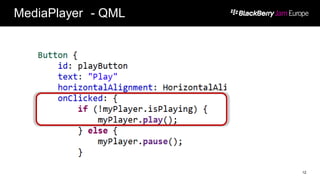
1. Play - Pause functionality
2. Using QML/Cascades
3. And using C++/Qt
10
Momentics
IDE
Attribution:http://www.flickr.com/photos/zooboing/4361038612/sizes/o/in/photostream/
MediaPlayer - QML
11
MediaPlayer - QML
12
MediaPlayer - Qt
13
Event Handling - C++/Qt
14
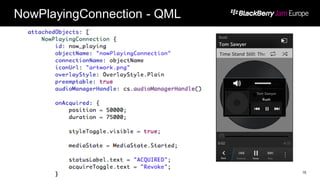
NowPlayingConnection - QML
15
Cont’d..
16
NowPlayingConnection - C++
17
…
VideoPlayerSample
http://github.com/blackberry/Cascades-Community-Samples
Another
sample…
Video Playback
 Create a ForeignWindowControl
 Attach the window to the MediaPlayer
 Scale, resize, reposition
 Great performance
 Smooth and responsive on interaction
19
ForeignWindowControl
20
Attaching the windowId
21
Multimedia Renderer API
a.k.a mm-renderer
Native
mm-renderer Overview
mm-renderer provides mechanisms for:
 specifying the set of media to play
 issuing playback control commands
 retrieving the current playback status
 requesting notifications when the status changes
 providing dynamic metadata (such as position in a track or playlist)
for some media content
23
mm-renderer Overview
API steps:
1. Configure mmr – connect & create context
2. Attach audio and video output
3. Attach media URI
4. Play media!
5. Deal with events
24
mm-renderer - Code Snippets
25
mm-renderer - Event Handling
 Done through Multimedia Renderer Event API
 The event information delivered by the API contains, but
is not limited to:
 the event type
 the context state
 a warning string, when applicable
 detailed error information, when applicable
26
C API – some relevant header files
 mm/renderer.h – Initialize contexts & start playback
 mm/renderer/types.h – Data types
 mm/renderer/event.h – Event handling
 strm.h – Dictionary API to define mm-renderer context settings
 Allows multiple processes to safely re-use and access same parameter information
27
C++/Qt with C BPS API
28
Qt Signals
OpenAL
 OpenAL 1.1
 Cross platform 3D audio API
 Comes bundled with Native SDK
 Great for Games and complex musical applications
 Granular & low-level audio functionalities
 Use OpenAL + OggVorbis to reduce audio memory footprint
through compression
 OggVorbis is an Open Source & Cross Platform API too.
 Great samples available at http://blackberry.github.com
29
Formats
Streaming protocols
DRM
Formats
31
Video + Audio Audio Image
• 3GP, 3GP2
• M4A
• M4V
• MOV
• MP4
• MPEG-4
• MKV
• MP2PS, MP2TS
• AVI
• ASF, WMV, WMA
• F4V
• MP3
• MKA
• AAC
• AWB
• AMR
• WAV
• OGG
• FLAC
• BMP, WBMP
• JPG
• GIF
• PNG
• TIFF
• SGI
• TGA
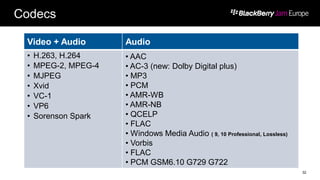
Codecs
32
Video + Audio Audio
• H.263, H.264
• MPEG-2, MPEG-4
• MJPEG
• Xvid
• VC-1
• VP6
• Sorenson Spark
• AAC
• AC-3 (new: Dolby Digital plus)
• MP3
• PCM
• AMR-WB
• AMR-NB
• QCELP
• FLAC
• Windows Media Audio ( 9, 10 Professional, Lossless)
• Vorbis
• FLAC
• PCM GSM6.10 G729 G722
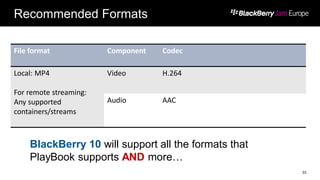
Recommended Formats
File format Component Codec
Local: MP4
For remote streaming:
Any supported
containers/streams
Video H.264
Audio AAC
33
BlackBerry 10 will support all the formats that
PlayBook supports AND more…
Supported Streaming Protocols
 HTTP
 HTTPS
 HTTP Progressive Download
 RTMPe
 RTSP
 Http Live Streaming (HLS) v3
34
HTTP Live Streaming
 Supports live data (unbounded multimedia stream)
 Of course, prerecorded content too
 Client intelligently switches streams (bit rates)
 Based on bandwidth availability
 Allows encryption of media over HTTPS
 Custom DRM schemes for content providers
35
Digital Rights Management
1) HLS with 128 AES
2) 3rd party DRM providers
3) Microsoft PlayReady
4) Adobe Flash Access (FAXS) – web only
36
Mainly related with content providers & studios
1) HLS with 128 AES (DRM continued)
 On our platform, it is impossible for one app to gain access to the
protected content buffers of another
 Internally, it is safe; externally, clear text AES keys are being transmitted in M3U
files.
 If your app can protect the AES keys, then you can use this
approach
 More details on the platform’s security with NDA (for studios, content
providers etc)
 The security team can be part of the engagement as well
37
2) 3rd party DRM providers
 BlackBerry has active engagements with some 3rd party
DRM providers for supporting BlackBerry 10 for product
launch
 BlackBerry can link content providers to these companies
 They will also entertain introductions to other similar companies (that
studios might know or prefer)
 A port to a new platform could take 6 - 9 months for these
companies
 Sooner the process starts, the better
38
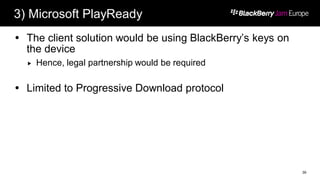
3) Microsoft PlayReady
 The client solution would be using BlackBerry’s keys on
the device
 Hence, legal partnership would be required
 Limited to Progressive Download protocol
39
4) Adobe Flash Access
 Quick solution (for web only)
 Re-using your web infrastructure in the app
40
Other formats/protocols?
41
Application
Multimedia API
Decrypt and
transform to
HLS (or any
other supported
formats)
Local Proxy
server
Often use
services from
other companies
Integration Capabilities
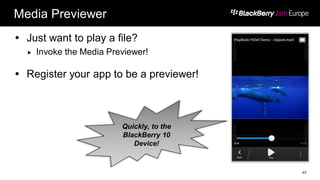
Media Previewer
 Just want to play a file?
 Invoke the Media Previewer!
 Register your app to be a previewer!
43
Quickly, to the
BlackBerry 10
Device!
Unbound invocation (Media Previewer)
 Just use the URI
44
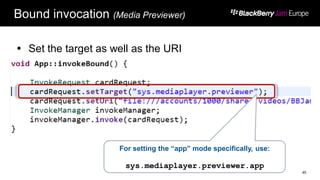
Bound invocation (Media Previewer)
 Set the target as well as the URI
45
For setting the “app” mode specifically, use:
sys.mediaplayer.previewer.app
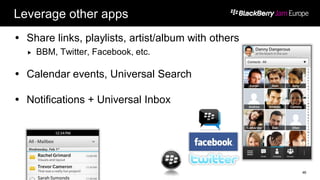
Leverage other apps
 Share links, playlists, artist/album with others
 BBM, Twitter, Facebook, etc.
 Calendar events, Universal Search
 Notifications + Universal Inbox
46
Leverage other devices
 Second screen via HDMI
 Other libraries for wireless communication
 DLNA, UPnP
47
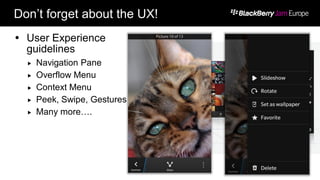
Don’t forget about the UX!
 User Experience
guidelines
 Navigation Pane
 Overflow Menu
 Context Menu
 Peek, Swipe, Gestures
 Many more….
48
Ending thoughts ..
 BlackBerry 10 SDK is all about options. Choose what fits
for your app!
Questions?
Comments?
Concerns?
49
Don’t Forget…
 Download the Mobile Conference Guide from BlackBerry
World. Search for BlackBerry Jam Europe!
 Complete your session surveys in your conference portal
or on your BlackBerry 10 device using the Mobile
Conference Guide.
 Fill out the conference survey at the Survey desk in the
First Floor Lounge or on your BlackBerry 10 device using
the Mobile Conference Guide and receive your gift*.
 Thank you for attending BlackBerry Jam Europe!
*limited quantities, while supplies last
THANK YOU
JAM 316
Sean McVeigh & Ranbijay Kumar
5 – 6 February, 2013

JAM316 - Native API Deep Dive: Multimedia Playback & Streaming

  • 1.
    Multimedia Playback &Streaming JAM 316 Sean McVeigh & Ranbijay Kumar BlackBerry 5 – 6 February, 2013
  • 2.
    What are weinterested in?  Building multimedia apps for…  Consuming Audio/Video  Manipulating the media  Dealing with content providers  An application/client solution  A compatible platform  Protocols & formats supported  DRM options 2
  • 3.
    Takeaways  Multimedia API Overview  Cascades Framework APIs – QML/Qt  Multimedia Renderer API – C  Formats & Streaming protocols  Digital Rights Management (DRM)  Sample code snippets! 3
  • 4.
  • 5.
    Core API capabilities Audio/Video playback:  Local or remote resource (streaming)  Embed video window within user interface  UI Controls (buttons, progress slider bar….)  Playlist control (next track, previous track …)  Metadata query and setting (artist, album info…) 5  Audio/video routing:  Audio via headphones, speakers, TV etc  Second screen via HDMI
  • 6.
    Core API capabilities(continued)  Audio volume control:  Through device buttons or API  Now Playing Area:  Set artist, album name, get next track/previous track commands  Invoke core media previewer (or any other ones)  In “previewer” mode or the “app” mode  Register as a media previewer 6
  • 7.
    Native SDK Context 7 CAPI • Multimedia Renderer API • Multimedia Renderer Event API • Great for complex multimedia Apps. C++/Qt (QML) - Cascades API • Wrapper Classes - high level APIs such as MediaPlayer, AudioRecorder etc. • Easy to integrate with Cascades Application
  • 8.
  • 9.
    Basic components  bb/multimedia/*.hpp MediaPlayer  AudioRecorder  NowPlayingConnection  Notifications  SystemSound  And other classes for enum types … 9
  • 10.
    Let’s see some[code] 1. Play - Pause functionality 2. Using QML/Cascades 3. And using C++/Qt 10 Momentics IDE Attribution:http://www.flickr.com/photos/zooboing/4361038612/sizes/o/in/photostream/
  • 11.
  • 12.
  • 13.
  • 14.
  • 15.
  • 16.
  • 17.
  • 18.
  • 19.
    Video Playback  Createa ForeignWindowControl  Attach the window to the MediaPlayer  Scale, resize, reposition  Great performance  Smooth and responsive on interaction 19
  • 20.
  • 21.
  • 22.
  • 23.
    mm-renderer Overview mm-renderer providesmechanisms for:  specifying the set of media to play  issuing playback control commands  retrieving the current playback status  requesting notifications when the status changes  providing dynamic metadata (such as position in a track or playlist) for some media content 23
  • 24.
    mm-renderer Overview API steps: 1.Configure mmr – connect & create context 2. Attach audio and video output 3. Attach media URI 4. Play media! 5. Deal with events 24
  • 25.
    mm-renderer - CodeSnippets 25
  • 26.
    mm-renderer - EventHandling  Done through Multimedia Renderer Event API  The event information delivered by the API contains, but is not limited to:  the event type  the context state  a warning string, when applicable  detailed error information, when applicable 26
  • 27.
    C API –some relevant header files  mm/renderer.h – Initialize contexts & start playback  mm/renderer/types.h – Data types  mm/renderer/event.h – Event handling  strm.h – Dictionary API to define mm-renderer context settings  Allows multiple processes to safely re-use and access same parameter information 27
  • 28.
    C++/Qt with CBPS API 28 Qt Signals
  • 29.
    OpenAL  OpenAL 1.1 Cross platform 3D audio API  Comes bundled with Native SDK  Great for Games and complex musical applications  Granular & low-level audio functionalities  Use OpenAL + OggVorbis to reduce audio memory footprint through compression  OggVorbis is an Open Source & Cross Platform API too.  Great samples available at http://blackberry.github.com 29
  • 30.
  • 31.
    Formats 31 Video + AudioAudio Image • 3GP, 3GP2 • M4A • M4V • MOV • MP4 • MPEG-4 • MKV • MP2PS, MP2TS • AVI • ASF, WMV, WMA • F4V • MP3 • MKA • AAC • AWB • AMR • WAV • OGG • FLAC • BMP, WBMP • JPG • GIF • PNG • TIFF • SGI • TGA
  • 32.
    Codecs 32 Video + AudioAudio • H.263, H.264 • MPEG-2, MPEG-4 • MJPEG • Xvid • VC-1 • VP6 • Sorenson Spark • AAC • AC-3 (new: Dolby Digital plus) • MP3 • PCM • AMR-WB • AMR-NB • QCELP • FLAC • Windows Media Audio ( 9, 10 Professional, Lossless) • Vorbis • FLAC • PCM GSM6.10 G729 G722
  • 33.
    Recommended Formats File formatComponent Codec Local: MP4 For remote streaming: Any supported containers/streams Video H.264 Audio AAC 33 BlackBerry 10 will support all the formats that PlayBook supports AND more…
  • 34.
    Supported Streaming Protocols HTTP  HTTPS  HTTP Progressive Download  RTMPe  RTSP  Http Live Streaming (HLS) v3 34
  • 35.
    HTTP Live Streaming Supports live data (unbounded multimedia stream)  Of course, prerecorded content too  Client intelligently switches streams (bit rates)  Based on bandwidth availability  Allows encryption of media over HTTPS  Custom DRM schemes for content providers 35
  • 36.
    Digital Rights Management 1)HLS with 128 AES 2) 3rd party DRM providers 3) Microsoft PlayReady 4) Adobe Flash Access (FAXS) – web only 36 Mainly related with content providers & studios
  • 37.
    1) HLS with128 AES (DRM continued)  On our platform, it is impossible for one app to gain access to the protected content buffers of another  Internally, it is safe; externally, clear text AES keys are being transmitted in M3U files.  If your app can protect the AES keys, then you can use this approach  More details on the platform’s security with NDA (for studios, content providers etc)  The security team can be part of the engagement as well 37
  • 38.
    2) 3rd partyDRM providers  BlackBerry has active engagements with some 3rd party DRM providers for supporting BlackBerry 10 for product launch  BlackBerry can link content providers to these companies  They will also entertain introductions to other similar companies (that studios might know or prefer)  A port to a new platform could take 6 - 9 months for these companies  Sooner the process starts, the better 38
  • 39.
    3) Microsoft PlayReady The client solution would be using BlackBerry’s keys on the device  Hence, legal partnership would be required  Limited to Progressive Download protocol 39
  • 40.
    4) Adobe FlashAccess  Quick solution (for web only)  Re-using your web infrastructure in the app 40
  • 41.
    Other formats/protocols? 41 Application Multimedia API Decryptand transform to HLS (or any other supported formats) Local Proxy server Often use services from other companies
  • 42.
  • 43.
    Media Previewer  Justwant to play a file?  Invoke the Media Previewer!  Register your app to be a previewer! 43 Quickly, to the BlackBerry 10 Device!
  • 44.
    Unbound invocation (MediaPreviewer)  Just use the URI 44
  • 45.
    Bound invocation (MediaPreviewer)  Set the target as well as the URI 45 For setting the “app” mode specifically, use: sys.mediaplayer.previewer.app
  • 46.
    Leverage other apps Share links, playlists, artist/album with others  BBM, Twitter, Facebook, etc.  Calendar events, Universal Search  Notifications + Universal Inbox 46
  • 47.
    Leverage other devices Second screen via HDMI  Other libraries for wireless communication  DLNA, UPnP 47
  • 48.
    Don’t forget aboutthe UX!  User Experience guidelines  Navigation Pane  Overflow Menu  Context Menu  Peek, Swipe, Gestures  Many more…. 48
  • 49.
    Ending thoughts .. BlackBerry 10 SDK is all about options. Choose what fits for your app! Questions? Comments? Concerns? 49
  • 50.
    Don’t Forget…  Downloadthe Mobile Conference Guide from BlackBerry World. Search for BlackBerry Jam Europe!  Complete your session surveys in your conference portal or on your BlackBerry 10 device using the Mobile Conference Guide.  Fill out the conference survey at the Survey desk in the First Floor Lounge or on your BlackBerry 10 device using the Mobile Conference Guide and receive your gift*.  Thank you for attending BlackBerry Jam Europe! *limited quantities, while supplies last
  • 51.
    THANK YOU JAM 316 SeanMcVeigh & Ranbijay Kumar 5 – 6 February, 2013