Enterprise Development 101
Kareem ElSayed
Application Development Advisor – EMEA
@kemobyte
2
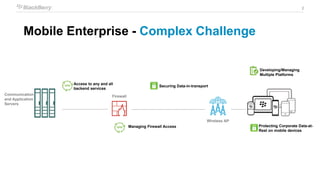
Mobile Enterprise - Complex Challenge
Communication
and Application
Servers
Wireless AP
Firewall
Securing Data-in-transport
Managing Firewall Access
Access to any and all
backend services
Developing/Managing
Multiple Platforms
Protecting Corporate Data-at-
Rest on mobile devices
3
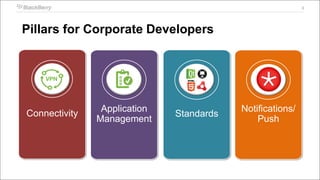
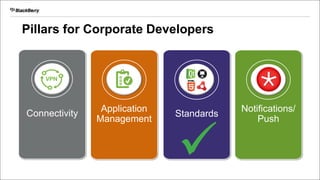
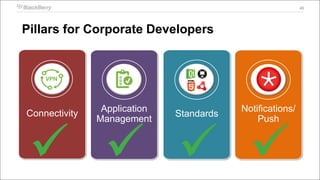
Pillars for Corporate Developers
Connectivity Application
Management
Standards
Notifications/
Push
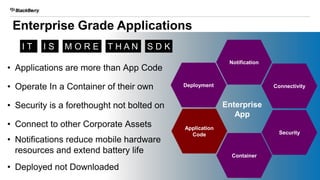
Enterprise Grade Applications
4
Enterprise
App
Notification
Deployment Connectivity
Container
Application
Code Security
• Applications are more than App Code
• Operate In a Container of their own
• Security is a forethought not bolted on
• Connect to other Corporate Assets
• Notifications reduce mobile hardware
resources and extend battery life
• Deployed not Downloaded
I T T H A N S D KM O R EI S
5
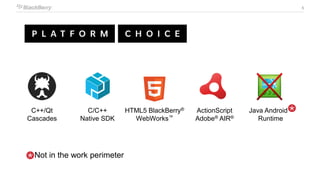
C++/Qt
Cascades
ActionScript
Adobe® AIR®
HTML5 BlackBerry®
WebWorks™
C/C++
Native SDK
Java Android™
Runtime
Not in the work perimeter
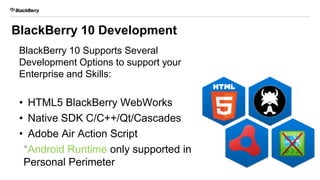
BlackBerry 10 Development
BlackBerry 10 Supports Several
Development Options to support your
Enterprise and Skills:
• HTML5 BlackBerry WebWorks
• Native SDK C/C++/Qt/Cascades
• Adobe Air Action Script
*Android Runtime only supported in
Personal Perimeter 6
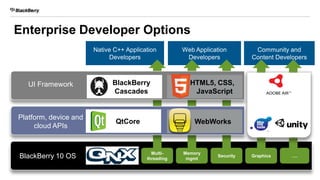
Enterprise Developer Options
7
Native C++ Application
Developers
Web Application
Developers
Community and
Content Developers
UI Framework
Platform, device and
cloud APIs
BlackBerry 10 OS
Multi-
threading
Memory
mgmt
Security
BlackBerry
Cascades
QtCore WebWorks
HTML5, CSS,
JavaScript
Graphics ….
Engines
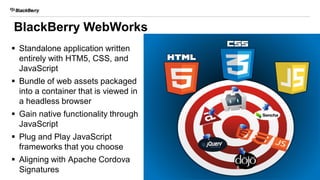
BlackBerry WebWorks
 Standalone application written
entirely with HTM5, CSS, and
JavaScript
 Bundle of web assets packaged
into a container that is viewed in
a headless browser
 Gain native functionality through
JavaScript
 Plug and Play JavaScript
frameworks that you choose
 Aligning with Apache Cordova
Signatures 8
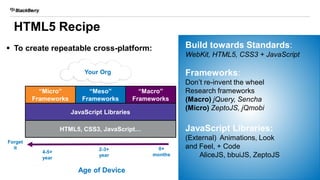
“Micro”
Frameworks
 To create repeatable cross-platform:
Your Org
Age of Device
0+
months
Forget
it
4-5+
year
2-3+
year
HTML5, CSS3, JavaScript…
JavaScript Libraries
“Meso”
Frameworks
“Macro”
Frameworks
Build towards Standards:
WebKit, HTML5, CSS3 + JavaScript
Frameworks:
Don’t re-invent the wheel
Research frameworks
(Macro) jQuery, Sencha
(Micro) ZeptoJS, jQmobi
JavaScript Libraries:
(External) Animations, Look
and Feel, + Code
AliceJS, bbuiJS, ZeptoJS
HTML5 Recipe
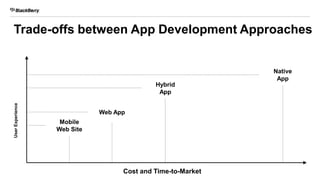
Trade-offs between App Development Approaches
Mobile
Web Site
Cost and Time-to-Market
UserExperience
Web App
Hybrid
App
Native
App
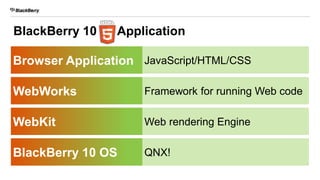
BlackBerry 10 Application
Browser Application
WebWorks
WebKit
BlackBerry 10 OS
JavaScript/HTML/CSS
Framework for running Web code
Web rendering Engine
QNX!
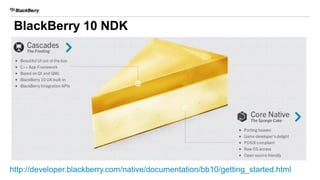
http://developer.blackberry.com/native/documentation/bb10/getting_started.html
BlackBerry 10 NDK
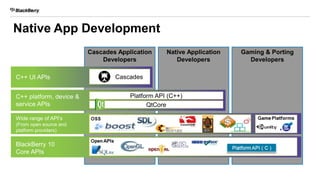
Cascades Application
Developers
Native Application
Developers
Gaming & Porting
Developers
C++ UI APIs
C++ platform, device &
service APIs
Wide range of API’s
(From open source and
platform providers)
BlackBerry 10
Core APIs
Cascades
Platform API (C++)
QtCore
Native App Development
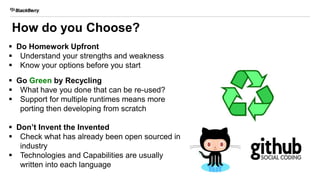
How do you Choose?
 Do Homework Upfront
 Understand your strengths and weakness
 Know your options before you start
 Go Green by Recycling
 What have you done that can be re-used?
 Support for multiple runtimes means more
porting then developing from scratch
 Don’t Invent the Invented
 Check what has already been open sourced in
industry
 Technologies and Capabilities are usually
written into each language
Pillars for Corporate Developers
Connectivity Application
Management
Standards
Notifications/
Push
17
18
19
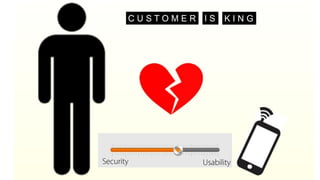
C U S T O M E R K I N GI S
20
21
BES10
MULTI-PLATFORM ENTERPRISE MOBILITY
MANAGEMENT
23
BlackBerry
Enterprise
Service 10
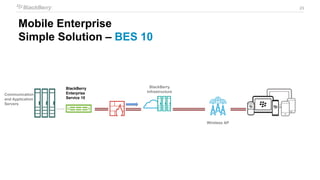
Communication
and Application
Servers
Wireless AP
BlackBerry
Infrastructure
Mobile Enterprise
Simple Solution – BES 10
24
Enterprise
Systems
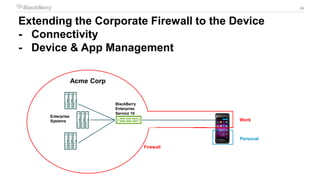
Extending the Corporate Firewall to the Device
- Connectivity
- Device & App Management
Work
Personal
Firewall
Acme Corp
BlackBerry
Enterprise
Service 10
25
Enterprise
Systems
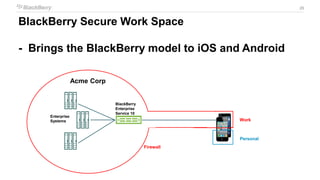
BlackBerry Secure Work Space
- Brings the BlackBerry model to iOS and Android
Work
Personal
Firewall
Acme Corp
BlackBerry
Enterprise
Service 10
26
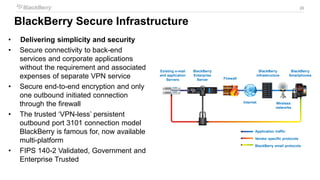
Application traffic
Vendor specific protocols
BlackBerry email protocols
Existing e-mail
and application
Servers
BlackBerry
Enterprise
Server Firewall
Internet
BlackBerry
infrastructure
Wireless
networks
BlackBerry
Smartphones
• Delivering simplicity and security
• Secure connectivity to back-end
services and corporate applications
without the requirement and associated
expenses of separate VPN service
• Secure end-to-end encryption and only
one outbound initiated connection
through the firewall
• The trusted ‘VPN-less’ persistent
outbound port 3101 connection model
BlackBerry is famous for, now available
multi-platform
• FIPS 140-2 Validated, Government and
Enterprise Trusted
BlackBerry Secure Infrastructure
27
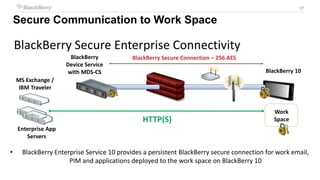
BlackBerry Secure Enterprise Connectivity
• BlackBerry Enterprise Service 10 provides a persistent BlackBerry secure connection for work email,
PIM and applications deployed to the work space on BlackBerry 10
BlackBerry
Device Service
with MDS-CS
HTTP(S)
BlackBerry Secure Connection – 256 AES
MS Exchange /
IBM Traveler
BlackBerry 10
Enterprise App
Servers
Work
Space
Secure Communication to Work Space
28
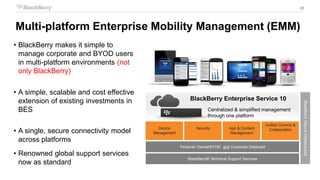
• BlackBerry makes it simple to
manage corporate and BYOD users
in multi-platform environments (not
only BlackBerry)
• A simple, scalable and cost effective
extension of existing investments in
BES
• A single, secure connectivity model
across platforms
• Renowned global support services
now as standard
Centralized & simplified management
through one platform
Personal Owned/BYOD and Corporate Deployed
BlackBerrySecureInfrastructure
Device
Management
Security App & Content
Management
Unified Comms &
Collaboration
BlackBerry® Technical Support Services
BlackBerry Enterprise Service 10
Multi-platform Enterprise Mobility Management (EMM)
29
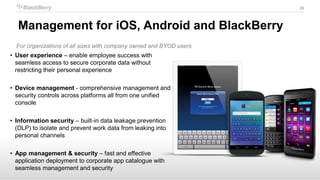
For organizations of all sizes with company owned and BYOD users
• User experience – enable employee success with
seamless access to secure corporate data without
restricting their personal experience
• Device management - comprehensive management and
security controls across platforms all from one unified
console
• Information security – built-in data leakage prevention
(DLP) to isolate and prevent work data from leaking into
personal channels
• App management & security – fast and effective
application deployment to corporate app catalogue with
seamless management and security
Management for iOS, Android and BlackBerry
30
30
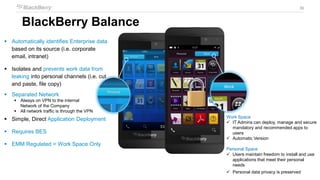
BlackBerry Balance
 Automatically identifies Enterprise data
based on its source (i.e. corporate
email, intranet)
 Isolates and prevents work data from
leaking into personal channels (i.e. cut
and paste, file copy)
 Separated Network
 Always on VPN to the internal
Network of the Company
 All network traffic is through the VPN
 Simple, Direct Application Deployment
 Requires BES
 EMM Regulated = Work Space Only
Work Space
 IT Admins can deploy, manage and secure
mandatory and recommended apps to
users
 Automatic Version
Personal Space
 Users maintain freedom to install and use
applications that meet their personal
needs
 Personal data privacy is preserved
31
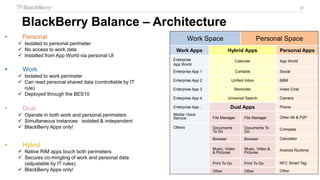
 Personal
 Isolated to personal perimeter
 No access to work data
 Installed from App World via personal UI
 Work
 Isolated to work perimeter
 Can read personal shared data (controllable by IT
rule)
 Deployed through the BES10
 Dual
 Operate in both work and personal perimeters
 Simultaneous instances: isolated & independent
 BlackBerry Apps only!
 Hybrid
 Native RIM apps touch both perimeters
 Secures co-mingling of work and personal data
(adjustable by IT rules)
 BlackBerry Apps only!
Work Space Personal Space
Work Apps Hybrid Apps Personal Apps
Enterprise
App World
Calendar App World
Enterprise App 1 Contacts Social
Enterprise App 2 Unified Inbox BBM
Enterprise App 3 Reminder Video Chat
Enterprise App 4 Universal Search Camera
Enterprise App .. Dual Apps Phone
Mobile Voice
Service File Manager File Manager Other IM & P2P
Others Documents
To Go
Documents To
Go
Compass
Browser Browser Calculator
Music, Video
& Pictures
Music, Video &
Pictures
Android Runtime
Print To Go Print To Go NFC Smart Tag
Other Other Other
BlackBerry Balance – Architecture
32
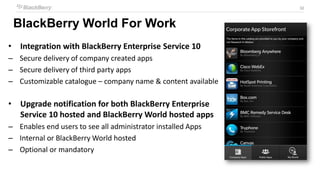
BlackBerry World For Work
• Integration with BlackBerry Enterprise Service 10
– Secure delivery of company created apps
– Secure delivery of third party apps
– Customizable catalogue – company name & content available
• Upgrade notification for both BlackBerry Enterprise
Service 10 hosted and BlackBerry World hosted apps
– Enables end users to see all administrator installed Apps
– Internal or BlackBerry World hosted
– Optional or mandatory
33
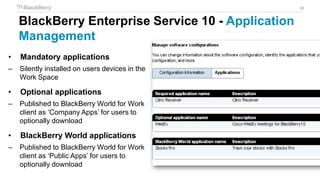
BlackBerry Enterprise Service 10 - Application
Management
• Mandatory applications
– Silently installed on users devices in the
Work Space
• Optional applications
– Published to BlackBerry World for Work
client as ‘Company Apps’ for users to
optionally download
• BlackBerry World applications
– Published to BlackBerry World for Work
client as ‘Public Apps’ for users to
optionally download
34
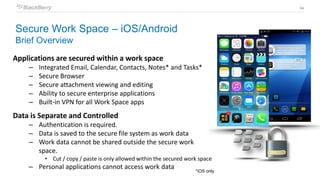
Applications are secured within a work space
– Integrated Email, Calendar, Contacts, Notes* and Tasks*
– Secure Browser
– Secure attachment viewing and editing
– Ability to secure enterprise applications
– Built-in VPN for all Work Space apps
Data is Separate and Controlled
– Authentication is required.
– Data is saved to the secure file system as work data
– Work data cannot be shared outside the secure work
space.
• Cut / copy / paste is only allowed within the secured work space
– Personal applications cannot access work data
Secure Work Space – iOS/Android
Brief Overview
*iOS only
35
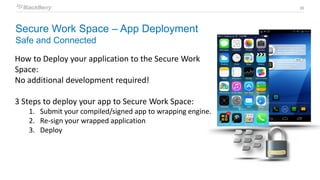
How to Deploy your application to the Secure Work
Space:
No additional development required!
3 Steps to deploy your app to Secure Work Space:
1. Submit your compiled/signed app to wrapping engine.
2. Re-sign your wrapped application
3. Deploy
Secure Work Space – App Deployment
Safe and Connected
36
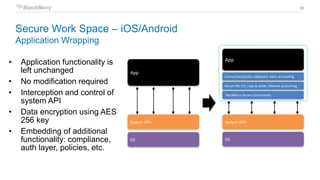
• Application functionality is
left unchanged
• No modification required
• Interception and control of
system API
• Data encryption using AES
256 key
• Embedding of additional
functionality: compliance,
auth layer, policies, etc.
Wrapped App
Wrapping
System APIs
OS
App
System APIs
OS
License/lock/policy validation, basic accounting
Secure file I/O, copy & paste, network accounting
App
Unwrapped App
BlackBerry Secure Connectivity
Secure Work Space – iOS/Android
Application Wrapping
37
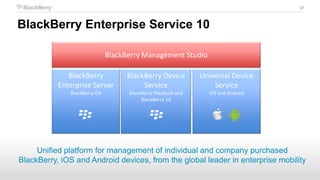
BlackBerry Enterprise Service 10
BlackBerry Management Studio
BlackBerry Device
Service
BlackBerry PlayBook and
BlackBerry 10
Universal Device
Service
iOS and Android
BlackBerry
Enterprise Server
BlackBerry OS
Unified platform for management of individual and company purchased
BlackBerry, iOS and Android devices, from the global leader in enterprise mobility
38
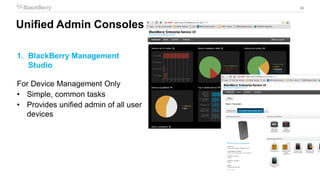
Unified Admin Consoles
1. BlackBerry Management
Studio
For Device Management Only
• Simple, common tasks
• Provides unified admin of all user
devices
39
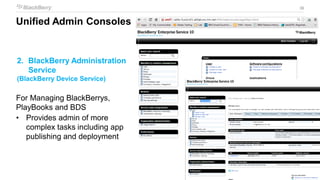
2. BlackBerry Administration
Service
(BlackBerry Device Service)
For Managing BlackBerrys,
PlayBooks and BDS
• Provides admin of more
complex tasks including app
publishing and deployment
Unified Admin Consoles
40
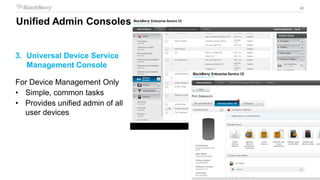
3. Universal Device Service
Management Console
For Device Management Only
• Simple, common tasks
• Provides unified admin of all
user devices
Unified Admin Consoles
41
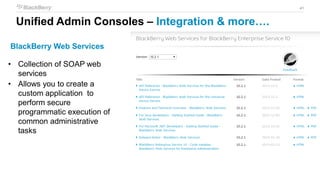
BlackBerry Web Services
• Collection of SOAP web
services
• Allows you to create a
custom application to
perform secure
programmatic execution of
common administrative
tasks
Unified Admin Consoles – Integration & more….
42
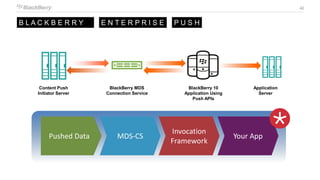
BlackBerry MDS
Connection Service
BlackBerry 10
Application Using
Push APIs
Content Push
Initiator Server
Application
Server
B L A C K B E R R Y E N T E R P R I S E P U S H
Pushed Data MDS-CS
Invocation
Framework
Your App
43
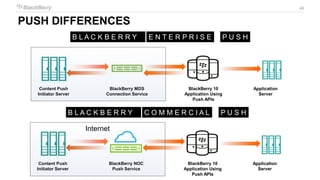
PUSH DIFFERENCES
BlackBerry MDS
Connection Service
BlackBerry 10
Application Using
Push APIs
Content Push
Initiator Server
Application
Server
B L A C K B E R R Y E N T E R P R I S E P U S H
BlackBerry NOC
Push Service
BlackBerry 10
Application Using
Push APIs
Content Push
Initiator Server
Application
Server
B L A C K B E R R Y C O M M E R C I A L P U S H
Internal Network
Internet
44
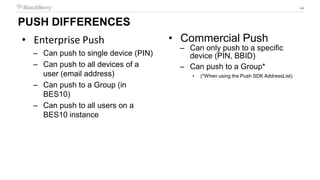
PUSH DIFFERENCES
• Enterprise Push
– Can push to single device (PIN)
– Can push to all devices of a
user (email address)
– Can push to a Group (in
BES10)
– Can push to all users on a
BES10 instance
• Commercial Push
– Can only push to a specific
device (PIN, BBID)
– Can push to a Group*
• (*When using the Push SDK AddressList)
45
Pillars for Corporate Developers
Connectivity Application
Management
Standards
Notifications/
Push
THANK YOU
Kareem ElSayed
Application Development Advisor – EMEA
Kelsayed@BlackBerry.com
@kemobyte

Enterprise Apps Development 101

  • 1.
    Enterprise Development 101 KareemElSayed Application Development Advisor – EMEA @kemobyte
  • 2.
    2 Mobile Enterprise -Complex Challenge Communication and Application Servers Wireless AP Firewall Securing Data-in-transport Managing Firewall Access Access to any and all backend services Developing/Managing Multiple Platforms Protecting Corporate Data-at- Rest on mobile devices
  • 3.
    3 Pillars for CorporateDevelopers Connectivity Application Management Standards Notifications/ Push
  • 4.
    Enterprise Grade Applications 4 Enterprise App Notification DeploymentConnectivity Container Application Code Security • Applications are more than App Code • Operate In a Container of their own • Security is a forethought not bolted on • Connect to other Corporate Assets • Notifications reduce mobile hardware resources and extend battery life • Deployed not Downloaded I T T H A N S D KM O R EI S
  • 5.
  • 6.
    BlackBerry 10 Development BlackBerry10 Supports Several Development Options to support your Enterprise and Skills: • HTML5 BlackBerry WebWorks • Native SDK C/C++/Qt/Cascades • Adobe Air Action Script *Android Runtime only supported in Personal Perimeter 6
  • 7.
    Enterprise Developer Options 7 NativeC++ Application Developers Web Application Developers Community and Content Developers UI Framework Platform, device and cloud APIs BlackBerry 10 OS Multi- threading Memory mgmt Security BlackBerry Cascades QtCore WebWorks HTML5, CSS, JavaScript Graphics …. Engines
  • 8.
    BlackBerry WebWorks  Standaloneapplication written entirely with HTM5, CSS, and JavaScript  Bundle of web assets packaged into a container that is viewed in a headless browser  Gain native functionality through JavaScript  Plug and Play JavaScript frameworks that you choose  Aligning with Apache Cordova Signatures 8
  • 9.
    “Micro” Frameworks  To createrepeatable cross-platform: Your Org Age of Device 0+ months Forget it 4-5+ year 2-3+ year HTML5, CSS3, JavaScript… JavaScript Libraries “Meso” Frameworks “Macro” Frameworks Build towards Standards: WebKit, HTML5, CSS3 + JavaScript Frameworks: Don’t re-invent the wheel Research frameworks (Macro) jQuery, Sencha (Micro) ZeptoJS, jQmobi JavaScript Libraries: (External) Animations, Look and Feel, + Code AliceJS, bbuiJS, ZeptoJS HTML5 Recipe
  • 10.
    Trade-offs between AppDevelopment Approaches Mobile Web Site Cost and Time-to-Market UserExperience Web App Hybrid App Native App
  • 11.
    BlackBerry 10 Application BrowserApplication WebWorks WebKit BlackBerry 10 OS JavaScript/HTML/CSS Framework for running Web code Web rendering Engine QNX!
  • 12.
  • 13.
    Cascades Application Developers Native Application Developers Gaming& Porting Developers C++ UI APIs C++ platform, device & service APIs Wide range of API’s (From open source and platform providers) BlackBerry 10 Core APIs Cascades Platform API (C++) QtCore Native App Development
  • 14.
    How do youChoose?  Do Homework Upfront  Understand your strengths and weakness  Know your options before you start  Go Green by Recycling  What have you done that can be re-used?  Support for multiple runtimes means more porting then developing from scratch  Don’t Invent the Invented  Check what has already been open sourced in industry  Technologies and Capabilities are usually written into each language
  • 15.
    Pillars for CorporateDevelopers Connectivity Application Management Standards Notifications/ Push
  • 16.
  • 17.
  • 18.
    19 C U ST O M E R K I N GI S
  • 19.
  • 20.
  • 21.
  • 22.
    23 BlackBerry Enterprise Service 10 Communication and Application Servers WirelessAP BlackBerry Infrastructure Mobile Enterprise Simple Solution – BES 10
  • 23.
    24 Enterprise Systems Extending the CorporateFirewall to the Device - Connectivity - Device & App Management Work Personal Firewall Acme Corp BlackBerry Enterprise Service 10
  • 24.
    25 Enterprise Systems BlackBerry Secure WorkSpace - Brings the BlackBerry model to iOS and Android Work Personal Firewall Acme Corp BlackBerry Enterprise Service 10
  • 25.
    26 Application traffic Vendor specificprotocols BlackBerry email protocols Existing e-mail and application Servers BlackBerry Enterprise Server Firewall Internet BlackBerry infrastructure Wireless networks BlackBerry Smartphones • Delivering simplicity and security • Secure connectivity to back-end services and corporate applications without the requirement and associated expenses of separate VPN service • Secure end-to-end encryption and only one outbound initiated connection through the firewall • The trusted ‘VPN-less’ persistent outbound port 3101 connection model BlackBerry is famous for, now available multi-platform • FIPS 140-2 Validated, Government and Enterprise Trusted BlackBerry Secure Infrastructure
  • 26.
    27 BlackBerry Secure EnterpriseConnectivity • BlackBerry Enterprise Service 10 provides a persistent BlackBerry secure connection for work email, PIM and applications deployed to the work space on BlackBerry 10 BlackBerry Device Service with MDS-CS HTTP(S) BlackBerry Secure Connection – 256 AES MS Exchange / IBM Traveler BlackBerry 10 Enterprise App Servers Work Space Secure Communication to Work Space
  • 27.
    28 • BlackBerry makesit simple to manage corporate and BYOD users in multi-platform environments (not only BlackBerry) • A simple, scalable and cost effective extension of existing investments in BES • A single, secure connectivity model across platforms • Renowned global support services now as standard Centralized & simplified management through one platform Personal Owned/BYOD and Corporate Deployed BlackBerrySecureInfrastructure Device Management Security App & Content Management Unified Comms & Collaboration BlackBerry® Technical Support Services BlackBerry Enterprise Service 10 Multi-platform Enterprise Mobility Management (EMM)
  • 28.
    29 For organizations ofall sizes with company owned and BYOD users • User experience – enable employee success with seamless access to secure corporate data without restricting their personal experience • Device management - comprehensive management and security controls across platforms all from one unified console • Information security – built-in data leakage prevention (DLP) to isolate and prevent work data from leaking into personal channels • App management & security – fast and effective application deployment to corporate app catalogue with seamless management and security Management for iOS, Android and BlackBerry
  • 29.
    30 30 BlackBerry Balance  Automaticallyidentifies Enterprise data based on its source (i.e. corporate email, intranet)  Isolates and prevents work data from leaking into personal channels (i.e. cut and paste, file copy)  Separated Network  Always on VPN to the internal Network of the Company  All network traffic is through the VPN  Simple, Direct Application Deployment  Requires BES  EMM Regulated = Work Space Only Work Space  IT Admins can deploy, manage and secure mandatory and recommended apps to users  Automatic Version Personal Space  Users maintain freedom to install and use applications that meet their personal needs  Personal data privacy is preserved
  • 30.
    31  Personal  Isolatedto personal perimeter  No access to work data  Installed from App World via personal UI  Work  Isolated to work perimeter  Can read personal shared data (controllable by IT rule)  Deployed through the BES10  Dual  Operate in both work and personal perimeters  Simultaneous instances: isolated & independent  BlackBerry Apps only!  Hybrid  Native RIM apps touch both perimeters  Secures co-mingling of work and personal data (adjustable by IT rules)  BlackBerry Apps only! Work Space Personal Space Work Apps Hybrid Apps Personal Apps Enterprise App World Calendar App World Enterprise App 1 Contacts Social Enterprise App 2 Unified Inbox BBM Enterprise App 3 Reminder Video Chat Enterprise App 4 Universal Search Camera Enterprise App .. Dual Apps Phone Mobile Voice Service File Manager File Manager Other IM & P2P Others Documents To Go Documents To Go Compass Browser Browser Calculator Music, Video & Pictures Music, Video & Pictures Android Runtime Print To Go Print To Go NFC Smart Tag Other Other Other BlackBerry Balance – Architecture
  • 31.
    32 BlackBerry World ForWork • Integration with BlackBerry Enterprise Service 10 – Secure delivery of company created apps – Secure delivery of third party apps – Customizable catalogue – company name & content available • Upgrade notification for both BlackBerry Enterprise Service 10 hosted and BlackBerry World hosted apps – Enables end users to see all administrator installed Apps – Internal or BlackBerry World hosted – Optional or mandatory
  • 32.
    33 BlackBerry Enterprise Service10 - Application Management • Mandatory applications – Silently installed on users devices in the Work Space • Optional applications – Published to BlackBerry World for Work client as ‘Company Apps’ for users to optionally download • BlackBerry World applications – Published to BlackBerry World for Work client as ‘Public Apps’ for users to optionally download
  • 33.
    34 Applications are securedwithin a work space – Integrated Email, Calendar, Contacts, Notes* and Tasks* – Secure Browser – Secure attachment viewing and editing – Ability to secure enterprise applications – Built-in VPN for all Work Space apps Data is Separate and Controlled – Authentication is required. – Data is saved to the secure file system as work data – Work data cannot be shared outside the secure work space. • Cut / copy / paste is only allowed within the secured work space – Personal applications cannot access work data Secure Work Space – iOS/Android Brief Overview *iOS only
  • 34.
    35 How to Deployyour application to the Secure Work Space: No additional development required! 3 Steps to deploy your app to Secure Work Space: 1. Submit your compiled/signed app to wrapping engine. 2. Re-sign your wrapped application 3. Deploy Secure Work Space – App Deployment Safe and Connected
  • 35.
    36 • Application functionalityis left unchanged • No modification required • Interception and control of system API • Data encryption using AES 256 key • Embedding of additional functionality: compliance, auth layer, policies, etc. Wrapped App Wrapping System APIs OS App System APIs OS License/lock/policy validation, basic accounting Secure file I/O, copy & paste, network accounting App Unwrapped App BlackBerry Secure Connectivity Secure Work Space – iOS/Android Application Wrapping
  • 36.
    37 BlackBerry Enterprise Service10 BlackBerry Management Studio BlackBerry Device Service BlackBerry PlayBook and BlackBerry 10 Universal Device Service iOS and Android BlackBerry Enterprise Server BlackBerry OS Unified platform for management of individual and company purchased BlackBerry, iOS and Android devices, from the global leader in enterprise mobility
  • 37.
    38 Unified Admin Consoles 1.BlackBerry Management Studio For Device Management Only • Simple, common tasks • Provides unified admin of all user devices
  • 38.
    39 2. BlackBerry Administration Service (BlackBerryDevice Service) For Managing BlackBerrys, PlayBooks and BDS • Provides admin of more complex tasks including app publishing and deployment Unified Admin Consoles
  • 39.
    40 3. Universal DeviceService Management Console For Device Management Only • Simple, common tasks • Provides unified admin of all user devices Unified Admin Consoles
  • 40.
    41 BlackBerry Web Services •Collection of SOAP web services • Allows you to create a custom application to perform secure programmatic execution of common administrative tasks Unified Admin Consoles – Integration & more….
  • 41.
    42 BlackBerry MDS Connection Service BlackBerry10 Application Using Push APIs Content Push Initiator Server Application Server B L A C K B E R R Y E N T E R P R I S E P U S H Pushed Data MDS-CS Invocation Framework Your App
  • 42.
    43 PUSH DIFFERENCES BlackBerry MDS ConnectionService BlackBerry 10 Application Using Push APIs Content Push Initiator Server Application Server B L A C K B E R R Y E N T E R P R I S E P U S H BlackBerry NOC Push Service BlackBerry 10 Application Using Push APIs Content Push Initiator Server Application Server B L A C K B E R R Y C O M M E R C I A L P U S H Internal Network Internet
  • 43.
    44 PUSH DIFFERENCES • EnterprisePush – Can push to single device (PIN) – Can push to all devices of a user (email address) – Can push to a Group (in BES10) – Can push to all users on a BES10 instance • Commercial Push – Can only push to a specific device (PIN, BBID) – Can push to a Group* • (*When using the Push SDK AddressList)
  • 44.
    45 Pillars for CorporateDevelopers Connectivity Application Management Standards Notifications/ Push
  • 46.
    THANK YOU Kareem ElSayed ApplicationDevelopment Advisor – EMEA Kelsayed@BlackBerry.com @kemobyte