+
Evaluation Question 4
+
How did you use
media technologies
in the construction
and research and
planning stages?
+
What type of technologies did I use?
 There were many ways in which I used technologies in both the
construction and the research and planning stages of my project. I
used multiple different hardware's , software’s and online websites.
 The different pieces of hardware, software and online websites came
together during integral pieces of my planning and creation of my
videos. I used a different websites in order to show off different skills
but to also showcase my work in multiple different ways so that
people looking at my work wouldn’t get bored of looking at the same
layout over and over again.
+
Hardware
- Nikon D3300
- Apple iMac
+
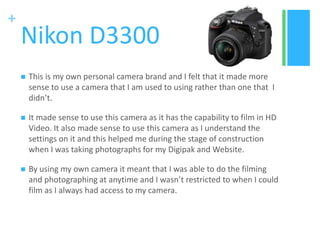
Nikon D3300
 This is my own personal camera brand and I felt that it made more
sense to use a camera that I am used to using rather than one that I
didn’t.
 It made sense to use this camera as it has the capability to film in HD
Video. It also made sense to use this camera as I understand the
settings on it and this helped me during the stage of construction
when I was taking photographs for my Digipak and Website.
 By using my own camera it meant that I was able to do the filming
and photographing at anytime and I wasn’t restricted to when I could
film as I always had access to my camera.
+
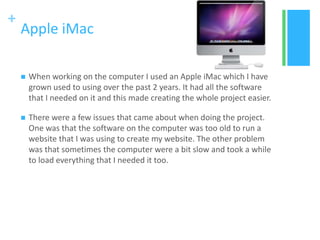
Apple iMac
 When working on the computer I used an Apple iMac which I have
grown used to using over the past 2 years. It had all the software
that I needed on it and this made creating the whole project easier.
 There were a few issues that came about when doing the project.
One was that the software on the computer was too old to run a
website that I was using to create my website. The other problem
was that sometimes the computer were a bit slow and took a while
to load everything that I needed it too.
+
Software
Indesign
Photoshop
Premier Pro
Power Point and Excel
+
InDesign
 I used InDesign during the construction stage of my project to create
my lyric booklet that would go in my digipak.
 Although InDesign is an Abobe product and many of the functions
were the same as Photoshop it still took me a while to get my head
around how it all worked. This took up valuable time in my
construction stage as I had to spend time learning how it worked,
however once I had got the hang of it I was able to create the
booklet with little problem.
 I think that learning how to use this was beneficial to me as I learnt
something completely new rather than just sticking with what I now
and this allowed me to further my knowledge
+
Photoshop
 I used Photoshop to create a logo, my digipak and the CD sticker
used in my digipak. I also used it to edit the images that went on my
website and on my digipak.
 Using Photoshop to create a product allowed me to build on skills
that I had acquired during my work experience and allowed me to
put different thing in to use. I feel that by using a piece of software
that I was already familiar with allowed me to create the products
with ease as I already knew how everything worked.
 When creating the digipak and CD sticker it took me a while because
everything had to be in the correct place due to the fact that I
couldn’t change the lines to fit my photographs and it took a few
attempts to print the CD Sticker due to the fact that the template
didn’t match with the printing stickers
+
Premiere Pro
 I used Premiere Pro last year when creating my film opening and this
meant that this year I was able to build on skills that I had already
acquired.
 During this project I used premiere pro to steady wobbly shoots in
order to give my film a more professional feel and make it appear
better. I also discovered how to lay photographs over a video clip and
I did this to enhance the theme within the video and all the
photographs contained friendship.
 I used premiere pro when completing my test lip sync as this was the
same software I used for my final project and this meant I was able
to get a feel as to how easy it was to create a lip sync in the software.
+
Excel and PowerPoint
 I used both Powerpoint and Excel in my research and planning stages.
 I used excel as a way to create graphs to show the results from my
questionnaire and put them in a more understandable way compared to
just being able to read them.
 I used PowerPoint when completing both my research and planning for
shoots. I used PowerPoint as it was a simple way to present lots of
information and it allowed me to include images that linked to what I
was describing.
 I was able to use both these pieces of software rather easily as they are
software that I have been using for many years now and appear to have
got the hang of.
+
Online
Youtube and Vimeo
Blogger
Wix
Examtime
Smart Survey
Slide Share
Prezi
+
Youtube and Vimeo
 I used both these online sites as a way in which to showcase my
finished music video. I used YouTube because it was the most
popular viewing platform from my music video habits questionnaire.
I also put it on Vimeo so that I could link it to my website as this was
the only way I was able to.
 Both these websites were quick to upload my video and I was able to
do this with minimal stress as it didn’t take up much of my time and I
was able to carry on with other work that needed my attention while
these were uploading.
+
Blogger
 I used blogger as the main platform for my project as I was able to
keep everything in one place. I feel that using blogger allowed me to
keep on track with my project as I was constantly able to see what I
had done and what needed to be done.
 One feature of blogger that was of great importance to me was the
labelling feature as it meant that I could keep everything in order and
look back at only specific parts of my project and know everything
was there. Without this I would have struggled as it would have been
an issue to find everything all the time
+
Wix
 I used Wix and online website creator to create my website. I had
used Wix last year and this made using it this year that much easier.
Wix was very simple to grasp once I had familiarised myself with it
and this meant that I was able to create the website rather quickly.
 There were however a few problems caused from using Wix. Once I
started to create the website something went wrong with it and I
had to start again this became time consuming and meant that I
wasted sometime. The other issue was that the software on the
computer was too old to run the website it meant that I had to do
this from home and was unable to get feedback on it due to the fact
that it couldn’t be opened at college
+
GoConqr
 GoConqr is a free mind map creating website and I used it at the
start of the project when brainstorming ideas as I was able to get a
lot in information down in a clear and consistent way meaning that it
could be easily interpreted.
 It allowed me to come up with many ideas around that topic and
meant that I could see them all in one place. It also allowed me to
link relevant ideas together meaning that everything involving one
topic could be found it one place on my blog rather that in 3 different
places.
+
Smart Survey
 The use of smart survey was integral to the collection of audience
feedback. By using Smart Survey I was able to leave my questionnaire
active for a week without having to check on it or look at whether
people were looking at it or not.
 It allowed me to collect data from lots of different people and
therefore meant that I could really get the opinions of my target
audience.
 I used this to collect responses to many things such as Digipak title
ideas and colour schemes for ancillary tasks.
+
Slide Share
 I used slide share in order to upload my PowerPoint's so that they
could be put on my blog. I uploaded both research and planning
PowerPoint’s as I didn’t feel that using screen shoots of the
PowerPoint really worked as it wasn’t going to be as clear as it would
be on the Slide Share.
 Slide Share also allowed anyone to look at my PowerPoint meaning
that many people could benefit from my research.
 Slide share works fast and uploaded my PowerPoint’s rather fast and
this meant that I could put the information on my blog relatively
quickly and without any issues.
+
Prezi
 Prezi is a piece of software that I had use last year but I used it a bit
less this year. I like using Prezi because I feel that it is a more
interesting way in which to present information. I enjoy using Prezi as
it is an online website that I know well and this meant I was able to
use this with minimal difficulty meaning I could produce them rather
quickly.
 One issue that I have with Prezi is that it is rather difficult to create
one from scratch however when using their templates they tend not
to have enough bubbles to write in meaning I continuously had to
adapt the Prezi for my piece of work.

Question 4

  • 1.
  • 2.
    + How did youuse media technologies in the construction and research and planning stages?
  • 3.
    + What type oftechnologies did I use?  There were many ways in which I used technologies in both the construction and the research and planning stages of my project. I used multiple different hardware's , software’s and online websites.  The different pieces of hardware, software and online websites came together during integral pieces of my planning and creation of my videos. I used a different websites in order to show off different skills but to also showcase my work in multiple different ways so that people looking at my work wouldn’t get bored of looking at the same layout over and over again.
  • 4.
  • 5.
    + Nikon D3300  Thisis my own personal camera brand and I felt that it made more sense to use a camera that I am used to using rather than one that I didn’t.  It made sense to use this camera as it has the capability to film in HD Video. It also made sense to use this camera as I understand the settings on it and this helped me during the stage of construction when I was taking photographs for my Digipak and Website.  By using my own camera it meant that I was able to do the filming and photographing at anytime and I wasn’t restricted to when I could film as I always had access to my camera.
  • 6.
    + Apple iMac  Whenworking on the computer I used an Apple iMac which I have grown used to using over the past 2 years. It had all the software that I needed on it and this made creating the whole project easier.  There were a few issues that came about when doing the project. One was that the software on the computer was too old to run a website that I was using to create my website. The other problem was that sometimes the computer were a bit slow and took a while to load everything that I needed it too.
  • 7.
  • 8.
    + InDesign  I usedInDesign during the construction stage of my project to create my lyric booklet that would go in my digipak.  Although InDesign is an Abobe product and many of the functions were the same as Photoshop it still took me a while to get my head around how it all worked. This took up valuable time in my construction stage as I had to spend time learning how it worked, however once I had got the hang of it I was able to create the booklet with little problem.  I think that learning how to use this was beneficial to me as I learnt something completely new rather than just sticking with what I now and this allowed me to further my knowledge
  • 9.
    + Photoshop  I usedPhotoshop to create a logo, my digipak and the CD sticker used in my digipak. I also used it to edit the images that went on my website and on my digipak.  Using Photoshop to create a product allowed me to build on skills that I had acquired during my work experience and allowed me to put different thing in to use. I feel that by using a piece of software that I was already familiar with allowed me to create the products with ease as I already knew how everything worked.  When creating the digipak and CD sticker it took me a while because everything had to be in the correct place due to the fact that I couldn’t change the lines to fit my photographs and it took a few attempts to print the CD Sticker due to the fact that the template didn’t match with the printing stickers
  • 10.
    + Premiere Pro  Iused Premiere Pro last year when creating my film opening and this meant that this year I was able to build on skills that I had already acquired.  During this project I used premiere pro to steady wobbly shoots in order to give my film a more professional feel and make it appear better. I also discovered how to lay photographs over a video clip and I did this to enhance the theme within the video and all the photographs contained friendship.  I used premiere pro when completing my test lip sync as this was the same software I used for my final project and this meant I was able to get a feel as to how easy it was to create a lip sync in the software.
  • 11.
    + Excel and PowerPoint I used both Powerpoint and Excel in my research and planning stages.  I used excel as a way to create graphs to show the results from my questionnaire and put them in a more understandable way compared to just being able to read them.  I used PowerPoint when completing both my research and planning for shoots. I used PowerPoint as it was a simple way to present lots of information and it allowed me to include images that linked to what I was describing.  I was able to use both these pieces of software rather easily as they are software that I have been using for many years now and appear to have got the hang of.
  • 12.
  • 13.
    + Youtube and Vimeo I used both these online sites as a way in which to showcase my finished music video. I used YouTube because it was the most popular viewing platform from my music video habits questionnaire. I also put it on Vimeo so that I could link it to my website as this was the only way I was able to.  Both these websites were quick to upload my video and I was able to do this with minimal stress as it didn’t take up much of my time and I was able to carry on with other work that needed my attention while these were uploading.
  • 14.
    + Blogger  I usedblogger as the main platform for my project as I was able to keep everything in one place. I feel that using blogger allowed me to keep on track with my project as I was constantly able to see what I had done and what needed to be done.  One feature of blogger that was of great importance to me was the labelling feature as it meant that I could keep everything in order and look back at only specific parts of my project and know everything was there. Without this I would have struggled as it would have been an issue to find everything all the time
  • 15.
    + Wix  I usedWix and online website creator to create my website. I had used Wix last year and this made using it this year that much easier. Wix was very simple to grasp once I had familiarised myself with it and this meant that I was able to create the website rather quickly.  There were however a few problems caused from using Wix. Once I started to create the website something went wrong with it and I had to start again this became time consuming and meant that I wasted sometime. The other issue was that the software on the computer was too old to run the website it meant that I had to do this from home and was unable to get feedback on it due to the fact that it couldn’t be opened at college
  • 16.
    + GoConqr  GoConqr isa free mind map creating website and I used it at the start of the project when brainstorming ideas as I was able to get a lot in information down in a clear and consistent way meaning that it could be easily interpreted.  It allowed me to come up with many ideas around that topic and meant that I could see them all in one place. It also allowed me to link relevant ideas together meaning that everything involving one topic could be found it one place on my blog rather that in 3 different places.
  • 17.
    + Smart Survey  Theuse of smart survey was integral to the collection of audience feedback. By using Smart Survey I was able to leave my questionnaire active for a week without having to check on it or look at whether people were looking at it or not.  It allowed me to collect data from lots of different people and therefore meant that I could really get the opinions of my target audience.  I used this to collect responses to many things such as Digipak title ideas and colour schemes for ancillary tasks.
  • 18.
    + Slide Share  Iused slide share in order to upload my PowerPoint's so that they could be put on my blog. I uploaded both research and planning PowerPoint’s as I didn’t feel that using screen shoots of the PowerPoint really worked as it wasn’t going to be as clear as it would be on the Slide Share.  Slide Share also allowed anyone to look at my PowerPoint meaning that many people could benefit from my research.  Slide share works fast and uploaded my PowerPoint’s rather fast and this meant that I could put the information on my blog relatively quickly and without any issues.
  • 19.
    + Prezi  Prezi isa piece of software that I had use last year but I used it a bit less this year. I like using Prezi because I feel that it is a more interesting way in which to present information. I enjoy using Prezi as it is an online website that I know well and this meant I was able to use this with minimal difficulty meaning I could produce them rather quickly.  One issue that I have with Prezi is that it is rather difficult to create one from scratch however when using their templates they tend not to have enough bubbles to write in meaning I continuously had to adapt the Prezi for my piece of work.