EVALUATION QUESTION 4
How did you use media technologies in the construction,
research, planning & evaluation stages?
PRE-
PRODUCTION
Although we can say that the technology used were for the 'production' sand
'post-production' stages only, I also used certain technology for the research
and planning stage, A.K.A pre-production. All of the technology I used for
the 'pre-production' stage were computer software technology, such as Prezi
and Blogger, which I will go into detail very soon.
These technologies were used to present information in a more creative and
interesting way. This wouldn't have been done if it wasn't for the Mac
computer I used throughout my time on this course. It is a pleasure to
access this technology from a single piece of hardware.
Throughout the course, I used Blogger for typing up my
work on an Internet-generated piece of software, but the
majority of my work had come from the pre-production
stage. I had to type up information, such as theorists
related to music video and my own ideas of what to do
for my construction piece. I had already used this in AS
Level Media Studies the year before so I was familiar with
how it works. I had made a huge amount of progress from
AS Level as I played around with Blogger more by sharing
posts from different programs like YouTube and Prezi,
something I didn't do much in at AS Level.
However...
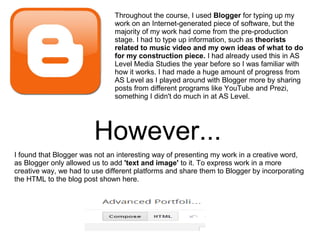
I found that Blogger was not an interesting way of presenting my work in a creative word,
as Blogger only allowed us to add 'text and image' to it. To express work in a more
creative way, we had to use different platforms and share them to Blogger by incorporating
the HTML to the blog post shown here.
Another way of presenting my work, but this time in a more interesting way, was the
presentation software, named Prezi. The progress I made from AS Level to now is the same
as Blogger, where I hadn't used Prezi to present my work as often as I needed to. This way,
my work at AS did not seem as creative as I thought it would have been. Prezi is similar to
Microsoft Powerpoint, but the transition of each slide was already included and the fact that
you had more room to put information, instead of creating slides over and over again.
Similar to the Blogger also, you could embed YouTube videos on to the presentation you
created on Prezi, allowing more formats to present work (not just text-wise, but visual also). I
found that this was very easy to use and a more creative way to present work on a whole.
There were no bad points about using Prezi, as no updates were made to the program from
the previous year, studying AS Level. I kept my account, as well as my presentations from
AS.
Finally, I used Google to research information about different media theorists and also
different media texts for my blog. I found this very useful because Google gave me all the
information for different links needed for my piece of media work. I use Google in
everyday life for research at home or at college, so of course I know very well how to use
this.
I had no problems with this as it gave me all the information it possibly can to help me
research different theorists and other important stuff I needed for my blog.
PRODUCTION
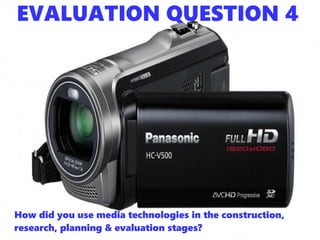
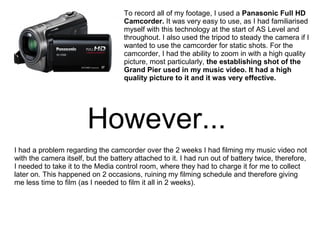
To record all of my footage, I used a Panasonic Full HD
Camcorder. It was very easy to use, as I had familiarised
myself with this technology at the start of AS Level and
throughout. I also used the tripod to steady the camera if I
wanted to use the camcorder for static shots. For the
camcorder, I had the ability to zoom in with a high quality
picture, most particularly, the establishing shot of the
Grand Pier used in my music video. It had a high
quality picture to it and it was very effective.
However...
I had a problem regarding the camcorder over the 2 weeks I had filming my music video not
with the camera itself, but the battery attached to it. I had run out of battery twice, therefore,
I needed to take it to the Media control room, where they had to charge it for me to collect
later on. This happened on 2 occasions, ruining my filming schedule and therefore giving
me less time to film (as I needed to film it all in 2 weeks).
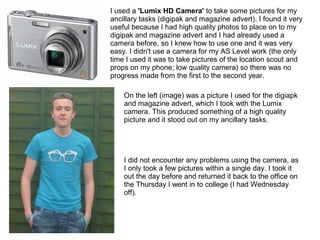
I used a 'Lumix HD Camera' to take some pictures for my
ancillary tasks (digipak and magazine advert). I found it very
useful because I had high quality photos to place on to my
digipak and magazine advert and I had already used a
camera before, so I knew how to use one and it was very
easy. I didn't use a camera for my AS Level work (the only
time I used it was to take pictures of the location scout and
props on my phone; low quality camera) so there was no
progress made from the first to the second year.
On the left (image) was a picture I used for the digiapk
and magazine advert, which I took with the Lumix
camera. This produced something of a high quality
picture and it stood out on my ancillary tasks.
I did not encounter any problems using the camera, as
I only took a few pictures within a single day. I took it
out the day before and returned it back to the office on
the Thursday I went in to college (I had Wednesday
off).
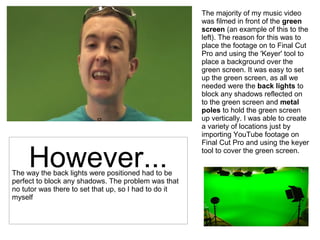
The majority of my music video
was filmed in front of the green
screen (an example of this to the
left). The reason for this was to
place the footage on to Final Cut
Pro and using the 'Keyer' tool to
place a background over the
green screen. It was easy to set
up the green screen, as all we
needed were the back lights to
block any shadows reflected on
to the green screen and metal
poles to hold the green screen
up vertically. I was able to create
a variety of locations just by
importing YouTube footage on
Final Cut Pro and using the keyer
tool to cover the green screen.
The way the back lights were positioned had to be
perfect to block any shadows. The problem was that
no tutor was there to set that up, so I had to do it
myself
However...
POST-
PRODUCTION
The majority of post-production relied on making my
final product (the music video) which took around 2
weeks. Final Cut Pro was very easy to use, as I
used it before at AS Level and I used the timeline to
sort out my clip by editing different pieces of
footage. There were many tools I used, for example,
the 'Blade' tool to crop footage, the 'Detach
Audio' tool to detach the song from the visuals,
so I could only include the audio in my work and
the 'Keyer' tool to apply a background in front of
the Green Screen.
I also had the chance to edit footage by applying different effects, e.g. applying the Black
and White effect for my 'Dr Jekyll' scene at the start and the 'Dream' tool for the 'Billy Elliot'
scene. What I progressed on this year from last year were the effects used for my
construction, as last year I didn't use any and also this year, I had a lot more creativity to do
whatever I wanted to my video, whereas at AS Level, I had to follow a narrative using
'Match-on-action'.
I had encountered no major problems whilst using Final Cut Pro as I already knew how to
use it from AS Level and I brought my knowledge into A2 Level.
To create my ancillary texts (digipak and magazine
advert) I used 'Adobe Photoshop FS6'. I used this to
effectively edit my pictures by changing the brightness
and contrast of the image, applying text and embedding
pictures from other sources to the digipak/magazine
advert. I ultimately did this in order to produce
professional images and therefore a professional piece
of work overall.
I also used an online
tool called
'DaFont.com' to
download fonts to
use for my ancillary
tasks, which creates
a distinctive style for
the recognition of my
artist. For this task, I
used the font 'Neon
80s' to create the
style for my artist.
However...I had not been familiar with Photoshop
before as I had never used it before in my
life. With the help from my tutor, I was
given the basic guidelines of how to
create my digipak, e.g. how to add text
and how to insert pictures etc.
DISTRIBUTION
For the Distribution stage, I used Facebook and YouTube to share my music video and
ancillary tasks respectively in order to gain feedback on my work*. I used these 2 in
particular because they appeal to my target audience of teenagers and young adults, as
they are the most commonly used websites for the age group. I found it easy to share my
information as I use Facebook and YouTube on a daily basis, whether at home or at
college. I had no difficulty sharing my video on YouTube or uploading my digipak and
magazine advert work on my Facebook, as it is all part of the websites.
*The feedback from YouTube and Facebook will be seen in Evaluation question 3.
CONCLUSION
Overall, technology was used throughout my 'A2 Advanced Portfolio' in order to present my
work in a very e-commercial and interesting way (It is a lot more interesting then pen and
paper). For the majority of my posts, my creativity played a vital part into how I structured each
blog post and how I presented it. I chose which piece of technology was most suitable for each
blog post, whether it was YouTube videos, presentations from Prezi or just simply text and
image on Blogger.
I believe in this day of age, the Internet has increased and developed the use of technology in
a way that is it even better to present information online than on pen and paper. Everyone
uses technology in everyday life. Whatever technology we use is our own choice. And the
expansion of the Internet has expanded our creativity in everyday society. The way we
communicate and the way we present work is different now thanks to the Internet.

Evaluation - Question 4 (A2 Media Studies

  • 1.
    EVALUATION QUESTION 4 Howdid you use media technologies in the construction, research, planning & evaluation stages?
  • 2.
  • 3.
    Although we cansay that the technology used were for the 'production' sand 'post-production' stages only, I also used certain technology for the research and planning stage, A.K.A pre-production. All of the technology I used for the 'pre-production' stage were computer software technology, such as Prezi and Blogger, which I will go into detail very soon. These technologies were used to present information in a more creative and interesting way. This wouldn't have been done if it wasn't for the Mac computer I used throughout my time on this course. It is a pleasure to access this technology from a single piece of hardware.
  • 4.
    Throughout the course,I used Blogger for typing up my work on an Internet-generated piece of software, but the majority of my work had come from the pre-production stage. I had to type up information, such as theorists related to music video and my own ideas of what to do for my construction piece. I had already used this in AS Level Media Studies the year before so I was familiar with how it works. I had made a huge amount of progress from AS Level as I played around with Blogger more by sharing posts from different programs like YouTube and Prezi, something I didn't do much in at AS Level. However... I found that Blogger was not an interesting way of presenting my work in a creative word, as Blogger only allowed us to add 'text and image' to it. To express work in a more creative way, we had to use different platforms and share them to Blogger by incorporating the HTML to the blog post shown here.
  • 5.
    Another way ofpresenting my work, but this time in a more interesting way, was the presentation software, named Prezi. The progress I made from AS Level to now is the same as Blogger, where I hadn't used Prezi to present my work as often as I needed to. This way, my work at AS did not seem as creative as I thought it would have been. Prezi is similar to Microsoft Powerpoint, but the transition of each slide was already included and the fact that you had more room to put information, instead of creating slides over and over again. Similar to the Blogger also, you could embed YouTube videos on to the presentation you created on Prezi, allowing more formats to present work (not just text-wise, but visual also). I found that this was very easy to use and a more creative way to present work on a whole. There were no bad points about using Prezi, as no updates were made to the program from the previous year, studying AS Level. I kept my account, as well as my presentations from AS.
  • 6.
    Finally, I usedGoogle to research information about different media theorists and also different media texts for my blog. I found this very useful because Google gave me all the information for different links needed for my piece of media work. I use Google in everyday life for research at home or at college, so of course I know very well how to use this. I had no problems with this as it gave me all the information it possibly can to help me research different theorists and other important stuff I needed for my blog.
  • 7.
  • 8.
    To record allof my footage, I used a Panasonic Full HD Camcorder. It was very easy to use, as I had familiarised myself with this technology at the start of AS Level and throughout. I also used the tripod to steady the camera if I wanted to use the camcorder for static shots. For the camcorder, I had the ability to zoom in with a high quality picture, most particularly, the establishing shot of the Grand Pier used in my music video. It had a high quality picture to it and it was very effective. However... I had a problem regarding the camcorder over the 2 weeks I had filming my music video not with the camera itself, but the battery attached to it. I had run out of battery twice, therefore, I needed to take it to the Media control room, where they had to charge it for me to collect later on. This happened on 2 occasions, ruining my filming schedule and therefore giving me less time to film (as I needed to film it all in 2 weeks).
  • 9.
    I used a'Lumix HD Camera' to take some pictures for my ancillary tasks (digipak and magazine advert). I found it very useful because I had high quality photos to place on to my digipak and magazine advert and I had already used a camera before, so I knew how to use one and it was very easy. I didn't use a camera for my AS Level work (the only time I used it was to take pictures of the location scout and props on my phone; low quality camera) so there was no progress made from the first to the second year. On the left (image) was a picture I used for the digiapk and magazine advert, which I took with the Lumix camera. This produced something of a high quality picture and it stood out on my ancillary tasks. I did not encounter any problems using the camera, as I only took a few pictures within a single day. I took it out the day before and returned it back to the office on the Thursday I went in to college (I had Wednesday off).
  • 10.
    The majority ofmy music video was filmed in front of the green screen (an example of this to the left). The reason for this was to place the footage on to Final Cut Pro and using the 'Keyer' tool to place a background over the green screen. It was easy to set up the green screen, as all we needed were the back lights to block any shadows reflected on to the green screen and metal poles to hold the green screen up vertically. I was able to create a variety of locations just by importing YouTube footage on Final Cut Pro and using the keyer tool to cover the green screen. The way the back lights were positioned had to be perfect to block any shadows. The problem was that no tutor was there to set that up, so I had to do it myself However...
  • 11.
  • 12.
    The majority ofpost-production relied on making my final product (the music video) which took around 2 weeks. Final Cut Pro was very easy to use, as I used it before at AS Level and I used the timeline to sort out my clip by editing different pieces of footage. There were many tools I used, for example, the 'Blade' tool to crop footage, the 'Detach Audio' tool to detach the song from the visuals, so I could only include the audio in my work and the 'Keyer' tool to apply a background in front of the Green Screen. I also had the chance to edit footage by applying different effects, e.g. applying the Black and White effect for my 'Dr Jekyll' scene at the start and the 'Dream' tool for the 'Billy Elliot' scene. What I progressed on this year from last year were the effects used for my construction, as last year I didn't use any and also this year, I had a lot more creativity to do whatever I wanted to my video, whereas at AS Level, I had to follow a narrative using 'Match-on-action'. I had encountered no major problems whilst using Final Cut Pro as I already knew how to use it from AS Level and I brought my knowledge into A2 Level.
  • 13.
    To create myancillary texts (digipak and magazine advert) I used 'Adobe Photoshop FS6'. I used this to effectively edit my pictures by changing the brightness and contrast of the image, applying text and embedding pictures from other sources to the digipak/magazine advert. I ultimately did this in order to produce professional images and therefore a professional piece of work overall. I also used an online tool called 'DaFont.com' to download fonts to use for my ancillary tasks, which creates a distinctive style for the recognition of my artist. For this task, I used the font 'Neon 80s' to create the style for my artist. However...I had not been familiar with Photoshop before as I had never used it before in my life. With the help from my tutor, I was given the basic guidelines of how to create my digipak, e.g. how to add text and how to insert pictures etc.
  • 14.
    DISTRIBUTION For the Distributionstage, I used Facebook and YouTube to share my music video and ancillary tasks respectively in order to gain feedback on my work*. I used these 2 in particular because they appeal to my target audience of teenagers and young adults, as they are the most commonly used websites for the age group. I found it easy to share my information as I use Facebook and YouTube on a daily basis, whether at home or at college. I had no difficulty sharing my video on YouTube or uploading my digipak and magazine advert work on my Facebook, as it is all part of the websites. *The feedback from YouTube and Facebook will be seen in Evaluation question 3.
  • 15.
    CONCLUSION Overall, technology wasused throughout my 'A2 Advanced Portfolio' in order to present my work in a very e-commercial and interesting way (It is a lot more interesting then pen and paper). For the majority of my posts, my creativity played a vital part into how I structured each blog post and how I presented it. I chose which piece of technology was most suitable for each blog post, whether it was YouTube videos, presentations from Prezi or just simply text and image on Blogger. I believe in this day of age, the Internet has increased and developed the use of technology in a way that is it even better to present information online than on pen and paper. Everyone uses technology in everyday life. Whatever technology we use is our own choice. And the expansion of the Internet has expanded our creativity in everyday society. The way we communicate and the way we present work is different now thanks to the Internet.