Harnessing light to power new possibilities
Advantages of Optical CXL
for Disaggregated Compute Architectures
Ron Swartzentruber
Director of Engineering
2
Agenda
 Memory centric shift in the data center
 AI Large Language Model growth
 Need for optical CXL technology
 Case study: OPT inference benefits using optical CXL
© Lightelligence, Inc.
3
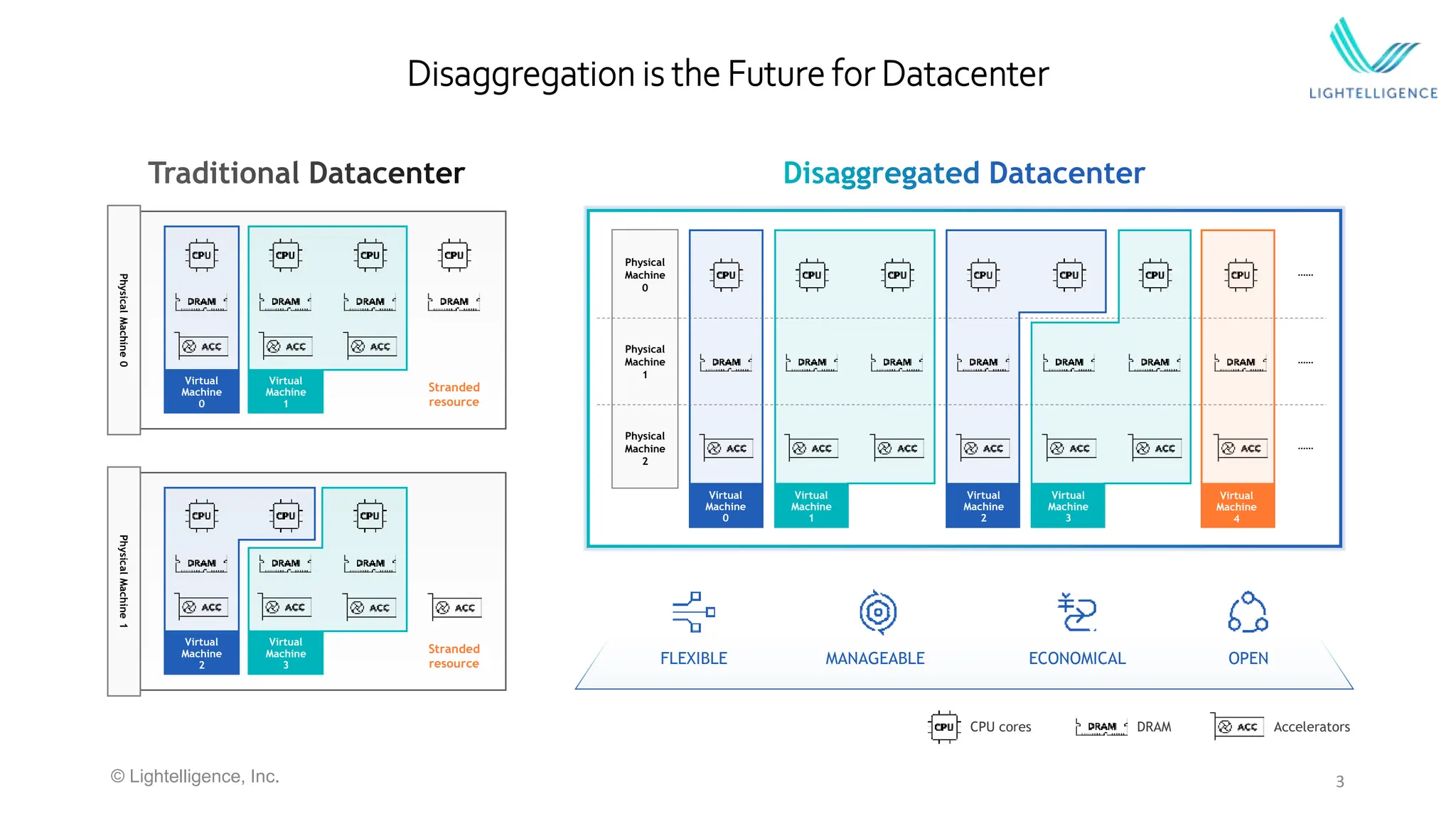
Physical
Machine
0
Virtual
Machine
0
Virtual
Machine
1
Stranded
resource
Physical
Machine
1
Stranded
resource
Virtual
Machine
2
Virtual
Machine
3 FLEXIBLE MANAGEABLE ECONOMICAL OPEN
Physical
Machine
1
Physical
Machine
0
Physical
Machine
2
……
……
……
Virtual
Machine
0
Virtual
Machine
1
Virtual
Machine
2
Virtual
Machine
3
Disaggregation is the Future for Datacenter
Virtual
Machine
4
CPU cores DRAM Accelerators
© Lightelligence, Inc.
4
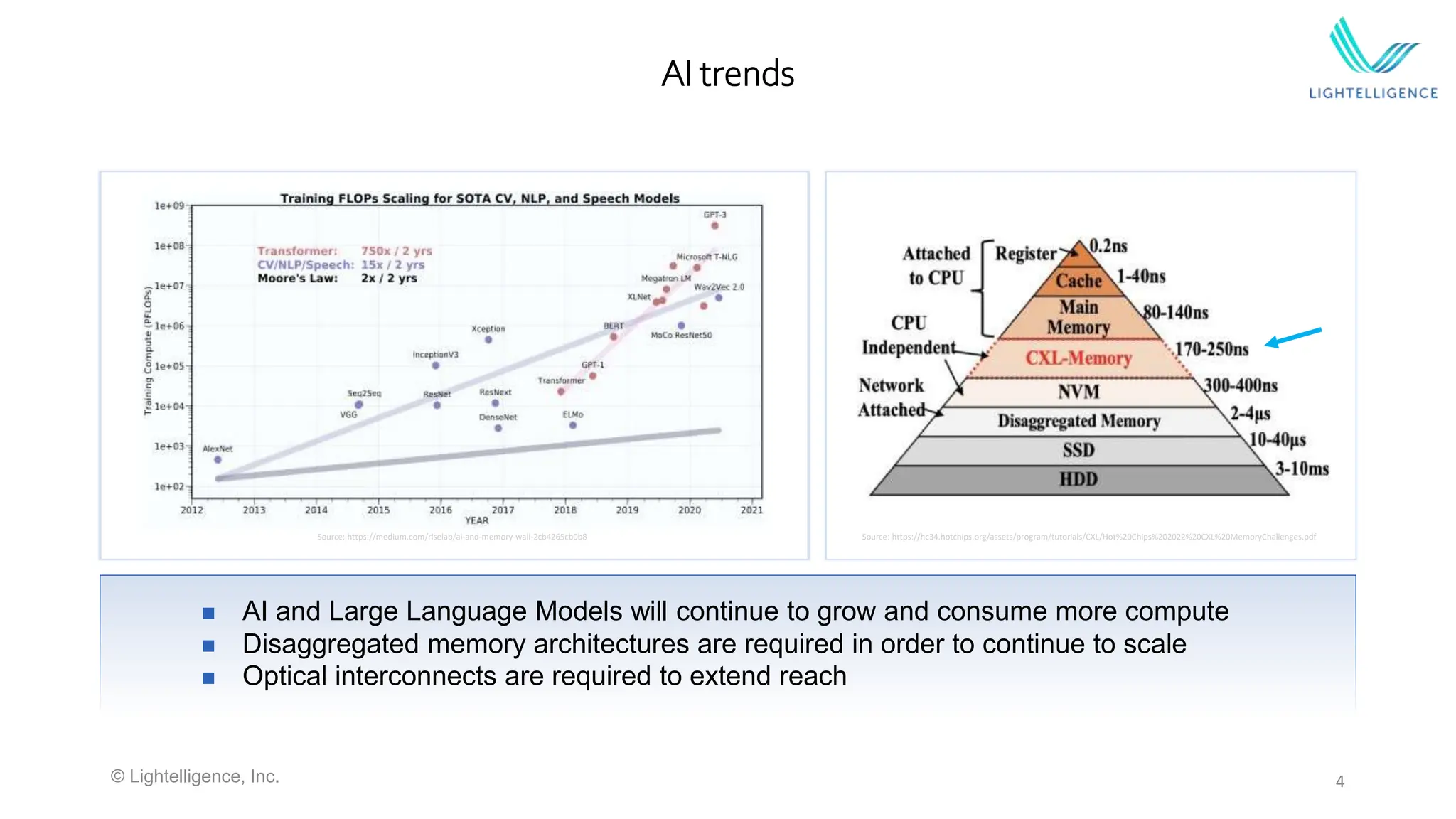
AI trends
 AI and Large Language Models will continue to grow and consume more compute
 Disaggregated memory architectures are required in order to continue to scale
 Optical interconnects are required to extend reach
Source: https://medium.com/riselab/ai-and-memory-wall-2cb4265cb0b8 Source: https://hc34.hotchips.org/assets/program/tutorials/CXL/Hot%20Chips%202022%20CXL%20MemoryChallenges.pdf
© Lightelligence, Inc.
5
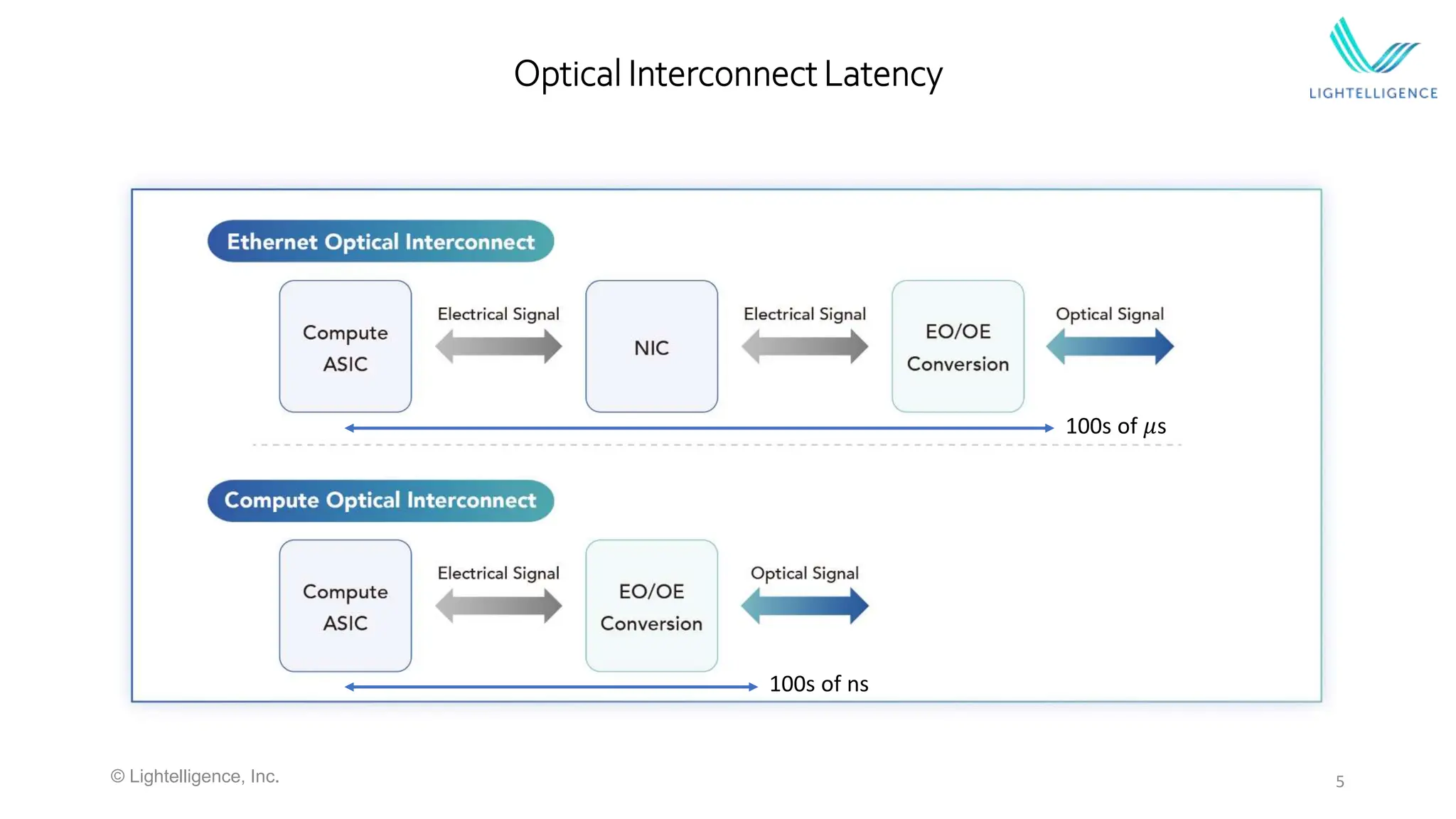
Optical Interconnect Latency
© Lightelligence, Inc.
100s of ns
100s of 𝜇s
6
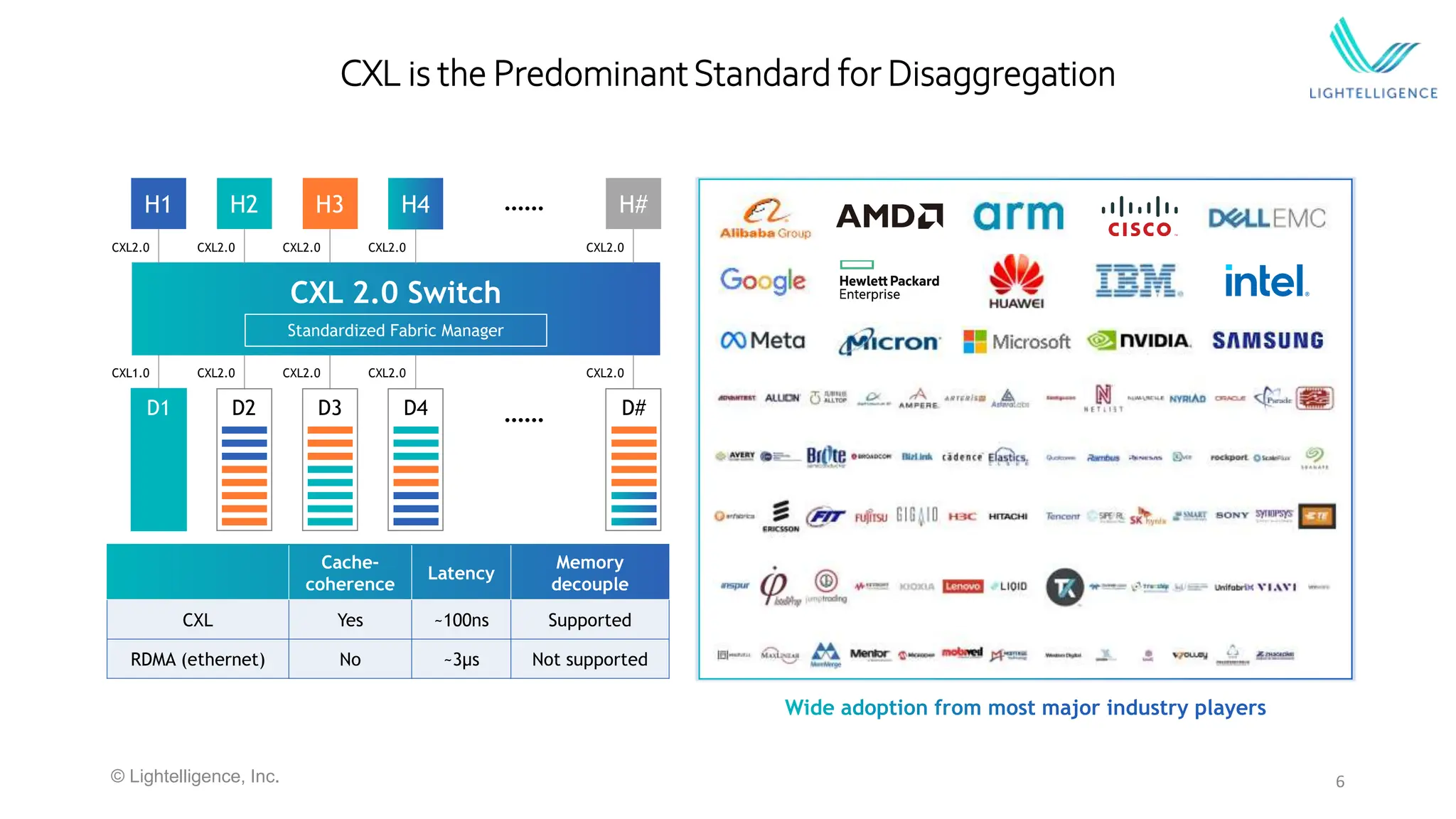
CXL is the PredominantStandard for Disaggregation
Cache-
coherence
Latency
Memory
decouple
CXL Yes ~100ns Supported
RDMA (ethernet) No ~3μs Not supported
CXL 2.0 Switch
Standardized Fabric Manager
H1 H2 H3 H4 H#
……
CXL2.0 CXL2.0 CXL2.0 CXL2.0 CXL2.0
CXL1.0 CXL2.0 CXL2.0 CXL2.0 CXL2.0
D1 D2 D3 D4 …… D#
© Lightelligence, Inc.
7
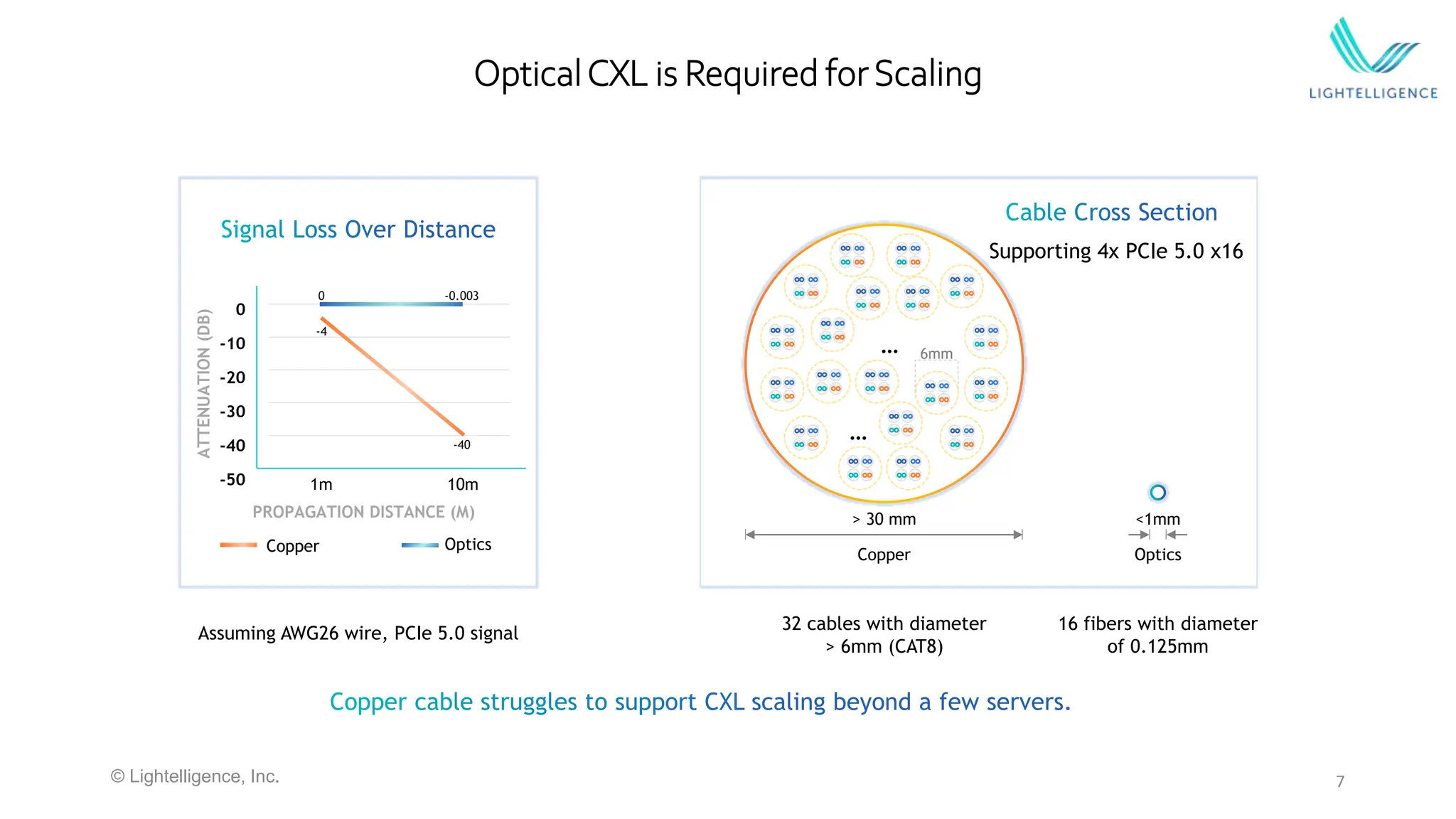
OpticalCXL is Required forScaling
ATTENUATION
(DB)
0
-10
-20
-30
-40
-50
PROPAGATION DISTANCE (M)
1m 10m
0 -0.003
-4
-40
Copper Optics
Assuming AWG26 wire, PCIe 5.0 signal
32 cables with diameter
> 6mm (CAT8)
16 fibers with diameter
of 0.125mm
…
…
6mm
> 30 mm
Copper
<1mm
Optics
Supporting 4x PCIe 5.0 x16
© Lightelligence, Inc.
8
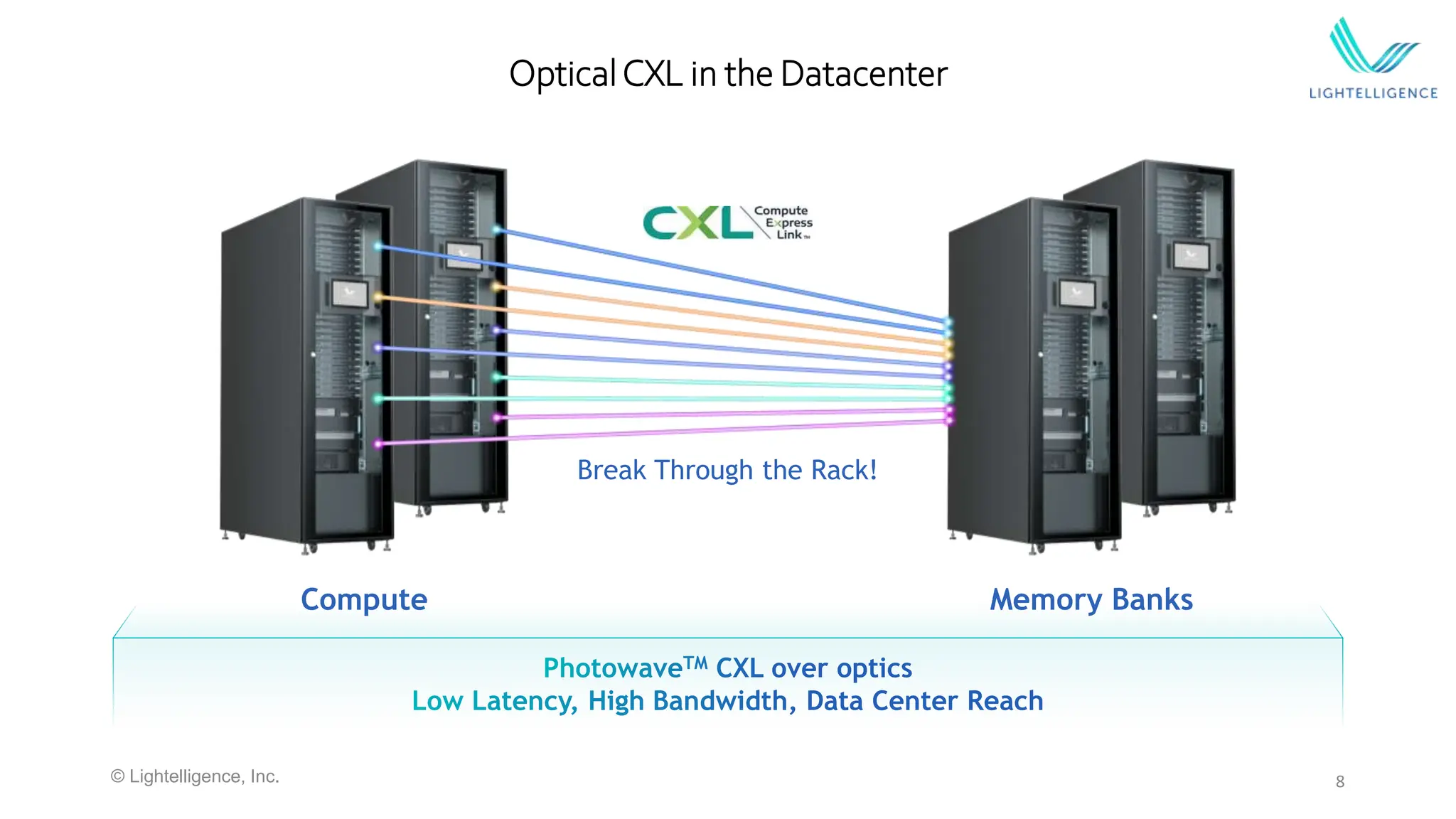
OpticalCXL in the Datacenter
Compute
Break Through the Rack!
Memory Banks
© Lightelligence, Inc.
9
Case study: LLM Inference
CXL Memory
Expander
CXL Memory
Expander
Server
2x CXL 1.1 CPUs
 2U Supermicro server
 2x AMD Genoa CXL 1.1 CPUs
 MemVerge Memory Tiering and
Pooling Software
 2x Micron 256GB Memory Expanders each with
CXL/PCIe Gen5x8 link
Memory
Expansion
Module
Photowave
Card
 Nvidia GPU running LLM inference
 All VMs access to CXL memory
 Secure application, encrypted data
Photowave Card
© Lightelligence, Inc.
10
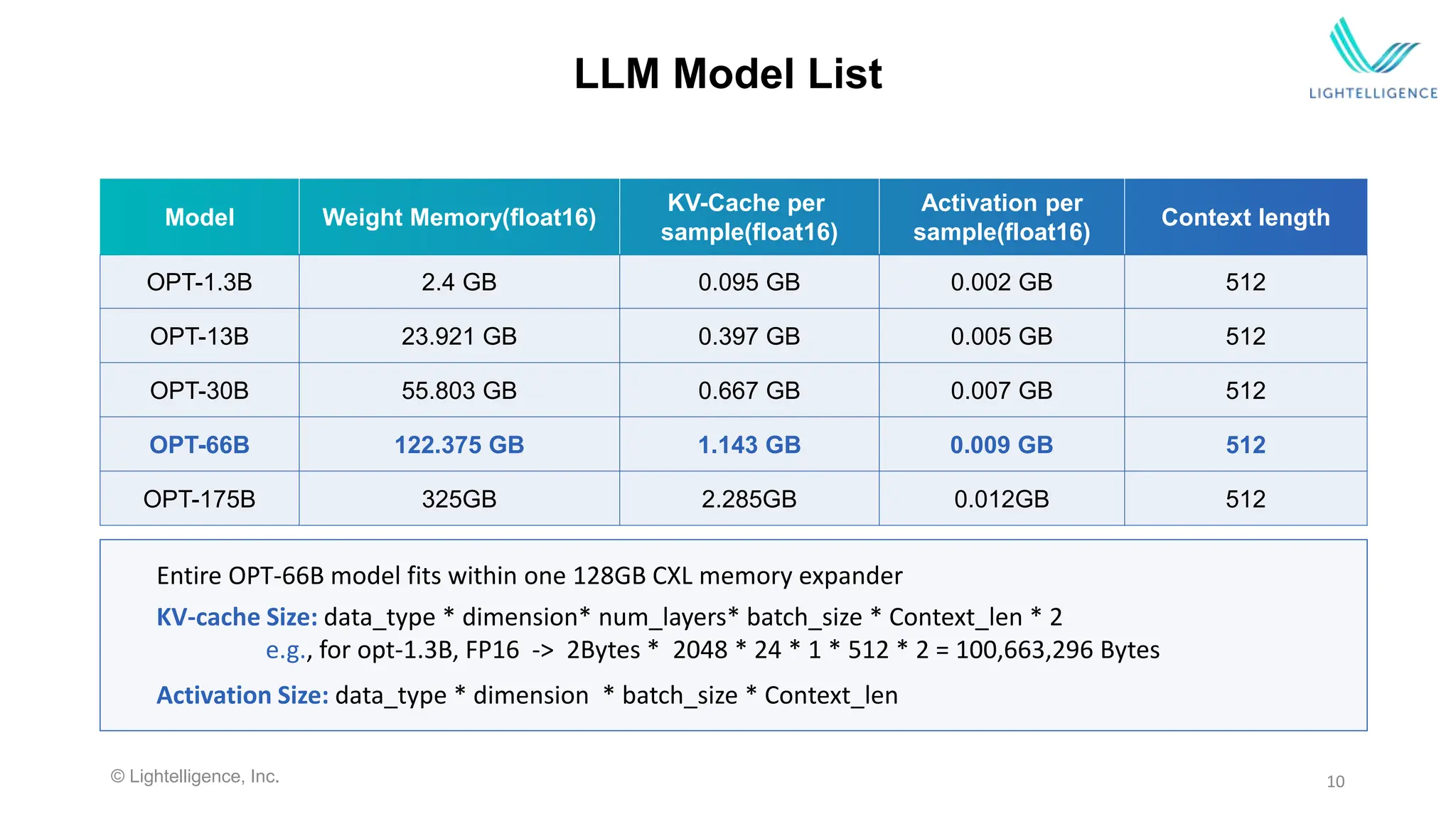
LLM Model List
Model Weight Memory(float16)
KV-Cache per
sample(float16)
Activation per
sample(float16)
Context length
OPT-1.3B 2.4 GB 0.095 GB 0.002 GB 512
OPT-13B 23.921 GB 0.397 GB 0.005 GB 512
OPT-30B 55.803 GB 0.667 GB 0.007 GB 512
OPT-66B 122.375 GB 1.143 GB 0.009 GB 512
OPT-175B 325GB 2.285GB 0.012GB 512
KV-cache Size: data_type * dimension* num_layers* batch_size * Context_len * 2
e.g., for opt-1.3B, FP16 -> 2Bytes * 2048 * 24 * 1 * 512 * 2 = 100,663,296 Bytes
Activation Size: data_type * dimension * batch_size * Context_len
Entire OPT-66B model fits within one 128GB CXL memory expander
© Lightelligence, Inc.
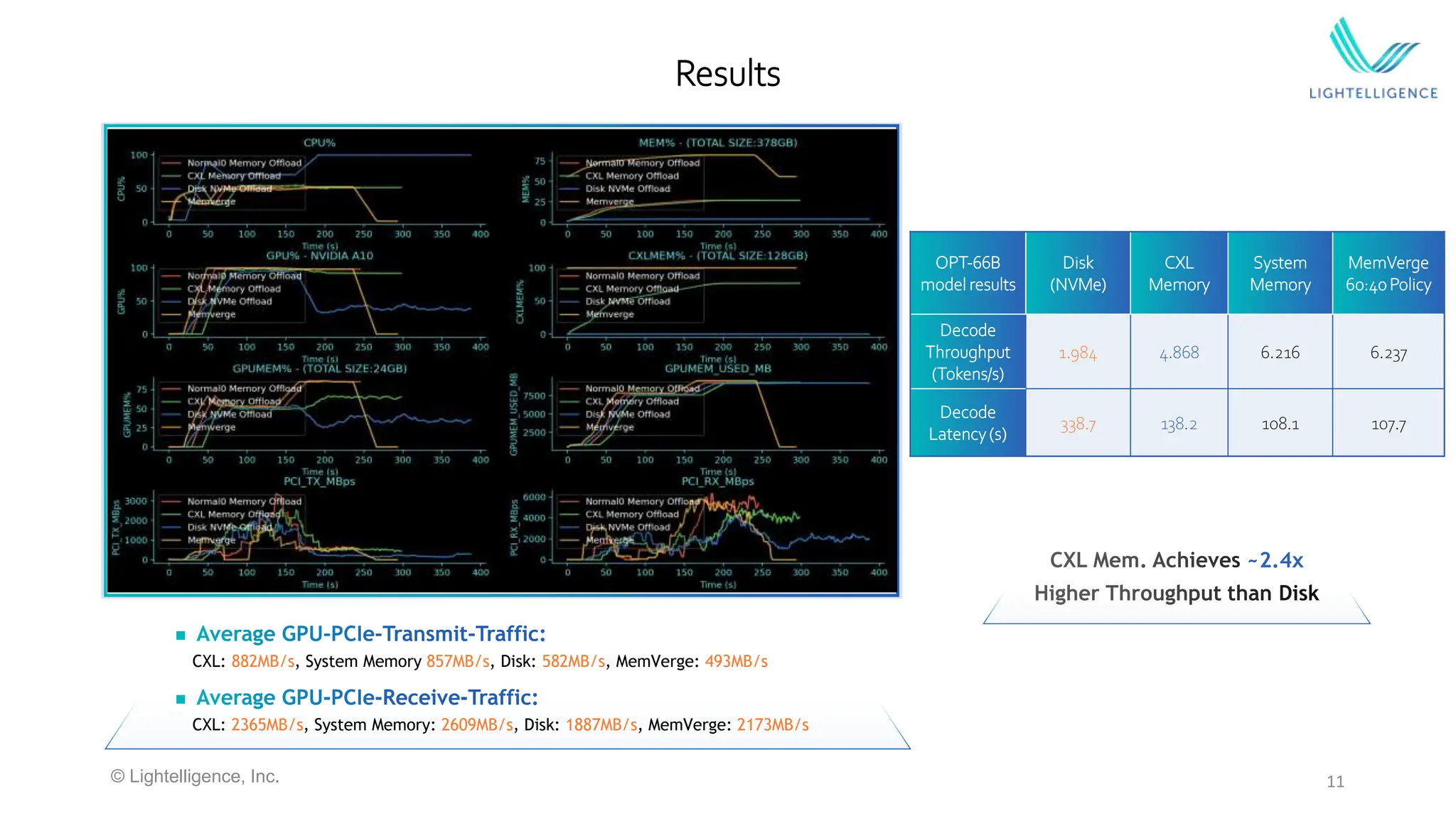

CXL: 882MB/s, System Memory 857MB/s, Disk: 582MB/s, MemVerge: 493MB/s

CXL: 2365MB/s, System Memory: 2609MB/s, Disk: 1887MB/s, MemVerge: 2173MB/s
11
Results
~2.4x
© Lightelligence, Inc.
OPT-66B
model results
Disk
(NVMe)
CXL
Memory
System
Memory
MemVerge
60:40Policy
Decode
Throughput
(Tokens/s)
1.984 4.868 6.216 6.237
Decode
Latency(s)
338.7 138.2 108.1 107.7
12
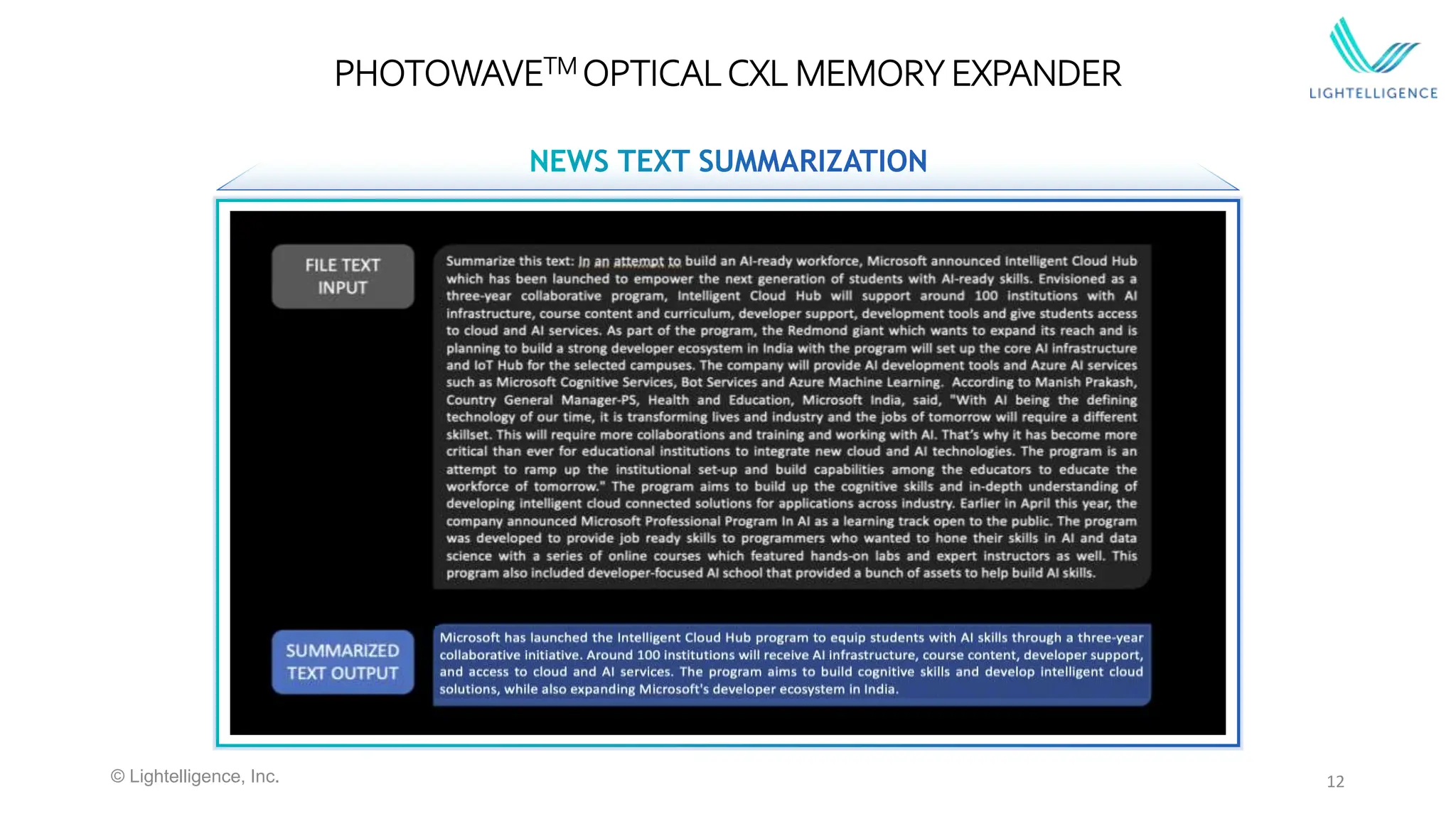
PHOTOWAVETM OPTICALCXL MEMORY EXPANDER
© Lightelligence, Inc.
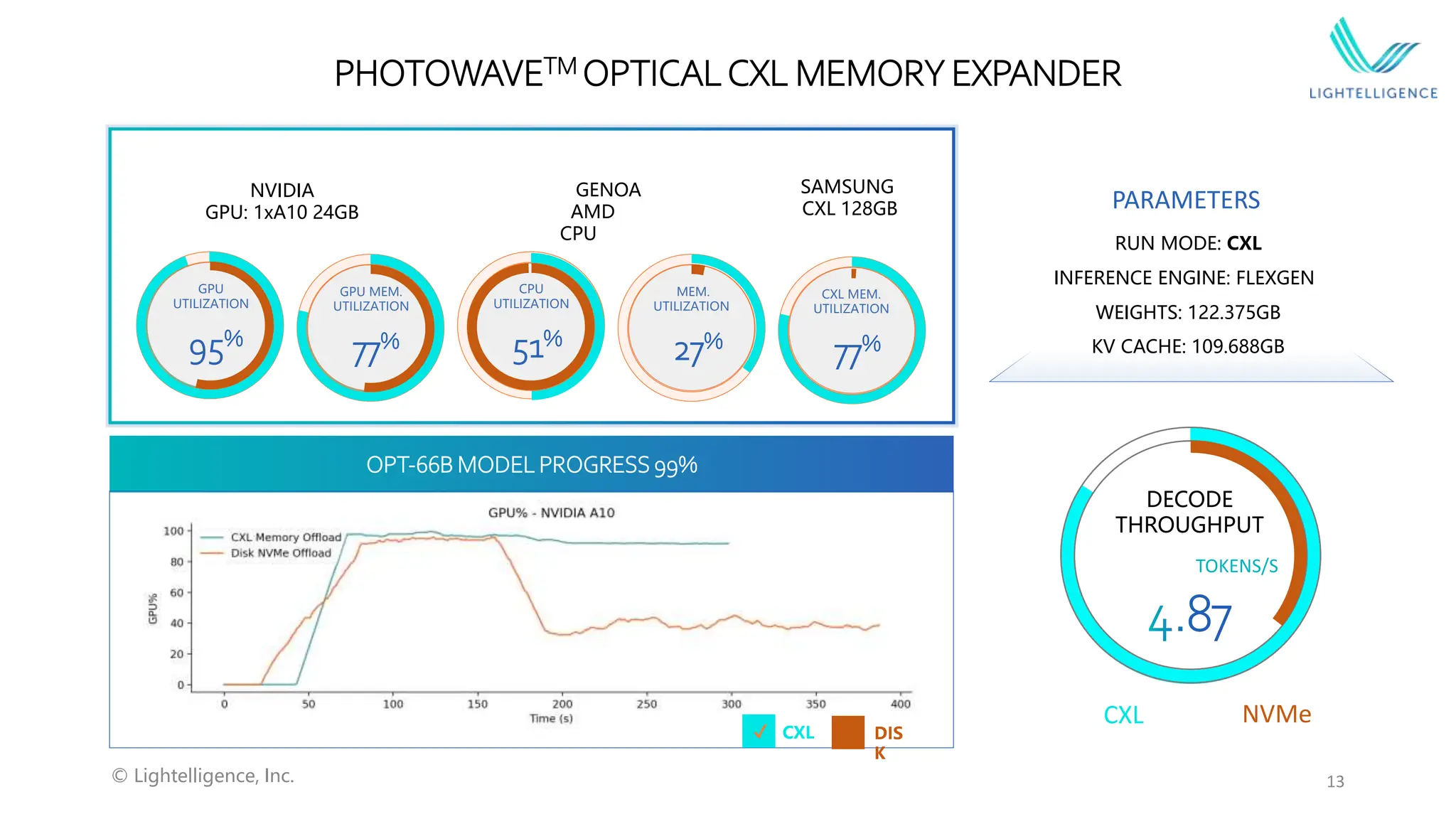
PHOTOWAVETM OPTICALCXL MEMORY EXPANDER
CXL
GPU
UTILIZATION
GPU MEM.
UTILIZATION
CPU
UTILIZATION
MEM.
UTILIZATION
CXL MEM.
UTILIZATION
DECODE
THROUGHPUT
GENOA
AMD
CPU
SAMSUNG
CXL 128GB
NVIDIA
GPU: 1xA10 24GB
OPT-66B MODEL PROGRESS 99%
TOKENS/S
PARAMETERS
INFERENCE ENGINE: FLEXGEN
KV CACHE: 109.688GB
RUN MODE: CXL
WEIGHTS: 122.375GB
95%
77% 51%
27%
77%
CXL DIS
K
✔️ ✔️
13
© Lightelligence, Inc.
NVMe
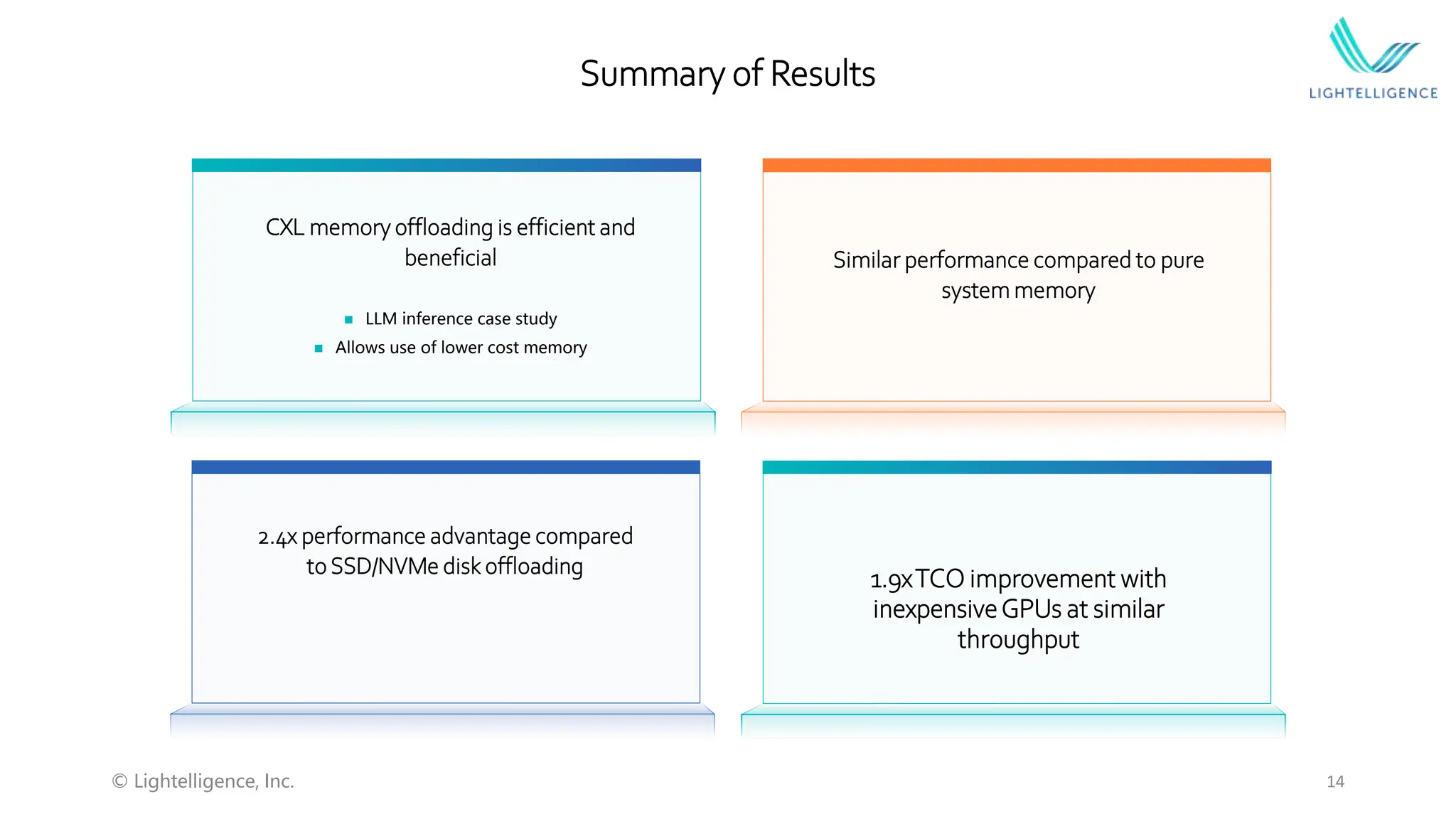
Summary of Results
CXL memory offloading is efficient and
beneficial
 LLM inference case study
 Allows use of lower cost memory
Similar performance compared to pure
system memory
1.9xTCO improvement with
inexpensiveGPUs at similar
throughput
2.4x performance advantage compared
to SSD/NVMe disk offloading
14
© Lightelligence, Inc.
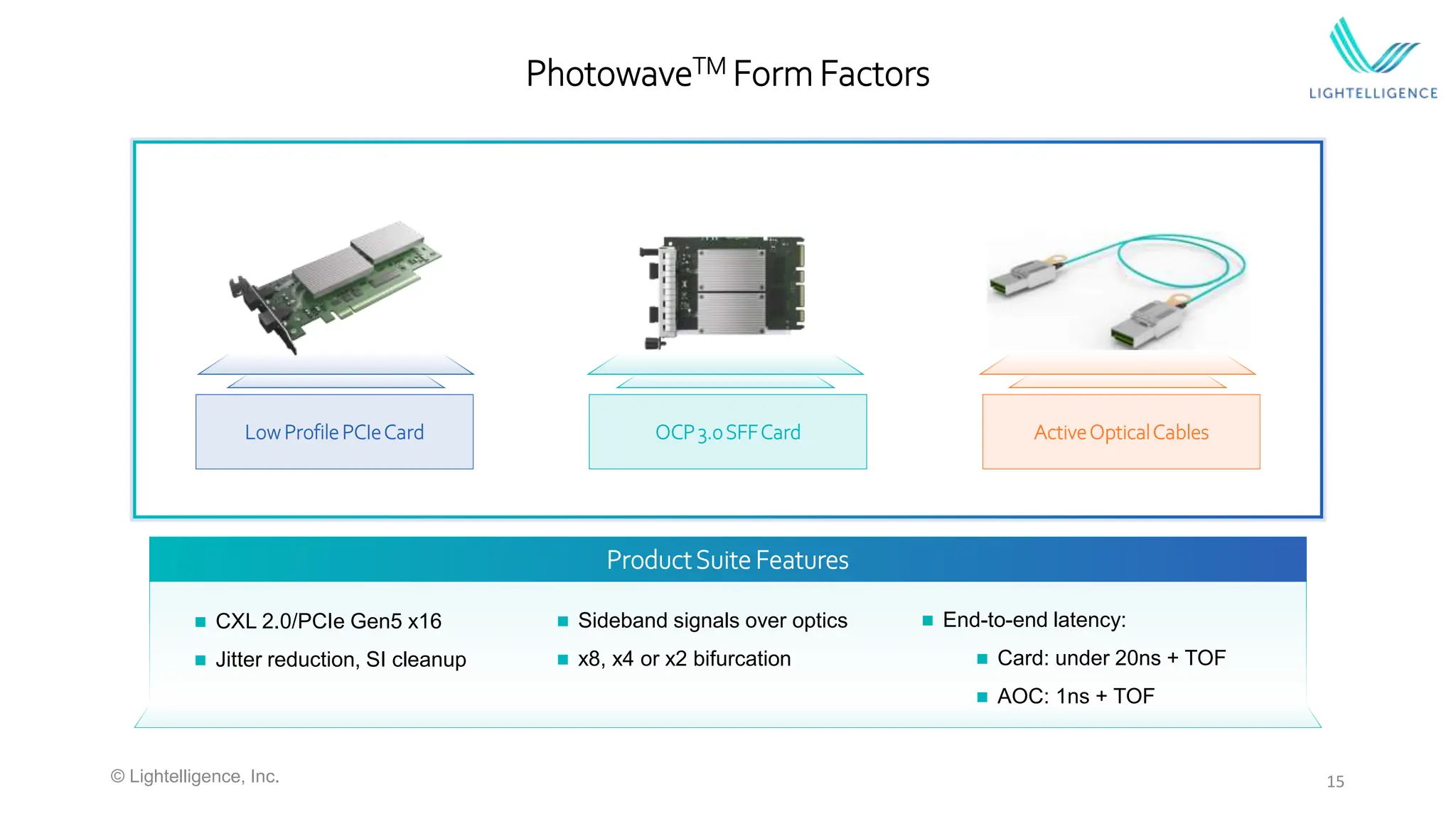
PhotowaveTM Form Factors
 CXL 2.0/PCIe Gen5 x16
 Jitter reduction, SI cleanup
 Sideband signals over optics
 x8, x4 or x2 bifurcation
 End-to-end latency:
 Card: under 20ns + TOF
 AOC: 1ns + TOF
Low ProfilePCIeCard OCP3.0SFFCard ActiveOpticalCables
ProductSuite Features
15
© Lightelligence, Inc.
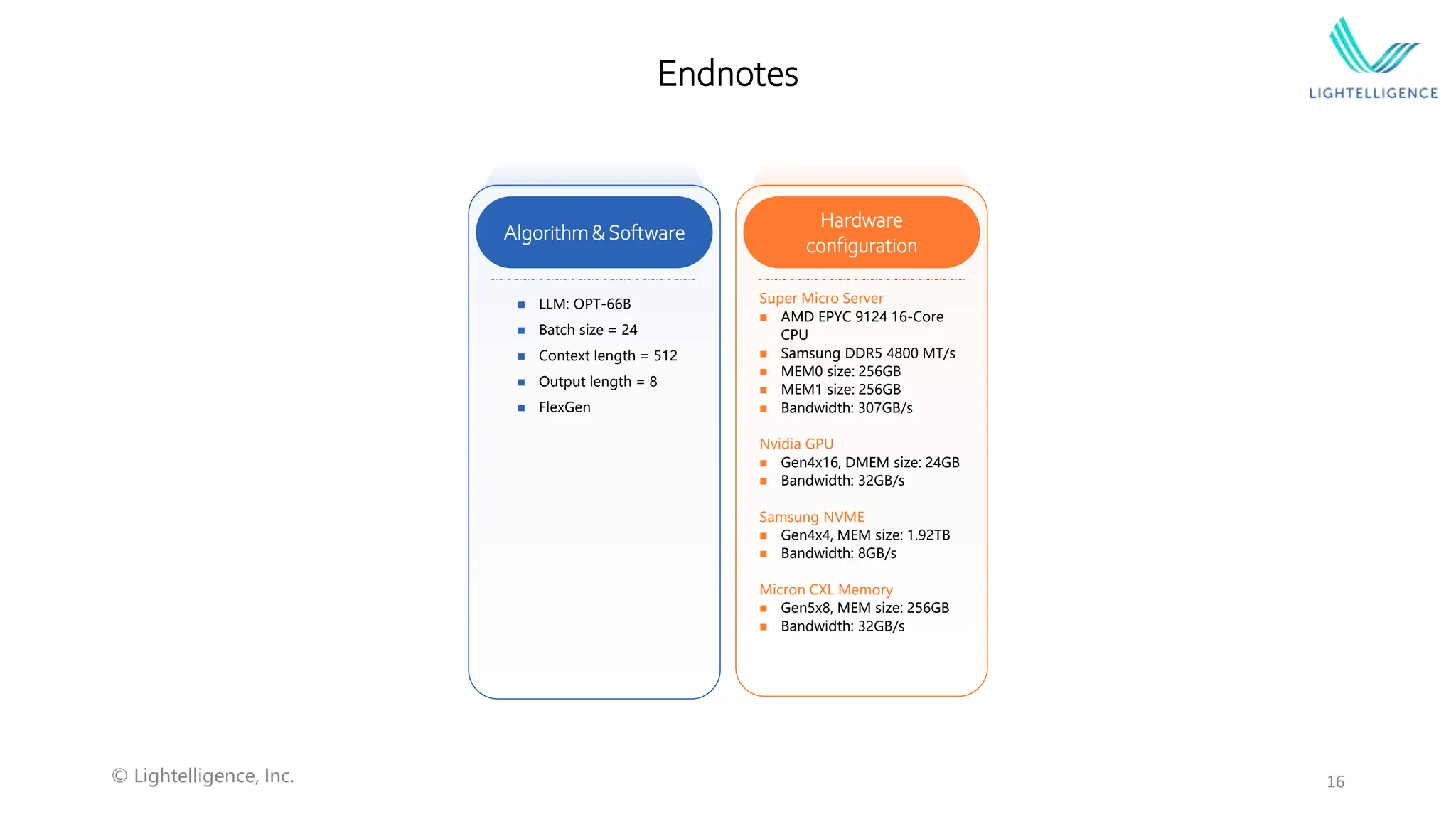
Endnotes
Hardware
configuration
Super Micro Server
 AMD EPYC 9124 16-Core
CPU
 Samsung DDR5 4800 MT/s
 MEM0 size: 256GB
 MEM1 size: 256GB
 Bandwidth: 307GB/s
Nvidia GPU
 Gen4x16, DMEM size: 24GB
 Bandwidth: 32GB/s
Samsung NVME
 Gen4x4, MEM size: 1.92TB
 Bandwidth: 8GB/s
Micron CXL Memory
 Gen5x8, MEM size: 256GB
 Bandwidth: 32GB/s
 LLM: OPT-66B
 Batch size = 24
 Context length = 512
 Output length = 8
 FlexGen
Algorithm&Software
16
© Lightelligence, Inc.

Q1 Memory Fabric Forum: Advantages of Optical CXL​ for Disaggregated Compute Architectures ​

  • 1.
    Harnessing light topower new possibilities Advantages of Optical CXL for Disaggregated Compute Architectures Ron Swartzentruber Director of Engineering
  • 2.
    2 Agenda  Memory centricshift in the data center  AI Large Language Model growth  Need for optical CXL technology  Case study: OPT inference benefits using optical CXL © Lightelligence, Inc.
  • 3.
    3 Physical Machine 0 Virtual Machine 0 Virtual Machine 1 Stranded resource Physical Machine 1 Stranded resource Virtual Machine 2 Virtual Machine 3 FLEXIBLE MANAGEABLEECONOMICAL OPEN Physical Machine 1 Physical Machine 0 Physical Machine 2 …… …… …… Virtual Machine 0 Virtual Machine 1 Virtual Machine 2 Virtual Machine 3 Disaggregation is the Future for Datacenter Virtual Machine 4 CPU cores DRAM Accelerators © Lightelligence, Inc.
  • 4.
    4 AI trends  AIand Large Language Models will continue to grow and consume more compute  Disaggregated memory architectures are required in order to continue to scale  Optical interconnects are required to extend reach Source: https://medium.com/riselab/ai-and-memory-wall-2cb4265cb0b8 Source: https://hc34.hotchips.org/assets/program/tutorials/CXL/Hot%20Chips%202022%20CXL%20MemoryChallenges.pdf © Lightelligence, Inc.
  • 5.
    5 Optical Interconnect Latency ©Lightelligence, Inc. 100s of ns 100s of 𝜇s
  • 6.
    6 CXL is thePredominantStandard for Disaggregation Cache- coherence Latency Memory decouple CXL Yes ~100ns Supported RDMA (ethernet) No ~3μs Not supported CXL 2.0 Switch Standardized Fabric Manager H1 H2 H3 H4 H# …… CXL2.0 CXL2.0 CXL2.0 CXL2.0 CXL2.0 CXL1.0 CXL2.0 CXL2.0 CXL2.0 CXL2.0 D1 D2 D3 D4 …… D# © Lightelligence, Inc.
  • 7.
    7 OpticalCXL is RequiredforScaling ATTENUATION (DB) 0 -10 -20 -30 -40 -50 PROPAGATION DISTANCE (M) 1m 10m 0 -0.003 -4 -40 Copper Optics Assuming AWG26 wire, PCIe 5.0 signal 32 cables with diameter > 6mm (CAT8) 16 fibers with diameter of 0.125mm … … 6mm > 30 mm Copper <1mm Optics Supporting 4x PCIe 5.0 x16 © Lightelligence, Inc.
  • 8.
    8 OpticalCXL in theDatacenter Compute Break Through the Rack! Memory Banks © Lightelligence, Inc.
  • 9.
    9 Case study: LLMInference CXL Memory Expander CXL Memory Expander Server 2x CXL 1.1 CPUs  2U Supermicro server  2x AMD Genoa CXL 1.1 CPUs  MemVerge Memory Tiering and Pooling Software  2x Micron 256GB Memory Expanders each with CXL/PCIe Gen5x8 link Memory Expansion Module Photowave Card  Nvidia GPU running LLM inference  All VMs access to CXL memory  Secure application, encrypted data Photowave Card © Lightelligence, Inc.
  • 10.
    10 LLM Model List ModelWeight Memory(float16) KV-Cache per sample(float16) Activation per sample(float16) Context length OPT-1.3B 2.4 GB 0.095 GB 0.002 GB 512 OPT-13B 23.921 GB 0.397 GB 0.005 GB 512 OPT-30B 55.803 GB 0.667 GB 0.007 GB 512 OPT-66B 122.375 GB 1.143 GB 0.009 GB 512 OPT-175B 325GB 2.285GB 0.012GB 512 KV-cache Size: data_type * dimension* num_layers* batch_size * Context_len * 2 e.g., for opt-1.3B, FP16 -> 2Bytes * 2048 * 24 * 1 * 512 * 2 = 100,663,296 Bytes Activation Size: data_type * dimension * batch_size * Context_len Entire OPT-66B model fits within one 128GB CXL memory expander © Lightelligence, Inc.
  • 11.
     CXL: 882MB/s, SystemMemory 857MB/s, Disk: 582MB/s, MemVerge: 493MB/s  CXL: 2365MB/s, System Memory: 2609MB/s, Disk: 1887MB/s, MemVerge: 2173MB/s 11 Results ~2.4x © Lightelligence, Inc. OPT-66B model results Disk (NVMe) CXL Memory System Memory MemVerge 60:40Policy Decode Throughput (Tokens/s) 1.984 4.868 6.216 6.237 Decode Latency(s) 338.7 138.2 108.1 107.7
  • 12.
    12 PHOTOWAVETM OPTICALCXL MEMORYEXPANDER © Lightelligence, Inc.
  • 13.
    PHOTOWAVETM OPTICALCXL MEMORYEXPANDER CXL GPU UTILIZATION GPU MEM. UTILIZATION CPU UTILIZATION MEM. UTILIZATION CXL MEM. UTILIZATION DECODE THROUGHPUT GENOA AMD CPU SAMSUNG CXL 128GB NVIDIA GPU: 1xA10 24GB OPT-66B MODEL PROGRESS 99% TOKENS/S PARAMETERS INFERENCE ENGINE: FLEXGEN KV CACHE: 109.688GB RUN MODE: CXL WEIGHTS: 122.375GB 95% 77% 51% 27% 77% CXL DIS K ✔️ ✔️ 13 © Lightelligence, Inc. NVMe
  • 14.
    Summary of Results CXLmemory offloading is efficient and beneficial  LLM inference case study  Allows use of lower cost memory Similar performance compared to pure system memory 1.9xTCO improvement with inexpensiveGPUs at similar throughput 2.4x performance advantage compared to SSD/NVMe disk offloading 14 © Lightelligence, Inc.
  • 15.
    PhotowaveTM Form Factors CXL 2.0/PCIe Gen5 x16  Jitter reduction, SI cleanup  Sideband signals over optics  x8, x4 or x2 bifurcation  End-to-end latency:  Card: under 20ns + TOF  AOC: 1ns + TOF Low ProfilePCIeCard OCP3.0SFFCard ActiveOpticalCables ProductSuite Features 15 © Lightelligence, Inc.
  • 16.
    Endnotes Hardware configuration Super Micro Server AMD EPYC 9124 16-Core CPU  Samsung DDR5 4800 MT/s  MEM0 size: 256GB  MEM1 size: 256GB  Bandwidth: 307GB/s Nvidia GPU  Gen4x16, DMEM size: 24GB  Bandwidth: 32GB/s Samsung NVME  Gen4x4, MEM size: 1.92TB  Bandwidth: 8GB/s Micron CXL Memory  Gen5x8, MEM size: 256GB  Bandwidth: 32GB/s  LLM: OPT-66B  Batch size = 24  Context length = 512  Output length = 8  FlexGen Algorithm&Software 16 © Lightelligence, Inc.

Editor's Notes

  • #7 Key message: CXL is industry consensus for disaggregation
  • #12 MemVerge policy: System memory 60%, CXL Memory 40%
  • #14 What is CPU% ******************************************************************************** CPU% mem 29.525 cxl 31.431000000000004 disk 81.46 main.py:36: MatplotlibDeprecationWarning: Calling gca() with keyword arguments was deprecated in Matplotlib 3.4. Starting two minor releases later, gca() will take no keyword arguments. The gca() function should only be used to get the current axes, or if no axes exist, create new axes with default keyword arguments. To create a new axes with non-default arguments, use plt.axes() or plt.subplot(). ax = plt.gca(facecolor='black') ******************************************************************************** MEM% mem 27.2 cxl 27.2 disk 11.722000000000001 ******************************************************************************** GPU% mem 99.49 cxl 97.05 disk 53.01 ******************************************************************************** CXLMEM% mem 0.0016306192454823602 cxl 77.11430249904593 disk 0.1663918208702139 ******************************************************************************** GPUMEM% mem 45.17 cxl 49.0 disk 34.71 ******************************************************************************** GPUMEM_USED_MB mem 9213.4375 cxl 9213.4375 disk 8979.4375 ******************************************************************************** PCI_TX_MBps mem 274.2578125 cxl 191.357421875 disk 81.064453125 ******************************************************************************** PCI_RX_MBps mem 2007.3828125 cxl 1422.421875 disk 1158.056640625 (tfpy38) hussainazhar@Hussains-MacBook-Air T4gpu % python main.py ******************************************************************************** CPU% mem 29.525 cxl 31.431000000000004 disk 81.46 main.py:36: MatplotlibDeprecationWarning: Calling gca() with keyword arguments was deprecated in Matplotlib 3.4. Starting two minor releases later, gca() will take no keyword arguments. The gca() function should only be used to get the current axes, or if no axes exist, create new axes with default keyword arguments. To create a new axes with non-default arguments, use plt.axes() or plt.subplot(). ax = plt.gca(facecolor='black') ******************************************************************************** MEM% mem 27.2 cxl 27.2 disk 11.722000000000001 ******************************************************************************** GPU% mem 99.49 cxl 97.05 disk 53.01 ******************************************************************************** CXLMEM% mem 0.0016306192454823602 cxl 77.11430249904593 disk 0.1663918208702139 ******************************************************************************** GPUMEM% mem 45.17 cxl 49.0 disk 34.71 ******************************************************************************** GPUMEM_USED_MB mem 9213.4375 cxl 9213.4375 disk 8979.4375 ******************************************************************************** PCI_TX_MBps mem 274.2578125 cxl 191.357421875 disk 81.064453125 ******************************************************************************** PCI_RX_MBps mem 2007.3828125 cxl 1422.421875 disk 1158.056640625