
06.12.2016
Recep Düzdemir | Software Infrastructure
Gizem Akman | Software Infrastructure
Push Notification
Push Notification
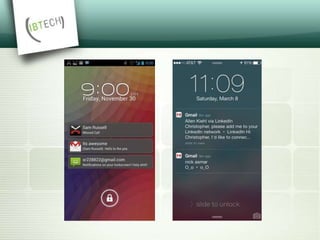
 Push notification is the delivery of information
from a software application to a computing
device without a specific request from
the client.
 Message may contain notification, data or
both.
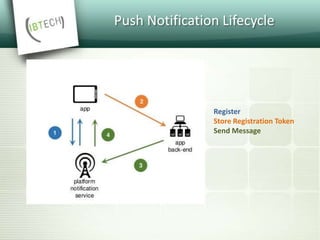
Push Notification Lifecycle
Register
Store Registration Token
Send Message
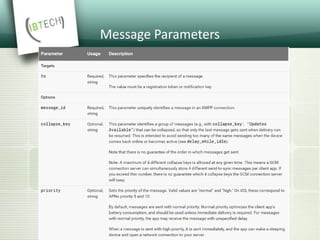
Message Parameters
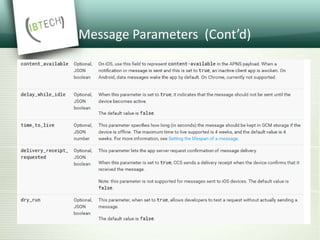
Message Parameters (Cont’d)
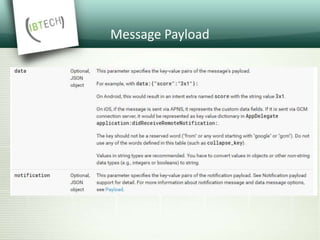
Message Payload
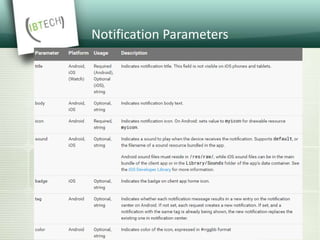
Notification Parameters
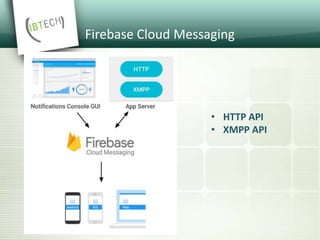
Firebase Cloud Messaging
• HTTP API
• XMPP API
FCM HTTP API
• @ https://gcm-http.googleapis.com/gcm/send
• syncronous
• supports multiple recipients and topics
• no delivery receipt
• unidirectional
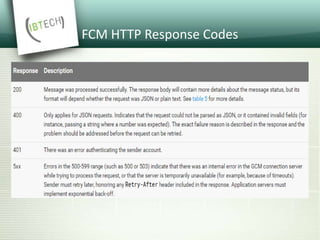
FCM HTTP Response Codes
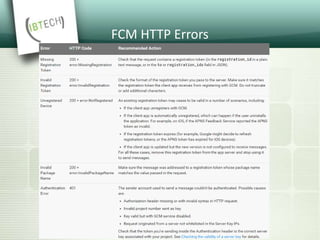
FCM HTTP Errors
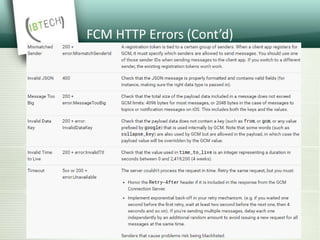
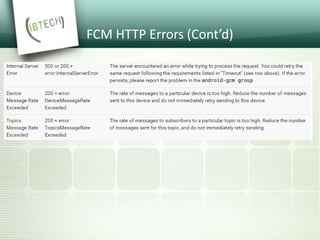
FCM HTTP Errors (Cont’d)
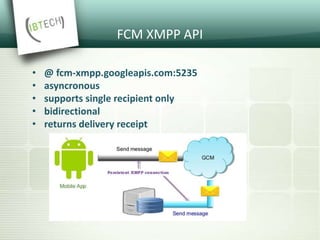
FCM XMPP API
• @ fcm-xmpp.googleapis.com:5235
• asyncronous
• supports single recipient only
• bidirectional
• returns delivery receipt
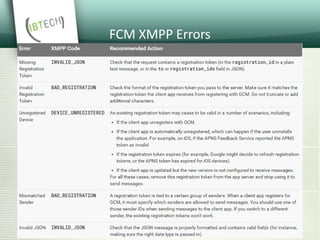
FCM XMPP Errors
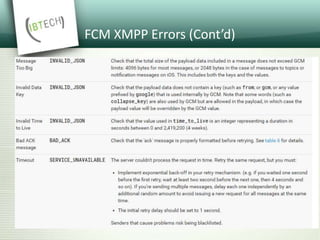
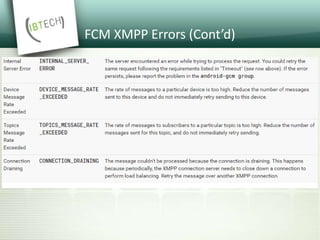
FCM XMPP Errors (Cont’d)
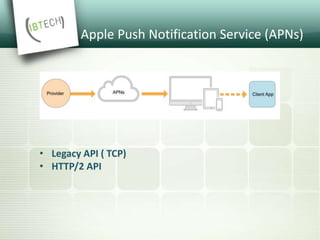
Apple Push Notification Service (APNs)
• Legacy API ( TCP)
• HTTP/2 API
APNs Binary API
• @gateway.push.apple.com:2195
• supports up to 2KB payload
• separate feedback service @ feedback.push.apple.com:2196
• returns no response in case of success
• returns an error response in case of failure and immediately
closes the connection
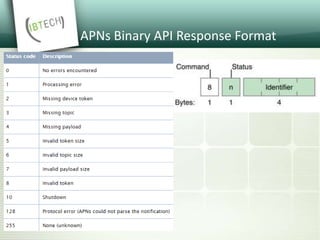
APNs Binary API Response Format
APNs HTTP/2 API
• @api.push.apple.com:443
• supports up to 4KB payload
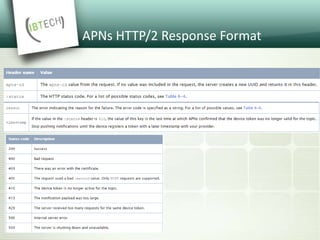
APNs HTTP/2 Response Format
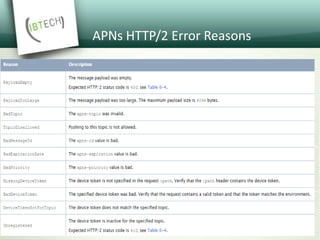
APNs HTTP/2 Error Reasons
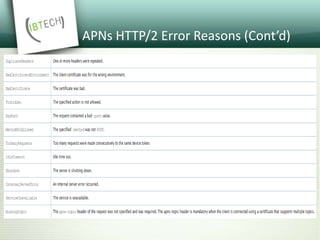
APNs HTTP/2 Error Reasons (Cont’d)
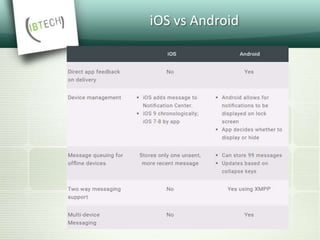
iOS vs Android
Q&A
IOS 10 RICH NOTIFICATIONS
 In iOS 10 notifications are becoming a key part
of Apple's mobile operating system, and one
of the primary way that users interact with
apps.
IOS 10 RICH NOTIFICATIONS
 As part of the new UserNotifications framework, Apple has
given us the ability to make notifications that contain
images, sound, video, or even custom content generated on
the device.
 Much of this capability comes via three new features
showcased at Worldwide Developers Conference(WWDC):
media attachments, notification service extensions, and
notification content extensions.
 Including media in your push notification can increase the
open rate.
What’s new in iOS 10
Notifications?
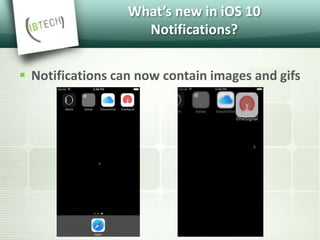
 Notifications can now contain images and gifs
What’s new in iOS 10
Notifications?
 It is now possible to add images and gifs to
notifications.
 These images or gifs can be loaded either from
the resources of your app, or from a remote URL.
 iOS will first download the image or gif and then
display the notification.
What’s new in iOS 10
Notifications?
 Notifications can contain
videos
 Notifications can contain
videos up to 50 megabytes
in size.
What’s new in iOS 10
Notifications?
 Notifications can be
interactive
 Notifications can now contain buttons.
Users can use action buttons to interact
with notifications.
 As with earlier versions of iOS, buttons
can also be used to open your app and
take specific actions. But unlike earlier
versions, actions buttons are much more
easily seen since they don't require a left-
swipe on the notification.
Why Media Attachments Are
Awesome
 Media attachments open up new opportunities for
user engagement with our apps.
 Before, we were limited to just a couple lines of text;
we had to rely on the user opening the app to do
anything more.
 This is a win-win for app makers and users. App makers
get to deliver more compelling content in their
notifications, and users get more choice in their level of
notification interaction.
How They Work
 Media attachments work slightly different between
local notifications and remote notifications.
 In the case of a local notification, its media attachment
must contain the URL of a file on disk at the time that
an app creates the notification.
 The file is copied when the notification is scheduled,
and that file is delivered along with the notification. No
extra effort is required.
How They Work
 For a remote notification, a remote notification service delivers
information about the media attachment as part of the APNS
notification payload.
 This includes the attachment URL, which, importantly, does not
have to be the URL of a file already on the device.
 However, iOS 10 will not automatically deliver an attachment with a
notification if that attachment is not stored locally.
 Apple’s solution to this problem is something called the
Notification Service Extension.
Notification Service Extension
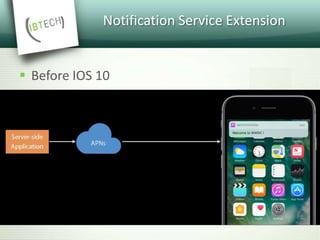
 Before IOS 10
Notification Service Extension
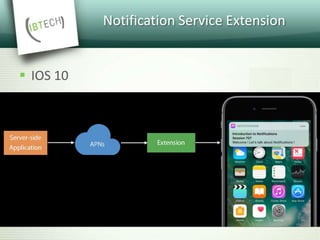
 IOS 10
Notification Service Extension
 Service extension lets you customize the
content of a remote notification before it is
delivered to the user.
 You could use the extension to decrypt an
encrypted data block or to download images
associated with the notification.
Notification Service Extension
 At 4KB in size, a remote notification’s payload is too
small to deliver a media attachment file itself.
 Instead, we define an attachment URL in the remote
notification payload.
 Once a device receives the remote notification payload
for our app, the app’s service extension gets the
chance to download the file at the URL and attach it to
the notification before the device displays the
notification to the user.
Notification Service Extension
 How to add service extension to your
application?
Notification Service Extension
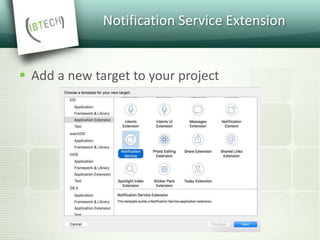
 Add a new target to your project
Notification Service Extension
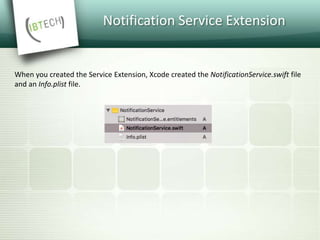
When you created the Service Extension, Xcode created the NotificationService.swift file
and an Info.plist file.
Notification Service Extension
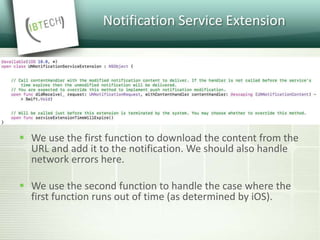
 We use the first function to download the content from the
URL and add it to the notification. We should also handle
network errors here.
 We use the second function to handle the case where the
first function runs out of time (as determined by iOS).
Notification Service Extension
How does iOS know which
notifications to intercept?
Notification Service Extension
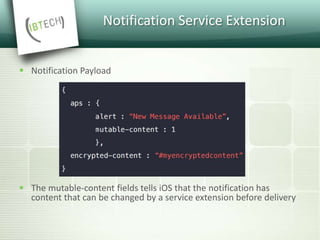
 Notification Payload
 The mutable-content fields tells iOS that the notification has
content that can be changed by a service extension before delivery
 What if we don’t just want to serve up simple
media files?
 What if we want to generate custom content?
Notification Content Extension
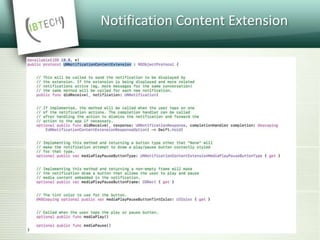
 Notification Content Extension let you provide
custom UI for your notifications.
 A Notification Content Extension gives us a
chance to process a notification and supply
new content to the notification before it is
displayed to the user.
Notification Content Extension
Most important things:
 Custom views
 Support for remote and local notifications
 No interaction with views (possible only with
notification actions)
 Respond to notification actions
Notification Content Extension
 How to add content extension to your
application?
Notification Content Extension
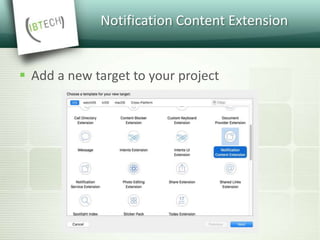
 Add a new target to your project
Notification Content Extension
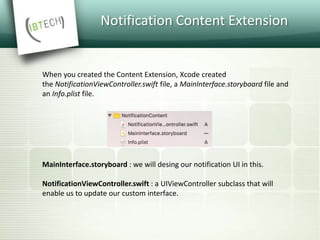
MainInterface.storyboard : we will desing our notification UI in this.
NotificationViewController.swift : a UIViewController subclass that will
enable us to update our custom interface.
When you created the Content Extension, Xcode created
the NotificationViewController.swift file, a MainInterface.storyboard file and
an Info.plist file.
Notification Content Extension
 How does the notification content extension
work?
Notification Content Extension
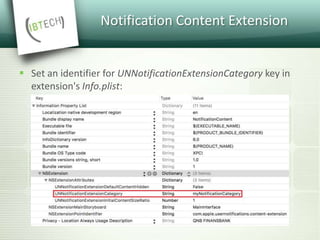
 Set an identifier for UNNotificationExtensionCategory key in
extension's Info.plist:
Notification Content Extension
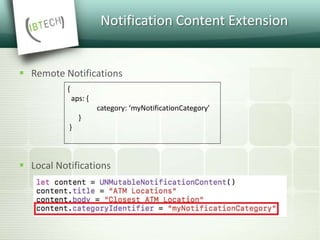
 Remote Notifications
 Local Notifications
{
aps: {
category: ‘myNotificationCategory'
}
}
Notification Content Extension
 We may also implement optional functions
that handle action button presses or display
media playback controls.
 How to add a custom action?
Notification Actions
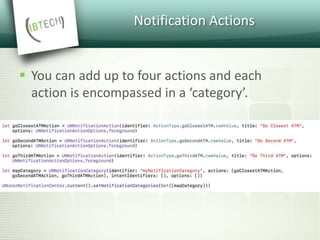
 You can add up to four actions and each
action is encompassed in a ‘category’.
 Demo
Android N Notifications
 Notifications are become an important part of
every Android application and it is an
intelligent way to re-engage users with the
installed apps.
 Effectively used notifications will help
application to get returning users.
Android N Notifications
 To provide a better user experience,
notifications on Android N have received a
visual refresh, improved support for custom
views, and expanded functionality in the
forms of Direct Reply, a new MessagingStyle,
and bundled notifications.
Android N Notifications
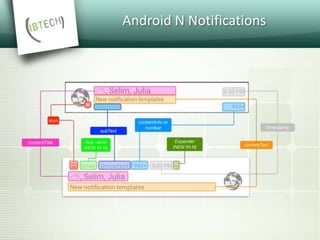
 The first and most obvious change is that the default look
and feel of notifications has significantly changed.
 Many of the fields that were spread around the
notifications have been collapsed into a new header row
with your app’s icon and name anchoring the notification.
 This change ensured that the title, text, and large icon are
given the most amount of space possible and, as a result,
notifications are generally slightly larger now and easier to
read.
Android N Notifications
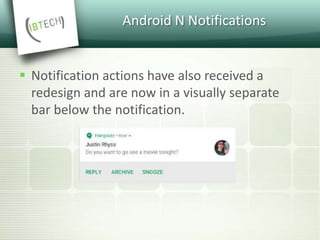
 Notification actions have also received a
redesign and are now in a visually separate
bar below the notification.
Direct Reply
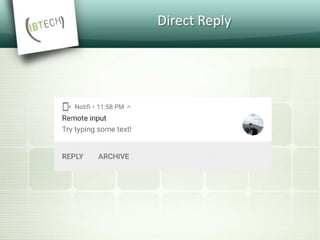
 While notification actions have already been
able to launch an Activity or do background
work with a Service or BroadcastReceiver,
Direct Reply allows you to build an action that
directly receives text input inline with the
notification actions.
Direct Reply
Android N Notifications
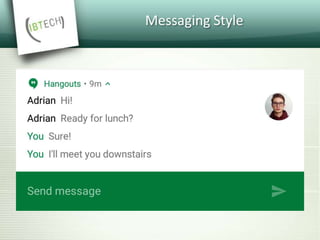
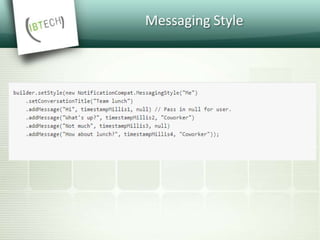
 If you’re building a messaging app and expect
back and forth conversations, you should use
MessagingStyle and append the additional
message to it.
Messaging Style
Messaging Style
Bundled Notifications
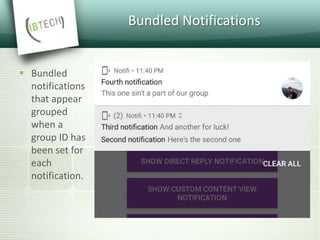
 Bundled
notifications
that appear
grouped
when a
group ID has
been set for
each
notification.
Bundled Notifications
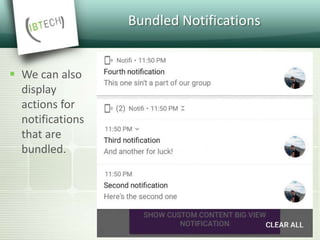
 We can also
display
actions for
notifications
that are
bundled.
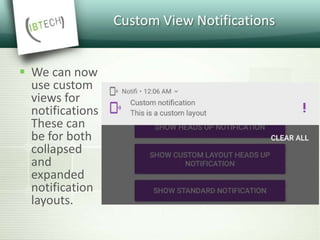
Custom View Notifications
 We can now
use custom
views for
notifications
These can
be for both
collapsed
and
expanded
notification
layouts.
 Demo
Q&A

Push Notification

  • 1.
    06.12.2016 Recep Düzdemir |Software Infrastructure Gizem Akman | Software Infrastructure Push Notification
  • 2.
    Push Notification  Pushnotification is the delivery of information from a software application to a computing device without a specific request from the client.  Message may contain notification, data or both.
  • 4.
    Push Notification Lifecycle Register StoreRegistration Token Send Message
  • 5.
  • 6.
  • 7.
  • 8.
  • 9.
    Firebase Cloud Messaging •HTTP API • XMPP API
  • 10.
    FCM HTTP API •@ https://gcm-http.googleapis.com/gcm/send • syncronous • supports multiple recipients and topics • no delivery receipt • unidirectional
  • 11.
  • 12.
  • 13.
    FCM HTTP Errors(Cont’d)
  • 14.
    FCM HTTP Errors(Cont’d)
  • 15.
    FCM XMPP API •@ fcm-xmpp.googleapis.com:5235 • asyncronous • supports single recipient only • bidirectional • returns delivery receipt
  • 16.
  • 17.
    FCM XMPP Errors(Cont’d)
  • 18.
    FCM XMPP Errors(Cont’d)
  • 19.
    Apple Push NotificationService (APNs) • Legacy API ( TCP) • HTTP/2 API
  • 20.
    APNs Binary API •@gateway.push.apple.com:2195 • supports up to 2KB payload • separate feedback service @ feedback.push.apple.com:2196 • returns no response in case of success • returns an error response in case of failure and immediately closes the connection
  • 21.
    APNs Binary APIResponse Format
  • 22.
    APNs HTTP/2 API •@api.push.apple.com:443 • supports up to 4KB payload
  • 23.
  • 24.
  • 25.
    APNs HTTP/2 ErrorReasons (Cont’d)
  • 26.
  • 27.
  • 29.
    IOS 10 RICHNOTIFICATIONS  In iOS 10 notifications are becoming a key part of Apple's mobile operating system, and one of the primary way that users interact with apps.
  • 30.
    IOS 10 RICHNOTIFICATIONS  As part of the new UserNotifications framework, Apple has given us the ability to make notifications that contain images, sound, video, or even custom content generated on the device.  Much of this capability comes via three new features showcased at Worldwide Developers Conference(WWDC): media attachments, notification service extensions, and notification content extensions.  Including media in your push notification can increase the open rate.
  • 31.
    What’s new iniOS 10 Notifications?  Notifications can now contain images and gifs
  • 32.
    What’s new iniOS 10 Notifications?  It is now possible to add images and gifs to notifications.  These images or gifs can be loaded either from the resources of your app, or from a remote URL.  iOS will first download the image or gif and then display the notification.
  • 33.
    What’s new iniOS 10 Notifications?  Notifications can contain videos  Notifications can contain videos up to 50 megabytes in size.
  • 34.
    What’s new iniOS 10 Notifications?  Notifications can be interactive  Notifications can now contain buttons. Users can use action buttons to interact with notifications.  As with earlier versions of iOS, buttons can also be used to open your app and take specific actions. But unlike earlier versions, actions buttons are much more easily seen since they don't require a left- swipe on the notification.
  • 35.
    Why Media AttachmentsAre Awesome  Media attachments open up new opportunities for user engagement with our apps.  Before, we were limited to just a couple lines of text; we had to rely on the user opening the app to do anything more.  This is a win-win for app makers and users. App makers get to deliver more compelling content in their notifications, and users get more choice in their level of notification interaction.
  • 36.
    How They Work Media attachments work slightly different between local notifications and remote notifications.  In the case of a local notification, its media attachment must contain the URL of a file on disk at the time that an app creates the notification.  The file is copied when the notification is scheduled, and that file is delivered along with the notification. No extra effort is required.
  • 37.
    How They Work For a remote notification, a remote notification service delivers information about the media attachment as part of the APNS notification payload.  This includes the attachment URL, which, importantly, does not have to be the URL of a file already on the device.  However, iOS 10 will not automatically deliver an attachment with a notification if that attachment is not stored locally.  Apple’s solution to this problem is something called the Notification Service Extension.
  • 38.
  • 39.
  • 40.
    Notification Service Extension Service extension lets you customize the content of a remote notification before it is delivered to the user.  You could use the extension to decrypt an encrypted data block or to download images associated with the notification.
  • 41.
    Notification Service Extension At 4KB in size, a remote notification’s payload is too small to deliver a media attachment file itself.  Instead, we define an attachment URL in the remote notification payload.  Once a device receives the remote notification payload for our app, the app’s service extension gets the chance to download the file at the URL and attach it to the notification before the device displays the notification to the user.
  • 42.
    Notification Service Extension How to add service extension to your application?
  • 43.
    Notification Service Extension Add a new target to your project
  • 44.
    Notification Service Extension Whenyou created the Service Extension, Xcode created the NotificationService.swift file and an Info.plist file.
  • 45.
    Notification Service Extension We use the first function to download the content from the URL and add it to the notification. We should also handle network errors here.  We use the second function to handle the case where the first function runs out of time (as determined by iOS).
  • 46.
    Notification Service Extension Howdoes iOS know which notifications to intercept?
  • 47.
    Notification Service Extension Notification Payload  The mutable-content fields tells iOS that the notification has content that can be changed by a service extension before delivery
  • 48.
     What ifwe don’t just want to serve up simple media files?  What if we want to generate custom content?
  • 49.
    Notification Content Extension Notification Content Extension let you provide custom UI for your notifications.  A Notification Content Extension gives us a chance to process a notification and supply new content to the notification before it is displayed to the user.
  • 50.
    Notification Content Extension Mostimportant things:  Custom views  Support for remote and local notifications  No interaction with views (possible only with notification actions)  Respond to notification actions
  • 51.
    Notification Content Extension How to add content extension to your application?
  • 52.
    Notification Content Extension Add a new target to your project
  • 53.
    Notification Content Extension MainInterface.storyboard: we will desing our notification UI in this. NotificationViewController.swift : a UIViewController subclass that will enable us to update our custom interface. When you created the Content Extension, Xcode created the NotificationViewController.swift file, a MainInterface.storyboard file and an Info.plist file.
  • 54.
    Notification Content Extension How does the notification content extension work?
  • 55.
    Notification Content Extension Set an identifier for UNNotificationExtensionCategory key in extension's Info.plist:
  • 56.
    Notification Content Extension Remote Notifications  Local Notifications { aps: { category: ‘myNotificationCategory' } }
  • 57.
  • 58.
    Notification Content Extension We may also implement optional functions that handle action button presses or display media playback controls.  How to add a custom action?
  • 59.
    Notification Actions  Youcan add up to four actions and each action is encompassed in a ‘category’.
  • 60.
  • 61.
    Android N Notifications Notifications are become an important part of every Android application and it is an intelligent way to re-engage users with the installed apps.  Effectively used notifications will help application to get returning users.
  • 62.
    Android N Notifications To provide a better user experience, notifications on Android N have received a visual refresh, improved support for custom views, and expanded functionality in the forms of Direct Reply, a new MessagingStyle, and bundled notifications.
  • 63.
    Android N Notifications The first and most obvious change is that the default look and feel of notifications has significantly changed.  Many of the fields that were spread around the notifications have been collapsed into a new header row with your app’s icon and name anchoring the notification.  This change ensured that the title, text, and large icon are given the most amount of space possible and, as a result, notifications are generally slightly larger now and easier to read.
  • 64.
  • 65.
    Android N Notifications Notification actions have also received a redesign and are now in a visually separate bar below the notification.
  • 66.
    Direct Reply  Whilenotification actions have already been able to launch an Activity or do background work with a Service or BroadcastReceiver, Direct Reply allows you to build an action that directly receives text input inline with the notification actions.
  • 67.
  • 68.
    Android N Notifications If you’re building a messaging app and expect back and forth conversations, you should use MessagingStyle and append the additional message to it.
  • 69.
  • 70.
  • 71.
    Bundled Notifications  Bundled notifications thatappear grouped when a group ID has been set for each notification.
  • 72.
    Bundled Notifications  Wecan also display actions for notifications that are bundled.
  • 73.
    Custom View Notifications We can now use custom views for notifications These can be for both collapsed and expanded notification layouts.
  • 74.
  • 75.

Editor's Notes

  • #3 iOS için content-available = silent notification Kavramlar karışmasın diye, gönderdiğimiz şeye mesaj diyelim. Notification = alert olarak ekranda görünen kısım (Display message) . Data = uygulamaya gönderilen bilgiler.
  • #5 Hiçbir pn sisteminde delivery garantisi yok. Servise gönderilen isteğin hata almaması, isteğin format olarak doğru olduğu ve gönderilmeye çalışılacağı anlamına gelir.
  • #6 APNs cihaza iletemezse yalnızca bir tane mesajı store ediyor. FCM 100 taneye kadar store ediyor. ( Collapse_key iOS için anlamsız)
  • #17 XMPP = Extensible Messaging and Presence Protocol
  • #31 iOS 10’da bildirimler daha önemli bir hale geldi ve kullanıcıların uygulamayla etkileşime geçmesinin başlıca yollarından biri oldu.
  • #32 Yeni UserNotifications framework’ü ile artık bildirimlere resim, ses, video ve custom içerik ekleyebiliyoruz. Bu yetenekler WWDC ‘de duyurulan service extension, content extension ve media attachments özellikleriye bir geldi. Bildirimlerde media içeriklerini kullanmak uygulamanın açılma oranını arttırıyor.
  • #34 Bu resim ve gif’ler uygulamanın resource’unda da bulunabilir, bir url’den de indirilebilir. Url’den yüklenecekse önce download işlemi yapılıyor daha sonra bildirim gösteriliyor.
  • #36 Bildirimlerde butonlar kullanabiliriz. Kullanıcılar bu butonları kullanarak bildirim ile etkileşime geçebilir. Eski versiyonlarda olduğu gibi butonlar uygulamanın açılması için kullanılabilir ama eski versiyonlardan farklı olarak butonlar artık daha kolay görünür hale geldi. Eskiden sola sürükleme ile görünürken şimdi bildirimin alt bölümünde bu butonlar görülebiliyor.
  • #37 Medya ekleri, uygulamalarımıza kullanıcıların katılımı için yeni fırsatlar yaratır. Önceden bildirimlerde birkaç satır text gösterebilirdik. Daha fazlası için kullanıcının uygulamayı açması gerekirdi. Yeni özellikler ile uygulama yazanlar bildirimlere daha şık içerikler ekleyebilir hale geldi, kullanıcılarda bildirimlerle daha fazla etkileşime geçer hale geldi.
  • #38 Medya ekleri local’de ve remote’da farklı şekilde çalışıyor. Lokalden bildirim yollanacaksa medya ekinin diskte bulunması gerekiyor.
  • #39 Remote notification’larda media ekleri için url’ler kullanılabilir. Ekler url’lerden downlod edilebilir. Bunun için de Service Extension özelliği geldi.
  • #42 Service extension’lar bildirim kullanıcıya gösterilmeden önce bildirimi customize edebilmemizi sağlıyor. Örneğin encrypted bir data kullanıcıya gösterilmeden önce decrypt edilebilir. Medya ekleri download edilebilir.
  • #43 Notification payload’lar max 4kb olduğu için medya ekini payload’da gönderemeyiz. Bunun yerine media ekini download edebileceğimiz url’i gönderebiliriz.
  • #50 Custom içerik göstermek istiyorsak ne yapmalıyız?
  • #51 Notification content extension bildirim kullanıcıya gösterilmeden önce bildirimin içeriğine göre custom UI’lar üretebilmemizi sağlar.
  • #58 UNNotificationExtensionInitialContentSizeRatio: number that represents the initial size of your view controller’s view expressed as a ratio of its height to its width. UNNotificationExtensionDefaultContentHidden: When set to YES, the system displays only your custom view controller in the notification interface. When set to NO, the system displays the default notification content in addition to your view controller’s content.
  • #63 Bildirimler, Android uygulamalarının önemli bir parçası haline geldi ve kullanıcıları yüklü uygulamalarla yeniden etkileşime geçirmenin akıllı bir yoludur. Etkili şekilde kullanılan bildirimler, kullanıcıları uygulamaya geri döndürmeye yardımcı olacaktır.
  • #64 Daha iyi bir kullanıcı deneyimi sağlamak için Android N'deki bildirimlere görsel yenileme, custom view’lar için daha gelişmiş destek, Direct Reply, MessagingStyle ve bundled notifications özellikleri geldi.
  • #65 Bildirimlerin default görünümünde değişiklikler oldu. Bazı alanlar bildirim içinde farklı yerlerde gösterilmeye başlandı. Bazı yeni alanlar eklendi. Bildirimler biraz daha genişledi ve okunması kolay hale getirildi.
  • #67 Notification action’lar yeniden dizayn edildi. Bildirimin altında ayrı bir bar’da gösterilmeye başlandı.
  • #68 En önemli yeniliklerden biri Direct Reply. Direct reply ile notification action’a bastığımızda bir text input ortaya çıkar. Bu text input’a bir değer girip bunu send butonu ile gönderebiliriz.
  • #70 Mesajlaşma uygulamaları için yeni gelen bir özellikte MessagingStyle. MessagingStyle ile önceki konuşmaları da bildirimde görebiliriz.
  • #72 Bu stil ile göstermek istediğimiz mesajları addMessage metodu ile ekleyebiliriz. Her bir mesajın timestamp’ini ve gönderen bilgisini set edebiliriz.
  • #73 Bildirimlere group id set ederek gruplayabiliriz. Bu da daha derli toplu bir görünüm sağlıyor.
  • #74 Bundle edilen bildirimlere de notification action’lar ekleyebiliriz.
  • #75 Hem expanded hem collapsed durumdaki bildirimler de custom view’lar kullanabiliriz.