
PWA
Progressive Web Apps
Yusuf Koraman - Software Infrastructure
“A new way to deliver amazing user experiences on the web.”
Summary
1. PWA , What? How? Who?
2. Browser Capabilities
3. Characteristics & Benefits
4. Architecture
1. Service Workers & Demo
2. Manifest File & Demo
3. Service Workers & Apis & Demo
5. Case Studies
What’s PWA?
Progressive Web App (PWA), in general, is a term used to denote web apps that use the latest web
technologies
Progressive Web Apps, also known as Installable Web Apps or Hybrid Web Apps
This new application type attempts to combine features offered by most modern browsers with
the benefits of mobile experience
Progressive Web Apps are enabled by the Application Manifest and Service Workers standards
by W3C.
How PWA works?
Minimum Requirements : Html, Css, Javascript.
Depends on OS
Web Site > Install Banner/ Properties > Add to Shortcut > Pwa working as a native/ hybrid apps.
Ex : https://www.flipkart.com/
Who?
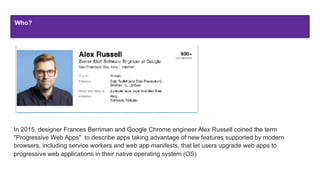
In 2015, designer Frances Berriman and Google Chrome engineer Alex Russell coined the term
"Progressive Web Apps" to describe apps taking advantage of new features supported by modern
browsers, including service workers and web app manifests, that let users upgrade web apps to
progressive web applications in their native operating system (OS)
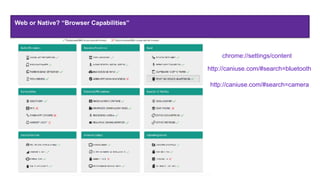
Web or Native? “Browser Capabilities”
chrome://settings/content
http://caniuse.com/#search=bluetooth
http://caniuse.com/#search=camera
Characteristics
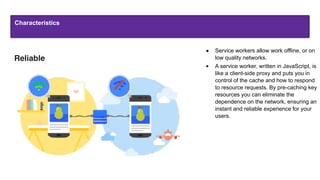
● Service workers allow work offline, or on
low quality networks.
● A service worker, written in JavaScript, is
like a client-side proxy and puts you in
control of the cache and how to respond
to resource requests. By pre-caching key
resources you can eliminate the
dependence on the network, ensuring an
instant and reliable experience for your
users.
Reliable
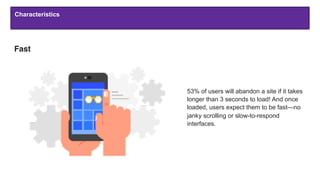
Fast
53% of users will abandon a site if it takes
longer than 3 seconds to load! And once
loaded, users expect them to be fast—no
janky scrolling or slow-to-respond
interfaces.
Characteristics
Characteristics
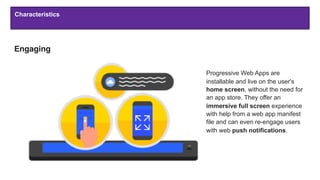
Engaging
Progressive Web Apps are
installable and live on the user's
home screen, without the need for
an app store. They offer an
immersive full screen experience
with help from a web app manifest
file and can even re-engage users
with web push notifications.
Characteristics
Characteristics
Progressive - Work for every user, regardless of browser choice.
Responsive - Fit any form factor: desktop, mobile, tablet, or forms yet to emerge.
App-like - Feel like an app to the user with app-style interactions and navigation.
Fresh - Always up-to-date thanks to the service worker update process.
Safe - Served via HTTPS to prevent snooping and ensure content hasn’t been tampered with.
Discoverable - Are identifiable as “applications” thanks to W3C manifests[6] and service worker
registration scope allowing search engines to find them.
Re-engageable - Make re-engagement easy through features like push notifications.
Installable - Allow users to “keep” apps they find most useful on their home screen without the hassle of
an app store.
Linkable - Easily shared via a URL and do not require complex installation.
Characteristics
Why build a Progressive Web App?
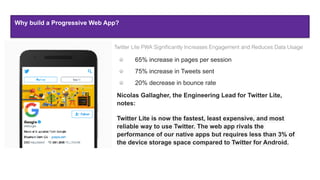
Twitter Lite PWA Significantly Increases Engagement and Reduces Data Usage
65% increase in pages per session
75% increase in Tweets sent
20% decrease in bounce rate
Nicolas Gallagher, the Engineering Lead for Twitter Lite,
notes:
Twitter Lite is now the fastest, least expensive, and most
reliable way to use Twitter. The web app rivals the
performance of our native apps but requires less than 3% of
the device storage space compared to Twitter for Android.
Why build a Progressive Web App?
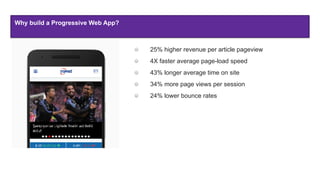
25% higher revenue per article pageview
4X faster average page-load speed
43% longer average time on site
34% more page views per session
24% lower bounce rates
Why build a Progressive Web App?
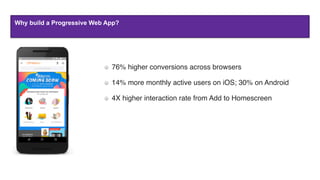
 76% higher conversions across browsers
 14% more monthly active users on iOS; 30% on Android
 4X higher interaction rate from Add to Homescreen
Why build a Progressive Web App?
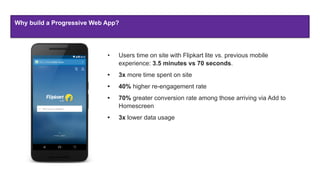
• Users time on site with Flipkart lite vs. previous mobile
experience: 3.5 minutes vs 70 seconds.
• 3x more time spent on site
• 40% higher re-engagement rate
• 70% greater conversion rate among those arriving via Add to
Homescreen
• 3x lower data usage
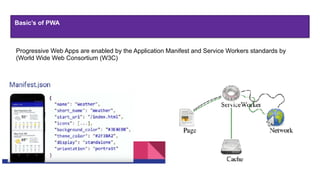
Basic’s of PWA
Progressive Web Apps are enabled by the Application Manifest and Service Workers standards by
(World Wide Web Consortium (W3C)
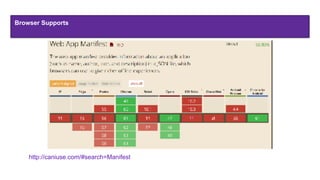
Browser Supports
http://caniuse.com/#search=Manifest
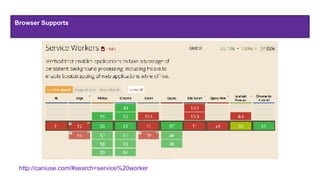
Browser Supports
http://caniuse.com/#search=service%20worker
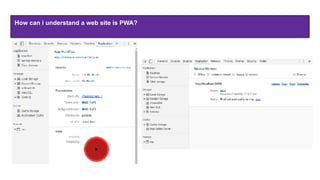
How can i understand a web site is PWA?
"/b9af9805d4535bd3.png
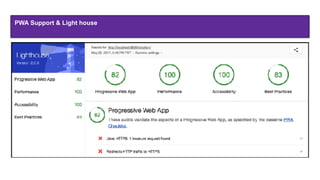
PWA Support & Light house
https://developers.google.com/web/ilt/pwa/lighthouse-pwa-analysis-tool
PWA Support & Light house
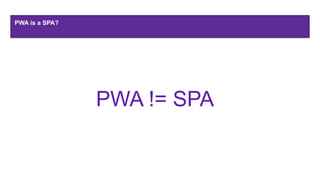
PWA is a SPA?
PWA != SPA
Current Status
The Safari (Apple) team has started work on serviceWorkers.
PWAs running on Android are now actually installed locally and work like native apps
WebUSB API is appearing with Chrome 61, giving web developers access to USB units
navigator.share API enables triggering the native OS share menu
Front end frameworks are rapidly evolving and maturing
Architecture
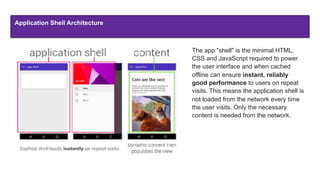
Application Shell Architecture
The app "shell" is the minimal HTML,
CSS and JavaScript required to power
the user interface and when cached
offline can ensure instant, reliably
good performance to users on repeat
visits. This means the application shell is
not loaded from the network every time
the user visits. Only the necessary
content is needed from the network.
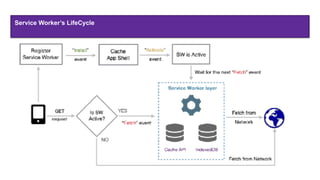
Service Workers
A service worker is a script that your browser runs in the background, separate from a web page, opening the
door to features that don't need a web page or user interaction.
Before service worker, there was one other API that gave users an offline experience on the web
called AppCache.
It's a JavaScript Worker, so it can't access the DOM directly.
Service worker can communicate with the pages it controls by responding to messages sent via
the postMessage interface, and those pages can manipulate the DOM if needed
Service worker is a programmable network proxy, allowing you to control how network requests from your
page are handled
A service worker has a lifecycle that is completely separate from your web page.
Service Worker’s LifeCycle
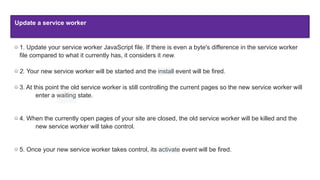
Update a service worker
1. Update your service worker JavaScript file. If there is even a byte's difference in the service worker
file compared to what it currently has, it considers it new.
2. Your new service worker will be started and the install event will be fired.
3. At this point the old service worker is still controlling the current pages so the new service worker will
enter a waiting state.
4. When the currently open pages of your site are closed, the old service worker will be killed and the
new service worker will take control.
5. Once your new service worker takes control, its activate event will be fired.
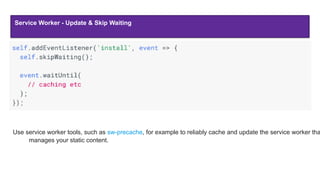
Service Worker - Update & Skip Waiting
Use service worker tools, such as sw-precache, for example to reliably cache and update the service worker tha
manages your static content.
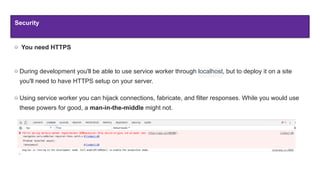
Security
You need HTTPS
During development you'll be able to use service worker through localhost, but to deploy it on a site
you'll need to have HTTPS setup on your server.
Using service worker you can hijack connections, fabricate, and filter responses. While you would use
these powers for good, a man-in-the-middle might not.
" Service Worker Registration
" Check Lifecycle
"Service Worker Caches
"Lazy load & Static caches
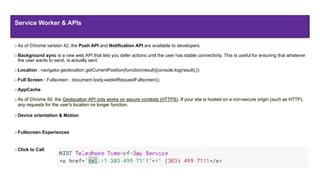
As of Chrome version 42, the Push API and Notification API are available to developers.
Background sync is a new web API that lets you defer actions until the user has stable connectivity. This is useful for ensuring that whatever
the user wants to send, is actually sent.
Location : navigator.geolocation.getCurrentPosition(function(result){console.log(result);})
Full Screen : Fullscreen : document.body.webkitRequestFullscreen();
AppCache
As of Chrome 50, the Geolocation API only works on secure contexts (HTTPS). If your site is hosted on a non-secure origin (such as HTTP),
any requests for the user's location no longer function.
Device orientation & Motion
Fullscreen Experiences
Click to Call
Service Worker & APIs
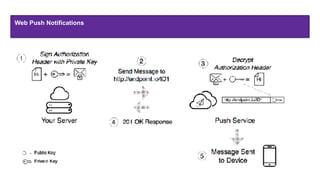
Web Push Notifications
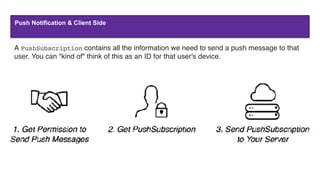
Push Notification & Client Side
A PushSubscription contains all the information we need to send a push message to that
user. You can "kind of" think of this as an ID for that user's device.
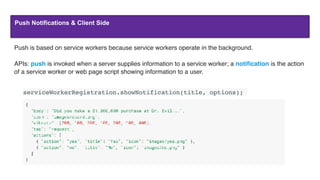
Push Notifications & Client Side
Push is based on service workers because service workers operate in the background.
APIs: push is invoked when a server supplies information to a service worker; a notification is the action
of a service worker or web page script showing information to a user.
serviceWorkerRegistration.showNotification(title, options);
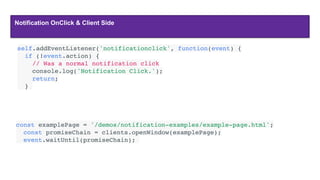
Notification OnClick & Client Side
const examplePage = '/demos/notification-examples/example-page.html';
  const promiseChain = clients.openWindow(examplePage);
  event.waitUntil(promiseChain);
self.addEventListener('notificationclick', function(event) {
  if (!event.action) {
    // Was a normal notification click
    console.log('Notification Click.');
    return;
  }
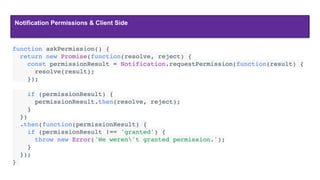
Notification Permissions & Client Side
function askPermission() {
  return new Promise(function(resolve, reject) {
    const permissionResult = Notification.requestPermission(function(result) {
      resolve(result);
    });
    if (permissionResult) {
      permissionResult.then(resolve, reject);
    }
  })
  .then(function(permissionResult) {
    if (permissionResult !== 'granted') {
      throw new Error('We weren't granted permission.');
    }
  });
}
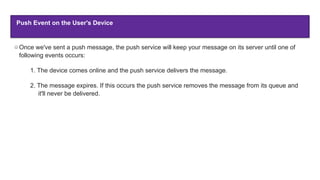
Push Event on the User's Device
Once we've sent a push message, the push service will keep your message on its server until one of
following events occurs:
1. The device comes online and the push service delivers the message.
2. The message expires. If this occurs the push service removes the message from its queue and
it'll never be delivered.
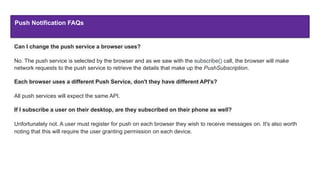
Push Notification FAQs
Can I change the push service a browser uses?
No. The push service is selected by the browser and as we saw with the subscribe() call, the browser will make
network requests to the push service to retrieve the details that make up the PushSubscription.
Each browser uses a different Push Service, don't they have different API's?
All push services will expect the same API.
If I subscribe a user on their desktop, are they subscribed on their phone as well?
Unfortunately not. A user must register for push on each browser they wish to receive messages on. It's also worth
noting that this will require the user granting permission on each device.
" Service Worker & Push Notifications
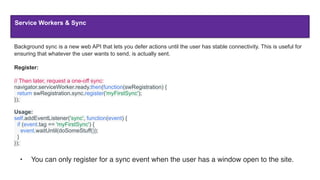
Service Workers & Sync
Background sync is a new web API that lets you defer actions until the user has stable connectivity. This is useful for
ensuring that whatever the user wants to send, is actually sent.
Register:
// Then later, request a one-off sync:
navigator.serviceWorker.ready.then(function(swRegistration) {
return swRegistration.sync.register('myFirstSync');
});
Usage:
self.addEventListener('sync', function(event) {
if (event.tag == 'myFirstSync') {
event.waitUntil(doSomeStuff());
}
});
• You can only register for a sync event when the user has a window open to the site.
" Service Worker & Sync
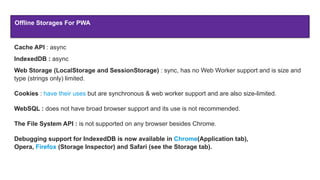
Offline Storages For PWA
Cache API : async
IndexedDB : async
Web Storage (LocalStorage and SessionStorage) : sync, has no Web Worker support and is size and
type (strings only) limited.
Cookies : have their uses but are synchronous & web worker support and are also size-limited.
WebSQL : does not have broad browser support and its use is not recommended.
The File System API : is not supported on any browser besides Chrome.
Debugging support for IndexedDB is now available in Chrome(Application tab),
Opera, Firefox (Storage Inspector) and Safari (see the Storage tab).
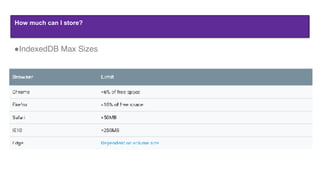
How much can I store?
"IndexedDB Max Sizes
" Index DB Sample
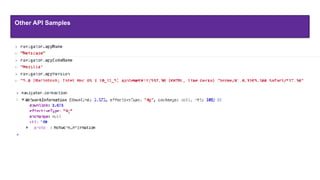
Other API Samples
" Other APIs & Media Sample
Manifest
The web app manifest is a simple JSON file that gives you, the developer, the ability to control how your app appears to the user
{
  "short_name": "AirHorner",
  "name": "Kinlan's AirHorner of Infamy",
  "icons": [
    {
      "src": "launcher-icon-1x.png",
      "type": "image/png",
      "sizes": "48x48"
    },
    {
      "src": "launcher-icon-2x.png",
      "type": "image/png",
      "sizes": "96x96"
    },
    {
      "src": "launcher-icon-4x.png",
      "type": "image/png",
      "sizes": "192x192"
    }
  ],
  "start_url": “index.html?launcher=true”,
“background_color": “#2196F3”,
“theme_color": “#2196F3”,
“display": “standalone",
“orientation": "landscape"
}
https://developer.mozilla.org/en-US/docs/Web/Manifest
" Manifest Sample
Case Studies
https://developers.google.com/web/showcase/region/#europe
Questions

Progressive Web Apps

  • 1.
    PWA Progressive Web Apps YusufKoraman - Software Infrastructure “A new way to deliver amazing user experiences on the web.”
  • 2.
    Summary 1. PWA ,What? How? Who? 2. Browser Capabilities 3. Characteristics & Benefits 4. Architecture 1. Service Workers & Demo 2. Manifest File & Demo 3. Service Workers & Apis & Demo 5. Case Studies
  • 3.
    What’s PWA? Progressive WebApp (PWA), in general, is a term used to denote web apps that use the latest web technologies Progressive Web Apps, also known as Installable Web Apps or Hybrid Web Apps This new application type attempts to combine features offered by most modern browsers with the benefits of mobile experience Progressive Web Apps are enabled by the Application Manifest and Service Workers standards by W3C.
  • 4.
    How PWA works? MinimumRequirements : Html, Css, Javascript. Depends on OS Web Site > Install Banner/ Properties > Add to Shortcut > Pwa working as a native/ hybrid apps. Ex : https://www.flipkart.com/
  • 5.
    Who? In 2015, designerFrances Berriman and Google Chrome engineer Alex Russell coined the term "Progressive Web Apps" to describe apps taking advantage of new features supported by modern browsers, including service workers and web app manifests, that let users upgrade web apps to progressive web applications in their native operating system (OS)
  • 7.
    Web or Native?“Browser Capabilities” chrome://settings/content http://caniuse.com/#search=bluetooth http://caniuse.com/#search=camera
  • 8.
    Characteristics ● Service workersallow work offline, or on low quality networks. ● A service worker, written in JavaScript, is like a client-side proxy and puts you in control of the cache and how to respond to resource requests. By pre-caching key resources you can eliminate the dependence on the network, ensuring an instant and reliable experience for your users. Reliable
  • 9.
    Fast 53% of userswill abandon a site if it takes longer than 3 seconds to load! And once loaded, users expect them to be fast—no janky scrolling or slow-to-respond interfaces. Characteristics
  • 10.
    Characteristics Engaging Progressive Web Appsare installable and live on the user's home screen, without the need for an app store. They offer an immersive full screen experience with help from a web app manifest file and can even re-engage users with web push notifications. Characteristics
  • 11.
    Characteristics Progressive - Workfor every user, regardless of browser choice. Responsive - Fit any form factor: desktop, mobile, tablet, or forms yet to emerge. App-like - Feel like an app to the user with app-style interactions and navigation. Fresh - Always up-to-date thanks to the service worker update process. Safe - Served via HTTPS to prevent snooping and ensure content hasn’t been tampered with. Discoverable - Are identifiable as “applications” thanks to W3C manifests[6] and service worker registration scope allowing search engines to find them. Re-engageable - Make re-engagement easy through features like push notifications. Installable - Allow users to “keep” apps they find most useful on their home screen without the hassle of an app store. Linkable - Easily shared via a URL and do not require complex installation. Characteristics
  • 12.
    Why build aProgressive Web App?
  • 13.
    Why build aProgressive Web App? Twitter Lite PWA Significantly Increases Engagement and Reduces Data Usage 65% increase in pages per session 75% increase in Tweets sent 20% decrease in bounce rate Nicolas Gallagher, the Engineering Lead for Twitter Lite, notes: Twitter Lite is now the fastest, least expensive, and most reliable way to use Twitter. The web app rivals the performance of our native apps but requires less than 3% of the device storage space compared to Twitter for Android.
  • 14.
    Why build aProgressive Web App? 25% higher revenue per article pageview 4X faster average page-load speed 43% longer average time on site 34% more page views per session 24% lower bounce rates
  • 15.
    Why build aProgressive Web App?  76% higher conversions across browsers  14% more monthly active users on iOS; 30% on Android  4X higher interaction rate from Add to Homescreen
  • 16.
    Why build aProgressive Web App? • Users time on site with Flipkart lite vs. previous mobile experience: 3.5 minutes vs 70 seconds. • 3x more time spent on site • 40% higher re-engagement rate • 70% greater conversion rate among those arriving via Add to Homescreen • 3x lower data usage
  • 17.
    Basic’s of PWA ProgressiveWeb Apps are enabled by the Application Manifest and Service Workers standards by (World Wide Web Consortium (W3C)
  • 18.
  • 19.
  • 20.
    How can iunderstand a web site is PWA? "/b9af9805d4535bd3.png
  • 21.
    PWA Support &Light house https://developers.google.com/web/ilt/pwa/lighthouse-pwa-analysis-tool
  • 22.
    PWA Support &Light house
  • 23.
    PWA is aSPA? PWA != SPA
  • 24.
    Current Status The Safari(Apple) team has started work on serviceWorkers. PWAs running on Android are now actually installed locally and work like native apps WebUSB API is appearing with Chrome 61, giving web developers access to USB units navigator.share API enables triggering the native OS share menu Front end frameworks are rapidly evolving and maturing
  • 25.
  • 26.
    Application Shell Architecture Theapp "shell" is the minimal HTML, CSS and JavaScript required to power the user interface and when cached offline can ensure instant, reliably good performance to users on repeat visits. This means the application shell is not loaded from the network every time the user visits. Only the necessary content is needed from the network.
  • 27.
    Service Workers A serviceworker is a script that your browser runs in the background, separate from a web page, opening the door to features that don't need a web page or user interaction. Before service worker, there was one other API that gave users an offline experience on the web called AppCache. It's a JavaScript Worker, so it can't access the DOM directly. Service worker can communicate with the pages it controls by responding to messages sent via the postMessage interface, and those pages can manipulate the DOM if needed Service worker is a programmable network proxy, allowing you to control how network requests from your page are handled A service worker has a lifecycle that is completely separate from your web page.
  • 28.
  • 29.
    Update a serviceworker 1. Update your service worker JavaScript file. If there is even a byte's difference in the service worker file compared to what it currently has, it considers it new. 2. Your new service worker will be started and the install event will be fired. 3. At this point the old service worker is still controlling the current pages so the new service worker will enter a waiting state. 4. When the currently open pages of your site are closed, the old service worker will be killed and the new service worker will take control. 5. Once your new service worker takes control, its activate event will be fired.
  • 30.
    Service Worker -Update & Skip Waiting Use service worker tools, such as sw-precache, for example to reliably cache and update the service worker tha manages your static content.
  • 31.
    Security You need HTTPS Duringdevelopment you'll be able to use service worker through localhost, but to deploy it on a site you'll need to have HTTPS setup on your server. Using service worker you can hijack connections, fabricate, and filter responses. While you would use these powers for good, a man-in-the-middle might not.
  • 32.
    " Service WorkerRegistration " Check Lifecycle "Service Worker Caches "Lazy load & Static caches
  • 33.
    As of Chromeversion 42, the Push API and Notification API are available to developers. Background sync is a new web API that lets you defer actions until the user has stable connectivity. This is useful for ensuring that whatever the user wants to send, is actually sent. Location : navigator.geolocation.getCurrentPosition(function(result){console.log(result);}) Full Screen : Fullscreen : document.body.webkitRequestFullscreen(); AppCache As of Chrome 50, the Geolocation API only works on secure contexts (HTTPS). If your site is hosted on a non-secure origin (such as HTTP), any requests for the user's location no longer function. Device orientation & Motion Fullscreen Experiences Click to Call Service Worker & APIs
  • 34.
  • 35.
    Push Notification &Client Side A PushSubscription contains all the information we need to send a push message to that user. You can "kind of" think of this as an ID for that user's device.
  • 36.
    Push Notifications &Client Side Push is based on service workers because service workers operate in the background. APIs: push is invoked when a server supplies information to a service worker; a notification is the action of a service worker or web page script showing information to a user. serviceWorkerRegistration.showNotification(title, options);
  • 37.
    Notification OnClick &Client Side const examplePage = '/demos/notification-examples/example-page.html';   const promiseChain = clients.openWindow(examplePage);   event.waitUntil(promiseChain); self.addEventListener('notificationclick', function(event) {   if (!event.action) {     // Was a normal notification click     console.log('Notification Click.');     return;   }
  • 38.
    Notification Permissions &Client Side function askPermission() {   return new Promise(function(resolve, reject) {     const permissionResult = Notification.requestPermission(function(result) {       resolve(result);     });     if (permissionResult) {       permissionResult.then(resolve, reject);     }   })   .then(function(permissionResult) {     if (permissionResult !== 'granted') {       throw new Error('We weren't granted permission.');     }   }); }
  • 39.
    Push Event onthe User's Device Once we've sent a push message, the push service will keep your message on its server until one of following events occurs: 1. The device comes online and the push service delivers the message. 2. The message expires. If this occurs the push service removes the message from its queue and it'll never be delivered.
  • 40.
    Push Notification FAQs CanI change the push service a browser uses? No. The push service is selected by the browser and as we saw with the subscribe() call, the browser will make network requests to the push service to retrieve the details that make up the PushSubscription. Each browser uses a different Push Service, don't they have different API's? All push services will expect the same API. If I subscribe a user on their desktop, are they subscribed on their phone as well? Unfortunately not. A user must register for push on each browser they wish to receive messages on. It's also worth noting that this will require the user granting permission on each device.
  • 41.
    " Service Worker& Push Notifications
  • 42.
    Service Workers &Sync Background sync is a new web API that lets you defer actions until the user has stable connectivity. This is useful for ensuring that whatever the user wants to send, is actually sent. Register: // Then later, request a one-off sync: navigator.serviceWorker.ready.then(function(swRegistration) { return swRegistration.sync.register('myFirstSync'); }); Usage: self.addEventListener('sync', function(event) { if (event.tag == 'myFirstSync') { event.waitUntil(doSomeStuff()); } }); • You can only register for a sync event when the user has a window open to the site.
  • 43.
  • 44.
    Offline Storages ForPWA Cache API : async IndexedDB : async Web Storage (LocalStorage and SessionStorage) : sync, has no Web Worker support and is size and type (strings only) limited. Cookies : have their uses but are synchronous & web worker support and are also size-limited. WebSQL : does not have broad browser support and its use is not recommended. The File System API : is not supported on any browser besides Chrome. Debugging support for IndexedDB is now available in Chrome(Application tab), Opera, Firefox (Storage Inspector) and Safari (see the Storage tab).
  • 45.
    How much canI store? "IndexedDB Max Sizes
  • 46.
    " Index DBSample
  • 47.
  • 48.
    " Other APIs& Media Sample
  • 49.
    Manifest The web app manifest isa simple JSON file that gives you, the developer, the ability to control how your app appears to the user {   "short_name": "AirHorner",   "name": "Kinlan's AirHorner of Infamy",   "icons": [     {       "src": "launcher-icon-1x.png",       "type": "image/png",       "sizes": "48x48"     },     {       "src": "launcher-icon-2x.png",       "type": "image/png",       "sizes": "96x96"     },     {       "src": "launcher-icon-4x.png",       "type": "image/png",       "sizes": "192x192"     }   ],   "start_url": “index.html?launcher=true”, “background_color": “#2196F3”, “theme_color": “#2196F3”, “display": “standalone", “orientation": "landscape" } https://developer.mozilla.org/en-US/docs/Web/Manifest
  • 50.
  • 51.
  • 52.