Webinar
What Are Push Notifications?
07/26/17
Meet Your Host
Aaron Sawitsky
Localytics
Head of Product Marketing
Agenda
The Basics
How Does Push Work?
Advanced Features
Examples
Push vs. Other Channels
Demo
Q&A
The Basics
What Are Push Notifications?
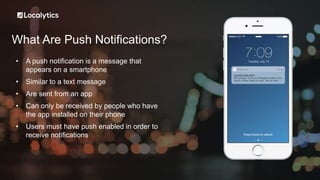
• A push notification is a message that
appears on a smartphone
• Similar to a text message
• Are sent from an app
• Can only be received by people who have
the app installed on their phone
• Users must have push enabled in order to
receive notifications
What do Push Notifications Look Like?
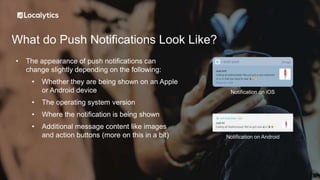
• The appearance of push notifications can
change slightly depending on the following:
• Whether they are being shown on an Apple
or Android device
• The operating system version
• Where the notification is being shown
• Additional message content like images
and action buttons (more on this in a bit)
Notification on iOS
Notification on Android
Where do Push Notifications Appear?
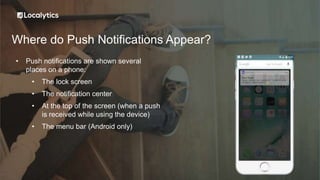
• Push notifications are shown several
places on a phone:
• The lock screen
• The notification center
• At the top of the screen (when a push
is received while using the device)
• The menu bar (Android only)
Why Use Push Notifications?
• Push notifications allow you to engage users outside your app
• If used correctly, push notifications can create a far more loyal and active customer
base
• The key is to not over-message and only deliver relevant content
Push vs. Other Channels
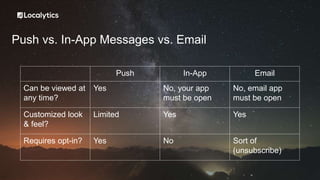
Push vs. In-App Messages vs. Email
Push In-App Email
Can be viewed at
any time?
Yes No, your app
must be open
No, email app
must be open
Customized look
& feel?
Limited Yes Yes
Requires opt-in? Yes No Sort of
(unsubscribe)
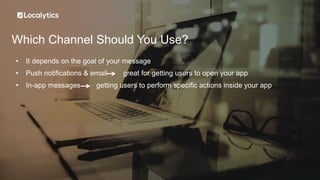
Which Channel Should You Use?
• It depends on the goal of your message
• Push notifications & email great for getting users to open your app
• In-app messages getting users to perform specific actions inside your app
How Does Push Work?
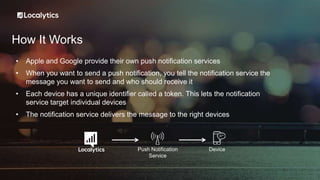
How It Works
• Apple and Google provide their own push notification services
• When you want to send a push notification, you tell the notification service the
message you want to send and who should receive it
• Each device has a unique identifier called a token. This lets the notification
service target individual devices
• The notification service delivers the message to the right devices
Push Notification
Service
Device
Advanced Features
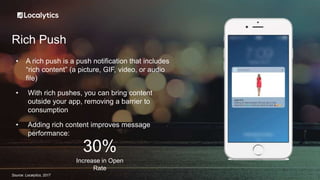
Rich Push
• A rich push is a push notification that includes
“rich content” (a picture, GIF, video, or audio
file)
• With rich pushes, you can bring content
outside your app, removing a barrier to
consumption
• Adding rich content improves message
performance:
Increase in Open
Rate
30%
Source: Localytics, 2017
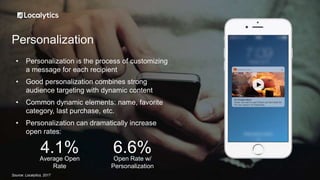
Personalization
• Personalization is the process of customizing
a message for each recipient
• Good personalization combines strong
audience targeting with dynamic content
• Common dynamic elements: name, favorite
category, last purchase, etc.
• Personalization can dramatically increase
open rates:
Source: Localytics, 2017
Average Open
Rate
4.1% Open Rate w/
Personalization
6.6%
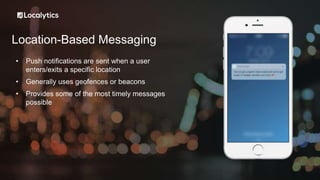
Location-Based Messaging
• Push notifications are sent when a user
enters/exits a specific location
• Generally uses geofences or beacons
• Provides some of the most timely messages
possible
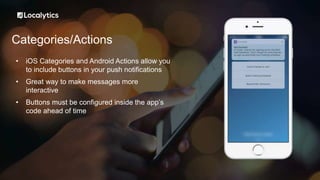
Categories/Actions
• iOS Categories and Android Actions allow you
to include buttons in your push notifications
• Great way to make messages more
interactive
• Buttons must be configured inside the app’s
code ahead of time
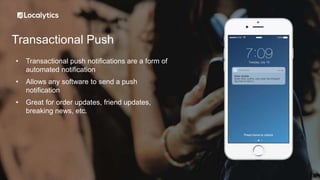
Transactional Push
• Transactional push notifications are a form of
automated notification
• Allows any software to send a push
notification
• Great for order updates, friend updates,
breaking news, etc.
Demo
Questions

What are Push Notifications?

  • 1.
    Webinar What Are PushNotifications? 07/26/17
  • 2.
    Meet Your Host AaronSawitsky Localytics Head of Product Marketing
  • 3.
    Agenda The Basics How DoesPush Work? Advanced Features Examples Push vs. Other Channels Demo Q&A
  • 4.
  • 5.
    What Are PushNotifications? • A push notification is a message that appears on a smartphone • Similar to a text message • Are sent from an app • Can only be received by people who have the app installed on their phone • Users must have push enabled in order to receive notifications
  • 6.
    What do PushNotifications Look Like? • The appearance of push notifications can change slightly depending on the following: • Whether they are being shown on an Apple or Android device • The operating system version • Where the notification is being shown • Additional message content like images and action buttons (more on this in a bit) Notification on iOS Notification on Android
  • 7.
    Where do PushNotifications Appear? • Push notifications are shown several places on a phone: • The lock screen • The notification center • At the top of the screen (when a push is received while using the device) • The menu bar (Android only)
  • 8.
    Why Use PushNotifications? • Push notifications allow you to engage users outside your app • If used correctly, push notifications can create a far more loyal and active customer base • The key is to not over-message and only deliver relevant content
  • 9.
  • 10.
    Push vs. In-AppMessages vs. Email Push In-App Email Can be viewed at any time? Yes No, your app must be open No, email app must be open Customized look & feel? Limited Yes Yes Requires opt-in? Yes No Sort of (unsubscribe)
  • 11.
    Which Channel ShouldYou Use? • It depends on the goal of your message • Push notifications & email great for getting users to open your app • In-app messages getting users to perform specific actions inside your app
  • 12.
  • 13.
    How It Works •Apple and Google provide their own push notification services • When you want to send a push notification, you tell the notification service the message you want to send and who should receive it • Each device has a unique identifier called a token. This lets the notification service target individual devices • The notification service delivers the message to the right devices Push Notification Service Device
  • 14.
  • 15.
    Rich Push • Arich push is a push notification that includes “rich content” (a picture, GIF, video, or audio file) • With rich pushes, you can bring content outside your app, removing a barrier to consumption • Adding rich content improves message performance: Increase in Open Rate 30% Source: Localytics, 2017
  • 16.
    Personalization • Personalization isthe process of customizing a message for each recipient • Good personalization combines strong audience targeting with dynamic content • Common dynamic elements: name, favorite category, last purchase, etc. • Personalization can dramatically increase open rates: Source: Localytics, 2017 Average Open Rate 4.1% Open Rate w/ Personalization 6.6%
  • 17.
    Location-Based Messaging • Pushnotifications are sent when a user enters/exits a specific location • Generally uses geofences or beacons • Provides some of the most timely messages possible
  • 18.
    Categories/Actions • iOS Categoriesand Android Actions allow you to include buttons in your push notifications • Great way to make messages more interactive • Buttons must be configured inside the app’s code ahead of time
  • 19.
    Transactional Push • Transactionalpush notifications are a form of automated notification • Allows any software to send a push notification • Great for order updates, friend updates, breaking news, etc.
  • 20.
  • 21.