
Quartz Scheduler
About
• «Quartz is a richly featured, open source job scheduling library that
can be integrated within virtually any Java application»
• First Release 10/Apr/09 --
https://jira.terracotta.org/jira/browse/QTZ?selectedTab=com.atlassia
n.jira.jira-projects-plugin:changelog-panel&allVersions=true
• https://github.com/quartz-scheduler/quartz
• http://www.quartz-scheduler.org/
Features
• Runtime Environments
• Job Scheduling
• Job Execution
• Job Persistence
• Transactions
• Clustering
• Listeners & Plug-Ins
Runtime Environments
• Quartz, can run embeded within another Standalone Application
• Can be instantiated within an application server(or servlet
container), and participate XA transactions.
• Can run as a stand-alone program, to be used via RMI
• Can be instantiated as a cluster
Job Scheduling
• at a certain time of day (to the millisecond)
• on certain days of the week
• on certain days of the month
• on certain days of the year
• not on certain days listed within a registered Calendar (such as
business holidays)
• repeated a specific number of times
• repeated until a specific time/date
• repeated indefinitely
• repeated with a delay interval
Job Execution
• Jobs can be any Java class that implements Job interface
• Job and TriggerListener can be notified
• Actions can be instructed according to returncode such as immediate
re-execution of the Job
Job Persistance
• Storage of jobs and triggers
• RAMJobStore
• JDBCJobStore(Container Managed Transactions, Unmanaged)
• Terracota Job Store(without need for a backing DB)
Transactions
• Can participate in JTA transactions
• Can manage Transactions(works for all jobs or per job with
@ExecuteInJTATransaction Annotation)
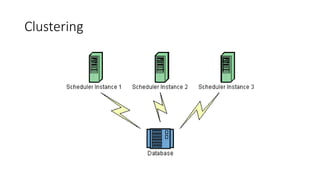
Clustering
• Fail-over
• Load Balancing
• Quartz’s built-in clustering features rely upon database persistence
via JDBCJobStore.
• Terracotta extensions to Quartz provide clustering capabilities
without the need for a backing database.
Listeners & Plug-Ins
• Applications can catch scheduling events to monitor or control
job/trigger behavior by implementing one or more listener interfaces.
• The Plug-In mechanism can be used add functionality to Quartz, such
keeping a history of job executions, or loading job and trigger
definitions from a file.
• Quartz ships with a number of “factory built” plug-ins and listeners.
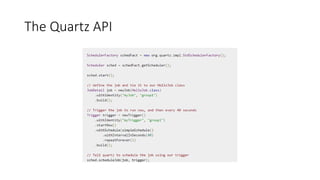
The Quartz API
• Scheduler - the main API for interacting with the scheduler.
• Job - an interface to be implemented by components that you wish to
have executed by the scheduler.
• JobDetail - used to define instances of Jobs.
• Trigger - a component that defines the schedule upon which a given
Job will be executed.
• JobBuilder - used to define/build JobDetail instances, which define
instances of Jobs.
• TriggerBuilder - used to define/build Trigger instances.
The Quartz API
org.quartz.Scheduler
• Add/delete/update/list Jobs
• Schedule/pause/resume triggers
• Start/shutdown
• Register calendars
Jobs And Job Details
• Job.execute(JobExecutionContext context)
• JobDetail
• jobClass
• durability
• requestsRecovery
• description
• key
• jobDataMap
• JobDataMap->Map<String,? Extends Serializable>
• Only usage of primitiveTypes and String is encourged.(Class-versioning problems
can occur with serialized Objects)
Job – Instances,State and Concurrency
• JobDetail -> «job» or «job definition»
• Each Execution of a Job Detail -> «Job Instance»
• A Class implements org.quartz.Job -> «job class»
• A new instance of the job class is created for each execution
• @DisallowConcurrentExecution -> an annotation on a Job Class. Tell
Quartz not to execute multiple instances of a given job definition
concurrently.
• @PersistJobDataAfterExecution -> update the stored copy of
JobDetail’s JobDataMap.
Job – Durability,RequestRecovery
• Durability -> if a job is non-durable, it is automatically deleted from
the scheduler once there are no longer active triggers associated with
it.
• RequestRecovery -> if a job “requests recovery”, and it is executing
during the time of a ‘hard shutdown’ of the scheduler (i.e. the
process it is running within crashes, or the machine is shut off), then
it is re-executed when the scheduler is started again. In this case, the
JobExecutionContext.isRecovering() method will return true.
Job – JobExecutionException
• Only type of exception can be thrown from Job.execute method.
• Can be interpreted as directives to Scheduler.
• RE_EXECUTE_JOB
• SET_TRIGGER_COMPLETE
• SET_ALL_JOB_TRIGGERS_COMPLETE
Trigger – Common Trigger Attributes
• jobKey
• startTime
• endTime
• priority -> nextexecutionTime ASC, priority DESC
• MisFire Instructions
• Calendars -> e.g. Business’s Holidays
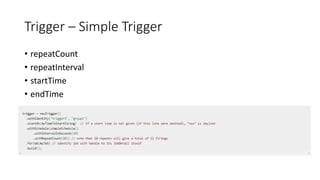
Trigger – Simple Trigger
• repeatCount
• repeatInterval
• startTime
• endTime
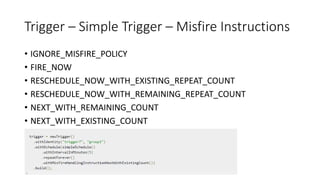
Trigger – Simple Trigger – Misfire Instructions
• IGNORE_MISFIRE_POLICY
• FIRE_NOW
• RESCHEDULE_NOW_WITH_EXISTING_REPEAT_COUNT
• RESCHEDULE_NOW_WITH_REMAINING_REPEAT_COUNT
• NEXT_WITH_REMAINING_COUNT
• NEXT_WITH_EXISTING_COUNT
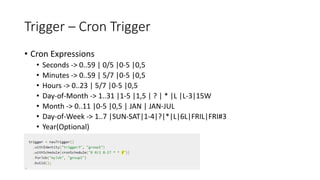
Trigger – Cron Trigger
• Cron Expressions
• Seconds -> 0..59 | 0/5 |0-5 |0,5
• Minutes -> 0..59 | 5/7 |0-5 |0,5
• Hours -> 0..23 | 5/7 |0-5 |0,5
• Day-of-Month -> 1..31 |1-5 |1,5 | ? | * |L |L-3|15W
• Month -> 0..11 |0-5 |0,5 | JAN | JAN-JUL
• Day-of-Week -> 1..7 |SUN-SAT|1-4|?|*|L|6L|FRIL|FRI#3
• Year(Optional)
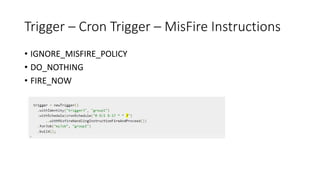
Trigger – Cron Trigger – MisFire Instructions
• IGNORE_MISFIRE_POLICY
• DO_NOTHING
• FIRE_NOW
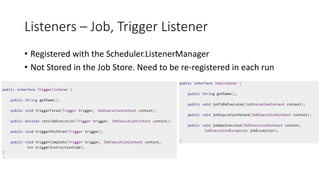
Listeners – Job, Trigger Listener
• Registered with the Scheduler.ListenerManager
• Not Stored in the Job Store. Need to be re-registered in each run
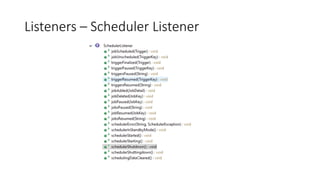
Listeners – Scheduler Listener
JobStores
• RAMJobStore
• JDBCJobStore
• TerracottaJobStore
JobStores - RAMJobStore
• The simplest JobStore to use
• The most performant(in terms of CPU time)
• Keeps all of its data in RAM
• When the application ends (or crashes) all of the scheduling
information is lost
• Config -> org.quartz.jobStore.class = org.quartz.simpl.RAMJobStore
JobStores – JDBCJobStore
• Keeps all of its data in a database via JDBC
• Works with nearly any database
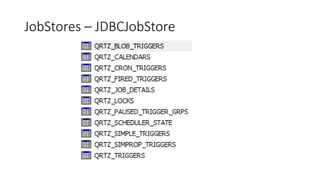
• Table-creation SQL scripts are shipped with the
distribution.(docs/dbTables)
• All the tables start with the prefix(default QRTZ) which can be changed
(org.quartz.jobStore.tablePrefix = SMG_)
• JobStoreTX -> Quartz Managed Transactions
• JobStoreCMT -> Container Managed Transactions
• org.quartz.jobStore.class = org.quartz.impl.jdbcjobstore.JobStoreTX
• org.quartz.jobStore.class = org.quartz.impl.jdbcjobstore.JobStoreCMT
JobStores – JDBCJobStore
JobStores – TerracotaJobStore
• Scaling and robustness without the use of a database
• Not open-source
ThreadPool
• Default org.quartz.simpl.SimpleThreadPool
• Maintains a fixed set of threads in its pool
• Never grows, never shrinks
• «Quite robust and is very well tested»
Logging
• Uses the SLF4J Framework
• Plugins can be enabled for capturing extra information about trigger
firings and job executions.
• org.quartz.plugins.history.LoggingJobHistoryPlugin
• org.quartz.plugins.history.LoggingTriggerHistoryPlugin
Clustering
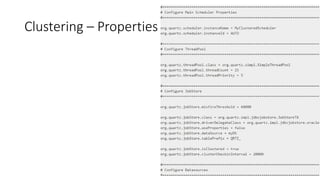
• Works with the JDBC-Jobstore and TerracottaJobStore
• Clustering on seperate machines needs clock synchronization.
• Each instance in the cluster should use the same copy of the
quartz.properties
• Exceptions:
• Different Thread Pool Size
• InstanceId
• Only one node will fire the job for each firing.
Clustering – Properties
Clustering
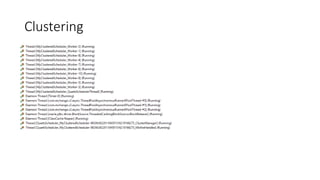
Clustering
FAQ
• How do I chain Job execution? How do I create a workflow?
• There currently is no "direct" or "free" way to chain triggers with Quartz
• What are the available alternatives to Quartz?
• There are no known competing open source projects
• Commercially, you will want to look at the well-regarded Flux scheduler.
EXAMPLES
Questions

Quartz Scheduler

  • 1.
  • 2.
    About • «Quartz isa richly featured, open source job scheduling library that can be integrated within virtually any Java application» • First Release 10/Apr/09 -- https://jira.terracotta.org/jira/browse/QTZ?selectedTab=com.atlassia n.jira.jira-projects-plugin:changelog-panel&allVersions=true • https://github.com/quartz-scheduler/quartz • http://www.quartz-scheduler.org/
  • 3.
    Features • Runtime Environments •Job Scheduling • Job Execution • Job Persistence • Transactions • Clustering • Listeners & Plug-Ins
  • 4.
    Runtime Environments • Quartz,can run embeded within another Standalone Application • Can be instantiated within an application server(or servlet container), and participate XA transactions. • Can run as a stand-alone program, to be used via RMI • Can be instantiated as a cluster
  • 5.
    Job Scheduling • ata certain time of day (to the millisecond) • on certain days of the week • on certain days of the month • on certain days of the year • not on certain days listed within a registered Calendar (such as business holidays) • repeated a specific number of times • repeated until a specific time/date • repeated indefinitely • repeated with a delay interval
  • 6.
    Job Execution • Jobscan be any Java class that implements Job interface • Job and TriggerListener can be notified • Actions can be instructed according to returncode such as immediate re-execution of the Job
  • 7.
    Job Persistance • Storageof jobs and triggers • RAMJobStore • JDBCJobStore(Container Managed Transactions, Unmanaged) • Terracota Job Store(without need for a backing DB)
  • 8.
    Transactions • Can participatein JTA transactions • Can manage Transactions(works for all jobs or per job with @ExecuteInJTATransaction Annotation)
  • 9.
    Clustering • Fail-over • LoadBalancing • Quartz’s built-in clustering features rely upon database persistence via JDBCJobStore. • Terracotta extensions to Quartz provide clustering capabilities without the need for a backing database.
  • 10.
    Listeners & Plug-Ins •Applications can catch scheduling events to monitor or control job/trigger behavior by implementing one or more listener interfaces. • The Plug-In mechanism can be used add functionality to Quartz, such keeping a history of job executions, or loading job and trigger definitions from a file. • Quartz ships with a number of “factory built” plug-ins and listeners.
  • 11.
    The Quartz API •Scheduler - the main API for interacting with the scheduler. • Job - an interface to be implemented by components that you wish to have executed by the scheduler. • JobDetail - used to define instances of Jobs. • Trigger - a component that defines the schedule upon which a given Job will be executed. • JobBuilder - used to define/build JobDetail instances, which define instances of Jobs. • TriggerBuilder - used to define/build Trigger instances.
  • 12.
  • 13.
    org.quartz.Scheduler • Add/delete/update/list Jobs •Schedule/pause/resume triggers • Start/shutdown • Register calendars
  • 14.
    Jobs And JobDetails • Job.execute(JobExecutionContext context) • JobDetail • jobClass • durability • requestsRecovery • description • key • jobDataMap • JobDataMap->Map<String,? Extends Serializable> • Only usage of primitiveTypes and String is encourged.(Class-versioning problems can occur with serialized Objects)
  • 15.
    Job – Instances,Stateand Concurrency • JobDetail -> «job» or «job definition» • Each Execution of a Job Detail -> «Job Instance» • A Class implements org.quartz.Job -> «job class» • A new instance of the job class is created for each execution • @DisallowConcurrentExecution -> an annotation on a Job Class. Tell Quartz not to execute multiple instances of a given job definition concurrently. • @PersistJobDataAfterExecution -> update the stored copy of JobDetail’s JobDataMap.
  • 16.
    Job – Durability,RequestRecovery •Durability -> if a job is non-durable, it is automatically deleted from the scheduler once there are no longer active triggers associated with it. • RequestRecovery -> if a job “requests recovery”, and it is executing during the time of a ‘hard shutdown’ of the scheduler (i.e. the process it is running within crashes, or the machine is shut off), then it is re-executed when the scheduler is started again. In this case, the JobExecutionContext.isRecovering() method will return true.
  • 17.
    Job – JobExecutionException •Only type of exception can be thrown from Job.execute method. • Can be interpreted as directives to Scheduler. • RE_EXECUTE_JOB • SET_TRIGGER_COMPLETE • SET_ALL_JOB_TRIGGERS_COMPLETE
  • 18.
    Trigger – CommonTrigger Attributes • jobKey • startTime • endTime • priority -> nextexecutionTime ASC, priority DESC • MisFire Instructions • Calendars -> e.g. Business’s Holidays
  • 19.
    Trigger – SimpleTrigger • repeatCount • repeatInterval • startTime • endTime
  • 20.
    Trigger – SimpleTrigger – Misfire Instructions • IGNORE_MISFIRE_POLICY • FIRE_NOW • RESCHEDULE_NOW_WITH_EXISTING_REPEAT_COUNT • RESCHEDULE_NOW_WITH_REMAINING_REPEAT_COUNT • NEXT_WITH_REMAINING_COUNT • NEXT_WITH_EXISTING_COUNT
  • 21.
    Trigger – CronTrigger • Cron Expressions • Seconds -> 0..59 | 0/5 |0-5 |0,5 • Minutes -> 0..59 | 5/7 |0-5 |0,5 • Hours -> 0..23 | 5/7 |0-5 |0,5 • Day-of-Month -> 1..31 |1-5 |1,5 | ? | * |L |L-3|15W • Month -> 0..11 |0-5 |0,5 | JAN | JAN-JUL • Day-of-Week -> 1..7 |SUN-SAT|1-4|?|*|L|6L|FRIL|FRI#3 • Year(Optional)
  • 22.
    Trigger – CronTrigger – MisFire Instructions • IGNORE_MISFIRE_POLICY • DO_NOTHING • FIRE_NOW
  • 23.
    Listeners – Job,Trigger Listener • Registered with the Scheduler.ListenerManager • Not Stored in the Job Store. Need to be re-registered in each run
  • 24.
  • 25.
  • 26.
    JobStores - RAMJobStore •The simplest JobStore to use • The most performant(in terms of CPU time) • Keeps all of its data in RAM • When the application ends (or crashes) all of the scheduling information is lost • Config -> org.quartz.jobStore.class = org.quartz.simpl.RAMJobStore
  • 27.
    JobStores – JDBCJobStore •Keeps all of its data in a database via JDBC • Works with nearly any database • Table-creation SQL scripts are shipped with the distribution.(docs/dbTables) • All the tables start with the prefix(default QRTZ) which can be changed (org.quartz.jobStore.tablePrefix = SMG_) • JobStoreTX -> Quartz Managed Transactions • JobStoreCMT -> Container Managed Transactions • org.quartz.jobStore.class = org.quartz.impl.jdbcjobstore.JobStoreTX • org.quartz.jobStore.class = org.quartz.impl.jdbcjobstore.JobStoreCMT
  • 28.
  • 29.
    JobStores – TerracotaJobStore •Scaling and robustness without the use of a database • Not open-source
  • 30.
    ThreadPool • Default org.quartz.simpl.SimpleThreadPool •Maintains a fixed set of threads in its pool • Never grows, never shrinks • «Quite robust and is very well tested»
  • 31.
    Logging • Uses theSLF4J Framework • Plugins can be enabled for capturing extra information about trigger firings and job executions. • org.quartz.plugins.history.LoggingJobHistoryPlugin • org.quartz.plugins.history.LoggingTriggerHistoryPlugin
  • 32.
    Clustering • Works withthe JDBC-Jobstore and TerracottaJobStore • Clustering on seperate machines needs clock synchronization. • Each instance in the cluster should use the same copy of the quartz.properties • Exceptions: • Different Thread Pool Size • InstanceId • Only one node will fire the job for each firing.
  • 33.
  • 34.
  • 35.
  • 36.
    FAQ • How doI chain Job execution? How do I create a workflow? • There currently is no "direct" or "free" way to chain triggers with Quartz • What are the available alternatives to Quartz? • There are no known competing open source projects • Commercially, you will want to look at the well-regarded Flux scheduler.
  • 37.
  • 38.