Pure Progression:
Optimising Email
Stella Sampani – Senior Strategic Account Manager
Agenda
• Session Objectives
• Introduction to the Pure360 Marketing Suite + Maturity Model update
• Introductions
• What makes a good email?
• The psychology of email
• BREAK
• Best practice for optimised email design and content
• Get inspired – Annie’s top rated emails
• Competition time…
• LUNCH!
Session Objectives
• To understand the main principles of the Pure360 Email Maturity Model and how our
Best Practice Framework can help to improve your results
• To understand more about the psychology of email and how you can use this to your
advantage in campaigns
• To learn the key components of an email and how they can be optimised to achieve
better results
• To come away from this session with actions as to how to improve your campaigns and
email maturity
• To be inspired to try something new!
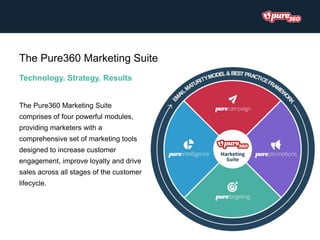
Technology. Strategy. Results
The Pure360 Marketing Suite
comprises of four powerful modules,
providing marketers with a
comprehensive set of marketing tools
designed to increase customer
engagement, improve loyalty and drive
sales across all stages of the customer
lifecycle.
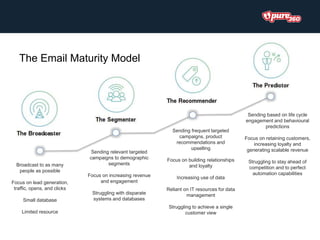
Broadcast to as many
people as possible
Focus on lead generation,
traffic, opens, and clicks
Small database
Limited resource
Sending relevant targeted
campaigns to demographic
segments
Focus on increasing revenue
and engagement
Struggling with disparate
systems and databases
Sending frequent targeted
campaigns, product
recommendations and
upselling
Focus on building relationships
and loyalty
Increasing use of data
Reliant on IT resources for data
management
Struggling to achieve a single
customer view
Sending based on life cycle
engagement and behavioural
predictions
Focus on retaining customers,
increasing loyalty and
generating scalable revenue
Struggling to stay ahead of
competition and to perfect
automation capabilities
The Email Maturity Model
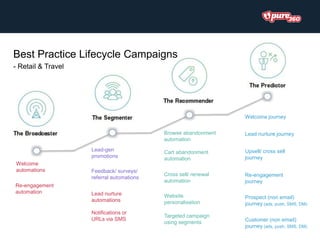
Lead-gen
promotions
Browse abandonment
automation
Notifications or
URLs via SMS
Feedback/ surveys/
referral automations
Re-engagement
automation Lead nurture
automations
Welcome
automations
Cart abandonment
automation
Welcome journey
Targeted campaign
using segments
Cross sell/ renewal
automation
Lead nurture journey
Re-engagement
journey
Upsell/ cross sell
journey
Prospect (non email)
journey (ads, push, SMS, DM)
Website
personalisation
Customer (non email)
journey (ads, push, SMS, DM)
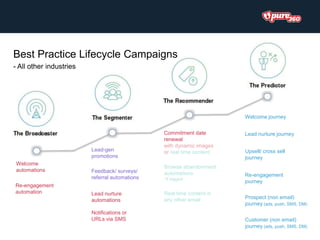
Best Practice Lifecycle Campaigns
- Retail & Travel
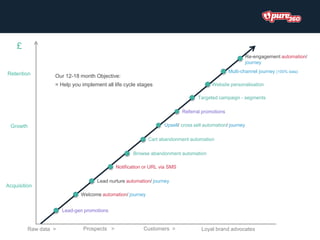
Notification or URL via SMS
Targeted campaign - segments
Referral promotions
Lead nurture automation/ journey
Welcome automation/ journey
Browse abandonment automation
Raw data > Loyal brand advocates
Website personalisation
£
Lead-gen promotions
Upsell/ cross sell automation/ journey
Retention
Acquisition
Growth
Prospects > Customers >
Our 12-18 month Objective:
= Help you implement all life cycle stages
Cart abandonment automation
Multi-channel journey (100% data)
Re-engagement automation/
journey
Lead-gen
promotions
Commitment date
renewal
with dynamic images
or real time content
Notifications or
URLs via SMS
Feedback/ surveys/
referral automations
Re-engagement
automation Lead nurture
automations
Welcome
automations
Welcome journey
Browse abandonment
automations
*if tagged
Lead nurture journey
Re-engagement
journey
Upsell/ cross sell
journey
Prospect (non email)
journey (ads, push, SMS, DM)
Real time content in
any other email
Customer (non email)
journey (ads, push, SMS, DM)
Best Practice Lifecycle Campaigns
- All other industries
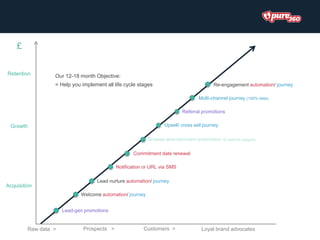
Notification or URL via SMS
Referral promotions
Lead nurture automation/ journey
Welcome automation/ journey
Commitment date renewal
Raw data > Loyal brand advocates
£
Lead-gen promotions
Upsell/ cross sell journey
Retention
Acquisition
Growth
Prospects > Customers >
Our 12-18 month Objective:
= Help you implement all life cycle stages
Browse abandonment automation (if website tagged)
Multi-channel journey (100% data)
Re-engagement automation/ journey
Introductions
Activity 1 - Maturity model audit
10 minutes
360 Marketing Suite for the mid-market
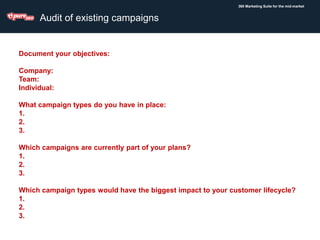
Audit of existing campaigns
Document your objectives:
Company:
Team:
Individual:
What campaign types do you have in place:
1.
2.
3.
Which campaigns are currently part of your plans?
1.
2.
3.
Which campaign types would have the biggest impact to your customer lifecycle?
1.
2.
3.
Activity 2 - Critiquing an email
5 minutes
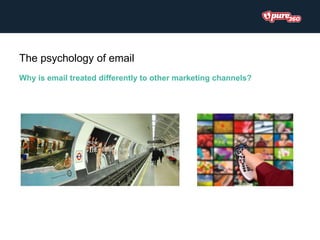
Why is email treated differently to other marketing channels?
The psychology of email
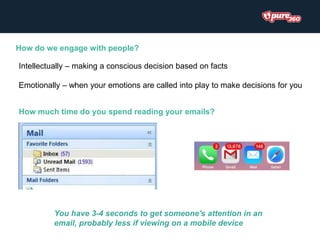
How do we engage with people?
Intellectually – making a conscious decision based on facts
Emotionally – when your emotions are called into play to make decisions for you
How much time do you spend reading your emails?
You have 3-4 seconds to get someone's attention in an
email, probably less if viewing on a mobile device
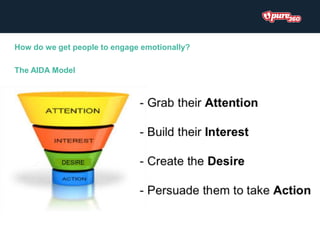
How do we get people to engage emotionally?
The AIDA Model
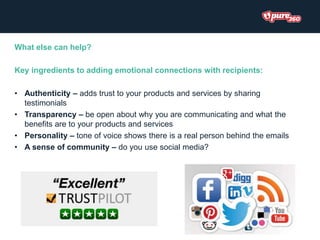
What else can help?
Key ingredients to adding emotional connections with recipients:
• Authenticity – adds trust to your products and services by sharing
testimonials
• Transparency – be open about why you are communicating and what the
benefits are to your products and services
• Personality – tone of voice shows there is a real person behind the emails
• A sense of community – do you use social media?
Language can be key!
Trigger an emotional response:-
“Home alarm systems: Click here!”
Or
“Protect your family with a new alarm system”
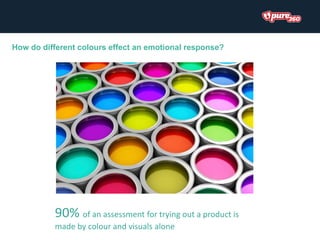
How do different colours effect an emotional response?
90% of an assessment for trying out a product is
made by colour and visuals alone
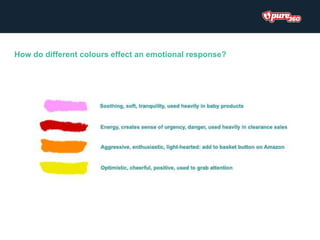
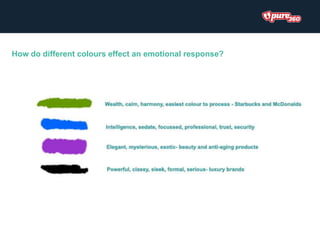
How do different colours effect an emotional response?
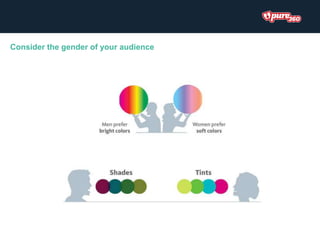
Consider the gender of your audience
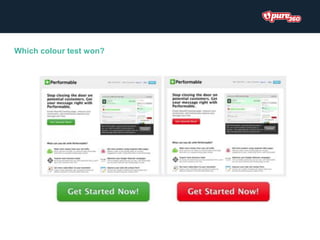
Which colour test won?
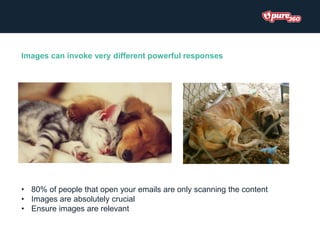
Images can invoke very different powerful responses
• 80% of people that open your emails are only scanning the content
• Images are absolutely crucial
• Ensure images are relevant
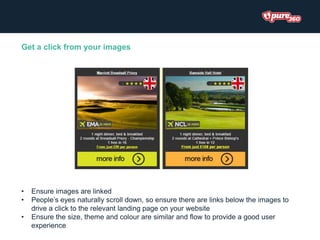
Get a click from your images
• Ensure images are linked
• People’s eyes naturally scroll down, so ensure there are links below the images to
drive a click to the relevant landing page on your website
• Ensure the size, theme and colour are similar and flow to provide a good user
experience
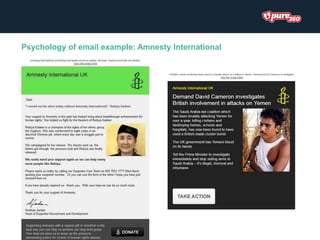
Psychology of email example: Amnesty International
Best practice tips for
email optimisation
Before you start writing copy or planning your design, define your
campaign’s goals. It helps guide the direction of your campaign, and
makes it easier to measure the success of your efforts.
Set your goals
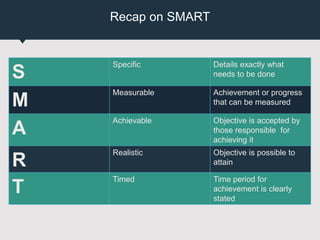
Recap on SMART
S
Specific Details exactly what
needs to be done
M
Measurable Achievement or progress
that can be measured
A
Achievable Objective is accepted by
those responsible for
achieving it
R
Realistic Objective is possible to
attain
T
Timed Time period for
achievement is clearly
stated
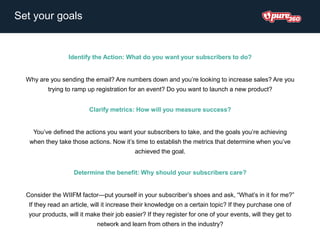
Set your goals
Identify the Action: What do you want your subscribers to do?
Why are you sending the email? Are numbers down and you’re looking to increase sales? Are you
trying to ramp up registration for an event? Do you want to launch a new product?
Clarify metrics: How will you measure success?
You’ve defined the actions you want your subscribers to take, and the goals you’re achieving
when they take those actions. Now it’s time to establish the metrics that determine when you’ve
achieved the goal.
Determine the benefit: Why should your subscribers care?
Consider the WIIFM factor—put yourself in your subscriber’s shoes and ask, “What’s in it for me?”
If they read an article, will it increase their knowledge on a certain topic? If they purchase one of
your products, will it make their job easier? If they register for one of your events, will they get to
network and learn from others in the industry?
Activity 3 - Setting goals for your
campaign
10 minutes
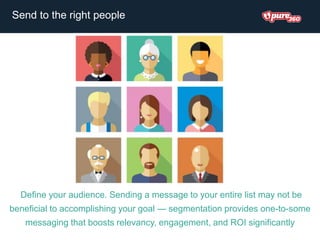
Define your audience. Sending a message to your entire list may not be
beneficial to accomplishing your goal — segmentation provides one-to-some
messaging that boosts relevancy, engagement, and ROI significantly
Send to the right people
Activity 4 – List your data sources
10 minutes
The content of your email has many components, including subject
lines, preview text, body copy, and CTAs. All of these aspects should
work together to achieve the goal of your campaign.
Craft your content
Mobile first approach
Why it’s important?
• In the third quarter of 2015, 54% of all email opens occurred on mobile devices or
tablets
• 75% of Gmail users access their accounts via mobile devices
• About 23% of mobile users reopen a sent email
• Mobile users who reopen an email are 65% more likely to click through
• 83% of mobile users say that a seamless experience across all devices is very
important
• Average smartphone conversion rates are up 64% compared to the average desktop
conversion rates
• 80% of users will delete an email if it does not look good on their
mobile devices
How to optimise:
• Ensure all CTA are ‘touch friendly’
Generally, you’ll want to keep CTAs big enough for even large
thumbs to easily tap. We recommend a minimum of 44 x 44px.
Mobile first approach
How to optimise:
• Ensure all CTA are ‘touch friendly’
• Clear concise content
You have on average 3-4 seconds to grab someone’s attention in an
email – it’s even less on a mobile device. Make sure you’re not
leaving your reader scrolling for hours!
Mobile first approach
How to optimise:
• Ensure all CTA are ‘touch friendly’
• Clear concise content
• Optimize for Retina displays
The trick to optimizing your images for Retina displays is to create
your images at twice the size you plan to display them. For example,
if you’d like an image to display at 300x200px, then create it at
600x400px, and define the size of the image as the intended
300x200px within your email.
Mobile first approach
How to optimise:
• Ensure all CTA are ‘touch friendly’
• Clear concise content
• Optimize for Retina displays
• Ensure your emails are fully responsive
Responsive design is all about making sure your emails are easy to
consume on a mobile device. This includes text that is readable,
images that are digestible and call to actions that are direct.
Essentially RD gives you a layout that is flexible and adapts to the
screen size of the device it is opened on.
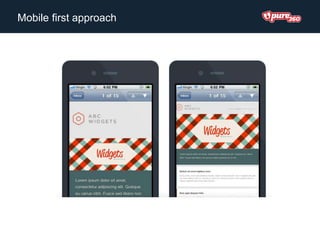
Mobile first approach
• Single-column layouts that are no wider than 500 to 600 pixels
• Links and buttons should have a minimum target area of 44 × 44 pixels, as
per Apple guidelines
• The minimum font size displayed on iPhones is 13 pixels.
• Keep your message concise, and place all important design elements in the
upper portion of the email.
• When possible, use display: none; to hide extraneous details in your mobile
layout. Elements like social sharing buttons may be great in the desktop inbox,
but aren’t always easy to use by the recipient on mobile devices.
Mobile first approach
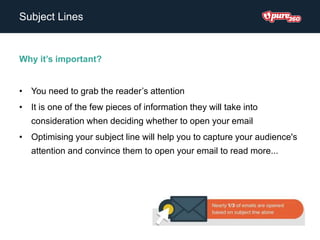
Subject Lines
Why it’s important?
• You need to grab the reader’s attention
• It is one of the few pieces of information they will take into
consideration when deciding whether to open your email
• Optimising your subject line will help you to capture your audience's
attention and convince them to open your email to read more...
Subject Lines
How to optimise
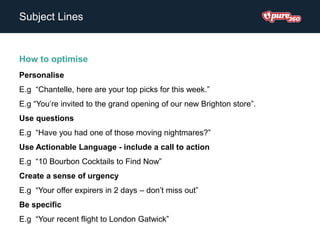
Personalise
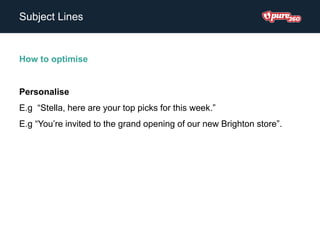
E.g “Stella, here are your top picks for this week.”
E.g “You’re invited to the grand opening of our new Brighton store”.
Subject Lines
How to optimise
Personalise
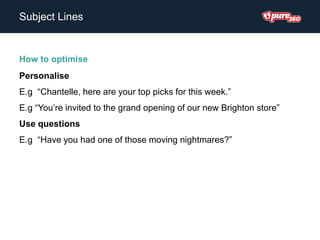
E.g “Chantelle, here are your top picks for this week.”
E.g “You’re invited to the grand opening of our new Brighton store”
Use questions
E.g “Have you had one of those moving nightmares?”
Subject Lines
How to optimise
Personalise
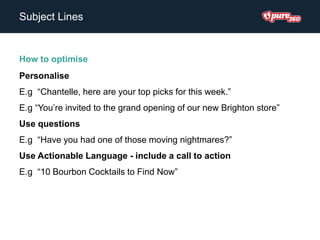
E.g “Chantelle, here are your top picks for this week.”
E.g “You’re invited to the grand opening of our new Brighton store”
Use questions
E.g “Have you had one of those moving nightmares?”
Use Actionable Language - include a call to action
E.g “10 Bourbon Cocktails to Find Now”
Subject Lines
How to optimise
Personalise
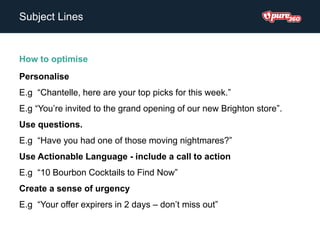
E.g “Chantelle, here are your top picks for this week.”
E.g “You’re invited to the grand opening of our new Brighton store”.
Use questions.
E.g “Have you had one of those moving nightmares?”
Use Actionable Language - include a call to action
E.g “10 Bourbon Cocktails to Find Now”
Create a sense of urgency
E.g “Your offer expirers in 2 days – don’t miss out”
Subject Lines
How to optimise
Personalise
E.g “Chantelle, here are your top picks for this week.”
E.g “You’re invited to the grand opening of our new Brighton store”.
Use questions
E.g “Have you had one of those moving nightmares?”
Use Actionable Language - include a call to action
E.g “10 Bourbon Cocktails to Find Now”
Create a sense of urgency
E.g “Your offer expirers in 2 days – don’t miss out”
Be specific
E.g “Your recent flight to London Gatwick”
Activity 5 - Compose your own subject
line
10 minutes
Inbox Preview Text
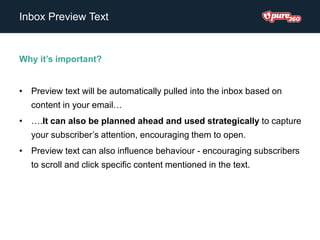
Why it’s important?
• Preview text will be automatically pulled into the inbox based on
content in your email…
• ….It can also be planned ahead and used strategically to capture
your subscriber’s attention, encouraging them to open.
• Preview text can also influence behaviour - encouraging subscribers
to scroll and click specific content mentioned in the text.
Inbox Preview Text
Why it’s important?
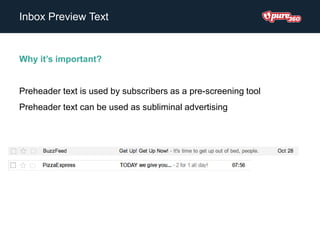
Preheader text is used by subscribers as a pre-screening tool
Preheader text can be used as subliminal advertising
Inbox Preview Text
How to optimise?
• Keep it short to ensure proper display across different devices
(generally between 40-50 characters)
• Consider how your pre-header text will look in your email campaign
• Use it as an extension of your subject line
• Include a call to action in your pre-header text
Sender Name & Address
Why it’s important?
• Forms the foundation of your recipients' trust and email relationship with you
• Is the email brand they use to recognize whether to ignore, delete or open
your messages
• Stands out in the sea of subject-line sameness
• Helps readers find your message if it gets routed to the junk folder
• Differentiates individual message streams such as promotional versus
transactional
• Is what the recipient uses to sort or search messages
• Embodies your ability to deliver on the recipient's expectation of value
Sender Name & Address
How to optimise?
• Use a trustworthy + recognizable sender name to build trust & make
your emails recognisable
• A successful sender name should be relevant to your audience,
imparting trust and a desire to open.
• Keep the sender name as short as possible, while still conveying your
brand correctly.
• Use different sender names to differentiate among newsletter brands
or email streams. BUT ensure you incorporate a common style, such
as the brand or company name, to promote continuity.
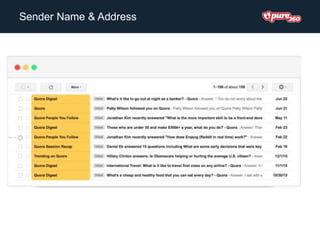
Sender Name & Address
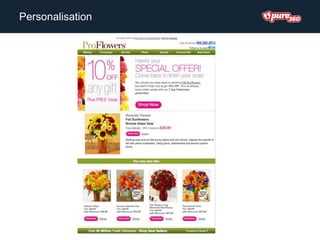
Personalisation
Why it’s important?
• 40% of consumers reported that they have marked emails as spam
simply because they were irrelevant
• Personalised emails receive 10% higher open rates, 14% higher click-
through rates and deliver 58% of email revenue
• Personalised customer experiences create brand loyalty in a digital
age
• Customer retention is built on relationship and familiarity so your
emails need to reflect your relationship with your customers
Personalisation
How to optimise
• Personalisation goes beyond addressing the email to the person’s first
name. Leverage the demographic and behavioural data you have
about your readers by including it in your emails.
• Utilise that data that you have! Whether that is their company name,
their location, their role at their company, the pages they’ve viewed on
your site or items they’ve previously purchased etc.
• Create fully automated journeys, based on multi channel behaviour to
maximise the effectiveness of your marketing efforts
Personalisation
Body Copy
Why it’s important?
• No matter how fancy your marketing emails look, without well-written
and compelling content, your subscribers will stop opening.
• The majority of readers scan, rather than read things.
• Sets the tone and voice of your brand
Body Copy
How to optimise
• Make your emails concise, compelling & interesting
• Only include relevant content
• Write for 'scanability‘
• Create a readable flow
• Excite the reader’s emotions
• Use the right tone of voice
• Convince the readers through proof
• Have consistent messaging, from your subject line, inbox preview text,
right through to your body copy and call to actions.
Images
Why it’s important?
• Images sell products
• Coloured visuals increase people's willingness to read a piece of
content by 80%.
• People only remember 10% of digested information 3 days later.
When that information is paired with a relevant image, people retained
65% of that information 3 days later.
• Content with relevant images gets 94% more views than content
without relevant images.
Images
How to optimise
• Use high quality images
• Prioritise images for mobile
• Use context where possible
• Draw attention to what’s important
Call to Action
Why it’s important?
• The ultimate goal of your email is to get people to click on it and take
action
• This is where the transition from a click to a conversion happens
Call to Action
How to optimise
• Always ensure your main CTA is above the fold!
• Use contrasting colours so that the CTA stands out in comparison to the rest
of your page
• A couple of words is best, no more than five is ideal
• Make sure it is compelling – WIIFM?
• Use action oriented language and let them know what to expect after clicking -
such as “Download”, “Shop now and save!”, “View the new collection”
• Be sure to state exactly what the visitor will get if they click on the CTA and go
to the landing page
• TEST!
Plain Text Version
Why it’s important?
• Spam filters like to see a plain text alternative
• Some email clients and apps can’t handle HTML
• Some people simply prefer it
• Smartwatches can only read plain text emails
Plain Text Version
How to optimise
• Keep the Copy the Same as Your HTML Version
• Create Compelling Email Copy
• Don't Overdo it With Links (And Shorten Them!)
• Consider Using All Caps in Headers
• Use Bullet Points
• Always include the view in browser link!
Activity 6 – Document improvements you
will commit to
10 minutes
Email Marketing
services for Christmas
2016
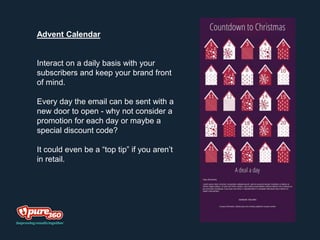
Advent Calendar
Interact on a daily basis with your
subscribers and keep your brand front
of mind.
Every day the email can be sent with a
new door to open - why not consider a
promotion for each day or maybe a
special discount code?
It could even be a “top tip” if you aren’t
in retail.
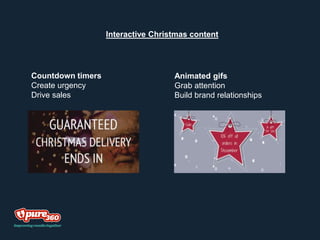
Interactive Christmas content
Countdown timers
Create urgency
Drive sales
Animated gifs
Grab attention
Build brand relationships
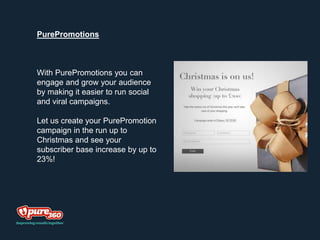
PurePromotions
With PurePromotions you can
engage and grow your audience
by making it easier to run social
and viral campaigns.
Let us create your PurePromotion
campaign in the run up to
Christmas and see your
subscriber base increase by up to
23%!
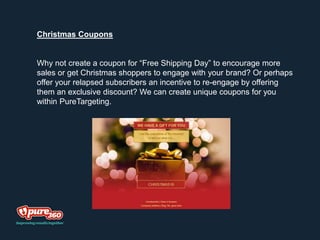
Christmas Coupons
Why not create a coupon for “Free Shipping Day” to encourage more
sales or get Christmas shoppers to engage with your brand? Or perhaps
offer your relapsed subscribers an incentive to re-engage by offering
them an exclusive discount? We can create unique coupons for you
within PureTargeting.
Let us do the hard work for you…
Managed Services
We can manage the entire process of creating and
sending your email campaign for you. From the creation of
the message, right the way through to the testing,
scheduling and sending of your message to your
database.
Creative Services
We have a great creative team who can deliver excellent
email templates which are responsive (meaning that they’ll
look great when viewed on any device), innovative and full
of festive cheer.
Any Questions?
Pure Progression: Optimising Email - November 2016

Pure Progression: Optimising Email - November 2016

  • 1.
    Pure Progression: Optimising Email StellaSampani – Senior Strategic Account Manager
  • 2.
    Agenda • Session Objectives •Introduction to the Pure360 Marketing Suite + Maturity Model update • Introductions • What makes a good email? • The psychology of email • BREAK • Best practice for optimised email design and content • Get inspired – Annie’s top rated emails • Competition time… • LUNCH!
  • 3.
    Session Objectives • Tounderstand the main principles of the Pure360 Email Maturity Model and how our Best Practice Framework can help to improve your results • To understand more about the psychology of email and how you can use this to your advantage in campaigns • To learn the key components of an email and how they can be optimised to achieve better results • To come away from this session with actions as to how to improve your campaigns and email maturity • To be inspired to try something new!
  • 4.
    Technology. Strategy. Results ThePure360 Marketing Suite The Pure360 Marketing Suite comprises of four powerful modules, providing marketers with a comprehensive set of marketing tools designed to increase customer engagement, improve loyalty and drive sales across all stages of the customer lifecycle.
  • 5.
    Broadcast to asmany people as possible Focus on lead generation, traffic, opens, and clicks Small database Limited resource Sending relevant targeted campaigns to demographic segments Focus on increasing revenue and engagement Struggling with disparate systems and databases Sending frequent targeted campaigns, product recommendations and upselling Focus on building relationships and loyalty Increasing use of data Reliant on IT resources for data management Struggling to achieve a single customer view Sending based on life cycle engagement and behavioural predictions Focus on retaining customers, increasing loyalty and generating scalable revenue Struggling to stay ahead of competition and to perfect automation capabilities The Email Maturity Model
  • 6.
    Lead-gen promotions Browse abandonment automation Notifications or URLsvia SMS Feedback/ surveys/ referral automations Re-engagement automation Lead nurture automations Welcome automations Cart abandonment automation Welcome journey Targeted campaign using segments Cross sell/ renewal automation Lead nurture journey Re-engagement journey Upsell/ cross sell journey Prospect (non email) journey (ads, push, SMS, DM) Website personalisation Customer (non email) journey (ads, push, SMS, DM) Best Practice Lifecycle Campaigns - Retail & Travel
  • 7.
    Notification or URLvia SMS Targeted campaign - segments Referral promotions Lead nurture automation/ journey Welcome automation/ journey Browse abandonment automation Raw data > Loyal brand advocates Website personalisation £ Lead-gen promotions Upsell/ cross sell automation/ journey Retention Acquisition Growth Prospects > Customers > Our 12-18 month Objective: = Help you implement all life cycle stages Cart abandonment automation Multi-channel journey (100% data) Re-engagement automation/ journey
  • 8.
    Lead-gen promotions Commitment date renewal with dynamicimages or real time content Notifications or URLs via SMS Feedback/ surveys/ referral automations Re-engagement automation Lead nurture automations Welcome automations Welcome journey Browse abandonment automations *if tagged Lead nurture journey Re-engagement journey Upsell/ cross sell journey Prospect (non email) journey (ads, push, SMS, DM) Real time content in any other email Customer (non email) journey (ads, push, SMS, DM) Best Practice Lifecycle Campaigns - All other industries
  • 9.
    Notification or URLvia SMS Referral promotions Lead nurture automation/ journey Welcome automation/ journey Commitment date renewal Raw data > Loyal brand advocates £ Lead-gen promotions Upsell/ cross sell journey Retention Acquisition Growth Prospects > Customers > Our 12-18 month Objective: = Help you implement all life cycle stages Browse abandonment automation (if website tagged) Multi-channel journey (100% data) Re-engagement automation/ journey
  • 10.
  • 11.
    Activity 1 -Maturity model audit 10 minutes
  • 12.
    360 Marketing Suitefor the mid-market Audit of existing campaigns Document your objectives: Company: Team: Individual: What campaign types do you have in place: 1. 2. 3. Which campaigns are currently part of your plans? 1. 2. 3. Which campaign types would have the biggest impact to your customer lifecycle? 1. 2. 3.
  • 13.
    Activity 2 -Critiquing an email 5 minutes
  • 15.
    Why is emailtreated differently to other marketing channels? The psychology of email
  • 16.
    How do weengage with people? Intellectually – making a conscious decision based on facts Emotionally – when your emotions are called into play to make decisions for you How much time do you spend reading your emails? You have 3-4 seconds to get someone's attention in an email, probably less if viewing on a mobile device
  • 17.
    How do weget people to engage emotionally? The AIDA Model
  • 18.
    What else canhelp? Key ingredients to adding emotional connections with recipients: • Authenticity – adds trust to your products and services by sharing testimonials • Transparency – be open about why you are communicating and what the benefits are to your products and services • Personality – tone of voice shows there is a real person behind the emails • A sense of community – do you use social media?
  • 19.
    Language can bekey! Trigger an emotional response:- “Home alarm systems: Click here!” Or “Protect your family with a new alarm system”
  • 20.
    How do differentcolours effect an emotional response? 90% of an assessment for trying out a product is made by colour and visuals alone
  • 21.
    How do differentcolours effect an emotional response?
  • 22.
    How do differentcolours effect an emotional response?
  • 23.
    Consider the genderof your audience
  • 24.
  • 25.
    Images can invokevery different powerful responses • 80% of people that open your emails are only scanning the content • Images are absolutely crucial • Ensure images are relevant
  • 26.
    Get a clickfrom your images • Ensure images are linked • People’s eyes naturally scroll down, so ensure there are links below the images to drive a click to the relevant landing page on your website • Ensure the size, theme and colour are similar and flow to provide a good user experience
  • 27.
    Psychology of emailexample: Amnesty International
  • 29.
    Best practice tipsfor email optimisation
  • 30.
    Before you startwriting copy or planning your design, define your campaign’s goals. It helps guide the direction of your campaign, and makes it easier to measure the success of your efforts. Set your goals
  • 31.
    Recap on SMART S SpecificDetails exactly what needs to be done M Measurable Achievement or progress that can be measured A Achievable Objective is accepted by those responsible for achieving it R Realistic Objective is possible to attain T Timed Time period for achievement is clearly stated
  • 32.
    Set your goals Identifythe Action: What do you want your subscribers to do? Why are you sending the email? Are numbers down and you’re looking to increase sales? Are you trying to ramp up registration for an event? Do you want to launch a new product? Clarify metrics: How will you measure success? You’ve defined the actions you want your subscribers to take, and the goals you’re achieving when they take those actions. Now it’s time to establish the metrics that determine when you’ve achieved the goal. Determine the benefit: Why should your subscribers care? Consider the WIIFM factor—put yourself in your subscriber’s shoes and ask, “What’s in it for me?” If they read an article, will it increase their knowledge on a certain topic? If they purchase one of your products, will it make their job easier? If they register for one of your events, will they get to network and learn from others in the industry?
  • 33.
    Activity 3 -Setting goals for your campaign 10 minutes
  • 34.
    Define your audience.Sending a message to your entire list may not be beneficial to accomplishing your goal — segmentation provides one-to-some messaging that boosts relevancy, engagement, and ROI significantly Send to the right people
  • 35.
    Activity 4 –List your data sources 10 minutes
  • 36.
    The content ofyour email has many components, including subject lines, preview text, body copy, and CTAs. All of these aspects should work together to achieve the goal of your campaign. Craft your content
  • 37.
    Mobile first approach Whyit’s important? • In the third quarter of 2015, 54% of all email opens occurred on mobile devices or tablets • 75% of Gmail users access their accounts via mobile devices • About 23% of mobile users reopen a sent email • Mobile users who reopen an email are 65% more likely to click through • 83% of mobile users say that a seamless experience across all devices is very important • Average smartphone conversion rates are up 64% compared to the average desktop conversion rates • 80% of users will delete an email if it does not look good on their mobile devices
  • 38.
    How to optimise: •Ensure all CTA are ‘touch friendly’ Generally, you’ll want to keep CTAs big enough for even large thumbs to easily tap. We recommend a minimum of 44 x 44px. Mobile first approach
  • 39.
    How to optimise: •Ensure all CTA are ‘touch friendly’ • Clear concise content You have on average 3-4 seconds to grab someone’s attention in an email – it’s even less on a mobile device. Make sure you’re not leaving your reader scrolling for hours! Mobile first approach
  • 40.
    How to optimise: •Ensure all CTA are ‘touch friendly’ • Clear concise content • Optimize for Retina displays The trick to optimizing your images for Retina displays is to create your images at twice the size you plan to display them. For example, if you’d like an image to display at 300x200px, then create it at 600x400px, and define the size of the image as the intended 300x200px within your email. Mobile first approach
  • 41.
    How to optimise: •Ensure all CTA are ‘touch friendly’ • Clear concise content • Optimize for Retina displays • Ensure your emails are fully responsive Responsive design is all about making sure your emails are easy to consume on a mobile device. This includes text that is readable, images that are digestible and call to actions that are direct. Essentially RD gives you a layout that is flexible and adapts to the screen size of the device it is opened on. Mobile first approach
  • 42.
  • 43.
    • Single-column layoutsthat are no wider than 500 to 600 pixels • Links and buttons should have a minimum target area of 44 × 44 pixels, as per Apple guidelines • The minimum font size displayed on iPhones is 13 pixels. • Keep your message concise, and place all important design elements in the upper portion of the email. • When possible, use display: none; to hide extraneous details in your mobile layout. Elements like social sharing buttons may be great in the desktop inbox, but aren’t always easy to use by the recipient on mobile devices. Mobile first approach
  • 44.
    Subject Lines Why it’simportant? • You need to grab the reader’s attention • It is one of the few pieces of information they will take into consideration when deciding whether to open your email • Optimising your subject line will help you to capture your audience's attention and convince them to open your email to read more...
  • 45.
    Subject Lines How tooptimise Personalise E.g “Stella, here are your top picks for this week.” E.g “You’re invited to the grand opening of our new Brighton store”.
  • 46.
    Subject Lines How tooptimise Personalise E.g “Chantelle, here are your top picks for this week.” E.g “You’re invited to the grand opening of our new Brighton store” Use questions E.g “Have you had one of those moving nightmares?”
  • 47.
    Subject Lines How tooptimise Personalise E.g “Chantelle, here are your top picks for this week.” E.g “You’re invited to the grand opening of our new Brighton store” Use questions E.g “Have you had one of those moving nightmares?” Use Actionable Language - include a call to action E.g “10 Bourbon Cocktails to Find Now”
  • 48.
    Subject Lines How tooptimise Personalise E.g “Chantelle, here are your top picks for this week.” E.g “You’re invited to the grand opening of our new Brighton store”. Use questions. E.g “Have you had one of those moving nightmares?” Use Actionable Language - include a call to action E.g “10 Bourbon Cocktails to Find Now” Create a sense of urgency E.g “Your offer expirers in 2 days – don’t miss out”
  • 49.
    Subject Lines How tooptimise Personalise E.g “Chantelle, here are your top picks for this week.” E.g “You’re invited to the grand opening of our new Brighton store”. Use questions E.g “Have you had one of those moving nightmares?” Use Actionable Language - include a call to action E.g “10 Bourbon Cocktails to Find Now” Create a sense of urgency E.g “Your offer expirers in 2 days – don’t miss out” Be specific E.g “Your recent flight to London Gatwick”
  • 50.
    Activity 5 -Compose your own subject line 10 minutes
  • 51.
    Inbox Preview Text Whyit’s important? • Preview text will be automatically pulled into the inbox based on content in your email… • ….It can also be planned ahead and used strategically to capture your subscriber’s attention, encouraging them to open. • Preview text can also influence behaviour - encouraging subscribers to scroll and click specific content mentioned in the text.
  • 52.
    Inbox Preview Text Whyit’s important? Preheader text is used by subscribers as a pre-screening tool Preheader text can be used as subliminal advertising
  • 53.
    Inbox Preview Text Howto optimise? • Keep it short to ensure proper display across different devices (generally between 40-50 characters) • Consider how your pre-header text will look in your email campaign • Use it as an extension of your subject line • Include a call to action in your pre-header text
  • 54.
    Sender Name &Address Why it’s important? • Forms the foundation of your recipients' trust and email relationship with you • Is the email brand they use to recognize whether to ignore, delete or open your messages • Stands out in the sea of subject-line sameness • Helps readers find your message if it gets routed to the junk folder • Differentiates individual message streams such as promotional versus transactional • Is what the recipient uses to sort or search messages • Embodies your ability to deliver on the recipient's expectation of value
  • 55.
    Sender Name &Address How to optimise? • Use a trustworthy + recognizable sender name to build trust & make your emails recognisable • A successful sender name should be relevant to your audience, imparting trust and a desire to open. • Keep the sender name as short as possible, while still conveying your brand correctly. • Use different sender names to differentiate among newsletter brands or email streams. BUT ensure you incorporate a common style, such as the brand or company name, to promote continuity.
  • 56.
  • 57.
    Personalisation Why it’s important? •40% of consumers reported that they have marked emails as spam simply because they were irrelevant • Personalised emails receive 10% higher open rates, 14% higher click- through rates and deliver 58% of email revenue • Personalised customer experiences create brand loyalty in a digital age • Customer retention is built on relationship and familiarity so your emails need to reflect your relationship with your customers
  • 58.
    Personalisation How to optimise •Personalisation goes beyond addressing the email to the person’s first name. Leverage the demographic and behavioural data you have about your readers by including it in your emails. • Utilise that data that you have! Whether that is their company name, their location, their role at their company, the pages they’ve viewed on your site or items they’ve previously purchased etc. • Create fully automated journeys, based on multi channel behaviour to maximise the effectiveness of your marketing efforts
  • 59.
  • 60.
    Body Copy Why it’simportant? • No matter how fancy your marketing emails look, without well-written and compelling content, your subscribers will stop opening. • The majority of readers scan, rather than read things. • Sets the tone and voice of your brand
  • 61.
    Body Copy How tooptimise • Make your emails concise, compelling & interesting • Only include relevant content • Write for 'scanability‘ • Create a readable flow • Excite the reader’s emotions • Use the right tone of voice • Convince the readers through proof • Have consistent messaging, from your subject line, inbox preview text, right through to your body copy and call to actions.
  • 62.
    Images Why it’s important? •Images sell products • Coloured visuals increase people's willingness to read a piece of content by 80%. • People only remember 10% of digested information 3 days later. When that information is paired with a relevant image, people retained 65% of that information 3 days later. • Content with relevant images gets 94% more views than content without relevant images.
  • 63.
    Images How to optimise •Use high quality images • Prioritise images for mobile • Use context where possible • Draw attention to what’s important
  • 64.
    Call to Action Whyit’s important? • The ultimate goal of your email is to get people to click on it and take action • This is where the transition from a click to a conversion happens
  • 65.
    Call to Action Howto optimise • Always ensure your main CTA is above the fold! • Use contrasting colours so that the CTA stands out in comparison to the rest of your page • A couple of words is best, no more than five is ideal • Make sure it is compelling – WIIFM? • Use action oriented language and let them know what to expect after clicking - such as “Download”, “Shop now and save!”, “View the new collection” • Be sure to state exactly what the visitor will get if they click on the CTA and go to the landing page • TEST!
  • 66.
    Plain Text Version Whyit’s important? • Spam filters like to see a plain text alternative • Some email clients and apps can’t handle HTML • Some people simply prefer it • Smartwatches can only read plain text emails
  • 67.
    Plain Text Version Howto optimise • Keep the Copy the Same as Your HTML Version • Create Compelling Email Copy • Don't Overdo it With Links (And Shorten Them!) • Consider Using All Caps in Headers • Use Bullet Points • Always include the view in browser link!
  • 68.
    Activity 6 –Document improvements you will commit to 10 minutes
  • 69.
  • 70.
    Advent Calendar Interact ona daily basis with your subscribers and keep your brand front of mind. Every day the email can be sent with a new door to open - why not consider a promotion for each day or maybe a special discount code? It could even be a “top tip” if you aren’t in retail.
  • 71.
    Interactive Christmas content Countdowntimers Create urgency Drive sales Animated gifs Grab attention Build brand relationships
  • 72.
    PurePromotions With PurePromotions youcan engage and grow your audience by making it easier to run social and viral campaigns. Let us create your PurePromotion campaign in the run up to Christmas and see your subscriber base increase by up to 23%!
  • 73.
    Christmas Coupons Why notcreate a coupon for “Free Shipping Day” to encourage more sales or get Christmas shoppers to engage with your brand? Or perhaps offer your relapsed subscribers an incentive to re-engage by offering them an exclusive discount? We can create unique coupons for you within PureTargeting.
  • 74.
    Let us dothe hard work for you… Managed Services We can manage the entire process of creating and sending your email campaign for you. From the creation of the message, right the way through to the testing, scheduling and sending of your message to your database. Creative Services We have a great creative team who can deliver excellent email templates which are responsive (meaning that they’ll look great when viewed on any device), innovative and full of festive cheer.
  • 75.

Editor's Notes

  • #7 Retail/Travel and Leisure
  • #8 Retail/Travel and Leisure
  • #9 Non retail/ Travel and Leisure
  • #10 Non retail/ Travel and Leisure
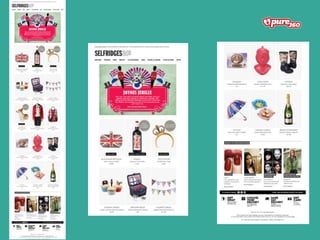
  • #15 Bad Super long No clear CTAs No inbox preview text No hierarchy of what you should be paying attention to Good Animated GIF is eye catching / engaging Good promotion of editorial content Clean and clear design Brand consistency
  • #16 Psychology is used for TV, billboards, radio, magazines, etc. but not often considered before designing our emails.
  • #18 A - Get peoples attention! - Use your ‘from name’, subject line and the ‘pre-header’ text to get attention I - Raise their interest by focusing on and demonstrating advantages and benefits – pre-header text, headings, titles, images and videos D - Convince them that they desire what you are offering them, and that the product or service will satisfy their needs – use your subject line, images, videos and body of the email to achieve this A - Lead them towards taking action! Links, buttons and icons arranged properly will allow people to act
  • #24 When designing your emails, consider who your target audience is, what the image and feeling you’re trying to convey, and what are the best colours to use to trigger this.
  • #25 Consider simple A/B tests – website, emails, call to actions What does each colour mean? Red won by 21%!!
  • #28 Change in the call to action language saw a massive increase in click through rates. Focus now is about getting people onto the site to then donate. Due to the nature of what they do and the causes they are trying to fight, they want to create more of a journey for their users Images of people invoke a more powerful emotional response.
  • #32 No matter what type of testing you are doing with your content / images Planning any changes to your strategy – always apply a SMART way of looking at things
  • #35 For instance, our clients have on average increased their online revenue by 12% using our PureTargeting functionality to target different segments with different offers. Additionally our own marketing team have seen an increase in open rates of 25% since offering a segmented industry specific newsletter. It’s easy to see that even simple segmentation can produce big results.
  • #41 However, keep in mind that since you’re using bigger file sizes, it could result in longer load times in the inbox.
  • #43 As a point of comparison, the right image is the same newsletter, without this stylesheet. See how tiny and unreadable the text is? Well, that’s the problem that faces millions of email newsletters received on mobile devices, everyday.
  • #46 If you’re targeting your campaign by demographic data, like first name, location or company, add a personal touch to your subject line. Adding this small detail will make recipients feel like the email is that much more relevant to them.
  • #47 A recent study by Litmus shows that subject lines framed as questions perform better than similar subject lines that were phrased as statements. Invokes a response
  • #48 Sometimes, it’s helpful to clearly inform readers what their next step should be. Otherwise, their eyes will just skim right over your subject line without understanding that an action is required on their part.
  • #49 The shorter the amount of time that recipients have to act, the more compelled they will feel to do so.
  • #50 When people read your subject lines, it should be obvious what your message is and why it’s relevant to them. Leaving your recipients guessing can cause frustration and lead them to ignore or delete your email.
  • #69 Annie