Discovering
Email Marketing
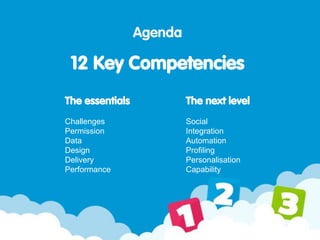
The essentials
Challenges
Permission
Data
Design
Delivery
Performance
Agenda
12 Key Competencies
The next level
Social
Integration
Automation
Profiling
Personalisation
Capability
1. Challenges
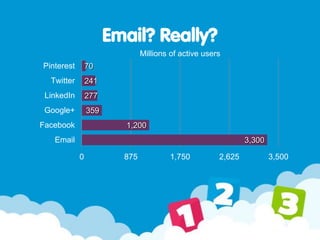
Email? Really?
70
241
277
359
1,200
3,300
0 875 1,750 2,625 3,500
Pinterest
Twitter
LinkedIn
Google+
Facebook
Email
Millions of active users
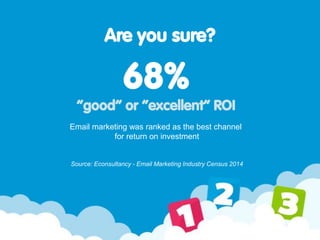
Are you sure?
68%
“good” or “excellent” ROI
Email marketing was ranked as the best channel
for return on investment
Source: Econsultancy - Email Marketing Industry Census 2014
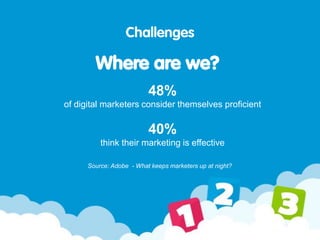
48%
of digital marketers consider themselves proficient
40%
think their marketing is effective
Challenges
Where are we?
Source: Adobe - What keeps marketers up at night?
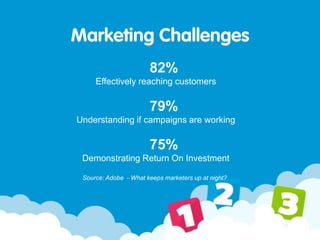
82%
Effectively reaching customers
79%
Understanding if campaigns are working
75%
Demonstrating Return On Investment
Marketing Challenges
Source: Adobe - What keeps marketers up at night?
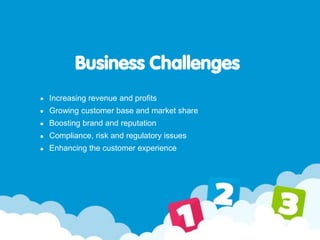
Business Challenges
Increasing revenue and profits
Growing customer base and market share
Boosting brand and reputation
Compliance, risk and regulatory issues
Enhancing the customer experience
2. Permission
Right Person. Right Place. Right Time.
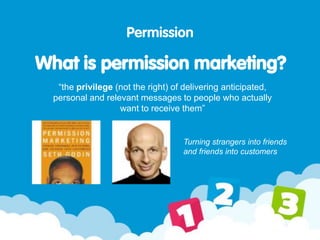
“the privilege (not the right) of delivering anticipated,
personal and relevant messages to people who actually
want to receive them”
Permission
What is permission marketing?
Turning strangers into friends
and friends into customers
Permission
Why is it important?
It’s the law!
You must get explicit permission from recipient, unless…
Obtained details via a sale, and
You’re marketing similar products, and
Opt-out available at point of collection, and
Opt-out available in all emails sent, and
Last transaction/contact less than 12 months ago
Must include company legal name, registration number, address
& contact details in every message
You need to be registered with the ICO
as a data controller
Permission
Why is it important?
But more importantly…
Without permission, a message is just spam
Permission is all about trust
90% of consumers subscribe to emails of trusted brands (DMA)
Loyal customers account for 80% of company profit
The most successful companies look at the sale as a way of
earning a lifelong customer (Sage)
71% of worldwide email traffic is considered as ‘spam’
Permission
How do you get it?
Ask! Permission can only be given directly
Can’t come from a 3rd party
Must be active: opt-in, not opt-out
Has to be fresh
Sell it!
You’re asking for their most valuable resource (time)
Set expectations
Let people know how often you’ll be in touch
3. Data
There is no value in data, only in how it is used.
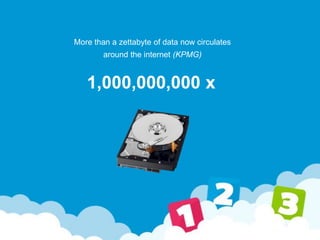
More than a zettabyte of data now circulates
around the internet (KPMG)
1,000,000,000 x
The volume of business data is increasing by
40%
every year
High performing businesses don’t simply gather data,
they gain insights
from the data they already possess. (KPMG)
Collecting contact data
How do you get it?
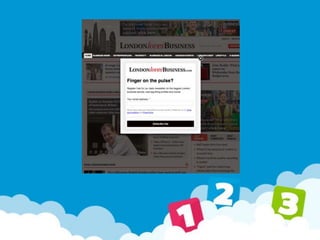
Use easy to find, fill and submit forms
Promote opt-in everywhere
Link to forms from your emails, websites and social channels
Keep it short
Make it clear what you are collecting data for
Promote trust - tell subscribers how you will protect their data
Offer an incentive and give value
Have a clear, compelling call to action
Collecting permission data takes effort – but is worth it
Use welcome emails
The most read emails you will ever send
4x more opens, 5x more clicks!
Use a compelling subject line
Have a clear goal
Incentivise purchase (discount or prompt)
Whitelisting (add to address book)
Capture additional data (competition)
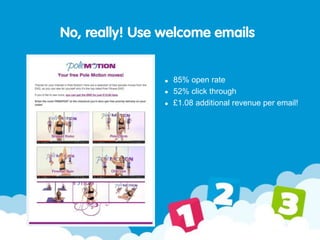
No, really! Use welcome emails
85% open rate
52% click through
£1.08 additional revenue per email!
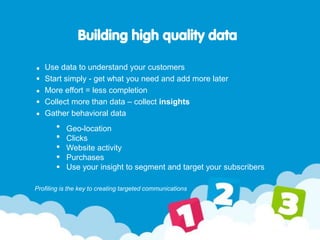
Building high quality data
Use data to understand your customers
Start simply - get what you need and add more later
More effort = less completion
Collect more than data – collect insights
Gather behavioral data
Profiling is the key to creating targeted communications
Geo-location
Clicks
Website activity
Purchases
Use your insight to segment and target your subscribers
4. Design
Stand out in the inbox.
Design
Key considerations
The importance of mobile
Is design important?
Content is King
Testing
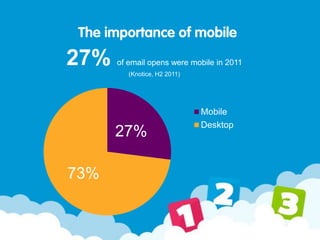
The importance of mobile
27% of email opens were mobile in 2011
(Knotice, H2 2011)
27%
73%
Mobile
Desktop
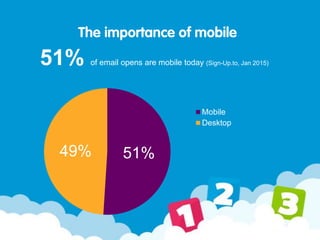
The importance of mobile
51% of email opens are mobile today (Sign-Up.to, Jan 2015)
51%49%
Mobile
Desktop
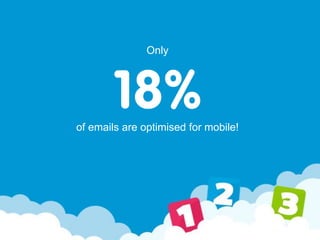
Only
18%of emails are optimised for mobile!
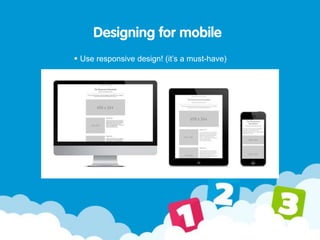
Designing for mobile
Use responsive design! (it’s a must-have)
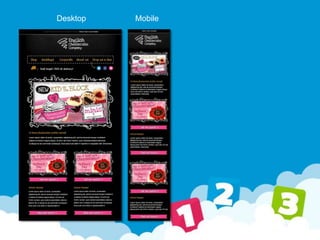
Desktop Mobile
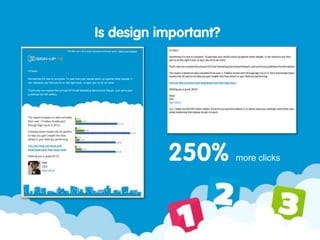
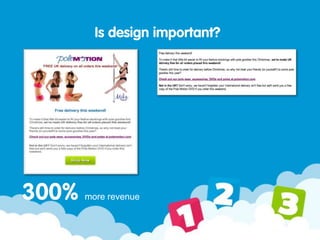
Is design important?
250% more clicks
Is design important?
300% more revenue
Content is King
Copywriting
Calls to action
Style, brand, consistency
Subject line
Be Remarkable!
Talk to people individually
Have something worth saying
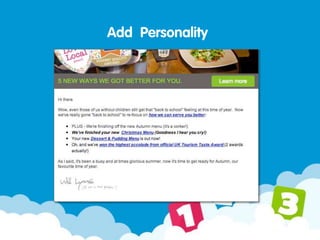
Add personality to your messages
Remember - they don’t care about you
They care about themselves!
Add Personality
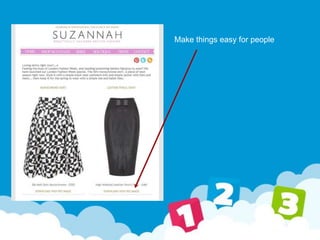
Make things easy for people
Test, test, test!
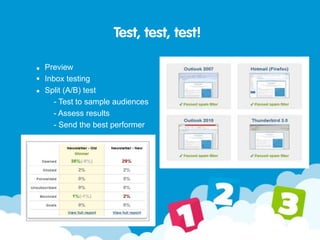
Preview
Inbox testing
Split (A/B) test
- Test to sample audiences
- Assess results
- Send the best performer
5. Delivery
Maximizing your chances of
successful delivery
Delivery
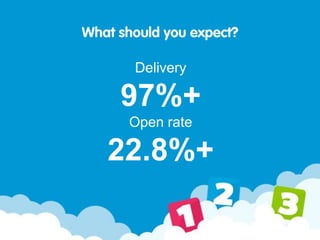
97%+
Open rate
22.8%+
What should you expect?
Delivery
Reputation
Recipient activity (opens, clicks)
Complaints (“this is spam”)
Recipient Whitelisting (add to address book)
What impacts getting to the inbox?
Delivery
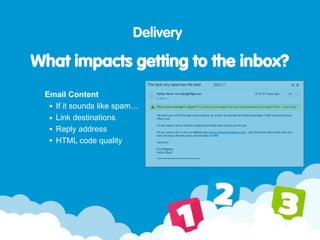
Email Content
If it sounds like spam…
Link destinations
Reply address
HTML code quality
What impacts getting to the inbox?
Delivery
Sender recognition
Subject line appeal
Relevance
Timing
Content
What impacts getting read?
Delivery
First 30 - 50 characters readable on most devices
Why? Give a clear benefit to the reader
Don’t be cryptic (often)
Can affect actions taken when reading
Subject line appeal
Delivery
Subject A: 4.3% CTO
The Exit Festival Newsletter
Subject B: 4.8% CTO
Get to Exit Festival this July for the ultimate
festival experience
Subject C: 7.0% CTO
Make this summer unforgettable - check out
Exit Festival!
Subject line appeal
Delivery
Relevance
Use audience segmentation and personalisation
Write for the reader’s perspective
Delivery
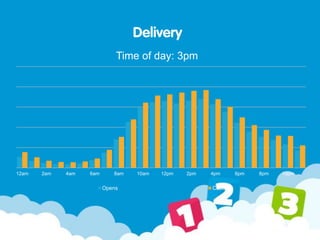
Time of day: 3pm
12am 2am 4am 6am 8am 10am 12pm 2pm 4pm 6pm 8pm 10pm
Opens Clicks
Delivery
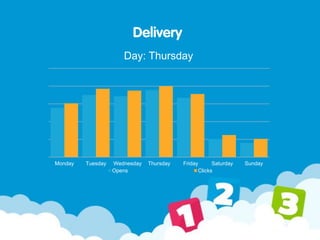
Monday Tuesday Wednesday Thursday Friday Saturday Sunday
Opens Clicks
Day: Thursday
Delivery
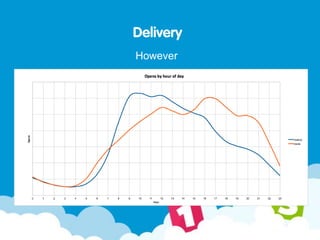
However
Delivery
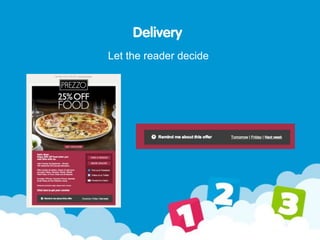
Let the reader decide
6. Performance
17% of email marketers never review
or analyze their results
6. Performance
17% of email marketers never review
or analyze their results
Performance
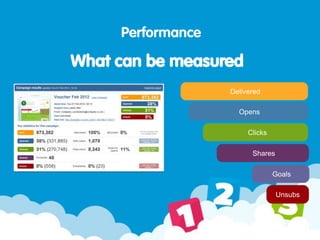
What can be measured
Delivered
Opens
Clicks
Shares
Goals
Unsubs
Click-to-open rate
unique clickers ÷ unique openers
Proportion of people who opened the email and then clicked
Better way to assess the relative performance of an email
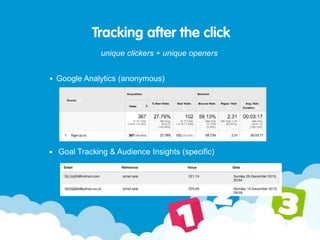
Tracking after the click
unique clickers ÷ unique openers
Google Analytics (anonymous)
Goal Tracking & Audience Insights (specific)
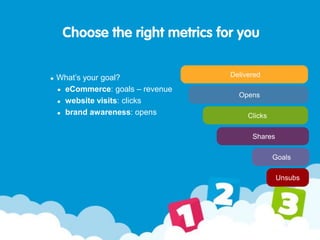
Choose the right metrics for you
What’s your goal?
eCommerce: goals – revenue
website visits: clicks
brand awareness: opens
Delivered
Opens
Clicks
Shares
Goals
Unsubs
Next steps…
Assess current capability
Evaluate against your goals
Identify key areas for improvement
Develop an implementation plan
Execute on your plan
Test, refine, repeat
Thank you!

Enterprise nation presentation 120215

  • 1.
  • 2.
    The essentials Challenges Permission Data Design Delivery Performance Agenda 12 KeyCompetencies The next level Social Integration Automation Profiling Personalisation Capability
  • 3.
  • 4.
    Email? Really? 70 241 277 359 1,200 3,300 0 8751,750 2,625 3,500 Pinterest Twitter LinkedIn Google+ Facebook Email Millions of active users
  • 5.
    Are you sure? 68% “good”or “excellent” ROI Email marketing was ranked as the best channel for return on investment Source: Econsultancy - Email Marketing Industry Census 2014
  • 6.
    48% of digital marketersconsider themselves proficient 40% think their marketing is effective Challenges Where are we? Source: Adobe - What keeps marketers up at night?
  • 7.
    82% Effectively reaching customers 79% Understandingif campaigns are working 75% Demonstrating Return On Investment Marketing Challenges Source: Adobe - What keeps marketers up at night?
  • 8.
    Business Challenges Increasing revenueand profits Growing customer base and market share Boosting brand and reputation Compliance, risk and regulatory issues Enhancing the customer experience
  • 9.
    2. Permission Right Person.Right Place. Right Time.
  • 11.
    “the privilege (notthe right) of delivering anticipated, personal and relevant messages to people who actually want to receive them” Permission What is permission marketing? Turning strangers into friends and friends into customers
  • 12.
    Permission Why is itimportant? It’s the law! You must get explicit permission from recipient, unless… Obtained details via a sale, and You’re marketing similar products, and Opt-out available at point of collection, and Opt-out available in all emails sent, and Last transaction/contact less than 12 months ago Must include company legal name, registration number, address & contact details in every message You need to be registered with the ICO as a data controller
  • 13.
    Permission Why is itimportant? But more importantly… Without permission, a message is just spam Permission is all about trust 90% of consumers subscribe to emails of trusted brands (DMA) Loyal customers account for 80% of company profit The most successful companies look at the sale as a way of earning a lifelong customer (Sage) 71% of worldwide email traffic is considered as ‘spam’
  • 14.
    Permission How do youget it? Ask! Permission can only be given directly Can’t come from a 3rd party Must be active: opt-in, not opt-out Has to be fresh Sell it! You’re asking for their most valuable resource (time) Set expectations Let people know how often you’ll be in touch
  • 15.
    3. Data There isno value in data, only in how it is used.
  • 16.
    More than azettabyte of data now circulates around the internet (KPMG) 1,000,000,000 x
  • 17.
    The volume ofbusiness data is increasing by 40% every year
  • 18.
    High performing businessesdon’t simply gather data, they gain insights from the data they already possess. (KPMG)
  • 19.
    Collecting contact data Howdo you get it? Use easy to find, fill and submit forms Promote opt-in everywhere Link to forms from your emails, websites and social channels Keep it short Make it clear what you are collecting data for Promote trust - tell subscribers how you will protect their data Offer an incentive and give value Have a clear, compelling call to action Collecting permission data takes effort – but is worth it
  • 21.
    Use welcome emails Themost read emails you will ever send 4x more opens, 5x more clicks! Use a compelling subject line Have a clear goal Incentivise purchase (discount or prompt) Whitelisting (add to address book) Capture additional data (competition)
  • 22.
    No, really! Usewelcome emails 85% open rate 52% click through £1.08 additional revenue per email!
  • 23.
    Building high qualitydata Use data to understand your customers Start simply - get what you need and add more later More effort = less completion Collect more than data – collect insights Gather behavioral data Profiling is the key to creating targeted communications Geo-location Clicks Website activity Purchases Use your insight to segment and target your subscribers
  • 24.
    4. Design Stand outin the inbox.
  • 25.
    Design Key considerations The importanceof mobile Is design important? Content is King Testing
  • 26.
    The importance ofmobile 27% of email opens were mobile in 2011 (Knotice, H2 2011) 27% 73% Mobile Desktop
  • 27.
    The importance ofmobile 51% of email opens are mobile today (Sign-Up.to, Jan 2015) 51%49% Mobile Desktop
  • 28.
    Only 18%of emails areoptimised for mobile!
  • 29.
    Designing for mobile Useresponsive design! (it’s a must-have)
  • 30.
  • 31.
  • 32.
  • 33.
    Content is King Copywriting Callsto action Style, brand, consistency Subject line
  • 34.
    Be Remarkable! Talk topeople individually Have something worth saying Add personality to your messages Remember - they don’t care about you They care about themselves!
  • 35.
  • 36.
    Make things easyfor people
  • 37.
    Test, test, test! Preview Inboxtesting Split (A/B) test - Test to sample audiences - Assess results - Send the best performer
  • 38.
    5. Delivery Maximizing yourchances of successful delivery
  • 39.
  • 40.
    Delivery Reputation Recipient activity (opens,clicks) Complaints (“this is spam”) Recipient Whitelisting (add to address book) What impacts getting to the inbox?
  • 41.
    Delivery Email Content If itsounds like spam… Link destinations Reply address HTML code quality What impacts getting to the inbox?
  • 42.
    Delivery Sender recognition Subject lineappeal Relevance Timing Content What impacts getting read?
  • 43.
    Delivery First 30 -50 characters readable on most devices Why? Give a clear benefit to the reader Don’t be cryptic (often) Can affect actions taken when reading Subject line appeal
  • 44.
    Delivery Subject A: 4.3%CTO The Exit Festival Newsletter Subject B: 4.8% CTO Get to Exit Festival this July for the ultimate festival experience Subject C: 7.0% CTO Make this summer unforgettable - check out Exit Festival! Subject line appeal
  • 45.
    Delivery Relevance Use audience segmentationand personalisation Write for the reader’s perspective
  • 46.
    Delivery Time of day:3pm 12am 2am 4am 6am 8am 10am 12pm 2pm 4pm 6pm 8pm 10pm Opens Clicks
  • 47.
    Delivery Monday Tuesday WednesdayThursday Friday Saturday Sunday Opens Clicks Day: Thursday
  • 48.
  • 49.
  • 50.
    6. Performance 17% ofemail marketers never review or analyze their results
  • 51.
    6. Performance 17% ofemail marketers never review or analyze their results
  • 52.
    Performance What can bemeasured Delivered Opens Clicks Shares Goals Unsubs
  • 53.
    Click-to-open rate unique clickers÷ unique openers Proportion of people who opened the email and then clicked Better way to assess the relative performance of an email
  • 54.
    Tracking after theclick unique clickers ÷ unique openers Google Analytics (anonymous) Goal Tracking & Audience Insights (specific)
  • 55.
    Choose the rightmetrics for you What’s your goal? eCommerce: goals – revenue website visits: clicks brand awareness: opens Delivered Opens Clicks Shares Goals Unsubs
  • 56.
    Next steps… Assess currentcapability Evaluate against your goals Identify key areas for improvement Develop an implementation plan Execute on your plan Test, refine, repeat
  • 57.