

Monday 25 November 2013
Experiment:
To	
  Learn	
  How	
  a	
  Diode	
  works
Monday 25 November 2013
• We	
  will	
  do	
  this	
  experiment	
  in	
  two	
  phases.	
  In	
  the	
  first	
  phase,	
  
we	
  will	
  learn	
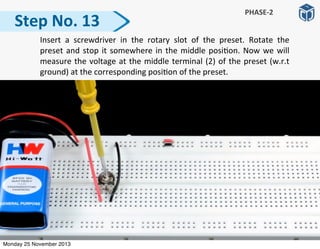
  about	
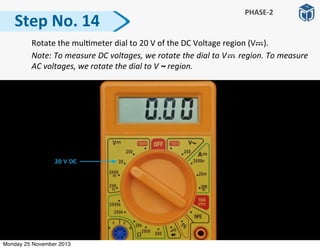
  the	
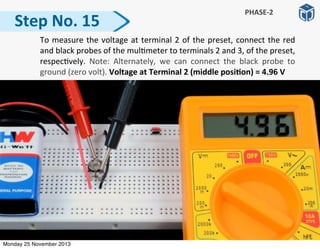
  basic	
  func:oning	
  of	
  a	
  diode.
• In	
  the	
  second	
  phase,	
  we	
  will	
  vary	
  voltage	
  across	
  the	
  diode	
  
and	
  observe	
  how	
  the	
  current	
  changes	
  through	
  it.	
  Then,	
  we	
  
will	
  plot	
  a	
  graph,	
  current	
  (I)	
  vs	
  voltage	
  (V).
Points	
  to	
  Remember
Monday 25 November 2013
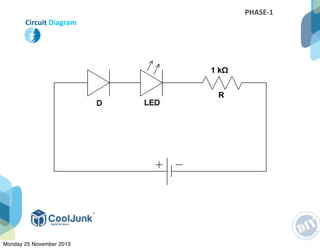
Circuit	
  Diagram
PHASE-­‐1
Monday 25 November 2013
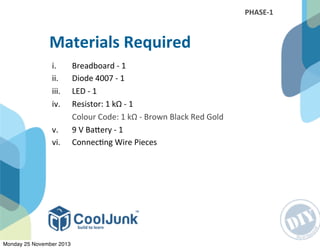
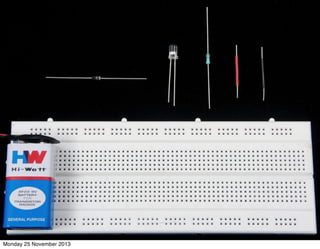
i. Breadboard	
  -­‐	
  1
ii. Diode	
  4007	
  -­‐	
  1
iii. LED	
  -­‐	
  1
iv. Resistor:	
  1	
  kΩ	
  -­‐	
  1


   Colour	
  Code:	
  1	
  kΩ	
  -­‐	
  Brown	
  Black	
  Red	
  Gold
v.	
  	
   9	
  V	
  BaRery	
  -­‐	
  1
vi.	
  	
   Connec:ng	
  Wire	
  Pieces
Materials	
  Required
PHASE-­‐1
Monday 25 November 2013
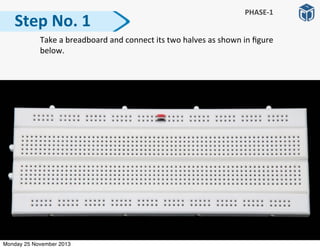
  Take	
  a	
  breadboard	
  and	
  connect	
  its	
  two	
  halves	
  as	
  shown	
  in	
  figure	
  
below.
Step	
  No.	
  1
PHASE-­‐1
Monday 25 November 2013
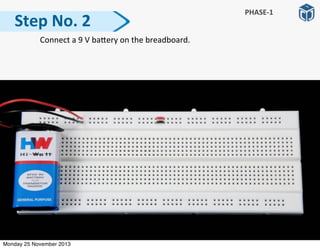
  Connect	
  a	
  9	
  V	
  baRery	
  on	
  the	
  breadboard.
Step	
  No.	
  2
PHASE-­‐1
Monday 25 November 2013
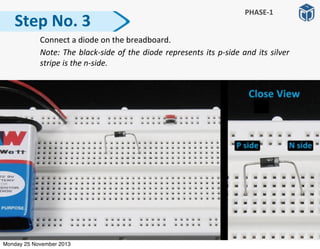
  Connect	
  a	
  diode	
  on	
  the	
  breadboard.	
  
	
   Note:	
  The	
  black-­‐side	
  of	
  the	
  diode	
  represents	
  its	
  p-­‐side	
  and	
  its	
  silver	
  
stripe	
  is	
  the	
  n-­‐side.
Step	
  No.	
  3
PHASE-­‐1
Monday 25 November 2013
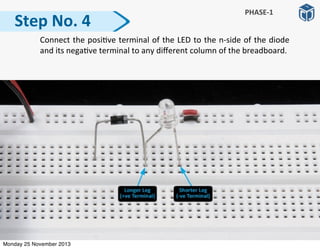
  Connect	
  the	
  posi:ve	
  terminal	
  of	
  the	
  LED	
  to	
  the	
  n-­‐side	
  of	
  the	
  diode	
  
and	
  its	
  nega:ve	
  terminal	
  to	
  any	
  different	
  column	
  of	
  the	
  breadboard.
Step	
  No.	
  4
PHASE-­‐1
Monday 25 November 2013
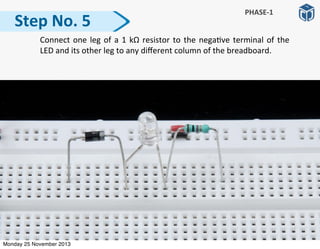
  Connect	
  one	
  leg	
  of	
  a	
  1	
  kΩ	
   resistor	
  to	
  the	
  nega:ve	
  terminal	
  of	
  the	
  
LED	
  and	
  its	
  other	
  leg	
  to	
  any	
  different	
  column	
  of	
  the	
  breadboard.	
  
Step	
  No.	
  5
PHASE-­‐1
Monday 25 November 2013
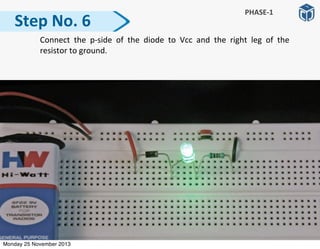
  Connect	
   the	
   p-­‐side	
   of	
   the	
   diode	
   to	
   Vcc	
   and	
   the	
   right	
   leg	
   of	
   the	
  
resistor	
  to	
  ground.	
  
Step	
  No.	
  6
PHASE-­‐1
Monday 25 November 2013
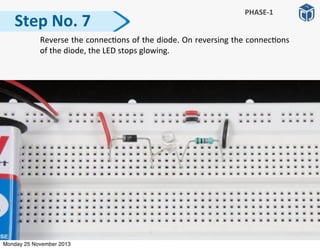
  Reverse	
  the	
  connec:ons	
  of	
  the	
  diode.	
  On	
  reversing	
  the	
  connec:ons	
  
of	
  the	
  diode,	
  the	
  LED	
  stops	
  glowing.
Step	
  No.	
  7
PHASE-­‐1
Monday 25 November 2013
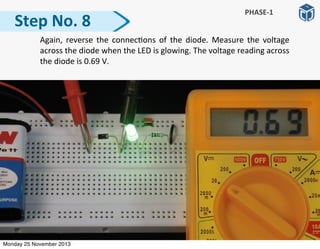
  Again,	
  reverse	
   the	
   connec:ons	
  of	
   the	
   diode.	
   Measure	
   the	
   voltage	
  
across	
  the	
  diode	
  when	
  the	
  LED	
  is	
  glowing.	
  The	
  voltage	
  reading	
  across	
  
the	
  diode	
  is	
  0.69	
  V.
Step	
  No.	
  8
PHASE-­‐1
Monday 25 November 2013
The	
  LED	
  glows	
  when	
  the	
  p-­‐side	
  of	
  the	
  diode	
  is	
  connected	
  to	
  
Vcc,	
  and	
  the	
  n-­‐side	
  is	
  connected	
  to	
  ground	
  through	
  the	
  LED	
  
and	
  the	
  resistor.	
  
The	
   LED	
   does	
   not	
   glow	
   when	
   the	
   n-­‐side	
   of	
   the	
   diode	
   is	
  
connected	
  to	
  Vcc	
  and	
  the	
  p-­‐side	
  is	
  connected	
  to	
  ground.
When	
  a	
  diode	
  is	
  conduc:ng,	
  a	
  voltage	
  drop	
  of	
  0.69	
  V	
  takes	
  
place	
   across	
   its	
   terminals.	
   The	
   diode	
   needs	
   a	
   minimum	
  
voltage	
  of	
  0.6	
  -­‐	
  0.7	
  V	
  to	
  allow	
  current	
  to	
  pass	
  through	
  it.
ObservaGon
PHASE-­‐1
Monday 25 November 2013
Disconnect	
  all	
  components	
  from	
  the	
  breadboard.	
  We	
  have	
  learned	
  how	
  
a	
  diode	
  works.	
  Now	
  its	
  :me	
  for	
  Phase-­‐2.	
  Refer	
  the	
  circuit	
  diagram	
  and	
  
follow	
  the	
  steps	
  given.
Next	
  Steps
Monday 25 November 2013
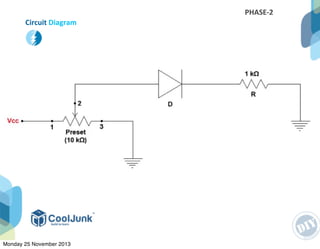
Circuit	
  Diagram
PHASE-­‐2
Monday 25 November 2013
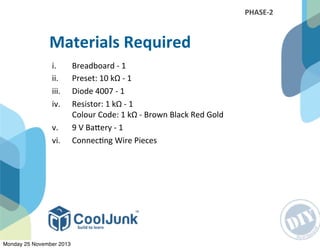
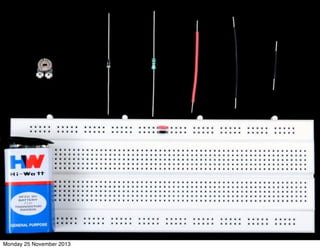
i. Breadboard	
  -­‐	
  1
ii. Preset:	
  10	
  kΩ	
  -­‐	
  1
iii. Diode	
  4007	
  -­‐	
  1
iv. Resistor:	
  1	
  kΩ	
  -­‐	
  1
Colour	
  Code:	
  1	
  kΩ	
  -­‐	
  Brown	
  Black	
  Red	
  Gold
v. 9	
  V	
  BaRery	
  -­‐	
  1
vi. Connec:ng	
  Wire	
  Pieces
Materials	
  Required
PHASE-­‐2
Monday 25 November 2013
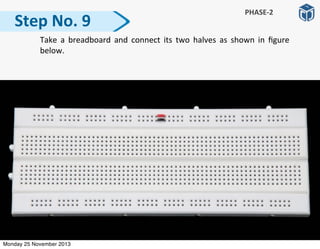
  Take	
   a	
   breadboard	
  and	
  connect	
  its	
  two	
   halves	
   as	
  shown	
   in	
   figure	
  
below.
Step	
  No.	
  9
PHASE-­‐2
Monday 25 November 2013
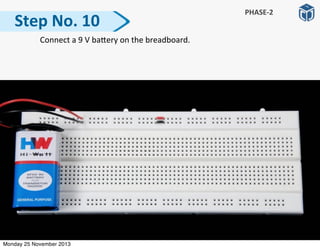
  Connect	
  a	
  9	
  V	
  baRery	
  on	
  the	
  breadboard.
Step	
  No.	
  10
PHASE-­‐2
Monday 25 November 2013
Step	
  No.	
  11
	
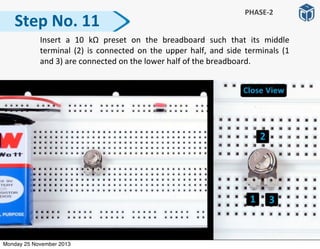
   Insert	
   a	
   10	
   kΩ	
   preset	
   on	
   the	
   breadboard	
   such	
   that	
   its	
   middle	
  
terminal	
  (2)	
  is	
  connected	
  on	
  the	
   upper	
   half,	
   and	
  side	
   terminals	
   (1	
  
and	
  3)	
  are	
  connected	
  on	
  the	
  lower	
  half	
  of	
  the	
  breadboard.
PHASE-­‐2
Monday 25 November 2013
Step	
  No.	
  12
	
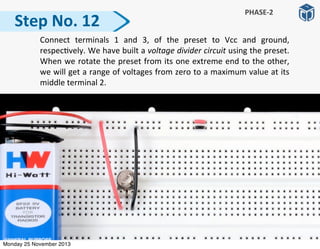
   Connect	
   terminals	
   1	
   and	
   3,	
   of	
   the	
   preset	
   to	
   Vcc	
   and	
   ground,	
  
respec:vely.	
  We	
  have	
  built	
  a	
  voltage	
  divider	
  circuit	
  using	
  the	
  preset.	
  
When	
  we	
  rotate	
  the	
  preset	
  from	
  its	
  one	
  extreme	
  end	
  to	
  the	
  other,	
  
we	
  will	
  get	
  a	
  range	
  of	
  voltages	
  from	
  zero	
  to	
  a	
  maximum	
  value	
  at	
  its	
  
middle	
  terminal	
  2.
PHASE-­‐2
Monday 25 November 2013
  Insert	
   a	
   screwdriver	
   in	
   the	
   rotary	
   slot	
   of	
   the	
   preset.	
   Rotate	
   the	
  
preset	
  and	
  stop	
  it	
  somewhere	
  in	
  the	
  middle	
  posi:on.	
  Now	
   we	
  will	
  
measure	
  the	
  voltage	
  at	
  the	
  middle	
  terminal	
  (2)	
  of	
  the	
  preset	
  (w.r.t	
  
ground)	
  at	
  the	
  corresponding	
  posi:on	
  of	
  the	
  preset.	
  
Step	
  No.	
  13
PHASE-­‐2
Monday 25 November 2013
  Rotate	
  the	
  mul:meter	
  dial	
  to	
  20	
  V	
  of	
  the	
  DC	
  Voltage	
  region	
  (V	


  ).	
  
	
   Note:	
  To	
  measure	
  DC	
  voltages,	
  we	
  rotate	
  the	
  dial	
  to	
  V	


  region.	
  To	
  measure	
  
AC	
  voltages,	
  we	
  rotate	
  the	
  dial	
  to	
  V	
  ~	
  region.	
  
Step	
  No.	
  14
PHASE-­‐2
Monday 25 November 2013
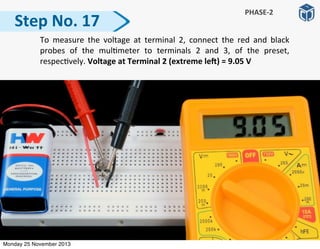
  To	
  measure	
  the	
  voltage	
  at	
  terminal	
  2	
  of	
  the	
  preset,	
  connect	
  the	
  red	
  
and	
  black	
  probes	
  of	
  the	
  mul:meter	
  to	
  terminals	
  2	
  and	
  3,	
  of	
  the	
  preset,	
  
respec:vely.	
   Note:	
   Alternately,	
   we	
   can	
   connect	
   the	
   black	
   probe	
   to	
  
ground	
  (zero	
  volt).	
  Voltage	
  at	
  Terminal	
  2	
  (middle	
  posiGon)	
  =	
  4.96	
  V
Step	
  No.	
  15
PHASE-­‐2
Monday 25 November 2013
  Again,	
   insert	
   the	
   screwdriver	
   in	
   the	
   rotary	
   slot	
   of	
   the	
   preset	
   and	
  
rotate	
   the	
   preset	
   to	
   its	
   extreme	
   le].	
   Measure	
   the	
   voltage	
   at	
   this	
  
posi:on	
  using	
  a	
  mul:meter.
Step	
  No.	
  16
PHASE-­‐2
Monday 25 November 2013
  To	
  measure	
   the	
   voltage	
   at	
   terminal	
  2,	
   connect	
   the	
   red	
   and	
   black	
  
probes	
   of	
   the	
   mul:meter	
   to	
   terminals	
   2	
   and	
   3,	
   of	
   the	
   preset,	
  
respec:vely.	
  Voltage	
  at	
  Terminal	
  2	
  (extreme	
  leP)	
  =	
  9.05	
  V
Step	
  No.	
  17
PHASE-­‐2
Monday 25 November 2013
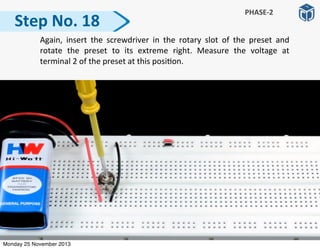
  Again,	
   insert	
   the	
   screwdriver	
   in	
   the	
   rotary	
   slot	
   of	
   the	
   preset	
   and	
  
rotate	
   the	
   preset	
   to	
   its	
   extreme	
   right.	
   Measure	
   the	
   voltage	
   at	
  
terminal	
  2	
  of	
  the	
  preset	
  at	
  this	
  posi:on.
Step	
  No.	
  18
PHASE-­‐2
Monday 25 November 2013
Step	
  No.	
  19
PHASE-­‐2
	
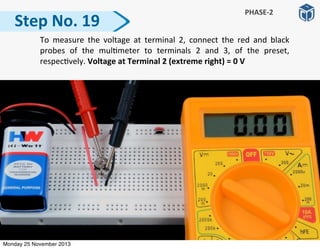
   To	
  measure	
   the	
   voltage	
   at	
   terminal	
  2,	
   connect	
   the	
   red	
   and	
   black	
  
probes	
   of	
   the	
   mul:meter	
   to	
   terminals	
   2	
   and	
   3,	
   of	
   the	
   preset,	
  
respec:vely.	
  Voltage	
  at	
  Terminal	
  2	
  (extreme	
  right)	
  =	
  0	
  V
Monday 25 November 2013
We	
  have	
  learned	
  that	
  using	
  a	
  voltage	
  divider	
  circuit,	
  we	
  can	
  
provide	
  variable	
  voltage	
  values	
  at	
  terminal	
  2	
  ranging	
  from	
  0	
  
to	
  9	
  V	
  (assuming	
  that	
  we	
  have	
  a	
  connected	
  a	
  single	
  baRery,	
  
providing	
  9	
  V).
Result
Monday 25 November 2013
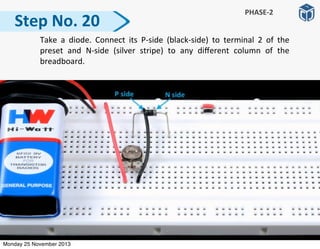
  Take	
   a	
   diode.	
   Connect	
   its	
   P-­‐side	
   (black-­‐side)	
   to	
   terminal	
   2	
   of	
   the	
  
preset	
   and	
   N-­‐side	
   (silver	
   stripe)	
   to	
   any	
   different	
   column	
   of	
   the	
  
breadboard.	
  
Step	
  No.	
  20
PHASE-­‐2
Monday 25 November 2013
  Take	
  a	
  1	
  kΩ	
  resistor.	
  Connect	
  its	
  one	
  leg	
  to	
  the	
  N-­‐side	
  of	
  the	
  diode	
  
and	
  its	
  other	
  leg	
  to	
  any	
  different	
  column	
  of	
  the	
  breadboard.	
  
Step	
  No.	
  21
PHASE-­‐2
Monday 25 November 2013
  Connect	
  the	
  other	
  leg	
  of	
  the	
  resistor	
  to	
  ground.	
  
Step	
  No.	
  22
PHASE-­‐2
Monday 25 November 2013
Congratula:ons!	
   We	
   have	
   completed	
   our	
   circuit.	
   Its	
   :me	
   for	
   some	
  
readings.	
  
Now	
  we	
  will	
  set	
  various	
  voltage	
  values	
  at	
  terminal	
  2	
  of	
  the	
  preset.	
  At	
  
each	
  value,	
  we	
  will	
  measure	
  voltage	
  across	
  the	
  diode	
  and	
  the	
  current	
  in	
  
the	
  circuit.
Next	
  Steps
Monday 25 November 2013
  Insert	
   the	
   screwdriver	
   in	
   the	
   rotary	
   slot	
   of	
   the	
   preset.	
   Stop	
   the	
  
preset	
  at	
  a	
  posi:on	
  which	
  lies	
  just	
  before	
  the	
  extreme	
  right	
  .	
  We	
  will	
  
now	
  measure	
  the	
  voltage	
  that	
  we	
  have	
  set	
  using	
  a	
  mul:meter.
Step	
  No.	
  23
PHASE-­‐2
Monday 25 November 2013
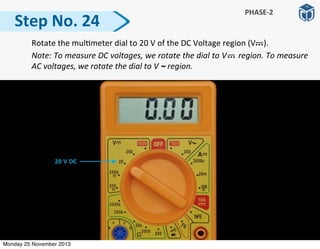
  Rotate	
  the	
  mul:meter	
  dial	
  to	
  20	
  V	
  of	
  the	
  DC	
  Voltage	
  region	
  (V	


  ).	
  
	
   Note:	
  To	
  measure	
  DC	
  voltages,	
  we	
  rotate	
  the	
  dial	
  to	
  V	


  region.	
  To	
  measure	
  
AC	
  voltages,	
  we	
  rotate	
  the	
  dial	
  to	
  V	
  ~	
  region.	
  
Step	
  No.	
  24
PHASE-­‐2
Monday 25 November 2013
Step	
  No.	
  25
PHASE-­‐2
	
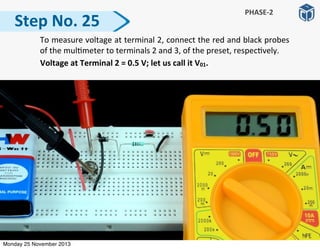
   To	
  measure	
  voltage	
  at	
  terminal	
  2,	
  connect	
  the	
  red	
  and	
  black	
  probes	
  
of	
  the	
  mul:meter	
  to	
  terminals	
  2	
  and	
  3,	
  of	
  the	
  preset,	
  respec:vely.


  Voltage	
  at	
  Terminal	
  2	
  =	
  0.5	
  V;	
  let	
  us	
  call	
  it	
  V01.
Monday 25 November 2013
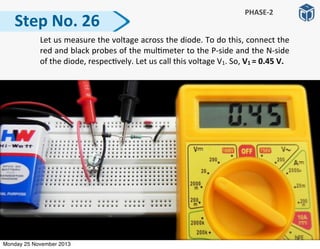
  Let	
  us	
  measure	
  the	
  voltage	
  across	
  the	
  diode.	
  To	
  do	
  this,	
  connect	
  the	
  
red	
  and	
  black	
  probes	
  of	
  the	
  mul:meter	
  to	
  the	
  P-­‐side	
  and	
  the	
  N-­‐side	
  
of	
  the	
  diode,	
  respec:vely.	
  Let	
  us	
  call	
  this	
  voltage	
  V1.	
  So,	
  V1	
  =	
  0.45	
  V.
Step	
  No.	
  26
PHASE-­‐2
Monday 25 November 2013
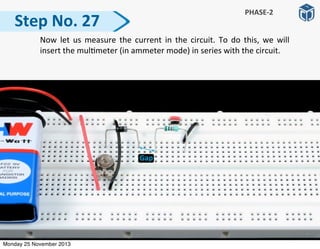
  Now	
   let	
  us	
  measure	
   the	
   current	
  in	
  the	
   circuit.	
   To	
  do	
   this,	
   we	
   will	
  
insert	
  the	
  mul:meter	
  (in	
  ammeter	
  mode)	
  in	
  series	
  with	
  the	
  circuit.
Step	
  No.	
  27
PHASE-­‐2
Monday 25 November 2013
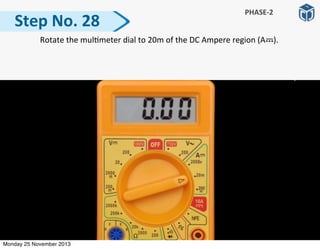
  Rotate	
  the	
  mul:meter	
  dial	
  to	
  20m	
  of	
  the	
  DC	
  Ampere	
  region	
  (A	


  ).	
  
Step	
  No.	
  28
PHASE-­‐2
Monday 25 November 2013
  To	
  measure	
  the	
  current,	
  connect	
  the	
  red	
  and	
  black	
  probes	
  to	
  the	
  N-­‐
side	
   and	
   the	
   le]	
   leg	
   of	
   the	
   resistor,	
   respec:vely.	
   Since	
   the	
  
mul:meter	
  dial	
  is	
  on	
  20m	
  posi:on,	
  the	
  current	
  in	
  the	
  circuit,	


  I1	
  =	
  0.04	
  mA	
  =	
  0.00004	
  A	
  ≅	
  0	
  A.
Step	
  No.	
  29
PHASE-­‐2
Monday 25 November 2013
  Reconnect	
  the	
  N-­‐side	
  of	
  the	
  diode	
  to	
  the	
  le]	
  leg	
  of	
  the	
  resistor.	
  
Step	
  No.	
  30
PHASE-­‐2
Monday 25 November 2013
  Insert	
   the	
   screwdriver	
  in	
   the	
   rotary	
   slot	
   of	
   the	
   preset.	
   Rotate	
   the	
  
preset	
  slowly	
  in	
  an	
  an:-­‐clockwise	
  direc:on	
  (towards	
  le])	
  and	
  stop	
  
rota:ng,	
  a]er	
  giving	
  it	
  a	
  slight	
  rota:on.	
  Measure	
  the	
  output	
  voltage	
  
at	
  terminal	
  2	
  of	
  the	
  preset	
  using	
  a	
  mul:meter.
Step	
  No.	
  31
PHASE-­‐2
Monday 25 November 2013
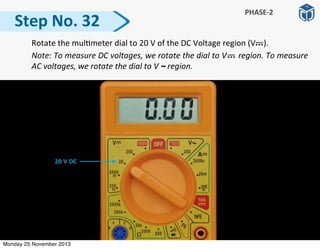
  Rotate	
  the	
  mul:meter	
  dial	
  to	
  20	
  V	
  of	
  the	
  DC	
  Voltage	
  region	
  (V	


  ).	
  
	
   Note:	
  To	
  measure	
  DC	
  voltages,	
  we	
  rotate	
  the	
  dial	
  to	
  V	


  region.	
  To	
  measure	
  
AC	
  voltages,	
  we	
  rotate	
  the	
  dial	
  to	
  V	
  ~	
  region.	
  
Step	
  No.	
  32
PHASE-­‐2
Monday 25 November 2013
Step	
  No.	
  33
PHASE-­‐2
	
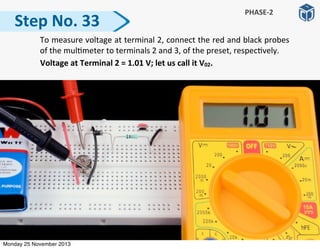
   To	
  measure	
  voltage	
  at	
  terminal	
  2,	
  connect	
  the	
  red	
  and	
  black	
  probes	
  
of	
  the	
  mul:meter	
  to	
  terminals	
  2	
  and	
  3,	
  of	
  the	
  preset,	
  respec:vely.


  Voltage	
  at	
  Terminal	
  2	
  =	
  1.01	
  V;	
  let	
  us	
  call	
  it	
  V02.
Monday 25 November 2013
Step	
  No.	
  34
PHASE-­‐2
	
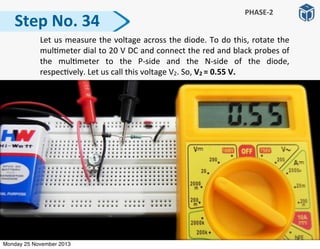
   Let	
  us	
  measure	
  the	
  voltage	
  across	
  the	
  diode.	
  To	
  do	
  this,	
  rotate	
  the	
  
mul:meter	
  dial	
  to	
  20	
  V	
  DC	
  and	
  connect	
  the	
  red	
  and	
  black	
  probes	
  of	
  
the	
   mul:meter	
   to	
   the	
   P-­‐side	
   and	
   the	
   N-­‐side	
   of	
   the	
   diode,	
  
respec:vely.	
  Let	
  us	
  call	
  this	
  voltage	
  V2.	
  So,	
  V2	
  =	
  0.55	
  V.
Monday 25 November 2013
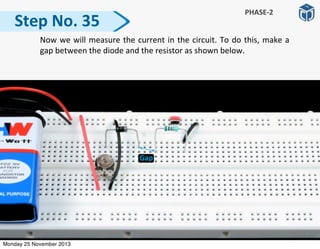
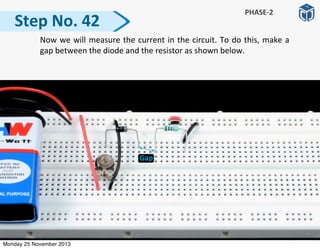
  Now	
  we	
  will	
  measure	
  the	
  current	
  in	
  the	
  circuit.	
  To	
  do	
  this,	
  make	
  a	
  
gap	
  between	
  the	
  diode	
  and	
  the	
  resistor	
  as	
  shown	
  below.	
  
Step	
  No.	
  35
PHASE-­‐2
Monday 25 November 2013
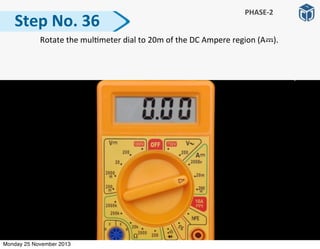
  Rotate	
  the	
  mul:meter	
  dial	
  to	
  20m	
  of	
  the	
  DC	
  Ampere	
  region	
  (A	


  ).	
  
Step	
  No.	
  36
PHASE-­‐2
Monday 25 November 2013
Step	
  No.	
  37
PHASE-­‐2
	
   To	
  measure	
  the	
  current,	
  connect	
  the	
  red	
  and	
  black	
  probes	
  to	
  the	
  N-­‐
side	
   and	
   the	
   le]	
   leg	
   of	
   the	
   resistor,	
   respec:vely.	
   Since	
   the	
  
mul:meter	
  dial	
  is	
  on	
  20m	
  posi:on,	
  the	
  current	
  in	
  the	
  circuit,	


  I2	
  =	
  0.46	
  mA.	
  
Monday 25 November 2013
  Reconnect	
  the	
  N-­‐side	
  of	
  the	
  diode	
  to	
  the	
  le]	
  leg	
  of	
  the	
  resistor.	
  
Step	
  No.	
  38
PHASE-­‐2
Monday 25 November 2013
Step	
  No.	
  39
PHASE-­‐2
	
   Insert	
   the	
   screwdriver	
  in	
   the	
   rotary	
   slot	
   of	
   the	
   preset.	
   Rotate	
   the	
  
preset	
  slowly	
  in	
  an	
  an:-­‐clockwise	
  direc:on	
  (towards	
  le])	
  and	
  stop	
  
rota:ng,	
  a]er	
  giving	
  it	
  a	
  slight	
  rota:on.	
  Measure	
  the	
  output	
  voltage	
  
at	
  terminal	
  2	
  of	
  the	
  preset	
  using	
  a	
  mul:meter.
Monday 25 November 2013
  Rotate	
  the	
  mul:meter	
  dial	
  to	
  20	
  V	
  of	
  the	
  DC	
  Voltage	
  region	
  (V	
   	
   	
  ).	


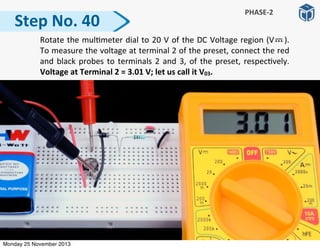
To	
  measure	
  the	
  voltage	
  at	
  terminal	
  2	
  of	
  the	
  preset,	
  connect	
  the	
  red	
  
and	
  black	
  probes	
  to	
  terminals	
  2	
  and	
  3,	
  of	
  the	
  preset,	
  respec:vely.	
  
Voltage	
  at	
  Terminal	
  2	
  =	
  3.01	
  V;	
  let	
  us	
  call	
  it	
  V03.
Step	
  No.	
  40
PHASE-­‐2
Monday 25 November 2013
Step	
  No.	
  41
PHASE-­‐2
	
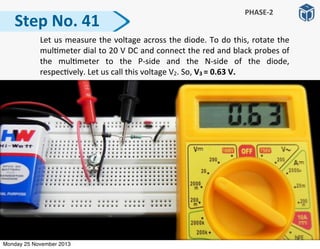
   Let	
  us	
  measure	
  the	
  voltage	
  across	
  the	
  diode.	
  To	
  do	
  this,	
  rotate	
  the	
  
mul:meter	
  dial	
  to	
  20	
  V	
  DC	
  and	
  connect	
  the	
  red	
  and	
  black	
  probes	
  of	
  
the	
   mul:meter	
   to	
   the	
   P-­‐side	
   and	
   the	
   N-­‐side	
   of	
   the	
   diode,	
  
respec:vely.	
  Let	
  us	
  call	
  this	
  voltage	
  V2.	
  So,	
  V3	
  =	
  0.63	
  V.
Monday 25 November 2013
Step	
  No.	
  42
PHASE-­‐2
	
   Now	
  we	
  will	
  measure	
  the	
  current	
  in	
  the	
  circuit.	
  To	
  do	
  this,	
  make	
  a	
  
gap	
  between	
  the	
  diode	
  and	
  the	
  resistor	
  as	
  shown	
  below.	
  
Monday 25 November 2013
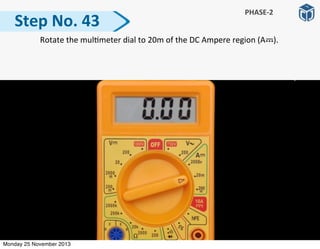
  Rotate	
  the	
  mul:meter	
  dial	
  to	
  20m	
  of	
  the	
  DC	
  Ampere	
  region	
  (A	


  ).	
  
Step	
  No.	
  43
PHASE-­‐2
Monday 25 November 2013
Step	
  No.	
  44
PHASE-­‐2
	
   To	
  measure	
  the	
  current,	
  connect	
  the	
  red	
  and	
  black	
  probes	
  to	
  the	
  N-­‐
side	
   and	
   the	
   le]	
   leg	
   of	
   the	
   resistor,	
   respec:vely.	
   Since	
   the	
  
mul:meter	
  dial	
  is	
  on	
  20m	
  posi:on,	
  the	
  current	
  in	
  the	
  circuit,	


  I3	
  =	
  2.4	
  mA.	
  
Monday 25 November 2013
  Reconnect	
  the	
  N-­‐side	
  of	
  the	
  diode	
  to	
  the	
  le]	
  leg	
  of	
  the	
  resistor.	
  
Step	
  No.	
  45
PHASE-­‐2
Monday 25 November 2013
Step	
  No.	
  46
PHASE-­‐2
	
   Insert	
   the	
   screwdriver	
  in	
   the	
   rotary	
   slot	
   of	
   the	
   preset.	
   Rotate	
   the	
  
preset	
  slowly	
  in	
  an	
  an:-­‐clockwise	
  direc:on	
  (towards	
  le])	
  and	
  stop	
  
rota:ng,	
  a]er	
  giving	
  it	
  a	
  slight	
  rota:on.	
  Measure	
  the	
  output	
  voltage	
  
at	
  terminal	
  2	
  of	
  the	
  preset	
  using	
  a	
  mul:meter.
Monday 25 November 2013
Step	
  No.	
  47
PHASE-­‐2
	
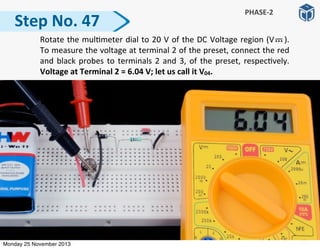
   Rotate	
  the	
  mul:meter	
  dial	
  to	
  20	
  V	
  of	
  the	
  DC	
  Voltage	
  region	
  (V	
   	
   	
  ).	


To	
  measure	
  the	
  voltage	
  at	
  terminal	
  2	
  of	
  the	
  preset,	
  connect	
  the	
  red	
  
and	
  black	
  probes	
  to	
  terminals	
  2	
  and	
  3,	
  of	
  the	
  preset,	
  respec:vely.	
  
Voltage	
  at	
  Terminal	
  2	
  =	
  6.04	
  V;	
  let	
  us	
  call	
  it	
  V04.
Monday 25 November 2013
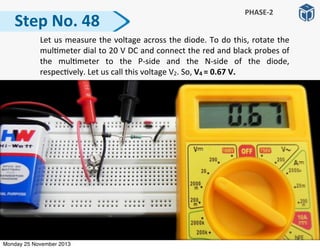
Step	
  No.	
  48
PHASE-­‐2
	
   Let	
  us	
  measure	
  the	
  voltage	
  across	
  the	
  diode.	
  To	
  do	
  this,	
  rotate	
  the	
  
mul:meter	
  dial	
  to	
  20	
  V	
  DC	
  and	
  connect	
  the	
  red	
  and	
  black	
  probes	
  of	
  
the	
   mul:meter	
   to	
   the	
   P-­‐side	
   and	
   the	
   N-­‐side	
   of	
   the	
   diode,	
  
respec:vely.	
  Let	
  us	
  call	
  this	
  voltage	
  V2.	
  So,	
  V4	
  =	
  0.67	
  V.
Monday 25 November 2013
Step	
  No.	
  49
PHASE-­‐2
	
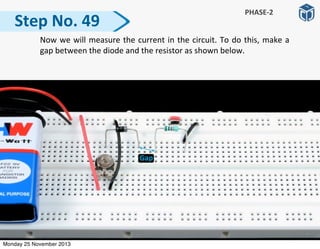
   Now	
  we	
  will	
  measure	
  the	
  current	
  in	
  the	
  circuit.	
  To	
  do	
  this,	
  make	
  a	
  
gap	
  between	
  the	
  diode	
  and	
  the	
  resistor	
  as	
  shown	
  below.	
  
Monday 25 November 2013
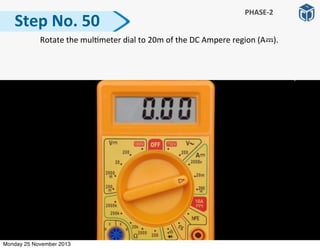
  Rotate	
  the	
  mul:meter	
  dial	
  to	
  20m	
  of	
  the	
  DC	
  Ampere	
  region	
  (A	


  ).	
  
Step	
  No.	
  50
PHASE-­‐2
Monday 25 November 2013
Step	
  No.	
  51
PHASE-­‐2
	
   To	
  measure	
  the	
  current,	
  connect	
  the	
  red	
  and	
  black	
  probes	
  to	
  the	
  N-­‐
side	
   and	
   the	
   le]	
   leg	
   of	
   the	
   resistor,	
   respec:vely.	
   Since	
   the	
  
mul:meter	
  dial	
  is	
  on	
  20m	
  posi:on,	
  the	
  current	
  in	
  the	
  circuit,	


  I4	
  =	
  5.59	
  mA.	
  
Monday 25 November 2013
  Reconnect	
  the	
  N-­‐side	
  of	
  the	
  diode	
  to	
  the	
  le]	
  leg	
  of	
  the	
  resistor.	
  
Step	
  No.	
  52
PHASE-­‐2
Monday 25 November 2013
  Insert	
   the	
   screwdriver	
  in	
   the	
   rotary	
   slot	
   of	
   the	
   preset.	
   Rotate	
   the	
  
preset	
  towards	
  the	
  extreme	
  le]	
  (in	
  an:clockwise	
  direc:on).
Step	
  No.	
  53
PHASE-­‐2
Monday 25 November 2013
Step	
  No.	
  54
PHASE-­‐2
	
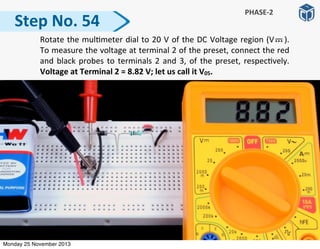
   Rotate	
  the	
  mul:meter	
  dial	
  to	
  20	
  V	
  of	
  the	
  DC	
  Voltage	
  region	
  (V	
   	
   	
  ).	


To	
  measure	
  the	
  voltage	
  at	
  terminal	
  2	
  of	
  the	
  preset,	
  connect	
  the	
  red	
  
and	
  black	
  probes	
  to	
  terminals	
  2	
  and	
  3,	
  of	
  the	
  preset,	
  respec:vely.	
  
Voltage	
  at	
  Terminal	
  2	
  =	
  8.82	
  V;	
  let	
  us	
  call	
  it	
  V05.
Monday 25 November 2013
Step	
  No.	
  55
PHASE-­‐2
	
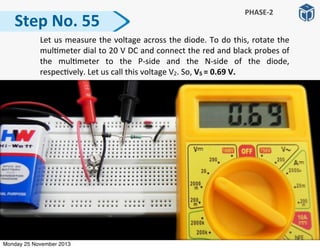
   Let	
  us	
  measure	
  the	
  voltage	
  across	
  the	
  diode.	
  To	
  do	
  this,	
  rotate	
  the	
  
mul:meter	
  dial	
  to	
  20	
  V	
  DC	
  and	
  connect	
  the	
  red	
  and	
  black	
  probes	
  of	
  
the	
   mul:meter	
   to	
   the	
   P-­‐side	
   and	
   the	
   N-­‐side	
   of	
   the	
   diode,	
  
respec:vely.	
  Let	
  us	
  call	
  this	
  voltage	
  V2.	
  So,	
  V5	
  =	
  0.69	
  V.
Monday 25 November 2013
Step	
  No.	
  56
PHASE-­‐2
	
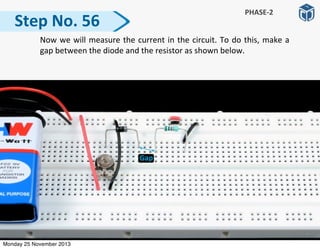
   Now	
  we	
  will	
  measure	
  the	
  current	
  in	
  the	
  circuit.	
  To	
  do	
  this,	
  make	
  a	
  
gap	
  between	
  the	
  diode	
  and	
  the	
  resistor	
  as	
  shown	
  below.	
  
Monday 25 November 2013
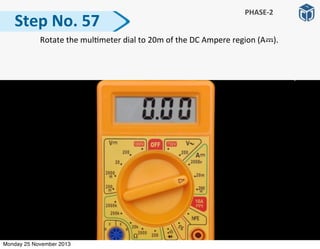
  Rotate	
  the	
  mul:meter	
  dial	
  to	
  20m	
  of	
  the	
  DC	
  Ampere	
  region	
  (A	


  ).	
  
Step	
  No.	
  57
PHASE-­‐2
Monday 25 November 2013
Step	
  No.	
  58
PHASE-­‐2
	
   To	
  measure	
  the	
  current,	
  connect	
  the	
  red	
  and	
  black	
  probes	
  to	
  the	
  N-­‐
side	
   and	
   the	
   le]	
   leg	
   of	
   the	
   resistor,	
   respec:vely.	
   Since	
   the	
  
mul:meter	
  dial	
  is	
  on	
  20m	
  posi:on,	
  the	
  current	
  in	
  the	
  circuit,	


  I5	
  =	
  8.14	
  mA.	
  
Monday 25 November 2013
  Reconnect	
  the	
  N-­‐side	
  of	
  the	
  diode	
  to	
  the	
  le]	
  leg	
  of	
  the	
  resistor.	
  
Step	
  No.	
  59
PHASE-­‐2
Monday 25 November 2013
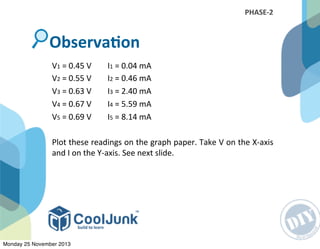
V1	
  =	
  0.45	
  V	


  I1	
  =	
  0.04	
  mA
V2	
  =	
  0.55	
  V	


  I2	
  =	
  0.46	
  mA
V3	
  =	
  0.63	
  V	


  I3	
  =	
  2.40	
  mA
V4	
  =	
  0.67	
  V	


  I4	
  =	
  5.59	
  mA
V5	
  =	
  0.69	
  V	


  I5	
  =	
  8.14	
  mA
Plot	
  these	
  readings	
  on	
  the	
  graph	
  paper.	
  Take	
  V	
  on	
  the	
  X-­‐axis	
  
and	
  I	
  on	
  the	
  Y-­‐axis.	
  See	
  next	
  slide.
ObservaGon
PHASE-­‐2
Monday 25 November 2013
V-­‐I	
  
CharacterisGcs	
  
of	
  a	
  Diode
Monday 25 November 2013
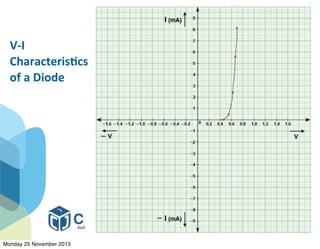
We	
   can	
   represent	
   the	
   working	
   of	
   diodes	
   using	
   a	
   voltage-­‐
current	
  characterisGc	
  curve.	
  The	
  curve	
  explains	
  how	
  a	
  diode	
  
behaves	
  when	
   different	
   voltages	
   are	
   applied	
  across	
   it.	
   We	
  
know	
   that	
  an	
  ordinary	
  diode	
  is	
  a	
  p-­‐n	
  junc:on,	
  which	
  when	
  
forward	
   biased	
   allows	
   the	
   current	
   to	
   pass	
   through	
   it	
   and	
  
when	
  reverse	
  biased	
  stops	
  the	
  flow	
  of	
  current.	
  
Result
Monday 25 November 2013
Consider	
  the	
  posi:ve	
  voltage	
  region.	
  Let	
  us	
  analyse	
  the	
  curve	
  
in	
  this	
  region:
a)	
  The	
  current	
  remains	
  zero	
  un:l	
  the	
  voltage	
  reaches	
  0.5	
  V	
  
(reading	
  2).	
  We	
  know	
  that	
  a	
  diode	
  needs	
  a	
  minimum	
  voltage	
  
to	
  get	
  forward-­‐biased.	
  Un:l	
  then,	
  the	
  diode	
  resists	
  the	
  flow	
  
of	
  current.	
  Hence,	
  the	
  current	
  is	
  zero.
b)	
   The	
   diode	
   starts	
   conduc:ng	
   at	
   0.5	
   V.	
   It	
   gets	
   forward	
  
biased	
  at	
  0.6-­‐0.7	
  V,	
  and	
  then	
  the	
  voltage	
  across	
  its	
  terminals	
  
becomes	
  constant
Analysis	
  from	
  the	
  Curve
Monday 25 November 2013
c)	
   On	
   further	
   increase	
   in	
   voltage,	
   the	
   current	
   increases	
  
exponen:ally	
   through	
   the	
   diode.	
   We	
   can	
   see	
   this	
   by	
  
observing	
  the	
  ‘exponenGal	
  behavior	
  of	
  the	
  curve’.	
  This	
  is	
  the	
  
forward	
  current,	
  measured	
  in	
  milliampere	
  (mA).
The	
  current	
  through	
  the	
  diode	
  in	
  nega:ve	
  voltage	
  region	
  is	
  
zero	
  because	
  the	
  diode	
  gets	
  reverse-­‐biased	
  and	
  it	
  does	
  not	
  
conduct.	
  We	
  have	
  seen	
  it	
  when	
  the	
  diode	
  was	
  connected	
  in	
  
reverse	
  direc:on	
  in	
  phase-­‐1	
  experiment.
Analysis	
  from	
  the	
  Curve
Monday 25 November 2013
• Ensure	
  that	
  the	
  baRery	
  voltage	
  is	
  more	
  than	
  6	
  volt.
• Ensure	
   that	
   the	
   wires	
   of	
   the	
   baRery	
   connector	
   are	
  
properly	
   inserted	
   into	
   the	
   breadboard.	
   The	
   red	
   wire	
  
should	
  be	
  inserted	
  into	
  the	
  first	
  row,	
  and	
  the	
  black	
  wire	
  
into	
  the	
  second	
  row	
  of	
  the	
  breadboard.
• Ensure	
  that	
  the	
   pins	
  of	
  the	
  preset	
  are	
  properly	
  inserted	
  
into	
  the	
  holes	
  of	
  the	
  breadboard,	
  and	
  are	
  not	
  popped	
  out	
  
or	
  twisted.
• Press	
  the	
  preset	
  a]er	
  connec:ng	
  it	
  on	
  the	
  breadboard	
  so	
  
that	
  its	
  pins	
  go	
  completely	
  inside	
  the	
  breadboard.
• Ensure	
   that	
   the	
   stripped	
   ends	
   of	
   the	
   connec:ng	
   wires	
  
should	
   be	
   long	
   enough	
   to	
   fit	
   inside	
   the	
   holes	
   of	
   the	
  
breadboard	
  completely.
TroubleshooGng	
  Tips
Monday 25 November 2013
TroubleshooGng	
  Tips
• Ensure	
  that	
  you	
  have	
  iden:fied	
  P	
  and	
  N	
  side	
  of	
  the	
  diode	
  
correctly.
• Ensure	
  that	
  the	
  there	
  are	
  no	
  loose	
  connec:ons.
Monday 25 November 2013
Result
PrecauGon
Notes
Circuit
Measure
AcGvity
Advantages
ModificaGon
Do	
  you	
  know?
Monday 25 November 2013

Project Sample: To Learn How a Diode Works

  • 1.
  • 2.
    Experiment: To  Learn  How  a  Diode  works Monday 25 November 2013
  • 3.
    • We  will  do  this  experiment  in  two  phases.  In  the  first  phase,   we  will  learn  about  the  basic  func:oning  of  a  diode. • In  the  second  phase,  we  will  vary  voltage  across  the  diode   and  observe  how  the  current  changes  through  it.  Then,  we   will  plot  a  graph,  current  (I)  vs  voltage  (V). Points  to  Remember Monday 25 November 2013
  • 4.
  • 5.
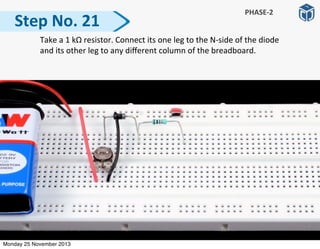
    i. Breadboard  -­‐  1 ii. Diode  4007  -­‐  1 iii. LED  -­‐  1 iv. Resistor:  1  kΩ  -­‐  1             Colour  Code:  1  kΩ  -­‐  Brown  Black  Red  Gold v.     9  V  BaRery  -­‐  1 vi.     Connec:ng  Wire  Pieces Materials  Required PHASE-­‐1 Monday 25 November 2013
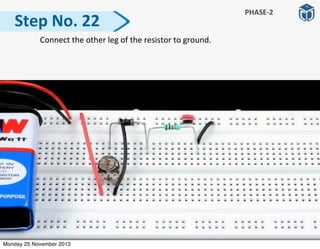
  • 6.
  • 7.
      Take  a  breadboard  and  connect  its  two  halves  as  shown  in  figure   below. Step  No.  1 PHASE-­‐1 Monday 25 November 2013
  • 8.
      Connect  a  9  V  baRery  on  the  breadboard. Step  No.  2 PHASE-­‐1 Monday 25 November 2013
  • 9.
      Connect  a  diode  on  the  breadboard.     Note:  The  black-­‐side  of  the  diode  represents  its  p-­‐side  and  its  silver   stripe  is  the  n-­‐side. Step  No.  3 PHASE-­‐1 Monday 25 November 2013
  • 10.
      Connect  the  posi:ve  terminal  of  the  LED  to  the  n-­‐side  of  the  diode   and  its  nega:ve  terminal  to  any  different  column  of  the  breadboard. Step  No.  4 PHASE-­‐1 Monday 25 November 2013
  • 11.
      Connect  one  leg  of  a  1  kΩ   resistor  to  the  nega:ve  terminal  of  the   LED  and  its  other  leg  to  any  different  column  of  the  breadboard.   Step  No.  5 PHASE-­‐1 Monday 25 November 2013
  • 12.
      Connect  the   p-­‐side   of   the   diode   to   Vcc   and   the   right   leg   of   the   resistor  to  ground.   Step  No.  6 PHASE-­‐1 Monday 25 November 2013
  • 13.
      Reverse  the  connec:ons  of  the  diode.  On  reversing  the  connec:ons   of  the  diode,  the  LED  stops  glowing. Step  No.  7 PHASE-­‐1 Monday 25 November 2013
  • 14.
      Again,  reverse   the   connec:ons  of   the   diode.   Measure   the   voltage   across  the  diode  when  the  LED  is  glowing.  The  voltage  reading  across   the  diode  is  0.69  V. Step  No.  8 PHASE-­‐1 Monday 25 November 2013
  • 15.
    The  LED  glows  when  the  p-­‐side  of  the  diode  is  connected  to   Vcc,  and  the  n-­‐side  is  connected  to  ground  through  the  LED   and  the  resistor.   The   LED   does   not   glow   when   the   n-­‐side   of   the   diode   is   connected  to  Vcc  and  the  p-­‐side  is  connected  to  ground. When  a  diode  is  conduc:ng,  a  voltage  drop  of  0.69  V  takes   place   across   its   terminals.   The   diode   needs   a   minimum   voltage  of  0.6  -­‐  0.7  V  to  allow  current  to  pass  through  it. ObservaGon PHASE-­‐1 Monday 25 November 2013
  • 16.
    Disconnect  all  components  from  the  breadboard.  We  have  learned  how   a  diode  works.  Now  its  :me  for  Phase-­‐2.  Refer  the  circuit  diagram  and   follow  the  steps  given. Next  Steps Monday 25 November 2013
  • 17.
  • 18.
    i. Breadboard  -­‐  1 ii. Preset:  10  kΩ  -­‐  1 iii. Diode  4007  -­‐  1 iv. Resistor:  1  kΩ  -­‐  1 Colour  Code:  1  kΩ  -­‐  Brown  Black  Red  Gold v. 9  V  BaRery  -­‐  1 vi. Connec:ng  Wire  Pieces Materials  Required PHASE-­‐2 Monday 25 November 2013
  • 19.
  • 20.
      Take  a   breadboard  and  connect  its  two   halves   as  shown   in   figure   below. Step  No.  9 PHASE-­‐2 Monday 25 November 2013
  • 21.
      Connect  a  9  V  baRery  on  the  breadboard. Step  No.  10 PHASE-­‐2 Monday 25 November 2013
  • 22.
    Step  No.  11   Insert   a   10   kΩ   preset   on   the   breadboard   such   that   its   middle   terminal  (2)  is  connected  on  the   upper   half,   and  side   terminals   (1   and  3)  are  connected  on  the  lower  half  of  the  breadboard. PHASE-­‐2 Monday 25 November 2013
  • 23.
    Step  No.  12   Connect   terminals   1   and   3,   of   the   preset   to   Vcc   and   ground,   respec:vely.  We  have  built  a  voltage  divider  circuit  using  the  preset.   When  we  rotate  the  preset  from  its  one  extreme  end  to  the  other,   we  will  get  a  range  of  voltages  from  zero  to  a  maximum  value  at  its   middle  terminal  2. PHASE-­‐2 Monday 25 November 2013
  • 24.
      Insert  a   screwdriver   in   the   rotary   slot   of   the   preset.   Rotate   the   preset  and  stop  it  somewhere  in  the  middle  posi:on.  Now   we  will   measure  the  voltage  at  the  middle  terminal  (2)  of  the  preset  (w.r.t   ground)  at  the  corresponding  posi:on  of  the  preset.   Step  No.  13 PHASE-­‐2 Monday 25 November 2013
  • 25.
      Rotate  the  mul:meter  dial  to  20  V  of  the  DC  Voltage  region  (V        ).     Note:  To  measure  DC  voltages,  we  rotate  the  dial  to  V          region.  To  measure   AC  voltages,  we  rotate  the  dial  to  V  ~  region.   Step  No.  14 PHASE-­‐2 Monday 25 November 2013
  • 26.
      To  measure  the  voltage  at  terminal  2  of  the  preset,  connect  the  red   and  black  probes  of  the  mul:meter  to  terminals  2  and  3,  of  the  preset,   respec:vely.   Note:   Alternately,   we   can   connect   the   black   probe   to   ground  (zero  volt).  Voltage  at  Terminal  2  (middle  posiGon)  =  4.96  V Step  No.  15 PHASE-­‐2 Monday 25 November 2013
  • 27.
      Again,  insert   the   screwdriver   in   the   rotary   slot   of   the   preset   and   rotate   the   preset   to   its   extreme   le].   Measure   the   voltage   at   this   posi:on  using  a  mul:meter. Step  No.  16 PHASE-­‐2 Monday 25 November 2013
  • 28.
      To  measure   the   voltage   at   terminal  2,   connect   the   red   and   black   probes   of   the   mul:meter   to   terminals   2   and   3,   of   the   preset,   respec:vely.  Voltage  at  Terminal  2  (extreme  leP)  =  9.05  V Step  No.  17 PHASE-­‐2 Monday 25 November 2013
  • 29.
      Again,  insert   the   screwdriver   in   the   rotary   slot   of   the   preset   and   rotate   the   preset   to   its   extreme   right.   Measure   the   voltage   at   terminal  2  of  the  preset  at  this  posi:on. Step  No.  18 PHASE-­‐2 Monday 25 November 2013
  • 30.
    Step  No.  19 PHASE-­‐2   To  measure   the   voltage   at   terminal  2,   connect   the   red   and   black   probes   of   the   mul:meter   to   terminals   2   and   3,   of   the   preset,   respec:vely.  Voltage  at  Terminal  2  (extreme  right)  =  0  V Monday 25 November 2013
  • 31.
    We  have  learned  that  using  a  voltage  divider  circuit,  we  can   provide  variable  voltage  values  at  terminal  2  ranging  from  0   to  9  V  (assuming  that  we  have  a  connected  a  single  baRery,   providing  9  V). Result Monday 25 November 2013
  • 32.
      Take  a   diode.   Connect   its   P-­‐side   (black-­‐side)   to   terminal   2   of   the   preset   and   N-­‐side   (silver   stripe)   to   any   different   column   of   the   breadboard.   Step  No.  20 PHASE-­‐2 Monday 25 November 2013
  • 33.
      Take  a  1  kΩ  resistor.  Connect  its  one  leg  to  the  N-­‐side  of  the  diode   and  its  other  leg  to  any  different  column  of  the  breadboard.   Step  No.  21 PHASE-­‐2 Monday 25 November 2013
  • 34.
      Connect  the  other  leg  of  the  resistor  to  ground.   Step  No.  22 PHASE-­‐2 Monday 25 November 2013
  • 35.
    Congratula:ons!   We   have   completed   our   circuit.   Its   :me   for   some   readings.   Now  we  will  set  various  voltage  values  at  terminal  2  of  the  preset.  At   each  value,  we  will  measure  voltage  across  the  diode  and  the  current  in   the  circuit. Next  Steps Monday 25 November 2013
  • 36.
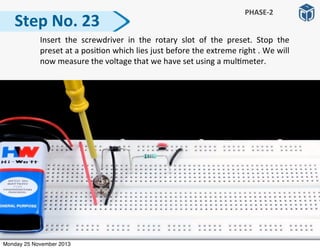
      Insert  the   screwdriver   in   the   rotary   slot   of   the   preset.   Stop   the   preset  at  a  posi:on  which  lies  just  before  the  extreme  right  .  We  will   now  measure  the  voltage  that  we  have  set  using  a  mul:meter. Step  No.  23 PHASE-­‐2 Monday 25 November 2013
  • 37.
      Rotate  the  mul:meter  dial  to  20  V  of  the  DC  Voltage  region  (V        ).     Note:  To  measure  DC  voltages,  we  rotate  the  dial  to  V          region.  To  measure   AC  voltages,  we  rotate  the  dial  to  V  ~  region.   Step  No.  24 PHASE-­‐2 Monday 25 November 2013
  • 38.
    Step  No.  25 PHASE-­‐2   To  measure  voltage  at  terminal  2,  connect  the  red  and  black  probes   of  the  mul:meter  to  terminals  2  and  3,  of  the  preset,  respec:vely.                    Voltage  at  Terminal  2  =  0.5  V;  let  us  call  it  V01. Monday 25 November 2013
  • 39.
      Let  us  measure  the  voltage  across  the  diode.  To  do  this,  connect  the   red  and  black  probes  of  the  mul:meter  to  the  P-­‐side  and  the  N-­‐side   of  the  diode,  respec:vely.  Let  us  call  this  voltage  V1.  So,  V1  =  0.45  V. Step  No.  26 PHASE-­‐2 Monday 25 November 2013
  • 40.
      Now  let  us  measure   the   current  in  the   circuit.   To  do   this,   we   will   insert  the  mul:meter  (in  ammeter  mode)  in  series  with  the  circuit. Step  No.  27 PHASE-­‐2 Monday 25 November 2013
  • 41.
      Rotate  the  mul:meter  dial  to  20m  of  the  DC  Ampere  region  (A        ).   Step  No.  28 PHASE-­‐2 Monday 25 November 2013
  • 42.
      To  measure  the  current,  connect  the  red  and  black  probes  to  the  N-­‐ side   and   the   le]   leg   of   the   resistor,   respec:vely.   Since   the   mul:meter  dial  is  on  20m  posi:on,  the  current  in  the  circuit,                      I1  =  0.04  mA  =  0.00004  A  ≅  0  A. Step  No.  29 PHASE-­‐2 Monday 25 November 2013
  • 43.
      Reconnect  the  N-­‐side  of  the  diode  to  the  le]  leg  of  the  resistor.   Step  No.  30 PHASE-­‐2 Monday 25 November 2013
  • 44.
      Insert  the   screwdriver  in   the   rotary   slot   of   the   preset.   Rotate   the   preset  slowly  in  an  an:-­‐clockwise  direc:on  (towards  le])  and  stop   rota:ng,  a]er  giving  it  a  slight  rota:on.  Measure  the  output  voltage   at  terminal  2  of  the  preset  using  a  mul:meter. Step  No.  31 PHASE-­‐2 Monday 25 November 2013
  • 45.
      Rotate  the  mul:meter  dial  to  20  V  of  the  DC  Voltage  region  (V        ).     Note:  To  measure  DC  voltages,  we  rotate  the  dial  to  V          region.  To  measure   AC  voltages,  we  rotate  the  dial  to  V  ~  region.   Step  No.  32 PHASE-­‐2 Monday 25 November 2013
  • 46.
    Step  No.  33 PHASE-­‐2   To  measure  voltage  at  terminal  2,  connect  the  red  and  black  probes   of  the  mul:meter  to  terminals  2  and  3,  of  the  preset,  respec:vely.                    Voltage  at  Terminal  2  =  1.01  V;  let  us  call  it  V02. Monday 25 November 2013
  • 47.
    Step  No.  34 PHASE-­‐2   Let  us  measure  the  voltage  across  the  diode.  To  do  this,  rotate  the   mul:meter  dial  to  20  V  DC  and  connect  the  red  and  black  probes  of   the   mul:meter   to   the   P-­‐side   and   the   N-­‐side   of   the   diode,   respec:vely.  Let  us  call  this  voltage  V2.  So,  V2  =  0.55  V. Monday 25 November 2013
  • 48.
      Now  we  will  measure  the  current  in  the  circuit.  To  do  this,  make  a   gap  between  the  diode  and  the  resistor  as  shown  below.   Step  No.  35 PHASE-­‐2 Monday 25 November 2013
  • 49.
      Rotate  the  mul:meter  dial  to  20m  of  the  DC  Ampere  region  (A        ).   Step  No.  36 PHASE-­‐2 Monday 25 November 2013
  • 50.
    Step  No.  37 PHASE-­‐2   To  measure  the  current,  connect  the  red  and  black  probes  to  the  N-­‐ side   and   the   le]   leg   of   the   resistor,   respec:vely.   Since   the   mul:meter  dial  is  on  20m  posi:on,  the  current  in  the  circuit,                      I2  =  0.46  mA.   Monday 25 November 2013
  • 51.
      Reconnect  the  N-­‐side  of  the  diode  to  the  le]  leg  of  the  resistor.   Step  No.  38 PHASE-­‐2 Monday 25 November 2013
  • 52.
    Step  No.  39 PHASE-­‐2   Insert   the   screwdriver  in   the   rotary   slot   of   the   preset.   Rotate   the   preset  slowly  in  an  an:-­‐clockwise  direc:on  (towards  le])  and  stop   rota:ng,  a]er  giving  it  a  slight  rota:on.  Measure  the  output  voltage   at  terminal  2  of  the  preset  using  a  mul:meter. Monday 25 November 2013
  • 53.
      Rotate  the  mul:meter  dial  to  20  V  of  the  DC  Voltage  region  (V      ).       To  measure  the  voltage  at  terminal  2  of  the  preset,  connect  the  red   and  black  probes  to  terminals  2  and  3,  of  the  preset,  respec:vely.   Voltage  at  Terminal  2  =  3.01  V;  let  us  call  it  V03. Step  No.  40 PHASE-­‐2 Monday 25 November 2013
  • 54.
    Step  No.  41 PHASE-­‐2   Let  us  measure  the  voltage  across  the  diode.  To  do  this,  rotate  the   mul:meter  dial  to  20  V  DC  and  connect  the  red  and  black  probes  of   the   mul:meter   to   the   P-­‐side   and   the   N-­‐side   of   the   diode,   respec:vely.  Let  us  call  this  voltage  V2.  So,  V3  =  0.63  V. Monday 25 November 2013
  • 55.
    Step  No.  42 PHASE-­‐2   Now  we  will  measure  the  current  in  the  circuit.  To  do  this,  make  a   gap  between  the  diode  and  the  resistor  as  shown  below.   Monday 25 November 2013
  • 56.
      Rotate  the  mul:meter  dial  to  20m  of  the  DC  Ampere  region  (A        ).   Step  No.  43 PHASE-­‐2 Monday 25 November 2013
  • 57.
    Step  No.  44 PHASE-­‐2   To  measure  the  current,  connect  the  red  and  black  probes  to  the  N-­‐ side   and   the   le]   leg   of   the   resistor,   respec:vely.   Since   the   mul:meter  dial  is  on  20m  posi:on,  the  current  in  the  circuit,                      I3  =  2.4  mA.   Monday 25 November 2013
  • 58.
      Reconnect  the  N-­‐side  of  the  diode  to  the  le]  leg  of  the  resistor.   Step  No.  45 PHASE-­‐2 Monday 25 November 2013
  • 59.
    Step  No.  46 PHASE-­‐2   Insert   the   screwdriver  in   the   rotary   slot   of   the   preset.   Rotate   the   preset  slowly  in  an  an:-­‐clockwise  direc:on  (towards  le])  and  stop   rota:ng,  a]er  giving  it  a  slight  rota:on.  Measure  the  output  voltage   at  terminal  2  of  the  preset  using  a  mul:meter. Monday 25 November 2013
  • 60.
    Step  No.  47 PHASE-­‐2   Rotate  the  mul:meter  dial  to  20  V  of  the  DC  Voltage  region  (V      ).       To  measure  the  voltage  at  terminal  2  of  the  preset,  connect  the  red   and  black  probes  to  terminals  2  and  3,  of  the  preset,  respec:vely.   Voltage  at  Terminal  2  =  6.04  V;  let  us  call  it  V04. Monday 25 November 2013
  • 61.
    Step  No.  48 PHASE-­‐2   Let  us  measure  the  voltage  across  the  diode.  To  do  this,  rotate  the   mul:meter  dial  to  20  V  DC  and  connect  the  red  and  black  probes  of   the   mul:meter   to   the   P-­‐side   and   the   N-­‐side   of   the   diode,   respec:vely.  Let  us  call  this  voltage  V2.  So,  V4  =  0.67  V. Monday 25 November 2013
  • 62.
    Step  No.  49 PHASE-­‐2   Now  we  will  measure  the  current  in  the  circuit.  To  do  this,  make  a   gap  between  the  diode  and  the  resistor  as  shown  below.   Monday 25 November 2013
  • 63.
      Rotate  the  mul:meter  dial  to  20m  of  the  DC  Ampere  region  (A        ).   Step  No.  50 PHASE-­‐2 Monday 25 November 2013
  • 64.
    Step  No.  51 PHASE-­‐2   To  measure  the  current,  connect  the  red  and  black  probes  to  the  N-­‐ side   and   the   le]   leg   of   the   resistor,   respec:vely.   Since   the   mul:meter  dial  is  on  20m  posi:on,  the  current  in  the  circuit,                      I4  =  5.59  mA.   Monday 25 November 2013
  • 65.
      Reconnect  the  N-­‐side  of  the  diode  to  the  le]  leg  of  the  resistor.   Step  No.  52 PHASE-­‐2 Monday 25 November 2013
  • 66.
      Insert  the   screwdriver  in   the   rotary   slot   of   the   preset.   Rotate   the   preset  towards  the  extreme  le]  (in  an:clockwise  direc:on). Step  No.  53 PHASE-­‐2 Monday 25 November 2013
  • 67.
    Step  No.  54 PHASE-­‐2   Rotate  the  mul:meter  dial  to  20  V  of  the  DC  Voltage  region  (V      ).       To  measure  the  voltage  at  terminal  2  of  the  preset,  connect  the  red   and  black  probes  to  terminals  2  and  3,  of  the  preset,  respec:vely.   Voltage  at  Terminal  2  =  8.82  V;  let  us  call  it  V05. Monday 25 November 2013
  • 68.
    Step  No.  55 PHASE-­‐2   Let  us  measure  the  voltage  across  the  diode.  To  do  this,  rotate  the   mul:meter  dial  to  20  V  DC  and  connect  the  red  and  black  probes  of   the   mul:meter   to   the   P-­‐side   and   the   N-­‐side   of   the   diode,   respec:vely.  Let  us  call  this  voltage  V2.  So,  V5  =  0.69  V. Monday 25 November 2013
  • 69.
    Step  No.  56 PHASE-­‐2   Now  we  will  measure  the  current  in  the  circuit.  To  do  this,  make  a   gap  between  the  diode  and  the  resistor  as  shown  below.   Monday 25 November 2013
  • 70.
      Rotate  the  mul:meter  dial  to  20m  of  the  DC  Ampere  region  (A        ).   Step  No.  57 PHASE-­‐2 Monday 25 November 2013
  • 71.
    Step  No.  58 PHASE-­‐2   To  measure  the  current,  connect  the  red  and  black  probes  to  the  N-­‐ side   and   the   le]   leg   of   the   resistor,   respec:vely.   Since   the   mul:meter  dial  is  on  20m  posi:on,  the  current  in  the  circuit,                      I5  =  8.14  mA.   Monday 25 November 2013
  • 72.
      Reconnect  the  N-­‐side  of  the  diode  to  the  le]  leg  of  the  resistor.   Step  No.  59 PHASE-­‐2 Monday 25 November 2013
  • 73.
    V1  =  0.45  V                I1  =  0.04  mA V2  =  0.55  V                I2  =  0.46  mA V3  =  0.63  V                I3  =  2.40  mA V4  =  0.67  V                I4  =  5.59  mA V5  =  0.69  V                I5  =  8.14  mA Plot  these  readings  on  the  graph  paper.  Take  V  on  the  X-­‐axis   and  I  on  the  Y-­‐axis.  See  next  slide. ObservaGon PHASE-­‐2 Monday 25 November 2013
  • 74.
    V-­‐I   CharacterisGcs   of  a  Diode Monday 25 November 2013
  • 75.
    We   can   represent   the   working   of   diodes   using   a   voltage-­‐ current  characterisGc  curve.  The  curve  explains  how  a  diode   behaves  when   different   voltages   are   applied  across   it.   We   know   that  an  ordinary  diode  is  a  p-­‐n  junc:on,  which  when   forward   biased   allows   the   current   to   pass   through   it   and   when  reverse  biased  stops  the  flow  of  current.   Result Monday 25 November 2013
  • 76.
    Consider  the  posi:ve  voltage  region.  Let  us  analyse  the  curve   in  this  region: a)  The  current  remains  zero  un:l  the  voltage  reaches  0.5  V   (reading  2).  We  know  that  a  diode  needs  a  minimum  voltage   to  get  forward-­‐biased.  Un:l  then,  the  diode  resists  the  flow   of  current.  Hence,  the  current  is  zero. b)   The   diode   starts   conduc:ng   at   0.5   V.   It   gets   forward   biased  at  0.6-­‐0.7  V,  and  then  the  voltage  across  its  terminals   becomes  constant Analysis  from  the  Curve Monday 25 November 2013
  • 77.
    c)   On   further   increase   in   voltage,   the   current   increases   exponen:ally   through   the   diode.   We   can   see   this   by   observing  the  ‘exponenGal  behavior  of  the  curve’.  This  is  the   forward  current,  measured  in  milliampere  (mA). The  current  through  the  diode  in  nega:ve  voltage  region  is   zero  because  the  diode  gets  reverse-­‐biased  and  it  does  not   conduct.  We  have  seen  it  when  the  diode  was  connected  in   reverse  direc:on  in  phase-­‐1  experiment. Analysis  from  the  Curve Monday 25 November 2013
  • 78.
    • Ensure  that  the  baRery  voltage  is  more  than  6  volt. • Ensure   that   the   wires   of   the   baRery   connector   are   properly   inserted   into   the   breadboard.   The   red   wire   should  be  inserted  into  the  first  row,  and  the  black  wire   into  the  second  row  of  the  breadboard. • Ensure  that  the   pins  of  the  preset  are  properly  inserted   into  the  holes  of  the  breadboard,  and  are  not  popped  out   or  twisted. • Press  the  preset  a]er  connec:ng  it  on  the  breadboard  so   that  its  pins  go  completely  inside  the  breadboard. • Ensure   that   the   stripped   ends   of   the   connec:ng   wires   should   be   long   enough   to   fit   inside   the   holes   of   the   breadboard  completely. TroubleshooGng  Tips Monday 25 November 2013
  • 79.
    TroubleshooGng  Tips • Ensure  that  you  have  iden:fied  P  and  N  side  of  the  diode   correctly. • Ensure  that  the  there  are  no  loose  connec:ons. Monday 25 November 2013
  • 80.
  • 81.