Tools and Techniques
BIM 8th Sem
By: Er. Sudarshan Sharma
Why do software projects fail?
•Programmers have poor habits – and they
don’t feel accountable for their work.
• Programmers don’t have good control of their source
code
• Code written by one person is often difficult for another
person to understand
• Programmers don’t test their code, which makes
diagnosing and fixing bugs more expensive
• The team does not have a good sense of the overall
health of the project.
Software Project Planning
• an organized and integrated management process, which focuses on
activities required for successful completion of the project.
• It prevents obstacles that arise in the project such as
• changes in projects or organization’s objectives,
• non-availability of resources,
• Mitigating the risks
• and so on
• It helps in
• better utilization of resources
• and optimal usage of the allotted time for a project.
objectives of the project planning
• It defines the roles and responsibilities of the project
management team members.
• It ensures that the project management team works according to
the business objectives.
• It checks feasibility of the schedule and user requirements.
• It determines project constraints.
Improper planning
• team may end up with a narrow focus, causing them to waste
time addressing problems that are of little importance to the
stakeholders.
• It’s easy to build great software that solves the wrong problems,
• doesn’t understand and agree on both why and how that
software will be built before the work begins.
Understand the Project Needs
• When a stakeholder does not feel that his needs are being met, he usually puts
pressure on the project manager to provide an early version of the software
• so that he can personally verify that the team really understands why the software
is being built.
The communication Gap
• Client(Usually Non-Technical): asks for an early version or a prototype of the software, he is
usually asking for evidence that his needs are understood and being addressed.
• Software team: provide details of what they are doing, and that he wants to be
• given a tour of the solution as it is being developed.
Understand the Project Needs
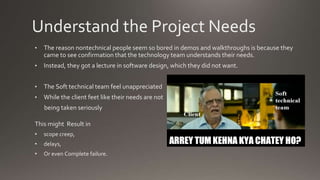
• The reason nontechnical people seem so bored in demos and walkthroughs is because they
came to see confirmation that the technology team understands their needs.
• Instead, they got a lecture in software design, which they did not want.
• The Soft technical team feel unappreciated
• While the client feet like their needs are not
being taken seriously
This might Result in
• scope creep,
• delays,
• Or even Complete failure.
Understand the Project Needs
• Even when a team is technically proficient and capable of delivering high-
quality, well-written software, when faced with a problematic project, most
managers will intuitively feel that the team is incapable of delivering
software without major quality problems.
• the project manager must identify the people who understand why they
need the software to built
• By talking to them and writing down their needs, the project manager the
stakeholders the feeling from the very beginning that the team is taking
their needs seriously.
Understand the Project Needs
• Drive the Scope of the Project
• Talk to the Main Stakeholder
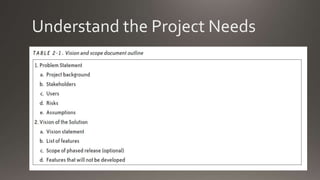
• Write the Vision and Scope Document
• Review the vision and scope document
Understand the Project Needs
Allocation of Project Resources
• The PMO arranges for resources to be allocated to the project.
• PMO monitors the allocation of human resources on projects to identify:
• Resources that are not allocated to any project
• Resources that are allocated to other projects, but are likely to be available to fulfill resource requests raised
by the SPM
• Resources that are allocated to other projects, but are being used as a resource buffer
In a small organization, a department manager might manage this type of resource monitoring and
allocation informally
Allocation of Project Resources
The resources may be
• Human Resources
• Skill Sets
• Tool Resources Computer/Handsets/Tablets
• Monetary Resources
Human Resources
• The PMO coordinates with the human resources (HR) department to
arrange for additional human resources.
• The HR department has several alternatives::
• Recruit from the market
• Hire temporary workers from a consulting company
• Hire part-time workers
• Borrow workers from a sister company or division
• Ask existing resources to work extra hours(Incentive Based)
Skill Sets
• The different skill set might be required for the delivery of a
project
• The specific personnel is allocated as per the requirement
• If the required skilled person is not in organization
• Training/certification of that skill set is provided inhouse
• Consulting services are taken
• Consultant hiring
• Project Outsourced for that specific technology
Tools
• The PMO coordinates with the systems administration department to
arrange for additional computer/tablet/mobile sets resources.
• The system administration department may choose from one or more
alternatives:
• Procure new systems/hardware from the market
• Rent systems or hardware
• Request that employees work in shifts and share resources
Monetary resources
• The PMO coordinates with the finance department to arrange for the
additional financial resources.
• The finance department obtains additional financial resources from:
• An advance from the customer
• Leveraging the financial reserves of the company
• Borrowing from the market
• Asset sales (e.g., accounts receivables can be packaged and sold on the open market)
The strategy to reduce the cost
• seeking expert guidance to achieve better productivity
• Investigating the appropriateness of using automation tools to speed up the
project if adding resources or improving productivity is not feasible
(Introducing new tools in an important project sometimes increases risk.).
• Coordinating with the business acquisition team to renegotiate the time
lines if all else fails to meet the requirements of the project
Creating the Project Plan
The project plan defines the work that will be done on the project and who
will do it. A typical project plan consists of:
• A statement of work that describes all work products (specifications, test
plans, code, defect reports, and any other product of work performed over
the course of the project) that will be produced and a list of people who will
perform that work
• A resource list that contains a list of all resources that will be needed for
the product, and their availability
Creating the Project Plan
The project plan defines the work that will be done on the project and who
will do it. A typical project plan consists of:
• A work breakdown structure and a set of effort estimates (described in
Chapter 3)
• A project schedule (described in Chapter 4)
• A risk plan that identifies any risks that might be encountered and
indicates how those risks would be handled, should they occur
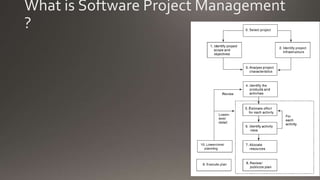
What is Software Project Management
?
Components of Project Plan
• Statement of work
• Resource List
• Estimates and project schedule
• Risk Plan
Risk Assess and Management Plan
• Prediction of risks
• estimate the impact of the risk
• Mitigation plans
•
Inspection checklist of Project Plan
• Statement of work
• Does the project plan include a statement of work (SOW)?
• Is the SOW complete—does it contain all of the features that will be developed?
• Are all work products represented?
• If estimates are known, have they been included?
• Resources
• Does the project plan include a resource list?
• Does the resource list contain all resources available to the project?
• Are there any resources known to be assigned to other projects at the same time that
they are assigned to this one?
• Have dates that the resources are unavailable (scheduled downtime for machines, vacations for people, times that facilities
cannot be booked, etc.) been taken into account?
Inspection checklist of Project Plan
• Project schedule
• Does the project plan include a schedule?
• Are there any tasks that are missing or incorrect?
• If a WBS was generated by a Delphi session, does the project schedule reflect all of the
tasks that were identified by the team?
• Does each task have a predecessor?
• Is a resource allocated to each task?
• If multiple resources have been assigned to a single task, has the task’s duration been
updated properly to reflect that?
• Is there a more efficient way to allocate resources?
• Does the project schedule contain periodic reviews?
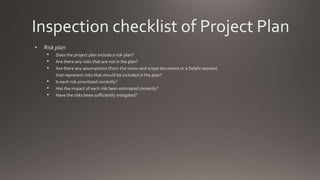
Inspection checklist of Project Plan
• Risk plan
• Does the project plan include a risk plan?
• Are there any risks that are not in the plan?
• Are there any assumptions (from the vision and scope document or a Delphi session)
that represent risks that should be included in the plan?
• Is each risk prioritized correctly?
• Has the impact of each risk been estimated correctly?
• Have the risks been sufficiently mitigated?
2.1 Tools and techniques.pptx

2.1 Tools and techniques.pptx

  • 1.
    Tools and Techniques BIM8th Sem By: Er. Sudarshan Sharma
  • 2.
    Why do softwareprojects fail? •Programmers have poor habits – and they don’t feel accountable for their work. • Programmers don’t have good control of their source code • Code written by one person is often difficult for another person to understand • Programmers don’t test their code, which makes diagnosing and fixing bugs more expensive • The team does not have a good sense of the overall health of the project.
  • 3.
    Software Project Planning •an organized and integrated management process, which focuses on activities required for successful completion of the project. • It prevents obstacles that arise in the project such as • changes in projects or organization’s objectives, • non-availability of resources, • Mitigating the risks • and so on • It helps in • better utilization of resources • and optimal usage of the allotted time for a project.
  • 4.
    objectives of theproject planning • It defines the roles and responsibilities of the project management team members. • It ensures that the project management team works according to the business objectives. • It checks feasibility of the schedule and user requirements. • It determines project constraints.
  • 5.
    Improper planning • teammay end up with a narrow focus, causing them to waste time addressing problems that are of little importance to the stakeholders. • It’s easy to build great software that solves the wrong problems, • doesn’t understand and agree on both why and how that software will be built before the work begins.
  • 6.
    Understand the ProjectNeeds • When a stakeholder does not feel that his needs are being met, he usually puts pressure on the project manager to provide an early version of the software • so that he can personally verify that the team really understands why the software is being built. The communication Gap • Client(Usually Non-Technical): asks for an early version or a prototype of the software, he is usually asking for evidence that his needs are understood and being addressed. • Software team: provide details of what they are doing, and that he wants to be • given a tour of the solution as it is being developed.
  • 7.
    Understand the ProjectNeeds • The reason nontechnical people seem so bored in demos and walkthroughs is because they came to see confirmation that the technology team understands their needs. • Instead, they got a lecture in software design, which they did not want. • The Soft technical team feel unappreciated • While the client feet like their needs are not being taken seriously This might Result in • scope creep, • delays, • Or even Complete failure.
  • 8.
    Understand the ProjectNeeds • Even when a team is technically proficient and capable of delivering high- quality, well-written software, when faced with a problematic project, most managers will intuitively feel that the team is incapable of delivering software without major quality problems. • the project manager must identify the people who understand why they need the software to built • By talking to them and writing down their needs, the project manager the stakeholders the feeling from the very beginning that the team is taking their needs seriously.
  • 9.
    Understand the ProjectNeeds • Drive the Scope of the Project • Talk to the Main Stakeholder • Write the Vision and Scope Document • Review the vision and scope document
  • 10.
  • 11.
    Allocation of ProjectResources • The PMO arranges for resources to be allocated to the project. • PMO monitors the allocation of human resources on projects to identify: • Resources that are not allocated to any project • Resources that are allocated to other projects, but are likely to be available to fulfill resource requests raised by the SPM • Resources that are allocated to other projects, but are being used as a resource buffer In a small organization, a department manager might manage this type of resource monitoring and allocation informally
  • 12.
    Allocation of ProjectResources The resources may be • Human Resources • Skill Sets • Tool Resources Computer/Handsets/Tablets • Monetary Resources
  • 13.
    Human Resources • ThePMO coordinates with the human resources (HR) department to arrange for additional human resources. • The HR department has several alternatives:: • Recruit from the market • Hire temporary workers from a consulting company • Hire part-time workers • Borrow workers from a sister company or division • Ask existing resources to work extra hours(Incentive Based)
  • 14.
    Skill Sets • Thedifferent skill set might be required for the delivery of a project • The specific personnel is allocated as per the requirement • If the required skilled person is not in organization • Training/certification of that skill set is provided inhouse • Consulting services are taken • Consultant hiring • Project Outsourced for that specific technology
  • 15.
    Tools • The PMOcoordinates with the systems administration department to arrange for additional computer/tablet/mobile sets resources. • The system administration department may choose from one or more alternatives: • Procure new systems/hardware from the market • Rent systems or hardware • Request that employees work in shifts and share resources
  • 16.
    Monetary resources • ThePMO coordinates with the finance department to arrange for the additional financial resources. • The finance department obtains additional financial resources from: • An advance from the customer • Leveraging the financial reserves of the company • Borrowing from the market • Asset sales (e.g., accounts receivables can be packaged and sold on the open market)
  • 17.
    The strategy toreduce the cost • seeking expert guidance to achieve better productivity • Investigating the appropriateness of using automation tools to speed up the project if adding resources or improving productivity is not feasible (Introducing new tools in an important project sometimes increases risk.). • Coordinating with the business acquisition team to renegotiate the time lines if all else fails to meet the requirements of the project
  • 18.
    Creating the ProjectPlan The project plan defines the work that will be done on the project and who will do it. A typical project plan consists of: • A statement of work that describes all work products (specifications, test plans, code, defect reports, and any other product of work performed over the course of the project) that will be produced and a list of people who will perform that work • A resource list that contains a list of all resources that will be needed for the product, and their availability
  • 19.
    Creating the ProjectPlan The project plan defines the work that will be done on the project and who will do it. A typical project plan consists of: • A work breakdown structure and a set of effort estimates (described in Chapter 3) • A project schedule (described in Chapter 4) • A risk plan that identifies any risks that might be encountered and indicates how those risks would be handled, should they occur
  • 20.
    What is SoftwareProject Management ?
  • 21.
    Components of ProjectPlan • Statement of work • Resource List • Estimates and project schedule • Risk Plan
  • 22.
    Risk Assess andManagement Plan • Prediction of risks • estimate the impact of the risk • Mitigation plans •
  • 23.
    Inspection checklist ofProject Plan • Statement of work • Does the project plan include a statement of work (SOW)? • Is the SOW complete—does it contain all of the features that will be developed? • Are all work products represented? • If estimates are known, have they been included? • Resources • Does the project plan include a resource list? • Does the resource list contain all resources available to the project? • Are there any resources known to be assigned to other projects at the same time that they are assigned to this one? • Have dates that the resources are unavailable (scheduled downtime for machines, vacations for people, times that facilities cannot be booked, etc.) been taken into account?
  • 24.
    Inspection checklist ofProject Plan • Project schedule • Does the project plan include a schedule? • Are there any tasks that are missing or incorrect? • If a WBS was generated by a Delphi session, does the project schedule reflect all of the tasks that were identified by the team? • Does each task have a predecessor? • Is a resource allocated to each task? • If multiple resources have been assigned to a single task, has the task’s duration been updated properly to reflect that? • Is there a more efficient way to allocate resources? • Does the project schedule contain periodic reviews?
  • 25.
    Inspection checklist ofProject Plan • Risk plan • Does the project plan include a risk plan? • Are there any risks that are not in the plan? • Are there any assumptions (from the vision and scope document or a Delphi session) that represent risks that should be included in the plan? • Is each risk prioritized correctly? • Has the impact of each risk been estimated correctly? • Have the risks been sufficiently mitigated?