Downloaded 17 times


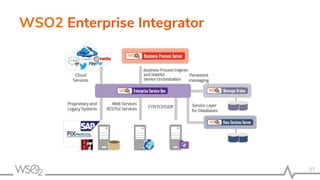


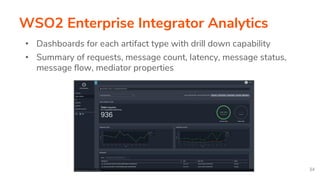


The document outlines the features and capabilities of WSO2 Enterprise Integrator, focusing on its modular architecture, interoperability, and various integration scenarios available. Key highlights include support for multiple data formats and protocols, developer-friendly tooling, and observability features for monitoring message flow and performance. The document also emphasizes the benefits of the system's deployment strategies, including CI/CD practices and reliable data transformations.


![[WSO2Con EU 2017] WSO2 Unleashed: Full Stack Automation, Pitfalls and Solutions](https://cdn.slidesharecdn.com/ss_thumbnails/fiot-final-171107115910-thumbnail.jpg?width=640&height=640&fit=bounds)


![[WSO2Con EU 2017] Open Interoperability of WSO2 Analytics Platform](https://cdn.slidesharecdn.com/ss_thumbnails/9mrq2xytr5oqokhb1dgt-signature-6abac760590306a9c092f3ba66249d9a805ee6b52c9eb804a80eabb33b95c5ef-poli-171106133401-thumbnail.jpg?width=640&height=640&fit=bounds)

![[WSO2Con EU 2017] Implementing Data Exchange Infrastructure in Government](https://cdn.slidesharecdn.com/ss_thumbnails/moldova-final-171107135900-thumbnail.jpg?width=640&height=640&fit=bounds)

![[WSO2Con EU 2017] Extending Your Enterprise Integration Patterns Beyond ESBs](https://cdn.slidesharecdn.com/ss_thumbnails/iqasrssmsvgfykj8m7c6-signature-b0c4715f543dfe5c10349ce8530b5c81ef3fc243f4ed1faea354e2a22502099b-poli-171107112010-thumbnail.jpg?width=640&height=640&fit=bounds)


![[WSO2Con USA 2018] Up-leveling Brownfield Integration](https://cdn.slidesharecdn.com/ss_thumbnails/up-levelingbrownfieldintegration-180717043516-thumbnail.jpg?width=640&height=640&fit=bounds)


![[Meetup] Building an Integration Agile Digital Enterprise](https://cdn.slidesharecdn.com/ss_thumbnails/buildinganintegrationagiledigitalecosystem-210512124018-thumbnail.jpg?width=640&height=640&fit=bounds)


![[WSO2 Integration Summit Nairobi 2019] Role of Integration in an API Driven W...](https://cdn.slidesharecdn.com/ss_thumbnails/wso2integrationsummitnairobi2019roleofintegrationinanapidrivenworld-190517050115-thumbnail.jpg?width=640&height=640&fit=bounds)
![[WSO2Con EU 2018] Up-Leveling Brownfield Integration](https://cdn.slidesharecdn.com/ss_thumbnails/3-181113084341-thumbnail.jpg?width=640&height=640&fit=bounds)


![[Roundtable] Choreo - The AI-Native Internal Developer Platform as a Service](https://cdn.slidesharecdn.com/ss_thumbnails/choreo-deck-250328074645-511dded7-thumbnail.jpg?width=640&height=640&fit=bounds)


