Microsoft Azure
An Introduction
2
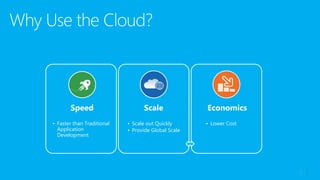
Speed
• Faster than Traditional
Application
Development
Scale
• Scale out Quickly
• Provide Global Scale
Economics
• Lower Cost
3
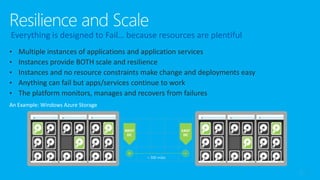
An Example: Windows Azure Storage
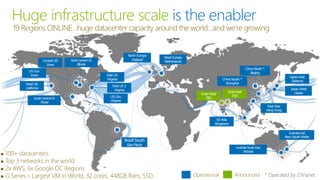
Huge infrastructure scale is the enabler
19 Regions ONLINE…huge datacenter capacity around the world…and we’re growing
 100+ datacenters
 Top 3 networks in the world
 2x AWS, 6x Google DC Regions
 G Series – Largest VM in World, 32 cores, 448GB Ram, SSD… Operational Announced
Central US
Iowa
West US
California
North Europe
Ireland
East US
Virginia
East US 2
Virginia
US Gov
Virginia
NorthCentralUS
Illinois
US Gov
Iowa
SouthCentralUS
Texas
Brazil South
Sao Paulo
West Europe
Netherlands
ChinaNorth *
Beijing
ChinaSouth *
Shanghai
JapanEast
Saitama
JapanWest
OsakaIndiaWest
TBD
IndiaEast
TBD
East Asia
Hong Kong
SE Asia
Singapore
AustraliaSouthEast
Victoria
AustraliaEast
New South Wales
* Operated by 21Vianet
 47% of New Apps are on-prem
 88% of Sockets in corp. datacenter
 98% of large Orgs have some
degree of virtualization
 20% of Orgs have Private Clouds
 Majority of cloud growth is IaaS
 Majority of new cloud apps are PaaS
 Most efficient model for cloud
development
 ~16% of new Apps qualify as SaaS
 Business model, not hosting model.
There are on-premise SaaS apps.
Windows Servers + System Center (+ Server Platform)
Microsoft Azure
Windows Server + Hyper-V + Microsoft Azure
Office 365, Dynamics, VS
Online, InTune etc…
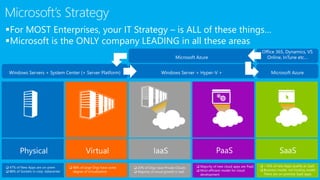
For MOST Enterprises, your IT Strategy – is ALL of these things…
Microsoft is the ONLY company LEADING in all these areas
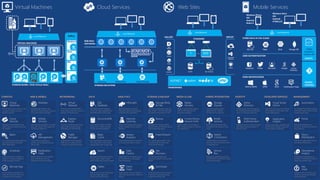
COMPUTE
Virtual
Machines
Get full control over a server in the
cloud and maintain it as your
business requires.
Cloud
Services
Managed Virtual Machines with
specific web and worker roles that
are stateless
Batch
For running large scale parallel and
high performance computing
(HPC) applications
Scheduler
Create jobs that run reliably on
simple or complex schedules to
invoke any type of service.
Remote App
Access Windows apps that run
within the Service on VM’s from
any device and any location.
WEB & MOBILE
Websites
Managed web platform, get
started for free and scale as you go
using many tools/ languages.
Mobile
Services
Add backend capabilities to mobile
apps, with native client support on
most device platforms.
API
Management
Publish APIs to developers,
partners and employees securely
and at scale.
Notification
Hubs
Deliver millions of cross platform
push notifications from any
application backend, anywhere.
NETWORKING
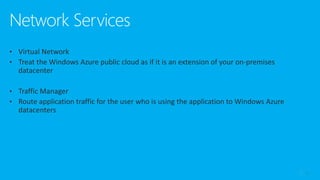
Virtual
Network
Provision and manage VPNs in
Azure and securely link to your on-
premises IT infrastructure.
Express
Route
Connect on-premises and cloud
data centers directly through
dedicated, non-internet lines.
Traffic
Manager
Load-balance incoming global
traffic across multiple services
running in multiple data centers.
ANALYTICS
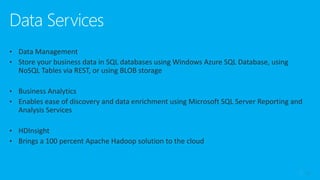
HDInsight
Big Data (based on Apache
Hadoop) analytics that integrate
easily with Microsoft Office.
Machine
Learning
Mine historical data with compute
power to predict future trends or
behavior.
Stream
Analytics
Process data streams in real-time
to discover and react to trends.
Data
Factory
Ingest data from multiple sources
to combine into a cloud based
Data Warehouse.
Event
Hubs
Ingest, persist, process millions of
events per second from millions of
devices.
IDENTITY
Active
Directory
Identity and access management
for cloud applications and ability to
link to on-premises Server AD.
Multi-Factor
Authentication
Safeguard access to data and apps
with additional physical layer of
security control.
MEDIA & CDN
Media
Services
Range of services that support
video on-demand and live
streaming workflows.
Content Delivery
Network (CDN)
Cache content for your apps at
100’s of edge locations to improve
user experiences.
DATA
SQL
Database
Managed relational database
service with high availability and
selectable performance levels.
DocumentDB
Store/retrieve millions of JSON
objects from a highly scalable
NoSQL document database.
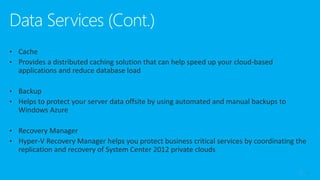
Redis
Cache
Make applications scale and be
more responsive under load by
keeping data closer to app logic.
Search
Managed, scalable search service
for your apps, create tunable
search results and ranking models.
Tables
Massive scale for semi-structured
key/value type data in this
schema-less NoSQL store.
DEVELOPER SERVICES
Visual Studio
Online
Store code, plan and track projects,
build, deploy and test apps in the
cloud collaboratively.
Application
Insights
Analyze app usage, availability and
performance to detect issues and
solve problems proactively.
HYBRID INTEGRATION
Storage
Queues
Simple message queue for
application de-coupling
architecture for scale out.
Biztalk
Services
Build EDI and Enterprise App
Integration (EAI) solutions in the
cloud.
Hybrid
Connections
Connect apps in Azure with on-
premises resources without a VPN
or dedicated line.
Service
Bus
Messaging capabilities (pub/sub,
queues) and on-premises to cloud
connectivity solution.
STORAGE & BACKUP
Storage Blobs
& Files
Store binary application data and
web content – store for dedicated
and shared virtual disks for VM’s
Import/Export
For massive data transfer – ship
encrypted disks to move data
in/out of blob storage.
Backup
Managed service that handles
backup/restore of Windows Server
machines/backup agent.
Site
Recovery
Coordinate replication and
recovery of System Center private
clouds
StorSimple
Automated, policy driven solution
to extend on-premises primary
storage for backup / DR.
MANAGEMENT
Automation
Run durable PowerShell scripts to
automate frequent, long running,
complex Azure tasks.
Portal
Web based experience to
provision, control and monitor all
Azure services.
Store /
Marketplace
Find and manage other services
provided by third parties.
Operational
Insights
Analyze and troubleshoot on-
premises IT infrastructure without
using instrumented code.
Key
Vault
Safeguard and control keys and
secrets in cloud scale hardware
security modules.
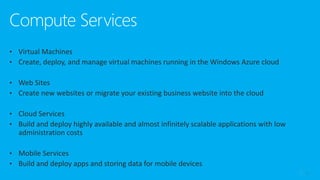
Virtual Machines
VIRTUAL MACHINES
STORAGE BLOBS / FILES (Virtual Disks)
…
Windows
Linux
SQL
GalleryLoad Balancer
Cloud Services
Load Balancer
WEB ROLE
INSTANCES
Tables/NoSQL
TYPE Y
STORAGE SOLUTIONS
Database
CACHE
Blobs/Files
TYPE X
QUEUE
Mobile Services
PUSH NOTIFICATIONS
USER AUTHENTICATION
STORE DATA IN THE CLOUD
Load Balancer
Windows Phone
iOS
Android
Nokia X
Windows Store
iOS
Android
HTML5/JS
Tables
Schedules
Custom API
SCRIPTS
SOURCE
CONTROL
Web Sites
Load Balancer
STANDARD
GALLERY DEPLOY
FRAMEWORKS
8
9
10
11
12
13
THANK YOU!
Email: sayederfan.Arefin@studentpartner.com,
erfanjordison@gmail.com
Website: http://sayederfanarefin.info

Introduction to Microsoft Azure

  • 1.
  • 2.
    2 Speed • Faster thanTraditional Application Development Scale • Scale out Quickly • Provide Global Scale Economics • Lower Cost
  • 3.
    3 An Example: WindowsAzure Storage
  • 5.
    Huge infrastructure scaleis the enabler 19 Regions ONLINE…huge datacenter capacity around the world…and we’re growing  100+ datacenters  Top 3 networks in the world  2x AWS, 6x Google DC Regions  G Series – Largest VM in World, 32 cores, 448GB Ram, SSD… Operational Announced Central US Iowa West US California North Europe Ireland East US Virginia East US 2 Virginia US Gov Virginia NorthCentralUS Illinois US Gov Iowa SouthCentralUS Texas Brazil South Sao Paulo West Europe Netherlands ChinaNorth * Beijing ChinaSouth * Shanghai JapanEast Saitama JapanWest OsakaIndiaWest TBD IndiaEast TBD East Asia Hong Kong SE Asia Singapore AustraliaSouthEast Victoria AustraliaEast New South Wales * Operated by 21Vianet
  • 6.
     47% ofNew Apps are on-prem  88% of Sockets in corp. datacenter  98% of large Orgs have some degree of virtualization  20% of Orgs have Private Clouds  Majority of cloud growth is IaaS  Majority of new cloud apps are PaaS  Most efficient model for cloud development  ~16% of new Apps qualify as SaaS  Business model, not hosting model. There are on-premise SaaS apps. Windows Servers + System Center (+ Server Platform) Microsoft Azure Windows Server + Hyper-V + Microsoft Azure Office 365, Dynamics, VS Online, InTune etc… For MOST Enterprises, your IT Strategy – is ALL of these things… Microsoft is the ONLY company LEADING in all these areas
  • 7.
    COMPUTE Virtual Machines Get full controlover a server in the cloud and maintain it as your business requires. Cloud Services Managed Virtual Machines with specific web and worker roles that are stateless Batch For running large scale parallel and high performance computing (HPC) applications Scheduler Create jobs that run reliably on simple or complex schedules to invoke any type of service. Remote App Access Windows apps that run within the Service on VM’s from any device and any location. WEB & MOBILE Websites Managed web platform, get started for free and scale as you go using many tools/ languages. Mobile Services Add backend capabilities to mobile apps, with native client support on most device platforms. API Management Publish APIs to developers, partners and employees securely and at scale. Notification Hubs Deliver millions of cross platform push notifications from any application backend, anywhere. NETWORKING Virtual Network Provision and manage VPNs in Azure and securely link to your on- premises IT infrastructure. Express Route Connect on-premises and cloud data centers directly through dedicated, non-internet lines. Traffic Manager Load-balance incoming global traffic across multiple services running in multiple data centers. ANALYTICS HDInsight Big Data (based on Apache Hadoop) analytics that integrate easily with Microsoft Office. Machine Learning Mine historical data with compute power to predict future trends or behavior. Stream Analytics Process data streams in real-time to discover and react to trends. Data Factory Ingest data from multiple sources to combine into a cloud based Data Warehouse. Event Hubs Ingest, persist, process millions of events per second from millions of devices. IDENTITY Active Directory Identity and access management for cloud applications and ability to link to on-premises Server AD. Multi-Factor Authentication Safeguard access to data and apps with additional physical layer of security control. MEDIA & CDN Media Services Range of services that support video on-demand and live streaming workflows. Content Delivery Network (CDN) Cache content for your apps at 100’s of edge locations to improve user experiences. DATA SQL Database Managed relational database service with high availability and selectable performance levels. DocumentDB Store/retrieve millions of JSON objects from a highly scalable NoSQL document database. Redis Cache Make applications scale and be more responsive under load by keeping data closer to app logic. Search Managed, scalable search service for your apps, create tunable search results and ranking models. Tables Massive scale for semi-structured key/value type data in this schema-less NoSQL store. DEVELOPER SERVICES Visual Studio Online Store code, plan and track projects, build, deploy and test apps in the cloud collaboratively. Application Insights Analyze app usage, availability and performance to detect issues and solve problems proactively. HYBRID INTEGRATION Storage Queues Simple message queue for application de-coupling architecture for scale out. Biztalk Services Build EDI and Enterprise App Integration (EAI) solutions in the cloud. Hybrid Connections Connect apps in Azure with on- premises resources without a VPN or dedicated line. Service Bus Messaging capabilities (pub/sub, queues) and on-premises to cloud connectivity solution. STORAGE & BACKUP Storage Blobs & Files Store binary application data and web content – store for dedicated and shared virtual disks for VM’s Import/Export For massive data transfer – ship encrypted disks to move data in/out of blob storage. Backup Managed service that handles backup/restore of Windows Server machines/backup agent. Site Recovery Coordinate replication and recovery of System Center private clouds StorSimple Automated, policy driven solution to extend on-premises primary storage for backup / DR. MANAGEMENT Automation Run durable PowerShell scripts to automate frequent, long running, complex Azure tasks. Portal Web based experience to provision, control and monitor all Azure services. Store / Marketplace Find and manage other services provided by third parties. Operational Insights Analyze and troubleshoot on- premises IT infrastructure without using instrumented code. Key Vault Safeguard and control keys and secrets in cloud scale hardware security modules. Virtual Machines VIRTUAL MACHINES STORAGE BLOBS / FILES (Virtual Disks) … Windows Linux SQL GalleryLoad Balancer Cloud Services Load Balancer WEB ROLE INSTANCES Tables/NoSQL TYPE Y STORAGE SOLUTIONS Database CACHE Blobs/Files TYPE X QUEUE Mobile Services PUSH NOTIFICATIONS USER AUTHENTICATION STORE DATA IN THE CLOUD Load Balancer Windows Phone iOS Android Nokia X Windows Store iOS Android HTML5/JS Tables Schedules Custom API SCRIPTS SOURCE CONTROL Web Sites Load Balancer STANDARD GALLERY DEPLOY FRAMEWORKS
  • 8.
  • 9.
  • 10.
  • 11.
  • 12.
  • 13.
  • 14.

Editor's Notes

  • #3 There is an underlying principle at play here in the Cloud – which is that because as we have seen resources are cheap, plentiful and immediately available, different approaches can be taken to build applications the way we always wanted to – focus on the business problems using simple approaches. At the heart of this is the concept in your applications that anything, any part of the app can fail. You can for example have your web server tier fail and the application can keep working. How you do this is by having multiple instances of your web tier, many copies. Any of the copies can fail – the platform makes sure that it can detect and recover from these failure simply by spinning up a new instance. The platform also needs to make sure that your application instances are separated across redundant parts of the underlying physical infrastructure (in Azure we call these fault domains). Use the Azure storage as an example. You give a file to Azure – it saves that file 3 times in 3 different fault domains. If any of the copies of the file fail because maybe a disk failed, the platform creates another copy. The platform can also (and this happens in Azure by default) copy the file another three times to Azure storage in a data center > 500 miles away (in the same region) proving business continuity/DR capabilities.
  • #4 There is an underlying principle at play here in the Cloud – which is that because as we have seen resources are cheap, plentiful and immediately available, different approaches can be taken to build applications the way we always wanted to – focus on the business problems using simple approaches. At the heart of this is the concept in your applications that anything, any part of the app can fail. You can for example have your web server tier fail and the application can keep working. How you do this is by having multiple instances of your web tier, many copies. Any of the copies can fail – the platform makes sure that it can detect and recover from these failure simply by spinning up a new instance. The platform also needs to make sure that your application instances are separated across redundant parts of the underlying physical infrastructure (in Azure we call these fault domains). Use the Azure storage as an example. You give a file to Azure – it saves that file 3 times in 3 different fault domains. If any of the copies of the file fail because maybe a disk failed, the platform creates another copy. The platform can also (and this happens in Azure by default) copy the file another three times to Azure storage in a data center > 500 miles away (in the same region) proving business continuity/DR capabilities.
  • #5 There is an underlying principle at play here in the Cloud – which is that because as we have seen resources are cheap, plentiful and immediately available, different approaches can be taken to build applications the way we always wanted to – focus on the business problems using simple approaches. At the heart of this is the concept in your applications that anything, any part of the app can fail. You can for example have your web server tier fail and the application can keep working. How you do this is by having multiple instances of your web tier, many copies. Any of the copies can fail – the platform makes sure that it can detect and recover from these failure simply by spinning up a new instance. The platform also needs to make sure that your application instances are separated across redundant parts of the underlying physical infrastructure (in Azure we call these fault domains). Use the Azure storage as an example. You give a file to Azure – it saves that file 3 times in 3 different fault domains. If any of the copies of the file fail because maybe a disk failed, the platform creates another copy. The platform can also (and this happens in Azure by default) copy the file another three times to Azure storage in a data center > 500 miles away (in the same region) proving business continuity/DR capabilities.
  • #6 Over the last few years we’ve truly delivered a huge infrastructure to enable us to grow our services at scale around the globe. Whether it’s our flagship facilities in Quincy, Washington or Boydton, Virginia, or some of the newly announced facilities in Shanghai, Australia and Brazil, it really is key for us to make smart investments around the world to deliver services in a resilient and reliable fashion.   A lot of people ask, what goes into site selection at Microsoft and how do we decide where to place our datacenter investments? There are over thirty-five factors in our site selection criteria. But really, the top elements are around proximity to customers and energy and fiber infrastructure, insuring that we have the capacity and the growth platforms to be able to grow our services.   Another key element is about skilled workforce. We need to insure that we have the right people to run and operate our datacenters on a day to day basis.
  • #7 Transition from previous slide Let’s talk about the transformation that's actually happening within IT.   Goal of this slide Frames the enterprise cloud computing conversation by highlighting the evolution from traditional to cloud computing models. Define industry taxonomy around IaaS and PaaS. Talking Points: If you're in the infrastructure as a service layer (IaaS), you're thinking about your datacenter as a set of pooled virtual resources (including compute, network and storage), not in terms of individual hosts or VMs. That said, you still have to manage the virtual infrastructure, operating system and the full application stack. When you're in the platform as a service layer (PaaS), you're talking about building applications which will then be delivered as a service – the platform providing all the required building blocks for your app. You don’t have to worry about the underlying infrastructure, operating systems or the application platform infrastructure. You can focus all your energies on your applications. With Windows Azure with primarily offer PaaS but are moving towards robust IaaS capabilities (more to come in this presentation with the Roadmap) A couple of data points from internal Microsoft research: 41% of our customers are using services across on premise and public clouds 80% of our customers over next 3 to 5 years will use hybrid models
  • #9 There is an underlying principle at play here in the Cloud – which is that because as we have seen resources are cheap, plentiful and immediately available, different approaches can be taken to build applications the way we always wanted to – focus on the business problems using simple approaches. At the heart of this is the concept in your applications that anything, any part of the app can fail. You can for example have your web server tier fail and the application can keep working. How you do this is by having multiple instances of your web tier, many copies. Any of the copies can fail – the platform makes sure that it can detect and recover from these failure simply by spinning up a new instance. The platform also needs to make sure that your application instances are separated across redundant parts of the underlying physical infrastructure (in Azure we call these fault domains). Use the Azure storage as an example. You give a file to Azure – it saves that file 3 times in 3 different fault domains. If any of the copies of the file fail because maybe a disk failed, the platform creates another copy. The platform can also (and this happens in Azure by default) copy the file another three times to Azure storage in a data center > 500 miles away (in the same region) proving business continuity/DR capabilities.
  • #10 There is an underlying principle at play here in the Cloud – which is that because as we have seen resources are cheap, plentiful and immediately available, different approaches can be taken to build applications the way we always wanted to – focus on the business problems using simple approaches. At the heart of this is the concept in your applications that anything, any part of the app can fail. You can for example have your web server tier fail and the application can keep working. How you do this is by having multiple instances of your web tier, many copies. Any of the copies can fail – the platform makes sure that it can detect and recover from these failure simply by spinning up a new instance. The platform also needs to make sure that your application instances are separated across redundant parts of the underlying physical infrastructure (in Azure we call these fault domains). Use the Azure storage as an example. You give a file to Azure – it saves that file 3 times in 3 different fault domains. If any of the copies of the file fail because maybe a disk failed, the platform creates another copy. The platform can also (and this happens in Azure by default) copy the file another three times to Azure storage in a data center > 500 miles away (in the same region) proving business continuity/DR capabilities.
  • #11 There is an underlying principle at play here in the Cloud – which is that because as we have seen resources are cheap, plentiful and immediately available, different approaches can be taken to build applications the way we always wanted to – focus on the business problems using simple approaches. At the heart of this is the concept in your applications that anything, any part of the app can fail. You can for example have your web server tier fail and the application can keep working. How you do this is by having multiple instances of your web tier, many copies. Any of the copies can fail – the platform makes sure that it can detect and recover from these failure simply by spinning up a new instance. The platform also needs to make sure that your application instances are separated across redundant parts of the underlying physical infrastructure (in Azure we call these fault domains). Use the Azure storage as an example. You give a file to Azure – it saves that file 3 times in 3 different fault domains. If any of the copies of the file fail because maybe a disk failed, the platform creates another copy. The platform can also (and this happens in Azure by default) copy the file another three times to Azure storage in a data center > 500 miles away (in the same region) proving business continuity/DR capabilities.
  • #12 There is an underlying principle at play here in the Cloud – which is that because as we have seen resources are cheap, plentiful and immediately available, different approaches can be taken to build applications the way we always wanted to – focus on the business problems using simple approaches. At the heart of this is the concept in your applications that anything, any part of the app can fail. You can for example have your web server tier fail and the application can keep working. How you do this is by having multiple instances of your web tier, many copies. Any of the copies can fail – the platform makes sure that it can detect and recover from these failure simply by spinning up a new instance. The platform also needs to make sure that your application instances are separated across redundant parts of the underlying physical infrastructure (in Azure we call these fault domains). Use the Azure storage as an example. You give a file to Azure – it saves that file 3 times in 3 different fault domains. If any of the copies of the file fail because maybe a disk failed, the platform creates another copy. The platform can also (and this happens in Azure by default) copy the file another three times to Azure storage in a data center > 500 miles away (in the same region) proving business continuity/DR capabilities.
  • #13 There is an underlying principle at play here in the Cloud – which is that because as we have seen resources are cheap, plentiful and immediately available, different approaches can be taken to build applications the way we always wanted to – focus on the business problems using simple approaches. At the heart of this is the concept in your applications that anything, any part of the app can fail. You can for example have your web server tier fail and the application can keep working. How you do this is by having multiple instances of your web tier, many copies. Any of the copies can fail – the platform makes sure that it can detect and recover from these failure simply by spinning up a new instance. The platform also needs to make sure that your application instances are separated across redundant parts of the underlying physical infrastructure (in Azure we call these fault domains). Use the Azure storage as an example. You give a file to Azure – it saves that file 3 times in 3 different fault domains. If any of the copies of the file fail because maybe a disk failed, the platform creates another copy. The platform can also (and this happens in Azure by default) copy the file another three times to Azure storage in a data center > 500 miles away (in the same region) proving business continuity/DR capabilities.
  • #14 There is an underlying principle at play here in the Cloud – which is that because as we have seen resources are cheap, plentiful and immediately available, different approaches can be taken to build applications the way we always wanted to – focus on the business problems using simple approaches. At the heart of this is the concept in your applications that anything, any part of the app can fail. You can for example have your web server tier fail and the application can keep working. How you do this is by having multiple instances of your web tier, many copies. Any of the copies can fail – the platform makes sure that it can detect and recover from these failure simply by spinning up a new instance. The platform also needs to make sure that your application instances are separated across redundant parts of the underlying physical infrastructure (in Azure we call these fault domains). Use the Azure storage as an example. You give a file to Azure – it saves that file 3 times in 3 different fault domains. If any of the copies of the file fail because maybe a disk failed, the platform creates another copy. The platform can also (and this happens in Azure by default) copy the file another three times to Azure storage in a data center > 500 miles away (in the same region) proving business continuity/DR capabilities.
  • #15 There is an underlying principle at play here in the Cloud – which is that because as we have seen resources are cheap, plentiful and immediately available, different approaches can be taken to build applications the way we always wanted to – focus on the business problems using simple approaches. At the heart of this is the concept in your applications that anything, any part of the app can fail. You can for example have your web server tier fail and the application can keep working. How you do this is by having multiple instances of your web tier, many copies. Any of the copies can fail – the platform makes sure that it can detect and recover from these failure simply by spinning up a new instance. The platform also needs to make sure that your application instances are separated across redundant parts of the underlying physical infrastructure (in Azure we call these fault domains). Use the Azure storage as an example. You give a file to Azure – it saves that file 3 times in 3 different fault domains. If any of the copies of the file fail because maybe a disk failed, the platform creates another copy. The platform can also (and this happens in Azure by default) copy the file another three times to Azure storage in a data center > 500 miles away (in the same region) proving business continuity/DR capabilities.