Inner class, Static class,
Multithreading, JavaBeans


              9/3/2012       1
Why Inner classes?

   New feature available in Java and D language.

   Different from Nested class and Composition.

   Provides better code hiding.

   Logically related classes can be made as Inner classes.

   Classes implemented through Multiple Inheritance in C++
    can be implemented using Inner classes in Java.


                                   9/3/2012                   2
Inner Class


   Inner classes are classes defined within other classes.

   The class that includes the inner class is called the outer class

   Inner classes can be hidden from other classes in the same
    package.

   They can be nested to any depth


                                    9/3/2012                            3
Inner Class
   An inner class definition is a member of the outer class in the
    same way that the instance variables and methods of the outer
    class are members

   An inner class is local to the outer class definition

   The name of an inner class may be reused for something else
    outside the outer class definition

   If the inner class is private, then the inner class cannot be
    accessed by name outside the definition of the outer class.


                                     9/3/2012                         4
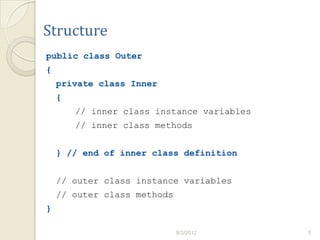
Structure
public class Outer
{
    private class Inner
    {
        // inner class instance variables
        // inner class methods


    } // end of inner class definition


    // outer class instance variables
    // outer class methods
}

                             9/3/2012       5
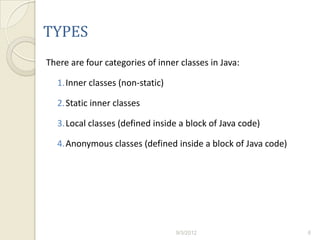
TYPES
There are four categories of inner classes in Java:

  1.Inner classes (non-static)

  2.Static inner classes

  3.Local classes (defined inside a block of Java code)

  4.Anonymous classes (defined inside a block of Java code)


                                  9/3/2012                    6
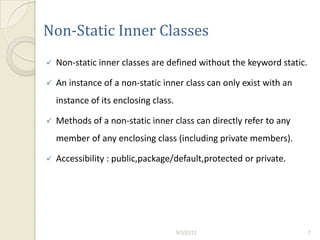
Non-Static Inner Classes
   Non-static inner classes are defined without the keyword static.

   An instance of a non-static inner class can only exist with an
    instance of its enclosing class.

   Methods of a non-static inner class can directly refer to any
    member of any enclosing class (including private members).

   Accessibility : public,package/default,protected or private.


                                       9/3/2012                        7
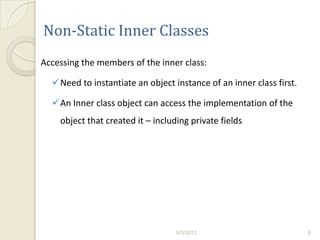
Non-Static Inner Classes
Accessing the members of the inner class:

  Need to instantiate an object instance of an inner class first.

  An Inner class object can access the implementation of the
    object that created it – including private fields


                                   9/3/2012                          8
Inner Class Creation
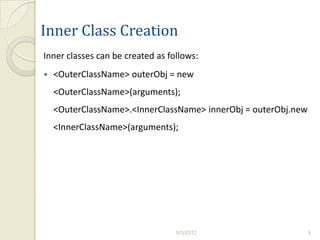
Inner classes can be created as follows:
   <OuterClassName> outerObj = new
    <OuterClassName>(arguments);
    <OuterClassName>.<InnerClassName> innerObj = outerObj.new
    <InnerClassName>(arguments);


                                  9/3/2012                      9
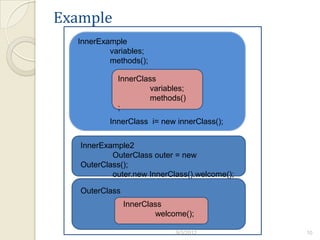
Example
  InnerExample
          variables;
          methods();

            InnerClass
                    variables;
                    methods()
            ;
          InnerClass i= new innerClass();


   InnerExample2
           OuterClass outer = new
   OuterClass();
           outer.new InnerClass().welcome();

   OuterClass
                InnerClass
                        welcome();

                             9/3/2012          10
Example
 //A named inner class is used.
 // This is used to show that it can access non-local variables in
 the enclosing object.
 public class InnerExample
 {
       static String msg= "Welcome";

      public static void main(String[] arg)
      {
               class InnerClass {
               public void doWork()
               {
                        System.out.println(msg);
               }
               }
      InnerClass i = new InnerClass();
      i.doWork();
      }
 }                               9/3/2012                            11
// Access inner class from outside
public class InnerExample2
{
      public static void main(String[] args)
      {
                OuterClass outer = new OuterClass();
                outer.new InnerClass().welcome();
      }
}
class OuterClass
{
     public class InnerClass
     {
                public void welcome()
                {
                         System.out.println("Welcome from
InnerClass()");
                }
     }
}


                                     9/3/2012               12
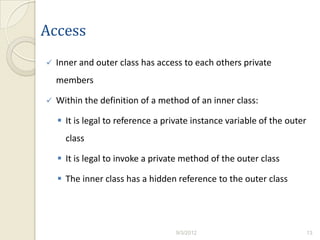
Access
   Inner and outer class has access to each others private
    members

   Within the definition of a method of an inner class:

     It is legal to reference a private instance variable of the outer
      class

     It is legal to invoke a private method of the outer class

     The inner class has a hidden reference to the outer class


                                   9/3/2012                               13
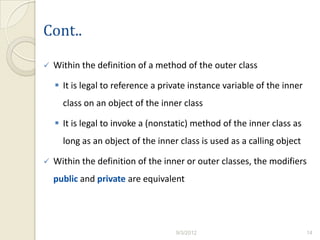
Cont..

   Within the definition of a method of the outer class

     It is legal to reference a private instance variable of the inner
      class on an object of the inner class

     It is legal to invoke a (nonstatic) method of the inner class as
      long as an object of the inner class is used as a calling object

   Within the definition of the inner or outer classes, the modifiers
    public and private are equivalent


                                    9/3/2012                              14
The .class File for an Inner Class
   Compiling any class in Java produces a .class file named
    ClassName.class

   Compiling a class with one (or more) inner classes causes both
    (or more) classes to be compiled, and produces two (or more)
    .class files

     Such as ClassName.class and
      ClassName$InnerClassName.class


                                   9/3/2012                          15
Nesting Inner Classes
   It is legal to nest inner classes within inner classes

     The rules are the same as before, but the names get longer

     Given class A, which has public inner class B, which has public
      inner class C, then the following is valid:

      A aObject = new A();

      A.B bObject = aObject.new B();

      A.B.C cObject = bObject.new C();


                                     9/3/2012                       16
Advantages
   They can make the outer class more self-contained since they
    are defined inside a class.

    Both of their methods have access to each other's private
    methods and instance variables.

   Using an inner class as a helping class is one of the most useful
    applications of inner classes

    If used as a helping class, an inner class should be marked
    private


                                    9/3/2012                            17
Static Class


     9/3/2012   18
An Intro to Static Class
   In order to understand the use of the static keyword in class
    declaration, we need to understand the class declaration itself.
    We can declare two kinds of classes: top-level classes and inner
    classes.

   “The static keyword does not do to a class declaration what it
    does to a variable or a method declaration.”
Inner Class
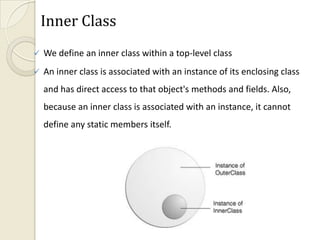
   We define an inner class within a top-level class
   An inner class is associated with an instance of its enclosing class
    and has direct access to that object's methods and fields. Also,
    because an inner class is associated with an instance, it cannot
    define any static members itself.
   To instantiate an inner class, you must first instantiate the
    outer class. Then, create the inner object within the outer
    object with this syntax:


   OuterClass.InnerClass innerObject = outerObject.new
    InnerClass();
An inner class can be one of the following four types:


1.   Local


2.   Member


3.   Nested
Local Class
   Local classes are the same as local variables, in the sense that
    they're created and used inside a block.

   Once you declare a class within a block, it can be instantiated as
    many times as you wish within that block.

   Like local variables, local classes aren't allowed to be declared
    public, protected, private, or static.
Member Class
   Member classes are defined within the body of a class.

   You can use member classes anywhere within the body of the
    containing class.

   You declare member classes when you want to use variables
    and methods of the containing class without explicit
    delegation.
   The member class is the only class that you can declare static.
    When you declare a member class, you can instantiate that
    member class only within the context of an object of the outer
    class in which this member class is declared. If you want to
    remove this restriction, you declare the member class a static
    class.


   When you declare a member class with a static modifier, it
    becomes a nested top-level class and can be used as a normal
    top-level class
Nested Top-level Class
   A nested top-level class is a member classes with
    a static modifier.

   A nested top-level class is just like any other top-level class
    except that it is declared within another class or interface.

   Nested top-level classes are typically used as a convenient way
    to group related classes without creating a new package.
   Nested classes are divided into two categories: static and non-
    static. Nested classes that are declared static are simply called
    static nested classes. Non-static nested classes are called inner
    classes.

   Static nested classes are accessed using the enclosing class
    name:

   Outer Class. Static Nested Class
    For example, to create an object for the static nested class,
    use this syntax:

   Outer Class.StaticNestedClass nested Object = new Outer
    Class.StaticNestedClass();
Static Nested Classes
   As with class methods and variables, a static nested class is
    associated with its outer class.

   And like static class methods, a static nested class cannot refer
    directly to instance variables or methods defined in its
    enclosing class — it can use them only through an object
    reference.
   Note: A static nested class interacts with the instance
    members of its outer class (and other classes) just like any
    other top-level class. In effect, a static nested class is
    behaviorally a top-level class that has been nested in another
    top-level class for packaging convenience.


   It is a way of logically grouping classes that are only used in
    one place.It increases encapsulation.Nested classes can lead to
    more readable and maintainable code.
Multithreading
Multithreading

   A thread is part of process in execution

   Two or more threads executed concurrently is multithreading


Advantage of Multithreading

   Maximum CPU Utilization
Thread in JAVA


   By default every JAVA program has a main thread.


    How to access main thread

      Thread t = Thread.currentThread();
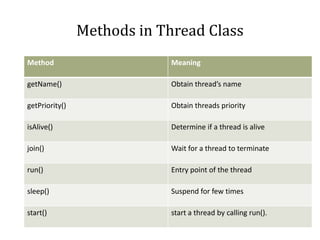
Methods in Thread Class
Method                       Meaning

getName()                    Obtain thread’s name

getPriority()                Obtain threads priority

isAlive()                    Determine if a thread is alive

join()                       Wait for a thread to terminate

run()                        Entry point of the thread

sleep()                      Suspend for few times

start()                      start a thread by calling run().
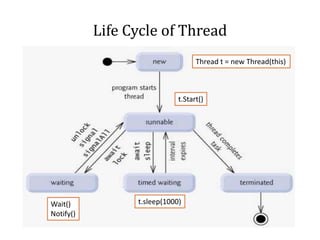
Life Cycle of Thread
                                   Thread t = new Thread(this)


                             t.Start()


Wait()           t.sleep(1000)
Notify()
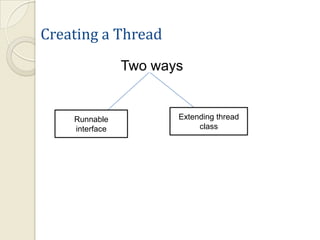
Creating a Thread
                Two ways


    Runnable           Extending thread
    interface               class
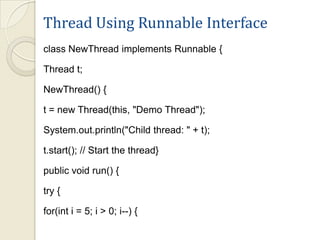
Thread Using Runnable Interface
class NewThread implements Runnable {

Thread t;

NewThread() {

t = new Thread(this, "Demo Thread");

System.out.println("Child thread: " + t);

t.start(); // Start the thread}

public void run() {

try {

for(int i = 5; i > 0; i--) {
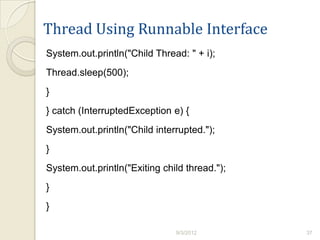
Thread Using Runnable Interface
System.out.println("Child Thread: " + i);
Thread.sleep(500);
}
} catch (InterruptedException e) {
System.out.println("Child interrupted.");
}
System.out.println("Exiting child thread.");
}
}

                               9/3/2012        37
class ThreadDemo {
public static void main(String args[]) {
new NewThread(); // create a new thread
try {
for(int i = 5; i > 0; i--) {
System.out.println("Main Thread: " + i);
Thread.sleep(1000);
} } catch (InterruptedException e) {
System.out.println("Main thread interrupted.");
}
System.out.println("Main thread exiting.");}
Output
   Child thread: Thread[Demo Thread,5,main]
   Main Thread: 5
   Child Thread: 5
   Child Thread: 4
   Main Thread: 4
   Child Thread: 3
   Child Thread: 2
   Main Thread: 3
   Child Thread: 1
   Exiting child thread.
   Main Thread: 2
   Main Thread: 1
   Main thread exiting.
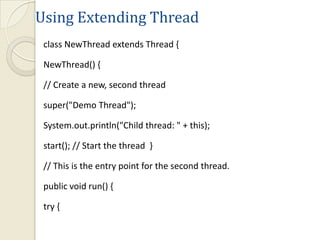
Using Extending Thread
 class NewThread extends Thread {

 NewThread() {

 // Create a new, second thread

 super("Demo Thread");

 System.out.println("Child thread: " + this);

 start(); // Start the thread }

 // This is the entry point for the second thread.

 public void run() {

 try {
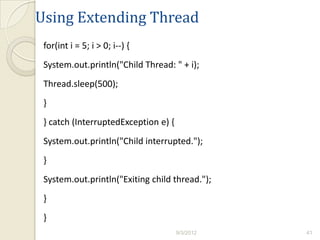
Using Extending Thread
 for(int i = 5; i > 0; i--) {
 System.out.println("Child Thread: " + i);
 Thread.sleep(500);
 }
 } catch (InterruptedException e) {
 System.out.println("Child interrupted.");
 }
 System.out.println("Exiting child thread.");
 }
 }
                                      9/3/2012   41
class ExtendThread {

public static void main(String args[]) {

new NewThread(); // create a new thread

try {

for(int i = 5; i > 0; i--) {

System.out.println("Main Thread: " + i);

Thread.sleep(1000);

} } catch (InterruptedException e) {

System.out.println("Main thread interrupted."); }

System.out.println("Main thread exiting."); } }
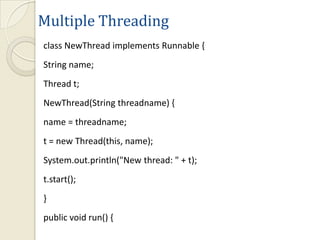
Multiple Threading
class NewThread implements Runnable {
String name;
Thread t;
NewThread(String threadname) {
name = threadname;
t = new Thread(this, name);
System.out.println("New thread: " + t);
t.start();
}
public void run() {
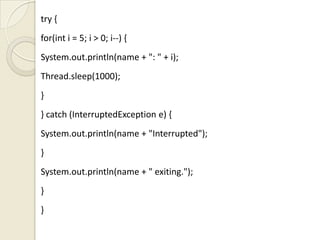
try {
for(int i = 5; i > 0; i--) {
System.out.println(name + ": " + i);
Thread.sleep(1000);
}
} catch (InterruptedException e) {
System.out.println(name + "Interrupted");
}
System.out.println(name + " exiting.");
}
}
class MultiThreadDemo {
public static void main(String args[]) {
new NewThread("One"); // start threads
new NewThread("Two");
new NewThread("Three");
try {
Thread.sleep(10000);
} catch (InterruptedException e) {
System.out.println("Main thread Interrupted");
}
System.out.println("Main thread exiting."); } }
Output
New thread: Thread[One,5,main]     Two: 3
New thread: Thread[Two,5,main]     One: 2
New thread: Thread[Three,5,main]   Three: 2
One: 5                             Two: 2
Two: 5                             One: 1
Three: 5                           Three: 1
One: 4                             Two: 1

Two: 4                             One exiting.

Three: 4                           Two exiting.

One: 3                             Three exiting.

Three: 3                           Main thread exiting.
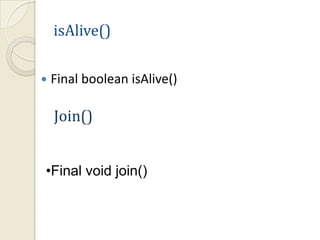
isAlive()

   Final boolean isAlive()

    Join()


•Final void join()
Thread Priority


 Low priority to high priority

 Numbered from 1 to 10
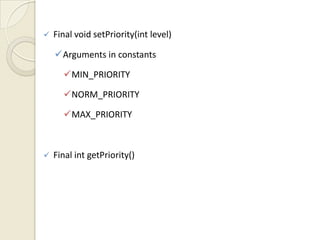
   Final void setPriority(int level)

    Arguments in constants

      MIN_PRIORITY

      NORM_PRIORITY

      MAX_PRIORITY


   Final int getPriority()
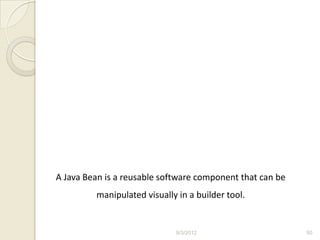
A Java Bean is a reusable software component that can be
         manipulated visually in a builder tool.


                             9/3/2012                      50
Introduction
   JavaBeans brings component technology to Java.

   JavaBeans lets you write Beans, that you can visually
    manipulate within application builder tools.

   Beans are classes written in the Java programming language
    conforming to a particular convention.

   They are used to encapsulate many objects into a single object
    (the bean), so that they can be passed around as a single bean
    object instead of as multiple individual objects.


                                    9/3/2012                         51
Introduction
   A Bean’s methods are no different than Java methods, and can
    be called from other Beans or a scripting environment
   Beans can be used with both builder tools, or manually
    manipulated by text tool through programmatic interfaces.
   Compact and Easy
   Portable
   Leverages the Strengths of the Java Platform
   Flexible Build-Time Component Editors

   Multithreading

   Security
                                  9/3/2012                         52
Convention
   A JavaBean is a Java Object that is serializable

         It allows applications and frameworks to reliably save,
         store, and restore the bean's state

   has a 0-argument constructor

         The class must have a public default constructor. This
         allows easy instantiation within editing and activation
         frameworks.

   and allows access to properties using getter and setter methods


                                     9/3/2012                         53
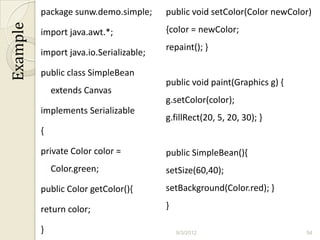
package sunw.demo.simple;      public void setColor(Color newColor)
Example
          import java.awt.*;             {color = newColor;
                                         repaint(); }
          import java.io.Serializable;

          public class SimpleBean
                                         public void paint(Graphics g) {
              extends Canvas
                                         g.setColor(color);
          implements Serializable
                                         g.fillRect(20, 5, 20, 30); }
          {

          private Color color =          public SimpleBean(){
              Color.green;               setSize(60,40);
          public Color getColor(){       setBackground(Color.red); }

          return color;                  }

          }                                  9/3/2012                      54
In addition to the Beans Development Kit (BDK) version 1.0, you
  will need the Java Development Kit (JDK) version 1.1.


         http://www.mediafire.com/?4hn81bgt83m29dg


                                 9/3/2012                         55
Builder tool
   A builder tool maintains Beans in a palette or toolbox.

   The user can select a component from the toolbox and place it

    into a container, choosing its size and position.

   None of these require a single line of code to be written by the

    application developer.

   The application development tool does that.

   This is accomplished through a set of standard interfaces

    provided by the component environment that allow the

    components to publish, or expose, their properties.
                                    9/3/2012                           56
BeanBox
   The BeanBox is an application for testing Beans, and serves as a
    simple demonstration for how more sophisticated Beans−aware
    builder tools should behave.

   The BeanBox is also a nice tool for learning about Beans.

   The BDK1.1beanbox. directory contains Windows (run.bat)
    and Unix (run.sh) scripts that start the BeanBox.

   When started, the BeanBox displays three windows: The
    BeanBox, ToolBox, and the Properties sheet.


                                    9/3/2012                           57
Creating Your Bean
   Save the program and compile it using

    javac programname.java

   Create a file called manifest.tmp using

    edit manifest.tmp

   The file manifest.tmp should contain

    Name: programname.class Java-Bean: True

   Create the jar file using

    jar cfmv jarfilename.jar manifest.tmp programname.class

   Copy the jar file in BDK1.1jars folder

                                    9/3/2012                  58
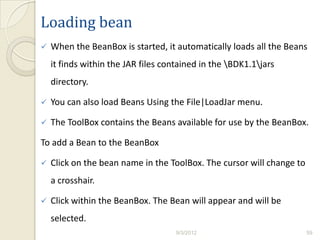
Loading bean
   When the BeanBox is started, it automatically loads all the Beans
    it finds within the JAR files contained in the BDK1.1jars
    directory.

   You can also load Beans Using the File|LoadJar menu.

   The ToolBox contains the Beans available for use by the BeanBox.

To add a Bean to the BeanBox

   Click on the bean name in the ToolBox. The cursor will change to
    a crosshair.

   Click within the BeanBox. The Bean will appear and will be
    selected.
                                     9/3/2012                          59
JavaBean Concepts- Properties
   Properties are attributes of a Bean that are referenced by
    name.

   These properties are usually read and written by calling
    methods on the Bean specifically created for that purpose.

   A programmer would set or get the value of this property
    through method calls, while an application developer using
    a visual development tool would manipulate the value of
    this property using a visual property editor.


                                  9/3/2012                       60
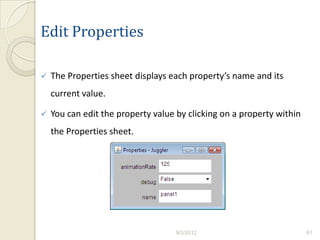
Edit Properties

   The Properties sheet displays each property’s name and its
    current value.

   You can edit the property value by clicking on a property within
    the Properties sheet.


                                    9/3/2012                           61
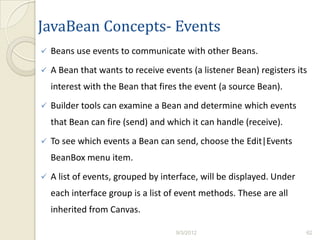
JavaBean Concepts- Events
   Beans use events to communicate with other Beans.
   A Bean that wants to receive events (a listener Bean) registers its
    interest with the Bean that fires the event (a source Bean).
   Builder tools can examine a Bean and determine which events
    that Bean can fire (send) and which it can handle (receive).
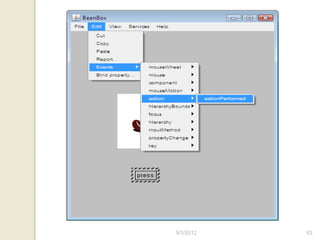
   To see which events a Bean can send, choose the Edit|Events
    BeanBox menu item.
   A list of events, grouped by interface, will be displayed. Under
    each interface group is a list of event methods. These are all
    inherited from Canvas.

                                    9/3/2012                           62
9/3/2012   63
Hooking Up Events in the BeanBox
   In this example you will use two OurButton bean instances to
    stop and start an instance of the animated Juggler bean.

   You will label the buttons "start" and "stop";

   Make the start button, when pressed, invoke the Juggler bean’s
    start method.

   Make the stop button, when pressed, invoke the Juggler bean’s
    stop method.


                                    9/3/2012                         64
JavaBean Concepts- Persistence
   A Bean persists by having its properties, fields, and state saved
    and restored to and from storage.

   The mechanism that makes persistence possible is called
    serialization.

   When a Bean instance is serialized, it is converted into a data
    stream and written to storage.

   Serialization done by implementing the java.io.Serializable
    interface

   Select the File|Save SerializeComponent menu item.


                                     9/3/2012                           65
Bean Introspection Reports
   Introspection is the process of discovering a Bean’s design−time
    features

   You can generate a Bean introspection report by choosing the
    the Edit|Report menu item.

   The report lists Bean events, properties, and methods, and their
    characteristics.

   By default Bean reports are sent to the java interpreter’s
    standard output.


                                   9/3/2012                            66
Using the BeanBox to Generate Applets
   Choose File|Make Applet to bring up the MakeApplet dialog.

   Use the default JAR file and applet name for this example. Press
    the OK button.

   The generated files were placed in the beanbox/tmp/myApplet
    directory.


                                   9/3/2012                            67
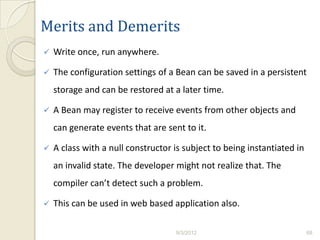
Merits and Demerits
   Write once, run anywhere.

   The configuration settings of a Bean can be saved in a persistent
    storage and can be restored at a later time.

   A Bean may register to receive events from other objects and
    can generate events that are sent to it.

   A class with a null constructor is subject to being instantiated in
    an invalid state. The developer might not realize that. The
    compiler can’t detect such a problem.

   This can be used in web based application also.

                                    9/3/2012                              68
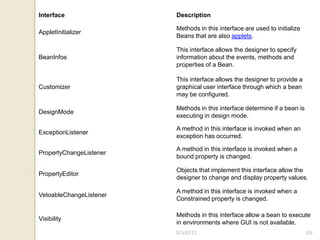
Interface                Description

                         Methods in this interface are used to initialize
AppletInitializer
                         Beans that are also applets.

                         This interface allows the designer to specify
BeanInfos                information about the events, methods and
                         properties of a Bean.

                         This interface allows the designer to provide a
Customizer               graphical user interface through which a bean
                         may be configured.

                         Methods in this interface determine if a bean is
DesignMode
                         executing in design mode.

                         A method in this interface is invoked when an
ExceptionListener
                         exception has occurred.

                         A method in this interface is invoked when a
PropertyChangeListener
                         bound property is changed.

                         Objects that implement this interface allow the
PropertyEditor
                         designer to change and display property values.

                         A method in this interface is invoked when a
VetoableChangeListener
                         Constrained property is changed.

                         Methods in this interface allow a bean to execute
Visibility
                         in environments where GUI is not available.
                         9/3/2012                                           69
References
   Using the Beans Development Kit1.0, September1997, A
    Tutorial, Alden DeSoto.

   http://inside.mines.edu/~crader/cs443/Chapters/Chap06.html

   http://web.mit.edu/1.124/LectureNotes/JavaBeans.html

   http://java.sun.com/developer/onlineTraining/Beans/JBeansAPI
    /Magercises/BeansDevelopmentKit/index.html


                                 9/3/2012                        70
Thank yu…!


     9/3/2012   71

Inner Classes & Multi Threading in JAVA

  • 1.
    Inner class, Staticclass, Multithreading, JavaBeans 9/3/2012 1
  • 2.
    Why Inner classes?  New feature available in Java and D language.  Different from Nested class and Composition.  Provides better code hiding.  Logically related classes can be made as Inner classes.  Classes implemented through Multiple Inheritance in C++ can be implemented using Inner classes in Java. 9/3/2012 2
  • 3.
    Inner Class  Inner classes are classes defined within other classes.  The class that includes the inner class is called the outer class  Inner classes can be hidden from other classes in the same package.  They can be nested to any depth 9/3/2012 3
  • 4.
    Inner Class  An inner class definition is a member of the outer class in the same way that the instance variables and methods of the outer class are members  An inner class is local to the outer class definition  The name of an inner class may be reused for something else outside the outer class definition  If the inner class is private, then the inner class cannot be accessed by name outside the definition of the outer class. 9/3/2012 4
  • 5.
    Structure public class Outer { private class Inner { // inner class instance variables // inner class methods } // end of inner class definition // outer class instance variables // outer class methods } 9/3/2012 5
  • 6.
    TYPES There are fourcategories of inner classes in Java: 1.Inner classes (non-static) 2.Static inner classes 3.Local classes (defined inside a block of Java code) 4.Anonymous classes (defined inside a block of Java code) 9/3/2012 6
  • 7.
    Non-Static Inner Classes  Non-static inner classes are defined without the keyword static.  An instance of a non-static inner class can only exist with an instance of its enclosing class.  Methods of a non-static inner class can directly refer to any member of any enclosing class (including private members).  Accessibility : public,package/default,protected or private. 9/3/2012 7
  • 8.
    Non-Static Inner Classes Accessingthe members of the inner class: Need to instantiate an object instance of an inner class first. An Inner class object can access the implementation of the object that created it – including private fields 9/3/2012 8
  • 9.
    Inner Class Creation Innerclasses can be created as follows:  <OuterClassName> outerObj = new <OuterClassName>(arguments); <OuterClassName>.<InnerClassName> innerObj = outerObj.new <InnerClassName>(arguments); 9/3/2012 9
  • 10.
    Example InnerExample variables; methods(); InnerClass variables; methods() ; InnerClass i= new innerClass(); InnerExample2 OuterClass outer = new OuterClass(); outer.new InnerClass().welcome(); OuterClass InnerClass welcome(); 9/3/2012 10
  • 11.
    Example //A namedinner class is used. // This is used to show that it can access non-local variables in the enclosing object. public class InnerExample { static String msg= "Welcome"; public static void main(String[] arg) { class InnerClass { public void doWork() { System.out.println(msg); } } InnerClass i = new InnerClass(); i.doWork(); } } 9/3/2012 11
  • 12.
    // Access innerclass from outside public class InnerExample2 { public static void main(String[] args) { OuterClass outer = new OuterClass(); outer.new InnerClass().welcome(); } } class OuterClass { public class InnerClass { public void welcome() { System.out.println("Welcome from InnerClass()"); } } } 9/3/2012 12
  • 13.
    Access  Inner and outer class has access to each others private members  Within the definition of a method of an inner class:  It is legal to reference a private instance variable of the outer class  It is legal to invoke a private method of the outer class  The inner class has a hidden reference to the outer class 9/3/2012 13
  • 14.
    Cont..  Within the definition of a method of the outer class  It is legal to reference a private instance variable of the inner class on an object of the inner class  It is legal to invoke a (nonstatic) method of the inner class as long as an object of the inner class is used as a calling object  Within the definition of the inner or outer classes, the modifiers public and private are equivalent 9/3/2012 14
  • 15.
    The .class Filefor an Inner Class  Compiling any class in Java produces a .class file named ClassName.class  Compiling a class with one (or more) inner classes causes both (or more) classes to be compiled, and produces two (or more) .class files  Such as ClassName.class and ClassName$InnerClassName.class 9/3/2012 15
  • 16.
    Nesting Inner Classes  It is legal to nest inner classes within inner classes  The rules are the same as before, but the names get longer  Given class A, which has public inner class B, which has public inner class C, then the following is valid: A aObject = new A(); A.B bObject = aObject.new B(); A.B.C cObject = bObject.new C(); 9/3/2012 16
  • 17.
    Advantages  They can make the outer class more self-contained since they are defined inside a class. Both of their methods have access to each other's private methods and instance variables.  Using an inner class as a helping class is one of the most useful applications of inner classes If used as a helping class, an inner class should be marked private 9/3/2012 17
  • 18.
    Static Class 9/3/2012 18
  • 19.
    An Intro toStatic Class  In order to understand the use of the static keyword in class declaration, we need to understand the class declaration itself. We can declare two kinds of classes: top-level classes and inner classes.  “The static keyword does not do to a class declaration what it does to a variable or a method declaration.”
  • 20.
    Inner Class  We define an inner class within a top-level class  An inner class is associated with an instance of its enclosing class and has direct access to that object's methods and fields. Also, because an inner class is associated with an instance, it cannot define any static members itself.
  • 21.
    To instantiate an inner class, you must first instantiate the outer class. Then, create the inner object within the outer object with this syntax:  OuterClass.InnerClass innerObject = outerObject.new InnerClass();
  • 22.
    An inner classcan be one of the following four types: 1. Local 2. Member 3. Nested
  • 23.
    Local Class  Local classes are the same as local variables, in the sense that they're created and used inside a block.  Once you declare a class within a block, it can be instantiated as many times as you wish within that block.  Like local variables, local classes aren't allowed to be declared public, protected, private, or static.
  • 24.
    Member Class  Member classes are defined within the body of a class.  You can use member classes anywhere within the body of the containing class.  You declare member classes when you want to use variables and methods of the containing class without explicit delegation.
  • 25.
    The member class is the only class that you can declare static. When you declare a member class, you can instantiate that member class only within the context of an object of the outer class in which this member class is declared. If you want to remove this restriction, you declare the member class a static class.  When you declare a member class with a static modifier, it becomes a nested top-level class and can be used as a normal top-level class
  • 26.
    Nested Top-level Class  A nested top-level class is a member classes with a static modifier.  A nested top-level class is just like any other top-level class except that it is declared within another class or interface.  Nested top-level classes are typically used as a convenient way to group related classes without creating a new package.
  • 27.
    Nested classes are divided into two categories: static and non- static. Nested classes that are declared static are simply called static nested classes. Non-static nested classes are called inner classes.  Static nested classes are accessed using the enclosing class name:  Outer Class. Static Nested Class For example, to create an object for the static nested class, use this syntax:  Outer Class.StaticNestedClass nested Object = new Outer Class.StaticNestedClass();
  • 28.
    Static Nested Classes  As with class methods and variables, a static nested class is associated with its outer class.  And like static class methods, a static nested class cannot refer directly to instance variables or methods defined in its enclosing class — it can use them only through an object reference.
  • 29.
    Note: A static nested class interacts with the instance members of its outer class (and other classes) just like any other top-level class. In effect, a static nested class is behaviorally a top-level class that has been nested in another top-level class for packaging convenience.  It is a way of logically grouping classes that are only used in one place.It increases encapsulation.Nested classes can lead to more readable and maintainable code.
  • 30.
  • 31.
    Multithreading  A thread is part of process in execution  Two or more threads executed concurrently is multithreading Advantage of Multithreading  Maximum CPU Utilization
  • 32.
    Thread in JAVA  By default every JAVA program has a main thread. How to access main thread Thread t = Thread.currentThread();
  • 33.
    Methods in ThreadClass Method Meaning getName() Obtain thread’s name getPriority() Obtain threads priority isAlive() Determine if a thread is alive join() Wait for a thread to terminate run() Entry point of the thread sleep() Suspend for few times start() start a thread by calling run().
  • 34.
    Life Cycle ofThread Thread t = new Thread(this) t.Start() Wait() t.sleep(1000) Notify()
  • 35.
    Creating a Thread Two ways Runnable Extending thread interface class
  • 36.
    Thread Using RunnableInterface class NewThread implements Runnable { Thread t; NewThread() { t = new Thread(this, "Demo Thread"); System.out.println("Child thread: " + t); t.start(); // Start the thread} public void run() { try { for(int i = 5; i > 0; i--) {
  • 37.
    Thread Using RunnableInterface System.out.println("Child Thread: " + i); Thread.sleep(500); } } catch (InterruptedException e) { System.out.println("Child interrupted."); } System.out.println("Exiting child thread."); } } 9/3/2012 37
  • 38.
    class ThreadDemo { publicstatic void main(String args[]) { new NewThread(); // create a new thread try { for(int i = 5; i > 0; i--) { System.out.println("Main Thread: " + i); Thread.sleep(1000); } } catch (InterruptedException e) { System.out.println("Main thread interrupted."); } System.out.println("Main thread exiting.");}
  • 39.
    Output  Child thread: Thread[Demo Thread,5,main]  Main Thread: 5  Child Thread: 5  Child Thread: 4  Main Thread: 4  Child Thread: 3  Child Thread: 2  Main Thread: 3  Child Thread: 1  Exiting child thread.  Main Thread: 2  Main Thread: 1  Main thread exiting.
  • 40.
    Using Extending Thread class NewThread extends Thread { NewThread() { // Create a new, second thread super("Demo Thread"); System.out.println("Child thread: " + this); start(); // Start the thread } // This is the entry point for the second thread. public void run() { try {
  • 41.
    Using Extending Thread for(int i = 5; i > 0; i--) { System.out.println("Child Thread: " + i); Thread.sleep(500); } } catch (InterruptedException e) { System.out.println("Child interrupted."); } System.out.println("Exiting child thread."); } } 9/3/2012 41
  • 42.
    class ExtendThread { publicstatic void main(String args[]) { new NewThread(); // create a new thread try { for(int i = 5; i > 0; i--) { System.out.println("Main Thread: " + i); Thread.sleep(1000); } } catch (InterruptedException e) { System.out.println("Main thread interrupted."); } System.out.println("Main thread exiting."); } }
  • 43.
    Multiple Threading class NewThreadimplements Runnable { String name; Thread t; NewThread(String threadname) { name = threadname; t = new Thread(this, name); System.out.println("New thread: " + t); t.start(); } public void run() {
  • 44.
    try { for(int i= 5; i > 0; i--) { System.out.println(name + ": " + i); Thread.sleep(1000); } } catch (InterruptedException e) { System.out.println(name + "Interrupted"); } System.out.println(name + " exiting."); } }
  • 45.
    class MultiThreadDemo { publicstatic void main(String args[]) { new NewThread("One"); // start threads new NewThread("Two"); new NewThread("Three"); try { Thread.sleep(10000); } catch (InterruptedException e) { System.out.println("Main thread Interrupted"); } System.out.println("Main thread exiting."); } }
  • 46.
    Output New thread: Thread[One,5,main] Two: 3 New thread: Thread[Two,5,main] One: 2 New thread: Thread[Three,5,main] Three: 2 One: 5 Two: 2 Two: 5 One: 1 Three: 5 Three: 1 One: 4 Two: 1 Two: 4 One exiting. Three: 4 Two exiting. One: 3 Three exiting. Three: 3 Main thread exiting.
  • 47.
    isAlive()  Final boolean isAlive() Join() •Final void join()
  • 48.
    Thread Priority  Lowpriority to high priority  Numbered from 1 to 10
  • 49.
    Final void setPriority(int level) Arguments in constants MIN_PRIORITY NORM_PRIORITY MAX_PRIORITY  Final int getPriority()
  • 50.
    A Java Beanis a reusable software component that can be manipulated visually in a builder tool. 9/3/2012 50
  • 51.
    Introduction  JavaBeans brings component technology to Java.  JavaBeans lets you write Beans, that you can visually manipulate within application builder tools.  Beans are classes written in the Java programming language conforming to a particular convention.  They are used to encapsulate many objects into a single object (the bean), so that they can be passed around as a single bean object instead of as multiple individual objects. 9/3/2012 51
  • 52.
    Introduction  A Bean’s methods are no different than Java methods, and can be called from other Beans or a scripting environment  Beans can be used with both builder tools, or manually manipulated by text tool through programmatic interfaces.  Compact and Easy  Portable  Leverages the Strengths of the Java Platform  Flexible Build-Time Component Editors  Multithreading  Security 9/3/2012 52
  • 53.
    Convention  A JavaBean is a Java Object that is serializable It allows applications and frameworks to reliably save, store, and restore the bean's state  has a 0-argument constructor The class must have a public default constructor. This allows easy instantiation within editing and activation frameworks.  and allows access to properties using getter and setter methods 9/3/2012 53
  • 54.
    package sunw.demo.simple; public void setColor(Color newColor) Example import java.awt.*; {color = newColor; repaint(); } import java.io.Serializable; public class SimpleBean public void paint(Graphics g) { extends Canvas g.setColor(color); implements Serializable g.fillRect(20, 5, 20, 30); } { private Color color = public SimpleBean(){ Color.green; setSize(60,40); public Color getColor(){ setBackground(Color.red); } return color; } } 9/3/2012 54
  • 55.
    In addition tothe Beans Development Kit (BDK) version 1.0, you will need the Java Development Kit (JDK) version 1.1. http://www.mediafire.com/?4hn81bgt83m29dg 9/3/2012 55
  • 56.
    Builder tool  A builder tool maintains Beans in a palette or toolbox.  The user can select a component from the toolbox and place it into a container, choosing its size and position.  None of these require a single line of code to be written by the application developer.  The application development tool does that.  This is accomplished through a set of standard interfaces provided by the component environment that allow the components to publish, or expose, their properties. 9/3/2012 56
  • 57.
    BeanBox  The BeanBox is an application for testing Beans, and serves as a simple demonstration for how more sophisticated Beans−aware builder tools should behave.  The BeanBox is also a nice tool for learning about Beans.  The BDK1.1beanbox. directory contains Windows (run.bat) and Unix (run.sh) scripts that start the BeanBox.  When started, the BeanBox displays three windows: The BeanBox, ToolBox, and the Properties sheet. 9/3/2012 57
  • 58.
    Creating Your Bean  Save the program and compile it using javac programname.java  Create a file called manifest.tmp using edit manifest.tmp  The file manifest.tmp should contain Name: programname.class Java-Bean: True  Create the jar file using jar cfmv jarfilename.jar manifest.tmp programname.class  Copy the jar file in BDK1.1jars folder 9/3/2012 58
  • 59.
    Loading bean  When the BeanBox is started, it automatically loads all the Beans it finds within the JAR files contained in the BDK1.1jars directory.  You can also load Beans Using the File|LoadJar menu.  The ToolBox contains the Beans available for use by the BeanBox. To add a Bean to the BeanBox  Click on the bean name in the ToolBox. The cursor will change to a crosshair.  Click within the BeanBox. The Bean will appear and will be selected. 9/3/2012 59
  • 60.
    JavaBean Concepts- Properties  Properties are attributes of a Bean that are referenced by name.  These properties are usually read and written by calling methods on the Bean specifically created for that purpose.  A programmer would set or get the value of this property through method calls, while an application developer using a visual development tool would manipulate the value of this property using a visual property editor. 9/3/2012 60
  • 61.
    Edit Properties  The Properties sheet displays each property’s name and its current value.  You can edit the property value by clicking on a property within the Properties sheet. 9/3/2012 61
  • 62.
    JavaBean Concepts- Events  Beans use events to communicate with other Beans.  A Bean that wants to receive events (a listener Bean) registers its interest with the Bean that fires the event (a source Bean).  Builder tools can examine a Bean and determine which events that Bean can fire (send) and which it can handle (receive).  To see which events a Bean can send, choose the Edit|Events BeanBox menu item.  A list of events, grouped by interface, will be displayed. Under each interface group is a list of event methods. These are all inherited from Canvas. 9/3/2012 62
  • 63.
  • 64.
    Hooking Up Eventsin the BeanBox  In this example you will use two OurButton bean instances to stop and start an instance of the animated Juggler bean.  You will label the buttons "start" and "stop";  Make the start button, when pressed, invoke the Juggler bean’s start method.  Make the stop button, when pressed, invoke the Juggler bean’s stop method. 9/3/2012 64
  • 65.
    JavaBean Concepts- Persistence  A Bean persists by having its properties, fields, and state saved and restored to and from storage.  The mechanism that makes persistence possible is called serialization.  When a Bean instance is serialized, it is converted into a data stream and written to storage.  Serialization done by implementing the java.io.Serializable interface  Select the File|Save SerializeComponent menu item. 9/3/2012 65
  • 66.
    Bean Introspection Reports  Introspection is the process of discovering a Bean’s design−time features  You can generate a Bean introspection report by choosing the the Edit|Report menu item.  The report lists Bean events, properties, and methods, and their characteristics.  By default Bean reports are sent to the java interpreter’s standard output. 9/3/2012 66
  • 67.
    Using the BeanBoxto Generate Applets  Choose File|Make Applet to bring up the MakeApplet dialog.  Use the default JAR file and applet name for this example. Press the OK button.  The generated files were placed in the beanbox/tmp/myApplet directory. 9/3/2012 67
  • 68.
    Merits and Demerits  Write once, run anywhere.  The configuration settings of a Bean can be saved in a persistent storage and can be restored at a later time.  A Bean may register to receive events from other objects and can generate events that are sent to it.  A class with a null constructor is subject to being instantiated in an invalid state. The developer might not realize that. The compiler can’t detect such a problem.  This can be used in web based application also. 9/3/2012 68
  • 69.
    Interface Description Methods in this interface are used to initialize AppletInitializer Beans that are also applets. This interface allows the designer to specify BeanInfos information about the events, methods and properties of a Bean. This interface allows the designer to provide a Customizer graphical user interface through which a bean may be configured. Methods in this interface determine if a bean is DesignMode executing in design mode. A method in this interface is invoked when an ExceptionListener exception has occurred. A method in this interface is invoked when a PropertyChangeListener bound property is changed. Objects that implement this interface allow the PropertyEditor designer to change and display property values. A method in this interface is invoked when a VetoableChangeListener Constrained property is changed. Methods in this interface allow a bean to execute Visibility in environments where GUI is not available. 9/3/2012 69
  • 70.
    References  Using the Beans Development Kit1.0, September1997, A Tutorial, Alden DeSoto.  http://inside.mines.edu/~crader/cs443/Chapters/Chap06.html  http://web.mit.edu/1.124/LectureNotes/JavaBeans.html  http://java.sun.com/developer/onlineTraining/Beans/JBeansAPI /Magercises/BeansDevelopmentKit/index.html 9/3/2012 70
  • 71.
    Thank yu…! 9/3/2012 71