
Presentation Tips Helping your audience get the most from your presentation
“ Stand to the left of screen.  Your audience with anchor on you, then read across, then come back and anchor on you…” (Burmark)
The slides aren’t the Presentation Slides shouldn’t say everything you will!
The presenter and the presentation “play  complementary  roles – like the cowboy and the horse” (Burmark)
Attack jargon with a vengeance Burmark, L. (2002).  Visual Literacy: Learn to See, See to Learn. Alexandria, VA. ASCD. P64. 20% of teacher surveyed can: operate HP computers & printers use software to teach writing skills After (16 words) Results from a survey show that two teachers out of ten have a working knowledge of how to operate the Hewlett Packard computer and inkjet printer.  The same number of teachers has knowledge about available computer software for teaching written language skills. Before (42 words)
Attack jargon with a vengeance Burmark, L. (2002).  Visual Literacy: Learn to See, See to Learn. Alexandria, VA. ASCD. P64. Publication Format Presentation Format 20% of teacher surveyed can: operate HP computers & printers use software to teach writing skills After (16 words) Results from a survey show that two teachers out of ten have a working knowledge of how to operate the Hewlett Packard computer and inkjet printer.  The same number of teachers has knowledge about available computer software for teaching written language skills. Before (42 words)
Increase Retention
Increase Retention Increase retention by 30%! Show slides for 14-21 seconds BEFORE talking about them (University of Colorado in Bolder, 1984)
Increase Retention “ Let the image sink in first; then you can hang  your  message on that visual hook.” (Burmark)
Attention Average Attention Span = 18 minutes
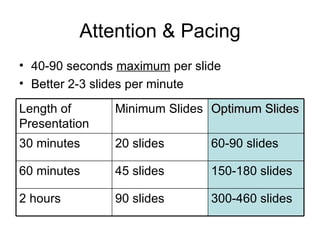
Attention & Pacing 40-90 seconds  maximum  per slide Better 2-3 slides per minute 300-460 slides 90 slides 2 hours 150-180 slides 45 slides 60 minutes 60-90 slides 20 slides 30 minutes Optimum Slides Minimum Slides Length of Presentation
 
Need to work a visual “commercial break” in at least every 15 minutes (relate it to your content) Humor = good for learning
Engage Engage audience every 3-4 minutes Ask a question Help make a connection Take a poll Build in time for discussion Think-Jot-Pair-Share almost always builds engagement
Brains like color
Brains see  yellow  first
Color visuals increase willingness to read by up to 80 percent
Color enhances learning and improves retention by more than 75 percent
77% perceive that  “Presentations that use color are able to  communicate better  than those that use black and white”  (3M)
Perception =  Reality
Be Smart. Build Great Presentations.
Be Smart. Build Great Presentations. Instructional Services Team

Presentation Tips

  • 1.
    Presentation Tips Helpingyour audience get the most from your presentation
  • 2.
    “ Stand tothe left of screen. Your audience with anchor on you, then read across, then come back and anchor on you…” (Burmark)
  • 3.
    The slides aren’tthe Presentation Slides shouldn’t say everything you will!
  • 4.
    The presenter andthe presentation “play complementary roles – like the cowboy and the horse” (Burmark)
  • 5.
    Attack jargon witha vengeance Burmark, L. (2002). Visual Literacy: Learn to See, See to Learn. Alexandria, VA. ASCD. P64. 20% of teacher surveyed can: operate HP computers & printers use software to teach writing skills After (16 words) Results from a survey show that two teachers out of ten have a working knowledge of how to operate the Hewlett Packard computer and inkjet printer. The same number of teachers has knowledge about available computer software for teaching written language skills. Before (42 words)
  • 6.
    Attack jargon witha vengeance Burmark, L. (2002). Visual Literacy: Learn to See, See to Learn. Alexandria, VA. ASCD. P64. Publication Format Presentation Format 20% of teacher surveyed can: operate HP computers & printers use software to teach writing skills After (16 words) Results from a survey show that two teachers out of ten have a working knowledge of how to operate the Hewlett Packard computer and inkjet printer. The same number of teachers has knowledge about available computer software for teaching written language skills. Before (42 words)
  • 7.
  • 8.
    Increase Retention Increaseretention by 30%! Show slides for 14-21 seconds BEFORE talking about them (University of Colorado in Bolder, 1984)
  • 9.
    Increase Retention “Let the image sink in first; then you can hang your message on that visual hook.” (Burmark)
  • 10.
    Attention Average AttentionSpan = 18 minutes
  • 11.
    Attention & Pacing40-90 seconds maximum per slide Better 2-3 slides per minute 300-460 slides 90 slides 2 hours 150-180 slides 45 slides 60 minutes 60-90 slides 20 slides 30 minutes Optimum Slides Minimum Slides Length of Presentation
  • 12.
  • 13.
    Need to worka visual “commercial break” in at least every 15 minutes (relate it to your content) Humor = good for learning
  • 14.
    Engage Engage audienceevery 3-4 minutes Ask a question Help make a connection Take a poll Build in time for discussion Think-Jot-Pair-Share almost always builds engagement
  • 15.
  • 16.
    Brains see yellow first
  • 17.
    Color visuals increasewillingness to read by up to 80 percent
  • 18.
    Color enhances learningand improves retention by more than 75 percent
  • 19.
    77% perceive that “Presentations that use color are able to communicate better than those that use black and white” (3M)
  • 20.
  • 21.
    Be Smart. BuildGreat Presentations.
  • 22.
    Be Smart. BuildGreat Presentations. Instructional Services Team