






Agenda
What Is File Handling in C?
File Handling Operations in C
File Handling Functions in C
File Opening Modes in C
What Is File Handling in C?
The data is stored in a file using a program called file handling.
The main objectives are:
• Create
• Read
• Write
• update
What Is File Handling in C?
Declaration:
FILE *ptr1, *ptr2;
File pointer is a variable that is used to access the files in the program to perform certain
operations on it.
Declaration:
int a, b;
The general syntax to open a file:
FILE *ptr;
ptr = fopen(“file_name”, “mode”);
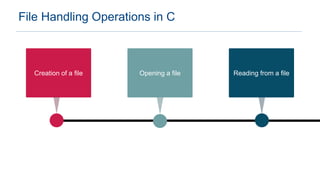
File Handling Operations in C
Opening a file Reading from a file
Creation of a file
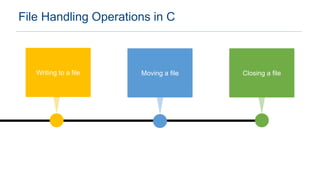
File Handling Operations in C
Moving a file Closing a file
Writing to a file
File Handling Functions in C
Sl. no Function Meaning
1 fopen() To open a file
2 fclose() To close a file
3 fprintf() Write to a file
4 fscanf() Read from a file
5 fputs() Write a string from file
6 fgets() Read a string from file
7 fseek() Adjust position in a file
8 rewind() Set current position to start of file
9 remove() Delete a file
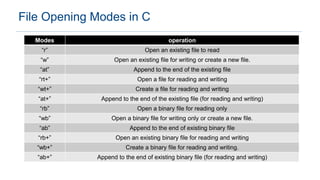
File Opening Modes in C
Modes operation
“r” Open an existing file to read
“w” Open an existing file for writing or create a new file.
“at” Append to the end of the existing file
“rt+” Open a file for reading and writing
“wt+” Create a file for reading and writing
“at+” Append to the end of the existing file (for reading and writing)
“rb” Open a binary file for reading only
“wb” Open a binary file for writing only or create a new file.
“ab” Append to the end of existing binary file
“rb+” Open an existing binary file for reading and writing
“wb+” Create a binary file for reading and writing.
“ab+” Append to the end of existing binary file (for reading and writing)
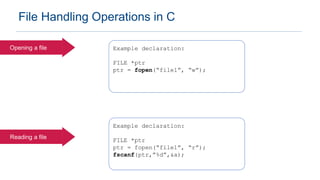
File Handling Operations in C
Opening a file Example declaration:
FILE *ptr
ptr = fopen(“file1”, “w”);
Reading a file
Example declaration:
FILE *ptr
ptr = fopen(“file1”, “r”);
fscanf(ptr,”%d”,&a);
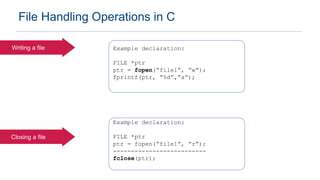
File Handling Operations in C
Writing a file Example declaration:
FILE *ptr
ptr = fopen(“file1”, “w”);
fprintf(ptr, “%d”,”a”);
Closing a file
Example declaration:
FILE *ptr
ptr = fopen(“file1”, “r”);
--------------------------
fclose(ptr);
File Handling Example Program
File handling in C

File handling in C

  • 2.
    Agenda What Is FileHandling in C? File Handling Operations in C File Handling Functions in C File Opening Modes in C
  • 3.
    What Is FileHandling in C?
  • 4.
    What Is FileHandling in C? The data is stored in a file using a program called file handling. The main objectives are: • Create • Read • Write • update
  • 5.
    What Is FileHandling in C? Declaration: FILE *ptr1, *ptr2; File pointer is a variable that is used to access the files in the program to perform certain operations on it. Declaration: int a, b; The general syntax to open a file: FILE *ptr; ptr = fopen(“file_name”, “mode”);
  • 6.
  • 7.
    File Handling Operationsin C Opening a file Reading from a file Creation of a file
  • 8.
    File Handling Operationsin C Moving a file Closing a file Writing to a file
  • 9.
  • 10.
    File Handling Functionsin C Sl. no Function Meaning 1 fopen() To open a file 2 fclose() To close a file 3 fprintf() Write to a file 4 fscanf() Read from a file 5 fputs() Write a string from file 6 fgets() Read a string from file 7 fseek() Adjust position in a file 8 rewind() Set current position to start of file 9 remove() Delete a file
  • 11.
  • 12.
    File Opening Modesin C Modes operation “r” Open an existing file to read “w” Open an existing file for writing or create a new file. “at” Append to the end of the existing file “rt+” Open a file for reading and writing “wt+” Create a file for reading and writing “at+” Append to the end of the existing file (for reading and writing) “rb” Open a binary file for reading only “wb” Open a binary file for writing only or create a new file. “ab” Append to the end of existing binary file “rb+” Open an existing binary file for reading and writing “wb+” Create a binary file for reading and writing. “ab+” Append to the end of existing binary file (for reading and writing)
  • 13.
    File Handling Operationsin C Opening a file Example declaration: FILE *ptr ptr = fopen(“file1”, “w”); Reading a file Example declaration: FILE *ptr ptr = fopen(“file1”, “r”); fscanf(ptr,”%d”,&a);
  • 14.
    File Handling Operationsin C Writing a file Example declaration: FILE *ptr ptr = fopen(“file1”, “w”); fprintf(ptr, “%d”,”a”); Closing a file Example declaration: FILE *ptr ptr = fopen(“file1”, “r”); -------------------------- fclose(ptr);
  • 15.