Capacitive Touch
Screen Technology
By:
Lavin Katiyar
ECE (3rd year)
1113331094
NIET GR.NOIDA
 Introduction
 History
 Components of Touch Screen
Capacitive touch screen technology
Types of Capacitive touch screen
 Advantages & Disadvantage
 Applications
Future Scope
Conclusion
Outline:
NIET GR.NOIDA
Introduction
A touch screen is a computer display screen that is
sensitive to human touch, allowing a user to interact
with the computer by touching pictures or words on
the screen.
A touch screen is an input device that allows users to
operate a PC by simply touching the display screen
which has a sensitive glass overlay placed on it.
 A touch screen accepts direct onscreen inputs.
NIET GR.NOIDA
History
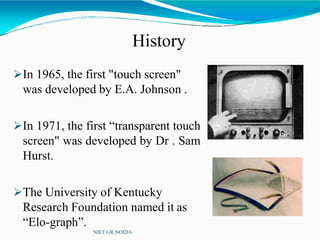
In 1965, the first "touch screen"
was developed by E.A. Johnson .
In 1971, the first “transparent touch
screen" was developed by Dr . Sam
Hurst.
The University of Kentucky
Research Foundation named it as
“Elo-graph”.
NIET GR.NOIDA
Components of Touchscreen
(How Does A TouchscreenWorks?)
NIET GR.NOIDA
A basic touch screen has three main components:
 Touch Sensor
 Controller
 Software Driver
Touch Sensor
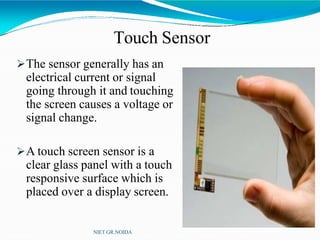
The sensor generally has an
electrical current or signal
going through it and touching
the screen causes a voltage or
signal change.
A touch screen sensor is a
clear glass panel with a touch
responsive surface which is
placed over a display screen.
NIET GR.NOIDA
Controller
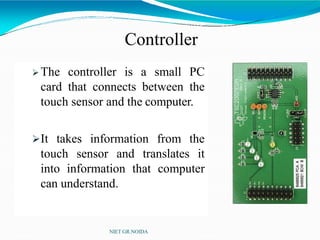
 The controller is a small PC
card that connects between the
touch sensor and the computer.
It takes information from the
touch sensor and translates it
into information that computer
can understand.
NIET GR.NOIDA
Software Driver
The driver is a software that allows the touch screen
and computer to work together.
It tells the operating system how to interpret the touch
event information that is sent from the controller.
Most touch screen drivers today are mouse-emulation
type drivers. This makes touching the screen the same
as clicking your mouse at the same location on the
screen.
NIET GR.NOIDA
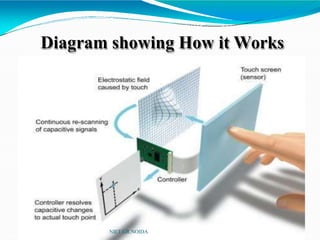
Diagram showing How it Works
NIET GR.NOIDA
Capacitive Touchscreens
NIET GR.NOIDA
Two types:
1. Surface Capacitive
Touchscreens.
2. Projected Capacitive
Touchscreens.
Surface Capacitive Touch Screen
Technology
NIET GR.NOIDA
In the capacitive system, a layer that stores electrical
charge is placed on the glass panel.
When a user touches, some of the charge is transferred
to the user, so the charge on the capacitive layer
decreases.
This decrease is measured in electrodes located at
each corner of the monitor.
The computer then calculates the coordinates, from
the relative differences in charge at each corner.
Contd.
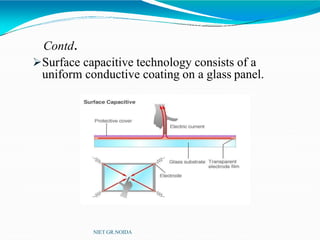
Surface capacitive technology consists of a
uniform conductive coating on a glass panel.
NIET GR.NOIDA
Contd.
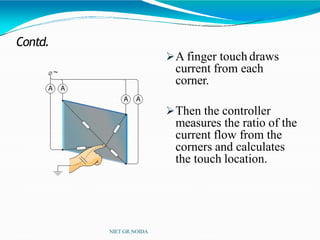
A finger touch draws
current from each
corner.
Then the controller
measures the ratio of the
current flow from the
corners and calculates
the touch location.
NIET GR.NOIDA
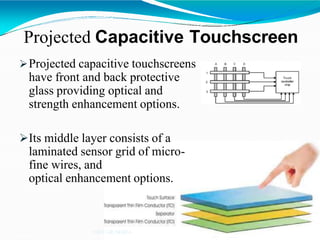
Projected Capacitive Touchscreen
Projected capacitive touchscreens
have front and back protective
glass providing optical and
strength enhancement options.
Its middle layer consists of a
laminated sensor grid of micro-
fine wires, and
optical enhancement options.
NIET GR.NOIDA
Contd.
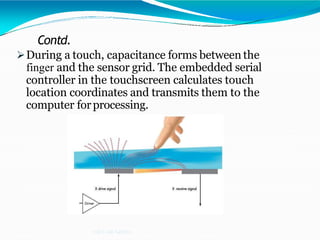
During a touch, capacitance forms between the
finger and the sensor grid. The embedded serial
controller in the touchscreen calculates touch
location coordinates and transmits them to the
computer forprocessing.
NIET GR.NOIDA
Advantage
NIET GR.NOIDA
High touch resolution.
High image clarity.
Not affected by contaminant.
User friendly.
Fast response.
Error free input.
No keyboard necessary.
Disadvantage
NIET GR.NOIDA
Finger stress
Fingerprints
Accepts input from finger only.
big screen leads to low battery life.
Applications
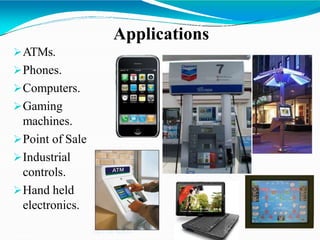
ATMs.
Phones.
Computers.
Gaming
machines.
Point of Sale
Industrial
controls.
Hand held
electronics.
NIET GR.NOIDA
Future Scope
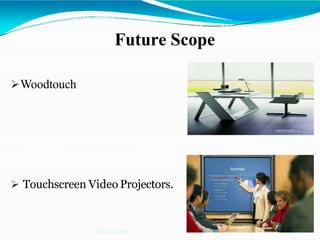
Woodtouch
 Touchscreen Video Projectors.
NIET GR.NOIDA
Conclusion
NIET GR.NOIDA
Though the capacitive touch screen technology contains
some limitations. it’s very user friendly, fast,
accurate, easy for the novices & fun to operate.
Touchscreens, touch panels or touchscreen panels are
display overlays which have the ability to display and
receive information on the same screen.
NIET GR.NOIDA

Capacitive touchscreen physic project touch screen

  • 1.
    Capacitive Touch Screen Technology By: LavinKatiyar ECE (3rd year) 1113331094 NIET GR.NOIDA
  • 2.
     Introduction  History Components of Touch Screen Capacitive touch screen technology Types of Capacitive touch screen  Advantages & Disadvantage  Applications Future Scope Conclusion Outline: NIET GR.NOIDA
  • 3.
    Introduction A touch screenis a computer display screen that is sensitive to human touch, allowing a user to interact with the computer by touching pictures or words on the screen. A touch screen is an input device that allows users to operate a PC by simply touching the display screen which has a sensitive glass overlay placed on it.  A touch screen accepts direct onscreen inputs. NIET GR.NOIDA
  • 4.
    History In 1965, thefirst "touch screen" was developed by E.A. Johnson . In 1971, the first “transparent touch screen" was developed by Dr . Sam Hurst. The University of Kentucky Research Foundation named it as “Elo-graph”. NIET GR.NOIDA
  • 5.
    Components of Touchscreen (HowDoes A TouchscreenWorks?) NIET GR.NOIDA A basic touch screen has three main components:  Touch Sensor  Controller  Software Driver
  • 6.
    Touch Sensor The sensorgenerally has an electrical current or signal going through it and touching the screen causes a voltage or signal change. A touch screen sensor is a clear glass panel with a touch responsive surface which is placed over a display screen. NIET GR.NOIDA
  • 7.
    Controller  The controlleris a small PC card that connects between the touch sensor and the computer. It takes information from the touch sensor and translates it into information that computer can understand. NIET GR.NOIDA
  • 8.
    Software Driver The driveris a software that allows the touch screen and computer to work together. It tells the operating system how to interpret the touch event information that is sent from the controller. Most touch screen drivers today are mouse-emulation type drivers. This makes touching the screen the same as clicking your mouse at the same location on the screen. NIET GR.NOIDA
  • 9.
    Diagram showing Howit Works NIET GR.NOIDA
  • 10.
    Capacitive Touchscreens NIET GR.NOIDA Twotypes: 1. Surface Capacitive Touchscreens. 2. Projected Capacitive Touchscreens.
  • 11.
    Surface Capacitive TouchScreen Technology NIET GR.NOIDA In the capacitive system, a layer that stores electrical charge is placed on the glass panel. When a user touches, some of the charge is transferred to the user, so the charge on the capacitive layer decreases. This decrease is measured in electrodes located at each corner of the monitor. The computer then calculates the coordinates, from the relative differences in charge at each corner.
  • 12.
    Contd. Surface capacitive technologyconsists of a uniform conductive coating on a glass panel. NIET GR.NOIDA
  • 13.
    Contd. A finger touchdraws current from each corner. Then the controller measures the ratio of the current flow from the corners and calculates the touch location. NIET GR.NOIDA
  • 14.
    Projected Capacitive Touchscreen Projectedcapacitive touchscreens have front and back protective glass providing optical and strength enhancement options. Its middle layer consists of a laminated sensor grid of micro- fine wires, and optical enhancement options. NIET GR.NOIDA
  • 15.
    Contd. During a touch,capacitance forms between the finger and the sensor grid. The embedded serial controller in the touchscreen calculates touch location coordinates and transmits them to the computer forprocessing. NIET GR.NOIDA
  • 16.
    Advantage NIET GR.NOIDA High touchresolution. High image clarity. Not affected by contaminant. User friendly. Fast response. Error free input. No keyboard necessary.
  • 17.
    Disadvantage NIET GR.NOIDA Finger stress Fingerprints Acceptsinput from finger only. big screen leads to low battery life.
  • 18.
  • 19.
    Future Scope Woodtouch  TouchscreenVideo Projectors. NIET GR.NOIDA
  • 20.
    Conclusion NIET GR.NOIDA Though thecapacitive touch screen technology contains some limitations. it’s very user friendly, fast, accurate, easy for the novices & fun to operate. Touchscreens, touch panels or touchscreen panels are display overlays which have the ability to display and receive information on the same screen.
  • 21.