Matlab
PDE Tool Box
GROUP 6
1
Outline
Introduction
Why we need it
PDE functions
Example problem
Solution of the problem
Code of the solution
Application
2
Introduction 14-01-07-031
What is PDE?
In mathematics, a partial differential equation (PDE) is a differential equation that contains
unknown multivariable functions and their partial derivatives. (A special case is ordinary
differential equations (ODEs), which deal with functions of a single variable and their
derivatives.)
PDEs are used to formulate problems involving functions of several variables, and are either
solved by hand, or used to create a relevant computer model.
3
Introduction
PDE Toolbox
Partial Differential Equation Toolbox™ provides functions for solving partial differential
equations (PDEs) in 2-D, 3-D, and time using finite element analysis.
It enables to specify and mesh 2-D and 3-D geometries and formulate boundary conditions and
equations.
It can solve static, time domain, frequency domain, and eigenvalue problems over the domain of
the geometry
4
Introduction: Opening PDE toolbox
Using the Apps Tab
On the MATLAB Toolstrip, click the Apps tab.
On the Apps tab, click the down arrow at the end of the Apps section.
Under Math, Statistics and Optimization, click the PDE button.
5
Introduction: Opening PDE toolbox
Using commands
To open a blank PDE app window, type pdetool in the MATLAB Command Window.
To open the PDE app with a circle already drawn in it, type pdecirc in the MATLAB Command
Window.
To open the PDE app with an ellipse already drawn in it, type pdeellip in the MATLAB Command
Window.
To open the PDE app with a rectangle already drawn in it, type pderect in the MATLAB
Command Window.
To open the PDE app with a polygon already drawn in it, type pdepoly in the MATLAB Command
Window.
6
Why do we need it 14-01-07-035
Time dependent pde
Changing with Space
7
PDE Setup
Create or import the geometry for your problem, a 2-D or 3-D region.
Set boundary conditions on the outer edges or faces of the geometry.
Specify the PDE coefficients.
Specify initial conditions.
Create a finite element mesh of the geometry.
Call the solver.
8
PDE Functions
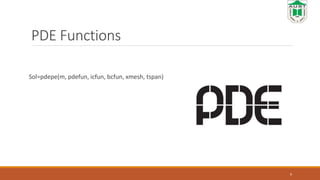
Sol=pdepe(m, pdefun, icfun, bcfun, xmesh, tspan)
9
Problem 14-01-07-050
10
At center
𝑑𝑇
𝑑𝑟
=0
temperature convection
−
𝑑𝑇
𝑑𝑟
=
ℎ
𝑘
𝑇 − 𝑇α
So for radius r the PDE is
𝑑𝑇
𝑑𝑡
= α
1
𝑟2
𝑑
𝑑𝑟
(
𝑟2 𝑑𝑇
𝑑𝑟
)
Problem 14-01-07-046
initial condition
T₀= 5ᵒC
Boundary condition
@r=0
𝑑𝑇
𝑑𝑟
= 0
@r=0.05 −
𝑑𝑇
𝑑𝑟
=
ℎ
𝑘
𝑇 − 𝑇α
11
Solution
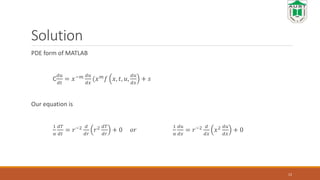
PDE form of MATLAB
C
𝑑𝑢
𝑑𝑡
= 𝑥−𝑚 𝑑𝑢
𝑑𝑥
(𝑥 𝑚 𝑓 𝑥, 𝑡, 𝑢,
𝑑𝑢
𝑑𝑥
+ 𝑠
Our equation is
1
α
𝑑𝑇
𝑑𝑡
= 𝑟−2 𝑑
𝑑𝑟
𝑟2 𝑑𝑇
𝑑𝑟
+ 0 𝑜𝑟
1
α
𝑑𝑢
𝑑𝑥
= 𝑟−2 𝑑
𝑑𝑥
𝑥2 𝑑𝑢
𝑑𝑥
+ 0
12
Code 14-01-07-045
function FLASH
m=2;
xmesh=linspace(0, 0.05, 20);
tspan=linspace(0,28800,32);
sol=pdepe(m, @pdefun, @icfun, @bcfun, xmesh,
tspan);
U=sol(:,:,1);
13
Function [c,f,s]=pdefun[x,t,u,DuDx]
C=1/ α;
F=DuDx;
S=0
Function u0=icfun(x)
u0=5;
code
Function [pl, ql, pr, qr]=pdebc(xl, ul, xr, ur, t)
pl=0;
ql=1;
Because matlab uses
P+qf=0
On left (center)
𝑑𝑇
𝑑𝑥
= 0 so, 0+1
𝑑𝑇
𝑑𝑥
=0
14
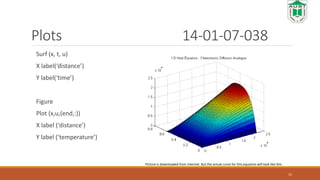
Plots 14-01-07-038
Surf (x, t, u)
X label(‘distance’)
Y label(‘time’)
Figure
Plot (x,u,(end,:))
X label (‘distance’)
Y label (‘temperature’)
15
Picture is downloaded from internet. But the actual curve for this equation will look like this.
Applications
 Electrostatics and Magneto statics
 Structural Mechanics
 DC Conduction and Elliptic Problems
 Heat Transfer and Diffusion
16
17
This presentation is made with the help of this video
https://www.youtube.com/watch?v=ri_1nxwupb8&t=596s

Presentation on Matlab pde toolbox

  • 1.
  • 2.
    Outline Introduction Why we needit PDE functions Example problem Solution of the problem Code of the solution Application 2
  • 3.
    Introduction 14-01-07-031 What isPDE? In mathematics, a partial differential equation (PDE) is a differential equation that contains unknown multivariable functions and their partial derivatives. (A special case is ordinary differential equations (ODEs), which deal with functions of a single variable and their derivatives.) PDEs are used to formulate problems involving functions of several variables, and are either solved by hand, or used to create a relevant computer model. 3
  • 4.
    Introduction PDE Toolbox Partial DifferentialEquation Toolbox™ provides functions for solving partial differential equations (PDEs) in 2-D, 3-D, and time using finite element analysis. It enables to specify and mesh 2-D and 3-D geometries and formulate boundary conditions and equations. It can solve static, time domain, frequency domain, and eigenvalue problems over the domain of the geometry 4
  • 5.
    Introduction: Opening PDEtoolbox Using the Apps Tab On the MATLAB Toolstrip, click the Apps tab. On the Apps tab, click the down arrow at the end of the Apps section. Under Math, Statistics and Optimization, click the PDE button. 5
  • 6.
    Introduction: Opening PDEtoolbox Using commands To open a blank PDE app window, type pdetool in the MATLAB Command Window. To open the PDE app with a circle already drawn in it, type pdecirc in the MATLAB Command Window. To open the PDE app with an ellipse already drawn in it, type pdeellip in the MATLAB Command Window. To open the PDE app with a rectangle already drawn in it, type pderect in the MATLAB Command Window. To open the PDE app with a polygon already drawn in it, type pdepoly in the MATLAB Command Window. 6
  • 7.
    Why do weneed it 14-01-07-035 Time dependent pde Changing with Space 7
  • 8.
    PDE Setup Create orimport the geometry for your problem, a 2-D or 3-D region. Set boundary conditions on the outer edges or faces of the geometry. Specify the PDE coefficients. Specify initial conditions. Create a finite element mesh of the geometry. Call the solver. 8
  • 9.
    PDE Functions Sol=pdepe(m, pdefun,icfun, bcfun, xmesh, tspan) 9
  • 10.
    Problem 14-01-07-050 10 At center 𝑑𝑇 𝑑𝑟 =0 temperatureconvection − 𝑑𝑇 𝑑𝑟 = ℎ 𝑘 𝑇 − 𝑇α So for radius r the PDE is 𝑑𝑇 𝑑𝑡 = α 1 𝑟2 𝑑 𝑑𝑟 ( 𝑟2 𝑑𝑇 𝑑𝑟 )
  • 11.
    Problem 14-01-07-046 initial condition T₀=5ᵒC Boundary condition @r=0 𝑑𝑇 𝑑𝑟 = 0 @r=0.05 − 𝑑𝑇 𝑑𝑟 = ℎ 𝑘 𝑇 − 𝑇α 11
  • 12.
    Solution PDE form ofMATLAB C 𝑑𝑢 𝑑𝑡 = 𝑥−𝑚 𝑑𝑢 𝑑𝑥 (𝑥 𝑚 𝑓 𝑥, 𝑡, 𝑢, 𝑑𝑢 𝑑𝑥 + 𝑠 Our equation is 1 α 𝑑𝑇 𝑑𝑡 = 𝑟−2 𝑑 𝑑𝑟 𝑟2 𝑑𝑇 𝑑𝑟 + 0 𝑜𝑟 1 α 𝑑𝑢 𝑑𝑥 = 𝑟−2 𝑑 𝑑𝑥 𝑥2 𝑑𝑢 𝑑𝑥 + 0 12
  • 13.
    Code 14-01-07-045 function FLASH m=2; xmesh=linspace(0,0.05, 20); tspan=linspace(0,28800,32); sol=pdepe(m, @pdefun, @icfun, @bcfun, xmesh, tspan); U=sol(:,:,1); 13 Function [c,f,s]=pdefun[x,t,u,DuDx] C=1/ α; F=DuDx; S=0 Function u0=icfun(x) u0=5;
  • 14.
    code Function [pl, ql,pr, qr]=pdebc(xl, ul, xr, ur, t) pl=0; ql=1; Because matlab uses P+qf=0 On left (center) 𝑑𝑇 𝑑𝑥 = 0 so, 0+1 𝑑𝑇 𝑑𝑥 =0 14
  • 15.
    Plots 14-01-07-038 Surf (x,t, u) X label(‘distance’) Y label(‘time’) Figure Plot (x,u,(end,:)) X label (‘distance’) Y label (‘temperature’) 15 Picture is downloaded from internet. But the actual curve for this equation will look like this.
  • 16.
    Applications  Electrostatics andMagneto statics  Structural Mechanics  DC Conduction and Elliptic Problems  Heat Transfer and Diffusion 16
  • 17.
    17 This presentation ismade with the help of this video https://www.youtube.com/watch?v=ri_1nxwupb8&t=596s