TEMPLATES
IN
C++
K.THAMIZHSELVI
Asst. Prof. of Computer Science
Bon Secours college for Women,
Thanjavur
TEMPLATES
• Template is a new concept allow the function or class
to work on more than one data type at once without
writing different codes for different data types.
• The parameters used during its definition is of generic
type and can be replaced later by actual parameter.
• This is called the concept of generic programming
• The templates are also called as parameterized classes
or functions.
Purpose of Templates
• Used in large programs
• Code reusability
• Time saving
• Flexibility of program
• Used to create a family of classes or functions.
Types of Templates
• 2 types:
– Class Template
– Function Template
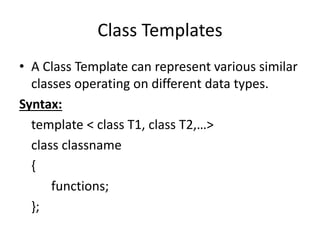
Class Templates
• A Class Template can represent various similar
classes operating on different data types.
Syntax:
template < class T1, class T2,…>
class classname
{
functions;
};
Eg:
template <class T>
class vector
{
T* v;
int size;
public:
vector (int m)
{
v = new T [size = m];
for ( int i = 0; i <size; i++)
v[i] = 0;
}
vector ( T* a)
{
for ( int i = 0; i <size; i++)
v[i] = a[i];
}
T operator* (vector &y)
{
T sum = 0;
for ( int i = 0; i <size; i++)
sum + = this -> v[i] * y . V [i];
return sum;
}
};
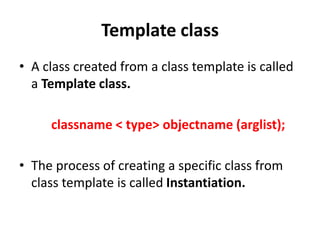
Template class
• A class created from a class template is called
a Template class.
classname < type> objectname (arglist);
• The process of creating a specific class from
class template is called Instantiation.
Class Templates with Multiple Parameters
• More than one generic data types can be used
in a class template.
• They can be declared by comma separated list
within the template specification.
template < class T1, class T2, …..>
class classname
{
………
body of the class
………
};
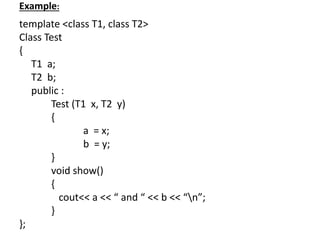
Example:
template <class T1, class T2>
Class Test
{
T1 a;
T2 b;
public :
Test (T1 x, T2 y)
{
a = x;
b = y;
}
void show()
{
cout<< a << “ and “ << b << “n”;
}
};
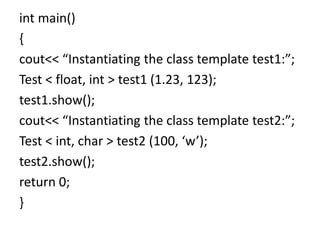
int main()
{
cout<< “Instantiating the class template test1:”;
Test < float, int > test1 (1.23, 123);
test1.show();
cout<< “Instantiating the class template test2:”;
Test < int, char > test2 (100, ‘w’);
test2.show();
return 0;
}
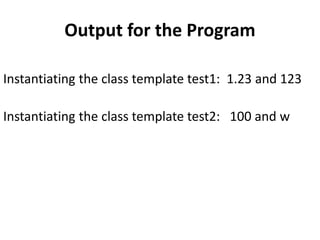
Output for the Program
Instantiating the class template test1: 1.23 and 123
Instantiating the class template test2: 100 and w
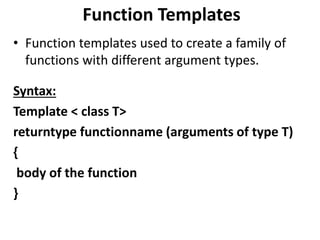
Function Templates
• Function templates used to create a family of
functions with different argument types.
Syntax:
Template < class T>
returntype functionname (arguments of type T)
{
body of the function
}
Example
template < class T>
void swap ( T &x, T &y)
{
T temp = x;
x = y;
y = temp;
}
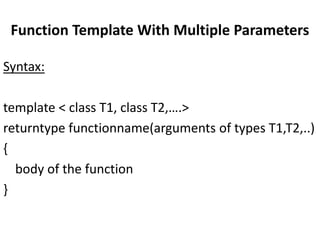
Function Template With Multiple Parameters
Syntax:
template < class T1, class T2,….>
returntype functionname(arguments of types T1,T2,..)
{
body of the function
}
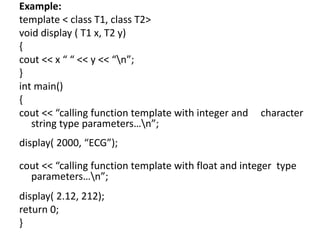
Example:
template < class T1, class T2>
void display ( T1 x, T2 y)
{
cout << x “ “ << y << “n”;
}
int main()
{
cout << “calling function template with integer and character
string type parameters…n”;
display( 2000, “ECG”);
cout << “calling function template with float and integer type
parameters…n”;
display( 2.12, 212);
return 0;
}
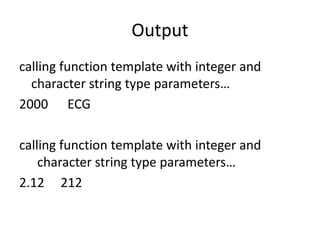
Output
calling function template with integer and
character string type parameters…
2000 ECG
calling function template with integer and
character string type parameters…
2.12 212
Templates in c++

Templates in c++

  • 1.
    TEMPLATES IN C++ K.THAMIZHSELVI Asst. Prof. ofComputer Science Bon Secours college for Women, Thanjavur
  • 2.
    TEMPLATES • Template isa new concept allow the function or class to work on more than one data type at once without writing different codes for different data types. • The parameters used during its definition is of generic type and can be replaced later by actual parameter. • This is called the concept of generic programming • The templates are also called as parameterized classes or functions.
  • 3.
    Purpose of Templates •Used in large programs • Code reusability • Time saving • Flexibility of program • Used to create a family of classes or functions.
  • 4.
    Types of Templates •2 types: – Class Template – Function Template
  • 5.
    Class Templates • AClass Template can represent various similar classes operating on different data types. Syntax: template < class T1, class T2,…> class classname { functions; };
  • 6.
    Eg: template <class T> classvector { T* v; int size; public: vector (int m) { v = new T [size = m]; for ( int i = 0; i <size; i++) v[i] = 0; } vector ( T* a) { for ( int i = 0; i <size; i++) v[i] = a[i]; } T operator* (vector &y) { T sum = 0; for ( int i = 0; i <size; i++) sum + = this -> v[i] * y . V [i]; return sum; } };
  • 7.
    Template class • Aclass created from a class template is called a Template class. classname < type> objectname (arglist); • The process of creating a specific class from class template is called Instantiation.
  • 8.
    Class Templates withMultiple Parameters • More than one generic data types can be used in a class template. • They can be declared by comma separated list within the template specification. template < class T1, class T2, …..> class classname { ……… body of the class ……… };
  • 9.
    Example: template <class T1,class T2> Class Test { T1 a; T2 b; public : Test (T1 x, T2 y) { a = x; b = y; } void show() { cout<< a << “ and “ << b << “n”; } };
  • 10.
    int main() { cout<< “Instantiatingthe class template test1:”; Test < float, int > test1 (1.23, 123); test1.show(); cout<< “Instantiating the class template test2:”; Test < int, char > test2 (100, ‘w’); test2.show(); return 0; }
  • 11.
    Output for theProgram Instantiating the class template test1: 1.23 and 123 Instantiating the class template test2: 100 and w
  • 12.
    Function Templates • Functiontemplates used to create a family of functions with different argument types. Syntax: Template < class T> returntype functionname (arguments of type T) { body of the function }
  • 13.
    Example template < classT> void swap ( T &x, T &y) { T temp = x; x = y; y = temp; }
  • 14.
    Function Template WithMultiple Parameters Syntax: template < class T1, class T2,….> returntype functionname(arguments of types T1,T2,..) { body of the function }
  • 15.
    Example: template < classT1, class T2> void display ( T1 x, T2 y) { cout << x “ “ << y << “n”; } int main() { cout << “calling function template with integer and character string type parameters…n”; display( 2000, “ECG”); cout << “calling function template with float and integer type parameters…n”; display( 2.12, 212); return 0; }
  • 16.
    Output calling function templatewith integer and character string type parameters… 2000 ECG calling function template with integer and character string type parameters… 2.12 212