ARYA COLLEGE of ENGG. & IT 
Submitted To: 
Er. Sandeep Tomar 
(Assistant Professor) 
Submitted By: 
Arpit Jain 
(10EARCS021) 
Wearable Computing 
1
Content 
1. The Early Days 
2. Evolution of Wearable Computing Techniques 
3. Introduction 
4. Operational Modes 
5. Technology Implementation 
6. Powering the Device 
7. Advantages 
8. Disadvantages 
9. Future Scope 
10.Conclusion 
11.References 
2
The Early Days 
“How Did it Start?” 
3
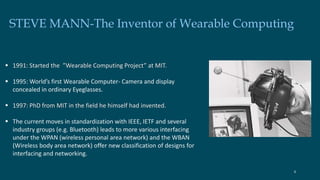
STEVE MANN-The Inventor of Wearable Computing 
 1991: Started the ”Wearable Computing Project” at MIT. 
 1995: World’s first Wearable Computer- Camera and display 
concealed in ordinary Eyeglasses. 
 1997: PhD from MIT in the field he himself had invented. 
 The current moves in standardization with IEEE, IETF and several 
industry groups (e.g. Bluetooth) leads to more various interfacing 
under the WPAN (wireless personal area network) and the WBAN 
(Wireless body area network) offer new classification of designs for 
interfacing and networking. 
4
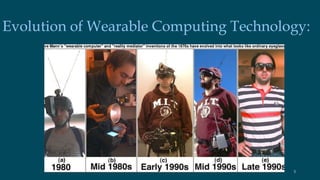
Evolution of Wearable Computing Technology: 
5
Introduction: 
 Wearable computers, also known as body-borne computers or wearables are miniature electronic devices that are 
worn by the bearer under, with or on top of clothing. 
 Modular computers whose components are small and light enough to be worn on a user's body for convenient 
operation. 
 The input and output components of wearables are worn close to the user's sensors (eyes and ears) and actuators 
(hands and mouth). 
 The computer evolution has moved from mainframes, to the desktop, and now the computing power is moving 
onti the person. 
 The user actually “Wearing” the computer, can utilize the power and functionality virtually anywhere in the 
environment. 
 The technology is developing and changing rapidly primarily due to vast changes in computer speed, wireless 
technology and miniaturization of components. 
6
Operational Modes: 
 Constancy 
 Augmentation 
 Mediation 
7
Technology Implementation: Input Devices 
 Speech Recogniser 
 Keyboard alternative including chording keyboards 
and special purpose keyboards 
 Mouse alternatives including trackballs, joysticks 
 Eye tracker 
 Head Mounted Display 
 Camera Recording View 
 Gesturing 
 Audio eg. Speaker and Mic 
 Network Availability 
 Video Capture devices, microphones, GPS locators 
 Other exotic devices such as skin sensors 
8
Head Mounted Display: 
• Small screen, typically covering one of your eyes. 
• Works like an ordinary monitor, providing an 
image floating in the air in front of you. 
• Transparent displays 
– Allows augmented reality, where virtual 
information overlaps the real world. 
• Opaque displays 
– Less sensitive to the background noise. 
State of the art. 
– Smallest. 
– Advanced. 
9
Camera 
• Any small camera. 
– Ordinary web camera. 
– Custom made camera. 
• Suitable placement 
– Head, follows user’s gaze. 
– Shoulder, more stable. 
10
Input Devices 
• Keyboard 
Canasta's IR keyboard. 
Arm-strapped keyboard. 
• Mouse 
• Gestures 
The Gesture pendant 
Fingers for dialing numbers 
• Voice recognition 
Suitable at times, but not as a generic 
solution for everything. 
• Multi-modal interfaces 
Combining several types of input, e.g. 
voice and gestures. 11
Output Devices: 
• Sight – Visual output 
HMD, wrist watch... 
• Hearing – Audio/sound/speech/music. 
Speakers, earplug/headset... 
• Touch – Tactile feedback 
Example: The radar vest, allowing a person to 
”feel” objects in the surrounding. 
• Taste and smell – Not that common, yet. 
12
Computer Itself 
Anything small but powerful enough! 
– Laptop or TabletPC 
– PC104 (a small PC) 
– Xybernaut 
– PDA, iPAQ, Toshiba 
– Or something else... 
13
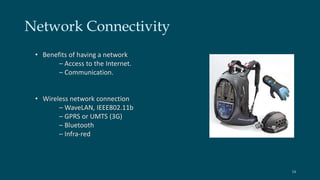
Network Connectivity 
• Benefits of having a network 
– Access to the Internet. 
– Communication. 
• Wireless network connection 
– WaveLAN, IEEE802.11b 
– GPRS or UMTS (3G) 
– Bluetooth 
– Infra-red 
14
Powering the Device: 
• Power is a significant problem! 
– You don’t want to drag a power cable behind you... 
– All devices consume power. 
• Tradeoff between functionality and power. 
– Batteries never last long enough. 
E.g. a laptop can run ~2-4 hours. 
• Typical power consumptions 
– Desktop computer, 100W 
– Laptop computer, 10W 
– Embedded CPU, 1W 
• Human body uses ~120W. 
– We need, let’s say, 5W for a wearable. 
15
Human Powered Devices 
Examples of human power availability 
– Body heat, 0.6 – 4.8W (wetsuit clothes) 
– Breath, 0.4 – 2.5W (pressure mask) 
– Blood pressure, 0.2W (turbine) 
– Limb motion, 0.3 – 1.5W (pulleys) 
– Finger motion, 0.019W (keyboard typing) 
– Walking, 5 – 8W (shoe generator) 
Walking is the best method so far. 
16
Advantages: 
 Enhanced Communication 
 Able to use wearable computers to complete daily tasks such 
as a computer which tracks the movements and habits of a 
person. 
• Flexibility 
• Freedom 
• Work from anywhere 
• Convenience 
17
Disadvantages: 
 Equipment can be heavy, Expensive 
 Some wearable computer can consist of a lot of wiring 
 Can cause irritation in heat, Side-Effects such as Headaches 
 Can be used to gain an unfair advantage over others 
 Security Concerns: 
i. Threat of being attacked 
ii. Threat of false read and write to memory 
iii. Security and protection by context control 
iv. Threat residually with pairing 
18
Future Scope: 
 These would dominate in the near future. 
 All the electronic devices would be able to communicate 
with each other and recognise who you are similar as 
shown in the movie Minority Report 
 Fitness and health bands will remain king 
 The "Internet of Things" will be a driver of wearables. 
 The Internet of Things, where regular items such as 
refrigerators or washing machines have enough smarts to 
talk to each other, is another hot trend. 
19
Conclusion: 
• Wearable computing 
– Invented by Steve Mann in the 1970s. 
• Technology 
– HMD, I/O devices, networks, power, etc. 
• Applications 
– Augmented memory. 
– Mediated reality. 
– Enhanced senses. 
– Avalanche rescue. 
– Market network. 
– Health-care. 
• Research issues 
– Interaction, merging with pervasive computing. 
– Much more remains... 
20
References: 
[1] http://www.sci-tech-today.com/story.xhtml?story_id=02000000H1ZW 
[2] http://www.campustechnology.com/articles/40766/ 
[3] http://about.eyetap.org/fundamentals 
[4] http://wearcam.org/cyborg.htm 
[5] L. Gorlenko and R. Merrick, No wires attached: Usability challenges in the connected mobile world. IBM Systems 
Journal. Volume 42, Number 4, 2003 
[6] Weiss, Handheld Usability, John Wiley & Sons, Hoboken, NJ (2002). 
[7] B. J. Rhodes, “The Remembrance Agent,” Proceedings of the First International Conference on the Practical 
Application of Intelligent Agents and Multi-Agent Technology (PAAM'96), 487–495 (1996). 
21
Thank You !! 
22

New technology

  • 1.
    ARYA COLLEGE ofENGG. & IT Submitted To: Er. Sandeep Tomar (Assistant Professor) Submitted By: Arpit Jain (10EARCS021) Wearable Computing 1
  • 2.
    Content 1. TheEarly Days 2. Evolution of Wearable Computing Techniques 3. Introduction 4. Operational Modes 5. Technology Implementation 6. Powering the Device 7. Advantages 8. Disadvantages 9. Future Scope 10.Conclusion 11.References 2
  • 3.
    The Early Days “How Did it Start?” 3
  • 4.
    STEVE MANN-The Inventorof Wearable Computing  1991: Started the ”Wearable Computing Project” at MIT.  1995: World’s first Wearable Computer- Camera and display concealed in ordinary Eyeglasses.  1997: PhD from MIT in the field he himself had invented.  The current moves in standardization with IEEE, IETF and several industry groups (e.g. Bluetooth) leads to more various interfacing under the WPAN (wireless personal area network) and the WBAN (Wireless body area network) offer new classification of designs for interfacing and networking. 4
  • 5.
    Evolution of WearableComputing Technology: 5
  • 6.
    Introduction:  Wearablecomputers, also known as body-borne computers or wearables are miniature electronic devices that are worn by the bearer under, with or on top of clothing.  Modular computers whose components are small and light enough to be worn on a user's body for convenient operation.  The input and output components of wearables are worn close to the user's sensors (eyes and ears) and actuators (hands and mouth).  The computer evolution has moved from mainframes, to the desktop, and now the computing power is moving onti the person.  The user actually “Wearing” the computer, can utilize the power and functionality virtually anywhere in the environment.  The technology is developing and changing rapidly primarily due to vast changes in computer speed, wireless technology and miniaturization of components. 6
  • 7.
    Operational Modes: Constancy  Augmentation  Mediation 7
  • 8.
    Technology Implementation: InputDevices  Speech Recogniser  Keyboard alternative including chording keyboards and special purpose keyboards  Mouse alternatives including trackballs, joysticks  Eye tracker  Head Mounted Display  Camera Recording View  Gesturing  Audio eg. Speaker and Mic  Network Availability  Video Capture devices, microphones, GPS locators  Other exotic devices such as skin sensors 8
  • 9.
    Head Mounted Display: • Small screen, typically covering one of your eyes. • Works like an ordinary monitor, providing an image floating in the air in front of you. • Transparent displays – Allows augmented reality, where virtual information overlaps the real world. • Opaque displays – Less sensitive to the background noise. State of the art. – Smallest. – Advanced. 9
  • 10.
    Camera • Anysmall camera. – Ordinary web camera. – Custom made camera. • Suitable placement – Head, follows user’s gaze. – Shoulder, more stable. 10
  • 11.
    Input Devices •Keyboard Canasta's IR keyboard. Arm-strapped keyboard. • Mouse • Gestures The Gesture pendant Fingers for dialing numbers • Voice recognition Suitable at times, but not as a generic solution for everything. • Multi-modal interfaces Combining several types of input, e.g. voice and gestures. 11
  • 12.
    Output Devices: •Sight – Visual output HMD, wrist watch... • Hearing – Audio/sound/speech/music. Speakers, earplug/headset... • Touch – Tactile feedback Example: The radar vest, allowing a person to ”feel” objects in the surrounding. • Taste and smell – Not that common, yet. 12
  • 13.
    Computer Itself Anythingsmall but powerful enough! – Laptop or TabletPC – PC104 (a small PC) – Xybernaut – PDA, iPAQ, Toshiba – Or something else... 13
  • 14.
    Network Connectivity •Benefits of having a network – Access to the Internet. – Communication. • Wireless network connection – WaveLAN, IEEE802.11b – GPRS or UMTS (3G) – Bluetooth – Infra-red 14
  • 15.
    Powering the Device: • Power is a significant problem! – You don’t want to drag a power cable behind you... – All devices consume power. • Tradeoff between functionality and power. – Batteries never last long enough. E.g. a laptop can run ~2-4 hours. • Typical power consumptions – Desktop computer, 100W – Laptop computer, 10W – Embedded CPU, 1W • Human body uses ~120W. – We need, let’s say, 5W for a wearable. 15
  • 16.
    Human Powered Devices Examples of human power availability – Body heat, 0.6 – 4.8W (wetsuit clothes) – Breath, 0.4 – 2.5W (pressure mask) – Blood pressure, 0.2W (turbine) – Limb motion, 0.3 – 1.5W (pulleys) – Finger motion, 0.019W (keyboard typing) – Walking, 5 – 8W (shoe generator) Walking is the best method so far. 16
  • 17.
    Advantages:  EnhancedCommunication  Able to use wearable computers to complete daily tasks such as a computer which tracks the movements and habits of a person. • Flexibility • Freedom • Work from anywhere • Convenience 17
  • 18.
    Disadvantages:  Equipmentcan be heavy, Expensive  Some wearable computer can consist of a lot of wiring  Can cause irritation in heat, Side-Effects such as Headaches  Can be used to gain an unfair advantage over others  Security Concerns: i. Threat of being attacked ii. Threat of false read and write to memory iii. Security and protection by context control iv. Threat residually with pairing 18
  • 19.
    Future Scope: These would dominate in the near future.  All the electronic devices would be able to communicate with each other and recognise who you are similar as shown in the movie Minority Report  Fitness and health bands will remain king  The "Internet of Things" will be a driver of wearables.  The Internet of Things, where regular items such as refrigerators or washing machines have enough smarts to talk to each other, is another hot trend. 19
  • 20.
    Conclusion: • Wearablecomputing – Invented by Steve Mann in the 1970s. • Technology – HMD, I/O devices, networks, power, etc. • Applications – Augmented memory. – Mediated reality. – Enhanced senses. – Avalanche rescue. – Market network. – Health-care. • Research issues – Interaction, merging with pervasive computing. – Much more remains... 20
  • 21.
    References: [1] http://www.sci-tech-today.com/story.xhtml?story_id=02000000H1ZW [2] http://www.campustechnology.com/articles/40766/ [3] http://about.eyetap.org/fundamentals [4] http://wearcam.org/cyborg.htm [5] L. Gorlenko and R. Merrick, No wires attached: Usability challenges in the connected mobile world. IBM Systems Journal. Volume 42, Number 4, 2003 [6] Weiss, Handheld Usability, John Wiley & Sons, Hoboken, NJ (2002). [7] B. J. Rhodes, “The Remembrance Agent,” Proceedings of the First International Conference on the Practical Application of Intelligent Agents and Multi-Agent Technology (PAAM'96), 487–495 (1996). 21
  • 22.