Hall, Accounting Information Systems, 8e
©2013 Cengage Learning. All Rights Reserved. May not be scanned, copied or duplicated, or posted to a publicly accessible website,in whole or in part.
Accounting Information Systems, 8e
James A. Hall
Chapter 2
Introduction to
Transaction Processing
Hall, Accounting Information Systems, 8e
©2013 Cengage Learning. All Rights Reserved. May not be scanned, copied or duplicated, or posted to a publicly accessible website,in whole or in part.
Objectives for Chapter 2
ď‚§ Understand the broad objectives of transaction cycles.
ď‚§ Recognize the types of transactions processed by each
of the three transaction cycles
ď‚§ Know the basic accounting records used in TPS.
ď‚§ Understand the relationship between the traditional
accounting records and their magnetic equivalents.
ď‚§ Be familiar with documentation techniques.
ď‚§ Understand the differences between batch and real-time
processing and the impact of these technologies on
transaction processing.
ď‚§ Be familiar with data coding schemes used in AIS.
2
Hall, Accounting Information Systems, 8e
©2013 Cengage Learning. All Rights Reserved. May not be scanned, copied or duplicated, or posted to a publicly accessible website,in whole or in part.
A Financial Transaction is...
ď‚§ an economic event that affects the assets and
equities of the firm, is reflected in its accounts,
and is measured in monetary terms.
ď‚§ similar types of transactions are grouped
together into three transaction cycles:
ď‚§ the expenditure cycle
ď‚§ the conversion cycle
ď‚§ the revenue cycle
3
Hall, Accounting Information Systems, 8e
©2013 Cengage Learning. All Rights Reserved. May not be scanned, copied or duplicated, or posted to a publicly accessible website,in whole or in part.
4Figure 2-1
Relationship between Transaction Cycles
Hall, Accounting Information Systems, 8e
©2013 Cengage Learning. All Rights Reserved. May not be scanned, copied or duplicated, or posted to a publicly accessible website,in whole or in part.
Each Cycle has Two Primary Subsystems
ď‚§ Expenditure Cycle: time lag between the two due to credit
relations with suppliers
ď‚§ physical component (acquisition of goods)
ď‚§ financial component (cash disbursements to the supplier)
ď‚§ Conversion Cycle:
ď‚§ the production system (planning, scheduling, and control
of the physical product through the manufacturing process)
ď‚§ the cost accounting system (monitors the flow of cost
information related to production)
ď‚§ Revenue Cycle: time lag between the two due to credit
relations with customers
ď‚§ physical component (sales order processing)
ď‚§ financial component (cash receipts)
5
Hall, Accounting Information Systems, 8e
©2013 Cengage Learning. All Rights Reserved. May not be scanned, copied or duplicated, or posted to a publicly accessible website,in whole or in part.
Manual System Accounting Records
ď‚§ Source Documents - used to capture and
formalize transaction data needed for
transaction processing
ď‚§ Product Documents - the result of
transaction processing
ď‚§ Turnaround Documents - a product
document of one system that becomes a
source document for another system
6
Hall, Accounting Information Systems, 8e
©2013 Cengage Learning. All Rights Reserved. May not be scanned, copied or duplicated, or posted to a publicly accessible website,in whole or in part.
Manual System Accounting Records
ď‚§ Journals - a record of chronological entry
ď‚§ special journals - specific classes of transactions that
occur in high frequency
ď‚§ general journal - nonrecurring, infrequent, and
dissimilar transactions
ď‚§ Ledger - a book of financial accounts
ď‚§ general ledger - shows activity for each account listed
on the chart of accounts
ď‚§ subsidiary ledger - shows activity by detail for each
account type
7
Hall, Accounting Information Systems, 8e
©2013 Cengage Learning. All Rights Reserved. May not be scanned, copied or duplicated, or posted to a publicly accessible website,in whole or in part.
Flow of Information from Economic
Event Into the General Ledger
8
Figure 2-8
Hall, Accounting Information Systems, 8e
©2013 Cengage Learning. All Rights Reserved. May not be scanned, copied or duplicated, or posted to a publicly accessible website,in whole or in part.
EXPLANATION OF
STEPS IN FIGURE:
1. Compare the AR
balance in the balance
sheet with the master file
AR control account
balance.
2. Reconcile the AR
control figure with the AR
subsidiary account total.
3. Select a sample of
update entries made to
accounts in the AR
subsidiary ledger
and trace these to
transactions in the sales
journal (archive file).
4. From these journal
entries, identify source
documents that can be
pulled from their files and
verified. If necessary,
confirm these source
documents by contacting
the customers.
Accounting Records in a Digital System
9
Figure 2-11
Hall, Accounting Information Systems, 8e
©2013 Cengage Learning. All Rights Reserved. May not be scanned, copied or duplicated, or posted to a publicly accessible website,in whole or in part.
Computer-Based Systems
ď‚§ The audit trail is less observable in computer-
based systems than traditional manual systems.
ď‚§ The data entry and computer programs are the
physical trail.
ď‚§ The data are stored in magnetic files.
10
Hall, Accounting Information Systems, 8e
©2013 Cengage Learning. All Rights Reserved. May not be scanned, copied or duplicated, or posted to a publicly accessible website,in whole or in part.
Source
Document
Journal General
Ledger
Financial
Statements
Financial
Statements
General
Ledger
Journal
Source
Document
Audit Trail
Accountants should be able to trace in both directions.
Sampling and confirmation are two common techniques.
11
Hall, Accounting Information Systems, 8e
©2013 Cengage Learning. All Rights Reserved. May not be scanned, copied or duplicated, or posted to a publicly accessible website,in whole or in part.
Accounts Receivable Control Account-General Ledger
Accounts Receivable Subsidiary Ledger
(sum of all customers’ receivables)
Sales Journal Cash Receipts Journal
Sales Order Deposit Slip
Remittance Advice
Shipping Notice
Example of Tracing an Audit Trail
Verifying Accounts Receivable
Physical Financial
12
Hall, Accounting Information Systems, 8e
©2013 Cengage Learning. All Rights Reserved. May not be scanned, copied or duplicated, or posted to a publicly accessible website,in whole or in part.
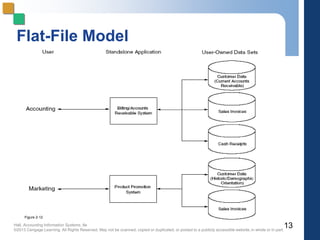
13
Figure 2-12
Flat-File Model
Hall, Accounting Information Systems, 8e
©2013 Cengage Learning. All Rights Reserved. May not be scanned, copied or duplicated, or posted to a publicly accessible website,in whole or in part.
Data Redundancy Problems
Data Storage
ď‚§ excessive storage costs of paper documents and/or
magnetic form
Data Updating
ď‚§ changes or additions must be performed multiple times
Currency of Information
ď‚§ potential problem of failing to update all affected files
Task-Data Dependency
 user’s inability to obtain additional information as needs
change
Data Integration
ď‚§ separate files are difficult to integrate across multiple users
14
Hall, Accounting Information Systems, 8e
©2013 Cengage Learning. All Rights Reserved. May not be scanned, copied or duplicated, or posted to a publicly accessible website,in whole or in part.
Database Model
15
Figure 2-13
Hall, Accounting Information Systems, 8e
©2013 Cengage Learning. All Rights Reserved. May not be scanned, copied or duplicated, or posted to a publicly accessible website,in whole or in part.
Computer Files
ď‚§ Master File - generally contains account data
(e.g., general ledger and subsidiary file)
ď‚§ Transaction File - a temporary file containing
transactions since the last update
ď‚§ Reference File - contains relatively constant
information used in processing (e.g., tax
tables, customer addresses)
ď‚§ Archive File - contains past transactions for
reference purposes
16
Hall, Accounting Information Systems, 8e
©2013 Cengage Learning. All Rights Reserved. May not be scanned, copied or duplicated, or posted to a publicly accessible website,in whole or in part.
Documentation Techniques
ď‚§ Documentation in a digital environment is
necessary for many reasons.
ď‚§ Five common documentation techniques:
ď‚§ Entity Relationship Diagram
ď‚§ Data Flow Diagrams
ď‚§ Document Flowcharts
ď‚§ System Flowcharts
ď‚§ Program Flowcharts
17
Hall, Accounting Information Systems, 8e
©2013 Cengage Learning. All Rights Reserved. May not be scanned, copied or duplicated, or posted to a publicly accessible website,in whole or in part.
Entity Relationship Diagram (ERD)
ď‚§ A documentation technique to represent
the relationship between entities in a
system.
18
Hall, Accounting Information Systems, 8e
©2013 Cengage Learning. All Rights Reserved. May not be scanned, copied or duplicated, or posted to a publicly accessible website,in whole or in part.
Cardinalities
ď‚§ Represent the numerical mapping
between entities:
ď‚§ one-to-one
ď‚§ one-to-many
ď‚§ many-to-many
19
Hall, Accounting Information Systems, 8e
©2013 Cengage Learning. All Rights Reserved. May not be scanned, copied or duplicated, or posted to a publicly accessible website,in whole or in part.
Sales-
person
Car
Type
Customer Order
Vendor Inventory
Assigned
Places
Supply
Entity Relationship Entity
1
M
M M
1
1
Cardinalities
20
Hall, Accounting Information Systems, 8e
©2013 Cengage Learning. All Rights Reserved. May not be scanned, copied or duplicated, or posted to a publicly accessible website,in whole or in part.
Data Flow Diagrams (DFD)…
ď‚§ use symbols to represent the processes, data
sources, data flows, and entities in a system
ď‚§ represent the logical elements of the system
ď‚§ do not represent the physical system
21
Hall, Accounting Information Systems, 8e
©2013 Cengage Learning. All Rights Reserved. May not be scanned, copied or duplicated, or posted to a publicly accessible website,in whole or in part.
Data Flow Diagram Symbols
Entity
Name
N
Process
Description
Data Store
Name
Direction of
data flow
22
Figure 2-14
Hall, Accounting Information Systems, 8e
©2013 Cengage Learning. All Rights Reserved. May not be scanned, copied or duplicated, or posted to a publicly accessible website,in whole or in part.
System Flowcharts…
ď‚§ illustrate the relationship among processes
and the documents that flow between
them
ď‚§ contain more details than data flow
diagrams
ď‚§ clearly depict the separation of functions in
a system
23
Hall, Accounting Information Systems, 8e
©2013 Cengage Learning. All Rights Reserved. May not be scanned, copied or duplicated, or posted to a publicly accessible website,in whole or in part.
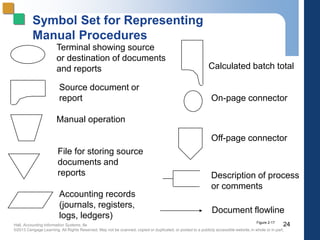
Symbol Set for Representing
Manual Procedures
Terminal showing source
or destination of documents
and reports
Source document or
report
Manual operation
File for storing source
documents and
reports
Accounting records
(journals, registers,
logs, ledgers)
Calculated batch total
On-page connector
Off-page connector
Description of process
or comments
Document flowline
24Figure 2-17
Hall, Accounting Information Systems, 8e
©2013 Cengage Learning. All Rights Reserved. May not be scanned, copied or duplicated, or posted to a publicly accessible website,in whole or in part.
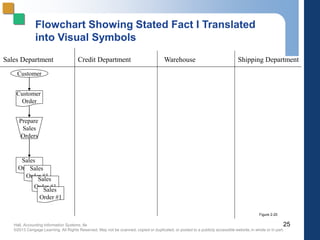
Sales Department Credit Department Warehouse Shipping Department
Flowchart Showing Stated Fact I Translated
into Visual Symbols
Customer
Customer
Order
Prepare
Sales
Orders
Sales
Order #1Sales
Order #1
Sales
Order #1
Sales
Order #1
25
Figure 2-20
Hall, Accounting Information Systems, 8e
©2013 Cengage Learning. All Rights Reserved. May not be scanned, copied or duplicated, or posted to a publicly accessible website,in whole or in part.
26
Flowchart Showing All Stated Facts
Translated into Visual Symbols
Figure 2-22
Hall, Accounting Information Systems, 8e
©2013 Cengage Learning. All Rights Reserved. May not be scanned, copied or duplicated, or posted to a publicly accessible website,in whole or in part.
System Flowcharts…
ď‚§ represent the relationship between the key
elements--input sources, programs, and
output products--of computer systems
ď‚§ depict the type of media being used (paper,
magnetic tape, magnetic disks, and
terminals)
ď‚§ in practice, not much difference between
document and system flowcharts
27
Hall, Accounting Information Systems, 8e
©2013 Cengage Learning. All Rights Reserved. May not be scanned, copied or duplicated, or posted to a publicly accessible website,in whole or in part.
Symbol Set for Representing Computer
Processes
Hard copy
Computer process
Direct access storage
device
Magnetic tape
Terminal input/
output device
Process flow
Real-time
(online)
connection
Video display
device
28
Figure 2-23
Hall, Accounting Information Systems, 8e
©2013 Cengage Learning. All Rights Reserved. May not be scanned, copied or duplicated, or posted to a publicly accessible website,in whole or in part.
29
Flowchart Showing Translation of
Facts 1, 2, and 3 into Visual Symbols
Figure 2-24
Hall, Accounting Information Systems, 8e
©2013 Cengage Learning. All Rights Reserved. May not be scanned, copied or duplicated, or posted to a publicly accessible website,in whole or in part.
Flowchart Showing All Facts Translated
into Visual Symbols
30Figure 2-25
Hall, Accounting Information Systems, 8e
©2013 Cengage Learning. All Rights Reserved. May not be scanned, copied or duplicated, or posted to a publicly accessible website,in whole or in part.
Figure 2-26
Program Flowcharts…
illustrate the logic used in programs
Program Flowchart Symbols
Logical process
Decision
Terminal start or
end operation
Input/output
operation
Flow of logical
process
31
Hall, Accounting Information Systems, 8e
©2013 Cengage Learning. All Rights Reserved. May not be scanned, copied or duplicated, or posted to a publicly accessible website,in whole or in part.
Transaction Processing Models
Batch versus real time systems (differences)
ď‚§ Information time frame
ď‚§ Resources
ď‚§ Operational efficiency
ď‚§ Efficiency v. effectiveness
ď‚§ Updating master files from transactions
ď‚§ Master file backup procedures
32
Hall, Accounting Information Systems, 8e
©2013 Cengage Learning. All Rights Reserved. May not be scanned, copied or duplicated, or posted to a publicly accessible website,in whole or in part.
Batch Processing
ď‚§ A batch is a group of similar transactions that are
accumulated over time and then processed
together.
ď‚§ The transactions must be independent of one
another during the time period over which the
transactions are accumulated in order for batch
processing to be appropriate.
ď‚§ A time lag exists between the event and the
processing.
33
Hall, Accounting Information Systems, 8e
©2013 Cengage Learning. All Rights Reserved. May not be scanned, copied or duplicated, or posted to a publicly accessible website,in whole or in part.
Sales
Orders
Keying
Unedited
Transactions
Edit
Run
Errors
Edited
Transactions
Sort
Run
Transactions
Update
Run
Old Master
(father)
AR
AR
New Master
(son)
Transactions (eventually transferred to an archive file)
correct errors and
resubmit
catches clerical errors
rearranges the transaction data by
key field so that it is in the same
sequence as the master file
changes the values in the master
file to reflect the transactions that
have occurred
Batch Processing/Sequential File
34
Hall, Accounting Information Systems, 8e
©2013 Cengage Learning. All Rights Reserved. May not be scanned, copied or duplicated, or posted to a publicly accessible website,in whole or in part.
Steps in Batch Processing/Sequential File
ď‚§ Keystroke - source documents are transcribed by clerks to
magnetic tape for processing later
ď‚§ Edit Run - identifies clerical errors in the batch and places
them into an error file
ď‚§ Sort Run - places the transaction file in the same order as the
master file using a primary key
ď‚§ Update Run - changes the value of appropriate fields in the
master file to reflect the transaction
ď‚§ Backup Procedure - the original master continues to exist
and a new master file is created
35
Hall, Accounting Information Systems, 8e
©2013 Cengage Learning. All Rights Reserved. May not be scanned, copied or duplicated, or posted to a publicly accessible website,in whole or in part.
Advantages of Batch Processing
ď‚§ Organizations can increase efficiency by
grouping large numbers of transactions into
batches rather than processing each event
separately.
ď‚§ Batch processing provides control over the
transaction process via control figures.
36
Hall, Accounting Information Systems, 8e
©2013 Cengage Learning. All Rights Reserved. May not be scanned, copied or duplicated, or posted to a publicly accessible website,in whole or in part.
Real-Time Systems…
ď‚§ process transactions individually at the
moment the economic event occurs
ď‚§ have no time lag between the economic event
and the processing
ď‚§ generally require greater resources than batch
processing since they require dedicated
processing capacity; however, these cost
differentials are decreasing
ď‚§ oftentimes have longer systems development
time
37
Hall, Accounting Information Systems, 8e
©2013 Cengage Learning. All Rights Reserved. May not be scanned, copied or duplicated, or posted to a publicly accessible website,in whole or in part.
38
Hall, Accounting Information Systems, 8e
©2013 Cengage Learning. All Rights Reserved. May not be scanned, copied or duplicated, or posted to a publicly accessible website,in whole or in part.
Why Do So Many AIS Use Batch
Processing?
ď‚§ AIS processing is characterized by high-volume,
independent transactions, such are recording
cash receipts checks received in the mail.
ď‚§ The processing of such high-volume checks can
be done during an off-peak computer time.
ď‚§ This is one reason why batch processing maybe
done using real-time data collection.
39
Hall, Accounting Information Systems, 8e
©2013 Cengage Learning. All Rights Reserved. May not be scanned, copied or duplicated, or posted to a publicly accessible website,in whole or in part.
Uses of Coding in AIS
ď‚§ Concisely represent large amounts of complex
information that would otherwise be
unmanageable
ď‚§ Provide a means of accountability over the
completeness of the transactions processed
ď‚§ Identify unique transactions and accounts
within a file
ď‚§ Support the audit function by providing an
effective audit trail
40
Hall, Accounting Information Systems, 8e
©2013 Cengage Learning. All Rights Reserved. May not be scanned, copied or duplicated, or posted to a publicly accessible website,in whole or in part.
Sequential Codes
ď‚§ Represent items in sequential order
ď‚§ Used to prenumber source documents
ď‚§ Track each transaction processed
ď‚§ Identify any out-of-sequence documents
ď‚§ Disadvantages:
ď‚§ arbitrary information
ď‚§ hard to make changes and insertions
41
Hall, Accounting Information Systems, 8e
©2013 Cengage Learning. All Rights Reserved. May not be scanned, copied or duplicated, or posted to a publicly accessible website,in whole or in part.
Block Codes
ď‚§ Represent whole classes by assigning each
class a specific range within the coding scheme
ď‚§ Used for chart of accounts
ď‚§ The basis of the general ledger
ď‚§ Allows for the easy insertion of new codes
within a block
 Don’t have to reorganize the coding structure
ď‚§ Disadvantage:
ď‚§ arbitrary information
42
Hall, Accounting Information Systems, 8e
©2013 Cengage Learning. All Rights Reserved. May not be scanned, copied or duplicated, or posted to a publicly accessible website,in whole or in part.
Group Codes
ď‚§ Represent complex items or events involving
two or more pieces of data using fields with
specific meaning
ď‚§ For example, a coding scheme for tracking
sales might be 04-09-476214-99, meaning:
Store Number Dept. Number Item Number Salesperson
04 09 476214 99
• Disadvantages:
– arbitrary information
– overused
43
Hall, Accounting Information Systems, 8e
©2013 Cengage Learning. All Rights Reserved. May not be scanned, copied or duplicated, or posted to a publicly accessible website,in whole or in part.
Alphabetic Codes
ď‚§ Used for many of the same purposes as
numeric codes
ď‚§ Can be assigned sequentially or used in
block and group coding techniques
ď‚§ May be used to represent large numbers of
items
ď‚§ Can represents up to 26 variations per field
ď‚§ Disadvantage:
ď‚§ arbitrary information
44
Hall, Accounting Information Systems, 8e
©2013 Cengage Learning. All Rights Reserved. May not be scanned, copied or duplicated, or posted to a publicly accessible website,in whole or in part.
Mnemonic Codes
ď‚§ Alphabetic characters used as
abbreviations, acronyms, and other types
of combinations
ď‚§ Do not require users to memorize the
meaning since the code itself is
informative – and not arbitrary
ď‚§ NY = New York
ď‚§ Disadvantages:
ď‚§ limited usability and availability
45

Pp 02-new

  • 1.
    Hall, Accounting InformationSystems, 8e ©2013 Cengage Learning. All Rights Reserved. May not be scanned, copied or duplicated, or posted to a publicly accessible website,in whole or in part. Accounting Information Systems, 8e James A. Hall Chapter 2 Introduction to Transaction Processing
  • 2.
    Hall, Accounting InformationSystems, 8e ©2013 Cengage Learning. All Rights Reserved. May not be scanned, copied or duplicated, or posted to a publicly accessible website,in whole or in part. Objectives for Chapter 2  Understand the broad objectives of transaction cycles.  Recognize the types of transactions processed by each of the three transaction cycles  Know the basic accounting records used in TPS.  Understand the relationship between the traditional accounting records and their magnetic equivalents.  Be familiar with documentation techniques.  Understand the differences between batch and real-time processing and the impact of these technologies on transaction processing.  Be familiar with data coding schemes used in AIS. 2
  • 3.
    Hall, Accounting InformationSystems, 8e ©2013 Cengage Learning. All Rights Reserved. May not be scanned, copied or duplicated, or posted to a publicly accessible website,in whole or in part. A Financial Transaction is...  an economic event that affects the assets and equities of the firm, is reflected in its accounts, and is measured in monetary terms.  similar types of transactions are grouped together into three transaction cycles:  the expenditure cycle  the conversion cycle  the revenue cycle 3
  • 4.
    Hall, Accounting InformationSystems, 8e ©2013 Cengage Learning. All Rights Reserved. May not be scanned, copied or duplicated, or posted to a publicly accessible website,in whole or in part. 4Figure 2-1 Relationship between Transaction Cycles
  • 5.
    Hall, Accounting InformationSystems, 8e ©2013 Cengage Learning. All Rights Reserved. May not be scanned, copied or duplicated, or posted to a publicly accessible website,in whole or in part. Each Cycle has Two Primary Subsystems  Expenditure Cycle: time lag between the two due to credit relations with suppliers  physical component (acquisition of goods)  financial component (cash disbursements to the supplier)  Conversion Cycle:  the production system (planning, scheduling, and control of the physical product through the manufacturing process)  the cost accounting system (monitors the flow of cost information related to production)  Revenue Cycle: time lag between the two due to credit relations with customers  physical component (sales order processing)  financial component (cash receipts) 5
  • 6.
    Hall, Accounting InformationSystems, 8e ©2013 Cengage Learning. All Rights Reserved. May not be scanned, copied or duplicated, or posted to a publicly accessible website,in whole or in part. Manual System Accounting Records  Source Documents - used to capture and formalize transaction data needed for transaction processing  Product Documents - the result of transaction processing  Turnaround Documents - a product document of one system that becomes a source document for another system 6
  • 7.
    Hall, Accounting InformationSystems, 8e ©2013 Cengage Learning. All Rights Reserved. May not be scanned, copied or duplicated, or posted to a publicly accessible website,in whole or in part. Manual System Accounting Records  Journals - a record of chronological entry  special journals - specific classes of transactions that occur in high frequency  general journal - nonrecurring, infrequent, and dissimilar transactions  Ledger - a book of financial accounts  general ledger - shows activity for each account listed on the chart of accounts  subsidiary ledger - shows activity by detail for each account type 7
  • 8.
    Hall, Accounting InformationSystems, 8e ©2013 Cengage Learning. All Rights Reserved. May not be scanned, copied or duplicated, or posted to a publicly accessible website,in whole or in part. Flow of Information from Economic Event Into the General Ledger 8 Figure 2-8
  • 9.
    Hall, Accounting InformationSystems, 8e ©2013 Cengage Learning. All Rights Reserved. May not be scanned, copied or duplicated, or posted to a publicly accessible website,in whole or in part. EXPLANATION OF STEPS IN FIGURE: 1. Compare the AR balance in the balance sheet with the master file AR control account balance. 2. Reconcile the AR control figure with the AR subsidiary account total. 3. Select a sample of update entries made to accounts in the AR subsidiary ledger and trace these to transactions in the sales journal (archive file). 4. From these journal entries, identify source documents that can be pulled from their files and verified. If necessary, confirm these source documents by contacting the customers. Accounting Records in a Digital System 9 Figure 2-11
  • 10.
    Hall, Accounting InformationSystems, 8e ©2013 Cengage Learning. All Rights Reserved. May not be scanned, copied or duplicated, or posted to a publicly accessible website,in whole or in part. Computer-Based Systems  The audit trail is less observable in computer- based systems than traditional manual systems.  The data entry and computer programs are the physical trail.  The data are stored in magnetic files. 10
  • 11.
    Hall, Accounting InformationSystems, 8e ©2013 Cengage Learning. All Rights Reserved. May not be scanned, copied or duplicated, or posted to a publicly accessible website,in whole or in part. Source Document Journal General Ledger Financial Statements Financial Statements General Ledger Journal Source Document Audit Trail Accountants should be able to trace in both directions. Sampling and confirmation are two common techniques. 11
  • 12.
    Hall, Accounting InformationSystems, 8e ©2013 Cengage Learning. All Rights Reserved. May not be scanned, copied or duplicated, or posted to a publicly accessible website,in whole or in part. Accounts Receivable Control Account-General Ledger Accounts Receivable Subsidiary Ledger (sum of all customers’ receivables) Sales Journal Cash Receipts Journal Sales Order Deposit Slip Remittance Advice Shipping Notice Example of Tracing an Audit Trail Verifying Accounts Receivable Physical Financial 12
  • 13.
    Hall, Accounting InformationSystems, 8e ©2013 Cengage Learning. All Rights Reserved. May not be scanned, copied or duplicated, or posted to a publicly accessible website,in whole or in part. 13 Figure 2-12 Flat-File Model
  • 14.
    Hall, Accounting InformationSystems, 8e ©2013 Cengage Learning. All Rights Reserved. May not be scanned, copied or duplicated, or posted to a publicly accessible website,in whole or in part. Data Redundancy Problems Data Storage  excessive storage costs of paper documents and/or magnetic form Data Updating  changes or additions must be performed multiple times Currency of Information  potential problem of failing to update all affected files Task-Data Dependency  user’s inability to obtain additional information as needs change Data Integration  separate files are difficult to integrate across multiple users 14
  • 15.
    Hall, Accounting InformationSystems, 8e ©2013 Cengage Learning. All Rights Reserved. May not be scanned, copied or duplicated, or posted to a publicly accessible website,in whole or in part. Database Model 15 Figure 2-13
  • 16.
    Hall, Accounting InformationSystems, 8e ©2013 Cengage Learning. All Rights Reserved. May not be scanned, copied or duplicated, or posted to a publicly accessible website,in whole or in part. Computer Files  Master File - generally contains account data (e.g., general ledger and subsidiary file)  Transaction File - a temporary file containing transactions since the last update  Reference File - contains relatively constant information used in processing (e.g., tax tables, customer addresses)  Archive File - contains past transactions for reference purposes 16
  • 17.
    Hall, Accounting InformationSystems, 8e ©2013 Cengage Learning. All Rights Reserved. May not be scanned, copied or duplicated, or posted to a publicly accessible website,in whole or in part. Documentation Techniques  Documentation in a digital environment is necessary for many reasons.  Five common documentation techniques:  Entity Relationship Diagram  Data Flow Diagrams  Document Flowcharts  System Flowcharts  Program Flowcharts 17
  • 18.
    Hall, Accounting InformationSystems, 8e ©2013 Cengage Learning. All Rights Reserved. May not be scanned, copied or duplicated, or posted to a publicly accessible website,in whole or in part. Entity Relationship Diagram (ERD)  A documentation technique to represent the relationship between entities in a system. 18
  • 19.
    Hall, Accounting InformationSystems, 8e ©2013 Cengage Learning. All Rights Reserved. May not be scanned, copied or duplicated, or posted to a publicly accessible website,in whole or in part. Cardinalities  Represent the numerical mapping between entities:  one-to-one  one-to-many  many-to-many 19
  • 20.
    Hall, Accounting InformationSystems, 8e ©2013 Cengage Learning. All Rights Reserved. May not be scanned, copied or duplicated, or posted to a publicly accessible website,in whole or in part. Sales- person Car Type Customer Order Vendor Inventory Assigned Places Supply Entity Relationship Entity 1 M M M 1 1 Cardinalities 20
  • 21.
    Hall, Accounting InformationSystems, 8e ©2013 Cengage Learning. All Rights Reserved. May not be scanned, copied or duplicated, or posted to a publicly accessible website,in whole or in part. Data Flow Diagrams (DFD)…  use symbols to represent the processes, data sources, data flows, and entities in a system  represent the logical elements of the system  do not represent the physical system 21
  • 22.
    Hall, Accounting InformationSystems, 8e ©2013 Cengage Learning. All Rights Reserved. May not be scanned, copied or duplicated, or posted to a publicly accessible website,in whole or in part. Data Flow Diagram Symbols Entity Name N Process Description Data Store Name Direction of data flow 22 Figure 2-14
  • 23.
    Hall, Accounting InformationSystems, 8e ©2013 Cengage Learning. All Rights Reserved. May not be scanned, copied or duplicated, or posted to a publicly accessible website,in whole or in part. System Flowcharts…  illustrate the relationship among processes and the documents that flow between them  contain more details than data flow diagrams  clearly depict the separation of functions in a system 23
  • 24.
    Hall, Accounting InformationSystems, 8e ©2013 Cengage Learning. All Rights Reserved. May not be scanned, copied or duplicated, or posted to a publicly accessible website,in whole or in part. Symbol Set for Representing Manual Procedures Terminal showing source or destination of documents and reports Source document or report Manual operation File for storing source documents and reports Accounting records (journals, registers, logs, ledgers) Calculated batch total On-page connector Off-page connector Description of process or comments Document flowline 24Figure 2-17
  • 25.
    Hall, Accounting InformationSystems, 8e ©2013 Cengage Learning. All Rights Reserved. May not be scanned, copied or duplicated, or posted to a publicly accessible website,in whole or in part. Sales Department Credit Department Warehouse Shipping Department Flowchart Showing Stated Fact I Translated into Visual Symbols Customer Customer Order Prepare Sales Orders Sales Order #1Sales Order #1 Sales Order #1 Sales Order #1 25 Figure 2-20
  • 26.
    Hall, Accounting InformationSystems, 8e ©2013 Cengage Learning. All Rights Reserved. May not be scanned, copied or duplicated, or posted to a publicly accessible website,in whole or in part. 26 Flowchart Showing All Stated Facts Translated into Visual Symbols Figure 2-22
  • 27.
    Hall, Accounting InformationSystems, 8e ©2013 Cengage Learning. All Rights Reserved. May not be scanned, copied or duplicated, or posted to a publicly accessible website,in whole or in part. System Flowcharts…  represent the relationship between the key elements--input sources, programs, and output products--of computer systems  depict the type of media being used (paper, magnetic tape, magnetic disks, and terminals)  in practice, not much difference between document and system flowcharts 27
  • 28.
    Hall, Accounting InformationSystems, 8e ©2013 Cengage Learning. All Rights Reserved. May not be scanned, copied or duplicated, or posted to a publicly accessible website,in whole or in part. Symbol Set for Representing Computer Processes Hard copy Computer process Direct access storage device Magnetic tape Terminal input/ output device Process flow Real-time (online) connection Video display device 28 Figure 2-23
  • 29.
    Hall, Accounting InformationSystems, 8e ©2013 Cengage Learning. All Rights Reserved. May not be scanned, copied or duplicated, or posted to a publicly accessible website,in whole or in part. 29 Flowchart Showing Translation of Facts 1, 2, and 3 into Visual Symbols Figure 2-24
  • 30.
    Hall, Accounting InformationSystems, 8e ©2013 Cengage Learning. All Rights Reserved. May not be scanned, copied or duplicated, or posted to a publicly accessible website,in whole or in part. Flowchart Showing All Facts Translated into Visual Symbols 30Figure 2-25
  • 31.
    Hall, Accounting InformationSystems, 8e ©2013 Cengage Learning. All Rights Reserved. May not be scanned, copied or duplicated, or posted to a publicly accessible website,in whole or in part. Figure 2-26 Program Flowcharts… illustrate the logic used in programs Program Flowchart Symbols Logical process Decision Terminal start or end operation Input/output operation Flow of logical process 31
  • 32.
    Hall, Accounting InformationSystems, 8e ©2013 Cengage Learning. All Rights Reserved. May not be scanned, copied or duplicated, or posted to a publicly accessible website,in whole or in part. Transaction Processing Models Batch versus real time systems (differences)  Information time frame  Resources  Operational efficiency  Efficiency v. effectiveness  Updating master files from transactions  Master file backup procedures 32
  • 33.
    Hall, Accounting InformationSystems, 8e ©2013 Cengage Learning. All Rights Reserved. May not be scanned, copied or duplicated, or posted to a publicly accessible website,in whole or in part. Batch Processing  A batch is a group of similar transactions that are accumulated over time and then processed together.  The transactions must be independent of one another during the time period over which the transactions are accumulated in order for batch processing to be appropriate.  A time lag exists between the event and the processing. 33
  • 34.
    Hall, Accounting InformationSystems, 8e ©2013 Cengage Learning. All Rights Reserved. May not be scanned, copied or duplicated, or posted to a publicly accessible website,in whole or in part. Sales Orders Keying Unedited Transactions Edit Run Errors Edited Transactions Sort Run Transactions Update Run Old Master (father) AR AR New Master (son) Transactions (eventually transferred to an archive file) correct errors and resubmit catches clerical errors rearranges the transaction data by key field so that it is in the same sequence as the master file changes the values in the master file to reflect the transactions that have occurred Batch Processing/Sequential File 34
  • 35.
    Hall, Accounting InformationSystems, 8e ©2013 Cengage Learning. All Rights Reserved. May not be scanned, copied or duplicated, or posted to a publicly accessible website,in whole or in part. Steps in Batch Processing/Sequential File  Keystroke - source documents are transcribed by clerks to magnetic tape for processing later  Edit Run - identifies clerical errors in the batch and places them into an error file  Sort Run - places the transaction file in the same order as the master file using a primary key  Update Run - changes the value of appropriate fields in the master file to reflect the transaction  Backup Procedure - the original master continues to exist and a new master file is created 35
  • 36.
    Hall, Accounting InformationSystems, 8e ©2013 Cengage Learning. All Rights Reserved. May not be scanned, copied or duplicated, or posted to a publicly accessible website,in whole or in part. Advantages of Batch Processing  Organizations can increase efficiency by grouping large numbers of transactions into batches rather than processing each event separately.  Batch processing provides control over the transaction process via control figures. 36
  • 37.
    Hall, Accounting InformationSystems, 8e ©2013 Cengage Learning. All Rights Reserved. May not be scanned, copied or duplicated, or posted to a publicly accessible website,in whole or in part. Real-Time Systems…  process transactions individually at the moment the economic event occurs  have no time lag between the economic event and the processing  generally require greater resources than batch processing since they require dedicated processing capacity; however, these cost differentials are decreasing  oftentimes have longer systems development time 37
  • 38.
    Hall, Accounting InformationSystems, 8e ©2013 Cengage Learning. All Rights Reserved. May not be scanned, copied or duplicated, or posted to a publicly accessible website,in whole or in part. 38
  • 39.
    Hall, Accounting InformationSystems, 8e ©2013 Cengage Learning. All Rights Reserved. May not be scanned, copied or duplicated, or posted to a publicly accessible website,in whole or in part. Why Do So Many AIS Use Batch Processing?  AIS processing is characterized by high-volume, independent transactions, such are recording cash receipts checks received in the mail.  The processing of such high-volume checks can be done during an off-peak computer time.  This is one reason why batch processing maybe done using real-time data collection. 39
  • 40.
    Hall, Accounting InformationSystems, 8e ©2013 Cengage Learning. All Rights Reserved. May not be scanned, copied or duplicated, or posted to a publicly accessible website,in whole or in part. Uses of Coding in AIS  Concisely represent large amounts of complex information that would otherwise be unmanageable  Provide a means of accountability over the completeness of the transactions processed  Identify unique transactions and accounts within a file  Support the audit function by providing an effective audit trail 40
  • 41.
    Hall, Accounting InformationSystems, 8e ©2013 Cengage Learning. All Rights Reserved. May not be scanned, copied or duplicated, or posted to a publicly accessible website,in whole or in part. Sequential Codes  Represent items in sequential order  Used to prenumber source documents  Track each transaction processed  Identify any out-of-sequence documents  Disadvantages:  arbitrary information  hard to make changes and insertions 41
  • 42.
    Hall, Accounting InformationSystems, 8e ©2013 Cengage Learning. All Rights Reserved. May not be scanned, copied or duplicated, or posted to a publicly accessible website,in whole or in part. Block Codes  Represent whole classes by assigning each class a specific range within the coding scheme  Used for chart of accounts  The basis of the general ledger  Allows for the easy insertion of new codes within a block  Don’t have to reorganize the coding structure  Disadvantage:  arbitrary information 42
  • 43.
    Hall, Accounting InformationSystems, 8e ©2013 Cengage Learning. All Rights Reserved. May not be scanned, copied or duplicated, or posted to a publicly accessible website,in whole or in part. Group Codes  Represent complex items or events involving two or more pieces of data using fields with specific meaning  For example, a coding scheme for tracking sales might be 04-09-476214-99, meaning: Store Number Dept. Number Item Number Salesperson 04 09 476214 99 • Disadvantages: – arbitrary information – overused 43
  • 44.
    Hall, Accounting InformationSystems, 8e ©2013 Cengage Learning. All Rights Reserved. May not be scanned, copied or duplicated, or posted to a publicly accessible website,in whole or in part. Alphabetic Codes  Used for many of the same purposes as numeric codes  Can be assigned sequentially or used in block and group coding techniques  May be used to represent large numbers of items  Can represents up to 26 variations per field  Disadvantage:  arbitrary information 44
  • 45.
    Hall, Accounting InformationSystems, 8e ©2013 Cengage Learning. All Rights Reserved. May not be scanned, copied or duplicated, or posted to a publicly accessible website,in whole or in part. Mnemonic Codes  Alphabetic characters used as abbreviations, acronyms, and other types of combinations  Do not require users to memorize the meaning since the code itself is informative – and not arbitrary  NY = New York  Disadvantages:  limited usability and availability 45