Accounting Information Systems, 6th
edition
James A. Hall
COPYRIGHT © 2009 South-Western, a division of Cengage Learning. Cengage Learning and South-Western
are trademarks used herein under license
Objectives for Chapter 10
Economic foundations of the REA model
Key differences between traditional ER modeling
and REA modeling
The structure of an REA diagram
Create an REA diagram by applying the view
modeling steps to a business case
Create an entity-wide REA diagram by applying
the view integration steps to a business case
Traditional Approaches:
User-View Orientation
When data-modeling and IS design is too
oriented toward the user’s views, problems
arise:
multiple information systems
duplication of data
restricted user-view leads to poor decision-
making
inability to support change
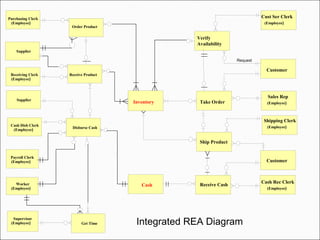
REA is an approach to database design meant to
overcome problems with traditional approaches:
formalized data modeling and design of IS
use of centralized database
use of relational database structure
collects detailed financial and non-financial data
supports accounting and non-accounting analysis
supports multiple user views
supports enterprise-wide planning
Resources, Events, and Agents Model
REA models consists of three
entity types and the associations
linking them.
Resources
Events
Agents
Resources in the REA Model
Resources – the ‘assets’ of the company
things of economic value
objects of economic exchanges able to generate revenue
objects that are scarce and under the control of the
organization
can be tangible or intangible
Does not include some traditional accounting
assets:
artifacts that can be generated from other primary data
for example, accounts receivables
Events in the REA Model
Events are phenomena that effect changes
in resources.
a source of detailed data in the REA approach
to databases
Events fall into two groups:
Economic – increases or decreases resources
Support – control, planning, and other
management activities; but do not directly
affect resources
Agents in the REA Model
Agents can be individuals or departments.
Participate in events
Affect resources
Have discretionary power to use or dispose of
resources
Can be inside or outside the organization
Clerks
Production workers
Customers
Suppliers, vendors
Departments, teams
Economic
Resource
Economic Event
External Economic
Agent
Internal Economic
Agent
Stock Flow
Duality
Participates
Participates
Elemental REA Model
Resources, Events, and Agents Model
Another key feature of the REA
model is economic duality.
Events occur in pairs
Represent the give event and receive
event of an economic exchange
Resource A
Give Economic
Event
External Agent
Internal Agent
Out Flow
Duality
Inflow Receive Economic
Event
External Agent
Internal Agent
Resource B
Participates
Give Activity
Receive Activity
Participates
Participates
Participates
REA Model showing Duality of
a Give and Receive Exchange
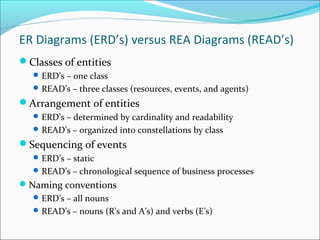
ER Diagrams (ERD’s) versus REA Diagrams (READ’s)
Classes of entities
ERD’s – one class
READ’s – three classes (resources, events, and agents)
Arrangement of entities
ERD’s – determined by cardinality and readability
READ’s – organized into constellations by class
Sequencing of events
ERD’s – static
READ’s – chronological sequence of business processes
Naming conventions
ERD’s – all nouns
READ’s – nouns (R’s and A’s) and verbs (E’s)
View Modeling: Creating an
Individual REA Diagram
View modeling is a multistep process for creating
an individual REA model.
The result is a single view of the entire database.
The four steps involved are:
1. identify the event entities to be modeled
2. identify the resource entities changed by events
3. identify the agent entities participating in events
4. determine associations and cardinalities between
entities
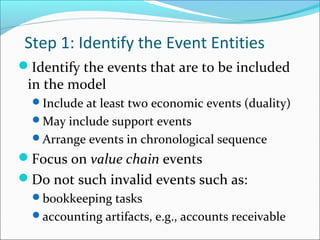
Step 1: Identify the Event Entities
Identify the events that are to be included
in the model
Include at least two economic events (duality)
May include support events
Arrange events in chronological sequence
Focus on value chain events
Do not such invalid events such as:
bookkeeping tasks
accounting artifacts, e.g., accounts receivable
Take Order
Receive Cash
Verify Availability
Ship Product
Arrangement of
Events Entities in
Order of
Occurrence
Order of Events
Events
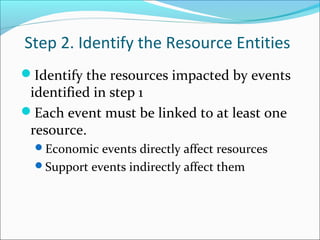
Step 2. Identify the Resource Entities
Identify the resources impacted by events
identified in step 1
Each event must be linked to at least one
resource.
Economic events directly affect resources
Support events indirectly affect them
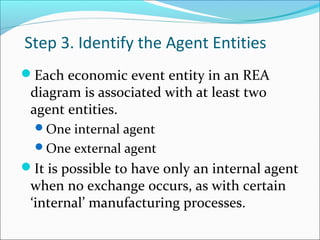
Step 3. Identify the Agent Entities
Each economic event entity in an REA
diagram is associated with at least two
agent entities.
One internal agent
One external agent
It is possible to have only an internal agent
when no exchange occurs, as with certain
‘internal’ manufacturing processes.
Inventory
Take Order
Customer
Sales
Representative
Receive Cash
Cash Receipts
Clerk
Shipping Clerk
Cash
Customer Services
Clerk
Verify Availability
Ship Product
Customer
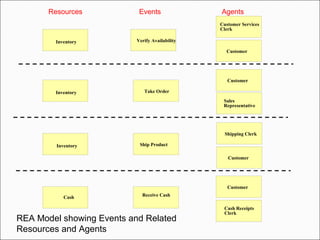
REA Model showing Events and Related
Resources and Agents
Customer
Inventory
Inventory
Customer
Resources Events Agents
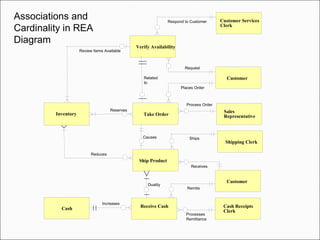
Step 4. Determine Associations and
Cardinalities between Entities
Association – reflects the nature of the relationship between
two entities
Represented by the labeled line connecting the entities
Cardinality – the degree of association between the entities
Describes the number of possible occurrences in one entity that
are associated with a single occurrence in a related entity
Cardinality reflects the business rules that are in play for a
particular organization.
Sometimes the rules are obvious and are the same for all
organizations.
Sometimes the rules differ, e.g., whether inventory items are
tracked individually or as quantity on hand.
Inventory Take Order
Customer
Sales
Representative
Reserves
Respond to Customer
Process Order
Increases
Receive Cash Cash Receipts
Clerk
Shipping Clerk
Cash
Places Order
Related
to
Processes
Remittance
Customer Services
Clerk
Verify Availability
Review Items Available
Request
Ship Product
Causes
Customer
Reduces
Duality
Ships
Remits
Receives
Associations and
Cardinality in REA
Diagram
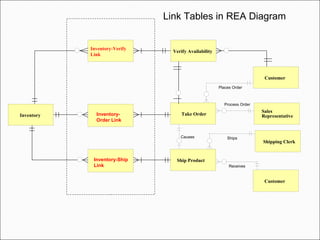
Many-to-Many Associations
Many-to-many (M:M) associations cannot
be directly implemented into relational
databases.
They require the creation of a new linking
table.
This process splits the M:M association into
two 1:M associations.
The linking table requires a ‘composite primary
key’.
Inventory Take Order
Customer
Sales
Representative
Process Order
Shipping Clerk
Places Order
Ship Product
Causes
Customer
Ships
Receives
Inventory-
Order Link
Inventory-Ship
Link
Link Tables in REA Diagram
Verify Availability
Inventory-Verify
Link
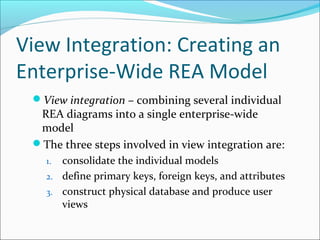
View Integration: Creating an
Enterprise-Wide REA Model
View integration – combining several individual
REA diagrams into a single enterprise-wide
model
The three steps involved in view integration are:
1. consolidate the individual models
2. define primary keys, foreign keys, and attributes
3. construct physical database and produce user
views
Step 1. Consolidate the Individual
Models
Merging multiple REA models requires
first a thorough understanding of the
business processes and entities involved in
the models.
Individual models are consolidated or
linked together based on shared entities.
For example, procurement (expenditures) and sales
(revenue) both use inventory and cash resource
entities.
Inventory Take Order
Customer
Sales Rep
Receive Cash
Cash Rec Clerk
Shipping Clerk
Cash
Cust Ser Clerk
Verify
Availability
Request
Ship Product
Customer
Get Time
Supervisor
Worker
Payroll Clerk
Order Product
Purchasing Clerk
Supplier
Receive Product
Disburse Cash
Cash Disb Clerk
Supplier
Receiving Clerk
Integrated REA Diagram
(Employee)
(Employee)
(Employee)
(Employee)
(Employee)
(Employee)
(Employee) (Employee)
(Employee)
(Employee)
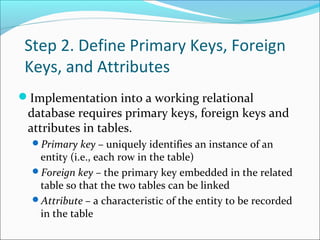
Step 2. Define Primary Keys, Foreign
Keys, and Attributes
Implementation into a working relational
database requires primary keys, foreign keys and
attributes in tables.
Primary key – uniquely identifies an instance of an
entity (i.e., each row in the table)
Foreign key – the primary key embedded in the related
table so that the two tables can be linked
Attribute – a characteristic of the entity to be recorded
in the table
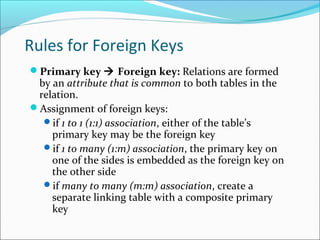
Rules for Foreign Keys
Primary key  Foreign key: Relations are formed
by an attribute that is common to both tables in the
relation.
Assignment of foreign keys:
if 1 to 1 (1:1) association, either of the table’s
primary key may be the foreign key
if 1 to many (1:m) association, the primary key on
one of the sides is embedded as the foreign key on
the other side
if many to many (m:m) association, create a
separate linking table with a composite primary
key
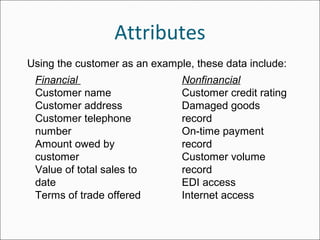
Attributes
Financial
Customer name
Customer address
Customer telephone
number
Amount owed by
customer
Value of total sales to
date
Terms of trade offered
Nonfinancial
Customer credit rating
Damaged goods
record
On-time payment
record
Customer volume
record
EDI access
Internet access
Using the customer as an example, these data include:
Step 3. Construct Physical Database
and Produce User Views
The database designer is now ready to create the physical
relational tables using software.
Once the tables have been constructed, some of them
must be populated with data.
Resource and Agent tables
Event tables must wait for business transactions to occur
before data can be entered.
The resulting database should support the information
needs of all users.
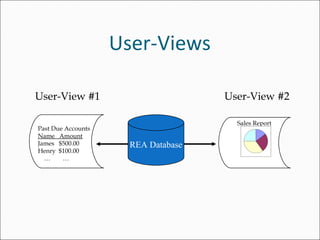
SQL is used to generate reports, computer screens, and
documents for users.
User-Views
User-View #1
Past Due Accounts
Name Amount
James $500.00
Henry $100.00
… …
Sales Report
User-View #2
REA Database
Value Chain Analysis
Competitive advantages from the REA approach
can be see via value chain analysis.
Value chain analysis distinguishes between
primary activities (create value) and support
activities (assist performing primary activities).
REA provides a model for identifying and
differentiating between these activities.
Prioritizing Strategy: Focus on primary activities;
eliminate or outsource support activities.
Revenue
Costs
Firm Infrastructure
Human resource management
Technology development
Procurement
Inbound
Logistics
Operations
Output
Logistics
Marketing
& Sales
Service
SupportActivities
Primary Activities
Margin
Competitive Advantages of the REA
Model
Using REA can lead to more efficient operations.
Helps managers identify non-value added activities
that can be eliminated
Increasing productivity via elimination of non-value
added activities generates excess capacity
Storing both financial and nonfinancial data in the
same central database reduces multiple data
collection, data storage, and maintenance.
Using REA can lead to more efficient operations.
Detailed financial and nonfinancial business data
supports a wider range of management decisions
supporting multiple user views (e.g., different
perspectives on a problem)
Provides managers with more relevant, timely, and
accurate information.
leading to better customer service, higher-quality
products, and flexible production processes
Competitive Advantages of the REA
Model

James hall ch 10

  • 1.
    Accounting Information Systems,6th edition James A. Hall COPYRIGHT © 2009 South-Western, a division of Cengage Learning. Cengage Learning and South-Western are trademarks used herein under license
  • 2.
    Objectives for Chapter10 Economic foundations of the REA model Key differences between traditional ER modeling and REA modeling The structure of an REA diagram Create an REA diagram by applying the view modeling steps to a business case Create an entity-wide REA diagram by applying the view integration steps to a business case
  • 3.
    Traditional Approaches: User-View Orientation Whendata-modeling and IS design is too oriented toward the user’s views, problems arise: multiple information systems duplication of data restricted user-view leads to poor decision- making inability to support change
  • 4.
    REA is anapproach to database design meant to overcome problems with traditional approaches: formalized data modeling and design of IS use of centralized database use of relational database structure collects detailed financial and non-financial data supports accounting and non-accounting analysis supports multiple user views supports enterprise-wide planning Resources, Events, and Agents Model
  • 5.
    Resources, Events, andAgents Model REA models consists of three entity types and the associations linking them. Resources Events Agents
  • 6.
    Resources in theREA Model Resources – the ‘assets’ of the company things of economic value objects of economic exchanges able to generate revenue objects that are scarce and under the control of the organization can be tangible or intangible Does not include some traditional accounting assets: artifacts that can be generated from other primary data for example, accounts receivables
  • 7.
    Events in theREA Model Events are phenomena that effect changes in resources. a source of detailed data in the REA approach to databases Events fall into two groups: Economic – increases or decreases resources Support – control, planning, and other management activities; but do not directly affect resources
  • 8.
    Agents in theREA Model Agents can be individuals or departments. Participate in events Affect resources Have discretionary power to use or dispose of resources Can be inside or outside the organization Clerks Production workers Customers Suppliers, vendors Departments, teams
  • 9.
    Economic Resource Economic Event External Economic Agent InternalEconomic Agent Stock Flow Duality Participates Participates Elemental REA Model
  • 10.
    Resources, Events, andAgents Model Another key feature of the REA model is economic duality. Events occur in pairs Represent the give event and receive event of an economic exchange
  • 11.
    Resource A Give Economic Event ExternalAgent Internal Agent Out Flow Duality Inflow Receive Economic Event External Agent Internal Agent Resource B Participates Give Activity Receive Activity Participates Participates Participates REA Model showing Duality of a Give and Receive Exchange
  • 12.
    ER Diagrams (ERD’s)versus REA Diagrams (READ’s) Classes of entities ERD’s – one class READ’s – three classes (resources, events, and agents) Arrangement of entities ERD’s – determined by cardinality and readability READ’s – organized into constellations by class Sequencing of events ERD’s – static READ’s – chronological sequence of business processes Naming conventions ERD’s – all nouns READ’s – nouns (R’s and A’s) and verbs (E’s)
  • 13.
    View Modeling: Creatingan Individual REA Diagram View modeling is a multistep process for creating an individual REA model. The result is a single view of the entire database. The four steps involved are: 1. identify the event entities to be modeled 2. identify the resource entities changed by events 3. identify the agent entities participating in events 4. determine associations and cardinalities between entities
  • 14.
    Step 1: Identifythe Event Entities Identify the events that are to be included in the model Include at least two economic events (duality) May include support events Arrange events in chronological sequence Focus on value chain events Do not such invalid events such as: bookkeeping tasks accounting artifacts, e.g., accounts receivable
  • 15.
    Take Order Receive Cash VerifyAvailability Ship Product Arrangement of Events Entities in Order of Occurrence Order of Events Events
  • 16.
    Step 2. Identifythe Resource Entities Identify the resources impacted by events identified in step 1 Each event must be linked to at least one resource. Economic events directly affect resources Support events indirectly affect them
  • 17.
    Step 3. Identifythe Agent Entities Each economic event entity in an REA diagram is associated with at least two agent entities. One internal agent One external agent It is possible to have only an internal agent when no exchange occurs, as with certain ‘internal’ manufacturing processes.
  • 18.
    Inventory Take Order Customer Sales Representative Receive Cash CashReceipts Clerk Shipping Clerk Cash Customer Services Clerk Verify Availability Ship Product Customer REA Model showing Events and Related Resources and Agents Customer Inventory Inventory Customer Resources Events Agents
  • 19.
    Step 4. DetermineAssociations and Cardinalities between Entities Association – reflects the nature of the relationship between two entities Represented by the labeled line connecting the entities Cardinality – the degree of association between the entities Describes the number of possible occurrences in one entity that are associated with a single occurrence in a related entity Cardinality reflects the business rules that are in play for a particular organization. Sometimes the rules are obvious and are the same for all organizations. Sometimes the rules differ, e.g., whether inventory items are tracked individually or as quantity on hand.
  • 20.
    Inventory Take Order Customer Sales Representative Reserves Respondto Customer Process Order Increases Receive Cash Cash Receipts Clerk Shipping Clerk Cash Places Order Related to Processes Remittance Customer Services Clerk Verify Availability Review Items Available Request Ship Product Causes Customer Reduces Duality Ships Remits Receives Associations and Cardinality in REA Diagram
  • 21.
    Many-to-Many Associations Many-to-many (M:M)associations cannot be directly implemented into relational databases. They require the creation of a new linking table. This process splits the M:M association into two 1:M associations. The linking table requires a ‘composite primary key’.
  • 22.
    Inventory Take Order Customer Sales Representative ProcessOrder Shipping Clerk Places Order Ship Product Causes Customer Ships Receives Inventory- Order Link Inventory-Ship Link Link Tables in REA Diagram Verify Availability Inventory-Verify Link
  • 23.
    View Integration: Creatingan Enterprise-Wide REA Model View integration – combining several individual REA diagrams into a single enterprise-wide model The three steps involved in view integration are: 1. consolidate the individual models 2. define primary keys, foreign keys, and attributes 3. construct physical database and produce user views
  • 24.
    Step 1. Consolidatethe Individual Models Merging multiple REA models requires first a thorough understanding of the business processes and entities involved in the models. Individual models are consolidated or linked together based on shared entities. For example, procurement (expenditures) and sales (revenue) both use inventory and cash resource entities.
  • 25.
    Inventory Take Order Customer SalesRep Receive Cash Cash Rec Clerk Shipping Clerk Cash Cust Ser Clerk Verify Availability Request Ship Product Customer Get Time Supervisor Worker Payroll Clerk Order Product Purchasing Clerk Supplier Receive Product Disburse Cash Cash Disb Clerk Supplier Receiving Clerk Integrated REA Diagram (Employee) (Employee) (Employee) (Employee) (Employee) (Employee) (Employee) (Employee) (Employee) (Employee)
  • 26.
    Step 2. DefinePrimary Keys, Foreign Keys, and Attributes Implementation into a working relational database requires primary keys, foreign keys and attributes in tables. Primary key – uniquely identifies an instance of an entity (i.e., each row in the table) Foreign key – the primary key embedded in the related table so that the two tables can be linked Attribute – a characteristic of the entity to be recorded in the table
  • 27.
    Rules for ForeignKeys Primary key  Foreign key: Relations are formed by an attribute that is common to both tables in the relation. Assignment of foreign keys: if 1 to 1 (1:1) association, either of the table’s primary key may be the foreign key if 1 to many (1:m) association, the primary key on one of the sides is embedded as the foreign key on the other side if many to many (m:m) association, create a separate linking table with a composite primary key
  • 28.
    Attributes Financial Customer name Customer address Customertelephone number Amount owed by customer Value of total sales to date Terms of trade offered Nonfinancial Customer credit rating Damaged goods record On-time payment record Customer volume record EDI access Internet access Using the customer as an example, these data include:
  • 29.
    Step 3. ConstructPhysical Database and Produce User Views The database designer is now ready to create the physical relational tables using software. Once the tables have been constructed, some of them must be populated with data. Resource and Agent tables Event tables must wait for business transactions to occur before data can be entered. The resulting database should support the information needs of all users. SQL is used to generate reports, computer screens, and documents for users.
  • 30.
    User-Views User-View #1 Past DueAccounts Name Amount James $500.00 Henry $100.00 … … Sales Report User-View #2 REA Database
  • 31.
    Value Chain Analysis Competitiveadvantages from the REA approach can be see via value chain analysis. Value chain analysis distinguishes between primary activities (create value) and support activities (assist performing primary activities). REA provides a model for identifying and differentiating between these activities. Prioritizing Strategy: Focus on primary activities; eliminate or outsource support activities.
  • 32.
    Revenue Costs Firm Infrastructure Human resourcemanagement Technology development Procurement Inbound Logistics Operations Output Logistics Marketing & Sales Service SupportActivities Primary Activities Margin
  • 33.
    Competitive Advantages ofthe REA Model Using REA can lead to more efficient operations. Helps managers identify non-value added activities that can be eliminated Increasing productivity via elimination of non-value added activities generates excess capacity Storing both financial and nonfinancial data in the same central database reduces multiple data collection, data storage, and maintenance.
  • 34.
    Using REA canlead to more efficient operations. Detailed financial and nonfinancial business data supports a wider range of management decisions supporting multiple user views (e.g., different perspectives on a problem) Provides managers with more relevant, timely, and accurate information. leading to better customer service, higher-quality products, and flexible production processes Competitive Advantages of the REA Model