ALL ABOUT
POSTS AND
                 SECRETS OF A
PAGES              CONTENT
                 MANAGEMENT
                   WEBSITE


  Judi Knight New Tricks
HI!
I’M JUDI
I DESIGN WEBSITES
WordPress Web Design
            &
Social Media Marketing


   “It’s never too late!”
I HATED MY OLD STATIC SITE
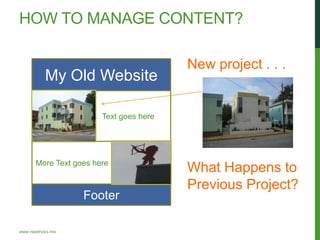
HOW TO MANAGE CONTENT?

                                         New project . . .
           My Old Website

                        Text goes here


       More Text goes here
                                         What Happens to
                                         Previous Project?
                   Footer

www.newtricks.me
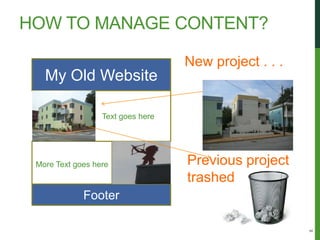
HOW TO MANAGE CONTENT?

                                   New project . . .
   My Old Website

                  Text goes here


 More Text goes here               Previous project
                                   trashed
             Footer


                                                       8
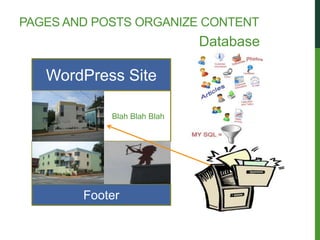
PAGES AND POSTS ORGANIZE CONTENT
                                         Database

    WordPress Site

                        Blah Blah Blah


  More Text goes here


              Footer
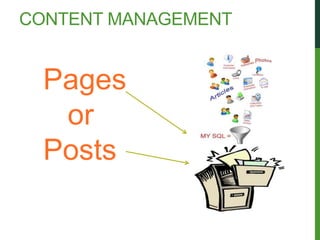
CONTENT MANAGEMENT


  Pages
   or
  Posts
PAGES VS POSTS

   • Pages: Static Content
      About, Contact, Services

   • Posts: Content that gets new
     entries or regularly updated and
     that can be Categorized


                                        11
www.newtricks.me
PAGES

 • Pages are for static information. An About
   page is a classic example of a static page.

 • Pages are not listed by date.

 • Pages do not use tags or categories.

 • Pages can be hierarchical.
 The URL for a page looks like this: http://blogname /page-title/
POSTS
• Posts can be assigned to categories.
• Use Posts when you will have multiples of a type of
  entry.
• Posts appear on the site in reverse chronological
  order.
• Posts can be on the home page in a blog-style site.
• The blog page may be on another page on the site.
• You can make a sticky posts, those will appear before
  the other posts.
• Posts can be found in the Category Archives.
• Posts are also displayed in the RSS feed of the blog.
• You can control how many posts are displayed on a
  page of posts.

The URL for a post is published like this: http://blogname.com/post-title/
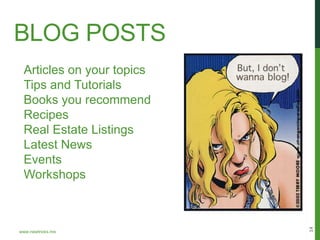
BLOG POSTS
 Articles on your topics
 Tips and Tutorials
 Books you recommend
 Recipes
 Real Estate Listings
 Latest News
 Events
 Workshops


                           14
www.newtricks.me
CUSTOM POST TYPES
When you have types of entries with
specific data fields to be collected and
displayed consistently across posts you may
need Custom Post Types.


         Example: http://smallhouseguide.com


                                               15
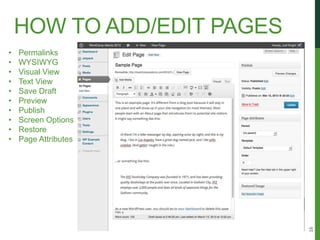
HOW TO ADD/EDIT PAGES
•   Permalinks
•   WYSIWYG
•   Visual View
•   Text View
•   Save Draft
•   Preview
•   Publish
•   Screen Options
•   Restore
•   Page Attributes


                            16
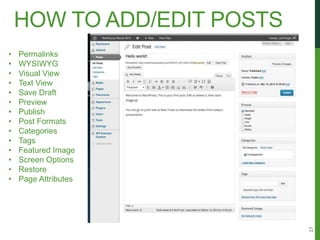
HOW TO ADD/EDIT POSTS
•   Permalinks
•   WYSIWYG
•   Visual View
•   Text View
•   Save Draft
•   Preview
•   Publish
•   Post Formats
•   Categories
•   Tags
•   Featured Image
•   Screen Options
•   Restore
•   Page Attributes


                            17

All about WordPress Posts and Pages WordCamp 2013

  • 1.
    ALL ABOUT POSTS AND SECRETS OF A PAGES CONTENT MANAGEMENT WEBSITE Judi Knight New Tricks
  • 2.
  • 3.
  • 4.
    I DESIGN WEBSITES WordPressWeb Design & Social Media Marketing “It’s never too late!”
  • 6.
    I HATED MYOLD STATIC SITE
  • 7.
    HOW TO MANAGECONTENT? New project . . . My Old Website Text goes here More Text goes here What Happens to Previous Project? Footer www.newtricks.me
  • 8.
    HOW TO MANAGECONTENT? New project . . . My Old Website Text goes here More Text goes here Previous project trashed Footer 8
  • 9.
    PAGES AND POSTSORGANIZE CONTENT Database WordPress Site Blah Blah Blah More Text goes here Footer
  • 10.
    CONTENT MANAGEMENT Pages or Posts
  • 11.
    PAGES VS POSTS • Pages: Static Content About, Contact, Services • Posts: Content that gets new entries or regularly updated and that can be Categorized 11 www.newtricks.me
  • 12.
    PAGES • Pagesare for static information. An About page is a classic example of a static page. • Pages are not listed by date. • Pages do not use tags or categories. • Pages can be hierarchical. The URL for a page looks like this: http://blogname /page-title/
  • 13.
    POSTS • Posts canbe assigned to categories. • Use Posts when you will have multiples of a type of entry. • Posts appear on the site in reverse chronological order. • Posts can be on the home page in a blog-style site. • The blog page may be on another page on the site. • You can make a sticky posts, those will appear before the other posts. • Posts can be found in the Category Archives. • Posts are also displayed in the RSS feed of the blog. • You can control how many posts are displayed on a page of posts. The URL for a post is published like this: http://blogname.com/post-title/
  • 14.
    BLOG POSTS Articleson your topics Tips and Tutorials Books you recommend Recipes Real Estate Listings Latest News Events Workshops 14 www.newtricks.me
  • 15.
    CUSTOM POST TYPES Whenyou have types of entries with specific data fields to be collected and displayed consistently across posts you may need Custom Post Types. Example: http://smallhouseguide.com 15
  • 16.
    HOW TO ADD/EDITPAGES • Permalinks • WYSIWYG • Visual View • Text View • Save Draft • Preview • Publish • Screen Options • Restore • Page Attributes 16
  • 17.
    HOW TO ADD/EDITPOSTS • Permalinks • WYSIWYG • Visual View • Text View • Save Draft • Preview • Publish • Post Formats • Categories • Tags • Featured Image • Screen Options • Restore • Page Attributes 17