


Drupal: A Glimpse
at Northeastern
University Libraries
Website
Who is iFactory?
• Based in Boston
• Interactive design and development company with over 20
  years experience
• Division of RDW Group, full-service communications agency
• Designers, strategic consultants, information architects,
  usability experts, developers
• Higher ed profiles include:
  colleges & universities | public & private | large & small
  undergraduate & graduate
  ivy league to community colleges | across the country
Where to find us
www.ifactory.com

blog: interactivity.ifactory.com

Find us as iFactoryBoston:
What you’ll learn today:
• Configuring some aspects of the Drupal admin to
  enable a wide variety of users to create content
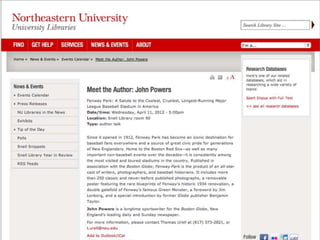
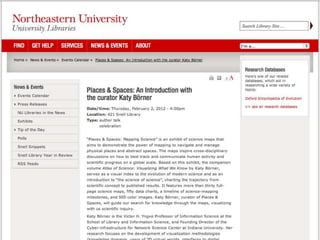
• Customizing display of complex content
  types, including using javascript blinds to show/hide
  information
• Setting up a variety of views for different ways to
  list, filter and sort content
• Tagging to enable highlighting content which otherwise
  does not get enough attention
• Using the Field Permissions module to deliver fine-
  grained customization of content delivery
Your presenter
           Lisa Sawin
           Solutions Architect for iFactory

Lisa has 10 years experience in software and web application
design. As a Solutions Architect for iFactory, Lisa's role is to be the
technical voice on projects, from the initial client meetings through
planning, construction and delivery of the final site. She is
experienced in developing Drupal and WordPress sites for a wide
variety of clients in various verticals, from libraries to higher ed to
small businesses.
Higher Ed Websites
• Often have a variety of content creators
• Content is often added without being screened
• Content can be very complex
• Users may need a variety ways to access this
  complex information
• Site may have a lot of information users don’t
  even know they would be interested in
• Different users may need different views of the
  same content
Higher Ed Websites
• Often have a variety of content creators
• Content is often added without being screened
• Content can be very complex
• Users may need a variety ways to access this
  complex information
• Site may have a lot of information users don’t
  even know they would be interested in
• Different users may need different views of the
  same content
Higher Ed Websites
• Often have a variety of content creators
• Content is often added without being screened
• Content can be very complex
• Users may need a variety ways to access this
  complex information
• Site may have a lot of information users don’t
  even know they would be interested in
• Different users may need different views of the
  same content
Higher Ed Websites
• Often have a variety of content creators
• Content is often added without being screened
• Content can be very complex
• Users may need a variety ways to access this
  complex information
• Site may have a lot of information users don’t
  even know they would be interested in
• Different users may need different views of the
  same content
Higher Ed Websites
• Often have a variety of content creators
• Content is often added without being screened
• Content can be very complex
• Users may need a variety ways to access this
  complex information
• Site may have a lot of information users don’t
  even know they would be interested in
• Different users may need different views of the
  same content
Higher Ed Websites
• Often have a variety of content creators
• Content is often added without being screened
• Content can be very complex
• Users may need a variety ways to access this
  complex information
• Site may have a lot of information users don’t
  even know they would be interested in
• Different users may need different views of the
  same content
Higher Ed Websites
• Often have a variety of content creators
• Content is often added without being screened
• Content can be very complex
• Users may need a variety ways to access this
  complex information
• Site may have a lot of information users don’t
  even know they would be interested in
• Different users may need different views of the
  same content
Drupal Strengths &
Weaknesses
•   Admin users have a lot of power
•   Admin user interface can be overwhelming
•   Many contributed modules available to help
•   Extensible by custom modules, too
Drupal Strengths &
Weaknesses
•   Admin users have a lot of power
•   Admin user interface can be overwhelming
•   Many contributed modules available to help
•   Extensible by custom modules, too
Drupal Strengths &
Weaknesses
•   Admin users have a lot of power
•   Admin user interface can be overwhelming
•   Many contributed modules available to help
•   Extensible by custom modules, too
Drupal Strengths &
Weaknesses
•   Admin users have a lot of power
•   Admin user interface can be overwhelming
•   Many contributed modules available to help
•   Extensible by custom modules, too
Drupal Strengths &
Weaknesses
•   Admin users have a lot of power
•   Admin user interface can be overwhelming
•   Many contributed modules available to help
•   Extensible by custom modules, too
Customizing Admin
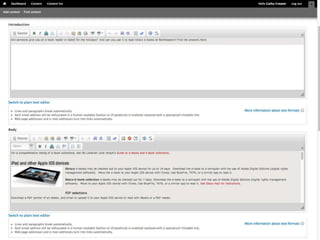
Features layouts increase freedom
• Constrained page
  while maintaining unified look & feel
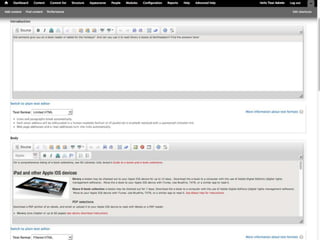
• Only give content creators the tools you’d like
  them to use
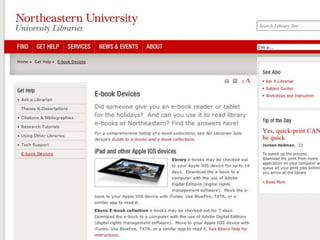
• Image styles constrain images to fit layout
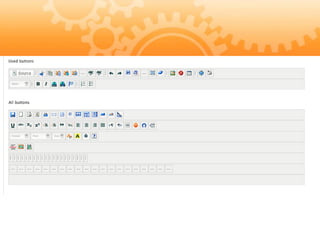
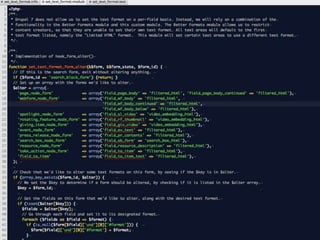
• Use combination of contrib and custom
  modules to constrain WYSIWYG tools
Customizing Admin
Features layouts increase freedom
• Constrained page
  while maintaining unified look & feel
• Only give content creators the tools you’d like
  them to use
• Image styles constrain images to fit layout
• Use combination of contrib and custom
  modules to constrain WYSIWYG tools
Customizing Admin
Features layouts increase freedom
• Constrained page
  while maintaining unified look & feel
• Only give content creators the tools you’d like
  them to use
• Image styles constrain images to fit layout
• Use combination of contrib and custom
  modules to constrain WYSIWYG tools
Customizing Admin
Features layouts increase freedom
• Constrained page
  while maintaining unified look & feel
• Only give content creators the tools you’d like
  them to use
• Image styles constrain images to fit layout
• Use combination of contrib and custom
  modules to constrain WYSIWYG tools
Customizing Admin
Features layouts increase freedom
• Constrained page
  while maintaining unified look & feel
• Only give content creators the tools you’d like
  them to use
• Image styles constrain images to fit layout
• Use combination of contrib and custom
  modules to constrain WYSIWYG tools
Contrib + custom = just right
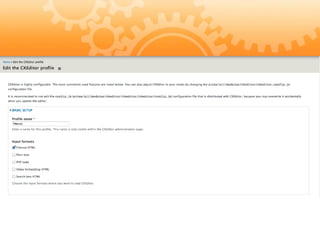
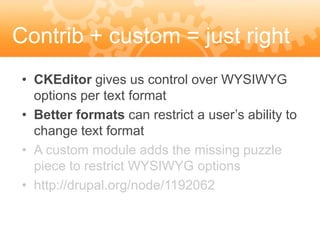
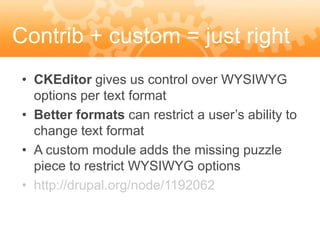
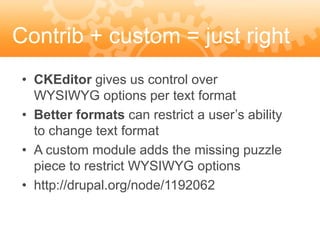
 • CKEditor gives us control over WYSIWYG
   options per text format
 • Better formats can restrict a user’s ability to
   change text format
 • A custom module adds the missing puzzle
   piece to restrict WYSIWYG options
 • http://drupal.org/node/1192062
Contrib + custom = just right
 • CKEditor gives us control over WYSIWYG
   options per text format
 • Better formats can restrict a user’s ability to
   change text format
 • A custom module adds the missing puzzle
   piece to restrict WYSIWYG options
 • http://drupal.org/node/1192062
Contrib + custom = just right
 • CKEditor gives us control over WYSIWYG
   options per text format
 • Better formats can restrict a user’s ability to
   change text format
 • A custom module adds the missing puzzle
   piece to restrict WYSIWYG options
 • http://drupal.org/node/1192062
Contrib + custom = just right
 • CKEditor gives us control over WYSIWYG
   options per text format
 • Better formats can restrict a user’s ability to
   change text format
 • A custom module adds the missing puzzle
   piece to restrict WYSIWYG options
 • http://drupal.org/node/1192062
Contrib + custom = just right
 • CKEditor gives us control over
   WYSIWYG options per text format
 • Better formats can restrict a user’s ability
   to change text format
 • A custom module adds the missing puzzle
   piece to restrict WYSIWYG options
 • http://drupal.org/node/1192062
Mitigate risk, increase
freedom
• Remove the option to “break” the site
• Encourage content creators by giving them an
  easy-to-use interface
Mitigate risk, increase
freedom
• Remove the option to “break” the site
• Encourage content creators by giving them an
  easy-to-use interface
Mitigate risk, increase
freedom
• Remove the option to “break” the site
• Encourage content creators by giving them an
  easy-to-use interface
Complex content
• Databases, services, software, courses, etc
• Lots of associated information
• Users may be confused about what these
  content types really are
Complex content
• Databases, services, software, courses, etc
• Lots of associated information
• Users may be confused about what these
  content types really are
Complex content
• Databases, services, software, courses, etc
• Lots of associated information
• Users may be confused about what these
  content types really are
Complex content
• Databases, services, software, courses, etc
• Lots of associated information
• Users may be confused about what these
  content types really are
Thoughtful presentation
is key
• Consistent, structured layout
• Understandable terms
• Expected interactions: a link should do what
  the users expect it to do
• Graphic design: use of color, font, spacing
Thoughtful presentation
is key
• Consistent, structured layout
• Understandable terms
• Expected interactions: a link should do what
  the users expect it to do
• Graphic design: use of color, font, spacing
Thoughtful presentation
is key
• Consistent, structured layout
• Understandable terms
• Expected interactions: a link should do what
  the users expect it to do
• Graphic design: use of color, font, spacing
Thoughtful presentation
is key
• Consistent, structured layout
• Understandable terms
• Expected interactions: a link should do what
  the users expect it to do
• Graphic design: use of color, font, spacing
Thoughtful presentation
is key
• Consistent, structured layout
• Understandable terms
• Expected interactions: a link should do what
  the users expect it to do
• Graphic design: use of color, font, spacing
Creatively remove
excess info
• Blinds to hide some of the content
• Icons
• Link intuitively
Creatively remove
excess info
• Blinds to hide some of the content
• Icons
• Link intuitively
Creatively remove
excess info
• Blinds to hide some of the content
• Icons
• Link intuitively
Creatively remove
excess info
• Blinds to hide some of the content
• Icons
• Link intuitively
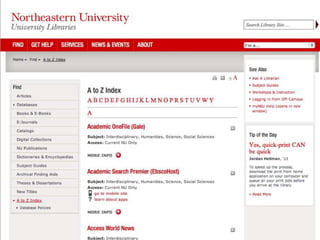
Use a variety of list
styles
• A-Z index
• Exposed filters
• Break down into menu items
Use a variety of list
styles
• A-Z index
• Exposed filters
• Break down into menu items
Use a variety of list
styles
• A-Z index
• Exposed filters
• Break down into menu items
Use a variety of list
styles
• A-Z index
• Exposed filters
• Break down into menu items
Related content blocks
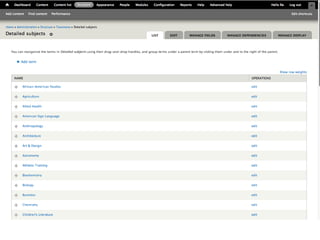
• Sitewide vocabulary to connect content
• Blocks to display on single node pages
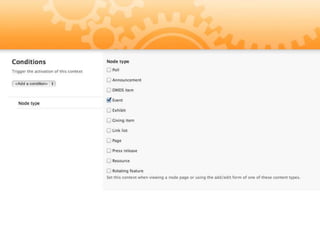
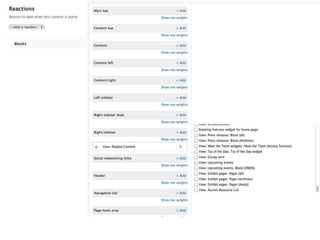
• Context to place blocks
Related content blocks
• Sitewide vocabulary to connect content
• Blocks to display on single node pages
• Context to place blocks
Related content blocks
• Sitewide vocabulary to connect content
• Blocks to display on single node pages
• Context to place blocks
Related content blocks
• Sitewide vocabulary to connect content
• Blocks to display on single node pages
• Context to place blocks
Altering site content for
users
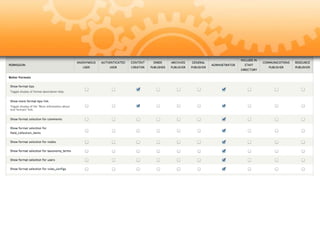
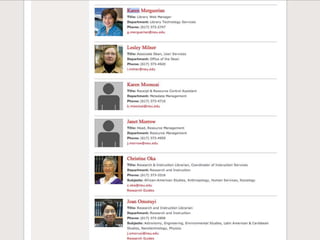
• Field Permissions for displaying individual
  fields for specific roles
• Context module handles display of blocks
  on a per-role or per-section basis
• Custom context conditions for block
  presentation based on page views
Altering site content for
users
• Field Permissions for displaying individual
  fields for specific roles
• Context module handles display of blocks
  on a per-role or per-section basis
• Custom context conditions for block
  presentation based on page views
Altering site content for
users
• Field Permissions for displaying individual
  fields for specific roles
• Context module handles display of blocks
  on a per-role or per-section basis
• Custom context conditions for block
  presentation based on page views
Altering site content for
users
• Field Permissions for displaying individual
  fields for specific roles
• Context module handles display of blocks
  on a per-role or per-section basis
• Custom context conditions for block
  presentation based on page views
Higher Ed Websites
• Use the power of Drupal to help your content
  creators feel empowered to keep content up-to-date
• Present complex content thoughtfully to make it
  easier to for users to understand and find what they
  need
• Target information to users, so they only see what
  they need
• Harness serendipitous discovery to show content to
  user who may not even know they were interested
Higher Ed Websites
• Use the power of Drupal to help your content
  creators feel empowered to keep content up-to-date
• Present complex content thoughtfully to make it
  easier to for users to understand and find what they
  need
• Target information to users, so they only see what
  they need
• Harness serendipitous discovery to show content to
  user who may not even know they were interested
Higher Ed Websites
• Use the power of Drupal to help your content
  creators feel empowered to keep content up-to-date
• Present complex content thoughtfully to make it
  easier to for users to understand and find what they
  need
• Target information to users, so they only see what
  they need
• Harness serendipitous discovery to show content to
  user who may not even know they were interested
Higher Ed Websites
• Use the power of Drupal to help your content
  creators feel empowered to keep content up-to-date
• Present complex content thoughtfully to make it
  easier to for users to understand and find what they
  need
• Target information to users, so they only see what
  they need
• Harness serendipitous discovery to show content to
  user who may not even know they were interested
Higher Ed Websites
• Use the power of Drupal to help your content
  creators feel empowered to keep content up-to-date
• Present complex content thoughtfully to make it
  easier to for users to understand and find what they
  need
• Target information to users, so they only see what
  they need
• Harness serendipitous discovery to show content to
  user who may not even know they were interested
www.ifactory.com
   interactivity.ifactory.com
   info@ifactory.com
   617.426.8600

Find us as iFactoryBoston:

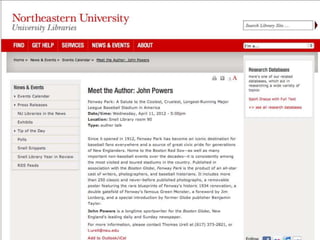
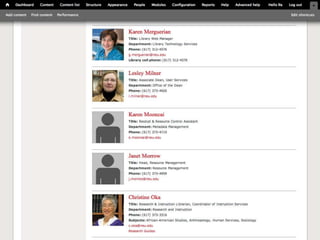
Drupal: Northeastern University Libraries website

  • 1.
    Drupal: A Glimpse atNortheastern University Libraries Website
  • 2.
    Who is iFactory? •Based in Boston • Interactive design and development company with over 20 years experience • Division of RDW Group, full-service communications agency • Designers, strategic consultants, information architects, usability experts, developers • Higher ed profiles include: colleges & universities | public & private | large & small undergraduate & graduate ivy league to community colleges | across the country
  • 3.
    Where to findus www.ifactory.com blog: interactivity.ifactory.com Find us as iFactoryBoston:
  • 4.
    What you’ll learntoday: • Configuring some aspects of the Drupal admin to enable a wide variety of users to create content • Customizing display of complex content types, including using javascript blinds to show/hide information • Setting up a variety of views for different ways to list, filter and sort content • Tagging to enable highlighting content which otherwise does not get enough attention • Using the Field Permissions module to deliver fine- grained customization of content delivery
  • 5.
    Your presenter Lisa Sawin Solutions Architect for iFactory Lisa has 10 years experience in software and web application design. As a Solutions Architect for iFactory, Lisa's role is to be the technical voice on projects, from the initial client meetings through planning, construction and delivery of the final site. She is experienced in developing Drupal and WordPress sites for a wide variety of clients in various verticals, from libraries to higher ed to small businesses.
  • 6.
    Higher Ed Websites •Often have a variety of content creators • Content is often added without being screened • Content can be very complex • Users may need a variety ways to access this complex information • Site may have a lot of information users don’t even know they would be interested in • Different users may need different views of the same content
  • 7.
    Higher Ed Websites •Often have a variety of content creators • Content is often added without being screened • Content can be very complex • Users may need a variety ways to access this complex information • Site may have a lot of information users don’t even know they would be interested in • Different users may need different views of the same content
  • 8.
    Higher Ed Websites •Often have a variety of content creators • Content is often added without being screened • Content can be very complex • Users may need a variety ways to access this complex information • Site may have a lot of information users don’t even know they would be interested in • Different users may need different views of the same content
  • 9.
    Higher Ed Websites •Often have a variety of content creators • Content is often added without being screened • Content can be very complex • Users may need a variety ways to access this complex information • Site may have a lot of information users don’t even know they would be interested in • Different users may need different views of the same content
  • 10.
    Higher Ed Websites •Often have a variety of content creators • Content is often added without being screened • Content can be very complex • Users may need a variety ways to access this complex information • Site may have a lot of information users don’t even know they would be interested in • Different users may need different views of the same content
  • 11.
    Higher Ed Websites •Often have a variety of content creators • Content is often added without being screened • Content can be very complex • Users may need a variety ways to access this complex information • Site may have a lot of information users don’t even know they would be interested in • Different users may need different views of the same content
  • 12.
    Higher Ed Websites •Often have a variety of content creators • Content is often added without being screened • Content can be very complex • Users may need a variety ways to access this complex information • Site may have a lot of information users don’t even know they would be interested in • Different users may need different views of the same content
  • 13.
    Drupal Strengths & Weaknesses • Admin users have a lot of power • Admin user interface can be overwhelming • Many contributed modules available to help • Extensible by custom modules, too
  • 14.
    Drupal Strengths & Weaknesses • Admin users have a lot of power • Admin user interface can be overwhelming • Many contributed modules available to help • Extensible by custom modules, too
  • 15.
    Drupal Strengths & Weaknesses • Admin users have a lot of power • Admin user interface can be overwhelming • Many contributed modules available to help • Extensible by custom modules, too
  • 16.
    Drupal Strengths & Weaknesses • Admin users have a lot of power • Admin user interface can be overwhelming • Many contributed modules available to help • Extensible by custom modules, too
  • 17.
    Drupal Strengths & Weaknesses • Admin users have a lot of power • Admin user interface can be overwhelming • Many contributed modules available to help • Extensible by custom modules, too
  • 18.
    Customizing Admin Features layoutsincrease freedom • Constrained page while maintaining unified look & feel • Only give content creators the tools you’d like them to use • Image styles constrain images to fit layout • Use combination of contrib and custom modules to constrain WYSIWYG tools
  • 19.
    Customizing Admin Features layoutsincrease freedom • Constrained page while maintaining unified look & feel • Only give content creators the tools you’d like them to use • Image styles constrain images to fit layout • Use combination of contrib and custom modules to constrain WYSIWYG tools
  • 21.
    Customizing Admin Features layoutsincrease freedom • Constrained page while maintaining unified look & feel • Only give content creators the tools you’d like them to use • Image styles constrain images to fit layout • Use combination of contrib and custom modules to constrain WYSIWYG tools
  • 22.
    Customizing Admin Features layoutsincrease freedom • Constrained page while maintaining unified look & feel • Only give content creators the tools you’d like them to use • Image styles constrain images to fit layout • Use combination of contrib and custom modules to constrain WYSIWYG tools
  • 23.
    Customizing Admin Features layoutsincrease freedom • Constrained page while maintaining unified look & feel • Only give content creators the tools you’d like them to use • Image styles constrain images to fit layout • Use combination of contrib and custom modules to constrain WYSIWYG tools
  • 27.
    Contrib + custom= just right • CKEditor gives us control over WYSIWYG options per text format • Better formats can restrict a user’s ability to change text format • A custom module adds the missing puzzle piece to restrict WYSIWYG options • http://drupal.org/node/1192062
  • 28.
    Contrib + custom= just right • CKEditor gives us control over WYSIWYG options per text format • Better formats can restrict a user’s ability to change text format • A custom module adds the missing puzzle piece to restrict WYSIWYG options • http://drupal.org/node/1192062
  • 31.
    Contrib + custom= just right • CKEditor gives us control over WYSIWYG options per text format • Better formats can restrict a user’s ability to change text format • A custom module adds the missing puzzle piece to restrict WYSIWYG options • http://drupal.org/node/1192062
  • 33.
    Contrib + custom= just right • CKEditor gives us control over WYSIWYG options per text format • Better formats can restrict a user’s ability to change text format • A custom module adds the missing puzzle piece to restrict WYSIWYG options • http://drupal.org/node/1192062
  • 35.
    Contrib + custom= just right • CKEditor gives us control over WYSIWYG options per text format • Better formats can restrict a user’s ability to change text format • A custom module adds the missing puzzle piece to restrict WYSIWYG options • http://drupal.org/node/1192062
  • 36.
    Mitigate risk, increase freedom •Remove the option to “break” the site • Encourage content creators by giving them an easy-to-use interface
  • 37.
    Mitigate risk, increase freedom •Remove the option to “break” the site • Encourage content creators by giving them an easy-to-use interface
  • 38.
    Mitigate risk, increase freedom •Remove the option to “break” the site • Encourage content creators by giving them an easy-to-use interface
  • 39.
    Complex content • Databases,services, software, courses, etc • Lots of associated information • Users may be confused about what these content types really are
  • 40.
    Complex content • Databases,services, software, courses, etc • Lots of associated information • Users may be confused about what these content types really are
  • 41.
    Complex content • Databases,services, software, courses, etc • Lots of associated information • Users may be confused about what these content types really are
  • 42.
    Complex content • Databases,services, software, courses, etc • Lots of associated information • Users may be confused about what these content types really are
  • 43.
    Thoughtful presentation is key •Consistent, structured layout • Understandable terms • Expected interactions: a link should do what the users expect it to do • Graphic design: use of color, font, spacing
  • 44.
    Thoughtful presentation is key •Consistent, structured layout • Understandable terms • Expected interactions: a link should do what the users expect it to do • Graphic design: use of color, font, spacing
  • 45.
    Thoughtful presentation is key •Consistent, structured layout • Understandable terms • Expected interactions: a link should do what the users expect it to do • Graphic design: use of color, font, spacing
  • 46.
    Thoughtful presentation is key •Consistent, structured layout • Understandable terms • Expected interactions: a link should do what the users expect it to do • Graphic design: use of color, font, spacing
  • 47.
    Thoughtful presentation is key •Consistent, structured layout • Understandable terms • Expected interactions: a link should do what the users expect it to do • Graphic design: use of color, font, spacing
  • 49.
    Creatively remove excess info •Blinds to hide some of the content • Icons • Link intuitively
  • 50.
    Creatively remove excess info •Blinds to hide some of the content • Icons • Link intuitively
  • 51.
    Creatively remove excess info •Blinds to hide some of the content • Icons • Link intuitively
  • 52.
    Creatively remove excess info •Blinds to hide some of the content • Icons • Link intuitively
  • 53.
    Use a varietyof list styles • A-Z index • Exposed filters • Break down into menu items
  • 54.
    Use a varietyof list styles • A-Z index • Exposed filters • Break down into menu items
  • 55.
    Use a varietyof list styles • A-Z index • Exposed filters • Break down into menu items
  • 56.
    Use a varietyof list styles • A-Z index • Exposed filters • Break down into menu items
  • 57.
    Related content blocks •Sitewide vocabulary to connect content • Blocks to display on single node pages • Context to place blocks
  • 60.
    Related content blocks •Sitewide vocabulary to connect content • Blocks to display on single node pages • Context to place blocks
  • 62.
    Related content blocks •Sitewide vocabulary to connect content • Blocks to display on single node pages • Context to place blocks
  • 63.
    Related content blocks •Sitewide vocabulary to connect content • Blocks to display on single node pages • Context to place blocks
  • 67.
    Altering site contentfor users • Field Permissions for displaying individual fields for specific roles • Context module handles display of blocks on a per-role or per-section basis • Custom context conditions for block presentation based on page views
  • 68.
    Altering site contentfor users • Field Permissions for displaying individual fields for specific roles • Context module handles display of blocks on a per-role or per-section basis • Custom context conditions for block presentation based on page views
  • 71.
    Altering site contentfor users • Field Permissions for displaying individual fields for specific roles • Context module handles display of blocks on a per-role or per-section basis • Custom context conditions for block presentation based on page views
  • 72.
    Altering site contentfor users • Field Permissions for displaying individual fields for specific roles • Context module handles display of blocks on a per-role or per-section basis • Custom context conditions for block presentation based on page views
  • 73.
    Higher Ed Websites •Use the power of Drupal to help your content creators feel empowered to keep content up-to-date • Present complex content thoughtfully to make it easier to for users to understand and find what they need • Target information to users, so they only see what they need • Harness serendipitous discovery to show content to user who may not even know they were interested
  • 74.
    Higher Ed Websites •Use the power of Drupal to help your content creators feel empowered to keep content up-to-date • Present complex content thoughtfully to make it easier to for users to understand and find what they need • Target information to users, so they only see what they need • Harness serendipitous discovery to show content to user who may not even know they were interested
  • 75.
    Higher Ed Websites •Use the power of Drupal to help your content creators feel empowered to keep content up-to-date • Present complex content thoughtfully to make it easier to for users to understand and find what they need • Target information to users, so they only see what they need • Harness serendipitous discovery to show content to user who may not even know they were interested
  • 76.
    Higher Ed Websites •Use the power of Drupal to help your content creators feel empowered to keep content up-to-date • Present complex content thoughtfully to make it easier to for users to understand and find what they need • Target information to users, so they only see what they need • Harness serendipitous discovery to show content to user who may not even know they were interested
  • 77.
    Higher Ed Websites •Use the power of Drupal to help your content creators feel empowered to keep content up-to-date • Present complex content thoughtfully to make it easier to for users to understand and find what they need • Target information to users, so they only see what they need • Harness serendipitous discovery to show content to user who may not even know they were interested
  • 78.
    www.ifactory.com interactivity.ifactory.com info@ifactory.com 617.426.8600 Find us as iFactoryBoston:

Editor's Notes

  • #28 http://drupal.org/node/1192062
  • #29 http://drupal.org/node/1192062
  • #32 http://drupal.org/node/1192062
  • #34 http://drupal.org/node/1192062
  • #36 http://drupal.org/node/1192062
  • #37 http://drupal.org/node/1192062
  • #38 http://drupal.org/node/1192062
  • #39 http://drupal.org/node/1192062