Blogger to WordPress
Why, How and Who?
www.newtricks.me 2
Why Blogger to WordPress
• Is your blog more than a hobby?
• Does your blog generate income?
• Do you aspire to have your blog earn
money through a membership community,
ads or affiliates?
• Are you hoping that your blog will grow
larger and impact a broader audience?
• Do you worry about Blogger shut down your
blog?
www.newtricks.me 3
Why Blogger to WordPress
If you are considering
moving your Blogger site it
means you have actually
been blogging and are now
ready to take the next step
to grow your business!
www.newtricks.me 4
Why Blogger to WordPress
Why Move to
WordPress?
www.newtricks.me 5
Why Blogger to WordPress
www.newtricks.me 6
Why Blogger to WordPress
Free and Open Source
You have your own hosting
account and domain name, but
the software is free and backed
by a huge community of
developers, designers and
users.
www.newtricks.me 7
Why Blogger to WordPress
Own Your Content.
You want to be able to
control your content and not
be vulnerable to having your
site taken down.
www.newtricks.me 8
Why Blogger to WordPress
Posts and Pages
WordPress started 10 years
ago as a blogging platform
but over time added the
ability to create pages for
content that is more static.
www.newtricks.me 9
Why Blogger to WordPress
More Than Just a Blog
Major site design flexibility.
You can make any kind of
site. Your home page can
be a static type page, a blog
page or a hybrid of the two.
www.newtricks.me 10
Why Blogger to WordPress
Themes
WordPress has over 1,950
free themes (and many more
premium themes). There are
themes for real estate,
membership sites, portfolios,
resumes, directories, events,
ecommerce and more….
www.newtricks.me 11
Why Blogger to WordPress
Plugins
WordPress has over 26,477
plugins that allow you to do
just about anything on or to
your WordPress site.
www.newtricks.me 12
Why Blogger to WordPress
Categories
WordPress lets you
categorize and tag your
content so it is very
organized and easy to find.
www.newtricks.me 13
Why Blogger to WordPress
Customization and Coding
WordPress gives you full
access to all theme files and
style sheets to make your
site your own.
Many themes come with
user options to customize
without coding.
www.newtricks.me 14
Why Blogger to WordPress
Frequent Easy Updates
WordPress continues to add
functionality so you can
update your WP versions,
themes and plugins.
Caveat:
You must keep site backed
up and updated for safety.
Two WordPress Platforms
✔
Two WordPress Platforms
•Like Blogger not Self-hosted
•www.domain@wordpress.com
•Limited plugins
•A lot of themes but not all
•Some customizability
•Limited functionality
•No e-commerce
Two WordPress Platforms
•Self- hosted on your account
•Your own domain
•All plugins
•All themes
•Fully customizable
•Full functionality
•e-commerce
✔
www.newtricks.me 18
Successful Migration:
You will need:
1) Hosting Account
2) Domain Name
3) Install WordPress
4) Configure WP
5) Theme & Site Design
6) Export Blogger Posts
7) Import Posts to WP
www.newtricks.me 19
# 1 Goal of Successful Migration:
Don’t Lose
Anything!
www.newtricks.me 20
Successful Migration:
Keep your:
•Search Engine Traffic,
•Search Engine Ranking
•Your Followers
•Your Subscribers
www.newtricks.me 21
Successful Migration:
Permalinks are key
Definition:
Permanent address of a page
or post on the internet.
Example:
www.newtricks.com/blog-startup-guide
www.newtricks.me 22
Successful Migration:
Permalinks are key to
• Google Page Rank
• Facebook/Twitter Share Count
• Bookmarks (Del.icio.us save-
count, Digg-count etc.)
• Backlinks – links coming from
other sites/blogs mentioning
your posts.
“permalink matters – the most!”
www.newtricks.me 23
Important Goals for Migration:
Starting or Starting Over
with WordPress.
This is like you had a shack out in the
woods that no one knew was there for a
brief time but then you built a new house
on a different property. Since no one knew
your address before you just have to
publicize your new address.
Get a domain name and hosting, install
and configure WordPress with a theme.
Then import your content from Blogger into
WP and announce a launch of the new site
www.newtricks.me 24
Important Goals for Migration:
Maintaining permalinks
for posts & pages.
This is like you built a new house on your
same lot so the house has changed but
your address did not. Nothing lost.
This is possible to do when you have a
Blogger site using your own domain name
and are changing the site to WordPress.
You can transfer your domain name and
then set up the permalinks in WordPress
so that they are identical to what they were
before in Blogger.
www.newtricks.me 25
Important Goals for Migration:
Redirecting permalinks
for posts & pages.
If you do not have your own domain name
in Blogger then your migration is like you
built a new house on a different lot so the
house and the address both have
changed. You will need to put in a change
of address so people can find you.
There is a plugin that can do the
redirection of the urls from your old
Blogger posts to the new urls (permalinks)
of your WordPress site.
www://yoursitename.blogger.com/lablena
me/nameofpost.html
Changes to
www://yourdomain.com/name of your post
www.newtricks.me 26
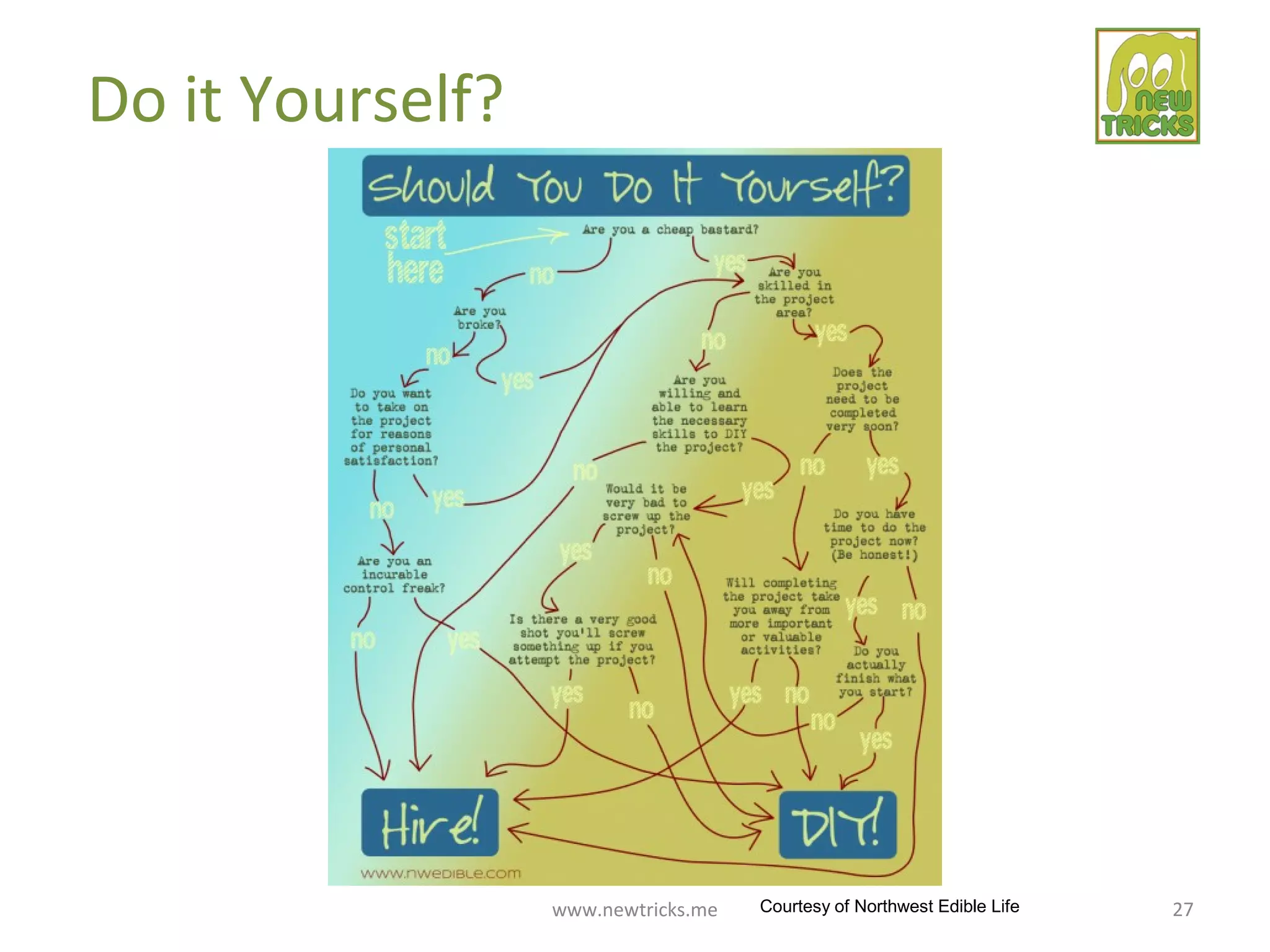
Do it Yourself?
www.newtricks.me 27
Do it Yourself?
Courtesy of Northwest Edible Life
www.newtricks.me 28
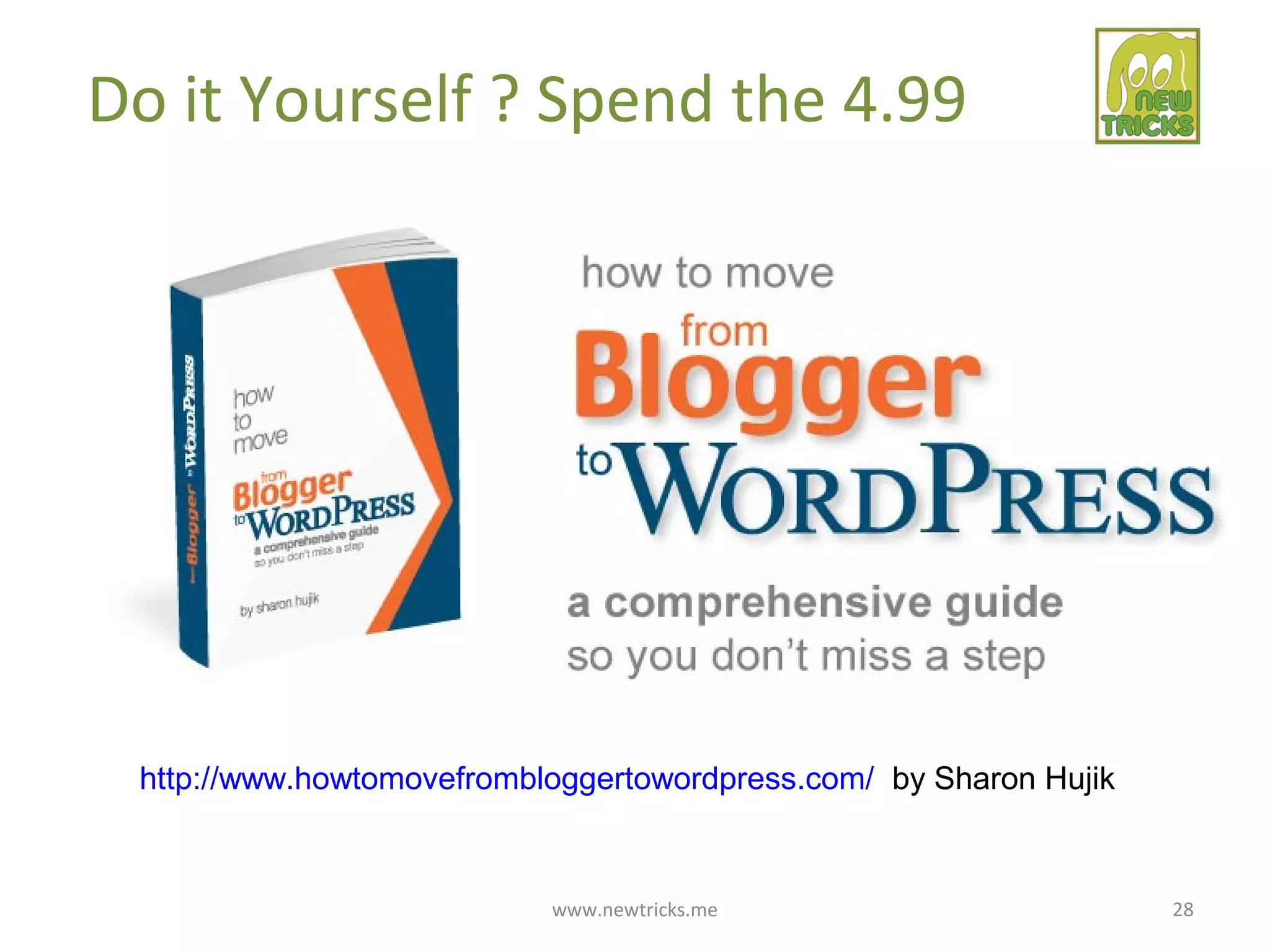
Do it Yourself ? Spend the 4.99
http://www.howtomovefrombloggertowordpress.com/ by Sharon Hujik
www.newtricks.me 29
Or, Relax & Have it Done For You
www.newtricks.me 30
Or, Have it Done For You
http://rtcamp.com/blogger-to-wordpress/
They have also created a plugin that helps with the process if you DIY
www.newtricks.me 31
Things to Remember
1. You will have to spend some time customizing your new WordPress site.
Do this first on your webhost with a temporary IP address.
2. Keep your Blogger Site active since you need it for the redirects to work.
3. Write a message on your Blogger Site with a message and a link to the new site.
4. Your images may not all come over. You can reenter them manually or
just let them stay hosted on your Blogger site.

Blogger to WordPress Migration

  • 1.
  • 2.
    www.newtricks.me 2 Why Bloggerto WordPress • Is your blog more than a hobby? • Does your blog generate income? • Do you aspire to have your blog earn money through a membership community, ads or affiliates? • Are you hoping that your blog will grow larger and impact a broader audience? • Do you worry about Blogger shut down your blog?
  • 3.
    www.newtricks.me 3 Why Bloggerto WordPress If you are considering moving your Blogger site it means you have actually been blogging and are now ready to take the next step to grow your business!
  • 4.
    www.newtricks.me 4 Why Bloggerto WordPress Why Move to WordPress?
  • 5.
  • 6.
    www.newtricks.me 6 Why Bloggerto WordPress Free and Open Source You have your own hosting account and domain name, but the software is free and backed by a huge community of developers, designers and users.
  • 7.
    www.newtricks.me 7 Why Bloggerto WordPress Own Your Content. You want to be able to control your content and not be vulnerable to having your site taken down.
  • 8.
    www.newtricks.me 8 Why Bloggerto WordPress Posts and Pages WordPress started 10 years ago as a blogging platform but over time added the ability to create pages for content that is more static.
  • 9.
    www.newtricks.me 9 Why Bloggerto WordPress More Than Just a Blog Major site design flexibility. You can make any kind of site. Your home page can be a static type page, a blog page or a hybrid of the two.
  • 10.
    www.newtricks.me 10 Why Bloggerto WordPress Themes WordPress has over 1,950 free themes (and many more premium themes). There are themes for real estate, membership sites, portfolios, resumes, directories, events, ecommerce and more….
  • 11.
    www.newtricks.me 11 Why Bloggerto WordPress Plugins WordPress has over 26,477 plugins that allow you to do just about anything on or to your WordPress site.
  • 12.
    www.newtricks.me 12 Why Bloggerto WordPress Categories WordPress lets you categorize and tag your content so it is very organized and easy to find.
  • 13.
    www.newtricks.me 13 Why Bloggerto WordPress Customization and Coding WordPress gives you full access to all theme files and style sheets to make your site your own. Many themes come with user options to customize without coding.
  • 14.
    www.newtricks.me 14 Why Bloggerto WordPress Frequent Easy Updates WordPress continues to add functionality so you can update your WP versions, themes and plugins. Caveat: You must keep site backed up and updated for safety.
  • 15.
  • 16.
    Two WordPress Platforms •LikeBlogger not Self-hosted •www.domain@wordpress.com •Limited plugins •A lot of themes but not all •Some customizability •Limited functionality •No e-commerce
  • 17.
    Two WordPress Platforms •Self-hosted on your account •Your own domain •All plugins •All themes •Fully customizable •Full functionality •e-commerce ✔
  • 18.
    www.newtricks.me 18 Successful Migration: Youwill need: 1) Hosting Account 2) Domain Name 3) Install WordPress 4) Configure WP 5) Theme & Site Design 6) Export Blogger Posts 7) Import Posts to WP
  • 19.
    www.newtricks.me 19 # 1Goal of Successful Migration: Don’t Lose Anything!
  • 20.
    www.newtricks.me 20 Successful Migration: Keepyour: •Search Engine Traffic, •Search Engine Ranking •Your Followers •Your Subscribers
  • 21.
    www.newtricks.me 21 Successful Migration: Permalinksare key Definition: Permanent address of a page or post on the internet. Example: www.newtricks.com/blog-startup-guide
  • 22.
    www.newtricks.me 22 Successful Migration: Permalinksare key to • Google Page Rank • Facebook/Twitter Share Count • Bookmarks (Del.icio.us save- count, Digg-count etc.) • Backlinks – links coming from other sites/blogs mentioning your posts. “permalink matters – the most!”
  • 23.
    www.newtricks.me 23 Important Goalsfor Migration: Starting or Starting Over with WordPress. This is like you had a shack out in the woods that no one knew was there for a brief time but then you built a new house on a different property. Since no one knew your address before you just have to publicize your new address. Get a domain name and hosting, install and configure WordPress with a theme. Then import your content from Blogger into WP and announce a launch of the new site
  • 24.
    www.newtricks.me 24 Important Goalsfor Migration: Maintaining permalinks for posts & pages. This is like you built a new house on your same lot so the house has changed but your address did not. Nothing lost. This is possible to do when you have a Blogger site using your own domain name and are changing the site to WordPress. You can transfer your domain name and then set up the permalinks in WordPress so that they are identical to what they were before in Blogger.
  • 25.
    www.newtricks.me 25 Important Goalsfor Migration: Redirecting permalinks for posts & pages. If you do not have your own domain name in Blogger then your migration is like you built a new house on a different lot so the house and the address both have changed. You will need to put in a change of address so people can find you. There is a plugin that can do the redirection of the urls from your old Blogger posts to the new urls (permalinks) of your WordPress site. www://yoursitename.blogger.com/lablena me/nameofpost.html Changes to www://yourdomain.com/name of your post
  • 26.
  • 27.
    www.newtricks.me 27 Do itYourself? Courtesy of Northwest Edible Life
  • 28.
    www.newtricks.me 28 Do itYourself ? Spend the 4.99 http://www.howtomovefrombloggertowordpress.com/ by Sharon Hujik
  • 29.
    www.newtricks.me 29 Or, Relax& Have it Done For You
  • 30.
    www.newtricks.me 30 Or, Haveit Done For You http://rtcamp.com/blogger-to-wordpress/ They have also created a plugin that helps with the process if you DIY
  • 31.
    www.newtricks.me 31 Things toRemember 1. You will have to spend some time customizing your new WordPress site. Do this first on your webhost with a temporary IP address. 2. Keep your Blogger Site active since you need it for the redirects to work. 3. Write a message on your Blogger Site with a message and a link to the new site. 4. Your images may not all come over. You can reenter them manually or just let them stay hosted on your Blogger site.