Porting Android to
     New Hardware
                                   th
Android Builders Summit – April 14 2011

           Karim Yaghmour
      karim.yaghmour@opersys.com
             @karimyaghmour
About ...
â—Ź   Author of:


â—Ź   Introduced Linux Trace Toolkit in 1999
â—Ź   Originated Adeos and relayfs (kernel/relay.c)
1. Components to port
2. Cross-development toolchain
3. Porting the bootloader
4. Porting the Linux kernel
5. Developing device drivers
6. Getting the AOSP
7. Implementing Android hardware libs
8. Customizing the user-space
9. Building the AOSP
10. Components to write to flash
11. Useful Embedded Linux tricks
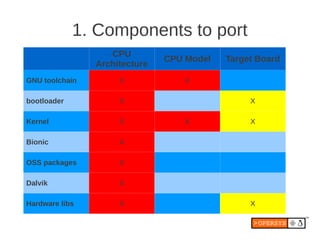
1. Components to port
                   CPU
                               CPU Model   Target Board
                Architecture
GNU toolchain        X             X

bootloader           X                          X

Kernel               X             X            X

Bionic               X

OSS packages         X

Dalvik               X

Hardware libs        X                          X
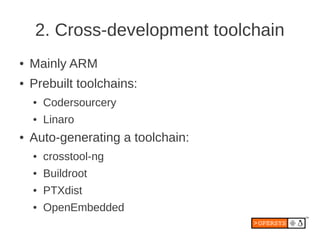
2. Cross-development toolchain
â—Ź   Mainly ARM
â—Ź   Prebuilt toolchains:
    â—Ź   Codersourcery
    â—Ź   Linaro
â—Ź   Auto-generating a toolchain:
    â—Ź   crosstool-ng
    â—Ź   Buildroot
    â—Ź   PTXdist
    â—Ź   OpenEmbedded
3. Porting the bootloader
â—Ź   Check aosp/bootable/bootloader/legacy
    â—Ź   README
    â—Ź   fastboot_protocol.txt
â—Ź   CPU support:
    â—Ź   include/[cpu]/*
    â—Ź   arch_[cpu]/*
â—Ź   Board support:
    â—Ź   Have your pick ...
4. Porting the Linux kernel
â—Ź   Requirements
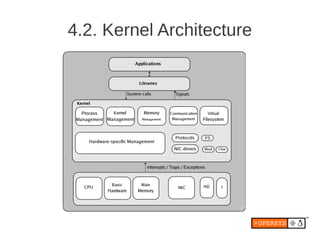
â—Ź   Kernel Architecture
â—Ź   Androidisms
â—Ź   Which kernel to start from
â—Ź   An intro to kernel source layout
â—Ź   Using a JTAG debugger
4.1. Requirements
â—Ź   Kernel is loaded in RAM and run by bootloader
â—Ź   Board schematics
â—Ź   Physical memory map
â—Ź   Chip timings
â—Ź   Receiving proper boot parameters from
    bootloader
4.2. Kernel Architecture
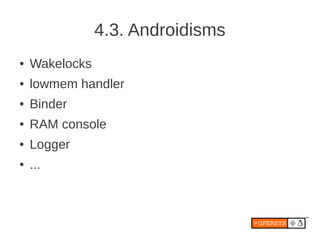
4.3. Androidisms
â—Ź   Wakelocks
â—Ź   lowmem handler
â—Ź   Binder
â—Ź   RAM console
â—Ź   Logger
â—Ź   ...
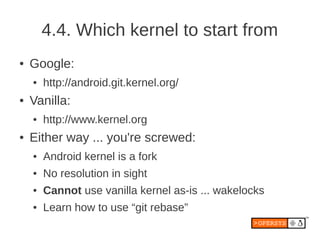
4.4. Which kernel to start from
â—Ź   Google:
    â—Ź   http://android.git.kernel.org/
â—Ź   Vanilla:
    â—Ź   http://www.kernel.org
â—Ź   Either way ... you're screwed:
    â—Ź   Android kernel is a fork
    â—Ź   No resolution in sight
    â—Ź   Cannot use vanilla kernel as-is ... wakelocks
    ●   Learn how to use “git rebase”
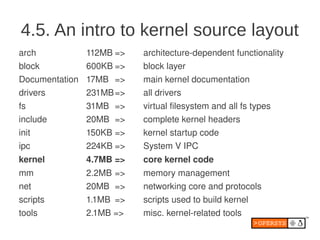
4.5. An intro to kernel source layout
arch            112MB =>   architecture­dependent functionality
block           600KB =>   block layer
Documentation   17MB =>    main kernel documentation
drivers         231MB =>   all drivers
fs              31MB =>    virtual filesystem and all fs types
include         20MB =>    complete kernel headers
init            150KB =>   kernel startup code
ipc             224KB =>   System V IPC
kernel          4.7MB =>   core kernel code
mm              2.2MB =>   memory management
net             20MB =>    networking core and protocols
scripts         1.1MB =>   scripts used to build kernel
tools           2.1MB =>   misc. kernel­related tools
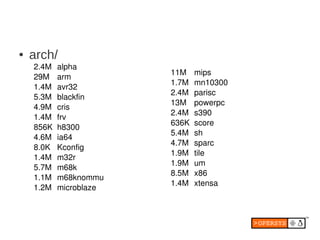
â—Ź   arch/
    2.4M   alpha
                        11M    mips
    29M    arm
                        1.7M   mn10300
    1.4M   avr32
                        2.4M   parisc
    5.3M   blackfin
                        13M    powerpc
    4.9M   cris
                        2.4M   s390
    1.4M   frv
                        636K   score
    856K   h8300
                        5.4M   sh
    4.6M   ia64
                        4.7M   sparc
    8.0K   Kconfig
                        1.9M   tile
    1.4M   m32r
                        1.9M   um
    5.7M   m68k
                        8.5M   x86
    1.1M   m68knommu
                        1.4M   xtensa
    1.2M   microblaze
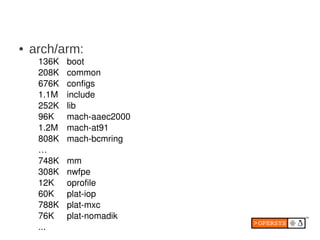
â—Ź   arch/arm:
     136K   boot
     208K   common
     676K   configs
     1.1M   include
     252K   lib
     96K    mach­aaec2000
     1.2M   mach­at91
     808K   mach­bcmring
     …
     748K   mm
     308K   nwfpe
     12K    oprofile
     60K    plat­iop
     788K   plat­mxc
     76K    plat­nomadik
     ...
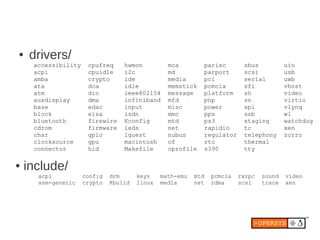
â—Ź   drivers/
     accessibility    cpufreq     hwmon          mca            parisc       sbus           uio
     acpi             cpuidle     i2c            md             parport      scsi           usb
     amba             crypto      ide            media          pci          serial         uwb
     ata              dca         idle           memstick       pcmcia       sfi            vhost
     atm              dio         ieee802154     message        platform     sh             video
     auxdisplay       dma         infiniband     mfd            pnp          sn             virtio
     base             edac        input          misc           power        spi            vlynq
     block            eisa        isdn           mmc            pps          ssb            w1
     bluetooth        firewire    Kconfig        mtd            ps3          staging        watchdog
     cdrom            firmware    leds           net            rapidio      tc             xen
     char             gpio        lguest         nubus          regulator    telephony      zorro
     clocksource      gpu         macintosh      of             rtc          thermal
     connector        hid         Makefile       oprofile       s390         tty

â—Ź   include/
      acpi           config   drm      keys    math-emu   mtd    pcmcia     rxrpc   sound   video
      asm-generic    crypto   Kbuild   linux   media      net    rdma       scsi    trace   xen
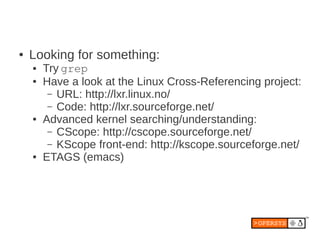
â—Ź   Looking for something:
    â—Ź   Try grep
    â—Ź   Have a look at the Linux Cross-Referencing project:
         – URL: http://lxr.linux.no/
         – Code: http://lxr.sourceforge.net/
    â—Ź   Advanced kernel searching/understanding:
         – CScope: http://cscope.sourceforge.net/
         – KScope front-end: http://kscope.sourceforge.net/
    â—Ź   ETAGS (emacs)
4.6. Using a JTAG debugger
â—Ź   Allows debugging of:
    â—Ź   Bootloader
    â—Ź   Early kernel code
    â—Ź   Device drivers
â—Ź   Need to find one that supports Linux kernel:
    â—Ź   Abatron
    â—Ź   Lauterbach
    â—Ź   GreenHills Software
    â—Ź   ...
5. Developing device drivers
â—Ź   Everything in Unix is a file, including devices
â—Ź   Get a copy of Linux Device Drivers, 3rd ed.
â—Ź   BTW, emulator kernel doesn't allow modules >:(
â—Ź   Use standard Linux model API
â—Ź   Try avoiding wakelocks in drivers
â—Ź   Use modules for development
â—Ź   Build drivers in when you ship
â—Ź   Remember: kernel is GPL, drivers are ... ???
●   Try using user-space “drivers” for proprietary parts
â—Ź   Android actually promotes use of user-space hardware libs
5.1. User space vs. kernel space
â—Ź   Separate address space:
    â—Ź   No explicit references to objects from other space
â—Ź   Memory protection amongst processes:
    â—Ź   No process can directly access or alter other
        processes' memory areas.
â—Ź   Memory protection between processes and kernel:
    â—Ź   No process can access anything inside the kernel
    â—Ź   Processes that attempt die (segfault)
â—Ź   Crossing between user space and kernel space is
    through specific events
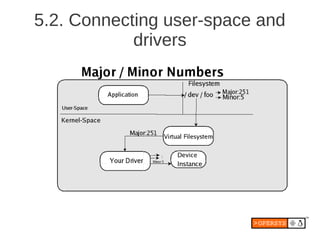
5.2. Connecting user-space and
            drivers
5.3. Types of drivers
â—Ź   Char
â—Ź   Block
â—Ź   Net
â—Ź   Subsystem:
    â—Ź   USB
    â—Ź   MTD
    â—Ź   Framebuffer
    â—Ź   Input
5.4. Kernel primitives
â—Ź   Timing
â—Ź   Interrupt handling and deferral
â—Ź   Memory management
â—Ź   /sys, hotplug, etc.
â—Ź   Locking mechanisms
â—Ź   Hardware access
â—Ź   ...
6. Getting the AOSP
â—Ź   Code-drop every ~6 months
â—Ź   Location:
    â—Ź    http://android.git.kernel.org/
●   Get “repo”:
        $ curl http://android.git.kernel.org/repo > ~/bin/repo
        $ chmod a+x ~/bin/repo
â—Ź   Fetch the AOSP:
    â—Ź    Make sure you fetch a tagged release
    â—Ź    Gingerbread:
          $ repo init -u git://android.git.kernel.org/platform/manifest.git -b gingerbread
          $ repo sync
6.1. AOSP content
bionic        C library replacement
bootable      Reference bootloader
build         Build system
cts           Compatibility Test Suite
dalvik        Dalvik VM
development   Development tools
device        Device-specific files and components
external      Copy of external projects used by AOSP
frameworks    System services, android.*, Android-related cmds, etc.
hardware      Hardware support libs
libcore       Apache Harmony
ndk           The NDK
packages      Stock Android apps, providers, etc.
prebuilt      Prebuilt binaries
sdk           The SDK
system        pieces of the world that are the core of the embedded linux platform at
              the heart of Android.
6.2. Useful pointers
â—Ź   See the build system doc at source.android.com
â—Ź   Check out device/ in AOSP
â—Ź   Check out Cyanogenmod
â—Ź   Check out xda-developers
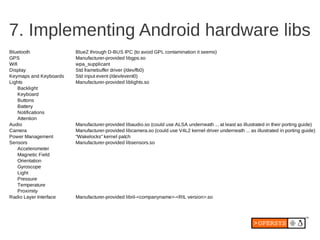
7. Implementing Android hardware libs
Bluetooth               BlueZ through D-BUS IPC (to avoid GPL contamination it seems)
GPS                     Manufacturer-provided libgps.so
Wifi                    wpa_supplicant
Display                 Std framebuffer driver (/dev/fb0)
Keymaps and Keyboards   Std input event (/dev/event0)
Lights                  Manufacturer-provided liblights.so
     Backlight
     Keyboard
     Buttons
     Battery
     Notifications
     Attention
Audio                   Manufacturer-provided libaudio.so (could use ALSA underneath ... at least as illustrated in their porting guide)
Camera                  Manufacturer-provided libcamera.so (could use V4L2 kernel driver underneath ... as illustrated in porting guide)
Power Management        “Wakelocks” kernel patch
Sensors                 Manufacturer-provided libsensors.so
     Accelerometer
     Magnetic Field
     Orientation
     Gyroscope
     Light
     Pressure
     Temperature
     Proximity
Radio Layer Interface   Manufacturer-provided libril-<companyname>-<RIL version>.so
8. Customizing the user-space
â—Ź   Boot screen
â—Ź   Status bar
â—Ź   Network
â—Ź   Preloaded apps
â—Ź   Browser bookmarks
â—Ź   Email provider customization
â—Ź   Themes
â—Ź   Adding new applications
â—Ź   Adding new services / new hardware type
â—Ź   Init
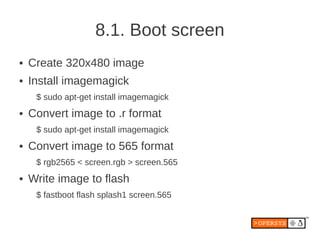
8.1. Boot screen
â—Ź   Create 320x480 image
â—Ź   Install imagemagick
     $ sudo apt-get install imagemagick
â—Ź   Convert image to .r format
     $ sudo apt-get install imagemagick
â—Ź   Convert image to 565 format
     $ rgb2565 < screen.rgb > screen.565
â—Ź   Write image to flash
     $ fastboot flash splash1 screen.565
8.2. Status bar
â—Ź   Location:
    â—Ź   frameworks/base/packages/SystemUI/src/com/android/systemui/statusbar
â—Ź   Look for:
    â—Ź   mService.setIcon(...)
â—Ź   Disable icons with:
    ●   mService.setIconVisibility(“[ICON_NAME]", false);
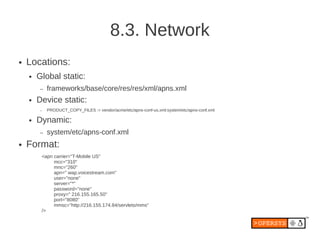
8.3. Network
â—Ź   Locations:
    â—Ź   Global static:
        –   frameworks/base/core/res/res/xml/apns.xml
    â—Ź   Device static:
        –   PRODUCT_COPY_FILES := vendor/acme/etc/apns-conf-us.xml:system/etc/apns-conf.xml

    â—Ź   Dynamic:
        –   system/etc/apns-conf.xml
â—Ź   Format:
         <apn carrier="T-Mobile US"
              mcc="310"
              mnc="260"
              apn=" wap.voicestream.com"
              user="none"
              server="*"
              password="none"
              proxy=" 216.155.165.50"
              port="8080"
              mmsc="http://216.155.174.84/servlets/mms"
         />
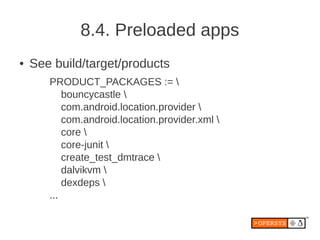
8.4. Preloaded apps
â—Ź   See build/target/products
       PRODUCT_PACKAGES := 
           bouncycastle 
           com.android.location.provider 
           com.android.location.provider.xml 
           core 
           core-junit 
           create_test_dmtrace 
           dalvikvm 
           dexdeps 
       ...
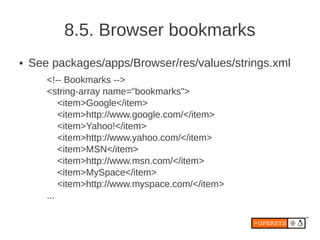
8.5. Browser bookmarks
â—Ź   See packages/apps/Browser/res/values/strings.xml
       <!-- Bookmarks -->
       <string-array name="bookmarks">
           <item>Google</item>
           <item>http://www.google.com/</item>
           <item>Yahoo!</item>
           <item>http://www.yahoo.com/</item>
           <item>MSN</item>
           <item>http://www.msn.com/</item>
           <item>MySpace</item>
           <item>http://www.myspace.com/</item>
       ...
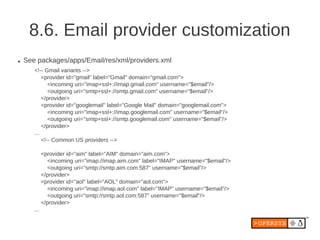
8.6. Email provider customization
â—Ź   See packages/apps/Email/res/xml/providers.xml
       <!-- Gmail variants -->
           <provider id="gmail" label="Gmail" domain="gmail.com">
              <incoming uri="imap+ssl+://imap.gmail.com" username="$email"/>
              <outgoing uri="smtp+ssl+://smtp.gmail.com" username="$email"/>
           </provider>
           <provider id="googlemail" label="Google Mail" domain="googlemail.com">
              <incoming uri="imap+ssl+://imap.googlemail.com" username="$email"/>
              <outgoing uri="smtp+ssl+://smtp.googlemail.com" username="$email"/>
           </provider>
       ...
           <!-- Common US providers -->

             <provider id="aim" label="AIM" domain="aim.com">
               <incoming uri="imap://imap.aim.com" label="IMAP" username="$email"/>
               <outgoing uri="smtp://smtp.aim.com:587" username="$email"/>
             </provider>
             <provider id="aol" label="AOL" domain="aol.com">
               <incoming uri="imap://imap.aol.com" label="IMAP" username="$email"/>
               <outgoing uri="smtp://smtp.aol.com:587" username="$email"/>
             </provider>
       ...
8.7. Themes
â—Ź   See
    framework/base/core/res/res/values/styles.xml
8.8. Adding new applications
â—Ź   Add application in packages/apps
â—Ź   Can use Eclipse to create initial version
â—Ź   Copy Eclipse project to packages/apps
â—Ź   Add an appropriate Android.mk file to project
â—Ź   Add project to PRODUCT_PACKAGES
8.9. Adding new services / new
                hardware type
â—Ź   Add your code to:
    frameworks/base/services/java/com/android/server/
â—Ź   Have the SystemServer.java init+reg. your service
â—Ź   Define hardware API for apps
â—Ź   Expose through:
    â—Ź   frameworks/base/core/java/android/os/[server].aidl
●   Call on native “driver” code through JNI
â—Ź   Implement or connect to appropriate driver
â—Ź   Create an app that calls on service
â—Ź   May need to create new SDK ...
8.10. Init
â—Ź   Android init semantics are different from:
    â—Ź   System V init
    â—Ź   Busybox init
●   See “Android Init Language” doc in porting guide
â—Ź   See init.rc examples:
    â—Ź   Emulator's init.rc
    â—Ź   device/[manufacturer]/[device]/init.rc
●   Global “properties” that can be set and read
â—Ź   Can be used to tweak low-memory conditions
9. Building the AOSP
â—Ź   Requires 64-bit Ubuntu 10.04
â—Ź   Packages required:
     $ sudo apt-get install ia32-libs bison flex gperf 
     > g++ libia32 libc6-dev-i386 libz-dev libstdc++ 
     > libstdc++6 libstdc++6-32 ia32-libstdc++6 
     > ia32-libstdc++ ia32-libstdc++5 ia32-libs 
     > libncurses-dev lib32ncurses-dev 
     > ia32-libncurses-dev ia32-libncurses lib32ncurses 
     > lib32ncurses5-dev
â—Ź   Patch build/core/droiddoc.mk
    â—Ź   https://groups.google.com/group/android-
        building/browse_thread/thread/833a8159a0e5c56c
â—Ź   Fix a few symbolic links:
     $ sudo ln -s /usr/lib32/libstdc++.so.6 /usr/lib32/libstdc++.so
     $ sudo ln -s /usr/lib32/libz.so.1 /usr/lib32/libz.so
â—Ź   Set up build environment:
     $ . build/envsetup.sh
     $ lunch
â—Ź   Launch build and go watch tonight's hockey game:
     $ make -j2
â—Ź   ... though you should check your screen at breaks ...
â—Ź   Just launch emulator when it's done:
     $ emulator &
â—Ź   Some nice tricks:
    â—Ź   See build/envsetup.sh for commands
    ●   Use “lunch” from AOSP root to set env vars
        –   You'll need that if you come back later and want to
            relaunch emulator from AOSP root.
10. Components to write to flash
â—Ź   See out/target/product/[product]/*.img
â—Ź   Typically:
    â—Ź   Bootloader
    â—Ź   boot (kernel and ramdisk)
    â—Ź   system (/system)
    â—Ź   userdata (/data)
11. Useful Embedded Linux tricks
â—Ź   crosstool-ng
â—Ź   Busybox
â—Ź   uClibc
11.1. crosstool-ng
â—Ź   Cross-development toolchain generator
â—Ź   Successor to crosstool
â—Ź   Available at:
     http://ymorin.is-a-geek.org/projects/crosstool
â—Ź   Downloads, patches, builds, installs, etc.
â—Ź   Comprises 23 steps
â—Ź   Menuconfig-based
â—Ź   Supports uClibc, glibc and eglibc
●   Supports ARM, Blackfin, MIPS, PowerPC, SH, …
â—Ź   Fairly well maintained
11.2. Busybox
â—Ź   Replicate Linux CLI experience
     [, [[, acpid, add-shell, addgroup, adduser, adjtimex, arp, arping, ash, awk, base64, basename, beep, blkid,
     blockdev, bootchartd, brctl, bunzip2, bzcat, bzip2, cal, cat, catv, chat, chattr, chgrp, chmod, chown, chpasswd,
     chpst, chroot, chrt, chvt, cksum, clear, cmp, comm, cp, cpio, crond, crontab, cryptpw, cttyhack, cut, date, dc, dd,
     deallocvt, delgroup, deluser, depmod, devmem, df, dhcprelay, diff, dirname, dmesg, dnsd, dnsdomainname,
     dos2unix, du, dumpkmap, dumpleases, echo, ed, egrep, eject, env, envdir, envuidgid, ether-wake, expand, expr,
     fakeidentd, false, fbset, fbsplash, fdflush, fdformat, fdisk, fgconsole, fgrep, find, findfs, flock, fold, free, freeramdisk,
     fsck, fsck.minix, fsync, ftpd, ftpget, ftpput, fuser, getopt, getty, grep, gunzip, gzip, halt, hd, hdparm, head, hexdump,
     hostid, hostname, httpd, hush, hwclock, id, ifconfig, ifdown, ifenslave, ifplugd, ifup, inetd, init, insmod, install,
     ionice, iostat, ip, ipaddr, ipcalc, ipcrm, ipcs, iplink, iproute, iprule, iptunnel, kbd_mode, kill, killall, killall5, klogd, last,
     length, less, linux32, linux64, linuxrc, ln, loadfont, loadkmap, logger, login, logname, logread, losetup, lpd, lpq, lpr,
     ls, lsattr, lsmod, lspci, lsusb, lzcat, lzma, lzop, lzopcat, makedevs, makemime, man, md5sum, mdev, mesg,
     microcom, mkdir, mkdosfs, mke2fs, mkfifo, mkfs.ext2, mkfs.minix, mkfs.vfat, mknod, mkpasswd, mkswap, mktemp,
     modinfo, modprobe, more, mount, mountpoint, mpstat, mt, mv, nameif, nbd-client, nc, netstat, nice, nmeter, nohup,
     nslookup, ntpd, od, openvt, passwd, patch, pgrep, pidof, ping, ping6, pipe_progress, pivot_root, pkill, pmap,
     popmaildir, poweroff, powertop, printenv, printf, ps, pscan, pwd, raidautorun, rdate, rdev, readahead, readlink,
     readprofile, realpath, reboot, reformime, remove-shell, renice, reset, resize, rev, rm, rmdir, rmmod, route, rpm,
     rpm2cpio, rtcwake, run-parts, runlevel, runsv, runsvdir, rx, script, scriptreplay, sed, sendmail, seq, setarch,
     setconsole, setfont, setkeycodes, setlogcons, setsid, setuidgid, sh, sha1sum, sha256sum, sha512sum, showkey,
     slattach, sleep, smemcap, softlimit, sort, split, start-stop-daemon, stat, strings, stty, su, sulogin, sum, sv, svlogd,
     swapoff, swapon, switch_root, sync, sysctl, syslogd, tac, tail, tar, tcpsvd, tee, telnet, telnetd, test, tftp, tftpd, time,
     timeout, top, touch, tr, traceroute, traceroute6, true, tty, ttysize, tunctl, udhcpc, udhcpd, udpsvd, umount, uname,
     unexpand, uniq, unix2dos, unlzma, unlzop, unxz, unzip, uptime, usleep, uudecode, uuencode, vconfig, vi, vlock,
     volname, wall, watch, watchdog, wc, wget, which, who, whoami, xargs, xz, xzcat, yes, zcat, zcip
â—Ź   Some features of interest:
    â—Ź   color-coded file lists
    â—Ź   tab completion
    â—Ź   "home", "end"
    â—Ź   grep, sed, wc, more, less
    â—Ź   vi
    â—Ź   ifconfig
    â—Ź   httpd
    â—Ź   sendmail
    â—Ź   tftp
    â—Ź   top
    â—Ź   ...
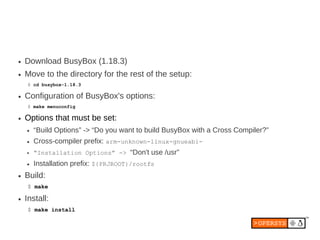
â—Ź   Download BusyBox (1.18.3)
â—Ź   Move to the directory for the rest of the setup:
    $ cd busybox-1.18.3

â—Ź   Configuration of BusyBox's options:
    $ make menuconfig

â—Ź   Options that must be set:
    ●   “Build Options” -> “Do you want to build BusyBox with a Cross Compiler?”
    â—Ź   Cross-compiler prefix: arm-unknown-linux-gnueabi-
    ●   “Installation Options” -> “Don't use /usr”
    â—Ź   Installation prefix: ${PRJROOT}/rootfs
â—Ź   Build:
    $ make

â—Ź   Install:
    $ make install
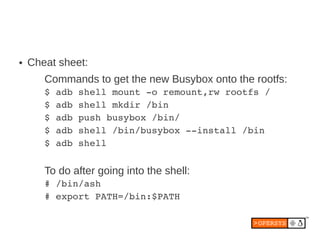
â—Ź   Cheat sheet:
       Commands to get the new Busybox onto the rootfs:
       $ adb shell mount ­o remount,rw rootfs /
       $ adb shell mkdir /bin
       $ adb push busybox /bin/
       $ adb shell /bin/busybox ­­install /bin
       $ adb shell


       To do after going into the shell:
       # /bin/ash
       # export PATH=/bin:$PATH
11.3. uClibc
â—Ź   Originates from uClinux effort
â—Ź   Support both CPUs that have and those that
    lack an MMU and/or an FPU.
â—Ź   Allows both static and dynamic linking
â—Ź   Most applications that build with glibc will build
    and work the same with uClibc.
â—Ź   Available from: http://uclibc.org/
Thank you ...


karim.yaghmour@opersys.com


     www.opersys.com

Porting Android ABS 2011

  • 1.
    Porting Android to New Hardware th Android Builders Summit – April 14 2011 Karim Yaghmour karim.yaghmour@opersys.com @karimyaghmour
  • 2.
    About ... â—Ź Author of: â—Ź Introduced Linux Trace Toolkit in 1999 â—Ź Originated Adeos and relayfs (kernel/relay.c)
  • 3.
    1. Components toport 2. Cross-development toolchain 3. Porting the bootloader 4. Porting the Linux kernel 5. Developing device drivers 6. Getting the AOSP 7. Implementing Android hardware libs 8. Customizing the user-space 9. Building the AOSP 10. Components to write to flash 11. Useful Embedded Linux tricks
  • 4.
    1. Components toport CPU CPU Model Target Board Architecture GNU toolchain X X bootloader X X Kernel X X X Bionic X OSS packages X Dalvik X Hardware libs X X
  • 5.
    2. Cross-development toolchain â—Ź Mainly ARM â—Ź Prebuilt toolchains: â—Ź Codersourcery â—Ź Linaro â—Ź Auto-generating a toolchain: â—Ź crosstool-ng â—Ź Buildroot â—Ź PTXdist â—Ź OpenEmbedded
  • 6.
    3. Porting thebootloader â—Ź Check aosp/bootable/bootloader/legacy â—Ź README â—Ź fastboot_protocol.txt â—Ź CPU support: â—Ź include/[cpu]/* â—Ź arch_[cpu]/* â—Ź Board support: â—Ź Have your pick ...
  • 7.
    4. Porting theLinux kernel â—Ź Requirements â—Ź Kernel Architecture â—Ź Androidisms â—Ź Which kernel to start from â—Ź An intro to kernel source layout â—Ź Using a JTAG debugger
  • 8.
    4.1. Requirements â—Ź Kernel is loaded in RAM and run by bootloader â—Ź Board schematics â—Ź Physical memory map â—Ź Chip timings â—Ź Receiving proper boot parameters from bootloader
  • 9.
  • 10.
    4.3. Androidisms â—Ź Wakelocks â—Ź lowmem handler â—Ź Binder â—Ź RAM console â—Ź Logger â—Ź ...
  • 11.
    4.4. Which kernelto start from ● Google: ● http://android.git.kernel.org/ ● Vanilla: ● http://www.kernel.org ● Either way ... you're screwed: ● Android kernel is a fork ● No resolution in sight ● Cannot use vanilla kernel as-is ... wakelocks ● Learn how to use “git rebase”
  • 12.
    4.5. An introto kernel source layout arch 112MB => architecture­dependent functionality block 600KB => block layer Documentation 17MB => main kernel documentation drivers 231MB => all drivers fs 31MB => virtual filesystem and all fs types include 20MB => complete kernel headers init 150KB => kernel startup code ipc 224KB => System V IPC kernel 4.7MB => core kernel code mm 2.2MB => memory management net 20MB => networking core and protocols scripts 1.1MB => scripts used to build kernel tools 2.1MB => misc. kernel­related tools
  • 13.
    â—Ź arch/ 2.4M alpha 11M mips 29M arm 1.7M mn10300 1.4M avr32 2.4M parisc 5.3M blackfin 13M powerpc 4.9M cris 2.4M s390 1.4M frv 636K score 856K h8300 5.4M sh 4.6M ia64 4.7M sparc 8.0K Kconfig 1.9M tile 1.4M m32r 1.9M um 5.7M m68k 8.5M x86 1.1M m68knommu 1.4M xtensa 1.2M microblaze
  • 14.
    ● arch/arm: 136K boot 208K common 676K configs 1.1M include 252K lib 96K mach­aaec2000 1.2M mach­at91 808K mach­bcmring … 748K mm 308K nwfpe 12K oprofile 60K plat­iop 788K plat­mxc 76K plat­nomadik ...
  • 15.
    â—Ź drivers/ accessibility cpufreq hwmon mca parisc sbus uio acpi cpuidle i2c md parport scsi usb amba crypto ide media pci serial uwb ata dca idle memstick pcmcia sfi vhost atm dio ieee802154 message platform sh video auxdisplay dma infiniband mfd pnp sn virtio base edac input misc power spi vlynq block eisa isdn mmc pps ssb w1 bluetooth firewire Kconfig mtd ps3 staging watchdog cdrom firmware leds net rapidio tc xen char gpio lguest nubus regulator telephony zorro clocksource gpu macintosh of rtc thermal connector hid Makefile oprofile s390 tty â—Ź include/ acpi config drm keys math-emu mtd pcmcia rxrpc sound video asm-generic crypto Kbuild linux media net rdma scsi trace xen
  • 16.
    ● Looking for something: ● Try grep ● Have a look at the Linux Cross-Referencing project: – URL: http://lxr.linux.no/ – Code: http://lxr.sourceforge.net/ ● Advanced kernel searching/understanding: – CScope: http://cscope.sourceforge.net/ – KScope front-end: http://kscope.sourceforge.net/ ● ETAGS (emacs)
  • 17.
    4.6. Using aJTAG debugger â—Ź Allows debugging of: â—Ź Bootloader â—Ź Early kernel code â—Ź Device drivers â—Ź Need to find one that supports Linux kernel: â—Ź Abatron â—Ź Lauterbach â—Ź GreenHills Software â—Ź ...
  • 18.
    5. Developing devicedrivers ● Everything in Unix is a file, including devices ● Get a copy of Linux Device Drivers, 3rd ed. ● BTW, emulator kernel doesn't allow modules >:( ● Use standard Linux model API ● Try avoiding wakelocks in drivers ● Use modules for development ● Build drivers in when you ship ● Remember: kernel is GPL, drivers are ... ??? ● Try using user-space “drivers” for proprietary parts ● Android actually promotes use of user-space hardware libs
  • 19.
    5.1. User spacevs. kernel space â—Ź Separate address space: â—Ź No explicit references to objects from other space â—Ź Memory protection amongst processes: â—Ź No process can directly access or alter other processes' memory areas. â—Ź Memory protection between processes and kernel: â—Ź No process can access anything inside the kernel â—Ź Processes that attempt die (segfault) â—Ź Crossing between user space and kernel space is through specific events
  • 20.
  • 21.
    5.3. Types ofdrivers â—Ź Char â—Ź Block â—Ź Net â—Ź Subsystem: â—Ź USB â—Ź MTD â—Ź Framebuffer â—Ź Input
  • 22.
    5.4. Kernel primitives â—Ź Timing â—Ź Interrupt handling and deferral â—Ź Memory management â—Ź /sys, hotplug, etc. â—Ź Locking mechanisms â—Ź Hardware access â—Ź ...
  • 23.
    6. Getting theAOSP ● Code-drop every ~6 months ● Location: ● http://android.git.kernel.org/ ● Get “repo”: $ curl http://android.git.kernel.org/repo > ~/bin/repo $ chmod a+x ~/bin/repo ● Fetch the AOSP: ● Make sure you fetch a tagged release ● Gingerbread: $ repo init -u git://android.git.kernel.org/platform/manifest.git -b gingerbread $ repo sync
  • 24.
    6.1. AOSP content bionic C library replacement bootable Reference bootloader build Build system cts Compatibility Test Suite dalvik Dalvik VM development Development tools device Device-specific files and components external Copy of external projects used by AOSP frameworks System services, android.*, Android-related cmds, etc. hardware Hardware support libs libcore Apache Harmony ndk The NDK packages Stock Android apps, providers, etc. prebuilt Prebuilt binaries sdk The SDK system pieces of the world that are the core of the embedded linux platform at the heart of Android.
  • 25.
    6.2. Useful pointers â—Ź See the build system doc at source.android.com â—Ź Check out device/ in AOSP â—Ź Check out Cyanogenmod â—Ź Check out xda-developers
  • 26.
    7. Implementing Androidhardware libs Bluetooth BlueZ through D-BUS IPC (to avoid GPL contamination it seems) GPS Manufacturer-provided libgps.so Wifi wpa_supplicant Display Std framebuffer driver (/dev/fb0) Keymaps and Keyboards Std input event (/dev/event0) Lights Manufacturer-provided liblights.so Backlight Keyboard Buttons Battery Notifications Attention Audio Manufacturer-provided libaudio.so (could use ALSA underneath ... at least as illustrated in their porting guide) Camera Manufacturer-provided libcamera.so (could use V4L2 kernel driver underneath ... as illustrated in porting guide) Power Management “Wakelocks” kernel patch Sensors Manufacturer-provided libsensors.so Accelerometer Magnetic Field Orientation Gyroscope Light Pressure Temperature Proximity Radio Layer Interface Manufacturer-provided libril-<companyname>-<RIL version>.so
  • 27.
    8. Customizing theuser-space â—Ź Boot screen â—Ź Status bar â—Ź Network â—Ź Preloaded apps â—Ź Browser bookmarks â—Ź Email provider customization â—Ź Themes â—Ź Adding new applications â—Ź Adding new services / new hardware type â—Ź Init
  • 28.
    8.1. Boot screen â—Ź Create 320x480 image â—Ź Install imagemagick $ sudo apt-get install imagemagick â—Ź Convert image to .r format $ sudo apt-get install imagemagick â—Ź Convert image to 565 format $ rgb2565 < screen.rgb > screen.565 â—Ź Write image to flash $ fastboot flash splash1 screen.565
  • 29.
    8.2. Status bar ● Location: ● frameworks/base/packages/SystemUI/src/com/android/systemui/statusbar ● Look for: ● mService.setIcon(...) ● Disable icons with: ● mService.setIconVisibility(“[ICON_NAME]", false);
  • 30.
    8.3. Network ● Locations: ● Global static: – frameworks/base/core/res/res/xml/apns.xml ● Device static: – PRODUCT_COPY_FILES := vendor/acme/etc/apns-conf-us.xml:system/etc/apns-conf.xml ● Dynamic: – system/etc/apns-conf.xml ● Format: <apn carrier="T-Mobile US" mcc="310" mnc="260" apn=" wap.voicestream.com" user="none" server="*" password="none" proxy=" 216.155.165.50" port="8080" mmsc="http://216.155.174.84/servlets/mms" />
  • 31.
    8.4. Preloaded apps â—Ź See build/target/products PRODUCT_PACKAGES := bouncycastle com.android.location.provider com.android.location.provider.xml core core-junit create_test_dmtrace dalvikvm dexdeps ...
  • 32.
    8.5. Browser bookmarks â—Ź See packages/apps/Browser/res/values/strings.xml <!-- Bookmarks --> <string-array name="bookmarks"> <item>Google</item> <item>http://www.google.com/</item> <item>Yahoo!</item> <item>http://www.yahoo.com/</item> <item>MSN</item> <item>http://www.msn.com/</item> <item>MySpace</item> <item>http://www.myspace.com/</item> ...
  • 33.
    8.6. Email providercustomization â—Ź See packages/apps/Email/res/xml/providers.xml <!-- Gmail variants --> <provider id="gmail" label="Gmail" domain="gmail.com"> <incoming uri="imap+ssl+://imap.gmail.com" username="$email"/> <outgoing uri="smtp+ssl+://smtp.gmail.com" username="$email"/> </provider> <provider id="googlemail" label="Google Mail" domain="googlemail.com"> <incoming uri="imap+ssl+://imap.googlemail.com" username="$email"/> <outgoing uri="smtp+ssl+://smtp.googlemail.com" username="$email"/> </provider> ... <!-- Common US providers --> <provider id="aim" label="AIM" domain="aim.com"> <incoming uri="imap://imap.aim.com" label="IMAP" username="$email"/> <outgoing uri="smtp://smtp.aim.com:587" username="$email"/> </provider> <provider id="aol" label="AOL" domain="aol.com"> <incoming uri="imap://imap.aol.com" label="IMAP" username="$email"/> <outgoing uri="smtp://smtp.aol.com:587" username="$email"/> </provider> ...
  • 34.
    8.7. Themes â—Ź See framework/base/core/res/res/values/styles.xml
  • 35.
    8.8. Adding newapplications â—Ź Add application in packages/apps â—Ź Can use Eclipse to create initial version â—Ź Copy Eclipse project to packages/apps â—Ź Add an appropriate Android.mk file to project â—Ź Add project to PRODUCT_PACKAGES
  • 36.
    8.9. Adding newservices / new hardware type ● Add your code to: frameworks/base/services/java/com/android/server/ ● Have the SystemServer.java init+reg. your service ● Define hardware API for apps ● Expose through: ● frameworks/base/core/java/android/os/[server].aidl ● Call on native “driver” code through JNI ● Implement or connect to appropriate driver ● Create an app that calls on service ● May need to create new SDK ...
  • 37.
    8.10. Init ● Android init semantics are different from: ● System V init ● Busybox init ● See “Android Init Language” doc in porting guide ● See init.rc examples: ● Emulator's init.rc ● device/[manufacturer]/[device]/init.rc ● Global “properties” that can be set and read ● Can be used to tweak low-memory conditions
  • 38.
    9. Building theAOSP â—Ź Requires 64-bit Ubuntu 10.04 â—Ź Packages required: $ sudo apt-get install ia32-libs bison flex gperf > g++ libia32 libc6-dev-i386 libz-dev libstdc++ > libstdc++6 libstdc++6-32 ia32-libstdc++6 > ia32-libstdc++ ia32-libstdc++5 ia32-libs > libncurses-dev lib32ncurses-dev > ia32-libncurses-dev ia32-libncurses lib32ncurses > lib32ncurses5-dev â—Ź Patch build/core/droiddoc.mk â—Ź https://groups.google.com/group/android- building/browse_thread/thread/833a8159a0e5c56c
  • 39.
    â—Ź Fix a few symbolic links: $ sudo ln -s /usr/lib32/libstdc++.so.6 /usr/lib32/libstdc++.so $ sudo ln -s /usr/lib32/libz.so.1 /usr/lib32/libz.so â—Ź Set up build environment: $ . build/envsetup.sh $ lunch â—Ź Launch build and go watch tonight's hockey game: $ make -j2 â—Ź ... though you should check your screen at breaks ... â—Ź Just launch emulator when it's done: $ emulator &
  • 40.
    ● Some nice tricks: ● See build/envsetup.sh for commands ● Use “lunch” from AOSP root to set env vars – You'll need that if you come back later and want to relaunch emulator from AOSP root.
  • 41.
    10. Components towrite to flash â—Ź See out/target/product/[product]/*.img â—Ź Typically: â—Ź Bootloader â—Ź boot (kernel and ramdisk) â—Ź system (/system) â—Ź userdata (/data)
  • 42.
    11. Useful EmbeddedLinux tricks â—Ź crosstool-ng â—Ź Busybox â—Ź uClibc
  • 43.
    11.1. crosstool-ng ● Cross-development toolchain generator ● Successor to crosstool ● Available at: http://ymorin.is-a-geek.org/projects/crosstool ● Downloads, patches, builds, installs, etc. ● Comprises 23 steps ● Menuconfig-based ● Supports uClibc, glibc and eglibc ● Supports ARM, Blackfin, MIPS, PowerPC, SH, … ● Fairly well maintained
  • 44.
    11.2. Busybox â—Ź Replicate Linux CLI experience [, [[, acpid, add-shell, addgroup, adduser, adjtimex, arp, arping, ash, awk, base64, basename, beep, blkid, blockdev, bootchartd, brctl, bunzip2, bzcat, bzip2, cal, cat, catv, chat, chattr, chgrp, chmod, chown, chpasswd, chpst, chroot, chrt, chvt, cksum, clear, cmp, comm, cp, cpio, crond, crontab, cryptpw, cttyhack, cut, date, dc, dd, deallocvt, delgroup, deluser, depmod, devmem, df, dhcprelay, diff, dirname, dmesg, dnsd, dnsdomainname, dos2unix, du, dumpkmap, dumpleases, echo, ed, egrep, eject, env, envdir, envuidgid, ether-wake, expand, expr, fakeidentd, false, fbset, fbsplash, fdflush, fdformat, fdisk, fgconsole, fgrep, find, findfs, flock, fold, free, freeramdisk, fsck, fsck.minix, fsync, ftpd, ftpget, ftpput, fuser, getopt, getty, grep, gunzip, gzip, halt, hd, hdparm, head, hexdump, hostid, hostname, httpd, hush, hwclock, id, ifconfig, ifdown, ifenslave, ifplugd, ifup, inetd, init, insmod, install, ionice, iostat, ip, ipaddr, ipcalc, ipcrm, ipcs, iplink, iproute, iprule, iptunnel, kbd_mode, kill, killall, killall5, klogd, last, length, less, linux32, linux64, linuxrc, ln, loadfont, loadkmap, logger, login, logname, logread, losetup, lpd, lpq, lpr, ls, lsattr, lsmod, lspci, lsusb, lzcat, lzma, lzop, lzopcat, makedevs, makemime, man, md5sum, mdev, mesg, microcom, mkdir, mkdosfs, mke2fs, mkfifo, mkfs.ext2, mkfs.minix, mkfs.vfat, mknod, mkpasswd, mkswap, mktemp, modinfo, modprobe, more, mount, mountpoint, mpstat, mt, mv, nameif, nbd-client, nc, netstat, nice, nmeter, nohup, nslookup, ntpd, od, openvt, passwd, patch, pgrep, pidof, ping, ping6, pipe_progress, pivot_root, pkill, pmap, popmaildir, poweroff, powertop, printenv, printf, ps, pscan, pwd, raidautorun, rdate, rdev, readahead, readlink, readprofile, realpath, reboot, reformime, remove-shell, renice, reset, resize, rev, rm, rmdir, rmmod, route, rpm, rpm2cpio, rtcwake, run-parts, runlevel, runsv, runsvdir, rx, script, scriptreplay, sed, sendmail, seq, setarch, setconsole, setfont, setkeycodes, setlogcons, setsid, setuidgid, sh, sha1sum, sha256sum, sha512sum, showkey, slattach, sleep, smemcap, softlimit, sort, split, start-stop-daemon, stat, strings, stty, su, sulogin, sum, sv, svlogd, swapoff, swapon, switch_root, sync, sysctl, syslogd, tac, tail, tar, tcpsvd, tee, telnet, telnetd, test, tftp, tftpd, time, timeout, top, touch, tr, traceroute, traceroute6, true, tty, ttysize, tunctl, udhcpc, udhcpd, udpsvd, umount, uname, unexpand, uniq, unix2dos, unlzma, unlzop, unxz, unzip, uptime, usleep, uudecode, uuencode, vconfig, vi, vlock, volname, wall, watch, watchdog, wc, wget, which, who, whoami, xargs, xz, xzcat, yes, zcat, zcip
  • 45.
    â—Ź Some features of interest: â—Ź color-coded file lists â—Ź tab completion â—Ź "home", "end" â—Ź grep, sed, wc, more, less â—Ź vi â—Ź ifconfig â—Ź httpd â—Ź sendmail â—Ź tftp â—Ź top â—Ź ...
  • 46.
    ● Download BusyBox (1.18.3) ● Move to the directory for the rest of the setup: $ cd busybox-1.18.3 ● Configuration of BusyBox's options: $ make menuconfig ● Options that must be set: ● “Build Options” -> “Do you want to build BusyBox with a Cross Compiler?” ● Cross-compiler prefix: arm-unknown-linux-gnueabi- ● “Installation Options” -> “Don't use /usr” ● Installation prefix: ${PRJROOT}/rootfs ● Build: $ make ● Install: $ make install
  • 47.
    ● Cheat sheet: Commands to get the new Busybox onto the rootfs: $ adb shell mount ­o remount,rw rootfs / $ adb shell mkdir /bin $ adb push busybox /bin/ $ adb shell /bin/busybox ­­install /bin $ adb shell To do after going into the shell: # /bin/ash # export PATH=/bin:$PATH
  • 48.
    11.3. uClibc â—Ź Originates from uClinux effort â—Ź Support both CPUs that have and those that lack an MMU and/or an FPU. â—Ź Allows both static and dynamic linking â—Ź Most applications that build with glibc will build and work the same with uClibc. â—Ź Available from: http://uclibc.org/
  • 49.