Android System Development
Day - 3
By Team Emertxe

Android HAL – Overview
✔
Sensor HAL
✔
Understanding data structures and APIs
✔
Adding support for a new sensor
✔
Writing test application for Sensor
Table of Content
Android HAL Overview
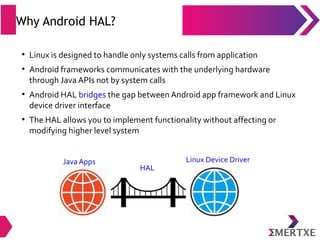
Why Android HAL?
●
Linux is designed to handle only systems calls from application
●
Android frameworks communicates with the underlying hardware
through Java APIs not by system calls
●
Android HAL bridges the gap between Android app framework and Linux
device driver interface
●
The HAL allows you to implement functionality without affecting or
modifying higher level system
Java Apps Linux Device Driver
HAL
What is Android HAL?
●
Provides API’s through which Android service can place a request to
device
●
Uses functions provided by Linux system to service the request from
android framework
●
A C/C++ layer with purely vendor specific implementation
●
Packaged into modules (.so) file & loaded by Android system at
appropriate time
“The hardware abstraction layer (HAL) defines a
standard interface for hardware vendors to implement
and allows Android to be agnostic about lower-level
driver implementations”
“The hardware abstraction layer (HAL) defines a
standard interface for hardware vendors to implement
and allows Android to be agnostic about lower-level
driver implementations”
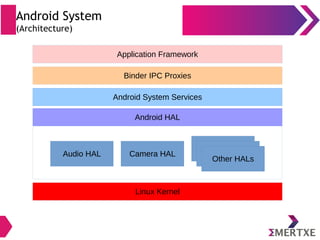
Android System
(Architecture)
Android HAL
Android System Services
Binder IPC Proxies
Application Framework
Linux Kernel
Audio HAL Camera HAL
Other HALs
Other HALs
Other HALs
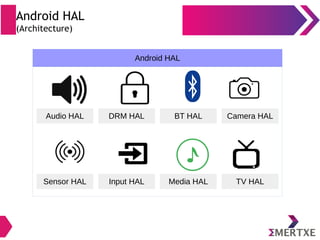
Android HAL
(Architecture)
Android HAL
Audio HAL DRM HAL BT HAL Camera HAL
Sensor HAL Input HAL Media HAL TV HAL
Android HAL
(Architecture)
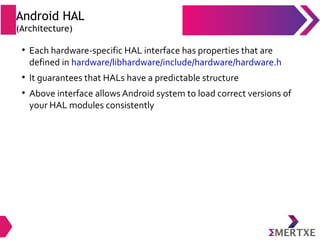
●
Each hardware-specific HAL interface has properties that are
defined in hardware/libhardware/include/hardware/hardware.h
●
It guarantees that HALs have a predictable structure
●
Above interface allows Android system to load correct versions of
your HAL modules consistently
Android HAL
(Architecture)
●
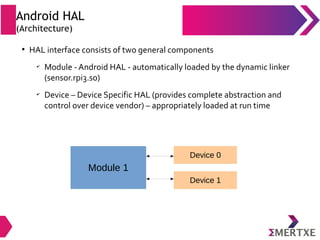
HAL interface consists of two general components
✔
Module - Android HAL - automatically loaded by the dynamic linker
(sensor.rpi3.so)
✔
Device – Device Specific HAL (provides complete abstraction and
control over device vendor) – appropriately loaded at run time
Module 1
Device 0
Device 1
Android HAL
(Module)
●
A module, stored as a shared library (.so file), represents packaged HAL
implementation
●
Contains metadata such as version, name, and author of the module,
which helps Android find and load it correctly
●
The “hardware.h” header file defines struct hw_module_t
●
This strtucture represents a module & contains information such as
module version, author and name
●
API are in <aosp>/hardware/libhardware/include/hardware
Android HAL
(Module...)
●
In addition, hw_module_t struct contains a pointer to another struct,
hw_module_methods_t, that contains a pointer to an "open" function
for the module
●
“open” function is used to initiate communication with the hardware
●
Each “hardware-specific HAL” usually extends generic hw_module_t
struct with additional information for that specific piece of hardware
Android HAL
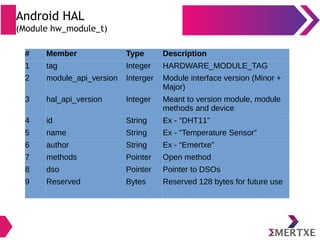
(Module hw_module_t)
# Member Type Description
1 tag Integer HARDWARE_MODULE_TAG
2 module_api_version Interger Module interface version (Minor +
Major)
3 hal_api_version Integer Meant to version module, module
methods and device
4 id String Ex - “DHT11”
5 name String Ex - “Temperature Sensor”
6 author String Ex - “Emertxe”
7 methods Pointer Open method
8 dso Pointer Pointer to DSOs
9 Reserved Bytes Reserved 128 bytes for future use
Android HAL
(Module...)
●
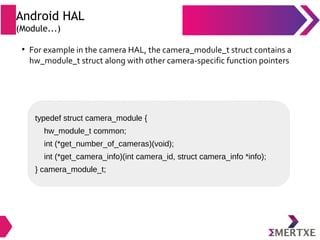
For example in the camera HAL, the camera_module_t struct contains a
hw_module_t struct along with other camera-specific function pointers
typedef struct camera_module {
hw_module_t common;
int (*get_number_of_cameras)(void);
int (*get_camera_info)(int camera_id, struct camera_info *info);
} camera_module_t;
Android HAL
(Naming a module)
●
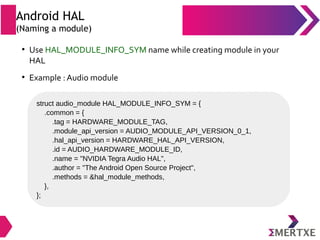
Use HAL_MODULE_INFO_SYM name while creating module in your
HAL
●
Example : Audio module
struct audio_module HAL_MODULE_INFO_SYM = {
.common = {
.tag = HARDWARE_MODULE_TAG,
.module_api_version = AUDIO_MODULE_API_VERSION_0_1,
.hal_api_version = HARDWARE_HAL_API_VERSION,
.id = AUDIO_HARDWARE_MODULE_ID,
.name = "NVIDIA Tegra Audio HAL",
.author = "The Android Open Source Project",
.methods = &hal_module_methods,
},
};
Android HAL
(Device)
●
A device abstracts the actual hardware of your product
●
Example: an audio module can contain a primary audio device (ear-jack),
a USB audio device, or a Bluetooth A2DP audio device
●
A device is represented by the hw_device_t structure
●
APIs are in <aosp>/hardware/libhardware_legacy/include/hardware_legacy
HAL
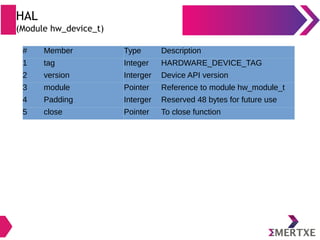
(Module hw_device_t)
# Member Type Description
1 tag Integer HARDWARE_DEVICE_TAG
2 version Interger Device API version
3 module Pointer Reference to module hw_module_t
4 Padding Interger Reserved 48 bytes for future use
5 close Pointer To close function
Android HAL
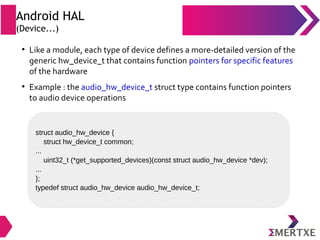
(Device...)
●
Like a module, each type of device defines a more-detailed version of the
generic hw_device_t that contains function pointers for specific features
of the hardware
●
Example : the audio_hw_device_t struct type contains function pointers
to audio device operations
struct audio_hw_device {
struct hw_device_t common;
...
uint32_t (*get_supported_devices)(const struct audio_hw_device *dev);
...
};
typedef struct audio_hw_device audio_hw_device_t;
Android HAL
(Structure)
●
LDD is a HAL for Linux, therefore, Android HAL looks similar to a Linux
device driver
●
Most of the Vendor specific implementations can be done in Android
HAL (rather than the driver)
●
Therefore, the license difference between driver (Open source license
GPL) and HAL (Apache License) will give more level of abstraction to
vendor
●
The driver triggers hardware (say sensor) and deliver the data back to
HAL which is passed back to Android application
Android Sensors Overview
Sensors Overview
(What?)
●
A device that responds to a physical stimulus (as heat, light, sound,
pressure, magnetism, or a particular motion) and transmits a
resulting impulse (as for measurement or operating a control)
– MerriamWebster Dictionary
Sensors Overview
(What?)
●
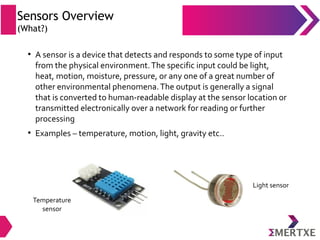
A sensor is a device that detects and responds to some type of input
from the physical environment.The specific input could be light,
heat, motion, moisture, pressure, or any one of a great number of
other environmental phenomena.The output is generally a signal
that is converted to human-readable display at the sensor location or
transmitted electronically over a network for reading or further
processing
●
Examples – temperature, motion, light, gravity etc..
Temperature
sensor
Light sensor
Sensors Overview
(Why?)
●
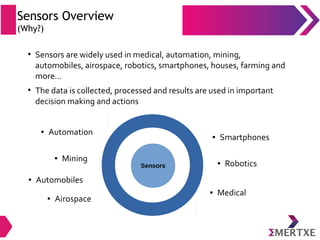
Sensors are widely used in medical, automation, mining,
automobiles, airospace, robotics, smartphones, houses, farming and
more...
●
The data is collected, processed and results are used in important
decision making and actions
Sensors
● Smartphones
● Robotics
● Medical
● Automation
● Mining
● Airospace
● Automobiles
Sensors overview
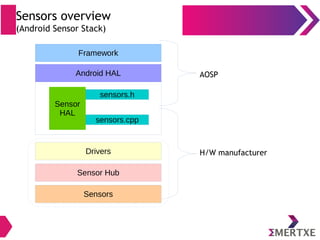
(Android Sensor Stack)
Android HAL
Framework
Sensor
HAL
sensors.h
sensors.cpp
H/W manufacturer
AOSP
Sensors
Sensor Hub
Drivers
Sensors Overview
(Application)
●
App access sensors through APIs
●
App shall rgister to a sensor
●
App specifies its preferred sampling frequency and its latency
requirements
●
Example :
✔
Register with accelerometer
✔
Request events at 100Hz
✔
Events to be reported with a 1-second latency
●
The application will receive events from the accelerometer at a rate
of at least 100Hz, and possibly delayed up to 1 second
Sensors Overview
(Framework)
●
Framework links several applications to HAL
●
HAL itself is single-client
●
Requests are multiplexed by framework to enable access to sensors
by many apps
●
When first app registers to a sensor, the framework sends a request
to the HAL to activate the sensor
●
Framework sends updated requested parameters to HAL for
additional registeration requests from other apps to same sensor
●
Frameworks deactivates the sensor on exit of last app to avoid
unwanted power consumption
Sensors Overview
(Framework)
●
Final Sampling frequency - max of all requested sampling frequencies
●
Meaning, some applications will receive events at a frequency higher
than the one they requested
●
Final maximum reporting latency – min of all requested ones
●
If one application requests one sensor with a maximum reporting
latency of 0, all applications will receive the events from this sensor in
continuous mode even if some requested the sensor with a non-zero
maximum reporting latency
Sensors Overview
(Implications of multiplexing)
●
No guarantee that events won’t arrive at a faster rate
●
No mechanism to send data down from the apps to sensors or their
drivers
●
This ensures one app cannot modify the behavior of sensors and
breaking other apps
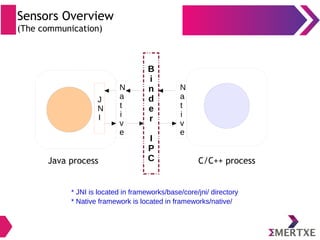
Sensors Overview
(The communication)
B
i
n
d
e
r
I
P
C C/C++ processJava process
J
N
I
N
a
t
i
v
e
* JNI is located in frameworks/base/core/jni/ directory
* Native framework is located in frameworks/native/
N
a
t
i
v
e
Sensors Overview
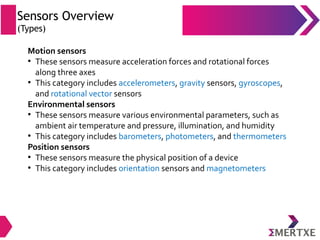
(Types)
Motion sensors
●
These sensors measure acceleration forces and rotational forces
along three axes
●
This category includes accelerometers, gravity sensors, gyroscopes,
and rotational vector sensors
Environmental sensors
●
These sensors measure various environmental parameters, such as
ambient air temperature and pressure, illumination, and humidity
●
This category includes barometers, photometers, and thermometers
Position sensors
●
These sensors measure the physical position of a device
●
This category includes orientation sensors and magnetometers
Sensors Overview
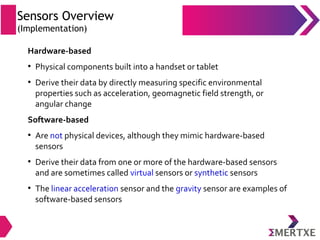
(Implementation)
Hardware-based
●
Physical components built into a handset or tablet
●
Derive their data by directly measuring specific environmental
properties such as acceleration, geomagnetic field strength, or
angular change
Software-based
●
Are not physical devices, although they mimic hardware-based
sensors
●
Derive their data from one or more of the hardware-based sensors
and are sometimes called virtual sensors or synthetic sensors
●
The linear acceleration sensor and the gravity sensor are examples of
software-based sensors
Sensors Overview
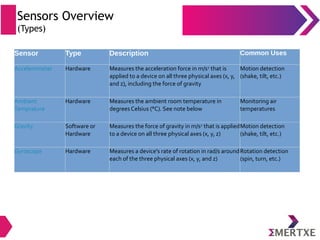
(Types)
Sensor Type Description Common Uses
Accelerometer Hardware Measures the acceleration force in m/s2
that is
applied to a device on all three physical axes (x, y,
and z), including the force of gravity
Motion detection
(shake, tilt, etc.)
Ambient
Temprature
Hardware Measures the ambient room temperature in
degrees Celsius (°C). See note below
Monitoring air
temperatures
Gravity Software or
Hardware
Measures the force of gravity in m/s2
that is applied
to a device on all three physical axes (x, y, z)
Motion detection
(shake, tilt, etc.)
Gyroscope Hardware Measures a device's rate of rotation in rad/s around
each of the three physical axes (x, y, and z)
Rotation detection
(spin, turn, etc.)
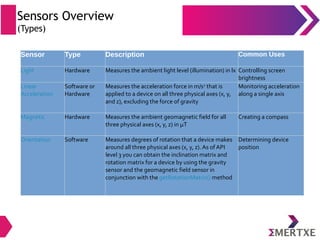
Sensors Overview
(Types)
Sensor Type Description Common Uses
Light Hardware Measures the ambient light level (illumination) in lx Controlling screen
brightness
Linear
Acceleration
Software or
Hardware
Measures the acceleration force in m/s2
that is
applied to a device on all three physical axes (x, y,
and z), excluding the force of gravity
Monitoring acceleration
along a single axis
Magnetic Hardware Measures the ambient geomagnetic field for all
three physical axes (x, y, z) in μT
Creating a compass
Orientation Software Measures degrees of rotation that a device makes
around all three physical axes (x, y, z). As of API
level 3 you can obtain the inclination matrix and
rotation matrix for a device by using the gravity
sensor and the geomagnetic field sensor in
conjunction with the getRotationMatrix() method
Determining device
position
Sensors Overview
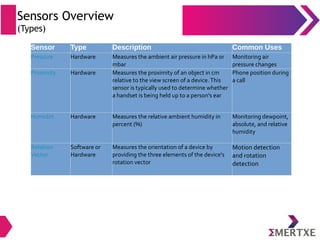
(Types)
Sensor Type Description Common Uses
Pressure Hardware Measures the ambient air pressure in hPa or
mbar
Monitoring air
pressure changes
Proximity Hardware Measures the proximity of an object in cm
relative to the view screen of a device.This
sensor is typically used to determine whether
a handset is being held up to a person's ear
Phone position during
a call
Humidirt Hardware Measures the relative ambient humidity in
percent (%)
Monitoring dewpoint,
absolute, and relative
humidity
Rotation
Vector
Software or
Hardware
Measures the orientation of a device by
providing the three elements of the device's
rotation vector
Motion detection
and rotation
detection
Sensors Overview
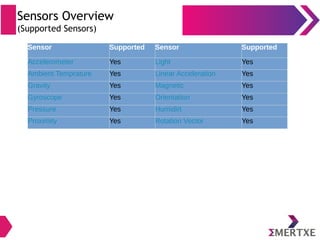
(Supported Sensors)
Sensor Supported Sensor Supported
Accelerometer Yes Light Yes
Ambient Temprature Yes Linear Acceleration Yes
Gravity Yes Magnetic Yes
Gyroscope Yes Orientation Yes
Pressure Yes Humidirt Yes
Proximity Yes Rotation Vector Yes
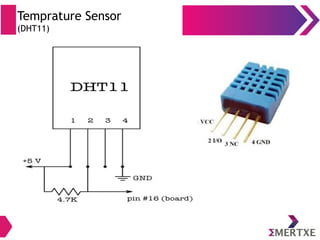
Temprature Sensor
(DHT11)
Android Sensor Framework
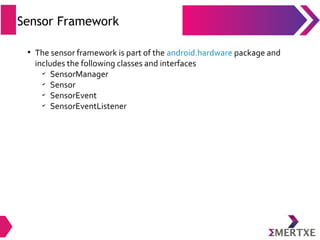
Sensor Framework
●
The sensor framework is part of the android.hardware package and
includes the following classes and interfaces
✔
SensorManager
✔
Sensor
✔
SensorEvent
✔
SensorEventListener
Sensor Framework
Android Sensor Framework can be used for -
●
Determine which sensors are available on a device
●
Determine an individual sensor's capabilities, such as its maximum
range, manufacturer, power requirements and resolution
●
Acquire raw sensor data and define the minimum rate at which you
acquire sensor data
●
Register and unregister sensor event listeners that monitor sensor
changes
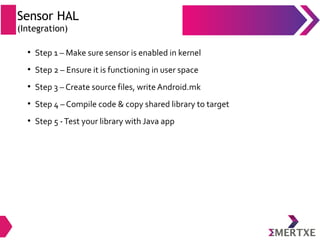
Sensor HAL
(Integration)
●
Step 1 – Make sure sensor is enabled in kernel
●
Step 2 – Ensure it is functioning in user space
●
Step 3 – Create source files, write Android.mk
●
Step 4 – Compile code & copy shared library to target
●
Step 5 -Test your library with Java app
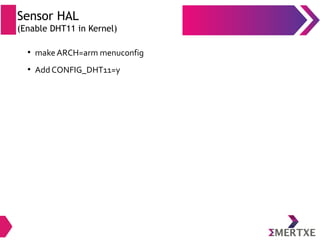
Sensor HAL
(Enable DHT11 in Kernel)
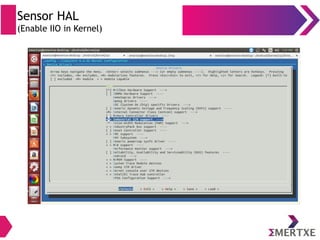
●
make ARCH=arm menuconfig
●
Add CONFIG_DHT11=y
Sensor HAL
(Enable IIO in Kernel)
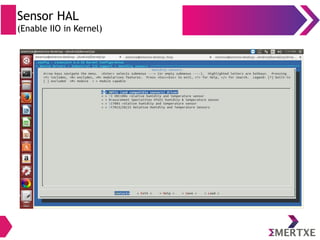
Sensor HAL
(Enable IIO in Kernel)
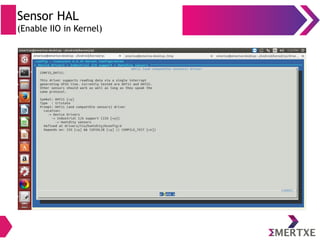
Sensor HAL
(Enable IIO in Kernel)
Sensor HAL
(Boot Configuration)
●
Add following line in /boot/config.txt
✔
dtoverlay=dht11,gpiopin=4
Sensor HAL
(Industrial IO deriver)
●
Device path : /dev/iio:device0
●
Sysfs path : /sys/bus/iio/devices/iio:device0
●
Temperature input file – in_temp_input
●
Humidity input file - in_humidityrelative_input
Sensor HAL
(Testing stand alone DHT11)
●
Use testiio utility program
●
Use test-nusensors utility program
(hardware/libhardware/tests/nusensors/nusensors.cpp)
●
Use strace to debug (su mode)
Sensor HAL
(Sensor HAL integration)
●
Integrating Intel open source sensor HAL
✔
Copy files in hardware/rpi/
✔
Write Android.mk
✔
Compile files and copy output in /system/lib/hw
✔
Use test-nusensors to test native library
✔
Use Android Studio to test at app level
Sensor HAL
(Sensor Event Mapping)
# Type Name Description
1 Integer version Set to sizeof sensors_event_t
2 Integer sensor Sensor handle (identifier)
3 Integer type Sensor Type
4 Integer reserved Reserved for future use
5 Integer timestamp Time is nano-seconds
6 Union Sensor members Used based on type of sensor
7 Integer flags Reserved flags (set to zero)
8 Integer reserved1[3] For future use
●
Data received from h/w sensor shall be mapped to Android sensor
event (sensors_event_t)
●
Members of sensors_event_t are as follows
Sensor HAL
(Sequence of calls)
●
Device boot up : get_sensors_list is called
●
Sensor activation : batch function will be called with the requested parameters,
followed by activate(..., enable=1)
✔
In HAL version 1_0, the order was the opposite: activate was called first, followed
by set_delay
●
Activated : batch function is called when requested to change characteristics of a
sensor
●
flush can be called at any time, even on non-activated sensors (in which case it must
return -EINVAL)
●
When a sensor gets deactivated, activate(..., enable=0) will be called.
●
In parallel to those calls, the poll function will be called repeatedly to request data. poll
can be called even when no sensors are activated
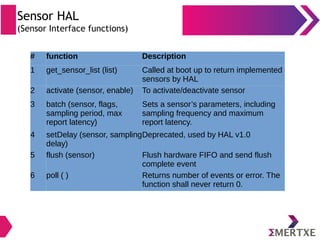
Sensor HAL
(Sensor Interface functions)
# function Description
1 get_sensor_list (list) Called at boot up to return implemented
sensors by HAL
2 activate (sensor, enable) To activate/deactivate sensor
3 batch (sensor, flags,
sampling period, max
report latency)
Sets a sensor’s parameters, including
sampling frequency and maximum
report latency.
4 setDelay (sensor, sampling
delay)
Deprecated, used by HAL v1.0
5 flush (sensor) Flush hardware FIFO and send flush
complete event
6 poll ( ) Returns number of events or error. The
function shall never return 0.
Android App Test Tools
• Robotium
• Monkey Runner
• Renorex
• Monkey Talk
• Appium
• UI Automator

Embedded Android : System Development - Part III

  • 1.
    Android System Development Day- 3 By Team Emertxe
  • 2.
     Android HAL –Overview ✔ Sensor HAL ✔ Understanding data structures and APIs ✔ Adding support for a new sensor ✔ Writing test application for Sensor Table of Content
  • 3.
  • 4.
    Why Android HAL? ● Linuxis designed to handle only systems calls from application ● Android frameworks communicates with the underlying hardware through Java APIs not by system calls ● Android HAL bridges the gap between Android app framework and Linux device driver interface ● The HAL allows you to implement functionality without affecting or modifying higher level system Java Apps Linux Device Driver HAL
  • 5.
    What is AndroidHAL? ● Provides API’s through which Android service can place a request to device ● Uses functions provided by Linux system to service the request from android framework ● A C/C++ layer with purely vendor specific implementation ● Packaged into modules (.so) file & loaded by Android system at appropriate time “The hardware abstraction layer (HAL) defines a standard interface for hardware vendors to implement and allows Android to be agnostic about lower-level driver implementations” “The hardware abstraction layer (HAL) defines a standard interface for hardware vendors to implement and allows Android to be agnostic about lower-level driver implementations”
  • 6.
    Android System (Architecture) Android HAL AndroidSystem Services Binder IPC Proxies Application Framework Linux Kernel Audio HAL Camera HAL Other HALs Other HALs Other HALs
  • 7.
    Android HAL (Architecture) Android HAL AudioHAL DRM HAL BT HAL Camera HAL Sensor HAL Input HAL Media HAL TV HAL
  • 8.
    Android HAL (Architecture) ● Each hardware-specificHAL interface has properties that are defined in hardware/libhardware/include/hardware/hardware.h ● It guarantees that HALs have a predictable structure ● Above interface allows Android system to load correct versions of your HAL modules consistently
  • 9.
    Android HAL (Architecture) ● HAL interfaceconsists of two general components ✔ Module - Android HAL - automatically loaded by the dynamic linker (sensor.rpi3.so) ✔ Device – Device Specific HAL (provides complete abstraction and control over device vendor) – appropriately loaded at run time Module 1 Device 0 Device 1
  • 10.
    Android HAL (Module) ● A module,stored as a shared library (.so file), represents packaged HAL implementation ● Contains metadata such as version, name, and author of the module, which helps Android find and load it correctly ● The “hardware.h” header file defines struct hw_module_t ● This strtucture represents a module & contains information such as module version, author and name ● API are in <aosp>/hardware/libhardware/include/hardware
  • 11.
    Android HAL (Module...) ● In addition,hw_module_t struct contains a pointer to another struct, hw_module_methods_t, that contains a pointer to an "open" function for the module ● “open” function is used to initiate communication with the hardware ● Each “hardware-specific HAL” usually extends generic hw_module_t struct with additional information for that specific piece of hardware
  • 12.
    Android HAL (Module hw_module_t) #Member Type Description 1 tag Integer HARDWARE_MODULE_TAG 2 module_api_version Interger Module interface version (Minor + Major) 3 hal_api_version Integer Meant to version module, module methods and device 4 id String Ex - “DHT11” 5 name String Ex - “Temperature Sensor” 6 author String Ex - “Emertxe” 7 methods Pointer Open method 8 dso Pointer Pointer to DSOs 9 Reserved Bytes Reserved 128 bytes for future use
  • 13.
    Android HAL (Module...) ● For examplein the camera HAL, the camera_module_t struct contains a hw_module_t struct along with other camera-specific function pointers typedef struct camera_module { hw_module_t common; int (*get_number_of_cameras)(void); int (*get_camera_info)(int camera_id, struct camera_info *info); } camera_module_t;
  • 14.
    Android HAL (Naming amodule) ● Use HAL_MODULE_INFO_SYM name while creating module in your HAL ● Example : Audio module struct audio_module HAL_MODULE_INFO_SYM = { .common = { .tag = HARDWARE_MODULE_TAG, .module_api_version = AUDIO_MODULE_API_VERSION_0_1, .hal_api_version = HARDWARE_HAL_API_VERSION, .id = AUDIO_HARDWARE_MODULE_ID, .name = "NVIDIA Tegra Audio HAL", .author = "The Android Open Source Project", .methods = &hal_module_methods, }, };
  • 15.
    Android HAL (Device) ● A deviceabstracts the actual hardware of your product ● Example: an audio module can contain a primary audio device (ear-jack), a USB audio device, or a Bluetooth A2DP audio device ● A device is represented by the hw_device_t structure ● APIs are in <aosp>/hardware/libhardware_legacy/include/hardware_legacy
  • 16.
    HAL (Module hw_device_t) # MemberType Description 1 tag Integer HARDWARE_DEVICE_TAG 2 version Interger Device API version 3 module Pointer Reference to module hw_module_t 4 Padding Interger Reserved 48 bytes for future use 5 close Pointer To close function
  • 17.
    Android HAL (Device...) ● Like amodule, each type of device defines a more-detailed version of the generic hw_device_t that contains function pointers for specific features of the hardware ● Example : the audio_hw_device_t struct type contains function pointers to audio device operations struct audio_hw_device { struct hw_device_t common; ... uint32_t (*get_supported_devices)(const struct audio_hw_device *dev); ... }; typedef struct audio_hw_device audio_hw_device_t;
  • 18.
    Android HAL (Structure) ● LDD isa HAL for Linux, therefore, Android HAL looks similar to a Linux device driver ● Most of the Vendor specific implementations can be done in Android HAL (rather than the driver) ● Therefore, the license difference between driver (Open source license GPL) and HAL (Apache License) will give more level of abstraction to vendor ● The driver triggers hardware (say sensor) and deliver the data back to HAL which is passed back to Android application
  • 19.
  • 20.
    Sensors Overview (What?) ● A devicethat responds to a physical stimulus (as heat, light, sound, pressure, magnetism, or a particular motion) and transmits a resulting impulse (as for measurement or operating a control) – MerriamWebster Dictionary
  • 21.
    Sensors Overview (What?) ● A sensoris a device that detects and responds to some type of input from the physical environment.The specific input could be light, heat, motion, moisture, pressure, or any one of a great number of other environmental phenomena.The output is generally a signal that is converted to human-readable display at the sensor location or transmitted electronically over a network for reading or further processing ● Examples – temperature, motion, light, gravity etc.. Temperature sensor Light sensor
  • 22.
    Sensors Overview (Why?) ● Sensors arewidely used in medical, automation, mining, automobiles, airospace, robotics, smartphones, houses, farming and more... ● The data is collected, processed and results are used in important decision making and actions Sensors ● Smartphones ● Robotics ● Medical ● Automation ● Mining ● Airospace ● Automobiles
  • 23.
    Sensors overview (Android SensorStack) Android HAL Framework Sensor HAL sensors.h sensors.cpp H/W manufacturer AOSP Sensors Sensor Hub Drivers
  • 24.
    Sensors Overview (Application) ● App accesssensors through APIs ● App shall rgister to a sensor ● App specifies its preferred sampling frequency and its latency requirements ● Example : ✔ Register with accelerometer ✔ Request events at 100Hz ✔ Events to be reported with a 1-second latency ● The application will receive events from the accelerometer at a rate of at least 100Hz, and possibly delayed up to 1 second
  • 25.
    Sensors Overview (Framework) ● Framework linksseveral applications to HAL ● HAL itself is single-client ● Requests are multiplexed by framework to enable access to sensors by many apps ● When first app registers to a sensor, the framework sends a request to the HAL to activate the sensor ● Framework sends updated requested parameters to HAL for additional registeration requests from other apps to same sensor ● Frameworks deactivates the sensor on exit of last app to avoid unwanted power consumption
  • 26.
    Sensors Overview (Framework) ● Final Samplingfrequency - max of all requested sampling frequencies ● Meaning, some applications will receive events at a frequency higher than the one they requested ● Final maximum reporting latency – min of all requested ones ● If one application requests one sensor with a maximum reporting latency of 0, all applications will receive the events from this sensor in continuous mode even if some requested the sensor with a non-zero maximum reporting latency
  • 27.
    Sensors Overview (Implications ofmultiplexing) ● No guarantee that events won’t arrive at a faster rate ● No mechanism to send data down from the apps to sensors or their drivers ● This ensures one app cannot modify the behavior of sensors and breaking other apps
  • 28.
    Sensors Overview (The communication) B i n d e r I P CC/C++ processJava process J N I N a t i v e * JNI is located in frameworks/base/core/jni/ directory * Native framework is located in frameworks/native/ N a t i v e
  • 29.
    Sensors Overview (Types) Motion sensors ● Thesesensors measure acceleration forces and rotational forces along three axes ● This category includes accelerometers, gravity sensors, gyroscopes, and rotational vector sensors Environmental sensors ● These sensors measure various environmental parameters, such as ambient air temperature and pressure, illumination, and humidity ● This category includes barometers, photometers, and thermometers Position sensors ● These sensors measure the physical position of a device ● This category includes orientation sensors and magnetometers
  • 30.
    Sensors Overview (Implementation) Hardware-based ● Physical componentsbuilt into a handset or tablet ● Derive their data by directly measuring specific environmental properties such as acceleration, geomagnetic field strength, or angular change Software-based ● Are not physical devices, although they mimic hardware-based sensors ● Derive their data from one or more of the hardware-based sensors and are sometimes called virtual sensors or synthetic sensors ● The linear acceleration sensor and the gravity sensor are examples of software-based sensors
  • 31.
    Sensors Overview (Types) Sensor TypeDescription Common Uses Accelerometer Hardware Measures the acceleration force in m/s2 that is applied to a device on all three physical axes (x, y, and z), including the force of gravity Motion detection (shake, tilt, etc.) Ambient Temprature Hardware Measures the ambient room temperature in degrees Celsius (°C). See note below Monitoring air temperatures Gravity Software or Hardware Measures the force of gravity in m/s2 that is applied to a device on all three physical axes (x, y, z) Motion detection (shake, tilt, etc.) Gyroscope Hardware Measures a device's rate of rotation in rad/s around each of the three physical axes (x, y, and z) Rotation detection (spin, turn, etc.)
  • 32.
    Sensors Overview (Types) Sensor TypeDescription Common Uses Light Hardware Measures the ambient light level (illumination) in lx Controlling screen brightness Linear Acceleration Software or Hardware Measures the acceleration force in m/s2 that is applied to a device on all three physical axes (x, y, and z), excluding the force of gravity Monitoring acceleration along a single axis Magnetic Hardware Measures the ambient geomagnetic field for all three physical axes (x, y, z) in μT Creating a compass Orientation Software Measures degrees of rotation that a device makes around all three physical axes (x, y, z). As of API level 3 you can obtain the inclination matrix and rotation matrix for a device by using the gravity sensor and the geomagnetic field sensor in conjunction with the getRotationMatrix() method Determining device position
  • 33.
    Sensors Overview (Types) Sensor TypeDescription Common Uses Pressure Hardware Measures the ambient air pressure in hPa or mbar Monitoring air pressure changes Proximity Hardware Measures the proximity of an object in cm relative to the view screen of a device.This sensor is typically used to determine whether a handset is being held up to a person's ear Phone position during a call Humidirt Hardware Measures the relative ambient humidity in percent (%) Monitoring dewpoint, absolute, and relative humidity Rotation Vector Software or Hardware Measures the orientation of a device by providing the three elements of the device's rotation vector Motion detection and rotation detection
  • 34.
    Sensors Overview (Supported Sensors) SensorSupported Sensor Supported Accelerometer Yes Light Yes Ambient Temprature Yes Linear Acceleration Yes Gravity Yes Magnetic Yes Gyroscope Yes Orientation Yes Pressure Yes Humidirt Yes Proximity Yes Rotation Vector Yes
  • 35.
  • 36.
  • 37.
    Sensor Framework ● The sensorframework is part of the android.hardware package and includes the following classes and interfaces ✔ SensorManager ✔ Sensor ✔ SensorEvent ✔ SensorEventListener
  • 38.
    Sensor Framework Android SensorFramework can be used for - ● Determine which sensors are available on a device ● Determine an individual sensor's capabilities, such as its maximum range, manufacturer, power requirements and resolution ● Acquire raw sensor data and define the minimum rate at which you acquire sensor data ● Register and unregister sensor event listeners that monitor sensor changes
  • 39.
    Sensor HAL (Integration) ● Step 1– Make sure sensor is enabled in kernel ● Step 2 – Ensure it is functioning in user space ● Step 3 – Create source files, write Android.mk ● Step 4 – Compile code & copy shared library to target ● Step 5 -Test your library with Java app
  • 40.
    Sensor HAL (Enable DHT11in Kernel) ● make ARCH=arm menuconfig ● Add CONFIG_DHT11=y
  • 41.
  • 42.
  • 43.
  • 44.
    Sensor HAL (Boot Configuration) ● Addfollowing line in /boot/config.txt ✔ dtoverlay=dht11,gpiopin=4
  • 45.
    Sensor HAL (Industrial IOderiver) ● Device path : /dev/iio:device0 ● Sysfs path : /sys/bus/iio/devices/iio:device0 ● Temperature input file – in_temp_input ● Humidity input file - in_humidityrelative_input
  • 46.
    Sensor HAL (Testing standalone DHT11) ● Use testiio utility program ● Use test-nusensors utility program (hardware/libhardware/tests/nusensors/nusensors.cpp) ● Use strace to debug (su mode)
  • 47.
    Sensor HAL (Sensor HALintegration) ● Integrating Intel open source sensor HAL ✔ Copy files in hardware/rpi/ ✔ Write Android.mk ✔ Compile files and copy output in /system/lib/hw ✔ Use test-nusensors to test native library ✔ Use Android Studio to test at app level
  • 48.
    Sensor HAL (Sensor EventMapping) # Type Name Description 1 Integer version Set to sizeof sensors_event_t 2 Integer sensor Sensor handle (identifier) 3 Integer type Sensor Type 4 Integer reserved Reserved for future use 5 Integer timestamp Time is nano-seconds 6 Union Sensor members Used based on type of sensor 7 Integer flags Reserved flags (set to zero) 8 Integer reserved1[3] For future use ● Data received from h/w sensor shall be mapped to Android sensor event (sensors_event_t) ● Members of sensors_event_t are as follows
  • 49.
    Sensor HAL (Sequence ofcalls) ● Device boot up : get_sensors_list is called ● Sensor activation : batch function will be called with the requested parameters, followed by activate(..., enable=1) ✔ In HAL version 1_0, the order was the opposite: activate was called first, followed by set_delay ● Activated : batch function is called when requested to change characteristics of a sensor ● flush can be called at any time, even on non-activated sensors (in which case it must return -EINVAL) ● When a sensor gets deactivated, activate(..., enable=0) will be called. ● In parallel to those calls, the poll function will be called repeatedly to request data. poll can be called even when no sensors are activated
  • 50.
    Sensor HAL (Sensor Interfacefunctions) # function Description 1 get_sensor_list (list) Called at boot up to return implemented sensors by HAL 2 activate (sensor, enable) To activate/deactivate sensor 3 batch (sensor, flags, sampling period, max report latency) Sets a sensor’s parameters, including sampling frequency and maximum report latency. 4 setDelay (sensor, sampling delay) Deprecated, used by HAL v1.0 5 flush (sensor) Flush hardware FIFO and send flush complete event 6 poll ( ) Returns number of events or error. The function shall never return 0.
  • 51.
    Android App TestTools • Robotium • Monkey Runner • Renorex • Monkey Talk • Appium • UI Automator