IT Project Management Framework
PLANNING
© Copyright 2017 Visual Paradigm | All Rights Reserved
Planning
Initiation Execution &
Control
CloseoutIdentification
1
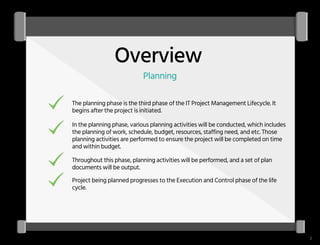
Overview
Planning
The planning phase is the third phase of the IT Project Management Lifecycle. It
begins after the project is initiated.
In the planning phase, various planning activities will be conducted, which includes
the planning of work, schedule, budget, resources, staffing need, and etc. Those
planning activities are performed to ensure the project will be completed on time
and within budget.
Throughout this phase, planning activities will be performed, and a set of plan
documents will be output.
Project being planned progresses to the Execution and Control phase of the life
cycle.
2
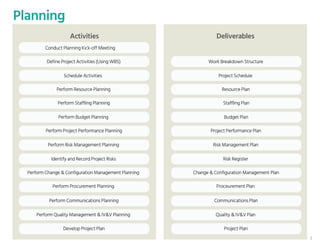
Planning
Conduct Planning Kick-off Meeting
Define Project Activities (Using WBS) Work Breakdown Structure
Schedule Activities Project Schedule
Perform Resource Planning Resource Plan
Perform Staffling Planning Staffling Plan
Perform Budget Planning Budget Plan
Perform Project Performance Planning Project Performance Plan
Perform Risk Management Planning Risk Management Plan
Identify and Record Project Risks Risk Register
Perform Change & Configuration Management Planning Change & Configuration Management Plan
Perform Procurement Planning Proceurement Plan
Activities
Perform Communications Planning
Deliverables
Communications Plan
Perform Quality Management & IV&V Planning Quality & IV&V Plan
Develop Project Plan Project Plan
3
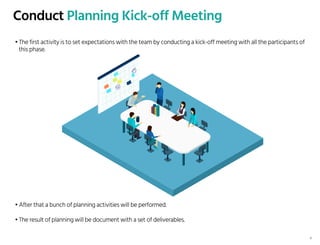
Conduct Planning Kick-off Meeting
• The first activity is to set expectations with the team by conducting a kick-off meeting with all the participants of
this phase.
• After that a bunch of planning activities will be performed.
• The result of planning will be document with a set of deliverables.
4
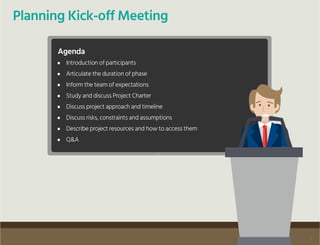
Planning Kick-off Meeting
Agenda
Introduction of participants
Articulate the duration of phase
Inform the team of expectations
Study and discuss Project Charter
Discuss project approach and timeline
Discuss risks, constraints and assumptions
Describe project resources and how to access them
Q&A
5
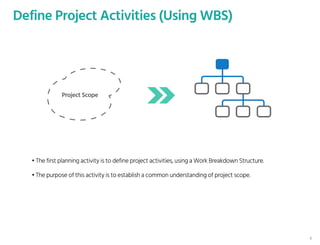
Define Project Activities (Using WBS)
Project Scope
• The first planning activity is to define project activities, using a Work Breakdown Structure.
• The purpose of this activity is to establish a common understanding of project scope.
6
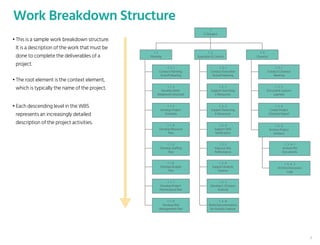
Work Breakdown Structure
• This is a sample work breakdown structure.
It is a description of the work that must be
done to complete the deliverables of a
project.
• The root element is the context element,
which is typically the name of the project.
• Each descending level in the WBS
represents an increasingly detailed
description of the project activities.
1
E-Octopus
1 . 1
Planning
1 . 1 . 1
Conduct Planning
Kickoff Meeting
1 . 2
Execution & Control
1 . 2 . 1
Conduct Execution
Kickoff Meeting
1 . 3
Closeout
1 . 3 . 1
Conduct Closeout
Meeting
1 . 1 . 2
Develop Work
Breakwork Structure
1 . 2 . 2
Support Searching
E-Resources
1 . 3 . 2
Document Lessons
Learned
1 . 1 . 3
Develop Project
Schedule
1 . 2 . 3
Support Reserving
E-Resources
1 . 3 . 3
Create Project
Closeout Report
1 . 1 . 4
Develop Resource
Plan
1 . 2 . 4
Support SMS
Notification
1 . 1 . 5
Develop Staffing
Plan
1 . 2 .5
Improve Site
Performance
1 . 1 .6
Develop Budget
Plan
1 . 2 . 6
Support Analytic
Feature
1 . 1 . 7
Develop Project
Performance Plan
1 . 2 . 7
Develop E-Octopus
Android
1 . 1 . 8
Develop Risk
Management Plan
1 . 2 . 8
Write Documentation
for Analytic Feature
1 . 3 . 4
Archive Project
Artifacts
1 . 3 . 4 . 1
Archive PM
Documents
1 . 3 . 4 . 2
Archive Discussion
Logs
7
Work Breakdown Structure
1
E-Octopus
1 . 1
Planning
1 . 1 . 1
Conduct Planning
Kickoff Meeting
1 . 2
Execution & Control
1 . 2 . 1
Conduct Execution
Kickoff Meeting
1 . 3
Closeout
1 . 3 . 1
Conduct Closeout
Meeting
1 . 1 . 2
Develop Work
Breakwork Structure
1 . 2 . 2
Support Searching
E-Resources
1 . 3 . 2
Document Lessons
Learned
1 . 1 . 3
Develop Project
Schedule
1 . 2 . 3
Support Reserving
E-Resources
1 . 3 . 3
Create Project
Closeout Report
1 . 1 . 4
Develop Resource
Plan
1 . 2 . 4
Support SMS
Notification
1 . 1 . 5
Develop Staffing
Plan
1 . 2 .5
Improve Site
Performance
1 . 1 .6
Develop Budget
Plan
1 . 2 . 6
Support Analytic
Feature
1 . 1 . 7
Develop Project
Performance Plan
1 . 2 . 7
Develop E-Octopus
Android
1 . 1 . 8
Develop Risk
Management Plan
1 . 2 . 8
Write Documentation
for Analytic Feature
1 . 3 . 4
Archive Project
Artifacts
1 . 3 . 4 . 1
Archive PM
Documents
1 . 3 . 4 . 2
Archive Discussion
Logs
Planning
Execution
& Control
Closeout
Phase-based structures
Unified CRM
Back-Office
Suite
User Manual
Deliverable-based structures
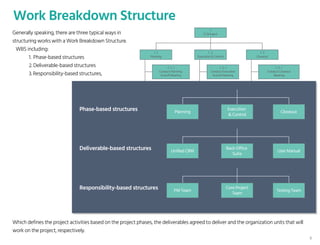
Generally speaking, there are three typical ways in
structuring works with a Work Breakdown Structure.
WBS including:
1. Phase-based structures
2. Deliverable-based structures
3. Responsibility-based structures,
Which defines the project activities based on the project phases, the deliverables agreed to deliver and the organization units that will
work on the project, respectively.
PM Team
Core Project
Team
Testing Team
Responsibility-based structures
8
Work Breakdown Structure
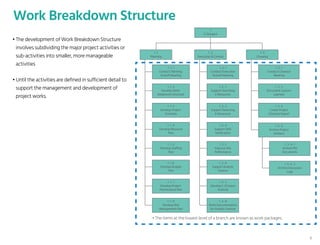
• The development of Work Breakdown Structure
involves subdividing the major project activities or
sub-activities into smaller, more manageable
activities
• Until the activities are defined in sufficient detail to
support the management and development of
project works.
1
E-Octopus
1 . 1
Planning
1 . 1 . 1
Conduct Planning
Kickoff Meeting
1 . 2
Execution & Control
1 . 2 . 1
Conduct Execution
Kickoff Meeting
1 . 3
Closeout
1 . 3 . 1
Conduct Closeout
Meeting
1 . 1 . 2
Develop Work
Breakwork Structure
1 . 2 . 2
Support Searching
E-Resources
1 . 3 . 2
Document Lessons
Learned
1 . 1 . 3
Develop Project
Schedule
1 . 2 . 3
Support Reserving
E-Resources
1 . 3 . 3
Create Project
Closeout Report
1 . 1 . 4
Develop Resource
Plan
1 . 2 . 4
Support SMS
Notification
1 . 1 . 5
Develop Staffing
Plan
1 . 2 .5
Improve Site
Performance
1 . 1 .6
Develop Budget
Plan
1 . 2 . 6
Support Analytic
Feature
1 . 1 . 7
Develop Project
Performance Plan
1 . 2 . 7
Develop E-Octopus
Android
1 . 1 . 8
Develop Risk
Management Plan
1 . 2 . 8
Write Documentation
for Analytic Feature
1 . 3 . 4
Archive Project
Artifacts
1 . 3 . 4 . 1
Archive PM
Documents
1 . 3 . 4 . 2
Archive Discussion
Logs
• The items at the lowest level of a branch are known as work packages.
9
Schedule Activities
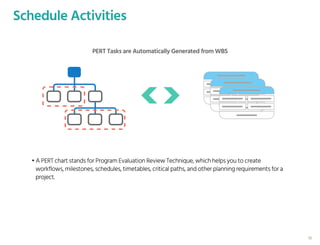
PERT Tasks are Automatically Generated from WBS
• A PERT chart stands for Program Evaluation Review Technique, which helps you to create
workflows, milestones, schedules, timetables, critical paths, and other planning requirements for a
project.
10
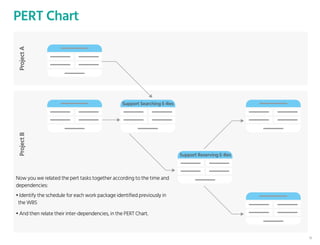
PERT ChartProjectAProjectB
Support Searching E-Res
Support Reserving E-Res
• Identify the schedule for each work package identified previously in
the WBS
• And then relate their inter-dependencies, in the PERT Chart.
Now you we related the pert tasks together according to the time and
dependencies:
11
PERT Chart
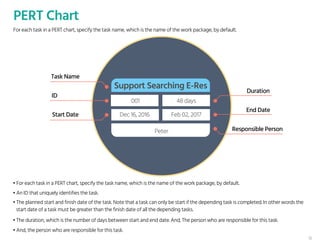
For each task in a PERT chart, specify the task name, which is the name of the work package, by default.
Support Searching E-Res
Peter
Dec 16, 2016 Feb 02, 2017
001 48 days
Task Name
ID
Start Date
Duration
End Date
Responsible Person
• An ID that uniquely identifies the task.
• For each task in a PERT chart, specify the task name, which is the name of the work package, by default.
• The planned start and finish date of the task. Note that a task can only be start if the depending task is completed. In other words the
start date of a task must be greater than the finish date of all the depending tasks.
• The duration, which is the number of days between start and end date. And, The person who are responsible for this task.
• And, the person who are responsible for this task.
12
PERT Chart
Amend Vacany Task List
ID
1
2
3
4
5
6
7
8
9
10
Design Vacancy Editing screen
Design vacancy approval pag...
Implement the vacancy amen...
Implement email delivery logic
Log the amendment record
Presents the amendement re...
Test vacancy editing
Test vacancy amendment ap...
Prepare manual on the Vacan...
2017-03-25
2017-03-25
2017-03-25
2017-03-25
2017-03-29
2017-04-03
2017-04-06
2017-04-07
2017-04-11
2017-04-22
2017-03-27
2017-03-27
2017-04-07
2017-03-30
2017-04-03
2017-04-06
2017-04-07
2017-04-10
2017-04-11
2017-04-22
Design Vacancy Editing screen
Design vacancy approval page (amendment)
Implement the vacancy amendment logic
Implement the vacancy amendement approval logic
Implement email delivery logic
Log the amend
Title Start Time End Time Sat 03-25 Sun 03-26 Mon 03-27 Tues 03-28 Wed 03-29
Sun 03-06 - Sat 04-01
Thur 03-30 Fri 03-31 Sat 04-01
Week Month
Sun 04-0
Gantt Chart
Support Searching E-Res
Support Reserving E-Res
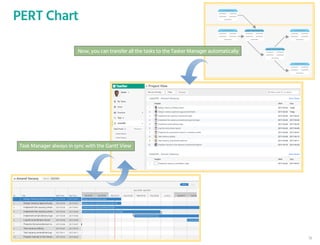
Now, you can transfer all the tasks to the Tasker Manager automatically
Task Manager always in sync with the Gantt View
13
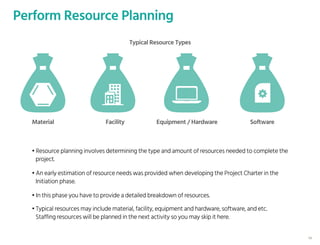
Perform Resource Planning
Material Facility Equipment / Hardware Software
• Resource planning involves determining the type and amount of resources needed to complete the
project.
• An early estimation of resource needs was provided when developing the Project Charter in the
Initiation phase.
• In this phase you have to provide a detailed breakdown of resources.
• Typical resources may include material, facility, equipment and hardware, software, and etc.
Staffing resources will be planned in the next activity so you may skip it here.
Typical Resource Types
14
Typical Resource Types
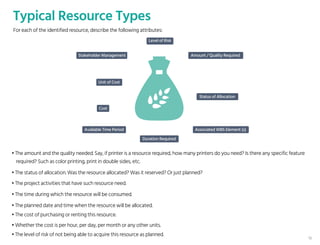
• The amount and the quality needed. Say, if printer is a resource required, how many printers do you need? Is there any specific feature
required? Such as color printing, print in double sides, etc.
• The status of allocation. Was the resource allocated? Was it reserved? Or just planned?
• The project activities that have such resource need.
• The time during which the resource will be consumed.
• The planned date and time when the resource will be allocated.
• The cost of purchasing or renting this resource.
• Whether the cost is per hour, per day, per month or any other units.
• The level of risk of not being able to acquire this resource as planned.
Level of Risk
Amount / Quality Required
Status of Allocation
Cost
Associated WBS Element (s)Available Time Period
Duration Required
Stakeholder Management
Unit of Cost
For each of the identified resource, describe the following attributes:
15
Perform Staffing Planning
• Staffing Plan is sometimes known as Human Resources Plan.
• The purpose of the Staffing Plan is to achieve project success by ensuring the appropriate human
resources with the necessary skills are acquired
16
Identify the Project Roles Required
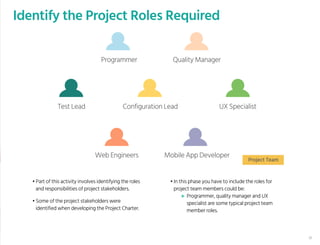
• Part of this activity involves identifying the roles
and responsibilities of project stakeholders.
• In this phase you have to include the roles for
project team members could be:
Programmer, quality manager and UX
specialist are some typical project team
member roles.
• Some of the project stakeholders were
identified when developing the Project Charter.
Test Lead Configuration Lead
Programmer Quality Manager
UX Specialist
Web Engineers Mobile App Developer
Project Team
17
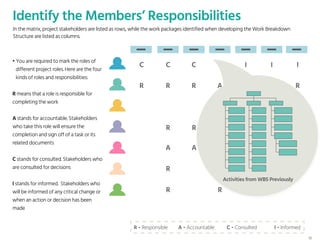
Identify the Members’ Responsibilities
R - Responsible A - Accountable C - Consulted I - Informed
In the matrix, project stakeholders are listed as rows, while the work packages identified when developing the Work Breakdown
Structure are listed as columns.
R R R A A R R
C C R
R R R
A A C
R R
R R
I
C C C C I I I
• You are required to mark the roles of
different project roles. Here are the four
kinds of roles and responsibilities:
R means that a role is responsible for
completing the work
A stands for accountable. Stakeholders
who take this role will ensure the
completion and sign off of a task or its
related documents
C stands for consulted. Stakeholders who
are consulted for decisions
I stands for informed. Stakeholders who
will be informed of any critical change or
when an action or decision has been
made
Activities from WBS Previously
18
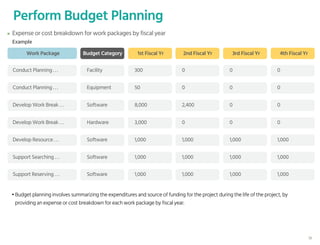
Perform Budget Planning
Work Package
Example
1st Fiscal Yr
Conduct Planning . . . 300
Conduct Planning . . . 50
Develop Work Break . . . 8,000
Develop Work Break . . . 3,000
Develop Resource . . . 1,000
Support Searching . . . 1,000
Support Reserving . . . 1,000
Budget Category
Facility
Equipment
Software
Hardware
Software
Software
Software
2nd Fiscal Yr
0
0
2,400
0
1,000
1,000
1,000
3rd Fiscal Yr
0
0
0
0
1,000
1,000
1,000
4th Fiscal Yr
0
0
0
0
1,000
1,000
1,000
Expense or cost breakdown for work packages by fiscal year
• Budget planning involves summarizing the expenditures and source of funding for the project during the life of the project, by
providing an expense or cost breakdown for each work package by fiscal year.
19
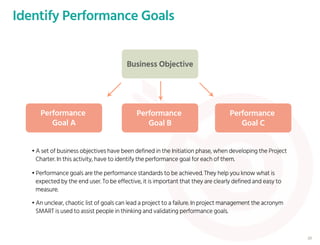
Identify Performance Goals
Business Objective
Performance
Goal A
Performance
Goal B
Performance
Goal C
• A set of business objectives have been defined in the Initiation phase, when developing the Project
Charter. In this activity, have to identify the performance goal for each of them.
• Performance goals are the performance standards to be achieved. They help you know what is
expected by the end user. To be effective, it is important that they are clearly defined and easy to
measure.
• An unclear, chaotic list of goals can lead a project to a failure. In project management the acronym
SMART is used to assist people in thinking and validating performance goals.
20
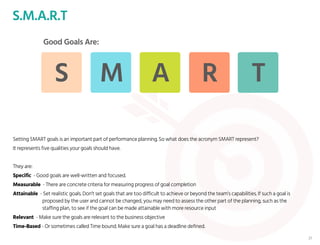
S.M.A.R.T
Good Goals Are:
S M A R T
Setting SMART goals is an important part of performance planning. So what does the acronym SMART represent?
It represents five qualities your goals should have.
They are:
Specific - Good goals are well-written and focused.
Measurable - There are concrete criteria for measuring progress of goal completion
Attainable - Set realistic goals. Don’t set goals that are too difficult to achieve or beyond the team’s capabilities. If such a goal is
proposed by the user and cannot be changed, you may need to assess the other part of the planning, such as the
staffing plan, to see if the goal can be made attainable with more resource input
Relevant - Make sure the goals are relevant to the business objective
Time-Based - Or sometimes called Time bound. Make sure a goal has a deadline defined.
21
Identify Performance Goals - Example
Improve
customer’s satisfaction
The shop page must be e
qually displayed in IE 9+,
Firefox 40+, Chrome 50+
Increase the average
daily view count of the
shop page by 20%.
Complete
‘Add Item to Cart’
by noon 13/8/2017
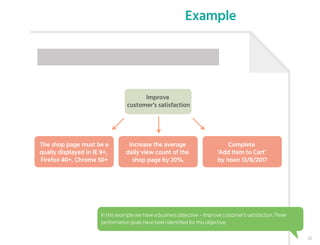
In this example we have a business objective – Improve customer’s satisfaction. Three
performance goals have been identified for this objective.
22
Identify Performance Goals - Example
Improve
customer’s satisfaction
The shop page must be e
qually displayed in IE 9+,
Firefox 40+, Chrome 50+
Increase the average
daily view count of the
shop page by 20%.
Complete
‘Add Item to Cart’
by noon 13/8/2017
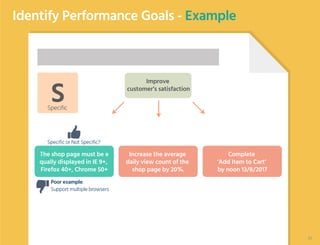
Poor example:
Support multiple browsers
SSpecific
Specific or Not Specific?
23
Identify Performance Goals - Example
Improve
customer’s satisfaction
The shop page must be e
qually displayed in IE 9+,
Firefox 40+, Chrome 50+
Increase the average
daily view count of the
shop page by 20%.
Complete
‘Add Item to Cart’
by noon 13/8/2017
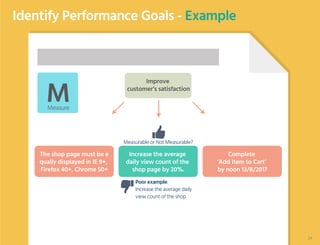
Poor example:
Increase the average daily
view count of the shop
MMeasure
Measurable or Not Measurable?
24
Identify Performance Goals - Example
Improve
customer’s satisfaction
The shop page must be e
qually displayed in IE 9+,
Firefox 40+, Chrome 50+
Increase the average
daily view count of the
shop page by 20%.
Complete
‘Add Item to Cart’
by noon 13/8/2017
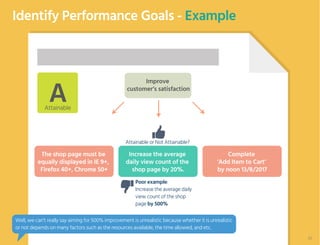
Poor example:
Increase the average daily
view count of the shop
page by 500%
AAttainable
Attainable or Not Attainable?
The shop page must be
equally displayed in IE 9+,
Firefox 40+, Chrome 50+
Well, we can’t really say aiming for 500% improvement is unrealistic because whether it is unrealistic
or not depends on many factors such as the resources available, the time allowed, and etc.
25
Identify Performance Goals - Example
Improve
customer’s satisfaction
The shop page must be
equally displayed in IE 9+,
Firefox 40+, Chrome 50+
Increase the average
daily view count of the
shop page by 20%.
Complete
‘Add Item to Cart’
by noon 13/8/2017
Poor example:
Improve the shop page’s
ranking in search engine by
10%
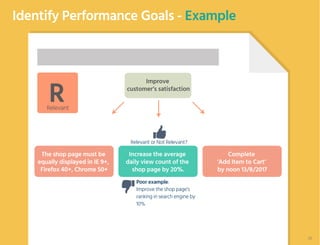
RRelevant
Relevant or Not Relevant?
26
Identify Performance Goals - Example
Improve
customer’s satisfaction
The shop page must be
equally displayed in IE 9+,
Firefox 40+, Chrome 50+
Increase the average
daily view count of the
shop page by 20%.
Complete
‘Add Item to Cart’
by noon 13/8/2017
Poor example:
Complete ‘Add Item to
Cart’ before the interim
meeting
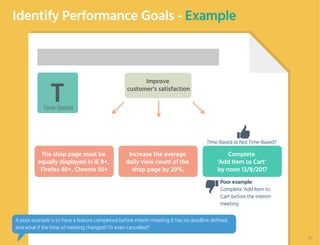
TTime-Based
Time-Based or Not Time-Based?
A poor example is to have a feature completed before interim meeting. It has no deadline defined,
and what if the time of meeting changed? Or even cancelled?
27
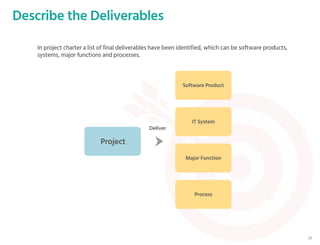
Describe the Deliverables
In project charter a list of final deliverables have been identified, which can be software products,
systems, major functions and processes.
Project
Software Product
IT System
Major Function
Process
Deliver
28
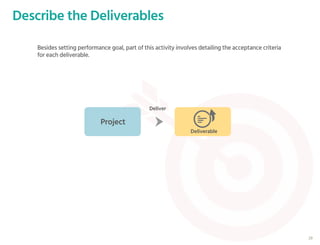
Besides setting performance goal, part of this activity involves detailing the acceptance criteria
for each deliverable.
Project
Deliverable
Deliver
Describe the Deliverables
29
Describe the Deliverables
Deliverable
Detailed Description
Planning Time of CompletionAccept Criteria
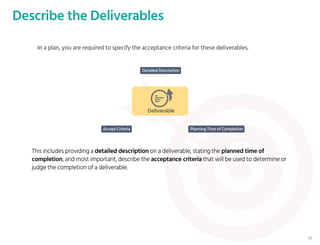
In a plan, you are required to specify the acceptance criteria for these deliverables.
This includes providing a detailed description on a deliverable, stating the planned time of
completion, and most important, describe the acceptance criteria that will be used to determine or
judge the completion of a deliverable.
30
Perform Risk Management Planning
• Risks have negative impacts to a project.
• Therefore, it is important to take appropriate measures to identify, migrate,
manage and control them.
• Risk Management Planning is to identify and detail these aspects.
31
Risk Management
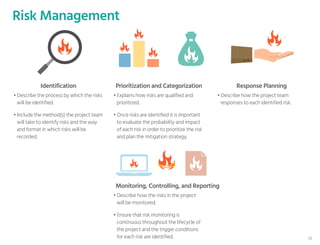
• Describe the process by which the risks
will be identified.
• Include the method(s) the project team
will take to identify risks and the way
and format in which risks will be
recorded.
• Explains how risks are qualified and
prioritized.
• Once risks are identified it is important
to evaluate the probability and impact
of each risk in order to prioritize the risk
and plan the mitigation strategy.
Identification Prioritization and Categorization
• Describe how the risks in the project
will be monitored.
• Ensure that risk monitoring is
continuous throughout the lifecycle of
the project and the trigger conditions
for each risk are identified.
Monitoring, Controlling, and Reporting
• Describe how the project team
responses to each identified risk.
Response Planning
32
Risk Register – Major Elements
• Identify project risks by following the risk management
approach described under the Risk Management Plan.
• Information of each identified risk is stored in Risk Register.
• The Risk Register is a log of all identified risks.
• It shows the probability and impact of the risks to the
project, mitigation strategy, and when the risk is estimated
to occur.
• This Risk Register is created in the Planning phase of the
project, and be updated in the Execution and Control phase
with the risks identified during the execution of project
activities.
Elements of Risk Register
Affected Work Packages
Probability [1 of 10]
Impact [1 of 10]
Risk Score [Probability x Impact]
Risk Management Approach / Migration Actions
Early Warning Signs / Trigger
Risk Owner
Date of Last Update
33
Perform Change & Configuration Management Planning
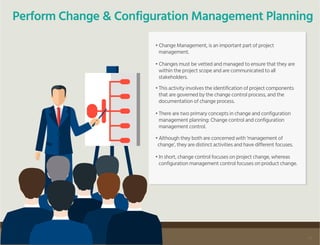
• Change Management, is an important part of project
management.
• Changes must be vetted and managed to ensure that they are
within the project scope and are communicated to all
stakeholders.
• This activity involves the identification of project components
that are governed by the change control process, and the
documentation of change process.
• There are two primary concepts in change and configuration
management planning: Change control and configuration
management control.
• Although they both are concerned with ‘management of
change’, they are distinct activities and have different focuses.
• In short, change control focuses on project change, whereas
configuration management control focuses on product change.
34
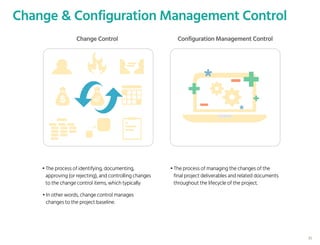
• The process of identifying, documenting,
approving (or rejecting), and controlling changes
to the change control items, which typically
• The process of managing the changes of the
final project deliverables and related documents
throughout the lifecycle of the project.
• In other words, change control manages
changes to the project baseline.
Change & Configuration Management Control
Change Control Configuration Management Control
35
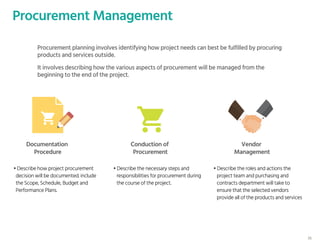
Procurement Management
• Describe how project procurement
decision will be documented. include
the Scope, Schedule, Budget and
Performance Plans.
• Describe the necessary steps and
responsibilities for procurement during
the course of the project.
• Describe the roles and actions the
project team and purchasing and
contracts department will take to
ensure that the selected vendors
provide all of the products and services
Procurement planning involves identifying how project needs can best be fulfilled by procuring
products and services outside.
It involves describing how the various aspects of procurement will be managed from the
beginning to the end of the project.
Documentation
Procedure
Conduction of
Procurement
Vendor
Management
36
Perform Communications Planning
• Different project stakeholders have different information needs. For example, the executive sponsor may want to
know about how the project is going.
• It is important for communications to be performed smoothly so that the information can be delivered to
stakeholders as needed.
• In order for the project members, customers and other stakeholders to have the information they need to achieve
their duties, and to manage stakeholders’ expectations about how the project is progressing, it is important to
document the information needs and the way to deliver the information.
In project management, communication is the way to deliver information needed by someone.
37
Communications Requirements
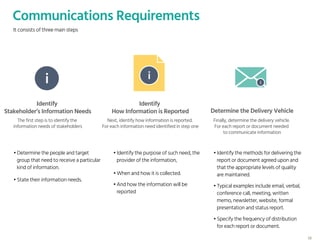
It consists of three main steps
i i i
Identify
Stakeholder’s Information Needs
Identify
How Information is Reported Determine the Delivery Vehicle
The first step is to identify the
information needs of stakeholders
Next, identify how information is reported.
For each information need identified in step one
Finally, determine the delivery vehicle.
For each report or document needed
to communicate information
• Determine the people and target
group that need to receive a particular
kind of information.
• Identify the purpose of such need, the
provider of the information,
• Identify the methods for delivering the
report or document agreed upon and
that the appropriate levels of quality
are maintained.
• State their information needs.
• When and how it is collected.
• And how the information will be
reported
• Typical examples include email, verbal,
conference call, meeting, written
memo, newsletter, website, formal
presentation and status report.
• Specify the frequency of distribution
for each report or document.
38
40
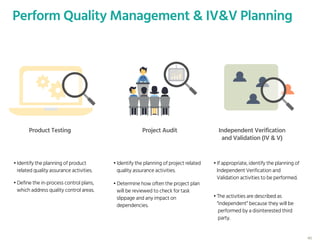
Perform Quality Management & IV&V Planning
Product Testing Project Audit Independent Verification
and Validation (IV & V)
• Identify the planning of product
related quality assurance activities.
• Identify the planning of project related
quality assurance activities.
• If appropriate, identify the planning of
Independent Verification and
Validation activities to be performed.
• Define the in-process control plans,
which address quality control areas.
• Determine how often the project plan
will be reviewed to check for task
slippage and any impact on
dependencies.
• The activities are described as
“independent” because they will be
performed by a disinterested third
party.
Work Breakdown Structure
Project Schedule
Resource Plan
Staffing Plan
Change & Configuration Management Plan
Procurement Plan
Communications Plan
Quality Management & IV&V Plan
Budget Plan
Project Performance Plan
Risk Management Plan
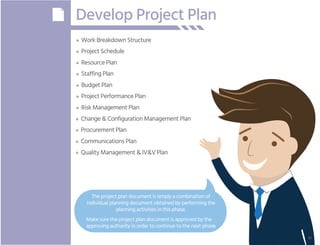
Develop Project Plan
The project plan document is simply a combination of
individual planning document obtained by performing the
planning activities in this phase.
Make sure the project plan document is approved by the
approving authority in order to continue to the next phase.
41
Understanding the objective of the Planning Phase
The core activities:
• Conduct Planning Kick-off Meeting
• Develop the various components of a Project Plans
Summary
42
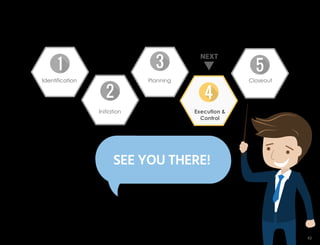
NEXT
SEE YOU THERE!
Identification Closeout
Initiation
Planning
Execution &
Control
43

PMBOK Planning Process Group

  • 1.
    IT Project ManagementFramework PLANNING © Copyright 2017 Visual Paradigm | All Rights Reserved Planning Initiation Execution & Control CloseoutIdentification 1
  • 2.
    Overview Planning The planning phaseis the third phase of the IT Project Management Lifecycle. It begins after the project is initiated. In the planning phase, various planning activities will be conducted, which includes the planning of work, schedule, budget, resources, staffing need, and etc. Those planning activities are performed to ensure the project will be completed on time and within budget. Throughout this phase, planning activities will be performed, and a set of plan documents will be output. Project being planned progresses to the Execution and Control phase of the life cycle. 2
  • 3.
    Planning Conduct Planning Kick-offMeeting Define Project Activities (Using WBS) Work Breakdown Structure Schedule Activities Project Schedule Perform Resource Planning Resource Plan Perform Staffling Planning Staffling Plan Perform Budget Planning Budget Plan Perform Project Performance Planning Project Performance Plan Perform Risk Management Planning Risk Management Plan Identify and Record Project Risks Risk Register Perform Change & Configuration Management Planning Change & Configuration Management Plan Perform Procurement Planning Proceurement Plan Activities Perform Communications Planning Deliverables Communications Plan Perform Quality Management & IV&V Planning Quality & IV&V Plan Develop Project Plan Project Plan 3
  • 4.
    Conduct Planning Kick-offMeeting • The first activity is to set expectations with the team by conducting a kick-off meeting with all the participants of this phase. • After that a bunch of planning activities will be performed. • The result of planning will be document with a set of deliverables. 4
  • 5.
    Planning Kick-off Meeting Agenda Introductionof participants Articulate the duration of phase Inform the team of expectations Study and discuss Project Charter Discuss project approach and timeline Discuss risks, constraints and assumptions Describe project resources and how to access them Q&A 5
  • 6.
    Define Project Activities(Using WBS) Project Scope • The first planning activity is to define project activities, using a Work Breakdown Structure. • The purpose of this activity is to establish a common understanding of project scope. 6
  • 7.
    Work Breakdown Structure •This is a sample work breakdown structure. It is a description of the work that must be done to complete the deliverables of a project. • The root element is the context element, which is typically the name of the project. • Each descending level in the WBS represents an increasingly detailed description of the project activities. 1 E-Octopus 1 . 1 Planning 1 . 1 . 1 Conduct Planning Kickoff Meeting 1 . 2 Execution & Control 1 . 2 . 1 Conduct Execution Kickoff Meeting 1 . 3 Closeout 1 . 3 . 1 Conduct Closeout Meeting 1 . 1 . 2 Develop Work Breakwork Structure 1 . 2 . 2 Support Searching E-Resources 1 . 3 . 2 Document Lessons Learned 1 . 1 . 3 Develop Project Schedule 1 . 2 . 3 Support Reserving E-Resources 1 . 3 . 3 Create Project Closeout Report 1 . 1 . 4 Develop Resource Plan 1 . 2 . 4 Support SMS Notification 1 . 1 . 5 Develop Staffing Plan 1 . 2 .5 Improve Site Performance 1 . 1 .6 Develop Budget Plan 1 . 2 . 6 Support Analytic Feature 1 . 1 . 7 Develop Project Performance Plan 1 . 2 . 7 Develop E-Octopus Android 1 . 1 . 8 Develop Risk Management Plan 1 . 2 . 8 Write Documentation for Analytic Feature 1 . 3 . 4 Archive Project Artifacts 1 . 3 . 4 . 1 Archive PM Documents 1 . 3 . 4 . 2 Archive Discussion Logs 7
  • 8.
    Work Breakdown Structure 1 E-Octopus 1. 1 Planning 1 . 1 . 1 Conduct Planning Kickoff Meeting 1 . 2 Execution & Control 1 . 2 . 1 Conduct Execution Kickoff Meeting 1 . 3 Closeout 1 . 3 . 1 Conduct Closeout Meeting 1 . 1 . 2 Develop Work Breakwork Structure 1 . 2 . 2 Support Searching E-Resources 1 . 3 . 2 Document Lessons Learned 1 . 1 . 3 Develop Project Schedule 1 . 2 . 3 Support Reserving E-Resources 1 . 3 . 3 Create Project Closeout Report 1 . 1 . 4 Develop Resource Plan 1 . 2 . 4 Support SMS Notification 1 . 1 . 5 Develop Staffing Plan 1 . 2 .5 Improve Site Performance 1 . 1 .6 Develop Budget Plan 1 . 2 . 6 Support Analytic Feature 1 . 1 . 7 Develop Project Performance Plan 1 . 2 . 7 Develop E-Octopus Android 1 . 1 . 8 Develop Risk Management Plan 1 . 2 . 8 Write Documentation for Analytic Feature 1 . 3 . 4 Archive Project Artifacts 1 . 3 . 4 . 1 Archive PM Documents 1 . 3 . 4 . 2 Archive Discussion Logs Planning Execution & Control Closeout Phase-based structures Unified CRM Back-Office Suite User Manual Deliverable-based structures Generally speaking, there are three typical ways in structuring works with a Work Breakdown Structure. WBS including: 1. Phase-based structures 2. Deliverable-based structures 3. Responsibility-based structures, Which defines the project activities based on the project phases, the deliverables agreed to deliver and the organization units that will work on the project, respectively. PM Team Core Project Team Testing Team Responsibility-based structures 8
  • 9.
    Work Breakdown Structure •The development of Work Breakdown Structure involves subdividing the major project activities or sub-activities into smaller, more manageable activities • Until the activities are defined in sufficient detail to support the management and development of project works. 1 E-Octopus 1 . 1 Planning 1 . 1 . 1 Conduct Planning Kickoff Meeting 1 . 2 Execution & Control 1 . 2 . 1 Conduct Execution Kickoff Meeting 1 . 3 Closeout 1 . 3 . 1 Conduct Closeout Meeting 1 . 1 . 2 Develop Work Breakwork Structure 1 . 2 . 2 Support Searching E-Resources 1 . 3 . 2 Document Lessons Learned 1 . 1 . 3 Develop Project Schedule 1 . 2 . 3 Support Reserving E-Resources 1 . 3 . 3 Create Project Closeout Report 1 . 1 . 4 Develop Resource Plan 1 . 2 . 4 Support SMS Notification 1 . 1 . 5 Develop Staffing Plan 1 . 2 .5 Improve Site Performance 1 . 1 .6 Develop Budget Plan 1 . 2 . 6 Support Analytic Feature 1 . 1 . 7 Develop Project Performance Plan 1 . 2 . 7 Develop E-Octopus Android 1 . 1 . 8 Develop Risk Management Plan 1 . 2 . 8 Write Documentation for Analytic Feature 1 . 3 . 4 Archive Project Artifacts 1 . 3 . 4 . 1 Archive PM Documents 1 . 3 . 4 . 2 Archive Discussion Logs • The items at the lowest level of a branch are known as work packages. 9
  • 10.
    Schedule Activities PERT Tasksare Automatically Generated from WBS • A PERT chart stands for Program Evaluation Review Technique, which helps you to create workflows, milestones, schedules, timetables, critical paths, and other planning requirements for a project. 10
  • 11.
    PERT ChartProjectAProjectB Support SearchingE-Res Support Reserving E-Res • Identify the schedule for each work package identified previously in the WBS • And then relate their inter-dependencies, in the PERT Chart. Now you we related the pert tasks together according to the time and dependencies: 11
  • 12.
    PERT Chart For eachtask in a PERT chart, specify the task name, which is the name of the work package, by default. Support Searching E-Res Peter Dec 16, 2016 Feb 02, 2017 001 48 days Task Name ID Start Date Duration End Date Responsible Person • An ID that uniquely identifies the task. • For each task in a PERT chart, specify the task name, which is the name of the work package, by default. • The planned start and finish date of the task. Note that a task can only be start if the depending task is completed. In other words the start date of a task must be greater than the finish date of all the depending tasks. • The duration, which is the number of days between start and end date. And, The person who are responsible for this task. • And, the person who are responsible for this task. 12
  • 13.
    PERT Chart Amend VacanyTask List ID 1 2 3 4 5 6 7 8 9 10 Design Vacancy Editing screen Design vacancy approval pag... Implement the vacancy amen... Implement the vacancy amen... Implement email delivery logic Log the amendment record Presents the amendement re... Test vacancy editing Test vacancy amendment ap... Prepare manual on the Vacan... 2017-03-25 2017-03-25 2017-03-25 2017-03-25 2017-03-29 2017-04-03 2017-04-06 2017-04-07 2017-04-11 2017-04-22 2017-03-27 2017-03-27 2017-04-07 2017-03-30 2017-04-03 2017-04-06 2017-04-07 2017-04-10 2017-04-11 2017-04-22 Design Vacancy Editing screen Design vacancy approval page (amendment) Implement the vacancy amendment logic Implement the vacancy amendement approval logic Implement email delivery logic Log the amend Title Start Time End Time Sat 03-25 Sun 03-26 Mon 03-27 Tues 03-28 Wed 03-29 Sun 03-06 - Sat 04-01 Thur 03-30 Fri 03-31 Sat 04-01 Week Month Sun 04-0 Gantt Chart Support Searching E-Res Support Reserving E-Res Now, you can transfer all the tasks to the Tasker Manager automatically Task Manager always in sync with the Gantt View 13
  • 14.
    Perform Resource Planning MaterialFacility Equipment / Hardware Software • Resource planning involves determining the type and amount of resources needed to complete the project. • An early estimation of resource needs was provided when developing the Project Charter in the Initiation phase. • In this phase you have to provide a detailed breakdown of resources. • Typical resources may include material, facility, equipment and hardware, software, and etc. Staffing resources will be planned in the next activity so you may skip it here. Typical Resource Types 14
  • 15.
    Typical Resource Types •The amount and the quality needed. Say, if printer is a resource required, how many printers do you need? Is there any specific feature required? Such as color printing, print in double sides, etc. • The status of allocation. Was the resource allocated? Was it reserved? Or just planned? • The project activities that have such resource need. • The time during which the resource will be consumed. • The planned date and time when the resource will be allocated. • The cost of purchasing or renting this resource. • Whether the cost is per hour, per day, per month or any other units. • The level of risk of not being able to acquire this resource as planned. Level of Risk Amount / Quality Required Status of Allocation Cost Associated WBS Element (s)Available Time Period Duration Required Stakeholder Management Unit of Cost For each of the identified resource, describe the following attributes: 15
  • 16.
    Perform Staffing Planning •Staffing Plan is sometimes known as Human Resources Plan. • The purpose of the Staffing Plan is to achieve project success by ensuring the appropriate human resources with the necessary skills are acquired 16
  • 17.
    Identify the ProjectRoles Required • Part of this activity involves identifying the roles and responsibilities of project stakeholders. • In this phase you have to include the roles for project team members could be: Programmer, quality manager and UX specialist are some typical project team member roles. • Some of the project stakeholders were identified when developing the Project Charter. Test Lead Configuration Lead Programmer Quality Manager UX Specialist Web Engineers Mobile App Developer Project Team 17
  • 18.
    Identify the Members’Responsibilities R - Responsible A - Accountable C - Consulted I - Informed In the matrix, project stakeholders are listed as rows, while the work packages identified when developing the Work Breakdown Structure are listed as columns. R R R A A R R C C R R R R A A C R R R R I C C C C I I I • You are required to mark the roles of different project roles. Here are the four kinds of roles and responsibilities: R means that a role is responsible for completing the work A stands for accountable. Stakeholders who take this role will ensure the completion and sign off of a task or its related documents C stands for consulted. Stakeholders who are consulted for decisions I stands for informed. Stakeholders who will be informed of any critical change or when an action or decision has been made Activities from WBS Previously 18
  • 19.
    Perform Budget Planning WorkPackage Example 1st Fiscal Yr Conduct Planning . . . 300 Conduct Planning . . . 50 Develop Work Break . . . 8,000 Develop Work Break . . . 3,000 Develop Resource . . . 1,000 Support Searching . . . 1,000 Support Reserving . . . 1,000 Budget Category Facility Equipment Software Hardware Software Software Software 2nd Fiscal Yr 0 0 2,400 0 1,000 1,000 1,000 3rd Fiscal Yr 0 0 0 0 1,000 1,000 1,000 4th Fiscal Yr 0 0 0 0 1,000 1,000 1,000 Expense or cost breakdown for work packages by fiscal year • Budget planning involves summarizing the expenditures and source of funding for the project during the life of the project, by providing an expense or cost breakdown for each work package by fiscal year. 19
  • 20.
    Identify Performance Goals BusinessObjective Performance Goal A Performance Goal B Performance Goal C • A set of business objectives have been defined in the Initiation phase, when developing the Project Charter. In this activity, have to identify the performance goal for each of them. • Performance goals are the performance standards to be achieved. They help you know what is expected by the end user. To be effective, it is important that they are clearly defined and easy to measure. • An unclear, chaotic list of goals can lead a project to a failure. In project management the acronym SMART is used to assist people in thinking and validating performance goals. 20
  • 21.
    S.M.A.R.T Good Goals Are: SM A R T Setting SMART goals is an important part of performance planning. So what does the acronym SMART represent? It represents five qualities your goals should have. They are: Specific - Good goals are well-written and focused. Measurable - There are concrete criteria for measuring progress of goal completion Attainable - Set realistic goals. Don’t set goals that are too difficult to achieve or beyond the team’s capabilities. If such a goal is proposed by the user and cannot be changed, you may need to assess the other part of the planning, such as the staffing plan, to see if the goal can be made attainable with more resource input Relevant - Make sure the goals are relevant to the business objective Time-Based - Or sometimes called Time bound. Make sure a goal has a deadline defined. 21
  • 22.
    Identify Performance Goals- Example Improve customer’s satisfaction The shop page must be e qually displayed in IE 9+, Firefox 40+, Chrome 50+ Increase the average daily view count of the shop page by 20%. Complete ‘Add Item to Cart’ by noon 13/8/2017 In this example we have a business objective – Improve customer’s satisfaction. Three performance goals have been identified for this objective. 22
  • 23.
    Identify Performance Goals- Example Improve customer’s satisfaction The shop page must be e qually displayed in IE 9+, Firefox 40+, Chrome 50+ Increase the average daily view count of the shop page by 20%. Complete ‘Add Item to Cart’ by noon 13/8/2017 Poor example: Support multiple browsers SSpecific Specific or Not Specific? 23
  • 24.
    Identify Performance Goals- Example Improve customer’s satisfaction The shop page must be e qually displayed in IE 9+, Firefox 40+, Chrome 50+ Increase the average daily view count of the shop page by 20%. Complete ‘Add Item to Cart’ by noon 13/8/2017 Poor example: Increase the average daily view count of the shop MMeasure Measurable or Not Measurable? 24
  • 25.
    Identify Performance Goals- Example Improve customer’s satisfaction The shop page must be e qually displayed in IE 9+, Firefox 40+, Chrome 50+ Increase the average daily view count of the shop page by 20%. Complete ‘Add Item to Cart’ by noon 13/8/2017 Poor example: Increase the average daily view count of the shop page by 500% AAttainable Attainable or Not Attainable? The shop page must be equally displayed in IE 9+, Firefox 40+, Chrome 50+ Well, we can’t really say aiming for 500% improvement is unrealistic because whether it is unrealistic or not depends on many factors such as the resources available, the time allowed, and etc. 25
  • 26.
    Identify Performance Goals- Example Improve customer’s satisfaction The shop page must be equally displayed in IE 9+, Firefox 40+, Chrome 50+ Increase the average daily view count of the shop page by 20%. Complete ‘Add Item to Cart’ by noon 13/8/2017 Poor example: Improve the shop page’s ranking in search engine by 10% RRelevant Relevant or Not Relevant? 26
  • 27.
    Identify Performance Goals- Example Improve customer’s satisfaction The shop page must be equally displayed in IE 9+, Firefox 40+, Chrome 50+ Increase the average daily view count of the shop page by 20%. Complete ‘Add Item to Cart’ by noon 13/8/2017 Poor example: Complete ‘Add Item to Cart’ before the interim meeting TTime-Based Time-Based or Not Time-Based? A poor example is to have a feature completed before interim meeting. It has no deadline defined, and what if the time of meeting changed? Or even cancelled? 27
  • 28.
    Describe the Deliverables Inproject charter a list of final deliverables have been identified, which can be software products, systems, major functions and processes. Project Software Product IT System Major Function Process Deliver 28
  • 29.
    Besides setting performancegoal, part of this activity involves detailing the acceptance criteria for each deliverable. Project Deliverable Deliver Describe the Deliverables 29
  • 30.
    Describe the Deliverables Deliverable DetailedDescription Planning Time of CompletionAccept Criteria In a plan, you are required to specify the acceptance criteria for these deliverables. This includes providing a detailed description on a deliverable, stating the planned time of completion, and most important, describe the acceptance criteria that will be used to determine or judge the completion of a deliverable. 30
  • 31.
    Perform Risk ManagementPlanning • Risks have negative impacts to a project. • Therefore, it is important to take appropriate measures to identify, migrate, manage and control them. • Risk Management Planning is to identify and detail these aspects. 31
  • 32.
    Risk Management • Describethe process by which the risks will be identified. • Include the method(s) the project team will take to identify risks and the way and format in which risks will be recorded. • Explains how risks are qualified and prioritized. • Once risks are identified it is important to evaluate the probability and impact of each risk in order to prioritize the risk and plan the mitigation strategy. Identification Prioritization and Categorization • Describe how the risks in the project will be monitored. • Ensure that risk monitoring is continuous throughout the lifecycle of the project and the trigger conditions for each risk are identified. Monitoring, Controlling, and Reporting • Describe how the project team responses to each identified risk. Response Planning 32
  • 33.
    Risk Register –Major Elements • Identify project risks by following the risk management approach described under the Risk Management Plan. • Information of each identified risk is stored in Risk Register. • The Risk Register is a log of all identified risks. • It shows the probability and impact of the risks to the project, mitigation strategy, and when the risk is estimated to occur. • This Risk Register is created in the Planning phase of the project, and be updated in the Execution and Control phase with the risks identified during the execution of project activities. Elements of Risk Register Affected Work Packages Probability [1 of 10] Impact [1 of 10] Risk Score [Probability x Impact] Risk Management Approach / Migration Actions Early Warning Signs / Trigger Risk Owner Date of Last Update 33
  • 34.
    Perform Change &Configuration Management Planning • Change Management, is an important part of project management. • Changes must be vetted and managed to ensure that they are within the project scope and are communicated to all stakeholders. • This activity involves the identification of project components that are governed by the change control process, and the documentation of change process. • There are two primary concepts in change and configuration management planning: Change control and configuration management control. • Although they both are concerned with ‘management of change’, they are distinct activities and have different focuses. • In short, change control focuses on project change, whereas configuration management control focuses on product change. 34
  • 35.
    • The processof identifying, documenting, approving (or rejecting), and controlling changes to the change control items, which typically • The process of managing the changes of the final project deliverables and related documents throughout the lifecycle of the project. • In other words, change control manages changes to the project baseline. Change & Configuration Management Control Change Control Configuration Management Control 35
  • 36.
    Procurement Management • Describehow project procurement decision will be documented. include the Scope, Schedule, Budget and Performance Plans. • Describe the necessary steps and responsibilities for procurement during the course of the project. • Describe the roles and actions the project team and purchasing and contracts department will take to ensure that the selected vendors provide all of the products and services Procurement planning involves identifying how project needs can best be fulfilled by procuring products and services outside. It involves describing how the various aspects of procurement will be managed from the beginning to the end of the project. Documentation Procedure Conduction of Procurement Vendor Management 36
  • 37.
    Perform Communications Planning •Different project stakeholders have different information needs. For example, the executive sponsor may want to know about how the project is going. • It is important for communications to be performed smoothly so that the information can be delivered to stakeholders as needed. • In order for the project members, customers and other stakeholders to have the information they need to achieve their duties, and to manage stakeholders’ expectations about how the project is progressing, it is important to document the information needs and the way to deliver the information. In project management, communication is the way to deliver information needed by someone. 37
  • 38.
    Communications Requirements It consistsof three main steps i i i Identify Stakeholder’s Information Needs Identify How Information is Reported Determine the Delivery Vehicle The first step is to identify the information needs of stakeholders Next, identify how information is reported. For each information need identified in step one Finally, determine the delivery vehicle. For each report or document needed to communicate information • Determine the people and target group that need to receive a particular kind of information. • Identify the purpose of such need, the provider of the information, • Identify the methods for delivering the report or document agreed upon and that the appropriate levels of quality are maintained. • State their information needs. • When and how it is collected. • And how the information will be reported • Typical examples include email, verbal, conference call, meeting, written memo, newsletter, website, formal presentation and status report. • Specify the frequency of distribution for each report or document. 38
  • 39.
    40 Perform Quality Management& IV&V Planning Product Testing Project Audit Independent Verification and Validation (IV & V) • Identify the planning of product related quality assurance activities. • Identify the planning of project related quality assurance activities. • If appropriate, identify the planning of Independent Verification and Validation activities to be performed. • Define the in-process control plans, which address quality control areas. • Determine how often the project plan will be reviewed to check for task slippage and any impact on dependencies. • The activities are described as “independent” because they will be performed by a disinterested third party.
  • 40.
    Work Breakdown Structure ProjectSchedule Resource Plan Staffing Plan Change & Configuration Management Plan Procurement Plan Communications Plan Quality Management & IV&V Plan Budget Plan Project Performance Plan Risk Management Plan Develop Project Plan The project plan document is simply a combination of individual planning document obtained by performing the planning activities in this phase. Make sure the project plan document is approved by the approving authority in order to continue to the next phase. 41
  • 41.
    Understanding the objectiveof the Planning Phase The core activities: • Conduct Planning Kick-off Meeting • Develop the various components of a Project Plans Summary 42
  • 42.
    NEXT SEE YOU THERE! IdentificationCloseout Initiation Planning Execution & Control 43