Accessibility in
pattern libraries
Accessibility in
pattern libraries
Moving away
from pages
In the past, many people approached
complex websites and web
applications as a series of “pages”.
These pages were often designed and
built as complete entities.
More recently, in complex websites
and applications, the focus has
shifted from full page layouts to 

re-usable components.
A re-usable component could be a
layout grid structure, a button, an
input, a drop-down, a menu, a
heading, a table, or even a pullquote.
So, what are
pattern
libraries?
Pattern libraries are a collection of
user interface components that can
be used multiple times across a
website or web application.
On large websites and complex
applications, pattern libraries have a
range of benefits.
In many cases they make it faster
and easier to build.
If done well, they provide a shared
vocabulary across all teams.
And most importantly, they provide a
consistent level of quality.
Lego blocks?
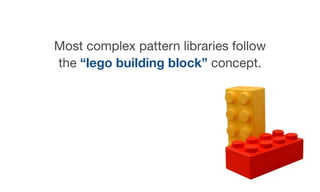
Most complex pattern libraries follow
the “lego building block” concept.
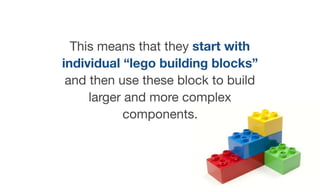
This means that they start with
individual “lego building blocks”
and then use these block to build
larger and more complex
components.
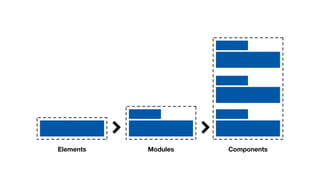
Complex pattern libraries are often
broken down into categories such as
elements, modules and
components.
Elements Modules Components
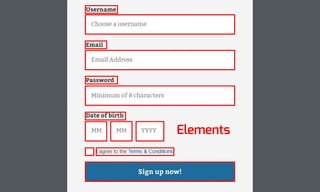
Elements
Elements are standard HTML
elements such as headings, labels,
inputs, buttons, etc.
They are the basic lego building
blocks of the pattern library.
Most of these elements are rarely
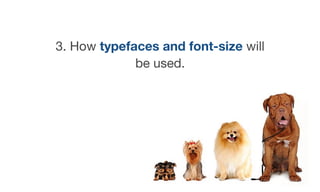
used on their own - they are used to
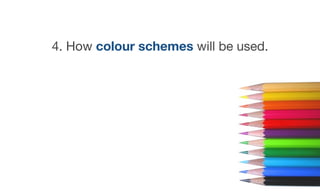
make modules and components.
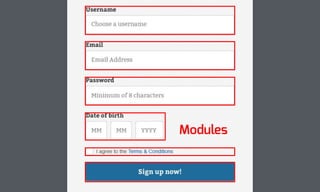
Modules
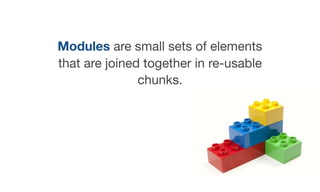
Modules are small sets of elements
that are joined together in re-usable
chunks.
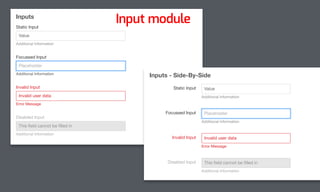
For example, an input module could
include a label, an input, a hint text, a
possible error message and then all of
the possible states including focus,
hover, and disabled.
Static Input
Disabled Input
This field cannot be filled in
Error Message
Additional Information
Invalid Input
Focussed Input
Invalid user data
Value
Additional Information
Inputs
Placeholder
Static Input
Additional Information
Value
Disabled Input This field cannot be filled in
Error Message
Additional Information
Invalid Input
Focussed Input
Invalid user data
Additional Information
Inputs - Side-By-Side
Placeholder
Input module
Components
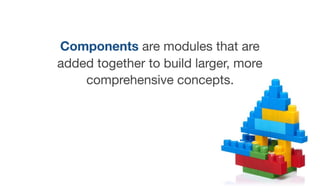
Components are modules that are
added together to build larger, more
comprehensive concepts.
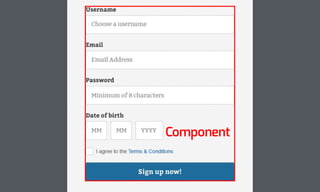
An example might be a signup form
that includes various form control
modules, a button module and a
potential success/error module.
Elements
Modules
Component
Final screens
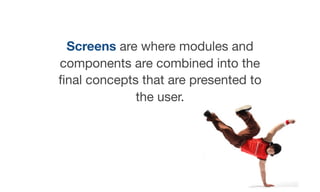
Screens are where modules and
components are combined into the
final concepts that are presented to
the user.
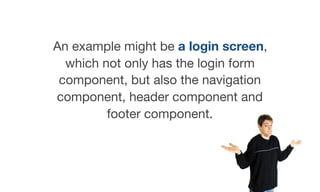
An example might be a login screen,
which not only has the login form
component, but also the navigation
component, header component and
footer component.
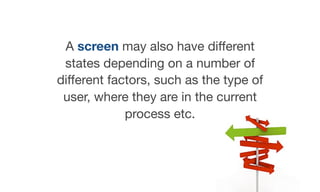
A screen may also have different
states depending on a number of
different factors, such as the type of
user, where they are in the current
process etc.
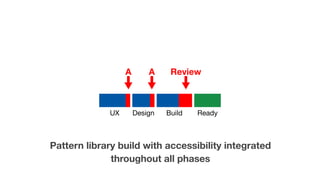
Generally, screens are not part of a
pattern library. The pattern library is
used to help create these screens.
Different types
of pattern
libraries
Pattern libraries can and should be
used during all phases of the design
and development process.
There are three distinctly different
types of pattern library:

UX/UI pattern libraries
Design style guides
Front end pattern libraries
UX/UI pattern
libraries
UX/UI pattern libraries often include

comprehensive documentation
that:
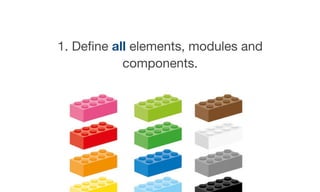
1. Define all elements, modules and
components.
2. Define the various states for all
elements, modules, components (i.e.
hover, focus, active states, logged-in
or logged out etc).
3. Define key dynamic behaviours
(i.e. animations, transitions, fly-outs,
drop-downs etc).
4. Define feedback and notification
mechanisms (i.e. success messages,
error messages etc).
5. Define additional information
associated with modules (i.e. hints,
tips etc).
These pattern libraries normally take
the form of detailed wireframes and/
or prototypes along with additional
documentation.
They help to communicate to internal
teams and stakeholders how a
website or app should be built.
Design style guides
During the design phase, the
emphasis is less about defining re-
usable modules and more about
defining a consistent “look and feel”
across every aspect of the website or
application.
For this reason, they are more often
style guides rather than pattern
libraries.
Design style guides should address:
1. How core branding will be
implemented across the website or
app.
2. The overall “look and feel”.
3. How typefaces and font-size will
be used.
4. How colour schemes will be used.
Front end pattern
libraries
Front-end pattern libraries should
produce fully functional HTML/CSS/
JS examples of all elements, modules
and components.
These examples should include all
states, dynamic behaviours and
feedback mechanisms.
These elements and modules can
then be used as needed to rapidly
build complex components and the
final screens.
The danger of copy/
paste pattern
libraries
One danger with front-end pattern
libraries is where modules and
components are presented as
examples that have to be copied and
pasted by developers.
The problem is that they can easily
be applied incorrectly.
Pattern libraries should be built so
that modules and components are
referenced directly from the pattern
library in some way.
This means that they can be updated
automatically without leaving legacy
versions across an application.
More importantly, they cannot be
applied incorrectly.
What about
existing pattern
libraries?
There is a wide range of pre-existing
UX and front-end pattern libraries
available today.
Some of these pattern libraries have a
simple purpose - such as predefined
sets of UI modules in wireframe form,
or front-end grid systems.
Others, especially in the front-end, are
full “frameworks” that offer a wide
range of fully functional elements,
modules and components.
There are some great benefits to
using a pre-existing framework.
They are often ready to use and are
therefore quick to implement.
They are also often useful for rapid
prototyping during the UX/UI phase.
However, there can be some
downsides as well.
The pre-build modules and
components may not suit your
project which means they have to be
heavily modified.
They often produce a generic look,
mainly because people are not
experienced enough to know how to
customise them.
You are also relying on someone else
for code quality.
This is especially true for
accessibility within pre-existing
frameworks.
Do you want to rely on others to make
sure all of your modules and
components are accessible?
Accessibility in
all phases
Many people focus on addressing
accessibility during the front-end
phase only.
However, accessibility can be
addressed to some degree during the
UX/UI and design phases as well.
UX/UI pattern libraries should
describe solutions to some aspects
of accessibility such as states,
behaviours, proximity, notifications,
error messages etc.
Good UX/UI pattern libraries even
help to describe how keystrokes
should allow users to “travel”
through complex components.
These descriptions should help
front-end teams when building the
final modules and components.
Design style guides should address a
range of design-related
accessibility concerns such as:
colour contrast, use of proximity, use
of iconography and font-size.
These requirements can then be
applied into the front-end modules
and components.
So, the UX/UI and design phases
provide recommendations and
requirements.
And these recommendations and
requirements can then be put into
action during the front-end phase.
Baking in
accessibility?
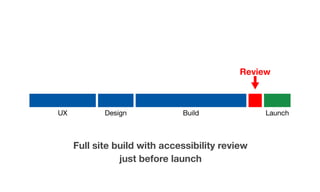
In the old days, accessibility reviews
were often tacked on at the end of
major site or application builds.
Often just before launch.
Full site build with accessibility review
just before launch
UX Design Build Launch
Review
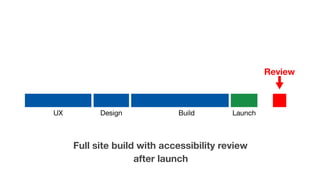
Even worse, in some circumstances,
reviews were carried out after launch
- only when someone made a
complaint.
Full site build with accessibility review
after launch
UX Design Build Launch
Review
Of course, that sort of thing never
happens today… does it?
With complex applications and
websites, there has been a shift away
from a single massive build cycle.
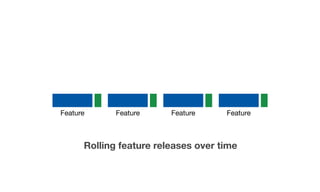
Instead, complex applications and
websites are often rolled out in a
series of feature releases.
Feature Feature Feature Feature
Rolling feature releases over time
A feature is a stand-alone section of
a web application. A new feature
may require anything from a single
screen to multiple screens.
For example, in a banking web
application, a new feature could allow
customers to add additional bank
accounts to the system.
Because features are released
individually, accessibility reviews can
be conducted on an individual
feature rather than an entire
application or site.
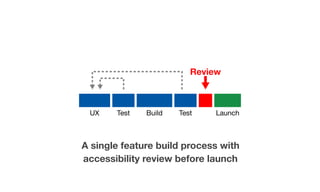
A single feature build process with
accessibility review before launch
UX Test Build Test Launch
Review
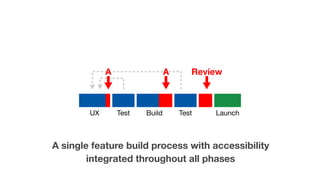
And, if accessibility is considered
during all phases of feature
development, the accessibility review
should be even less painful.
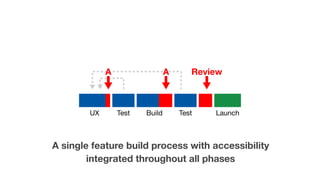
A single feature build process with accessibility
integrated throughout all phases
A A Review
UX Test Build Test Launch
However, with the use of pattern
libraries, accessibility can be “baked
in” even earlier in the process.
In many cases, an initial pattern library
is built before any features are
ready.
These initial pattern libraries often
include elements and modules but no
components.
Accessibility should be “baked into”
each of these modules. And, they
need to be carefully reviewed before
proceeding.
What does this mean? 

Well, it means following basic
accessibility guidelines…
Making sure all modules use
semantic and well-formed markup.
Using alt attributes on images.
Making sure for and id attributes are
used correctly for labels and inputs.
Making sure th, thead, tbody are
used appropriately in tables.
Using additional aria roles, labels and
descriptions where appropriate.
If modules are built correctly, they
provides a solid foundation for all
future components.
The process is often similar to a
feature release, except the outcome
is the initial pattern library rather than
a feature.
Pattern library build with accessibility integrated
throughout all phases
A A Review
UX Design Build Ready
As new features move into
production, new components are built
and added into the pattern library.
Some people make the mistake of
assuming that these components will
automatically be accessible
because they use the tested modules
as a base.
However, components often present
their own accessibility issues.
For this reason, new components
should also be tested and reviewed
before launch, as part of the feature
release.
A single feature build process with accessibility
integrated throughout all phases
A A Review
UX Test Build Test Launch
Bottom line
For large websites and complex apps,
pattern libraries are critical.
UX/UI pattern libraries and design
style guides should include
accessibility as part of the process.
For front-end pattern libraries, make
sure to bake accessibility into all
core modules and test carefully.
Make sure to test all components
and screens as they are released
with features.
And, avoid building pattern libraries
that rely on developers having to
copy/paste code samples.
These steps will save a world of pain
in the future.
Russ Weakley
Max Design
Site: maxdesign.com.au
Twitter: twitter.com/russmaxdesign
Slideshare: slideshare.net/maxdesign
Linkedin: linkedin.com/in/russweakley

Accessibility in pattern libraries

  • 1.
  • 2.
  • 3.
    In the past,many people approached complex websites and web applications as a series of “pages”.
  • 4.
    These pages wereoften designed and built as complete entities.
  • 5.
    More recently, incomplex websites and applications, the focus has shifted from full page layouts to 
 re-usable components.
  • 6.
    A re-usable componentcould be a layout grid structure, a button, an input, a drop-down, a menu, a heading, a table, or even a pullquote.
  • 7.
  • 8.
    Pattern libraries area collection of user interface components that can be used multiple times across a website or web application.
  • 9.
    On large websitesand complex applications, pattern libraries have a range of benefits.
  • 10.
    In many casesthey make it faster and easier to build.
  • 11.
    If done well,they provide a shared vocabulary across all teams.
  • 12.
    And most importantly,they provide a consistent level of quality.
  • 13.
  • 14.
    Most complex patternlibraries follow the “lego building block” concept.
  • 15.
    This means thatthey start with individual “lego building blocks” and then use these block to build larger and more complex components.
  • 16.
    Complex pattern librariesare often broken down into categories such as elements, modules and components.
  • 17.
  • 18.
  • 19.
    Elements are standardHTML elements such as headings, labels, inputs, buttons, etc.
  • 20.
    They are thebasic lego building blocks of the pattern library.
  • 21.
    Most of theseelements are rarely used on their own - they are used to make modules and components.
  • 22.
  • 23.
    Modules are smallsets of elements that are joined together in re-usable chunks.
  • 24.
    For example, aninput module could include a label, an input, a hint text, a possible error message and then all of the possible states including focus, hover, and disabled.
  • 25.
    Static Input Disabled Input Thisfield cannot be filled in Error Message Additional Information Additional Information Invalid Input Focussed Input Invalid user data Value Additional Information Inputs Placeholder Static Input Additional Information Value Disabled Input This field cannot be filled in Error Message Additional Information Invalid Input Focussed Input Invalid user data Additional Information Inputs - Side-By-Side Placeholder Input module
  • 26.
  • 27.
    Components are modulesthat are added together to build larger, more comprehensive concepts.
  • 28.
    An example mightbe a signup form that includes various form control modules, a button module and a potential success/error module.
  • 29.
  • 30.
  • 31.
  • 32.
  • 33.
    Screens are wheremodules and components are combined into the final concepts that are presented to the user.
  • 34.
    An example mightbe a login screen, which not only has the login form component, but also the navigation component, header component and footer component.
  • 35.
    A screen mayalso have different states depending on a number of different factors, such as the type of user, where they are in the current process etc.
  • 36.
    Generally, screens arenot part of a pattern library. The pattern library is used to help create these screens.
  • 37.
  • 38.
    Pattern libraries canand should be used during all phases of the design and development process.
  • 39.
    There are threedistinctly different types of pattern library: UX/UI pattern libraries Design style guides Front end pattern libraries
  • 40.
  • 41.
    UX/UI pattern librariesoften include comprehensive documentation that:
  • 42.
    1. Define allelements, modules and components.
  • 43.
    2. Define thevarious states for all elements, modules, components (i.e. hover, focus, active states, logged-in or logged out etc).
  • 44.
    3. Define keydynamic behaviours (i.e. animations, transitions, fly-outs, drop-downs etc).
  • 45.
    4. Define feedbackand notification mechanisms (i.e. success messages, error messages etc).
  • 46.
    5. Define additionalinformation associated with modules (i.e. hints, tips etc).
  • 47.
    These pattern librariesnormally take the form of detailed wireframes and/ or prototypes along with additional documentation.
  • 48.
    They help tocommunicate to internal teams and stakeholders how a website or app should be built.
  • 49.
  • 50.
    During the designphase, the emphasis is less about defining re- usable modules and more about defining a consistent “look and feel” across every aspect of the website or application.
  • 51.
    For this reason,they are more often style guides rather than pattern libraries.
  • 52.
    Design style guidesshould address:
  • 53.
    1. How corebranding will be implemented across the website or app.
  • 54.
    2. The overall“look and feel”.
  • 55.
    3. How typefacesand font-size will be used.
  • 56.
    4. How colourschemes will be used.
  • 57.
  • 58.
    Front-end pattern librariesshould produce fully functional HTML/CSS/ JS examples of all elements, modules and components.
  • 59.
    These examples shouldinclude all states, dynamic behaviours and feedback mechanisms.
  • 60.
    These elements andmodules can then be used as needed to rapidly build complex components and the final screens.
  • 61.
    The danger ofcopy/ paste pattern libraries
  • 62.
    One danger withfront-end pattern libraries is where modules and components are presented as examples that have to be copied and pasted by developers.
  • 63.
    The problem isthat they can easily be applied incorrectly.
  • 64.
    Pattern libraries shouldbe built so that modules and components are referenced directly from the pattern library in some way.
  • 65.
    This means thatthey can be updated automatically without leaving legacy versions across an application.
  • 66.
    More importantly, theycannot be applied incorrectly.
  • 67.
  • 68.
    There is awide range of pre-existing UX and front-end pattern libraries available today.
  • 69.
    Some of thesepattern libraries have a simple purpose - such as predefined sets of UI modules in wireframe form, or front-end grid systems.
  • 70.
    Others, especially inthe front-end, are full “frameworks” that offer a wide range of fully functional elements, modules and components.
  • 71.
    There are somegreat benefits to using a pre-existing framework.
  • 72.
    They are oftenready to use and are therefore quick to implement.
  • 73.
    They are alsooften useful for rapid prototyping during the UX/UI phase.
  • 74.
    However, there canbe some downsides as well.
  • 75.
    The pre-build modulesand components may not suit your project which means they have to be heavily modified.
  • 76.
    They often producea generic look, mainly because people are not experienced enough to know how to customise them.
  • 77.
    You are alsorelying on someone else for code quality.
  • 78.
    This is especiallytrue for accessibility within pre-existing frameworks.
  • 79.
    Do you wantto rely on others to make sure all of your modules and components are accessible?
  • 80.
  • 81.
    Many people focuson addressing accessibility during the front-end phase only.
  • 82.
    However, accessibility canbe addressed to some degree during the UX/UI and design phases as well.
  • 83.
    UX/UI pattern librariesshould describe solutions to some aspects of accessibility such as states, behaviours, proximity, notifications, error messages etc.
  • 84.
    Good UX/UI patternlibraries even help to describe how keystrokes should allow users to “travel” through complex components.
  • 85.
    These descriptions shouldhelp front-end teams when building the final modules and components.
  • 86.
    Design style guidesshould address a range of design-related accessibility concerns such as: colour contrast, use of proximity, use of iconography and font-size.
  • 87.
    These requirements canthen be applied into the front-end modules and components.
  • 88.
    So, the UX/UIand design phases provide recommendations and requirements.
  • 89.
    And these recommendationsand requirements can then be put into action during the front-end phase.
  • 90.
  • 91.
    In the olddays, accessibility reviews were often tacked on at the end of major site or application builds. Often just before launch.
  • 92.
    Full site buildwith accessibility review just before launch UX Design Build Launch Review
  • 93.
    Even worse, insome circumstances, reviews were carried out after launch - only when someone made a complaint.
  • 94.
    Full site buildwith accessibility review after launch UX Design Build Launch Review
  • 95.
    Of course, thatsort of thing never happens today… does it?
  • 96.
    With complex applicationsand websites, there has been a shift away from a single massive build cycle.
  • 97.
    Instead, complex applicationsand websites are often rolled out in a series of feature releases.
  • 98.
    Feature Feature FeatureFeature Rolling feature releases over time
  • 99.
    A feature isa stand-alone section of a web application. A new feature may require anything from a single screen to multiple screens.
  • 100.
    For example, ina banking web application, a new feature could allow customers to add additional bank accounts to the system.
  • 101.
    Because features arereleased individually, accessibility reviews can be conducted on an individual feature rather than an entire application or site.
  • 102.
    A single featurebuild process with accessibility review before launch UX Test Build Test Launch Review
  • 103.
    And, if accessibilityis considered during all phases of feature development, the accessibility review should be even less painful.
  • 104.
    A single featurebuild process with accessibility integrated throughout all phases A A Review UX Test Build Test Launch
  • 105.
    However, with theuse of pattern libraries, accessibility can be “baked in” even earlier in the process.
  • 106.
    In many cases,an initial pattern library is built before any features are ready.
  • 107.
    These initial patternlibraries often include elements and modules but no components.
  • 108.
    Accessibility should be“baked into” each of these modules. And, they need to be carefully reviewed before proceeding.
  • 109.
    What does thismean? Well, it means following basic accessibility guidelines…
  • 110.
    Making sure allmodules use semantic and well-formed markup.
  • 111.
  • 112.
    Making sure forand id attributes are used correctly for labels and inputs.
  • 113.
    Making sure th,thead, tbody are used appropriately in tables.
  • 114.
    Using additional ariaroles, labels and descriptions where appropriate.
  • 115.
    If modules arebuilt correctly, they provides a solid foundation for all future components.
  • 116.
    The process isoften similar to a feature release, except the outcome is the initial pattern library rather than a feature.
  • 117.
    Pattern library buildwith accessibility integrated throughout all phases A A Review UX Design Build Ready
  • 118.
    As new featuresmove into production, new components are built and added into the pattern library.
  • 119.
    Some people makethe mistake of assuming that these components will automatically be accessible because they use the tested modules as a base.
  • 120.
    However, components oftenpresent their own accessibility issues.
  • 121.
    For this reason,new components should also be tested and reviewed before launch, as part of the feature release.
  • 122.
    A single featurebuild process with accessibility integrated throughout all phases A A Review UX Test Build Test Launch
  • 123.
  • 124.
    For large websitesand complex apps, pattern libraries are critical.
  • 125.
    UX/UI pattern librariesand design style guides should include accessibility as part of the process.
  • 126.
    For front-end patternlibraries, make sure to bake accessibility into all core modules and test carefully.
  • 127.
    Make sure totest all components and screens as they are released with features.
  • 128.
    And, avoid buildingpattern libraries that rely on developers having to copy/paste code samples.
  • 129.
    These steps willsave a world of pain in the future.
  • 130.
    Russ Weakley Max Design Site:maxdesign.com.au Twitter: twitter.com/russmaxdesign Slideshare: slideshare.net/maxdesign Linkedin: linkedin.com/in/russweakley