PIXEL RESOLUTION   DIMENSIONS = Width x Height in Pixels  DENSITY  = Pixels Per Inch =  ppi   Screen Resolution Monitor Resolution Bit Resolution Image Resolution Scanning Resolution Printing Resolution
Image Resolution Detail of digital image measured in Pixels. Dimension W x H in pixels Density Pixels per inch = ppi
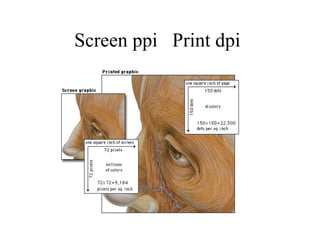
Screen Resolution Screen resolution refers to the number of pixels a screen can display within a given area.  Screen resolution is usually expressed in pixels per linear inch of screen. Most personal computer displays have resolutions that vary from 72 to 96 pixels per inch (ppi).  Images for Web pages are always limited by the resolution of the computer screen. Thus a square GIF graphic of 72 by 72 pixels will be approximately one inch square on a 72-ppi display monitor.
Screen ppi  Print dpi
Scanning Resolution To be determined by the OUTPUT DEVICE Target Resolution for Screen - 72 - 96 ppi Target Resolution for Halftone Output Device/Printer    i.e. Imager setter, Laser Printer 2 X line Screen  (Lines Per Inch - lpi) 85 lpi - Big Dots Newspapers, Comic Books 120 lpi Fair Resolution Posters, flyers 150 lpi Medium - Good Resolution Brochures, Magazines 200 lpi Excellent high quality Art Books, High end mag
Bit Resolution The # of bits of INFORMATION per pixel Determines how many colors can be displayed  at one time on the screen. Greater pixel depth means more available colors and more accurate color 1 bit color = 2 values - black / white  8 bit color = 256 values of color 24 bit color = 16.4 million values of color 32 bit color = millions
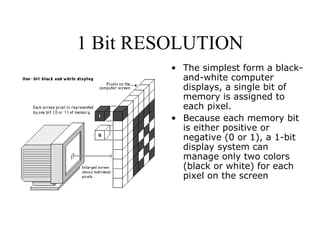
1 Bit RESOLUTION The simplest form a black-and-white computer displays, a single bit of memory is assigned to  each pixel.  Because each memory bit is either positive or negative (0 or 1), a 1-bit display system can manage only two colors (black or white) for each pixel on the screen
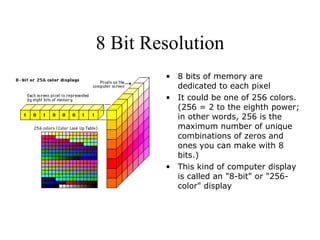
8 Bit Resolution 8 bits of memory are dedicated to each pixel It could be one of 256 colors. (256 = 2 to the eighth power; in other words, 256 is the maximum number of unique combinations of zeros and ones you can make with 8 bits.)  This kind of computer display is called an "8-bit" or "256-color" display
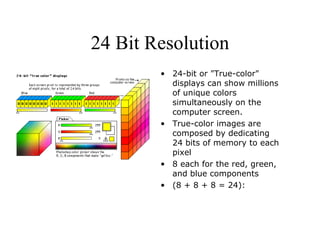
24 Bit Resolution 24-bit or "True-color" displays can show millions of unique colors simultaneously on the computer screen.  True-color images are composed by dedicating  24 bits of memory to each pixel  8 each for the red, green, and blue components  (8 + 8 + 8 = 24):

Pixel resolution

  • 1.
    PIXEL RESOLUTION DIMENSIONS = Width x Height in Pixels DENSITY = Pixels Per Inch = ppi Screen Resolution Monitor Resolution Bit Resolution Image Resolution Scanning Resolution Printing Resolution
  • 2.
    Image Resolution Detailof digital image measured in Pixels. Dimension W x H in pixels Density Pixels per inch = ppi
  • 3.
    Screen Resolution Screenresolution refers to the number of pixels a screen can display within a given area. Screen resolution is usually expressed in pixels per linear inch of screen. Most personal computer displays have resolutions that vary from 72 to 96 pixels per inch (ppi). Images for Web pages are always limited by the resolution of the computer screen. Thus a square GIF graphic of 72 by 72 pixels will be approximately one inch square on a 72-ppi display monitor.
  • 4.
    Screen ppi Print dpi
  • 5.
    Scanning Resolution Tobe determined by the OUTPUT DEVICE Target Resolution for Screen - 72 - 96 ppi Target Resolution for Halftone Output Device/Printer i.e. Imager setter, Laser Printer 2 X line Screen (Lines Per Inch - lpi) 85 lpi - Big Dots Newspapers, Comic Books 120 lpi Fair Resolution Posters, flyers 150 lpi Medium - Good Resolution Brochures, Magazines 200 lpi Excellent high quality Art Books, High end mag
  • 6.
    Bit Resolution The# of bits of INFORMATION per pixel Determines how many colors can be displayed at one time on the screen. Greater pixel depth means more available colors and more accurate color 1 bit color = 2 values - black / white 8 bit color = 256 values of color 24 bit color = 16.4 million values of color 32 bit color = millions
  • 7.
    1 Bit RESOLUTIONThe simplest form a black-and-white computer displays, a single bit of memory is assigned to each pixel. Because each memory bit is either positive or negative (0 or 1), a 1-bit display system can manage only two colors (black or white) for each pixel on the screen
  • 8.
    8 Bit Resolution8 bits of memory are dedicated to each pixel It could be one of 256 colors. (256 = 2 to the eighth power; in other words, 256 is the maximum number of unique combinations of zeros and ones you can make with 8 bits.) This kind of computer display is called an "8-bit" or "256-color" display
  • 9.
    24 Bit Resolution24-bit or "True-color" displays can show millions of unique colors simultaneously on the computer screen. True-color images are composed by dedicating 24 bits of memory to each pixel 8 each for the red, green, and blue components (8 + 8 + 8 = 24):