Glossary.
Pixels
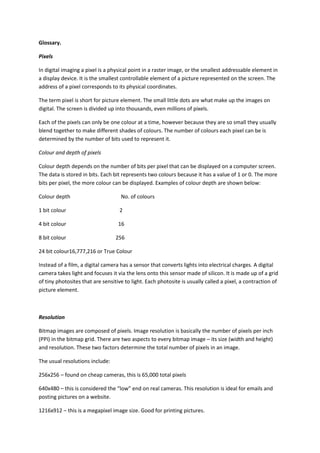
In digital imaging a pixel is a physical point in a raster image, or the smallest addressable element in
a display device. It is the smallest controllable element of a picture represented on the screen. The
address of a pixel corresponds to its physical coordinates.
The term pixel is short for picture element. The small little dots are what make up the images on
digital. The screen is divided up into thousands, even millions of pixels.
Each of the pixels can only be one colour at a time, however because they are so small they usually
blend together to make different shades of colours. The number of colours each pixel can be is
determined by the number of bits used to represent it.
Colour and depth of pixels
Colour depth depends on the number of bits per pixel that can be displayed on a computer screen.
The data is stored in bits. Each bit represents two colours because it has a value of 1 or 0. The more
bits per pixel, the more colour can be displayed. Examples of colour depth are shown below:
Colour depth No. of colours
1 bit colour 2
4 bit colour 16
8 bit colour 256
24 bit colour16,777,216 or True Colour
Instead of a film, a digital camera has a sensor that converts lights into electrical charges. A digital
camera takes light and focuses it via the lens onto this sensor made of silicon. It is made up of a grid
of tiny photosites that are sensitive to light. Each photosite is usually called a pixel, a contraction of
picture element.
Resolution
Bitmap images are composed of pixels. Image resolution is basically the number of pixels per inch
(PPI) in the bitmap grid. There are two aspects to every bitmap image – its size (width and height)
and resolution. These two factors determine the total number of pixels in an image.
The usual resolutions include:
256x256 – found on cheap cameras, this is 65,000 total pixels
640x480 – this is considered the “low” end on real cameras. This resolution is ideal for emails and
posting pictures on a website.
1216x912 – this is a megapixel image size. Good for printing pictures.
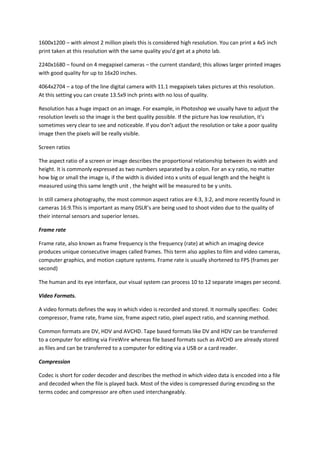
1600x1200 – with almost 2 million pixels this is considered high resolution. You can print a 4x5 inch
print taken at this resolution with the same quality you’d get at a photo lab.
2240x1680 – found on 4 megapixel cameras – the current standard; this allows larger printed images
with good quality for up to 16x20 inches.
4064x2704 – a top of the line digital camera with 11.1 megapixels takes pictures at this resolution.
At this setting you can create 13.5x9 inch prints with no loss of quality.
Resolution has a huge impact on an image. For example, in Photoshop we usually have to adjust the
resolution levels so the image is the best quality possible. If the picture has low resolution, it’s
sometimes very clear to see and noticeable. If you don’t adjust the resolution or take a poor quality
image then the pixels will be really visible.
Screen ratios
The aspect ratio of a screen or image describes the proportional relationship between its width and
height. It is commonly expressed as two numbers separated by a colon. For an x:y ratio, no matter
how big or small the image is, if the width is divided into x units of equal length and the height is
measured using this same length unit , the height will be measured to be y units.
In still camera photography, the most common aspect ratios are 4:3, 3:2, and more recently found in
cameras 16:9.This is important as many DSLR’s are being used to shoot video due to the quality of
their internal sensors and superior lenses.
Frame rate
Frame rate, also known as frame frequency is the frequency (rate) at which an imaging device
produces unique consecutive images called frames. This term also applies to film and video cameras,
computer graphics, and motion capture systems. Frame rate is usually shortened to FPS (frames per
second)
The human and its eye interface, our visual system can process 10 to 12 separate images per second.
Video Formats.
A video formats defines the way in which video is recorded and stored. It normally specifies: Codec
compressor, frame rate, frame size, frame aspect ratio, pixel aspect ratio, and scanning method.
Common formats are DV, HDV and AVCHD. Tape based formats like DV and HDV can be transferred
to a computer for editing via FireWire whereas file based formats such as AVCHD are already stored
as files and can be transferred to a computer for editing via a USB or a card reader.
Compression
Codec is short for coder decoder and describes the method in which video data is encoded into a file
and decoded when the file is played back. Most of the video is compressed during encoding so the
terms codec and compressor are often used interchangeably.
Glossary

Glossary

  • 1.
    Glossary. Pixels In digital imaginga pixel is a physical point in a raster image, or the smallest addressable element in a display device. It is the smallest controllable element of a picture represented on the screen. The address of a pixel corresponds to its physical coordinates. The term pixel is short for picture element. The small little dots are what make up the images on digital. The screen is divided up into thousands, even millions of pixels. Each of the pixels can only be one colour at a time, however because they are so small they usually blend together to make different shades of colours. The number of colours each pixel can be is determined by the number of bits used to represent it. Colour and depth of pixels Colour depth depends on the number of bits per pixel that can be displayed on a computer screen. The data is stored in bits. Each bit represents two colours because it has a value of 1 or 0. The more bits per pixel, the more colour can be displayed. Examples of colour depth are shown below: Colour depth No. of colours 1 bit colour 2 4 bit colour 16 8 bit colour 256 24 bit colour16,777,216 or True Colour Instead of a film, a digital camera has a sensor that converts lights into electrical charges. A digital camera takes light and focuses it via the lens onto this sensor made of silicon. It is made up of a grid of tiny photosites that are sensitive to light. Each photosite is usually called a pixel, a contraction of picture element. Resolution Bitmap images are composed of pixels. Image resolution is basically the number of pixels per inch (PPI) in the bitmap grid. There are two aspects to every bitmap image – its size (width and height) and resolution. These two factors determine the total number of pixels in an image. The usual resolutions include: 256x256 – found on cheap cameras, this is 65,000 total pixels 640x480 – this is considered the “low” end on real cameras. This resolution is ideal for emails and posting pictures on a website. 1216x912 – this is a megapixel image size. Good for printing pictures.
  • 2.
    1600x1200 – withalmost 2 million pixels this is considered high resolution. You can print a 4x5 inch print taken at this resolution with the same quality you’d get at a photo lab. 2240x1680 – found on 4 megapixel cameras – the current standard; this allows larger printed images with good quality for up to 16x20 inches. 4064x2704 – a top of the line digital camera with 11.1 megapixels takes pictures at this resolution. At this setting you can create 13.5x9 inch prints with no loss of quality. Resolution has a huge impact on an image. For example, in Photoshop we usually have to adjust the resolution levels so the image is the best quality possible. If the picture has low resolution, it’s sometimes very clear to see and noticeable. If you don’t adjust the resolution or take a poor quality image then the pixels will be really visible. Screen ratios The aspect ratio of a screen or image describes the proportional relationship between its width and height. It is commonly expressed as two numbers separated by a colon. For an x:y ratio, no matter how big or small the image is, if the width is divided into x units of equal length and the height is measured using this same length unit , the height will be measured to be y units. In still camera photography, the most common aspect ratios are 4:3, 3:2, and more recently found in cameras 16:9.This is important as many DSLR’s are being used to shoot video due to the quality of their internal sensors and superior lenses. Frame rate Frame rate, also known as frame frequency is the frequency (rate) at which an imaging device produces unique consecutive images called frames. This term also applies to film and video cameras, computer graphics, and motion capture systems. Frame rate is usually shortened to FPS (frames per second) The human and its eye interface, our visual system can process 10 to 12 separate images per second. Video Formats. A video formats defines the way in which video is recorded and stored. It normally specifies: Codec compressor, frame rate, frame size, frame aspect ratio, pixel aspect ratio, and scanning method. Common formats are DV, HDV and AVCHD. Tape based formats like DV and HDV can be transferred to a computer for editing via FireWire whereas file based formats such as AVCHD are already stored as files and can be transferred to a computer for editing via a USB or a card reader. Compression Codec is short for coder decoder and describes the method in which video data is encoded into a file and decoded when the file is played back. Most of the video is compressed during encoding so the terms codec and compressor are often used interchangeably.