Bitmap Graphics
Bitmap Graphics
 Pictures are made up of little dots called pixels.
 The colour of each dot is saved in binary code, for
example:
 White – 0000
 Blue – 0001
 Green – 1000
 Red - 1100
Editing
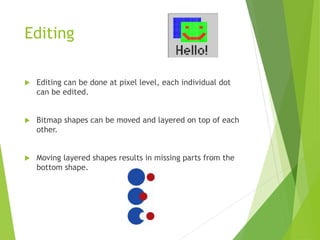
 Editing can be done at pixel level, each individual dot
can be edited.
 Bitmap shapes can be moved and layered on top of each
other.
 Moving layered shapes results in missing parts from the
bottom shape.
Storage Requirements
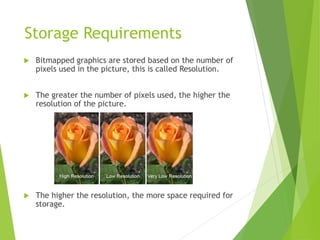
 Bitmapped graphics are stored based on the number of
pixels used in the picture, this is called Resolution.
 The greater the number of pixels used, the higher the
resolution of the picture.
 The higher the resolution, the more space required for
storage.

Bitmap graphics

  • 1.
  • 2.
    Bitmap Graphics  Picturesare made up of little dots called pixels.  The colour of each dot is saved in binary code, for example:  White – 0000  Blue – 0001  Green – 1000  Red - 1100
  • 3.
    Editing  Editing canbe done at pixel level, each individual dot can be edited.  Bitmap shapes can be moved and layered on top of each other.  Moving layered shapes results in missing parts from the bottom shape.
  • 4.
    Storage Requirements  Bitmappedgraphics are stored based on the number of pixels used in the picture, this is called Resolution.  The greater the number of pixels used, the higher the resolution of the picture.  The higher the resolution, the more space required for storage.