


COMPUTER RESOLUTION
things you need to know
MONITOR RESOLUTION
A computer monitor is made of pixels
Monitor resolution is measured in pixels,
width by height.
640 x 480 resolution means that the
screen is 640 pixels wide by 480 tall.
Pixels are so close together that they
appear connected.
A pixel is the smallest element of a video
image, but not the smallest element of a
monitor's screen.
Since each pixel must be made up of three
separate colors, there are smaller red,
green, and blue dots.
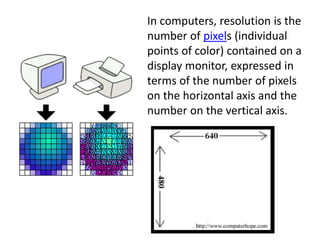
In computers, resolution is the
number of pixels (individual
points of color) contained on a
display monitor, expressed in
terms of the number of pixels
on the horizontal axis and the
number on the vertical axis.
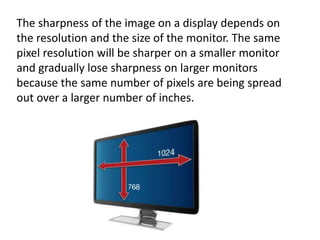
The sharpness of the image on a display depends on
the resolution and the size of the monitor. The same
pixel resolution will be sharper on a smaller monitor
and gradually lose sharpness on larger monitors
because the same number of pixels are being spread
out over a larger number of inches.
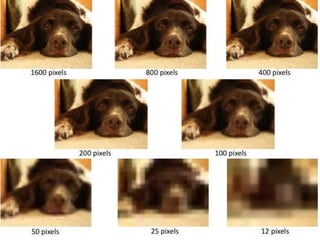
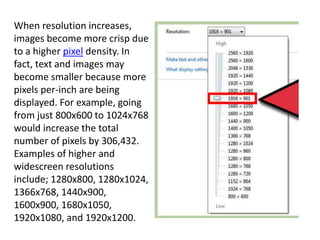
When resolution increases,
images become more crisp due
to a higher pixel density. In
fact, text and images may
become smaller because more
pixels per-inch are being
displayed. For example, going
from just 800x600 to 1024x768
would increase the total
number of pixels by 306,432.
Examples of higher and
widescreen resolutions
include; 1280x800, 1280x1024,
1366x768, 1440x900,
1600x900, 1680x1050,
1920x1080, and 1920x1200.
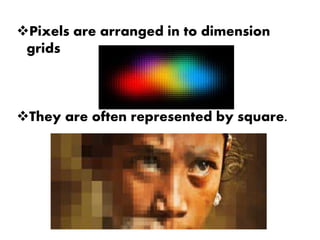
Pixels are arranged in to dimension
grids
They are often represented by square.
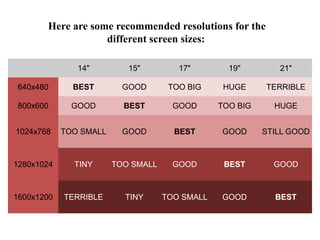
Here are some recommended resolutions for the
different screen sizes:
14" 15" 17" 19" 21"
640x480 BEST GOOD TOO BIG HUGE TERRIBLE
800x600 GOOD BEST GOOD TOO BIG HUGE
1024x768 TOO SMALL GOOD BEST GOOD STILL GOOD
1280x1024 TINY TOO SMALL GOOD BEST GOOD
1600x1200 TERRIBLE TINY TOO SMALL GOOD BEST
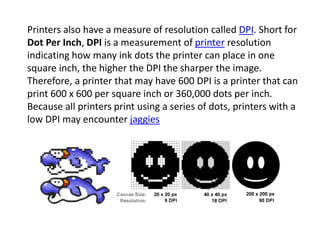
Printers also have a measure of resolution called DPI. Short for
Dot Per Inch, DPI is a measurement of printer resolution
indicating how many ink dots the printer can place in one
square inch, the higher the DPI the sharper the image.
Therefore, a printer that may have 600 DPI is a printer that can
print 600 x 600 per square inch or 360,000 dots per inch.
Because all printers print using a series of dots, printers with a
low DPI may encounter jaggies
Computer resolution

Computer resolution

  • 1.
  • 2.
    MONITOR RESOLUTION A computermonitor is made of pixels Monitor resolution is measured in pixels, width by height. 640 x 480 resolution means that the screen is 640 pixels wide by 480 tall. Pixels are so close together that they appear connected. A pixel is the smallest element of a video image, but not the smallest element of a monitor's screen. Since each pixel must be made up of three separate colors, there are smaller red, green, and blue dots.
  • 4.
    In computers, resolutionis the number of pixels (individual points of color) contained on a display monitor, expressed in terms of the number of pixels on the horizontal axis and the number on the vertical axis.
  • 5.
    The sharpness ofthe image on a display depends on the resolution and the size of the monitor. The same pixel resolution will be sharper on a smaller monitor and gradually lose sharpness on larger monitors because the same number of pixels are being spread out over a larger number of inches.
  • 6.
    When resolution increases, imagesbecome more crisp due to a higher pixel density. In fact, text and images may become smaller because more pixels per-inch are being displayed. For example, going from just 800x600 to 1024x768 would increase the total number of pixels by 306,432. Examples of higher and widescreen resolutions include; 1280x800, 1280x1024, 1366x768, 1440x900, 1600x900, 1680x1050, 1920x1080, and 1920x1200.
  • 7.
    Pixels are arrangedin to dimension grids They are often represented by square.
  • 8.
    Here are somerecommended resolutions for the different screen sizes: 14" 15" 17" 19" 21" 640x480 BEST GOOD TOO BIG HUGE TERRIBLE 800x600 GOOD BEST GOOD TOO BIG HUGE 1024x768 TOO SMALL GOOD BEST GOOD STILL GOOD 1280x1024 TINY TOO SMALL GOOD BEST GOOD 1600x1200 TERRIBLE TINY TOO SMALL GOOD BEST
  • 9.
    Printers also havea measure of resolution called DPI. Short for Dot Per Inch, DPI is a measurement of printer resolution indicating how many ink dots the printer can place in one square inch, the higher the DPI the sharper the image. Therefore, a printer that may have 600 DPI is a printer that can print 600 x 600 per square inch or 360,000 dots per inch. Because all printers print using a series of dots, printers with a low DPI may encounter jaggies