Introducing PhoneGap
The hybrid framework for building
smartphone application

Compiled by Trieu Nguyen
@ tantrieuf31@gmail.com
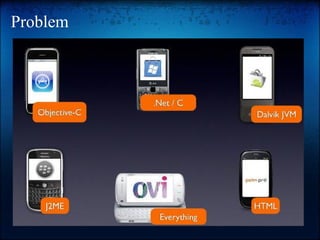
Problem
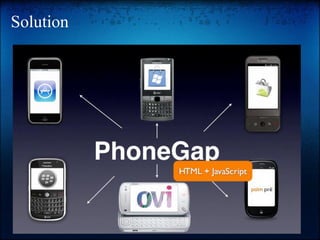
Solution
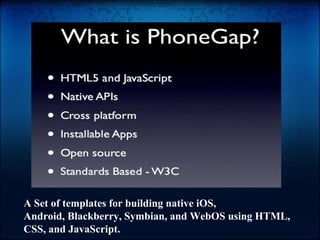
A Set of templates for building native iOS,
Android, Blackberry, Symbian, and WebOS using HTML,
CSS, and JavaScript.
Pros & Cons
Here are the pros of PhoneGap framework:
● Can use our current authoring tools (E.g: Photoshop for doing mockup)
● Can use our current web design and development skills.
● The development cycle is fast.
● Can access the all cool hardware features of phone. (Using JavaScript ObjectiveC Bridge)
● Good performance for model iPhone 3G, 3GS, 4, and iPad.
● Mixing both native iOS view and webview.
● Clean code, usability, flexible and maintainable.
Some cons:
● It can be difficult to achieve sophisticated UI effects.
● Must learning HTML5 and design for smartphone.
● Complex games, intensive graphics. Use OpenGL for that, not PhoneGap.
● For slower phones (not iPhone, not Nexus One, Droid, not Xperia X10),
PhoneGap apps using the latest interactive Google Maps APIs tend to be
slow. Static maps OK, though.
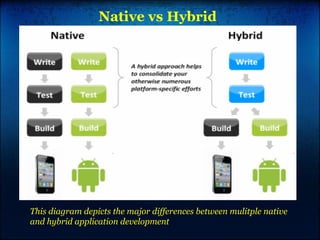
Native vs Hybrid

This diagram depicts the major differences between mulitple native
and hybrid application development
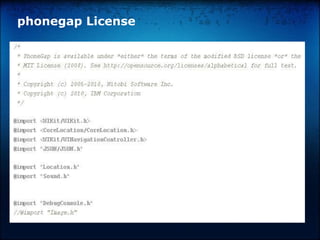
phonegap License
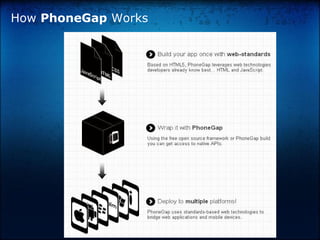
How PhoneGap Works
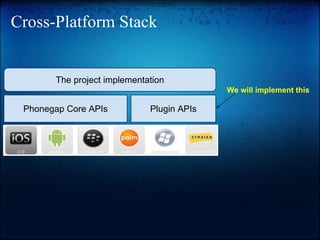
Cross-Platform Stack

The project implementation
We will implement this

Phonegap Core APIs

Plugin APIs
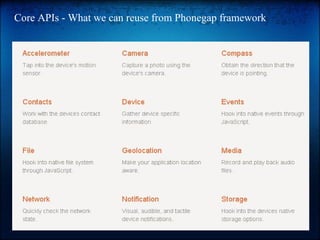
Core APIs - What we can reuse from Phonegap framework
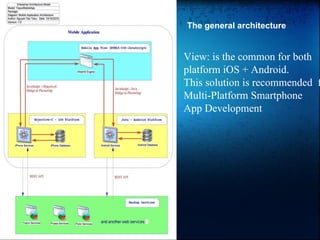
The general architecture

View: is the common for both
platform iOS + Android.
This solution is recommended f
Multi-Platform Smartphone
App Development
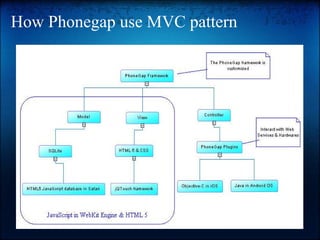
How Phonegap use MVC pattern
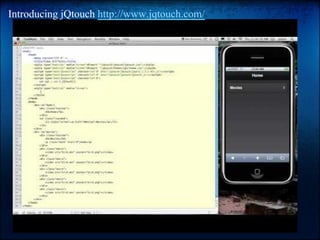
Introducing jQtouch http://www.jqtouch.com/
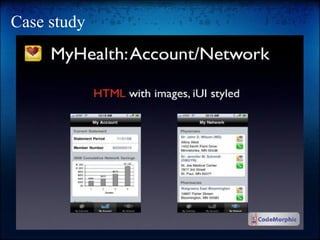
Case study
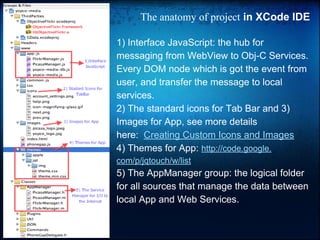
The anatomy of project in XCode IDE
1) Interface JavaScript: the hub for
messaging from WebView to Obj-C Services.
Every DOM node which is got the event from
user, and transfer the message to local
services.
2) The standard icons for Tab Bar and 3)
Images for App, see more details
here: Creating Custom Icons and Images
4) Themes for App: http://code.google.
com/p/jqtouch/w/list

5) The AppManager group: the logical folder
for all sources that manage the data between
local App and Web Services.
More resources
Get started: http://www.phonegap.com/start
My notes
https://docs.google.com/document/pub?
id=1pn6gd7k77pzM0AgJLLJYrgxVPRBfvYAKKvkNXU1nchc

From slideshare
http://www.slideshare.net/search/slideshow?searchfrom=header&q=phonegap

Official Document:
http://wiki.phonegap.com
http://www.phonegap.com/docs
Phonegap source code:
https://github.com/phonegap
About the project "Tele-radiology"
Step 1: http://www.phonegap.com/start
Step 2: http://jquerymobile.com/ or http://www.jqtouch.com/
Step 3: A simple project http://dl.dropbox.com/u/4074962/TeleRadiologyiPad.zip
Step 4: Check it out https://docs.google.com/document/pub?
id=14P1H1pDbOBIhynUgGt5jQLkByRVveuxf6dmXTXIED_8
Step 5: http://www.clearcanvas.
ca/dnn/Portals/0/ClearCanvasFiles/Documentation/DevelopersGuide/2_0_SP1/
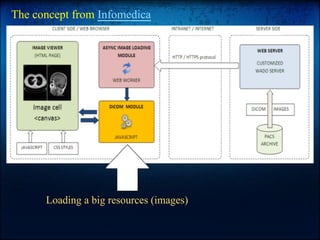
The concept from Infomedica

Loading a big resources (images)
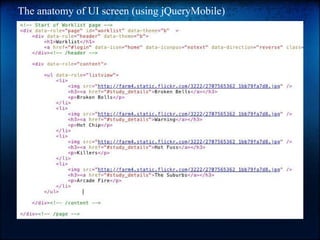
The anatomy of UI screen (using jQueryMobile)

PhoneGap Framework for smartphone app developement

  • 1.
    Introducing PhoneGap The hybridframework for building smartphone application Compiled by Trieu Nguyen @ tantrieuf31@gmail.com
  • 2.
  • 3.
  • 4.
    A Set oftemplates for building native iOS, Android, Blackberry, Symbian, and WebOS using HTML, CSS, and JavaScript.
  • 5.
    Pros & Cons Hereare the pros of PhoneGap framework: ● Can use our current authoring tools (E.g: Photoshop for doing mockup) ● Can use our current web design and development skills. ● The development cycle is fast. ● Can access the all cool hardware features of phone. (Using JavaScript ObjectiveC Bridge) ● Good performance for model iPhone 3G, 3GS, 4, and iPad. ● Mixing both native iOS view and webview. ● Clean code, usability, flexible and maintainable. Some cons: ● It can be difficult to achieve sophisticated UI effects. ● Must learning HTML5 and design for smartphone. ● Complex games, intensive graphics. Use OpenGL for that, not PhoneGap. ● For slower phones (not iPhone, not Nexus One, Droid, not Xperia X10), PhoneGap apps using the latest interactive Google Maps APIs tend to be slow. Static maps OK, though.
  • 6.
    Native vs Hybrid Thisdiagram depicts the major differences between mulitple native and hybrid application development
  • 7.
  • 8.
  • 9.
    Cross-Platform Stack The projectimplementation We will implement this Phonegap Core APIs Plugin APIs
  • 10.
    Core APIs -What we can reuse from Phonegap framework
  • 11.
    The general architecture View:is the common for both platform iOS + Android. This solution is recommended f Multi-Platform Smartphone App Development
  • 12.
    How Phonegap useMVC pattern
  • 13.
  • 14.
  • 15.
    The anatomy ofproject in XCode IDE 1) Interface JavaScript: the hub for messaging from WebView to Obj-C Services. Every DOM node which is got the event from user, and transfer the message to local services. 2) The standard icons for Tab Bar and 3) Images for App, see more details here: Creating Custom Icons and Images 4) Themes for App: http://code.google. com/p/jqtouch/w/list 5) The AppManager group: the logical folder for all sources that manage the data between local App and Web Services.
  • 16.
    More resources Get started:http://www.phonegap.com/start My notes https://docs.google.com/document/pub? id=1pn6gd7k77pzM0AgJLLJYrgxVPRBfvYAKKvkNXU1nchc From slideshare http://www.slideshare.net/search/slideshow?searchfrom=header&q=phonegap Official Document: http://wiki.phonegap.com http://www.phonegap.com/docs Phonegap source code: https://github.com/phonegap
  • 17.
    About the project"Tele-radiology" Step 1: http://www.phonegap.com/start Step 2: http://jquerymobile.com/ or http://www.jqtouch.com/ Step 3: A simple project http://dl.dropbox.com/u/4074962/TeleRadiologyiPad.zip Step 4: Check it out https://docs.google.com/document/pub? id=14P1H1pDbOBIhynUgGt5jQLkByRVveuxf6dmXTXIED_8 Step 5: http://www.clearcanvas. ca/dnn/Portals/0/ClearCanvasFiles/Documentation/DevelopersGuide/2_0_SP1/
  • 18.
    The concept fromInfomedica Loading a big resources (images)
  • 20.
    The anatomy ofUI screen (using jQueryMobile)