Introduction to Mobile
Programming with
PhoneGap
Yagiz Nizipli
What is PhoneGap?
• PhoneGap is a JavaScript framework used to access
mobile device’s core features without writing native
code for each device.
• It is perfectly used with JS, HTML and CSS.
• It helps developer to use the same code written for a
platform to be used with minor changes in other
platform.
• PhoneGap supports iOS, Android, Windows Phone,
BlackBerry and WebOS.
Where should I start?
• Visit phonegap.com
• Install PG using Node Package Manager. Simply
type: “sudo npm install -g phonegap”
• Type “phonegap create helloWorld” to create a
new project.
• Type “phonegap add ios” to add iOS version of
your current project, and later on type “phonegap
run ios” to test it!
A Simple Hello World
Application
• Let’s write a simple “Hello World” application.
• Create your project.
• Edit index.html inside /www directory (if you want
to do more than “Hello World”).
• Type “phonegap add ios” and later type
“phonegap run ios”.
• Here is your “Hello World” application!
Take a photo using
PhoneGap
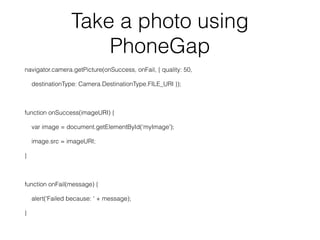
navigator.camera.getPicture(onSuccess, onFail, { quality: 50,
destinationType: Camera.DestinationType.FILE_URI });
!
function onSuccess(imageURI) {
var image = document.getElementById(‘myImage');
image.src = imageURI;
}
!
function onFail(message) {
alert('Failed because: ' + message);
}
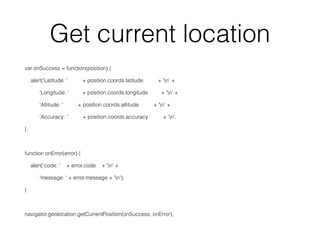
Get current location
var onSuccess = function(position) {
alert('Latitude: ' + position.coords.latitude + 'n' +
'Longitude: ' + position.coords.longitude + 'n' +
'Altitude: ' + position.coords.altitude + 'n' +
'Accuracy: ' + position.coords.accuracy + ‘n';
};
!
function onError(error) {
alert('code: ' + error.code + 'n' +
'message: ' + error.message + 'n');
}
!
navigator.geolocation.getCurrentPosition(onSuccess, onError);
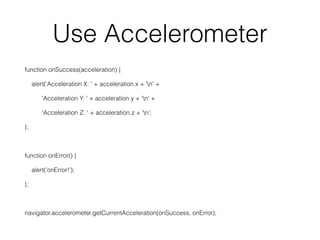
Use Accelerometer
function onSuccess(acceleration) {
alert('Acceleration X: ' + acceleration.x + 'n' +
'Acceleration Y: ' + acceleration.y + 'n' +
'Acceleration Z: ' + acceleration.z + ‘n’;
};
!
function onError() {
alert('onError!');
};
!
navigator.accelerometer.getCurrentAcceleration(onSuccess, onError);
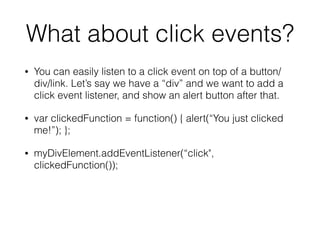
What about click events?
• You can easily listen to a click event on top of a button/
div/link. Let’s say we have a “div” and we want to add a
click event listener, and show an alert button after that.
• var clickedFunction = function() { alert(“You just clicked
me!”); };
• myDivElement.addEventListener(“click",
clickedFunction());
!
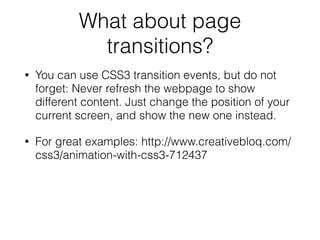
What about page
transitions?
• You can use CSS3 transition events, but do not
forget: Never refresh the webpage to show
different content. Just change the position of your
current screen, and show the new one instead.
• For great examples: http://www.creativebloq.com/
css3/animation-with-css3-712437
!

Introduction to PhoneGap

  • 1.
    Introduction to Mobile Programmingwith PhoneGap Yagiz Nizipli
  • 2.
    What is PhoneGap? •PhoneGap is a JavaScript framework used to access mobile device’s core features without writing native code for each device. • It is perfectly used with JS, HTML and CSS. • It helps developer to use the same code written for a platform to be used with minor changes in other platform. • PhoneGap supports iOS, Android, Windows Phone, BlackBerry and WebOS.
  • 3.
    Where should Istart? • Visit phonegap.com • Install PG using Node Package Manager. Simply type: “sudo npm install -g phonegap” • Type “phonegap create helloWorld” to create a new project. • Type “phonegap add ios” to add iOS version of your current project, and later on type “phonegap run ios” to test it!
  • 4.
    A Simple HelloWorld Application • Let’s write a simple “Hello World” application. • Create your project. • Edit index.html inside /www directory (if you want to do more than “Hello World”). • Type “phonegap add ios” and later type “phonegap run ios”. • Here is your “Hello World” application!
  • 5.
    Take a photousing PhoneGap navigator.camera.getPicture(onSuccess, onFail, { quality: 50, destinationType: Camera.DestinationType.FILE_URI }); ! function onSuccess(imageURI) { var image = document.getElementById(‘myImage'); image.src = imageURI; } ! function onFail(message) { alert('Failed because: ' + message); }
  • 6.
    Get current location varonSuccess = function(position) { alert('Latitude: ' + position.coords.latitude + 'n' + 'Longitude: ' + position.coords.longitude + 'n' + 'Altitude: ' + position.coords.altitude + 'n' + 'Accuracy: ' + position.coords.accuracy + ‘n'; }; ! function onError(error) { alert('code: ' + error.code + 'n' + 'message: ' + error.message + 'n'); } ! navigator.geolocation.getCurrentPosition(onSuccess, onError);
  • 7.
    Use Accelerometer function onSuccess(acceleration){ alert('Acceleration X: ' + acceleration.x + 'n' + 'Acceleration Y: ' + acceleration.y + 'n' + 'Acceleration Z: ' + acceleration.z + ‘n’; }; ! function onError() { alert('onError!'); }; ! navigator.accelerometer.getCurrentAcceleration(onSuccess, onError);
  • 8.
    What about clickevents? • You can easily listen to a click event on top of a button/ div/link. Let’s say we have a “div” and we want to add a click event listener, and show an alert button after that. • var clickedFunction = function() { alert(“You just clicked me!”); }; • myDivElement.addEventListener(“click", clickedFunction()); !
  • 9.
    What about page transitions? •You can use CSS3 transition events, but do not forget: Never refresh the webpage to show different content. Just change the position of your current screen, and show the new one instead. • For great examples: http://www.creativebloq.com/ css3/animation-with-css3-712437 !