Marc Logghe
Goals
• Perl Positioning System: find your way in the
  Perl World
• Write Once, Use Many Times
• Object Oriented Perl
  – Consumer
  – Developer
• Thou shalt not be afraid of the Bioperl Beast
Agenda Day1
• Perl refresher
    –   Scalars
    –   Arrays and lists
    –   Hashes
    –   Subroutines and functions
•   Perldoc
•   Creating and running a Perl script
•   References and advanced data structures
•   Packages and modules
•   Objects, (multiple) inheritance, polymorphism
Agenda Day 2
• What is bioperl ?
• Taming the Bioperl Beast
  – Finding modules
  – Finding methods
  – Data::Dumper
• Sequence processing
• One image says more than 1000 words
Variables
• Data of any type may be stored within three basic
  types of variables:
   – Scalar (strings, numbers, references)
   – Array (aka list but not quite the same)
   – Hash (aka associative array)
• Variable names are always preceded by a
  “dereferencing symbol” or prefix. If needed: {}
   – $ - Scalar variables
   – @ - List variables
   – % - Associative array aka hash variables
Variables
• You do NOT have to
  – Declare the variable before using it
  – Define the variable’s data type
  – Allocate memory for new data values
Scalar variables
• Scalar variable stores a string, a number, a
  character, a reference, undef
• $name, ${name}, ${‘name’}
• More magic: $_
Array variables
• Array variable stores a list of scalars
• @name, @{name}, @{‘name’}
• Index
   – Map: index => scalar value
   – zero-indexed (distance from start)
Array variables
• List assignment:
           @count = (1, 2, 3, 4, 5);
           @count = („apple‟, „bat‟, „cat‟);
           @count2 = @count;

•   Individual assignment: $count[2] = 42
•   Individual acces: print $count[2]
•   Special variable $#<array name>
•   Scalar context
Array variables
• Access multiple values via array slice:
          print @array[3,2,4,1,0,-1];


• Assign multiple values via array slice:
          @array[3,2,4,1,0,-1] = @new_values;
Lists
• List = temporary sequence of comma
  separated values usually in () or result of qw
  operator        my @array = qw/blood sweat tears/;

• Array = container for a list
• Use:
   – Array initialization
   – Extract values from array
      my ($var1, $var2[42], $var3, @var4) = @args;
      my ($var5, $var6) = @args;
Lists
• List flattening
     my @vehicles = („truck‟, @cars, („tank‟,‟jeep‟));

• Remember: each element of list must be a
  scalar, not another list
=> NOT hierarchical list of 3 elements
FLATTENED list of scalar values
• Individual access and slicing cf. arrays
 my @vehicles = („truck‟, @cars, („tank‟,‟jeep‟))[2,-1];
Hash variables
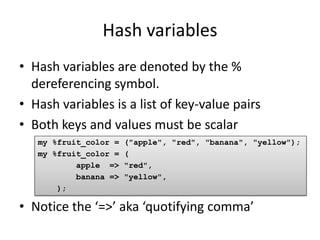
• Hash variables are denoted by the %
  dereferencing symbol.
• Hash variables is a list of key-value pairs
• Both keys and values must be scalar
   my %fruit_color =   ("apple", "red", "banana", "yellow");
   my %fruit_color =   (
           apple =>    "red",
           banana =>   "yellow",
       );

• Notice the ‘=>’ aka ‘quotifying comma’
Hash variables
• Individual access: $hash{key}
• Access multiple values via slice:
     @slice = @hash{„key2‟,‟key23‟,‟key4‟}

• Assign multiple values via slice:
     @hash{„key2‟,‟key23‟,‟key4‟} = @new_values;
Non data types
• Filehandle
  – There are several predefined filehandles, including
    STDIN, STDOUT, STDERR and DATA (default
    opened).
  – No prefix
• Code value aka subroutine
  – Dereferencing symbol “&”
Subroutines
• We can reuse a segment of Perl code by
  placing it within a subroutine.
• The subroutine is defined using the sub
  keyword and a name (= variable name !!).
• The subroutine body is defined by placing
  code statements within the {} code block
  symbols. sub MySubroutine{
                   #Perl code goes here.
                   my @args = @_;
              }
Subroutines
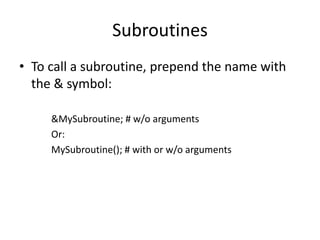
• To call a subroutine, prepend the name with
  the & symbol:

     &MySubroutine; # w/o arguments
     Or:
     MySubroutine(); # with or w/o arguments
Subroutines
• Arguments in underscore array variable (@_)
   my @results = MySubroutine(@arg1, „arg2‟, („arg3‟,
   „arg4‟));

   sub MySubroutine{
       #Perl code goes here.
       my ($thingy, @args) = @_;
   }


• List flattening !!
Subroutines
• Return value
  – Nothing
                     sub MySubroutine{
  – Scalar value         #Perl code goes here.
                         my ($thingy, @args) = @_;
  – List value           do_something(@args);
• Return value       }

  – Explicit with return function
  – Implicit: value of the last statement
Subroutines
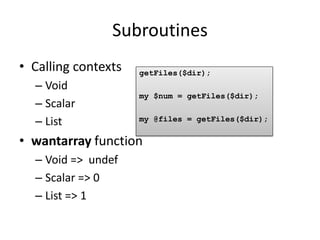
• Calling contexts   getFiles($dir);
  – Void
                     my $num = getFiles($dir);
  – Scalar
  – List             my @files = getFiles($dir);

• wantarray function
  – Void => undef
  – Scalar => 0
  – List => 1
Functions and operators
• Built-in routines
• Function
  – Arguments at right hand side
  – Sensible name (defined, open, print, ...)
Functions
• Perl provides a rich set of built-in functions to
  help you perform common tasks.
• Several categories of useful built-in function
  include
  – Arithmetic functions (sqrt, sin, … )
  – List functions (push, chomp, … )
  – String functions (length, substr, … )
  – Existance functions (defined, undef)
Array functions
• Array as queue: push/shift (FIFO)
• Array as stack: push/pop (LIFO)

              @row1                   push
      shift
                 1     2       3
    unshift                           pop
List functions
• chomp: remove newline from every element
  in the list
• map: kind of loop without escape, every
  element ($_) is ‘processed’
• grep: kind of filter
• sort
• join
Hash functions
• keys: returns the hash keys in random order
• values: returns values of the hash in random
  order but same order as keys function call
• each: returns (key, value) pairs
• delete: remove a particular key (and
  associated value) from a hash
Operators
• Operator
  – Complex and subtle (=,<>, <=>, ?:, ->,=>,...)
  – Symbolic name (+,<,>,&,!, ...)
Operators
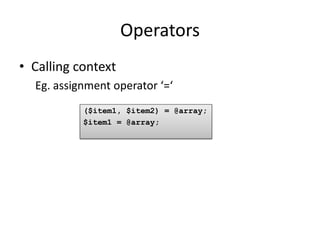
• Calling context
  Eg. assignment operator ‘=‘
           ($item1, $item2) = @array;
           $item1 = @array;
perldoc
• Access to Perl’s documentation system
  – Command line
  – Web: http://perldoc.perl.org/
• Documentation overview: perldoc perl
• Function info:
  – perldoc perlfunc
  – perldoc -f <function name>
• Operator info: perldoc perlop
• Searching the FAQs: perldoc -q <FAQ keyword>
perldoc
• Move around

                  Action                   Key stroke
      Page down                space
      Page up                  b
      Scroll down/up           Down/up arrow
      Jump to end              Shift+G
      Jump to beginning        1 shift+G
      Jump to line <x>         <x> shift+G
perldoc
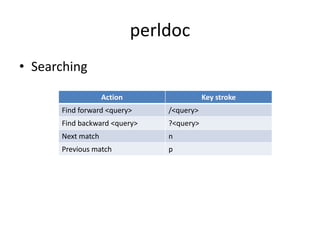
• Searching

                   Action                  Key stroke
      Find forward <query>      /<query>
      Find backward <query>     ?<query>
      Next match                n
      Previous match            p
Creating a script
• Text editor (vi, textpad, notepad++, ...)
• IDE (Komodo, Eclipse, EMACS, Geany, ...)
  See: www.perlide.org
• Shebang (not for modules)
  #!/usr/bin/perl
Executing a script
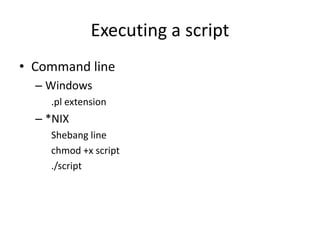
• Command line
  – Windows
    .pl extension
  – *NIX
    Shebang line
    chmod +x script
    ./script
Executing a script
• Geany IDE
References (and referents)
• A reference is a special scalar value which
  “refers to” or “points to” any value.
  – A variable name is one kind of reference that you
    are already familiar with. It’s a given name.
  – Reference is a kind of private, internal, computer
    generated name
• A referent is the value that the reference is
  pointing to
Creating References
• Method 1: references to variables are created
  by using the backslash() operator.
          $name = „bioperl‟;
          $reference = $name;
          $array_reference = @array_name;
          $hash_reference = %hash_name;
          $subroutine_ref = &sub_name;
Creating References
• Method 2:
  – [ ITEMS ] makes a new, anonymous array and
    returns a reference to that array.
  – { ITEMS } makes a new, anonymous hash, and
    returns a reference to that hash

    my $array_ref = [ 1, „foo‟, undef, 13 ];
    my $hash_ref = {one => 1, two => 2};
Dereferencing a Reference
• Use the appropriate dereferencing symbol
  Scalar: $
  Array: @
  Hash: %
  Subroutine: &
Dereferencing a Reference
• Remember $name, ${‘name’} ?
  Means: give me the scalar value where the variable
   ‘name’ is pointing to.
• A reference $reference ìs a name, so
  $$reference, ${$reference}
  Means: give me the scalar value where the
   reference $reference is pointing to
Dereferencing a Reference
• The arrow operator: ->
  – Arrays and hashes
    my $array_ref = [ 1, „foo‟, undef, 13 ];
    my $hash_ref = {one => 1, two => 2};

    ${$array_ref}[1] = ${$hash_ref}{„two‟}
    # can be written as:
    $array_ref->[1] = $hash_ref->{two}


  – Subroutines
    &{$sub_ref}($arg1,$arg2)
    # can be written as:
    $sub_ref->($arg1, $arg2)
Identifying a referent
• ref function

                $scalar_ref                      ref($scalar_ref)
       Scalar value                    undef
       Reference to scalar             ‘SCALAR’
       Reference to array              ‘ARRAY’
       Reference to hash               ‘HASH’
       Reference to subroutine         ‘CODE’
       Refernce to filehandle          ‘IO’ or ‘IO::HANDLE’
       Reference to other reference    ‘REF’
       Reference to blessed referent   Package name aka type
References
• Why do we need references ???
  – Create complex data structures
     !! Arrays and hashes can only store scalar values
  – Pass arrays, hashes, subroutines, ... as arguments
    to subroutines and functions
     !! List flattening
Complex data structures
• Remind:
  – Reference is a scalar value
  – Arrays and hashes are sets of scalar values
       my $array_ref = [ 1, 2, 3 ];
       my $hash_ref = {one => 1, two => 2};
       my %data = ( arrayref => $array_ref,
                    hash_ref => $hash_ref);

  – In one go:
  my %data = ( arrayref => [ 1, 2, 3 ],
               hash_ref => {one => 1, two => 2}
                      );
Complex data structures
• Individual access
    my %data = ( arrayref => [ 1, 2, 3 ],
                 hash_ref => {one => 1,
                              two => [„a‟,‟b‟]});

                                  How to access this value ?


    my $wanted_value = $data{hash_ref}->{two}->[1];
Complex data structures
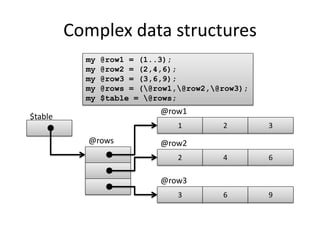
           my   @row1 = (1..3);
           my   @row2 = (2,4,6);
           my   @row3 = (3,6,9);
           my   @rows = (@row1,@row2,@row3);
           my   $table = @rows;
                            @row1
$table
                                1        2        3
           @rows            @row2
                                2        4        6

                            @row3
                                3        6        9
Complex data structures
               my $table   = [
                  [1, 2,   3],
                  [2, 4,   6],
                  [3, 6,   9]
               ];

$table
                                 1   2   3


                                 2   4   6


                                 3   6   9
Complex data structures
• Individual access   my $wanted_value = $table->[1]->[2];
                      # shorter form:
                      $wanted_value = $table->[1][2]


 $table
                              1         2        3


                              2         4        6


                              3         6        9
Packages and modules
• 2 types of variables:
  – Global aka package variables
  – Lexical variables
Packages and modules
• Global / package variables
  – Visible everywhere in every program
  – You get the if you don’t say otherwise
  – !! Autovivification         $var1 = 42;
                               print “$var1, “, ++$var2;
                               # results in:
                               42, 1

• Name has 2 parts: family name + given name
  – Default family name is ‘main’. $John is actually
    $main::John
  – $Cleese::John has nothing to do with $Wayne::John
  – Family name = package name
Packages and modules
• Lexical / private variables
  – Explicitely declared as my $var1 = 42;
  – Only visible within the boundaries of a code block
    or file.
  – They cease to exist as soon as the program leaves
    the code block or the program ends
  – The do not have a family name aka they do not
    belong to a package
• ALWAYS USE LEXICAL VARIABLES          #!/usr/bin/perl
  (except for subroutines ...)          use strict;
                                        my $var1 = 42;
Packages
• Wikipedia:
    In general, a namespace is a container that
    provides context for the identifiers (variable
    names) it holds, and allows the disambiguation of
    homonym identifiers residing in different
    namespaces.
• Family where the (global!) variables (incl.
  subroutines) live (remember $John)
Packages
• Family has a:
  – name, defined via package declaration
       package Bio::SeqIO::genbank;
       # welcome to the Bio::SeqIO::genbank family
       sub write_seq{}
       package Bio::SeqIO::fasta;
       # welcome to the Bio::SeqIO::fasta family
       sub write_seq{}


  – House, block or blocks of code that follow the
    package declaration
Packages
• Why do we need packages ???
  – To organize code
  – To improve maintainability
  – To avoid name space collisions
Modules
• What ?
  A text file (with a .pm suffix) containing Perl source
    code, that can contain any number of
    namespaces. It must evaluate to a true value.
                                             use Data::Dumper;
• Loading
  – At compile time: use <module> require Data::Dumper;
                                        require ‘my_file.pl’;
  – At run time: require <expr>         require $class;

  – <expr> and <module>:compiler translates each
    double-colon '::' into a path separator and
    appends '.pm'.
     E.g. Data::Dumper yields Data/Dumper.pm
Modules
• A module can contain multiple packages, but
  convention dictates that each module
  contains a package of the same name.
  – easy to quickly locate the code in any given
    package (perldoc –m <module>)
  – not obligatory !!
• A module name is unique
  – 1 to 1 mapping to file system !!
  – Should start with capital letter
Module files
• Module files are stored in a subdirectory
  hierarchy that parallels the module name
  hierarchy.
• All module files must have an extension
  of .pm.
          Module           Is stored in
          Config           Config.pm
          Math::Complex    Math/Complex.pm
          String::Approx   String/Approx.pm
Modules
• Module path is relative. So, where is Perl
  searching for that module ?
• Possible modules roots
  – @INC        []$ perldoc –V
                …
                @INC:
                    /etc/perl
                    /usr/local/lib/perl/5.10.1
                    /usr/local/share/perl/5.10.1
                    /usr/lib/perl5
                    /usr/share/perl5
                    /usr/lib/perl/5.10
                    /usr/share/perl/5.10
                    /usr/local/lib/site_perl
                    .
Modules
• Alternative module roots (perldoc -q library)
  – In script
         use lib ‘/my/alternative/module/path’;

  – Command line
         []$ perl -I/my/alternative/module/path script.pl

  – Environment
         export PERL5LIB=$PERL5LIB:/my/alternative/module/path
Modules
• Test/Speak.pm                            • Test.pl
package My::Package::Says::Hello;             #!/usr/bin/perl
                                              use strict;
sub speak                                     use Test::Speak;
{
  print __PACKAGE__, " says: 'Hello'n";      My::Package::Says::Hello::speak();
}                                             My::Package::Says::Blah::speak();

package My::Package::Says::Blah;

sub speak
{
  print __PACKAGE__, " says: 'Blah'n";
}

1;
Modules
• Why do we need modules???
  – To organize packages into files/folders
  – Code reuse (ne copy & paste !)
• Module repository: CPAN
  – http://search.cpan.org
  – https://metacpan.org/
• Pragma
  – Special module that influences the code (compilation)
  – Lowercase
  – Lexically scoped
Modules
• Module information
  – In standard distribution: perldoc perlmodlib
  – Manually installed: perldoc perllocal
  – All modules: perldoc –q installed
  – Documentation: perldoc <module name>
  – Location: perldoc –l <module name>
  – Source: perldoc –m <module name>
Packages and Modules - Summary
1.  A package is a separate namespace within Perl code.
2.  A module can have more than one package defined within it.
3.  The default package is main.
4.  We can get to variables (and subroutines) within packages by
    using the fully qualified name
5. To write a package, just write package <package name> where
    you want the package to start.
6. Package declarations last until the end of the enclosing block, file
    or until the next package statement
7. The require and use keywords can be used to import the contents
    of other files for use in a program.
8. Files which are included must end with a true value.
9. Perl looks for modules in a list of directories stored in @INC
10. Module names map to the file system
Exercises
• Bioperl Training Exercise 1: perldoc
• Bioperl Training Exercise 2: thou shalt not forget
• Bioperl Training Exercise 3: arrays
• Bioperl Training Exercise 4: hashes
• Bioperl Training Exercise 5: packages and
  modules 1
• Bioperl Training Exercise 6: packages and
  modules 2
• Bioperl Training Exercise 7: complex data
  structures
Object Oriented Programming in Perl
• Why do we need objects and OOP ?
  – It’s fun
  – Code reuse
  – Abstraction
Object Oriented Programming in Perl
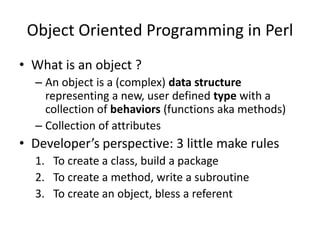
• What is an object ?
  – An object is a (complex) data structure
    representing a new, user defined type with a
    collection of behaviors (functions aka methods)
  – Collection of attributes
• Developer’s perspective: 3 little make rules
  1. To create a class, build a package
  2. To create a method, write a subroutine
  3. To create an object, bless a referent
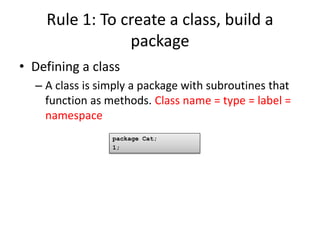
Rule 1: To create a class, build a
                package
• Defining a class
  – A class is simply a package with subroutines that
    function as methods. Class name = type = label =
    namespace
                 package Cat;
                 1;
Rule 2: To create a method, write a
               subroutine
• First argument of methods is always class
  name or object itself (or rather: reference)
          package Cat;
          sub meow {
             my $self = shift;
             print __PACKAGE__ “ says: meow !n”;
          }
          1;


• Subroutine call the OO way (method
  invocation arrow operator) Cat->meow;
                                      $cat->meow;
Rule 3: To create an object, bless a
                referent
• ‘Special’ method: constructor
  – Any name will do, in most cases new
  – Object can be anything, in most cases hash
  – Reference to object is stored in variable
  – bless
     • Arguments: reference (+ class). Does not change !!
     • Underlying referent is blessed (= typed, labelled)
     • Returns reference      package Cat;
                            sub new {
                              my ($class, @args) = @_;
                              my $self = { _name => $_args[0] };
                              bless $self, $class;
                            }
Objects
• Perl objects are data structures ( a collection
  of attributes).
• To create an object we have to take 3 rules
  into account:
  1. Classes are just packages
  2. Methods are just subroutines
  3. Blessing a referent creates an object
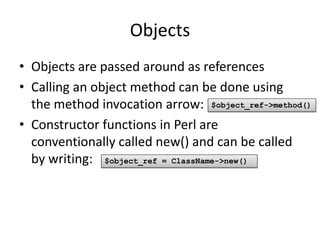
Objects
• Objects are passed around as references
• Calling an object method can be done using
  the method invocation arrow: $object_ref->method()
• Constructor functions in Perl are
  conventionally called new() and can be called
  by writing: $object_ref = ClassName->new()
Inheritance
• Concept
   – Way to extend functionality of a class by deriving a
     (more specific) sub-class from it
• In Perl:
   – Way of specifying where to look for methods
   – store the name of 1 or more classes in the
     package variable @ISA package NorthAmericanCat;
                              use Cat;
                               @ISA = qw(Cat);

   – Multiple inheritance !!
                               package NorthAmericanCat;
                               use Cat;
                               use Animal;
                               @ISA = qw(Cat Animal);
Inheritance
• UNIVERSAL, parent of all classes
• Predifined methods
  – isa(‘<class name>’): check if the object inherits
    from a particular class
  – can(‘<method name>’): check if <method name>
    is a callable method
Inheritance
• SUPER: superclass of the current package
            $self->SUPER::do_something()

  – start looking in @ISA for a class that can()
    do_something
  – explicitely call a method of a parental class
  – often used by Bioperl to initialize object attributes
Polymorphism
• Concept
  – methods defined in the base class will override
    methods defined in the parent classes
  – same method has different behaviours
Exercises
• Bioperl Training Exercise 8: OOP
• Bioperl Training Exercise 9: inheritance,
  polymorphism
• Bioperl Training Exercise 10: aggregation,
  delegation

Marc’s (bio)perl course

  • 1.
  • 2.
    Goals • Perl PositioningSystem: find your way in the Perl World • Write Once, Use Many Times • Object Oriented Perl – Consumer – Developer • Thou shalt not be afraid of the Bioperl Beast
  • 4.
    Agenda Day1 • Perlrefresher – Scalars – Arrays and lists – Hashes – Subroutines and functions • Perldoc • Creating and running a Perl script • References and advanced data structures • Packages and modules • Objects, (multiple) inheritance, polymorphism
  • 5.
    Agenda Day 2 •What is bioperl ? • Taming the Bioperl Beast – Finding modules – Finding methods – Data::Dumper • Sequence processing • One image says more than 1000 words
  • 6.
    Variables • Data ofany type may be stored within three basic types of variables: – Scalar (strings, numbers, references) – Array (aka list but not quite the same) – Hash (aka associative array) • Variable names are always preceded by a “dereferencing symbol” or prefix. If needed: {} – $ - Scalar variables – @ - List variables – % - Associative array aka hash variables
  • 7.
    Variables • You doNOT have to – Declare the variable before using it – Define the variable’s data type – Allocate memory for new data values
  • 8.
    Scalar variables • Scalarvariable stores a string, a number, a character, a reference, undef • $name, ${name}, ${‘name’} • More magic: $_
  • 9.
    Array variables • Arrayvariable stores a list of scalars • @name, @{name}, @{‘name’} • Index – Map: index => scalar value – zero-indexed (distance from start)
  • 10.
    Array variables • Listassignment: @count = (1, 2, 3, 4, 5); @count = („apple‟, „bat‟, „cat‟); @count2 = @count; • Individual assignment: $count[2] = 42 • Individual acces: print $count[2] • Special variable $#<array name> • Scalar context
  • 11.
    Array variables • Accessmultiple values via array slice: print @array[3,2,4,1,0,-1]; • Assign multiple values via array slice: @array[3,2,4,1,0,-1] = @new_values;
  • 12.
    Lists • List =temporary sequence of comma separated values usually in () or result of qw operator my @array = qw/blood sweat tears/; • Array = container for a list • Use: – Array initialization – Extract values from array my ($var1, $var2[42], $var3, @var4) = @args; my ($var5, $var6) = @args;
  • 13.
    Lists • List flattening my @vehicles = („truck‟, @cars, („tank‟,‟jeep‟)); • Remember: each element of list must be a scalar, not another list => NOT hierarchical list of 3 elements FLATTENED list of scalar values • Individual access and slicing cf. arrays my @vehicles = („truck‟, @cars, („tank‟,‟jeep‟))[2,-1];
  • 14.
    Hash variables • Hashvariables are denoted by the % dereferencing symbol. • Hash variables is a list of key-value pairs • Both keys and values must be scalar my %fruit_color = ("apple", "red", "banana", "yellow"); my %fruit_color = ( apple => "red", banana => "yellow", ); • Notice the ‘=>’ aka ‘quotifying comma’
  • 15.
    Hash variables • Individualaccess: $hash{key} • Access multiple values via slice: @slice = @hash{„key2‟,‟key23‟,‟key4‟} • Assign multiple values via slice: @hash{„key2‟,‟key23‟,‟key4‟} = @new_values;
  • 16.
    Non data types •Filehandle – There are several predefined filehandles, including STDIN, STDOUT, STDERR and DATA (default opened). – No prefix • Code value aka subroutine – Dereferencing symbol “&”
  • 18.
    Subroutines • We canreuse a segment of Perl code by placing it within a subroutine. • The subroutine is defined using the sub keyword and a name (= variable name !!). • The subroutine body is defined by placing code statements within the {} code block symbols. sub MySubroutine{ #Perl code goes here. my @args = @_; }
  • 19.
    Subroutines • To calla subroutine, prepend the name with the & symbol: &MySubroutine; # w/o arguments Or: MySubroutine(); # with or w/o arguments
  • 20.
    Subroutines • Arguments inunderscore array variable (@_) my @results = MySubroutine(@arg1, „arg2‟, („arg3‟, „arg4‟)); sub MySubroutine{ #Perl code goes here. my ($thingy, @args) = @_; } • List flattening !!
  • 21.
    Subroutines • Return value – Nothing sub MySubroutine{ – Scalar value #Perl code goes here. my ($thingy, @args) = @_; – List value do_something(@args); • Return value } – Explicit with return function – Implicit: value of the last statement
  • 22.
    Subroutines • Calling contexts getFiles($dir); – Void my $num = getFiles($dir); – Scalar – List my @files = getFiles($dir); • wantarray function – Void => undef – Scalar => 0 – List => 1
  • 23.
    Functions and operators •Built-in routines • Function – Arguments at right hand side – Sensible name (defined, open, print, ...)
  • 24.
    Functions • Perl providesa rich set of built-in functions to help you perform common tasks. • Several categories of useful built-in function include – Arithmetic functions (sqrt, sin, … ) – List functions (push, chomp, … ) – String functions (length, substr, … ) – Existance functions (defined, undef)
  • 25.
    Array functions • Arrayas queue: push/shift (FIFO) • Array as stack: push/pop (LIFO) @row1 push shift 1 2 3 unshift pop
  • 26.
    List functions • chomp:remove newline from every element in the list • map: kind of loop without escape, every element ($_) is ‘processed’ • grep: kind of filter • sort • join
  • 27.
    Hash functions • keys:returns the hash keys in random order • values: returns values of the hash in random order but same order as keys function call • each: returns (key, value) pairs • delete: remove a particular key (and associated value) from a hash
  • 28.
    Operators • Operator – Complex and subtle (=,<>, <=>, ?:, ->,=>,...) – Symbolic name (+,<,>,&,!, ...)
  • 29.
    Operators • Calling context Eg. assignment operator ‘=‘ ($item1, $item2) = @array; $item1 = @array;
  • 31.
    perldoc • Access toPerl’s documentation system – Command line – Web: http://perldoc.perl.org/ • Documentation overview: perldoc perl • Function info: – perldoc perlfunc – perldoc -f <function name> • Operator info: perldoc perlop • Searching the FAQs: perldoc -q <FAQ keyword>
  • 32.
    perldoc • Move around Action Key stroke Page down space Page up b Scroll down/up Down/up arrow Jump to end Shift+G Jump to beginning 1 shift+G Jump to line <x> <x> shift+G
  • 33.
    perldoc • Searching Action Key stroke Find forward <query> /<query> Find backward <query> ?<query> Next match n Previous match p
  • 34.
    Creating a script •Text editor (vi, textpad, notepad++, ...) • IDE (Komodo, Eclipse, EMACS, Geany, ...) See: www.perlide.org • Shebang (not for modules) #!/usr/bin/perl
  • 35.
    Executing a script •Command line – Windows .pl extension – *NIX Shebang line chmod +x script ./script
  • 36.
  • 38.
    References (and referents) •A reference is a special scalar value which “refers to” or “points to” any value. – A variable name is one kind of reference that you are already familiar with. It’s a given name. – Reference is a kind of private, internal, computer generated name • A referent is the value that the reference is pointing to
  • 39.
    Creating References • Method1: references to variables are created by using the backslash() operator. $name = „bioperl‟; $reference = $name; $array_reference = @array_name; $hash_reference = %hash_name; $subroutine_ref = &sub_name;
  • 40.
    Creating References • Method2: – [ ITEMS ] makes a new, anonymous array and returns a reference to that array. – { ITEMS } makes a new, anonymous hash, and returns a reference to that hash my $array_ref = [ 1, „foo‟, undef, 13 ]; my $hash_ref = {one => 1, two => 2};
  • 41.
    Dereferencing a Reference •Use the appropriate dereferencing symbol Scalar: $ Array: @ Hash: % Subroutine: &
  • 42.
    Dereferencing a Reference •Remember $name, ${‘name’} ? Means: give me the scalar value where the variable ‘name’ is pointing to. • A reference $reference ìs a name, so $$reference, ${$reference} Means: give me the scalar value where the reference $reference is pointing to
  • 43.
    Dereferencing a Reference •The arrow operator: -> – Arrays and hashes my $array_ref = [ 1, „foo‟, undef, 13 ]; my $hash_ref = {one => 1, two => 2}; ${$array_ref}[1] = ${$hash_ref}{„two‟} # can be written as: $array_ref->[1] = $hash_ref->{two} – Subroutines &{$sub_ref}($arg1,$arg2) # can be written as: $sub_ref->($arg1, $arg2)
  • 44.
    Identifying a referent •ref function $scalar_ref ref($scalar_ref) Scalar value undef Reference to scalar ‘SCALAR’ Reference to array ‘ARRAY’ Reference to hash ‘HASH’ Reference to subroutine ‘CODE’ Refernce to filehandle ‘IO’ or ‘IO::HANDLE’ Reference to other reference ‘REF’ Reference to blessed referent Package name aka type
  • 45.
    References • Why dowe need references ??? – Create complex data structures !! Arrays and hashes can only store scalar values – Pass arrays, hashes, subroutines, ... as arguments to subroutines and functions !! List flattening
  • 46.
    Complex data structures •Remind: – Reference is a scalar value – Arrays and hashes are sets of scalar values my $array_ref = [ 1, 2, 3 ]; my $hash_ref = {one => 1, two => 2}; my %data = ( arrayref => $array_ref, hash_ref => $hash_ref); – In one go: my %data = ( arrayref => [ 1, 2, 3 ], hash_ref => {one => 1, two => 2} );
  • 47.
    Complex data structures •Individual access my %data = ( arrayref => [ 1, 2, 3 ], hash_ref => {one => 1, two => [„a‟,‟b‟]}); How to access this value ? my $wanted_value = $data{hash_ref}->{two}->[1];
  • 48.
    Complex data structures my @row1 = (1..3); my @row2 = (2,4,6); my @row3 = (3,6,9); my @rows = (@row1,@row2,@row3); my $table = @rows; @row1 $table 1 2 3 @rows @row2 2 4 6 @row3 3 6 9
  • 49.
    Complex data structures my $table = [ [1, 2, 3], [2, 4, 6], [3, 6, 9] ]; $table 1 2 3 2 4 6 3 6 9
  • 50.
    Complex data structures •Individual access my $wanted_value = $table->[1]->[2]; # shorter form: $wanted_value = $table->[1][2] $table 1 2 3 2 4 6 3 6 9
  • 51.
    Packages and modules •2 types of variables: – Global aka package variables – Lexical variables
  • 52.
    Packages and modules •Global / package variables – Visible everywhere in every program – You get the if you don’t say otherwise – !! Autovivification $var1 = 42; print “$var1, “, ++$var2; # results in: 42, 1 • Name has 2 parts: family name + given name – Default family name is ‘main’. $John is actually $main::John – $Cleese::John has nothing to do with $Wayne::John – Family name = package name
  • 54.
    Packages and modules •Lexical / private variables – Explicitely declared as my $var1 = 42; – Only visible within the boundaries of a code block or file. – They cease to exist as soon as the program leaves the code block or the program ends – The do not have a family name aka they do not belong to a package • ALWAYS USE LEXICAL VARIABLES #!/usr/bin/perl (except for subroutines ...) use strict; my $var1 = 42;
  • 55.
    Packages • Wikipedia: In general, a namespace is a container that provides context for the identifiers (variable names) it holds, and allows the disambiguation of homonym identifiers residing in different namespaces. • Family where the (global!) variables (incl. subroutines) live (remember $John)
  • 56.
    Packages • Family hasa: – name, defined via package declaration package Bio::SeqIO::genbank; # welcome to the Bio::SeqIO::genbank family sub write_seq{} package Bio::SeqIO::fasta; # welcome to the Bio::SeqIO::fasta family sub write_seq{} – House, block or blocks of code that follow the package declaration
  • 57.
    Packages • Why dowe need packages ??? – To organize code – To improve maintainability – To avoid name space collisions
  • 58.
    Modules • What ? A text file (with a .pm suffix) containing Perl source code, that can contain any number of namespaces. It must evaluate to a true value. use Data::Dumper; • Loading – At compile time: use <module> require Data::Dumper; require ‘my_file.pl’; – At run time: require <expr> require $class; – <expr> and <module>:compiler translates each double-colon '::' into a path separator and appends '.pm'. E.g. Data::Dumper yields Data/Dumper.pm
  • 59.
    Modules • A modulecan contain multiple packages, but convention dictates that each module contains a package of the same name. – easy to quickly locate the code in any given package (perldoc –m <module>) – not obligatory !! • A module name is unique – 1 to 1 mapping to file system !! – Should start with capital letter
  • 60.
    Module files • Modulefiles are stored in a subdirectory hierarchy that parallels the module name hierarchy. • All module files must have an extension of .pm. Module Is stored in Config Config.pm Math::Complex Math/Complex.pm String::Approx String/Approx.pm
  • 61.
    Modules • Module pathis relative. So, where is Perl searching for that module ? • Possible modules roots – @INC []$ perldoc –V … @INC: /etc/perl /usr/local/lib/perl/5.10.1 /usr/local/share/perl/5.10.1 /usr/lib/perl5 /usr/share/perl5 /usr/lib/perl/5.10 /usr/share/perl/5.10 /usr/local/lib/site_perl .
  • 62.
    Modules • Alternative moduleroots (perldoc -q library) – In script use lib ‘/my/alternative/module/path’; – Command line []$ perl -I/my/alternative/module/path script.pl – Environment export PERL5LIB=$PERL5LIB:/my/alternative/module/path
  • 63.
    Modules • Test/Speak.pm • Test.pl package My::Package::Says::Hello; #!/usr/bin/perl use strict; sub speak use Test::Speak; { print __PACKAGE__, " says: 'Hello'n"; My::Package::Says::Hello::speak(); } My::Package::Says::Blah::speak(); package My::Package::Says::Blah; sub speak { print __PACKAGE__, " says: 'Blah'n"; } 1;
  • 64.
    Modules • Why dowe need modules??? – To organize packages into files/folders – Code reuse (ne copy & paste !) • Module repository: CPAN – http://search.cpan.org – https://metacpan.org/ • Pragma – Special module that influences the code (compilation) – Lowercase – Lexically scoped
  • 65.
    Modules • Module information – In standard distribution: perldoc perlmodlib – Manually installed: perldoc perllocal – All modules: perldoc –q installed – Documentation: perldoc <module name> – Location: perldoc –l <module name> – Source: perldoc –m <module name>
  • 66.
    Packages and Modules- Summary 1. A package is a separate namespace within Perl code. 2. A module can have more than one package defined within it. 3. The default package is main. 4. We can get to variables (and subroutines) within packages by using the fully qualified name 5. To write a package, just write package <package name> where you want the package to start. 6. Package declarations last until the end of the enclosing block, file or until the next package statement 7. The require and use keywords can be used to import the contents of other files for use in a program. 8. Files which are included must end with a true value. 9. Perl looks for modules in a list of directories stored in @INC 10. Module names map to the file system
  • 68.
    Exercises • Bioperl TrainingExercise 1: perldoc • Bioperl Training Exercise 2: thou shalt not forget • Bioperl Training Exercise 3: arrays • Bioperl Training Exercise 4: hashes • Bioperl Training Exercise 5: packages and modules 1 • Bioperl Training Exercise 6: packages and modules 2 • Bioperl Training Exercise 7: complex data structures
  • 70.
    Object Oriented Programmingin Perl • Why do we need objects and OOP ? – It’s fun – Code reuse – Abstraction
  • 71.
    Object Oriented Programmingin Perl • What is an object ? – An object is a (complex) data structure representing a new, user defined type with a collection of behaviors (functions aka methods) – Collection of attributes • Developer’s perspective: 3 little make rules 1. To create a class, build a package 2. To create a method, write a subroutine 3. To create an object, bless a referent
  • 72.
    Rule 1: Tocreate a class, build a package • Defining a class – A class is simply a package with subroutines that function as methods. Class name = type = label = namespace package Cat; 1;
  • 73.
    Rule 2: Tocreate a method, write a subroutine • First argument of methods is always class name or object itself (or rather: reference) package Cat; sub meow { my $self = shift; print __PACKAGE__ “ says: meow !n”; } 1; • Subroutine call the OO way (method invocation arrow operator) Cat->meow; $cat->meow;
  • 74.
    Rule 3: Tocreate an object, bless a referent • ‘Special’ method: constructor – Any name will do, in most cases new – Object can be anything, in most cases hash – Reference to object is stored in variable – bless • Arguments: reference (+ class). Does not change !! • Underlying referent is blessed (= typed, labelled) • Returns reference package Cat; sub new { my ($class, @args) = @_; my $self = { _name => $_args[0] }; bless $self, $class; }
  • 75.
    Objects • Perl objectsare data structures ( a collection of attributes). • To create an object we have to take 3 rules into account: 1. Classes are just packages 2. Methods are just subroutines 3. Blessing a referent creates an object
  • 76.
    Objects • Objects arepassed around as references • Calling an object method can be done using the method invocation arrow: $object_ref->method() • Constructor functions in Perl are conventionally called new() and can be called by writing: $object_ref = ClassName->new()
  • 77.
    Inheritance • Concept – Way to extend functionality of a class by deriving a (more specific) sub-class from it • In Perl: – Way of specifying where to look for methods – store the name of 1 or more classes in the package variable @ISA package NorthAmericanCat; use Cat; @ISA = qw(Cat); – Multiple inheritance !! package NorthAmericanCat; use Cat; use Animal; @ISA = qw(Cat Animal);
  • 78.
    Inheritance • UNIVERSAL, parentof all classes • Predifined methods – isa(‘<class name>’): check if the object inherits from a particular class – can(‘<method name>’): check if <method name> is a callable method
  • 79.
    Inheritance • SUPER: superclassof the current package $self->SUPER::do_something() – start looking in @ISA for a class that can() do_something – explicitely call a method of a parental class – often used by Bioperl to initialize object attributes
  • 80.
    Polymorphism • Concept – methods defined in the base class will override methods defined in the parent classes – same method has different behaviours
  • 82.
    Exercises • Bioperl TrainingExercise 8: OOP • Bioperl Training Exercise 9: inheritance, polymorphism • Bioperl Training Exercise 10: aggregation, delegation