

www.webstackacademy.com ‹#›
Function
JavaScript
www.webstackacademy.com ‹#›

Introduction to functions

Passing values to functions

Returning values

Local and Global variables

Functions as objects

Function constructor
Table of Content
www.webstackacademy.com ‹#›www.webstackacademy.com ‹#›
Function basics
(JavaScript)
www.webstackacademy.com ‹#›
What is function?
●
A function is a block of JavaScript code that is defined once but
may be executed, or invoked, any number of times
●
A function can be used to return a value, construct an object, or
as a mechanism to simply run code
●
JavaScript functions are defined with the function keyword
●
Either function declaration or a function expression can be used
www.webstackacademy.com ‹#›
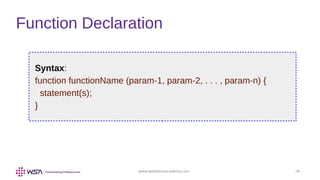
Function Declaration
Syntax:
function functionName (param-1, param-2, . . . , param-n) {
statement(s);
}
www.webstackacademy.com ‹#›
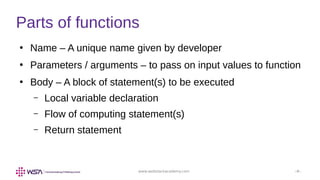
Parts of functions
●
Name – A unique name given by developer
●
Parameters / arguments – to pass on input values to function
●
Body – A block of statement(s) to be executed
– Local variable declaration
– Flow of computing statement(s)
– Return statement
www.webstackacademy.com ‹#›
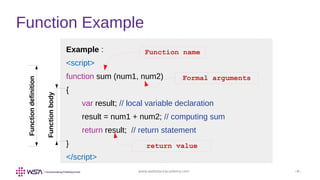
Example :
<script>
function sum (num1, num2)
{
var result; // local variable declaration
result = num1 + num2; // computing sum
return result; // return statement
}
</script>
Function Example
Function name
return value
Formal arguments
Functionbody
Functiondefinition
www.webstackacademy.com ‹#›
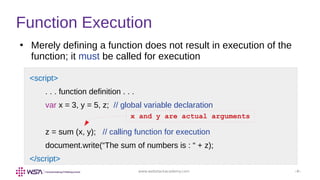
<script>
. . . function definition . . .
var x = 3, y = 5, z; // global variable declaration
z = sum (x, y); // calling function for execution
document.write(“The sum of numbers is : “ + z);
</script>
Function Execution
●
Merely defining a function does not result in execution of the
function; it must be called for execution
x and y are actual arguments
www.webstackacademy.com ‹#›
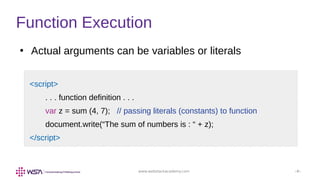
<script>
. . . function definition . . .
var z = sum (4, 7); // passing literals (constants) to function
document.write(“The sum of numbers is : “ + z);
</script>
Function Execution
●
Actual arguments can be variables or literals
www.webstackacademy.com ‹#›
●
Formal arguments are the names listed within parenthesis
in function definition (also known as function parameters)
●
Formal arguments are initialized through actual arguments
at run time
●
Actual arguments are variables or literals passed to the
function at the time of invocation (call to execute)
●
The formal arguments are visible to function only
Actual Vs formal arguments
www.webstackacademy.com ‹#›
Actual Vs formal arguments
●
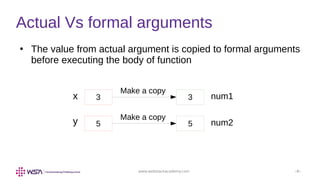
The value from actual argument is copied to formal arguments
before executing the body of function
3
5
3
5
x
y
Make a copy
Make a copy
num1
num2
www.webstackacademy.com ‹#›
The return statement
●
By default a function returns undefined
●
Return statement is used to return primitive value or reference of an object
●
The return value or reference
– Can be directly passed on to expressions
– Must be collected using assignment operator to store in a variable and
further utilization
●
There could be more than one return statements present in the function;
but, only one value or reference can be returned
●
The function exits after execution of return statement
www.webstackacademy.com ‹#›
Class Work
●
Write a function to find the square of a given number
●
Write a function to find sum of cubes of two numbers
●
Write a function to reverse a number
[ Hint n =12345 output : 54321 ]
●
Write a function to print all numbers between 1 and 100 which
is divisible by given number z
www.webstackacademy.com ‹#›
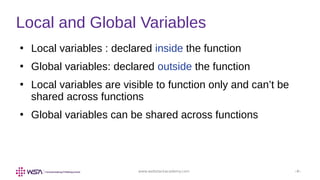
Local and Global Variables
●
Local variables : declared inside the function
●
Global variables: declared outside the function
●
Local variables are visible to function only and can’t be
shared across functions
●
Global variables can be shared across functions
www.webstackacademy.com ‹#›
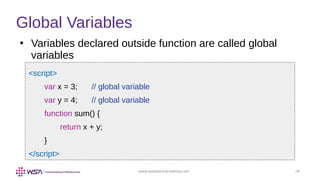
Global Variables
<script>
var x = 3; // global variable
var y = 4; // global variable
function sum() {
return x + y;
}
</script>
●
Variables declared outside function are called global
variables
www.webstackacademy.com ‹#›
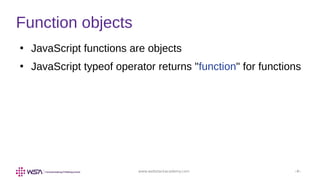
Function objects
●
JavaScript functions are objects
●
JavaScript typeof operator returns "function" for functions
www.webstackacademy.com ‹#›
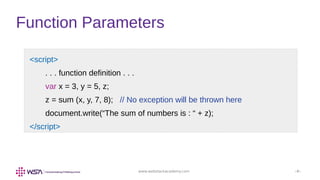
Function Parameters
●
JavaScript is a weekly typed language
●
JavaScript function definitions do not specify data types
for parameters
●
JavaScript does not cross check the number of
arguments received against defined parameters
www.webstackacademy.com ‹#›
Function Parameters
<script>
. . . function definition . . .
var x = 3, y = 5, z;
z = sum (x, y, 7, 8); // No exception will be thrown here
document.write(“The sum of numbers is : “ + z);
</script>
www.webstackacademy.com ‹#›
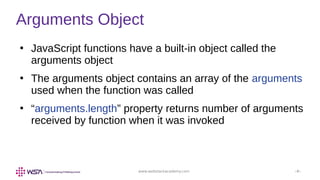
Arguments Object
●
JavaScript functions have a built-in object called the
arguments object
●
The arguments object contains an array of the arguments
used when the function was called
●
“arguments.length” property returns number of arguments
received by function when it was invoked
www.webstackacademy.com ‹#›
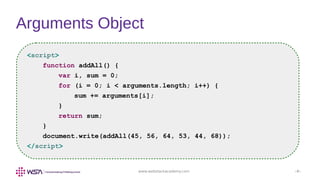
Arguments Object
<script>
function addAll() {
var i, sum = 0;
for (i = 0; i < arguments.length; i++) {
sum += arguments[i];
}
return sum;
}
document.write(addAll(45, 56, 64, 53, 44, 68));
</script>
www.webstackacademy.com ‹#›
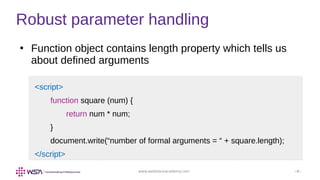
Robust parameter handling
●
Function object contains length property which tells us
about defined arguments
<script>
function square (num) {
return num * num;
}
document.write(“number of formal arguments = “ + square.length);
</script>
www.webstackacademy.com ‹#›
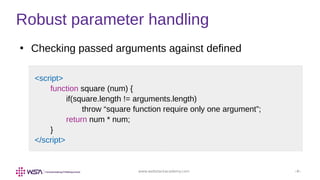
Robust parameter handling
●
Checking passed arguments against defined
<script>
function square (num) {
if(square.length != arguments.length)
throw “square function require only one argument”;
return num * num;
}
</script>
www.webstackacademy.com ‹#›
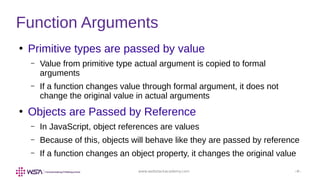
Function Arguments
●
Primitive types are passed by value
– Value from primitive type actual argument is copied to formal
arguments
– If a function changes value through formal argument, it does not
change the original value in actual arguments
●
Objects are Passed by Reference
– In JavaScript, object references are values
– Because of this, objects will behave like they are passed by reference
– If a function changes an object property, it changes the original value
www.webstackacademy.com ‹#›
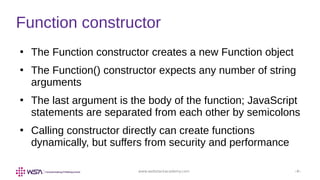
Function constructor
●
The Function constructor creates a new Function object
●
The Function() constructor expects any number of string
arguments
●
The last argument is the body of the function; JavaScript
statements are separated from each other by semicolons
●
Calling constructor directly can create functions
dynamically, but suffers from security and performance
www.webstackacademy.com ‹#›
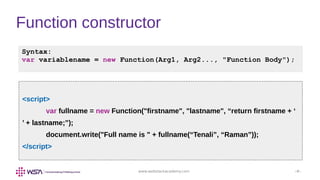
<script>
var fullname = new Function("firstname", "lastname", “return firstname + ‘
’ + lastname;”);
document.write("Full name is " + fullname(“Tenali”, “Raman”));
</script>
Function constructor
Syntax:
var variablename = new Function(Arg1, Arg2..., "Function Body");
www.webstackacademy.com ‹#›
Web Stack Academy (P) Ltd
#83, Farah Towers,
1st floor,MG Road,
Bangalore – 560001
M: +91-80-4128 9576
T: +91-98862 69112
E: info@www.webstackacademy.com