Dan Downing Principal Consultant Dion Johnson
Agenda Introduction State of adoption of server virtualization Operational barriers and concerns Virtualization technologies The six critical success factors a performance tester needs to know Anatomy if a virtual system Principles of virtual workload modeling Shortcomings and key bottlenecks of virtual systems System resources:  what to measure and how Analyzing and presenting compelling results Case Study How a provider of insurance market intelligence went virtual, and how they proved performance
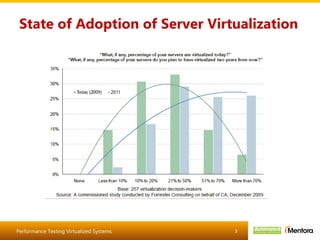
State of Adoption of Server Virtualization
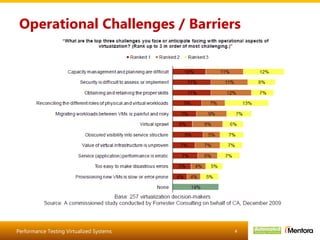
Operational Challenges / Barriers
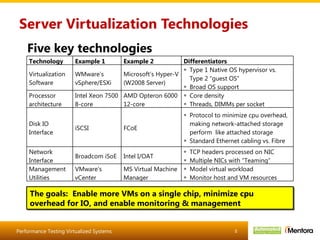
Server Virtualization Technologies Five key technologies The goals:  Enable more VMs on a single chip, minimize cpu overhead for IO, and enable monitoring & management Technology Example 1 Example 2 Differentiators Virtualization Software WMware’s  vSphere/ESXi Microsoft’s Hyper-V (W2008 Server) Type 1 Native OS hypervisor vs. Type 2 “guest OS” Broad OS support Processor architecture Intel Xeon 7500 8-core AMD Opteron 6000 12-core Core density Threads, DIMMs per socket Disk IO Interface iSCSI FCoE Protocol to minimize cpu overhead, making network-attached storage perform  like attached storage Standard Ethernet cabling vs. Fibre Network Interface Broadcom iSoE Intel I/OAT TCP headers processed on NIC Multiple NICs with “Teaming” Management Utilities VMware’s vCenter MS Virtual Machine Manager Model virtual workload Monitor host and VM resources
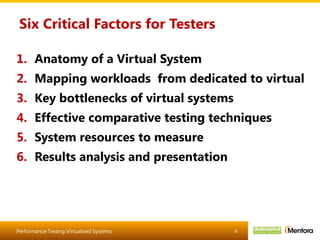
Six Critical Factors for Testers Anatomy of a Virtual System Mapping workloads  from dedicated to virtual Key bottlenecks of virtual systems Effective comparative testing techniques System resources to measure Results analysis and presentation
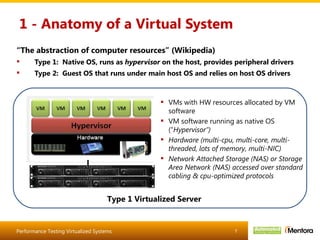
1 - Anatomy of a Virtual System “ The abstraction of computer resources” (Wikipedia) Type 1:  Native OS, runs as  hypervisor  on the host, provides peripheral drivers Type 2:  Guest OS that runs under main host OS and relies on host OS drivers VMs with HW resources allocated by VM software VM software running as native OS (“ Hypervisor”) Hardware (multi-cpu, multi-core, multi-threaded, lots of memory, multi-NIC) Network Attached Storage (NAS) or Storage Area Network (NAS) accessed over standard cabling & cpu-optimized protocols Type 1 Virtualized Server
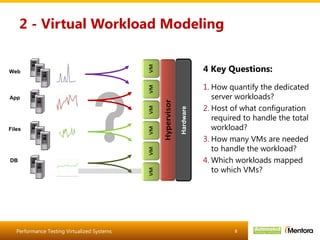
2 - Virtual Workload Modeling How quantify the dedicated server workloads? Host of what configuration required to handle the total workload? How many VMs are needed to handle the workload? Which workloads mapped to which VMs? 4 Key Questions: Web App Files DB Hardware
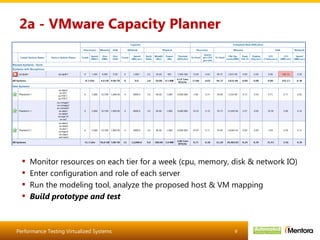
2a - VMware Capacity Planner Monitor resources on each tier for a week (cpu, memory, disk & network IO) Enter configuration and role of each server Run the modeling tool, analyze the proposed host & VM mapping Build prototype and test
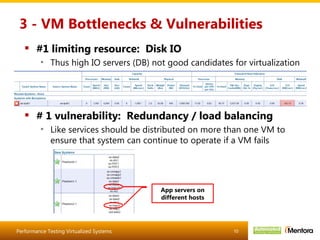
3 - VM Bottlenecks & Vulnerabilities #1 limiting resource:  Disk IO Thus high IO servers (DB) not good candidates for virtualization # 1 vulnerability:  Redundancy / load balancing Like services should be distributed on more than one VM to ensure that system can continue to operate if a VM fails App servers on different hosts
4 - Performance Testing Techniques Test in parallel on dedicated and VM environments Eliminates time-of-day differences due to loads on shared components Test a light workload first Establish a baseline for both systems at low/no contention Test a 50% workload Compare performance scalability under reasonable load, without potentially overwhelming the DB Test fail-over of VMs Validate system recovery / availability /lost transactions if a virtual web / app / file server fails
5 - System Resources to Measure VM resources Cpu, memory, disk IO, network IO (Unix:  Load Average) Web server:  queued requests JVM:  Heap utilization Host resources Cpu, memory, disk IO (% disk busy and IOPS), network IO DB server:  lock waits, deadlocks Monitoring utilities Windows: perfmon Unix/Linux:  nmon, sar
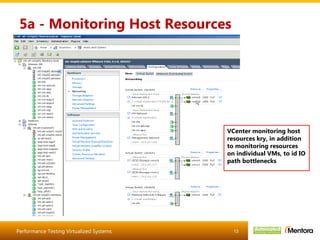
5a - Monitoring Host Resources VCenter monitoring host resources kry, in addition to monitoring resources on individual VMs, to id IO path bottlenecks
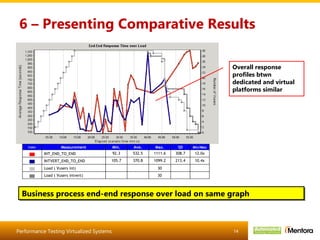
6 – Presenting Comparative Results Business process end-end response over load on same graph Overall response profiles btwn dedicated and virtual platforms similar
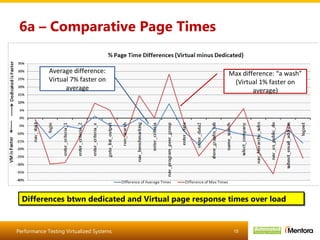
6a – Comparative Page Times Differences btwn dedicated and Virtual page response times over load Average difference: Virtual 7% faster on average Max difference: “a wash” (Virtual 1% faster on average)
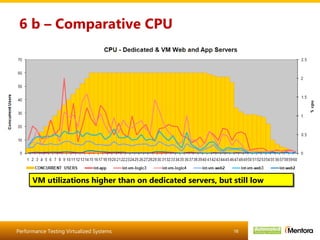
6 b – Comparative CPU VM utilizations higher than on dedicated servers, but still low
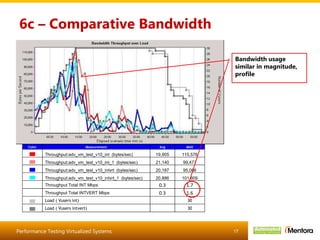
6c – Comparative Bandwidth Bandwidth usage similar in magnitude, profile
Case Study: SAMPLE Consolidated 18 dedicated servers into 3 virtual hosts Reduced rack space, power & cooling footprint and maintenance costs Performance-tested and showed improved performance and increased efficiency Preeminent provider of market intelligence to the commercial insurance industry Corporate, legal, financial and regulatory data for hundreds of thousands of public and private companies Competitive information for underwriters, brokers and risk managers Analytic tools for benchmarking and comparative analysis HQ in NYC Solution Business Challenge Needed to contain operating costs while assuring their customers 24/7 availability and performance Have 18 dedicated, underutilized servers in a managed hosting Tier 4 data center
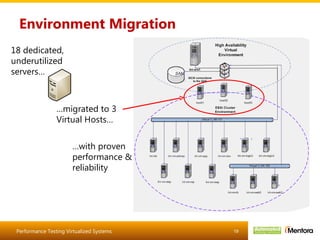
Environment Migration 18 dedicated, underutilized servers… … migrated to 3 Virtual Hosts… … with proven performance & reliability
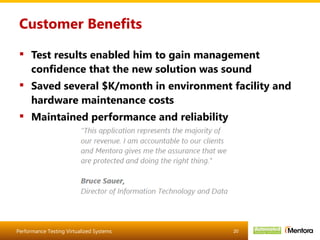
Customer Benefits Test results enabled him to gain management confidence that the new solution was sound Saved several $K/month in environment facility and hardware maintenance costs Maintained performance and reliability
In Conclusion As testers, we need to stay ahead of the technologies curve to continue adding value to our organizations Virtualized systems are becoming the norm While the fundamentals are the same, performance testing them require new understanding and know-how

Performance testing virtualized systems v5

  • 1.
    Dan Downing PrincipalConsultant Dion Johnson
  • 2.
    Agenda Introduction Stateof adoption of server virtualization Operational barriers and concerns Virtualization technologies The six critical success factors a performance tester needs to know Anatomy if a virtual system Principles of virtual workload modeling Shortcomings and key bottlenecks of virtual systems System resources: what to measure and how Analyzing and presenting compelling results Case Study How a provider of insurance market intelligence went virtual, and how they proved performance
  • 3.
    State of Adoptionof Server Virtualization
  • 4.
  • 5.
    Server Virtualization TechnologiesFive key technologies The goals: Enable more VMs on a single chip, minimize cpu overhead for IO, and enable monitoring & management Technology Example 1 Example 2 Differentiators Virtualization Software WMware’s vSphere/ESXi Microsoft’s Hyper-V (W2008 Server) Type 1 Native OS hypervisor vs. Type 2 “guest OS” Broad OS support Processor architecture Intel Xeon 7500 8-core AMD Opteron 6000 12-core Core density Threads, DIMMs per socket Disk IO Interface iSCSI FCoE Protocol to minimize cpu overhead, making network-attached storage perform like attached storage Standard Ethernet cabling vs. Fibre Network Interface Broadcom iSoE Intel I/OAT TCP headers processed on NIC Multiple NICs with “Teaming” Management Utilities VMware’s vCenter MS Virtual Machine Manager Model virtual workload Monitor host and VM resources
  • 6.
    Six Critical Factorsfor Testers Anatomy of a Virtual System Mapping workloads from dedicated to virtual Key bottlenecks of virtual systems Effective comparative testing techniques System resources to measure Results analysis and presentation
  • 7.
    1 - Anatomyof a Virtual System “ The abstraction of computer resources” (Wikipedia) Type 1: Native OS, runs as hypervisor on the host, provides peripheral drivers Type 2: Guest OS that runs under main host OS and relies on host OS drivers VMs with HW resources allocated by VM software VM software running as native OS (“ Hypervisor”) Hardware (multi-cpu, multi-core, multi-threaded, lots of memory, multi-NIC) Network Attached Storage (NAS) or Storage Area Network (NAS) accessed over standard cabling & cpu-optimized protocols Type 1 Virtualized Server
  • 8.
    2 - VirtualWorkload Modeling How quantify the dedicated server workloads? Host of what configuration required to handle the total workload? How many VMs are needed to handle the workload? Which workloads mapped to which VMs? 4 Key Questions: Web App Files DB Hardware
  • 9.
    2a - VMwareCapacity Planner Monitor resources on each tier for a week (cpu, memory, disk & network IO) Enter configuration and role of each server Run the modeling tool, analyze the proposed host & VM mapping Build prototype and test
  • 10.
    3 - VMBottlenecks & Vulnerabilities #1 limiting resource: Disk IO Thus high IO servers (DB) not good candidates for virtualization # 1 vulnerability: Redundancy / load balancing Like services should be distributed on more than one VM to ensure that system can continue to operate if a VM fails App servers on different hosts
  • 11.
    4 - PerformanceTesting Techniques Test in parallel on dedicated and VM environments Eliminates time-of-day differences due to loads on shared components Test a light workload first Establish a baseline for both systems at low/no contention Test a 50% workload Compare performance scalability under reasonable load, without potentially overwhelming the DB Test fail-over of VMs Validate system recovery / availability /lost transactions if a virtual web / app / file server fails
  • 12.
    5 - SystemResources to Measure VM resources Cpu, memory, disk IO, network IO (Unix: Load Average) Web server: queued requests JVM: Heap utilization Host resources Cpu, memory, disk IO (% disk busy and IOPS), network IO DB server: lock waits, deadlocks Monitoring utilities Windows: perfmon Unix/Linux: nmon, sar
  • 13.
    5a - MonitoringHost Resources VCenter monitoring host resources kry, in addition to monitoring resources on individual VMs, to id IO path bottlenecks
  • 14.
    6 – PresentingComparative Results Business process end-end response over load on same graph Overall response profiles btwn dedicated and virtual platforms similar
  • 15.
    6a – ComparativePage Times Differences btwn dedicated and Virtual page response times over load Average difference: Virtual 7% faster on average Max difference: “a wash” (Virtual 1% faster on average)
  • 16.
    6 b –Comparative CPU VM utilizations higher than on dedicated servers, but still low
  • 17.
    6c – ComparativeBandwidth Bandwidth usage similar in magnitude, profile
  • 18.
    Case Study: SAMPLEConsolidated 18 dedicated servers into 3 virtual hosts Reduced rack space, power & cooling footprint and maintenance costs Performance-tested and showed improved performance and increased efficiency Preeminent provider of market intelligence to the commercial insurance industry Corporate, legal, financial and regulatory data for hundreds of thousands of public and private companies Competitive information for underwriters, brokers and risk managers Analytic tools for benchmarking and comparative analysis HQ in NYC Solution Business Challenge Needed to contain operating costs while assuring their customers 24/7 availability and performance Have 18 dedicated, underutilized servers in a managed hosting Tier 4 data center
  • 19.
    Environment Migration 18dedicated, underutilized servers… … migrated to 3 Virtual Hosts… … with proven performance & reliability
  • 20.
    Customer Benefits Testresults enabled him to gain management confidence that the new solution was sound Saved several $K/month in environment facility and hardware maintenance costs Maintained performance and reliability
  • 21.
    In Conclusion Astesters, we need to stay ahead of the technologies curve to continue adding value to our organizations Virtualized systems are becoming the norm While the fundamentals are the same, performance testing them require new understanding and know-how