Data Organization

Presenter
PeopleSoft Technical Guru
Relational Databases
• A relational database is a collection of data
items organized as a set of formallydescribed tables from which data can be
accessed or reassembled in many different
ways without having to reorganize the
database tables.
• It stores all its data inside tables, and nothing
more. All operations on data are done on the
tables themselves or produces another tables
as the result.
Relational Databases
• Table Structure
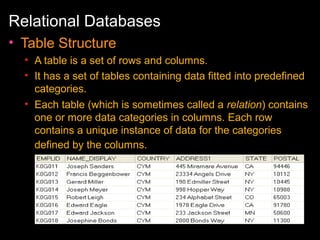
• A table is a set of rows and columns.
• It has a set of tables containing data fitted into predefined
categories.
• Each table (which is sometimes called a relation) contains
one or more data categories in columns. Each row
contains a unique instance of data for the categories
defined by the columns.
Relational Databases
• Normalization
• Normalization is the process of efficiently
organizing data in a database.
• Advantages of the normalization process
• Eliminating redundant data (for example, storing the
same data in more than one table)
• Ensuring data dependencies make sense (only storing
related data in a table).
Relational Databases
• Key Fields
• Key fields uniquely identify each row of data on a
relational database table.
• If there can be only one ID per student, then the key
would be STUDENT_ID on the
PSU_STUDENT_TBL.
• If a student can have more than one recorded skill and
more than one degree, then we would need two
additional tables, each with STUDENT_ID as a key
plus at least one more key field to uniquely identify
rows of data.
Relational Databases
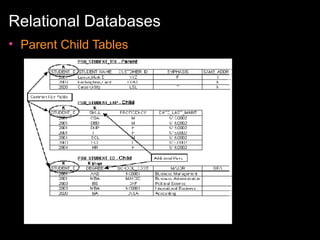
• Parent Child Tables
• During normalization, the breakdown of data based on a
single field that occurs multiple times indicates a
parent/child relationship .
• The table holding basic Student information and the tables
constructed to hold data about a Student’s Experience and
a Student’s Educational background represent parent/child
relationships.
• A child table must have all the key fields of the
parent table in the same order plus at least one
additional key field.
Relational Databases
• Parent Child Tables
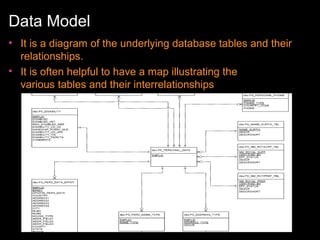
Data Model
• It is a diagram of the underlying database tables and their
relationships.
• It is often helpful to have a map illustrating the
various tables and their interrelationships
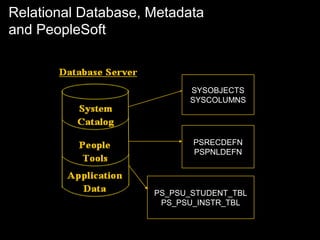
Relational Database, Metadata
and PeopleSoft

SYSOBJECTS
SYSCOLUMNS

PSRECDEFN
PSPNLDEFN

PS_PSU_STUDENT_TBL
PS_PSU_INSTR_TBL
Relational Database, Metadata
and PeopleSoft
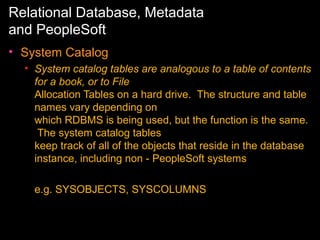
• System Catalog
• System catalog tables are analogous to a table of contents
for a book, or to File
Allocation Tables on a hard drive. The structure and table
names vary depending on
which RDBMS is being used, but the function is the same.
The system catalog tables
keep track of all of the objects that reside in the database
instance, including non - PeopleSoft systems
e.g. SYSOBJECTS, SYSCOLUMNS
Relational Database, Metadata
and PeopleSoft
•

PeopleTools Tables
•

PeopleTools tables hold metadata about the PeopleSoft application that is installed on
the
database.
The PeopleTools tables contain the structure that the applications use to define the user
interface. The structure of the tables is the same for all applications. Each application
enters data into the PeopleTools tables when it is installed.

PSDBFIELD - fields in application data tables
PSRECDEFN - application data table s, indexes, views
PSPNLDEFN - Values used to generate the HTML pages received by
the browser
PSPRSDEFN - Contents of the portal registry, which builds the user
navigation
PSXLATITEM - Values used to validate data for specific fields
Relational Database, Metadata
and PeopleSoft
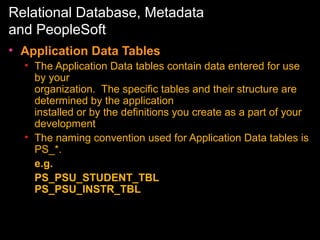
• Application Data Tables
• The Application Data tables contain data entered for use
by your
organization. The specific tables and their structure are
determined by the application
installed or by the definitions you create as a part of your
development
• The naming convention used for Application Data tables is
PS_*.
e.g.
PS_PSU_STUDENT_TBL
PS_PSU_INSTR_TBL
Query Analyzer
•

SQL “SELECT” Syntax

•

SELECT [COLUMNS] FROM [TABLE_NAME]

•

SELECT [COLUMNS] FROM [TABLE_NAME] WHERE [COLUMN1] =
[CONDITION]

•

SELECT [COLUMNS] FROM [TABLE_NAME] WHERE [COLUMN1] =
[CONDITION] ORDER BY [COLUMNS] [DESC/ASC]

•
•

SELECT [COLUMNS],GROUP FUNCTIONS FROM
[TABLE_NAME] WHERE [COLUMN1] = [CONDITION] GROUP BY
[COLUMNS]
Group Functions – Max/Min/Count/Sum

•
Query Analyzer
• SQL INSERT/UPDATE/DELETE Syntax
• INSERT INTO [TABLE_NAME] [COLUMNS]
VALUES[VALUE1,VALUE2…]
• UPDATE [TABLE_NAME] SET [COLUMN] = [VALUE]
WHERE [COLUMN1] = [CONDITION]
• DELETE FROM [TABLE_NAME] WHERE [COLUMN1] =
[CONDITION]
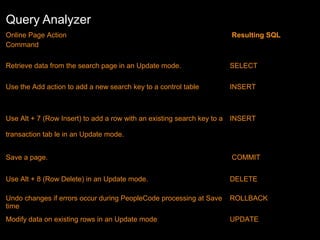
Query Analyzer
Online Page Action
Command

Resulting SQL

Retrieve data from the search page in an Update mode.

SELECT

Use the Add action to add a new search key to a control table

INSERT

Use Alt + 7 (Row Insert) to add a row with an existing search key to a

INSERT

transaction tab le in an Update mode.
Save a page.

COMMIT

Use Alt + 8 (Row Delete) in an Update mode.

DELETE

Undo changes if errors occur during PeopleCode processing at Save
time

ROLLBACK

Modify data on existing rows in an Update mode

UPDATE
PIA – Peoplesoft Internet Architecture
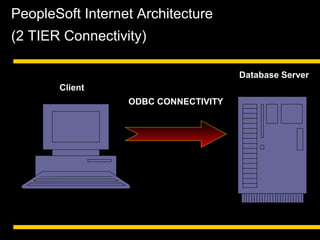
PeopleSoft Internet Architecture
(2 TIER Connectivity)
Database Server
Client
ODBC CONNECTIVITY
PeopleSoft Internet Architecture
(2 TIER Connectivity)
• Advantages
• Simpler architecture requiring only client
workstation and database server components to
be installed.
• System administrators are not required to invest
time learning application server administration.
• No need to consider purchasing either an
additional machine or upgrading an existing
machine to use as an application server.
PeopleSoft Internet Architecture:
Definition
• PIA stands for PeopleSoft Internet Architecture.
• It is the runtime architecture used to deploy and
execute
• the pure Internet applications of PeopleSoft 8. Its
called pure since it follows the thin client model
• Executes the applications built with PeopleTools
development environment.
Features of PIA
•
•
•
•

Pure Internet
Server-centric
Component-centric
Four-tier Architecture
Advantages of PIA Over
Client/Server
• Thin Client:
– No executables on the client side – Low Cost
– No Processing at client side

• Network Protocol – The protocol used is HTTP
• Security - SSL security can be implemented in
PIA
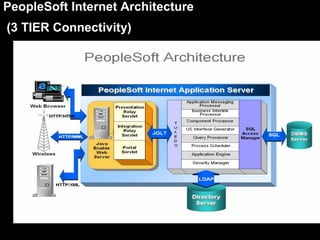
PeopleSoft Internet Architecture
(3 TIER Connectivity)
PeopleSoft Internet Architecture
(3 TIER Connectivity)
• Advantages
• Reduced network traffic.
• Improved WAN performance.
• Reduced maintenance of client workstation configuration,
since database connectivity is not required on the client.
• Enabling Web Client connections
• Ability to scale the system, as needed, to meet rising user
demands by reconfiguring application servers, by installing
application server(s) on more powerful machines, and by
using multiple application servers
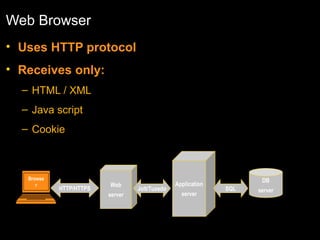
Web Browser
• Uses HTTP protocol
• Receives only:
– HTML / XML
– Java script
– Cookie

Browse
r

HTTP/HTTPS

Web
server

Jolt/Tuxedo

Application
server

DB
SQL

server
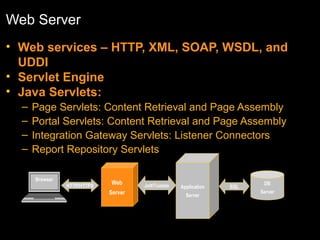
Web Server
• Web services – HTTP, XML, SOAP, WSDL, and
UDDI
• Servlet Engine
• Java Servlets:
–
–
–
–

Page Servlets: Content Retrieval and Page Assembly
Portal Servlets: Content Retrieval and Page Assembly
Integration Gateway Servlets: Listener Connectors
Report Repository Servlets
Browser
HTTP/HTTPS

Web
Server

Jolt/Tuxedo

Application
Server

SQL

DB
Server
Web Server (Contd.)

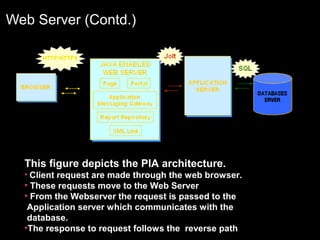
This figure depicts the PIA architecture.
• Client request are made through the web browser.

• These requests move to the Web Server
• From the Webserver the request is passed to the
Application server which communicates with the
database.
•The response to request follows the reverse path
Application Server
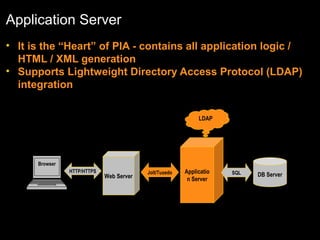
• It is the “Heart” of PIA - contains all application logic /
HTML / XML generation
• Supports Lightweight Directory Access Protocol (LDAP)
integration
LDAP

Browser
HTTP/HTTPS

Web Server

Jolt/Tuxedo

Applicatio
n Server

SQL

DB Server
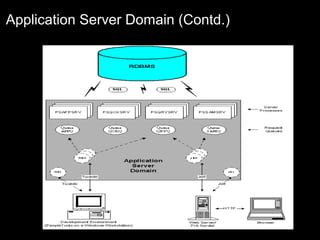
Application Server Domain
• Collection of server processes, supporting
processes, and resource managers
• A domain advertises a set of “services” (such as
build a page and save a page)
• Process scheduler also built around “domains”
• You can have more than one domain per machine
(server)
• Each domain only connects to one database.
• Multiple domains can connect to the same
database.
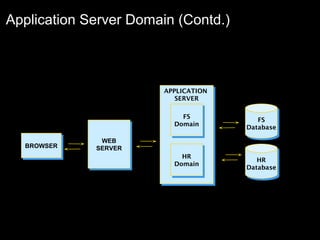
Application Server Domain (Contd.)

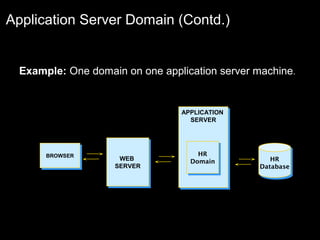
Example: One domain on one application server machine.

APPLICATION
APPLICATION
SERVER
SERVER

BROWSER
BROWSER

WEB
WEB
SERVER
SERVER

HR
HR
Domain
Domain

HR
HR
Database
Database
Application Server Domain (Contd.)

APPLICATION
APPLICATION
SERVER
SERVER
FS
FS
Domain
Domain
BROWSER
BROWSER

WEB
WEB
SERVER
SERVER

HR
HR
Domain
Domain

FS
FS
Database
Database

HR
HR
Database
Database
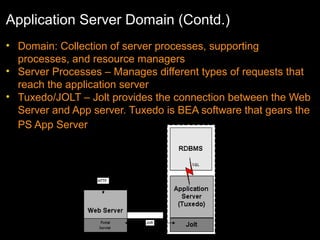
Application Server Domain (Contd.)
• Domain: Collection of server processes, supporting
processes, and resource managers
• Server Processes – Manages different types of requests that
reach the application server
• Tuxedo/JOLT – Jolt provides the connection between the Web
Server and App server. Tuxedo is BEA software that gears the
PS App Server
Application Server Domain (Contd.)
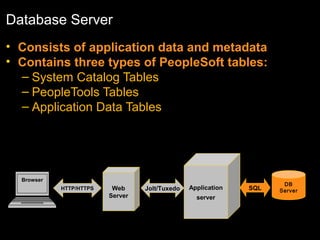
Database Server
• Consists of application data and metadata
• Contains three types of PeopleSoft tables:
– System Catalog Tables
– PeopleTools Tables
– Application Data Tables

Browser
HTTP/HTTPS

Web
Server

Jolt/Tuxedo

Application
server

SQL

DB
Server
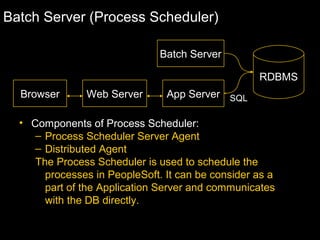
Batch Server (Process Scheduler)
Batch Server
RDBMS
Browser

Web Server

App Server SQL

• Components of Process Scheduler:
– Process Scheduler Server Agent
– Distributed Agent
The Process Scheduler is used to schedule the
processes in PeopleSoft. It can be consider as a
part of the Application Server and communicates
with the DB directly.
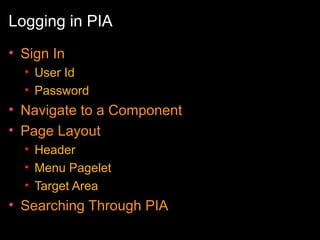
Logging in PIA
• Sign In
• User Id
• Password

• Navigate to a Component
• Page Layout
• Header
• Menu Pagelet
• Target Area

• Searching Through PIA
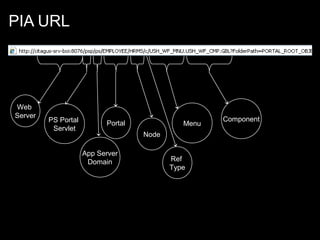
PIA URL

Web
Server

PS Portal
Servlet

Portal

Menu
Node

App Server
Domain

Ref
Type

Component
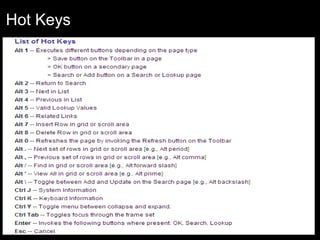
Hot Keys
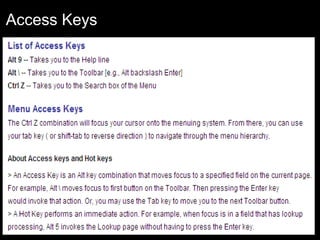
Access Keys
Question???

People soft basics

  • 1.
  • 2.
    Relational Databases • Arelational database is a collection of data items organized as a set of formallydescribed tables from which data can be accessed or reassembled in many different ways without having to reorganize the database tables. • It stores all its data inside tables, and nothing more. All operations on data are done on the tables themselves or produces another tables as the result.
  • 3.
    Relational Databases • TableStructure • A table is a set of rows and columns. • It has a set of tables containing data fitted into predefined categories. • Each table (which is sometimes called a relation) contains one or more data categories in columns. Each row contains a unique instance of data for the categories defined by the columns.
  • 4.
    Relational Databases • Normalization •Normalization is the process of efficiently organizing data in a database. • Advantages of the normalization process • Eliminating redundant data (for example, storing the same data in more than one table) • Ensuring data dependencies make sense (only storing related data in a table).
  • 5.
    Relational Databases • KeyFields • Key fields uniquely identify each row of data on a relational database table. • If there can be only one ID per student, then the key would be STUDENT_ID on the PSU_STUDENT_TBL. • If a student can have more than one recorded skill and more than one degree, then we would need two additional tables, each with STUDENT_ID as a key plus at least one more key field to uniquely identify rows of data.
  • 6.
    Relational Databases • ParentChild Tables • During normalization, the breakdown of data based on a single field that occurs multiple times indicates a parent/child relationship . • The table holding basic Student information and the tables constructed to hold data about a Student’s Experience and a Student’s Educational background represent parent/child relationships. • A child table must have all the key fields of the parent table in the same order plus at least one additional key field.
  • 7.
  • 8.
    Data Model • Itis a diagram of the underlying database tables and their relationships. • It is often helpful to have a map illustrating the various tables and their interrelationships
  • 9.
    Relational Database, Metadata andPeopleSoft SYSOBJECTS SYSCOLUMNS PSRECDEFN PSPNLDEFN PS_PSU_STUDENT_TBL PS_PSU_INSTR_TBL
  • 10.
    Relational Database, Metadata andPeopleSoft • System Catalog • System catalog tables are analogous to a table of contents for a book, or to File Allocation Tables on a hard drive. The structure and table names vary depending on which RDBMS is being used, but the function is the same. The system catalog tables keep track of all of the objects that reside in the database instance, including non - PeopleSoft systems e.g. SYSOBJECTS, SYSCOLUMNS
  • 11.
    Relational Database, Metadata andPeopleSoft • PeopleTools Tables • PeopleTools tables hold metadata about the PeopleSoft application that is installed on the database. The PeopleTools tables contain the structure that the applications use to define the user interface. The structure of the tables is the same for all applications. Each application enters data into the PeopleTools tables when it is installed. PSDBFIELD - fields in application data tables PSRECDEFN - application data table s, indexes, views PSPNLDEFN - Values used to generate the HTML pages received by the browser PSPRSDEFN - Contents of the portal registry, which builds the user navigation PSXLATITEM - Values used to validate data for specific fields
  • 12.
    Relational Database, Metadata andPeopleSoft • Application Data Tables • The Application Data tables contain data entered for use by your organization. The specific tables and their structure are determined by the application installed or by the definitions you create as a part of your development • The naming convention used for Application Data tables is PS_*. e.g. PS_PSU_STUDENT_TBL PS_PSU_INSTR_TBL
  • 13.
    Query Analyzer • SQL “SELECT”Syntax • SELECT [COLUMNS] FROM [TABLE_NAME] • SELECT [COLUMNS] FROM [TABLE_NAME] WHERE [COLUMN1] = [CONDITION] • SELECT [COLUMNS] FROM [TABLE_NAME] WHERE [COLUMN1] = [CONDITION] ORDER BY [COLUMNS] [DESC/ASC] • • SELECT [COLUMNS],GROUP FUNCTIONS FROM [TABLE_NAME] WHERE [COLUMN1] = [CONDITION] GROUP BY [COLUMNS] Group Functions – Max/Min/Count/Sum •
  • 14.
    Query Analyzer • SQLINSERT/UPDATE/DELETE Syntax • INSERT INTO [TABLE_NAME] [COLUMNS] VALUES[VALUE1,VALUE2…] • UPDATE [TABLE_NAME] SET [COLUMN] = [VALUE] WHERE [COLUMN1] = [CONDITION] • DELETE FROM [TABLE_NAME] WHERE [COLUMN1] = [CONDITION]
  • 15.
    Query Analyzer Online PageAction Command Resulting SQL Retrieve data from the search page in an Update mode. SELECT Use the Add action to add a new search key to a control table INSERT Use Alt + 7 (Row Insert) to add a row with an existing search key to a INSERT transaction tab le in an Update mode. Save a page. COMMIT Use Alt + 8 (Row Delete) in an Update mode. DELETE Undo changes if errors occur during PeopleCode processing at Save time ROLLBACK Modify data on existing rows in an Update mode UPDATE
  • 16.
    PIA – PeoplesoftInternet Architecture
  • 17.
    PeopleSoft Internet Architecture (2TIER Connectivity) Database Server Client ODBC CONNECTIVITY
  • 18.
    PeopleSoft Internet Architecture (2TIER Connectivity) • Advantages • Simpler architecture requiring only client workstation and database server components to be installed. • System administrators are not required to invest time learning application server administration. • No need to consider purchasing either an additional machine or upgrading an existing machine to use as an application server.
  • 19.
    PeopleSoft Internet Architecture: Definition •PIA stands for PeopleSoft Internet Architecture. • It is the runtime architecture used to deploy and execute • the pure Internet applications of PeopleSoft 8. Its called pure since it follows the thin client model • Executes the applications built with PeopleTools development environment.
  • 20.
    Features of PIA • • • • PureInternet Server-centric Component-centric Four-tier Architecture
  • 21.
    Advantages of PIAOver Client/Server • Thin Client: – No executables on the client side – Low Cost – No Processing at client side • Network Protocol – The protocol used is HTTP • Security - SSL security can be implemented in PIA
  • 22.
  • 23.
    PeopleSoft Internet Architecture (3TIER Connectivity) • Advantages • Reduced network traffic. • Improved WAN performance. • Reduced maintenance of client workstation configuration, since database connectivity is not required on the client. • Enabling Web Client connections • Ability to scale the system, as needed, to meet rising user demands by reconfiguring application servers, by installing application server(s) on more powerful machines, and by using multiple application servers
  • 24.
    Web Browser • UsesHTTP protocol • Receives only: – HTML / XML – Java script – Cookie Browse r HTTP/HTTPS Web server Jolt/Tuxedo Application server DB SQL server
  • 25.
    Web Server • Webservices – HTTP, XML, SOAP, WSDL, and UDDI • Servlet Engine • Java Servlets: – – – – Page Servlets: Content Retrieval and Page Assembly Portal Servlets: Content Retrieval and Page Assembly Integration Gateway Servlets: Listener Connectors Report Repository Servlets Browser HTTP/HTTPS Web Server Jolt/Tuxedo Application Server SQL DB Server
  • 26.
    Web Server (Contd.) Thisfigure depicts the PIA architecture. • Client request are made through the web browser. • These requests move to the Web Server • From the Webserver the request is passed to the Application server which communicates with the database. •The response to request follows the reverse path
  • 27.
    Application Server • Itis the “Heart” of PIA - contains all application logic / HTML / XML generation • Supports Lightweight Directory Access Protocol (LDAP) integration LDAP Browser HTTP/HTTPS Web Server Jolt/Tuxedo Applicatio n Server SQL DB Server
  • 28.
    Application Server Domain •Collection of server processes, supporting processes, and resource managers • A domain advertises a set of “services” (such as build a page and save a page) • Process scheduler also built around “domains” • You can have more than one domain per machine (server) • Each domain only connects to one database. • Multiple domains can connect to the same database.
  • 29.
    Application Server Domain(Contd.) Example: One domain on one application server machine. APPLICATION APPLICATION SERVER SERVER BROWSER BROWSER WEB WEB SERVER SERVER HR HR Domain Domain HR HR Database Database
  • 30.
    Application Server Domain(Contd.) APPLICATION APPLICATION SERVER SERVER FS FS Domain Domain BROWSER BROWSER WEB WEB SERVER SERVER HR HR Domain Domain FS FS Database Database HR HR Database Database
  • 31.
    Application Server Domain(Contd.) • Domain: Collection of server processes, supporting processes, and resource managers • Server Processes – Manages different types of requests that reach the application server • Tuxedo/JOLT – Jolt provides the connection between the Web Server and App server. Tuxedo is BEA software that gears the PS App Server
  • 32.
  • 33.
    Database Server • Consistsof application data and metadata • Contains three types of PeopleSoft tables: – System Catalog Tables – PeopleTools Tables – Application Data Tables Browser HTTP/HTTPS Web Server Jolt/Tuxedo Application server SQL DB Server
  • 34.
    Batch Server (ProcessScheduler) Batch Server RDBMS Browser Web Server App Server SQL • Components of Process Scheduler: – Process Scheduler Server Agent – Distributed Agent The Process Scheduler is used to schedule the processes in PeopleSoft. It can be consider as a part of the Application Server and communicates with the DB directly.
  • 35.
    Logging in PIA •Sign In • User Id • Password • Navigate to a Component • Page Layout • Header • Menu Pagelet • Target Area • Searching Through PIA
  • 36.
  • 37.
  • 38.
  • 39.