COMPONENT INTERFACE

          By,
           Mr. Srinivas.
What is Component Interface?

 A means to access the PeopleSoft application without using the
  PeopleSoft pages.

 It exposes a PeopleSoft component for synchronous access from
  external application(peoplecode,c/cpp, java).

 External applications need not be concerned with the details of page
  structures and component definitions in order to access the underlying
  data and business logic through component interfaces.
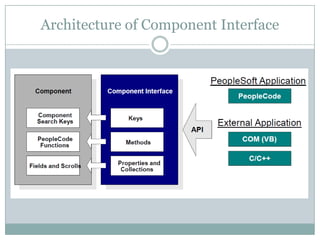
Architecture of Component Interface
Architecture(Contd..)

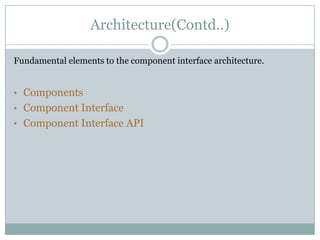
Fundamental elements to the component interface architecture.


• Components
• Component Interface
• Component Interface API
Elements of ComponentInterface

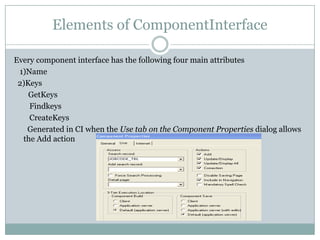
Every component interface has the following four main attributes
 1)Name
 2)Keys
    GetKeys
    Findkeys
    CreateKeys
   Generated in CI when the Use tab on the Component Properties dialog allows
  the Add action
Elements of ComponentInterface(contd…)

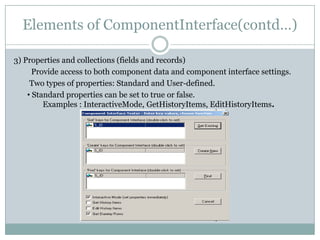
3) Properties and collections (fields and records)
      Provide access to both component data and component interface settings.
     Two types of properties: Standard and User-defined.
    • Standard properties can be set to true or false.
         Examples : InteractiveMode, GetHistoryItems, EditHistoryItems.
Userdefined methods

•   User-defined properties map to record fields on the PeopleSoft component and
    are displayed in the PeopleSoft Application Designer.

•    A component interface collection is a special type of property that corresponds to a
    scroll.

4)Methods
• A method is a function that performs a specific task on a component interface at runtime.


•   Two main types of methods: standard and user-defined.
Standard methods

•   Standard methods are those that are available for all component interfaces.
        1.Cancel: Cancels any changes made since the last save.
        2.Create: Creates new instance of CI
        3.Find :Performs partial key search on the particular instance of the CI
    using search key at level zero.
        4.Get :Retrieves a particular instance of CI.
        5.Save : Saves an instance of the CI.
        6.GetPropertyByName:Returns the value of the property specified by name.
        7.SetPropertyName: Sets the value to the property specified by name.
Userdefined Methods

•Those that you can create to meet the requirements of an individual component
interface.

•A method is simply a PeopleCode function that you wish to make accessible through
the component interface

• Each method maps to a single People Code function

•The Component Interface object, instantiated from a session object, is created at
runtime as a way to access the data specified by the Component Interface.


              &oSession = %Session;
           &oSIdn1Ci = &oSession.GetCompIntfc(CompIntfc.S_IDN1_CI);
•   When you populate a Component Interface with data, the first thing you fill out
    are its keys, as you would in a component. These can be keys for getting an
    existing instance of the data or for creating a new instance of the data.

•   Component Interface properties provide access to the data in a component
    buffer.

•   Component Interface methods are functions that can be called to perform
    operations on a Component Interface.


•   Component Interface can map to only one component.

•   A component can have any number of CIs.
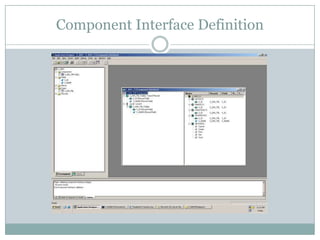
Component Interface Definition
Developing & Implementing CI

Design
 Define Fields
 Record Definition
 Build Record
 Defines Pages
 Define Components
 Define the Component Interface
 Link the Component to the Menu
 Authorize User Access (Security)
 Test your Component Interface
•   A component interface is a PeopleTools object that you create in Application
   Designer.
• Add individual objects, or groups of objects, to the component interface by
   dragging objects from the component view into the component interface view.
Creating & Working with a CI

 To create a new component interface
 Select File, New from the Application Designer menu.
   Select the Component Interface object type from the New dialog.
   Select the component on which this component interface will be based.
   Save the component interface.
   Add properties, collections, or methods to the component interface.
   Set the security.
   Test the component interface.
Working with Component Interface

Declaring a Component Interface Object
 Component Interfaces are declared as type ApiObject. For
  example: Local ApiObject &TESTCI;

Scope of a Component Interface Object
 A Component Interface can be instantiated from PeopleCode, from a Visual
  Basic program, from COM and C/C++.

 Variables defined at Component and Global are only for Component Interface
Example

   In this example, you are getting an existing instance of data for the EMPL_CHECK_CI
    Component Interface, which is based on the EMPL_CHECKLIST component, for the
    Update/Display mode.

Local ApiObject &TESTSESSION;
Local ApiObject &TESTCI;
&TESTSESSION = GetSession();
&TESTSESSION.Connect(1, "EXISTING", "", "", 0);
&TESTCI = &TESTSESSION.GetCompIntfc(COMPINTFC.EMPL_CHECK_CI);
&TESTCI.EMPLID= "8001";
&TESTCI.Get();
/* Get checklist Code */
&CHECKLIST_CD = &TESTCI.CHECKLIST_CD;
/* Set Effective date */
&TESTCI.EFFDT = "01-01-1990";
Component Interface
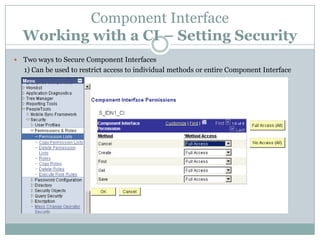
    Working with a CI – Setting Security
   Two ways to Secure Component Interfaces
    1) Can be used to restrict access to individual methods or entire Component Interface
Setting Security(contd..)

2)Application Designer
    • To make individual property =Read Only‘
Using the CI Tester
Using the CI Tester(contd..)

•   Specify whether to run in Interactive mode.
     In noninteractive mode, if you set a property, the property is not validated
    until you perform the save. However, in interactive mode the property is
    validated immediately.

•   Specify whether to get or edit history items.
    Selecting Get History Items retrieves history data
    Selecting Edit History Items enables editing and saving of history data.
     These options apply to effective-dated fields only
Runtime considerations

  WinMessage Unavailable
    You cannot use WinMessage in a component that will be used to build a
component interface. Use MsgGet() instead.
 Email from a Component Interface
      To use a component interface to send email, use TriggerBusinessEvent
People Code event, not SendMail.
 Related Display
     Related display fields are not available for use in a component interface
  as they are not held in the buffer context that the component interface uses.
 Row Inserts
   If RowInserts have been disabled for a page, you must take care when
 calling inserts against the corresponding component interface.

•    Any PeopleCode associated with push buttons used on the page to add
    rows will not be invoked by the component interface when an insert is
    done.
Benefits of CI

 Access to all business logic


 Delivered PeopleSoft logic


 Your customizations Insulated from complexities of application


 Data relationships


   Data Integrity

 Upgradeable PeopleTools object


 Result: Saves Time & Money
Thank you

Component interface

  • 1.
    COMPONENT INTERFACE By, Mr. Srinivas.
  • 2.
    What is ComponentInterface?  A means to access the PeopleSoft application without using the PeopleSoft pages.  It exposes a PeopleSoft component for synchronous access from external application(peoplecode,c/cpp, java).  External applications need not be concerned with the details of page structures and component definitions in order to access the underlying data and business logic through component interfaces.
  • 3.
  • 4.
    Architecture(Contd..) Fundamental elements tothe component interface architecture. • Components • Component Interface • Component Interface API
  • 5.
    Elements of ComponentInterface Everycomponent interface has the following four main attributes 1)Name 2)Keys GetKeys Findkeys CreateKeys Generated in CI when the Use tab on the Component Properties dialog allows the Add action
  • 6.
    Elements of ComponentInterface(contd…) 3)Properties and collections (fields and records) Provide access to both component data and component interface settings. Two types of properties: Standard and User-defined. • Standard properties can be set to true or false. Examples : InteractiveMode, GetHistoryItems, EditHistoryItems.
  • 7.
    Userdefined methods • User-defined properties map to record fields on the PeopleSoft component and are displayed in the PeopleSoft Application Designer. • A component interface collection is a special type of property that corresponds to a scroll. 4)Methods • A method is a function that performs a specific task on a component interface at runtime. • Two main types of methods: standard and user-defined.
  • 8.
    Standard methods • Standard methods are those that are available for all component interfaces. 1.Cancel: Cancels any changes made since the last save. 2.Create: Creates new instance of CI 3.Find :Performs partial key search on the particular instance of the CI using search key at level zero. 4.Get :Retrieves a particular instance of CI. 5.Save : Saves an instance of the CI. 6.GetPropertyByName:Returns the value of the property specified by name. 7.SetPropertyName: Sets the value to the property specified by name.
  • 9.
    Userdefined Methods •Those thatyou can create to meet the requirements of an individual component interface. •A method is simply a PeopleCode function that you wish to make accessible through the component interface • Each method maps to a single People Code function •The Component Interface object, instantiated from a session object, is created at runtime as a way to access the data specified by the Component Interface. &oSession = %Session; &oSIdn1Ci = &oSession.GetCompIntfc(CompIntfc.S_IDN1_CI);
  • 10.
    When you populate a Component Interface with data, the first thing you fill out are its keys, as you would in a component. These can be keys for getting an existing instance of the data or for creating a new instance of the data. • Component Interface properties provide access to the data in a component buffer. • Component Interface methods are functions that can be called to perform operations on a Component Interface. • Component Interface can map to only one component. • A component can have any number of CIs.
  • 11.
  • 12.
    Developing & ImplementingCI Design Define Fields Record Definition Build Record Defines Pages Define Components Define the Component Interface Link the Component to the Menu Authorize User Access (Security) Test your Component Interface • A component interface is a PeopleTools object that you create in Application Designer. • Add individual objects, or groups of objects, to the component interface by dragging objects from the component view into the component interface view.
  • 13.
    Creating & Workingwith a CI  To create a new component interface  Select File, New from the Application Designer menu.  Select the Component Interface object type from the New dialog.  Select the component on which this component interface will be based.  Save the component interface.  Add properties, collections, or methods to the component interface.  Set the security.  Test the component interface.
  • 14.
    Working with ComponentInterface Declaring a Component Interface Object  Component Interfaces are declared as type ApiObject. For example: Local ApiObject &TESTCI; Scope of a Component Interface Object  A Component Interface can be instantiated from PeopleCode, from a Visual Basic program, from COM and C/C++.  Variables defined at Component and Global are only for Component Interface
  • 15.
    Example  In this example, you are getting an existing instance of data for the EMPL_CHECK_CI Component Interface, which is based on the EMPL_CHECKLIST component, for the Update/Display mode. Local ApiObject &TESTSESSION; Local ApiObject &TESTCI; &TESTSESSION = GetSession(); &TESTSESSION.Connect(1, "EXISTING", "", "", 0); &TESTCI = &TESTSESSION.GetCompIntfc(COMPINTFC.EMPL_CHECK_CI); &TESTCI.EMPLID= "8001"; &TESTCI.Get(); /* Get checklist Code */ &CHECKLIST_CD = &TESTCI.CHECKLIST_CD; /* Set Effective date */ &TESTCI.EFFDT = "01-01-1990";
  • 16.
    Component Interface Working with a CI – Setting Security  Two ways to Secure Component Interfaces 1) Can be used to restrict access to individual methods or entire Component Interface
  • 17.
    Setting Security(contd..) 2)Application Designer • To make individual property =Read Only‘
  • 18.
  • 19.
    Using the CITester(contd..) • Specify whether to run in Interactive mode. In noninteractive mode, if you set a property, the property is not validated until you perform the save. However, in interactive mode the property is validated immediately. • Specify whether to get or edit history items. Selecting Get History Items retrieves history data Selecting Edit History Items enables editing and saving of history data. These options apply to effective-dated fields only
  • 20.
    Runtime considerations  WinMessage Unavailable You cannot use WinMessage in a component that will be used to build a component interface. Use MsgGet() instead.  Email from a Component Interface To use a component interface to send email, use TriggerBusinessEvent People Code event, not SendMail.  Related Display Related display fields are not available for use in a component interface as they are not held in the buffer context that the component interface uses.  Row Inserts If RowInserts have been disabled for a page, you must take care when calling inserts against the corresponding component interface. • Any PeopleCode associated with push buttons used on the page to add rows will not be invoked by the component interface when an insert is done.
  • 21.
    Benefits of CI Access to all business logic  Delivered PeopleSoft logic  Your customizations Insulated from complexities of application  Data relationships  Data Integrity  Upgradeable PeopleTools object  Result: Saves Time & Money
  • 22.