OAF Development Guide
Concept

 Controller (CO)
 Application Module (AM)
 View Object (VO)
 Entity Object (EO)
 Page, Region & Region Items
Concept - Controller (CO)
   A controller in OA Framework is a Java class that is attached to
    a region. It is mainly responsible for page rendering and
    respond to and handle user actions
   Based on OAController interface (3 methods)
     –   processRequest(): called by OA Framework just before a region
         gets displayed
     –   processFormData(): invoked when a user submits the page
     –   processFormRequest(): invoked if processFormData() does not
         raise any unhandled exceptions
   Common Parameters
     –   OAPageContext: provides application context and also the current
         user’s session-related details
             get parameter values passed to the page
             get a handle to the Root Application Module
             navigate to another page
     –   OAWebBean: Use this parameter to get a handle to any of the
         beans within an OAF page
Concept - Application Module (AM)

A  broker between the User Interface and
  Database Object [VO and EO]
 Every OA Framework page accessed
  through Oracle Applications must have an
  Application Module attached to its top-level
  region
 Application modules can also be attached at
  lower-level regions within the page (i.e.
  Nested AMs
Concept - View Object (VO)

 query data from database
 can be SQL or EO based
Concept - Entity Object (EO)

 include all columns of a corresponding table
 responsible for doing inserts, updates, and
  deletes to database tables
 each instance of an entity object represents a
  single row in the database table
Concept - Page, Region & Region Items

A page consists of regions, and the region
 can consist of various region items. Regions
 and region items can be of differing types.
 They can also be nested within other regions.
Tools

 JavaDecomplier
 JDeveloper
 Browser (with Developer Mode)
Tools - Java Decomplier

 Decompile   java .class files (CO / VO / EO
  etc.)
 E.g. Cavaj

  http://cavaj-java-decompiler.en.softonic.com
Tools - JDeveloper

 Determinethe right version of JDeveloper
 Metalink Note: 416708.1
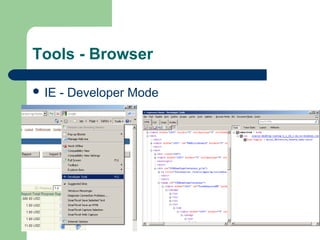
Tools - Browser

 IE   - Developer Mode
Tools - Browser

 Firefox   – Firebug Plug-in
Setup

 Environment   Variable
 Java Packages
 Page / Region XML Files
 DBC File
 Profile Options
Setup – Environment Variable

 JDEV_USER_HOME

 E.g. C:JDeveloper9ijdevhomejdev
Setup – Java Packages

 Standard    Package Convention
  –   e.g. Package oracle.apps.ap.oie.webui -> Path:
      $JAVA_TOP/oracle/apps/oie/webui
 Extension    Naming Convention
  –   adding company name as a prefix
  –   e.g. Package pag.oracle.apps.ap.oie.webui ->
      Path $JAVA_TOP/pag/oracle/apps/oie/webui
Setup – Java Packages

   Download class files & server.xml
    –   Save to <JDEV_USER_HOME>myclasses
    –   E.g.
        C:JDeveloper9ijdevhomejdevmyclassesoracleappsapo
        iewebui*
    –   Some important classes:
          $JAVA_TOP/oracle/cabo/*
          $JAVA_TOP/oracle/jbo/*
          $JAVA_TOP/oracle/svc/*
          $JAVA_TOP/oracle/apps/fnd/common/*
          $JAVA_TOP/oracle/apps/fnd/framework/*
          $JAVA_TOP/oracle/apps/fnd/wf/*
Setup – Page / Region XML Files

 Download    xml files
  –   Path: <APPLICATION_TOP>/mds/*
  –   e.g. $AP_TOP/mds/oie/webui/*.xml
  –   Save to <JDEV_USER_HOME>myprojects
  –   e.g.
      C:JDeveloper9ijdevhomejdevmyprojectsoracle
      appsapoiewebui*
  –   (Note: does not have to create "mds" folder)
Setup – DBC File

 Contains all the information (except
  password) required to establish a database
  connection
 Download From $FND_SECURE
 Save to
  <JDEV_USER_HOME>dbc_filessecure
Setup – Profile Option

 Personalize     Self-Service Defn
  –   must be set to Yes for personalizations to be
      performed
 FND:    personalization region Link Enabled
  –   enable personalization links at region level.
 FND:    Diagnostics
  –   An About this page link appears at the bottom of
      every OA Framework page
Methods

 “About this Page”
 Personalization
 Extension
  –   CO Extension
  –   VO Extension and Substitution
  –   EO / AM Extension
 Modification   of existing classes (not preferred)
Deployment

 Page  / Region XML Files
 VO Substitutions
 .class files (e.g. CO Extension)
Deployment - Page / Region XML Files

   Step 1 – import.bat
    –   cd C:JDeveloper9ijdevbinjdevbin
    –   import
        C:JDeveloper9ijdevhomejdevmyprojectsoracleappsapoie
        webuiOIEMAINPAGE.xml -username apps -password apps
        -rootdir C:JDeveloper9ijdevhomejdevmyprojects
        -dbconnection
        "(DESCRIPTION=(ADDRESS_LIST=(ADDRESS=(PROTOCOL
        =TCP)(HOST = pagdisc.local)(PORT=1523)))
        (CONNECT_DATA=(SERVICE_NAME = UAT)))"
Deployment - Page / Region XML Files

 Step   2 – Clear MDS Cache
  –   Login as Functional Administrator
Deployment - VO Substitutions

 Step   1 - jpximport.bat
  –   cd C:JDeveloper9ijdevbinjdevbin
  –   jpximport.bat
      C:JDeveloper9ijdevhomejdevmyclassesPAGO
      IE.jpx -username apps -password apps
      -dbconnection
      "(DESCRIPTION=(ADDRESS_LIST=(ADDRESS
      =(PROTOCOL=TCP)(HOST = pagdisc.local)
      (PORT=1523)))
      (CONNECT_DATA=(SERVICE_NAME = UAT)))"
Deployment - VO Substitutions

 Step   2 – Bounce mid-tier
  –   $COMMON_TOP/admin/scripts/adstpall.sh
      apps/<apps_password>
  –   $COMMON_TOP/admin/scripts/adstrtal.sh
      apps/<apps_password>
Deployment - .class files

 Step   1 – Upload .class files
  –   Upload .class files to $JAVA_TOP (e.g.
      $JAVA_TOP/oracle/apps/ap/oie/webui)
 Step   2 – Bounce apache
  –   $COMMON_TOP/admin/scripts/
      $TWO_TASK*/adapcctl.sh stop
  –   $COMMON_TOP/admin/scripts/
      $TWO_TASK*/adapcctl.sh start

Oaf development-guide

  • 1.
  • 2.
    Concept  Controller (CO) Application Module (AM)  View Object (VO)  Entity Object (EO)  Page, Region & Region Items
  • 3.
    Concept - Controller(CO)  A controller in OA Framework is a Java class that is attached to a region. It is mainly responsible for page rendering and respond to and handle user actions  Based on OAController interface (3 methods) – processRequest(): called by OA Framework just before a region gets displayed – processFormData(): invoked when a user submits the page – processFormRequest(): invoked if processFormData() does not raise any unhandled exceptions  Common Parameters – OAPageContext: provides application context and also the current user’s session-related details  get parameter values passed to the page  get a handle to the Root Application Module  navigate to another page – OAWebBean: Use this parameter to get a handle to any of the beans within an OAF page
  • 4.
    Concept - ApplicationModule (AM) A broker between the User Interface and Database Object [VO and EO]  Every OA Framework page accessed through Oracle Applications must have an Application Module attached to its top-level region  Application modules can also be attached at lower-level regions within the page (i.e. Nested AMs
  • 5.
    Concept - ViewObject (VO)  query data from database  can be SQL or EO based
  • 6.
    Concept - EntityObject (EO)  include all columns of a corresponding table  responsible for doing inserts, updates, and deletes to database tables  each instance of an entity object represents a single row in the database table
  • 7.
    Concept - Page,Region & Region Items A page consists of regions, and the region can consist of various region items. Regions and region items can be of differing types. They can also be nested within other regions.
  • 8.
    Tools  JavaDecomplier  JDeveloper Browser (with Developer Mode)
  • 9.
    Tools - JavaDecomplier  Decompile java .class files (CO / VO / EO etc.)  E.g. Cavaj http://cavaj-java-decompiler.en.softonic.com
  • 10.
    Tools - JDeveloper Determinethe right version of JDeveloper Metalink Note: 416708.1
  • 11.
    Tools - Browser IE - Developer Mode
  • 12.
    Tools - Browser Firefox – Firebug Plug-in
  • 13.
    Setup  Environment Variable  Java Packages  Page / Region XML Files  DBC File  Profile Options
  • 14.
    Setup – EnvironmentVariable  JDEV_USER_HOME E.g. C:JDeveloper9ijdevhomejdev
  • 15.
    Setup – JavaPackages  Standard Package Convention – e.g. Package oracle.apps.ap.oie.webui -> Path: $JAVA_TOP/oracle/apps/oie/webui  Extension Naming Convention – adding company name as a prefix – e.g. Package pag.oracle.apps.ap.oie.webui -> Path $JAVA_TOP/pag/oracle/apps/oie/webui
  • 16.
  • 17.
    Setup – JavaPackages  Download class files & server.xml – Save to <JDEV_USER_HOME>myclasses – E.g. C:JDeveloper9ijdevhomejdevmyclassesoracleappsapo iewebui* – Some important classes:  $JAVA_TOP/oracle/cabo/*  $JAVA_TOP/oracle/jbo/*  $JAVA_TOP/oracle/svc/*  $JAVA_TOP/oracle/apps/fnd/common/*  $JAVA_TOP/oracle/apps/fnd/framework/*  $JAVA_TOP/oracle/apps/fnd/wf/*
  • 18.
    Setup – Page/ Region XML Files  Download xml files – Path: <APPLICATION_TOP>/mds/* – e.g. $AP_TOP/mds/oie/webui/*.xml – Save to <JDEV_USER_HOME>myprojects – e.g. C:JDeveloper9ijdevhomejdevmyprojectsoracle appsapoiewebui* – (Note: does not have to create "mds" folder)
  • 19.
    Setup – DBCFile  Contains all the information (except password) required to establish a database connection  Download From $FND_SECURE  Save to <JDEV_USER_HOME>dbc_filessecure
  • 20.
    Setup – ProfileOption  Personalize Self-Service Defn – must be set to Yes for personalizations to be performed  FND: personalization region Link Enabled – enable personalization links at region level.  FND: Diagnostics – An About this page link appears at the bottom of every OA Framework page
  • 21.
    Methods  “About thisPage”  Personalization  Extension – CO Extension – VO Extension and Substitution – EO / AM Extension  Modification of existing classes (not preferred)
  • 22.
    Deployment  Page / Region XML Files  VO Substitutions  .class files (e.g. CO Extension)
  • 23.
    Deployment - Page/ Region XML Files  Step 1 – import.bat – cd C:JDeveloper9ijdevbinjdevbin – import C:JDeveloper9ijdevhomejdevmyprojectsoracleappsapoie webuiOIEMAINPAGE.xml -username apps -password apps -rootdir C:JDeveloper9ijdevhomejdevmyprojects -dbconnection "(DESCRIPTION=(ADDRESS_LIST=(ADDRESS=(PROTOCOL =TCP)(HOST = pagdisc.local)(PORT=1523))) (CONNECT_DATA=(SERVICE_NAME = UAT)))"
  • 24.
    Deployment - Page/ Region XML Files  Step 2 – Clear MDS Cache – Login as Functional Administrator
  • 25.
    Deployment - VOSubstitutions  Step 1 - jpximport.bat – cd C:JDeveloper9ijdevbinjdevbin – jpximport.bat C:JDeveloper9ijdevhomejdevmyclassesPAGO IE.jpx -username apps -password apps -dbconnection "(DESCRIPTION=(ADDRESS_LIST=(ADDRESS =(PROTOCOL=TCP)(HOST = pagdisc.local) (PORT=1523))) (CONNECT_DATA=(SERVICE_NAME = UAT)))"
  • 26.
    Deployment - VOSubstitutions  Step 2 – Bounce mid-tier – $COMMON_TOP/admin/scripts/adstpall.sh apps/<apps_password> – $COMMON_TOP/admin/scripts/adstrtal.sh apps/<apps_password>
  • 27.
    Deployment - .classfiles  Step 1 – Upload .class files – Upload .class files to $JAVA_TOP (e.g. $JAVA_TOP/oracle/apps/ap/oie/webui)  Step 2 – Bounce apache – $COMMON_TOP/admin/scripts/ $TWO_TASK*/adapcctl.sh stop – $COMMON_TOP/admin/scripts/ $TWO_TASK*/adapcctl.sh start