PAYROLL MANAGEMENT
INTRODUCTION
Payroll Management System is basically
used to build an application
programme , that a company use
to manage the records of the
employees working in the
company.
Only the administration has the legal
rights to work with the system.
Employees can only log on to the
system to see their current status.
Payroll Management is a
process of gathering salary
related information , updating
them in a timely manner and
disbursing salary within payroll
cycle to the employees.
Payroll Management
PROJEC OBJECTIVES
• To improve efficiency of company’s
administration
• To store up-to-date information the employees
• To make the employees understand the rules of
the company .
• To reduce extra cost for the security of the
database
PROJECT DESCRIPTION
• The term payroll encompasses every employee who receive
a regular wage or other compensation. The different
payment methods are calculated by a payroll specialist and
the appropriate paychecks are issued.
• After a payroll accountant multiplies an employee's hours ny
his/her pay rate , the gross income amount is entered into a
computer programme.
• Setting up an effective payroll system is not difficult for
trained professional's ,but it can be very time consuming.
• A payroll system involves everything that has to do with
the payment of employees and the filling of employment
taxes, keeping track of hours, calculating salary,
printing and delivering checks etc.
• Few of the possible deductions are:
• Health Insurance
• Vacation Days
• Sick Days
• Employee Loans
• Child Syupport Payments
• Workman’s Compensation
PAYROLL SYSTEM IS USED TO:
• Create Records
• Delete Records
• Save Records
• Update Records
For employees according to their according
given to the administration of the company
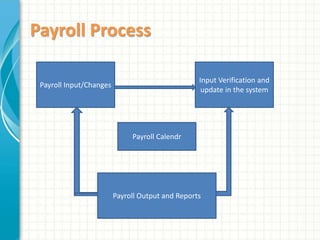
Payroll Process
Input Verification and
update in the system
Payroll Input/Changes
Payroll Calendr
Payroll Output and Reports
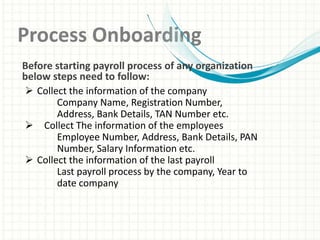
Process Onboarding
 Collect the information of the company
Company Name, Registration Number,
Address, Bank Details, TAN Number etc.
 Collect The information of the employees
Employee Number, Address, Bank Details, PAN
Number, Salary Information etc.
 Collect the information of the last payroll
Last payroll process by the company, Year to
date company
Before starting payroll process of any organization
below steps need to follow:
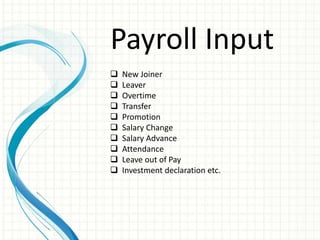
Payroll Input
 New Joiner
 Leaver
 Overtime
 Transfer
 Promotion
 Salary Change
 Salary Advance
 Attendance
 Leave out of Pay
 Investment declaration etc.
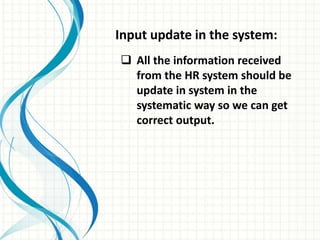
Input update in the system:
 All the information received
from the HR system should be
update in system in the
systematic way so we can get
correct output.
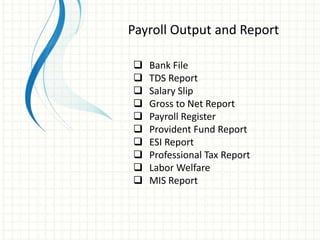
Payroll Output and Report
 Bank File
 TDS Report
 Salary Slip
 Gross to Net Report
 Payroll Register
 Provident Fund Report
 ESI Report
 Professional Tax Report
 Labor Welfare
 MIS Report
TECHNICAL ISSUES
• How the program save data ?
• How error are detected and how the error message are
to be displayed ?
• What happens when we try to overwrite the data ?
• Is the software user-friendly ?
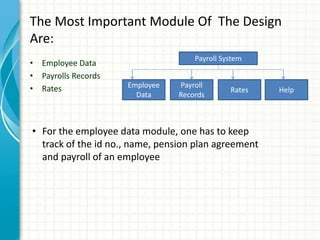
The Most Important Module Of The Design
Are:
• Employee Data
• Payrolls Records
• Rates
Payroll System
Employee
Data
Payroll
Records
Rates Help
• For the employee data module, one has to keep
track of the id no., name, pension plan agreement
and payroll of an employee
CHOOSING A PAYROLL SYSTEM
It becomes difficult to find out the payroll system you
specifically require. The criteria that help one to do so are
as follows:-
• Security
• Compatibility
• Credibility
• Flexibility
SOFTWARE REQUIRED
 The payroll can be managed using the java , SQLite and some
other platforms. Many payroll management software are
available in the market
 To make the administration to maintain the Payroll of its
employees at a very faster phase.
 The management can buy those software or create one such
for it easy use.
 Sanvels Consulting services provide you such payroll
software at affordable cost..
The hardware requirements for payroll
management system are:
• Pentium IV Processor
• Hard Disk: 80GB HDD
• Ram: at least 256 MB
The Software specification are:
• JAVA (Front End)
• SQLite (Back End)
The Java Development Kit (JDK) is a Sun
Microsystems product aimed at java
developers. On 17/11/2006, Sun announced
that is would be released under the GUN
General Public Licensee (GPL) , thus
making it free software.
The JDK also come with a complete Java
Runtime Environment, usually called a
private runtime. It consist of java virtual
machine, all of the class lairise as well as
additional lairise like internationalization
liars…
THANK YOU

PAYROLL MANAGEMENT (1).pptx

  • 1.
  • 2.
    INTRODUCTION Payroll Management Systemis basically used to build an application programme , that a company use to manage the records of the employees working in the company. Only the administration has the legal rights to work with the system. Employees can only log on to the system to see their current status.
  • 3.
    Payroll Management isa process of gathering salary related information , updating them in a timely manner and disbursing salary within payroll cycle to the employees. Payroll Management
  • 4.
    PROJEC OBJECTIVES • Toimprove efficiency of company’s administration • To store up-to-date information the employees • To make the employees understand the rules of the company . • To reduce extra cost for the security of the database
  • 5.
    PROJECT DESCRIPTION • Theterm payroll encompasses every employee who receive a regular wage or other compensation. The different payment methods are calculated by a payroll specialist and the appropriate paychecks are issued. • After a payroll accountant multiplies an employee's hours ny his/her pay rate , the gross income amount is entered into a computer programme. • Setting up an effective payroll system is not difficult for trained professional's ,but it can be very time consuming.
  • 6.
    • A payrollsystem involves everything that has to do with the payment of employees and the filling of employment taxes, keeping track of hours, calculating salary, printing and delivering checks etc. • Few of the possible deductions are: • Health Insurance • Vacation Days • Sick Days • Employee Loans • Child Syupport Payments • Workman’s Compensation
  • 7.
    PAYROLL SYSTEM ISUSED TO: • Create Records • Delete Records • Save Records • Update Records For employees according to their according given to the administration of the company
  • 8.
    Payroll Process Input Verificationand update in the system Payroll Input/Changes Payroll Calendr Payroll Output and Reports
  • 9.
    Process Onboarding  Collectthe information of the company Company Name, Registration Number, Address, Bank Details, TAN Number etc.  Collect The information of the employees Employee Number, Address, Bank Details, PAN Number, Salary Information etc.  Collect the information of the last payroll Last payroll process by the company, Year to date company Before starting payroll process of any organization below steps need to follow:
  • 10.
    Payroll Input  NewJoiner  Leaver  Overtime  Transfer  Promotion  Salary Change  Salary Advance  Attendance  Leave out of Pay  Investment declaration etc.
  • 11.
    Input update inthe system:  All the information received from the HR system should be update in system in the systematic way so we can get correct output.
  • 12.
    Payroll Output andReport  Bank File  TDS Report  Salary Slip  Gross to Net Report  Payroll Register  Provident Fund Report  ESI Report  Professional Tax Report  Labor Welfare  MIS Report
  • 13.
    TECHNICAL ISSUES • Howthe program save data ? • How error are detected and how the error message are to be displayed ? • What happens when we try to overwrite the data ? • Is the software user-friendly ?
  • 14.
    The Most ImportantModule Of The Design Are: • Employee Data • Payrolls Records • Rates Payroll System Employee Data Payroll Records Rates Help • For the employee data module, one has to keep track of the id no., name, pension plan agreement and payroll of an employee
  • 15.
    CHOOSING A PAYROLLSYSTEM It becomes difficult to find out the payroll system you specifically require. The criteria that help one to do so are as follows:- • Security • Compatibility • Credibility • Flexibility
  • 16.
    SOFTWARE REQUIRED  Thepayroll can be managed using the java , SQLite and some other platforms. Many payroll management software are available in the market  To make the administration to maintain the Payroll of its employees at a very faster phase.  The management can buy those software or create one such for it easy use.  Sanvels Consulting services provide you such payroll software at affordable cost..
  • 17.
    The hardware requirementsfor payroll management system are: • Pentium IV Processor • Hard Disk: 80GB HDD • Ram: at least 256 MB The Software specification are: • JAVA (Front End) • SQLite (Back End)
  • 18.
    The Java DevelopmentKit (JDK) is a Sun Microsystems product aimed at java developers. On 17/11/2006, Sun announced that is would be released under the GUN General Public Licensee (GPL) , thus making it free software. The JDK also come with a complete Java Runtime Environment, usually called a private runtime. It consist of java virtual machine, all of the class lairise as well as additional lairise like internationalization liars…
  • 19.

Editor's Notes

  • #4 This template can be used as a starter file for presenting training materials in a group setting. Sections Right-click on a slide to add sections. Sections can help to organize your slides or facilitate collaboration between multiple authors. Notes Use the Notes section for delivery notes or to provide additional details for the audience. View these notes in Presentation View during your presentation. Keep in mind the font size (important for accessibility, visibility, videotaping, and online production) Coordinated colors Pay particular attention to the graphs, charts, and text boxes. Consider that attendees will print in black and white or grayscale. Run a test print to make sure your colors work when printed in pure black and white and grayscale. Graphics, tables, and graphs Keep it simple: If possible, use consistent, non-distracting styles and colors. Label all graphs and tables.
  • #9 Give a brief overview of the presentation. Describe the major focus of the presentation and why it is important. Introduce each of the major topics. To provide a road map for the audience, you can repeat this Overview slide throughout the presentation, highlighting the particular topic you will discuss next.
  • #10 This is another option for an Overview slides using transitions.